Customer Ratings & Reviews
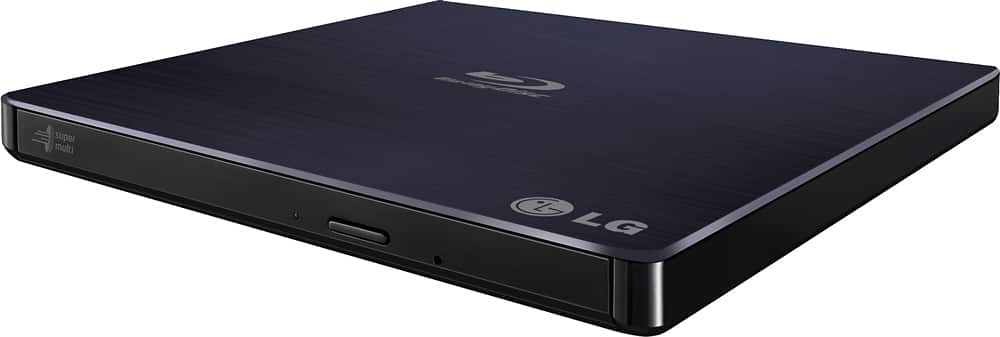
- Model:
- BP50NB40
- |
- SKU:
- 9243009
Customer reviews
Rating 4.4 out of 5 stars with 4442 reviews
(4,442 customer reviews)Rating by feature
- Value4.3
Rating 4.3 out of 5 stars
- Quality4.4
Rating 4.4 out of 5 stars
- Ease of Use4.5
Rating 4.5 out of 5 stars
Customers are saying
Customers love the 8x External USB 2.0 Blu-ray Disc Double-Layer DVD±RW/CD-RW Disc Rewriter for its ease of use, Blu-ray capabilities, and excellent performance in reading and writing discs. The product is also praised for its light and portable size, good speed, and compatibility across operating systems. However, some customers have expressed concerns about the included software and the noise level during operation. Overall, the product is well-received for its features and reasonable price.
This summary was generated by AI based on customer reviews.
- Pros mentioned:Overall performance
Rated 5 out of 5 stars
Great product, could lose the bloatware disc inclu
Posted .This reviewer received promo considerations or sweepstakes entry for writing a review.Does what i need it to. Ive bought LG drives before, and have always been satisfied with their performance. I just wish you could get a discount on good media burning programs instead of the bloatware that it comes with.
I would recommend this to a friend - Pros mentioned:Blu-ray, Ease of use
Rated 5 out of 5 stars
Great for my iMac
Posted .This reviewer received promo considerations or sweepstakes entry for writing a review.Easy to setup, can with the appropriate software to play bluerays on my iMac.
I would recommend this to a friend - Pros mentioned:Blu-ray
Rated 5 out of 5 stars
The great race to get rid of CDs?
Posted .This reviewer received promo considerations or sweepstakes entry for writing a review.Excellent product, I do not think DVDs or CDs will ever go away so why not be able to make your own?
I would recommend this to a friend Rated 3 out of 5 stars
So far so good!
Posted .This reviewer received promo considerations or sweepstakes entry for writing a review.I get no kick backs so I will tell it the way it is. This unit works for apple although it came with no apple apps. for support of hardware and for the price it should have. Two usb plugs no clear information on when to use both or when it is needed. Not much info in the manual information. It is not quiet, one button for opening unit tray, manual push closing. Button releases tray but tray does not open all the way. The disk snaps into place on the spindle ring, this kind of pressure on a flimsy delicate tray may kill the tray travel rail in the future. This unit is light, delicate and slick which may or may not be a plus in the future. Overall for the 89.00 price tag you expect more quality. In short this unit works does but does it warrant the price tag? I personally do not feel this units hardware screams quality. I can not say it does not work therefore I can tell people so far it works as stated. I have not burned dvds as of yet so the burning of disks is another review.
I would recommend this to a friendRated 5 out of 5 stars
LG Blu-ray writer
Posted .This reviewer received promo considerations or sweepstakes entry for writing a review.It’s a great writer at a great price. I use it to archive Home movies Pictures and computer projects. I do you tube video shows and like to save copies of my shows.
I would recommend this to a friendRated 4 out of 5 stars
External DVD is a must
Posted .This reviewer received promo considerations or sweepstakes entry for writing a review.For those with a newer computer that do not have a dvd drive in them, this is the way to go. The price is a little much and when you add the $9.99 Geek Squad it's kind of pointless, HOWEVER, if you can find this little beauty on sale or do a price match it is well worth it!
I would recommend this to a friend- Pros mentioned:Speed
Rated 5 out of 5 stars
Exactly what I needed
Posted .This reviewer received promo considerations or sweepstakes entry for writing a review.My old bluray burner had seen better days and was giving me a lot of disc errors. This one is a good price and does exactly what it's supposed to. I do a lot of 100GB XL disc burning for archival purposes, and this does them in over 2x the speed of my old burner.
I would recommend this to a friend - Pros mentioned:Blu-ray
Rated 4 out of 5 stars
Works well, small size for traveling
Posted .This reviewer received promo considerations or sweepstakes entry for writing a review.When my old external optical drive died, I looked online at Best Buy to make sure they had a decent selection and check reviews. I went to my local store and picked up this one, which plays CD's, DVD's and Blu-ray discs. Works like a charm.
I would recommend this to a friend Rated 5 out of 5 stars
Great external drive for reading and burning discs
Posted .This reviewer received promo considerations or sweepstakes entry for writing a review.We are slowly reaching the age where physical media will be less common. We may be in the last generation that can purchase BD, DVD reader/rewriter drives. So I am grateful that devices like this are still on sale. I can watch movies on my laptop that lack an optical drive, back up different types of files. Who knows if external drives will still be available for purchase in 2 or 3 years from now? I purchased this drive 3 years ago and it is working really well. Very reliable device.
I would recommend this to a friend- Pros mentioned:Ease of use
Rated 4 out of 5 stars
Good little device
Posted .This reviewer received promo considerations or sweepstakes entry for writing a review.It is not stated on the box that the device requires two usb ports to function. Installed and had to do a bunch of updates before I could use it. After all that was done, it was easy to use.
I would recommend this to a friend - Pros mentioned:Ease of use
Rated 5 out of 5 stars
Great product for a reasonable price
Posted .This reviewer received promo considerations or sweepstakes entry for writing a review.I use this with my HP Envy 2 in 1 laptop which doesn't have an optical drive. It is very easy to use by just plugging it into the USB port and inserting a disc. No problems and I got it for $71.99 with my rewards discount. Would buy again if I purchase another laptop
I would recommend this to a friend - Pros mentioned:Overall performance
Rated 5 out of 5 stars
Very Pleased
Posted .This reviewer received promo considerations or sweepstakes entry for writing a review.Exactly what he wanted for Christmas, shipped quickly, arrived in perfect condition.
I would recommend this to a friend - Pros mentioned:Blu-ray
Rated 1 out of 5 stars
Will NOT play blu-ray movies after Win10 upgrade
Posted .This reviewer received promo considerations or sweepstakes entry for writing a review.Wow, talk about identifying a Win10 issue too late! This external drive will play blu-ray movies on my laptop in Win7, but not after upgrading to Win10. Tried EVERYTHING! Tried all the available Win10 AMD 6620G drivers to no avail. Tried all the PowerDVD potential fixes to no avail. Spent hours and hours trying. The Win10 drivers work for my most demanding games, but not this blu-ray drive when trying to play blu-ray movies. Not sure of other functions. PowerDVD says my video card not sufficient, but same card works fine with the same PowerDVD software to play blu-ray movies in Win7. Plays blu-ray movies on my other very wimpy laptop with Win10 and its wimpy graphics card (it won't even come close to handling the same video as my HP DV6 Entertainment Laptop). Definitely an AMD / Win10 video driver issue. Thank goodness I kept my old hard drive with my Win7. Will be switching back to Win7. Maybe one day AMD & Win10 will work it out eventually, but not hopeful.
No, I would not recommend this to a friend - Pros mentioned:Blu-ray
Rated 5 out of 5 stars
Great player/writer, not a single complaint.
Posted .This reviewer received promo considerations or sweepstakes entry for writing a review.Four years of use, and this player/writer is going strong just like it did fresh out of the box!
I would recommend this to a friend Rated 4 out of 5 stars
Great Bluray player, problematic software
Posted .This reviewer received promo considerations or sweepstakes entry for writing a review.Works great once you figure out the cybertech software. It said my gtx 1080 ti with updated drivers was a outdated videocard, not compatable. I just got black screen when I tried to play a dvd or a bluray disc. Im using Windows 10. After 2 days of trying to make it work, I found a quick fix. You open up the cyberlink power 12 media center, into the play movie app, go to the video enhancement check box uncheck the box, then it will play both both dvds and bluray discs. It basically disables the videocard hardware acceleration and uses the cpu intergrated video acceleration. I have a intel i7 7700 cpu. Now it works, its plays all discs smoothly and clearly.
I would recommend this to a friend- Pros mentioned:Blu-ray
Rated 5 out of 5 stars
Blu-Ray DVD player/writer
Posted .This reviewer received promo considerations or sweepstakes entry for writing a review.Exactly what I wanted and needed. Blu-Ray DVD player/writer
I would recommend this to a friend - Pros mentioned:Ease of use
Rated 4 out of 5 stars
Works
Posted .This reviewer received promo considerations or sweepstakes entry for writing a review.I’ve used this machine several times and it works pretty well so far. Note for Mac users: you will have to find software to make it work with your computer.
I would recommend this to a friend - Pros mentioned:Speed
Rated 5 out of 5 stars
Handy addition to external peripherals
Posted .This reviewer received promo considerations or sweepstakes entry for writing a review.Performs even better than expected. Speeds are very good and battery drain is minimal.
I would recommend this to a friend - Pros mentioned:Blu-ray
Rated 5 out of 5 stars
Great portable Blu-ray player
Posted .This reviewer received promo considerations or sweepstakes entry for writing a review.The blu-ray player works fantasticly. I've yet to try the other features so can't say how good those are just yet.
I would recommend this to a friend - Pros mentioned:Size
Rated 5 out of 5 stars
DVD/CD writer
Posted .This reviewer received promo considerations or sweepstakes entry for writing a review.Worked great..compact in size so I can take it with me when traveling
I would recommend this to a friend