Customer Ratings & Reviews
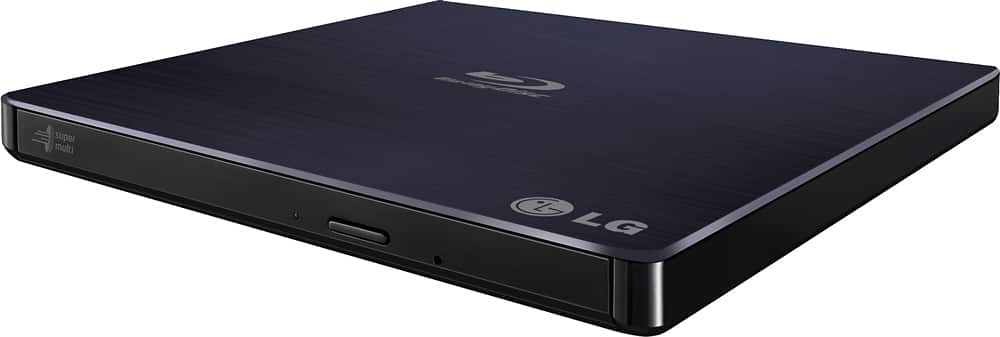
- Model:
- BP50NB40
- |
- SKU:
- 9243009
Customer reviews
Rating 4.4 out of 5 stars with 4442 reviews
(4,442 customer reviews)Rating by feature
- Value4.3
Rating 4.3 out of 5 stars
- Quality4.4
Rating 4.4 out of 5 stars
- Ease of Use4.5
Rating 4.5 out of 5 stars
Customers are saying
Customers love the 8x External USB 2.0 Blu-ray Disc Double-Layer DVD±RW/CD-RW Disc Rewriter for its ease of use, Blu-ray capabilities, and excellent performance in reading and writing discs. The product is also praised for its light and portable size, good speed, and compatibility across operating systems. However, some customers have expressed concerns about the included software and the noise level during operation. Overall, the product is well-received for its features and reasonable price.
This summary was generated by AI based on customer reviews.
- Pros mentioned:Ease of use
Rated 4 out of 5 stars
nice gift
Posted .This reviewer received promo considerations or sweepstakes entry for writing a review.i got it for christmas and it works great and easy to hookup
I would recommend this to a friend - Pros mentioned:Ease of use
Rated 5 out of 5 stars
Works Like A Charm
Posted .This reviewer received promo considerations or sweepstakes entry for writing a review.Was easy to setup, burned my HD movie correctly the first time. Quiet operation. Needing a second USB jack was not an issue as my desktop has 2 available ports on the front panel. Highly recommended!
I would recommend this to a friend - Cons mentioned:Noise level
Rated 4 out of 5 stars
Compatible with Linux but Loud
Posted .This reviewer received promo considerations or sweepstakes entry for writing a review.Compatible with Linux, but super loud. Luckily I only want it to backup my Blu-Ray and DVDs.
I would recommend this to a friend - Cons mentioned:Software
Rated 4 out of 5 stars
It does what it says it does
Posted .This reviewer received promo considerations or sweepstakes entry for writing a review.It doesn't come with software that can play blu-rays.
I would recommend this to a friend - Pros mentioned:Ease of use
Rated 5 out of 5 stars
Very slim and easy to use
Posted .This reviewer received promo considerations or sweepstakes entry for writing a review.Brought this since my laptop doesn't have a cd/DVD player burner. Read the reviews and decided to try this one. Really like! Easy to use.
I would recommend this to a friend - Pros mentioned:Ease of use
Rated 4 out of 5 stars
awesome
Posted .This reviewer received promo considerations or sweepstakes entry for writing a review.very awesome blu ray player for your lap top..Easy to operate
I would recommend this to a friend - Pros mentioned:Blu-ray
Rated 3 out of 5 stars
And Ray player separate from my computer
Posted .This reviewer received promo considerations or sweepstakes entry for writing a review.I need to do a tire to connect to my computer. I was only allowed to play DVD and one fast collection is mainly Blu-rays. And I just haven't gotten around the downloading the HD copies. But this Blu-ray player does not require any electricity attention LOL computer and if you have it send a little run forever and I'm quite happy with this. So let me know what you think of it if you buy one. As always bill
I would recommend this to a friend Rated 5 out of 5 stars
Great Product
Posted .This reviewer received promo considerations or sweepstakes entry for writing a review.This product is exciting, attractive, and works well with my Windows 10 laptop. Plug and play. I have an older laptop. Software installed slower than expect but not very slow. Suggestive selling requires someone to press a button to visit a website to download an update. Since I did not download anything, and since I went to a sales website, I concluded that this was a sales strategy. This drive works for 99% of my collection. The player did not play parts of a Blue Man Group disk. I downloaded files to make the VLC player use Blu-ray disks with this drive.
I would recommend this to a friend- Pros mentioned:Blu-ray
Rated 5 out of 5 stars
Excellent burner
Posted .This reviewer received promo considerations or sweepstakes entry for writing a review.Great bluray burner...used several. Lg made a great external drive.
I would recommend this to a friend - Pros mentioned:Blu-ray
Rated 4 out of 5 stars
Great option for Windows Tablets
Posted .This reviewer received promo considerations or sweepstakes entry for writing a review.Great addition to Windows Tablets for anyone looking to add external optical drive & blue-ray player functionality.
I would recommend this to a friend - Pros mentioned:Ease of use
Rated 5 out of 5 stars
Easy to Use and worth the price
Posted .This reviewer received promo considerations or sweepstakes entry for writing a review.I like the how easy to use the disk drive is. The speeds for reading and writing are phenomenal. If you have a lot of blu-rays I would recommend.
I would recommend this to a friend - Pros mentioned:Ease of use
Rated 5 out of 5 stars
Excellent and updated
Posted .This reviewer received promo considerations or sweepstakes entry for writing a review.Easy to use and I enjoy being able to use it with my laptop. And play DVDs fir work and personal purposes. If you need one this is agood one buy
I would recommend this to a friend - Pros mentioned:Blu-ray
Rated 5 out of 5 stars
Good Blu Ray DL burner!
Posted .This reviewer received promo considerations or sweepstakes entry for writing a review.Got this as a spare external blu ray burner but ended up permanently connected to Macmini. Great plug and play Blu ray player and burner.
I would recommend this to a friend - Pros mentioned:Overall performance
Rated 4 out of 5 stars
Fantastic BluRay Writer/Reader
Posted .This reviewer received promo considerations or sweepstakes entry for writing a review.Very useful for improved quality from Photoshop Presentations (slide shows) for display on the TV.
I would recommend this to a friend Rated 4 out of 5 stars
Great but USB cables need to be longer
Posted .This reviewer received promo considerations or sweepstakes entry for writing a review.Great item - only issue is that for most laptops, the USB ports are on OPPOSITE sides. So the cable for this device (as you need both to be plugged in) does NOT really work well. You need an adapter, which costs money.
I would recommend this to a friend- Pros mentioned:Blu-ray
Rated 5 out of 5 stars
Good product
Posted .This reviewer received promo considerations or sweepstakes entry for writing a review.Very good for laptops without the cd/dvd reader. We are using to reproduce bluray movies since we do not have a bluray player at home.
I would recommend this to a friend Rated 3 out of 5 stars
Agonizingly slow.
Posted .This reviewer received promo considerations or sweepstakes entry for writing a review.I bought this because my new computer does not have a space for a Blu-ray Drive. I like to backup my DVDs and Blu-rays to my computer. This drive is agonizingly slow for that. I haven't tried it with a Blu-ray but it took a half hour to back up a DVD a Blu-ray would take several hours. I'll be returning it. I have it connected via 2 USB 3.0 I didn't try playing a DVD or a Blu-ray so I can't comment on that, nor did I try burning one after it's abysmal performance on reading I can't see it being that good for writing either. I'll have to look elsewhere. I give Best Buy ***** 5 stars because of their hassle free return policy.
No, I would not recommend this to a friend- Pros mentioned:Ease of use
Rated 5 out of 5 stars
External drive.
Posted .This reviewer received promo considerations or sweepstakes entry for writing a review.Worked perfectly for watching Blu-ray’s. Easy install.
I would recommend this to a friend - Pros mentioned:Blu-ray
Rated 3 out of 5 stars
Bluray dinosaur.
Posted .This reviewer received promo considerations or sweepstakes entry for writing a review.Uses up two usb slots. Keep that in mind when you purchase this product. However, you will be able to play blu-rays on your device. This things are slim pickings since they are needed less and less every day.
I would recommend this to a friend Rated 4 out of 5 stars
Quality Blu-ray Writer - Does it write 4K 2160p?
Posted .This reviewer received promo considerations or sweepstakes entry for writing a review.Good product and states it works with both PCs and TVs yet my SmartTV's USB input hasn't been able to read the drive to play Blu-rays. This device would be PERFECT if it actually plays and writes 4K content. Does anybody have an answer as to whether it works with TVs and more importantly 4K Blu-ray discs?
I would recommend this to a friend