Customer Ratings & Reviews
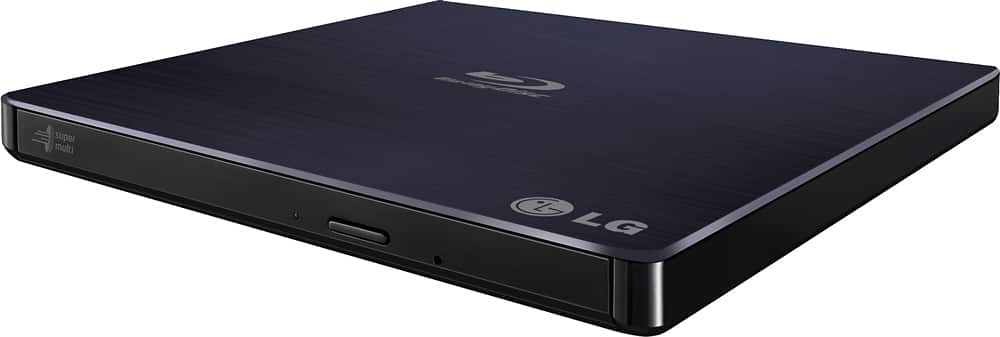
- Model:
- BP50NB40
- SKU:
- 9243009
Rating by feature
- Value
Rating 4.3 out of 5 stars
- Quality
Rating 4.4 out of 5 stars
- Ease of Use
Rating 4.5 out of 5 stars
Customers are saying
Customers love the 8x External USB 2.0 Blu-ray Disc Double-Layer DVD±RW/CD-RW Disc Rewriter for its ease of use, Blu-ray capabilities, and excellent performance in reading and writing discs. The product is also praised for its light and portable size, good speed, and compatibility across operating systems. However, some customers have expressed concerns about the included software and the noise level during operation. Overall, the product is well-received for its features and reasonable price.
This summary was generated by AI based on customer reviews.
- Pros mentioned:Ease of use
Worked for 5 Months then USB connector broke
Posted .This reviewer received promo considerations or sweepstakes entry for writing a review.I got this back on July 5 2017 and had used it for several computers and watching movies. Loved it. and on a USB 3.X connection, only the data connector was needed unlike USB 2 ports needing both to get the power needed. I liked the portability until I went to pack it this last time and the USB socket inside broke right off, stuck on the cable. I can see some of the copper trace on the solder points showing it was not just bad soldering. Went online to see if I could get it fixed by LG and found that it only has a 90 day warranty. It is now Nov 25 of the same year. Making it out of warranty. Didn't apply any extra pressure on the jack to try and remove the cable. I have had other connections last years. I have been doing IT work since Windows 3.1 so I have had experience with all sorts of connectors.
No, I would not recommend this to a friendBrand response from LGAnswers
Posted .Thanks so much for the excellent review. Such detailed information really helps our R&D team understand our customers and what it takes to make you happy. We greatly appreciate the feedback and we are sorry the disc rewriter did not meet your expectations. ^CP

- Pros mentioned:Ease of use
Nice external drive
Posted .This reviewer received promo considerations or sweepstakes entry for writing a review.Bought it to use with a Surface Pro 3. Works great. Nice and portable.
I would recommend this to a friend - Pros mentioned:Ease of use
Great product.
Posted .This reviewer received promo considerations or sweepstakes entry for writing a review.This product was very useful and easy to install. Way better than my computers original drive.
I would recommend this to a friend - Pros mentioned:Ease of use
Does what it should
Posted .This reviewer received promo considerations or sweepstakes entry for writing a review.It works just like I expected it to. Plug it in and have an external drive. No fuss.
I would recommend this to a friend Great drive for a slim laptop
Posted .This reviewer received promo considerations or sweepstakes entry for writing a review.My latest computer does not include an optical drive, and I rarely need one. However, there are times that I want to install older software I only have on disk. This drive works wonderfully when needed and doesn't add weight to my computer when it isn't needed.
I would recommend this to a friend- Pros mentioned:Ease of use
Good Product
Posted .This reviewer received promo considerations or sweepstakes entry for writing a review.It is easy to set up and start using right away. I also like the slim design.
I would recommend this to a friend - Cons mentioned:Connectivity, Software
Freezes too much and software does not work
Posted .This reviewer received promo considerations or sweepstakes entry for writing a review.I bought this a few weeks ago. I have a Windows 8.1 laptop. First Windows has poor connectivity with the device. Device freezes a lot. Windows not recognize it immediately - you have to give it 4-5 min to be recongnized. The bundled software PowerDVD 10 is outdated and does not work well with windows. The latest version online is expensive. I ended up buying another software called aurora blu ray player which works ok. Overall quite unhappy with the product.
No, I would not recommend this to a friend OK with limited read only use so far
Posted .This reviewer received promo considerations or sweepstakes entry for writing a review.It has worked OK with limited read only use so far.
I would recommend this to a friendPoor Assembly & Poor System Requirements on Box
Posted .This reviewer received promo considerations or sweepstakes entry for writing a review.When I was looking at this product in the store, I read the specs (system requirements) on the box to make sure it would work on my brand new HP Win-10 laptop. It was OK and I bought it. My first impression upon removing the product from the box was that this is a very cheaply manufactured product. But, so what, I thought. Then I noticed that the top lid of of the plastic enclosure was not attached properly. The front right corner if the lid was sticking up where it should have been snapped into place. So what, I thought. I could always exchange it for one that was assembled correctly. But I was curious and wanted to reserve final judgment based on actual operation and functionality. The drive comes with a Y-connector USB cable. I plugged the single end of the USB cable into the drive, then one end of the Y-connector ends of the cable into my laptop. No drive letter appeared in File Explorer, but the laptop did play a sound-bite to indicate something connected. That's when I thought it required the other end of the Y-connector to also be plugged into a USB port. But I did not have a spare adjacent USB port. When I read product reviews, I thought this was only necessary on MAC laptops and not necessary for Win-10 PCs. So if this is true, this device was not properly recognized by my Win-10 OpSys with only one end was connected to my laptop. If this is NOT true, in that I DO need to connect both ends of the Y-connector into my laptop, this fact was omitted in the specs on the box. Are you listening LG???? The box says nothing that the computer needs to have two available ADJACENT USB ports. I returned the product to best buy withing 1 hour. I love LG products, but this external optical drive IS A PIECE OF CRAP! I hope this helps those who read reviews before purchasing. I did not.
No, I would not recommend this to a friendBrand response from LGAnswers
Posted .Oh no! I hate to see that you've had some issues with your external drive. If you need any further assistance you can contact us directly via Twitter @LGUSSupport or Facebook https://www.facebook.com/LGUSSupport/ or at 1-800-243-0000. ^KH
1st one i bought, this one?
Posted .This reviewer received promo considerations or sweepstakes entry for writing a review.i have had this model before and it has worked well, my concern is that the last one i bought the connector fell inside the case holding, I am attempting to fix this myself.
I would recommend this to a friend- Pros mentioned:Ease of use
Easy to use
Posted .This reviewer received promo considerations or sweepstakes entry for writing a review.This Blu-ray external drive is easy to use and light weight
I would recommend this to a friend Great external Blu-ray drive
Posted .This reviewer received promo considerations or sweepstakes entry for writing a review.It’s a great external blu Ray Drive for those who don’t have all of the UHD capabilities that come with today’s computers. The 3D effect works great on most modern computers that I can see and the Cyberlink software that comes with it works GREAT!
I would recommend this to a friendGood Blu-Ray reader
Posted .This reviewer received promo considerations or sweepstakes entry for writing a review.Have it since at least August 2020. This drive still works to this day. Very reliable when reading data discs. Have not used it too much for burning.
I would recommend this to a friendBrand response from LGAnswers
Posted .Thank you so much for your wonderful review! We’re thrilled to hear that you enjoyed LG - 8x External USB 2.0 Blu-ray Disc Double-Layer DVD±RW/CD-RW Disc Rewriter .~Tanisha
Great Blu-ray player
Posted .This reviewer received promo considerations or sweepstakes entry for writing a review.I bought this because I needed to reload some few software programs after purchasing a new laptop that were too slow to download and wanted an all in one type deal. Although the slide is not what I wanted the rest makes up for it. The cord is too short so I had an extra one to extend it longer. I like it so far.
I would recommend this to a friendFine product
Posted .This reviewer received promo considerations or sweepstakes entry for writing a review.Fine product. It served the purpose as intended. Mainly used it for burning blu ray disks for large files. Internal component broke after several years
I would recommend this to a friend- Pros mentioned:Blu-ray
DVD laser dies just outside the warranty period
Posted .This reviewer received promo considerations or sweepstakes entry for writing a review.DVD laser stopped working just under 2 years after I bought it. LG's warranty for this drive is only 1 year. Talked with LG customer support for a collective total of 3 hours for them to say that they can't replace it and might be able to give me a discount on buying another. I dropped $105 on this drive for it to play Blu-ray, DVD, and CD, but it didn't even last me 2 years (all of which was spent sitting on my desk).
No, I would not recommend this to a friendBrand response from LG Digital Customer Care
Posted .Hi, Cameron. Thank you for sharing your experience with the Blu-ray Disc (BP50NB40) model. We understand your concern about a product that doesn’t perform as expected, especially after such a short time. We aim to provide reliable, high-quality products that exceed our customer's needs.
While the standard warranty is one year, we appreciate your loyalty and want to help. If you haven’t already, we recommend checking for any firmware updates on the LG support website, as these can sometimes resolve performance issues. For quick help, visit https://www.lg.com/us/support/help-library/updating-firmware-bluray--1428606495664.
For further assistance regarding your situation, please send us a private message on social media @LGUSSupport. We're here to explore all possible solutions and ensure you receive the best support possible. Thank you for your understanding, and we hope to assist you further. ^Juvy
LG modelBP50NB40 slim Blu-ray
Posted .This reviewer received promo considerations or sweepstakes entry for writing a review.Purchased this unit to watch Blu-ray movies on my 11" and 13" mac air and IMac desktop. Purchased 3 licenses of software on line and it works great. The picture is very clear and crisp. It has exceeded my expectations.
I would recommend this to a friendVery light build quality, buy only if you need ext
Posted .This reviewer received promo considerations or sweepstakes entry for writing a review.Sometimes the only choice I have for an external player. This is the third one of these, exact model, I have had in four years. I do use it 4 to 5 timed a week but the build quality is not very good at. Do not buy if you want to take it with on the go or move it around much because it will not last even a year. If it was made stronger it would be a good product but as they are now, two stars is about right.
No, I would not recommend this to a friendBrand response from LG Digital Customer Care
Posted .Hi, Edwin. We appreciate your feedback on the LG Blu-ray Disc (BP50NB40) model. We understand how important durability is, especially for frequent use. We strive to provide high-quality products that exceed our customer's needs and expectations. While this model is designed for portability, ensuring it is used on a stable surface and handled with care can help extend its lifespan.
If you're experiencing issues with reliability, we’d love to assist you in finding ways to optimize performance. Feel free to reach out to us on social media @LGUSSupport for further support. ^Juvy
DVD Player
Posted .This reviewer received promo considerations or sweepstakes entry for writing a review.The Item Arrived in good condition and seems to operated as described
I would recommend this to a friendInstructions??????
Posted .This reviewer received promo considerations or sweepstakes entry for writing a review.OK folks, here is my dilemma..... Reading the instructions is always very helpful when installing software or hardware. The instructions say, "before using the disk drive install the software first". I purchased this drive because my computer does not have a dvd drive. So, how do I get the software installed before I use the disk drive? I just wonder if the people that write these instructions read what they write. Funny, NOT! I will update once I actually get this drive installed and use.
No, I would not recommend this to a friendBrand response from LGAnswers
Posted .Hi Ric and thank you for reaching out. I can understand how frustrating it would be to have issues with the setup of the dvd drive you recently invested in and I would like to thank you for your patience. If there is anything you are needing assistance with, please reach out to our Computer Product Specialists at 1-800-243-0000. ^AB