Customer Ratings & Reviews
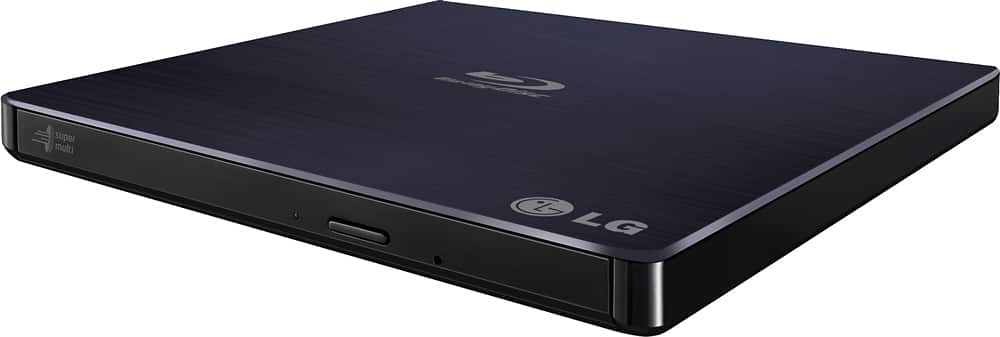
- Model:
- BP50NB40
- SKU:
- 9243009
Rating by feature
- Value
Rating 4.3 out of 5 stars
- Quality
Rating 4.4 out of 5 stars
- Ease of Use
Rating 4.5 out of 5 stars
Customers are saying
Customers love the 8x External USB 2.0 Blu-ray Disc Double-Layer DVD±RW/CD-RW Disc Rewriter for its ease of use, Blu-ray capabilities, and excellent performance in reading and writing discs. The product is also praised for its light and portable size, good speed, and compatibility across operating systems. However, some customers have expressed concerns about the included software and the noise level during operation. Overall, the product is well-received for its features and reasonable price.
This summary was generated by AI based on customer reviews.
Not Happy
Posted .This reviewer received promo considerations or sweepstakes entry for writing a review.I bought this Blu-Ray device less than a month ago, and frankly it's been nothing but a headache. When I first started out, I would attempt to rip the entire disk. A few episodes of a season would rip then the problems would start. The device would just stop functioning, so I'd have to redo some episodes. Now I just do one episode at a time. Even now, after a few episodes it just seems to fall asleep and I have to keep retrying just to rip a single episode. What sucks even more is that Best Buy only gives you a 15-day window to return items. So I'm out over $100 for a piece of junk that I can't return.
No, I would not recommend this to a friendBrand response from LGAnswers
Posted .We are continuously working to improve the quality of our products and anticipate market demands that drive customer satisfaction. Your feedback is especially important to us and your concerns will be shared with our product team. If you have questions or further concerns, please reach out to our support team on Twitter via @LGUSSupport or on Facebook at https://www.facebook.com/LGUSA/. We apologize for any inconvenience this caused. ^Venette

Angry
Posted .This reviewer received promo considerations or sweepstakes entry for writing a review.I am so mad. Opened the Blu-Ray/DVD drive/writer and as soon I took the cable out I knew it was wrong. It was a usb mini to usb cable! It requires a micro that is split at the end for pc and power (2 usbs). The product seemed factory sealed but I blame both Best-buy and LG! I paid $80 bucks for this think and now I have to make my third trip to the store. Notably it’s the only model the stores carry around here that has Blu Ray. Embarrassing Best Buy. For being an elite plus member I demand money back. I always have to go back to your store for things like this. The reason why I shop online more now away from your store. My loyalty is done, this was the last straw.
No, I would not recommend this to a friendBrand response from LGAnswers
Posted .Thank you for your review it is very important to us. It is terrible to hear of the trouble caused to you due to your Blu-Ray Player being a USB mini to USB cable. I can definitely understand how frustrating it may be to have to make multiple trips to the store for issues similar to this. I would love to assist in any way possible. If there is anything we can do to help out in the near future feel free to reach out to us directly at 1(800)243-0000 via Facebook https://www.facebook.com/LGUSSupport or Twitter @LGUSSupport. ^TH
- Cons mentioned:Software
software crashes and stops working.
Posted .This reviewer received promo considerations or sweepstakes entry for writing a review.The software with it crashes quite of even though i have a power computer, and after a while the external dvd player stops reading Normal and blue ray disk.,
No, I would not recommend this to a friend Design flaw - weak USB connector
Posted .This reviewer received promo considerations or sweepstakes entry for writing a review.The micro usb connector on this unit is extremely delicate/cheap. Any torque on the wire will cause the connector to dislodge and go inside the machine. This happened to me twice with a store bought and replacement unit. The first time I plugged in the usb and literally pushed the usb socket into the machine. The second time the drive fell less than 1 foot as I tried to transfer the latop and drive from lap to floor.
No, I would not recommend this to a friendBrand response from LGAnswers
Posted .Thank you for bringing this to our attention. If you need any assistance you can contact us directly via Twitter @LGUSSupport or Facebook https://www.facebook.com/LGUSSupport/ or at 1-800-243-0000. ^KH
- Pros mentioned:Blu-ray
Defective...Do Not Buy
Posted .This reviewer received promo considerations or sweepstakes entry for writing a review.Purchased 3 months ago to play blu rays on my Mac. Worked fine for 3 months and then all of a sudden it stopped working. Wish I purchased the Geek Squad 2 year replacement.
No, I would not recommend this to a friend Don't Buy This
Posted .This reviewer received promo considerations or sweepstakes entry for writing a review.I bought an LG External Blu Ray a few years ago (CP50SN20). It came with CyberLink 10.0 OEM. My Star Wars Blu Ray will NOT play on any computer using this drive. I've tried uninstalling, reinstalling, repeat process four times. I contacted CyberlLink on two different support tickets (one for each computer I tried it on). Both of their responses say the same ... pay $$$ to upgrade to CyberLink 16. I would never recommend this product until it comes with a better Blu Ray vendor.
No, I would not recommend this to a friendBought yesterday
Posted .This reviewer received promo considerations or sweepstakes entry for writing a review.Blue ray quality is meh. Better to spend the extra money for a better one.
No, I would not recommend this to a friendBrand response from LGAnswers
Posted .Hi there, We would love to better understand what concerns you with your Blu-Ray Player? Please know that we're here to help better serve you with a resolution that will satisfy you even though we really want you to be happy. Should you decide to go forward we would love to help. We want to ask a favor of you? Please if you can have your serial number to your unit and a good contact phone number and proof of purchase, And we will be more than glad to take it from there. This is how you can get our private message, live Chat: https://www.lg.com/us/support/chatbot
Email: https://www.lg.com/us/support/email-appointment
Facebook Messenger: LG Global
Twitter: @LGUSSupport. ~Tanisha
Wrong Cable
Posted .This reviewer received promo considerations or sweepstakes entry for writing a review.The device came with the wrong cable. I opened the package to make sure it had everything when I bought it. But I didn't need it until several weeks later. When I attempted to set it up I noticed the cable has the wrong USB type and is unable to connect to the device. This falls outside of Best Buy's return and exchange window. I am now waiting on a USED replacement device from LG. The LG customer service was very condescending when called about this problem.
No, I would not recommend this to a friendBrand response from LGAnswers
Posted .What you have described is far from what we expect. We would be more than happy to look into this issue for you. Our support team is available by calling our computer specialists at 800-243-0000. ^CP
Says it works for Mac. Doesn't.
Posted .This reviewer received promo considerations or sweepstakes entry for writing a review.It worked great for burning DVD movies, but it would not burn Blu-ray movies from Mac. The box states that it works for mac with a disclaimer that it will not PLAY blu-ray movies without extra software. I have software for burning blu-ray (Adobe Encore) but it would not burn. I ended up purchasing the SEA TECH Aluminum External USB Blu-Ray Writer Super Drive and it worked perfectly straight out of the box. If it doesn't work on Mac they should tell you.
No, I would not recommend this to a friendBrand response from LGAnswers
Posted .Thank you for your feedback, it is very important to us. I hate to hear you were dissatisfied with the functionality of your Blu-Ray player. If there is anything we can assist you with, please feel free to reach out to us via phone at 1-800-243-0000 or online on Facebook https://www.facebook.com/LGUSSupport or Twitter @LGUSSupport so I can gather the necessary information from you. ^AB
Can't read Blu Rays, so...
Posted .This reviewer received promo considerations or sweepstakes entry for writing a review.Best But clearly sent me a used or refurbed unit without disclosing that fact as the outside of the unit was covered with smudges and scratches upon opening. Also telling is that it's missing the documentation and included CD containing installation software. Without the software, the unit doesn't recognize Blu Rays and is therefore a brick. Avoid like the plague.
No, I would not recommend this to a friendBrand response from LGAnswers
Posted .We are sorry to hear that your unit is not working as designed. We are continuously working to improve the quality of our products, availability while anticipating market demands that drive customer satisfaction. If the problem hasn't resolve, please reach out to our support team on Twitter via @LGUSSupport or on Facebook at https://www.facebook.com/LGUSA/. We apologize for any inconvenience this caused. ^Venette
Don’t buy this piece of crap product
Posted .This reviewer received promo considerations or sweepstakes entry for writing a review.It’s impossible to use I was just trying to burn my home dvds to blu Ray and why? Why do they even make blank blu Ray disks why does LG’s make this product? All for NOTHING. This product was my last hope. And the software stinks. The customer service stinks. You shouldn’t buy software more and more when it just doesn’t work. I’m done with this writer I’m done with LG’s and I’m done period
I would recommend this to a friendBrand response from LGAnswers
Posted .If you're in need of some guidance with using your disc drive, please give us a call at 800-243-0000 so a computer specialist can help out. ^CP
Not compatible with Mac
Posted .This reviewer received promo considerations or sweepstakes entry for writing a review.This product was recommended by a Best Buy salesperson. He failed to mention that I still needed to pay for and download the Blu Ray software from LG. Even after I did, I could not get it to work on my Mac even though LG claims it is compatible. WASTE OF MONEY.
No, I would not recommend this to a friendBrand response from LGAnswers
Posted .We are sorry to hear of your experience with your unit. Please know that we are continuously working to improve the quality of our products and anticipate market demands that drive customer satisfaction. Your feedback is especially important to us and your concerns will be shared with our product team. We hope that you will consider LG for your future product needs. For the latest updates on LG Home video, please visit https://www.lg.com/us/home-video. You can always reach out to LG Customer Support by direct message via Twitter (@LGUSSupport) or Facebook (https://www.facebook.com/LGUSA/) with any product questions or concerns. We apologize for any inconvenience this caused. ^Daphane
Won't play on TV.
Posted .This reviewer received promo considerations or sweepstakes entry for writing a review.After installing all software, it wouldn't play on tv. After hooking up to my computer, it plays standard DVD, but not BLU-RAY.
No, I would not recommend this to a friendBrand response from LG Digital Customer Care
Posted .Hi, there. Thank you for taking the time to review the LG Blu-ray Disc (BP50NB40) model. We apologize for the inconvenience you have experienced with playing Blu-ray disc on your TV. We understand how frustrating it can be when a product doesn't function as expected.
We recommend checking if your TV is compatible with Blu-ray playback and if it supports the necessary codecs. Additionally, ensure that you have the latest firmware updates installed for both your TV and the BP50NB40. If you find that the issue persists after following the provided instructions, please reach out to us on social media @LGUSSupport so we can help you further. We look forward to the opportunity to assist you and regain your trust in our products. ^Juvy
Simply doesn't work
Posted .This reviewer received promo considerations or sweepstakes entry for writing a review.Plugged it into multiple laptops in my home and the drive: wasn't recognized on one, despite having installed the included software, and WOULD NOT rip either a DVD or Blu-ray on the other two. I believe it's because the USB power interface is simply not powerful enough to keep the disc spinning long enough to get the job done.
No, I would not recommend this to a friendnot up to LG standards
Posted .This reviewer received promo considerations or sweepstakes entry for writing a review.I bought this unit in Nov. and found it difficult to use with a dvd. Sometimes it would work and sometimes it would not let me watch the dvd. I put it away and just got it out to use and the connection plug came out of the dvd unit and I can't use it. i am calling LG tomorrow,
No, I would not recommend this to a friendBrand response from LGAnswers
Posted .Thank you so much for the feedback. We appreciate you taking the time to let us know what is going on so we can improve. Certainly give us a call at 800-243-0000 so we can look into this for you. ^CP
Junk.
Posted .This reviewer received promo considerations or sweepstakes entry for writing a review.Junk. Used 2 times then housing for connection broke off. Time to return had passed and trying to get a replacement from LG is too cumbersome. Will never buy an LG product again.
No, I would not recommend this to a friendBrand response from LGAnswers
Posted .What you have described is far from what we expect. We would be more than happy to look into this issue for you. Our support team is available via Twitter @LGUSSupport or Facebook www.Facebook.com/LGUSA ^CP
Broke after a few uses
Posted .This reviewer received promo considerations or sweepstakes entry for writing a review.The USB plug on the back of the drive broke after only a few uses. Looking at how it was attached, I'm amazed it lasted that long. So far, LG warranty support has not impressed me. I recommend looking for a different drive.
No, I would not recommend this to a friendBrand response from LGAnswers
Posted .What you have described is far from what we expect. We would be more than happy to look into this issue for you. Our support team is available via Twitter @LGUSSupport or Facebook www.Facebook.com/LGSupportUSA ^CP
Stopped Recognizing Blu-ray
Posted .This reviewer received promo considerations or sweepstakes entry for writing a review.Contacted LG, their customer service department is as good as their product. No answer.
No, I would not recommend this to a friendBrand response from LGAnswers
Posted .Hi! Having a Blu-ray player that doesn't recognize your discs seriously impacts your entertainment experience. So that we can look further into this, please message us on Facebook or Twitter at the handle @LGUSSupport. We'd be happy to look into providing a resolution you'd be satisfied with. ^Chris
Slow and Bad Read Capabilities
Posted .This reviewer received promo considerations or sweepstakes entry for writing a review.Completely disappointed in LG, my second external BR reader from them that completely fails. Trouble reading the second title on a blu ray TV series. Also, reading typically caps at 2x for blu ray discs.
No, I would not recommend this to a frienddoes not work
Posted .This reviewer received promo considerations or sweepstakes entry for writing a review.bought at time I bought my dell inspiron the box said 2.4 ghz on line it said 3.0 or higher! I'm going to take it back and get one that will work on my comp.
No, I would not recommend this to a friend