Customer Ratings & Reviews








- Model:
- 920-013369
- SKU:
- 6629029
Rating by feature
- Value
Rating 4.6 out of 5 stars
- Quality
Rating 4.8 out of 5 stars
- Ease of Use
Rating 4.8 out of 5 stars
Customers are saying
Customers are pleased with the product's ease of use, clean design, and strong magnetic attachment, which also offers excellent adjustability, simple connectivity, and impressive battery life. They generally find its overall performance to be very good. However, some customers express concerns about the added weight, the lack of side protection, and the absence of a backlit keyboard.
This summary was generated by AI based on customer reviews.
- Cons mentioned:Weight
Very Functional
||Posted . Owned for 2 weeks when reviewed.This reviewer received promo considerations or sweepstakes entry for writing a review.The product is really nice. I recommend following the instructions on the folding. The product does make the device a bit heavier. However, the portable keyboard is nice. It is very flexible and I like that I do not constantly have to plug in the keyboard to charge (it does run on batteries).
I would recommend this to a friendBrand response from Logitech
Posted .Hey! We're truly glad to hear our product is working well for you. Your feedback helps us understand what resonates with our users. Thank you for being part of the Logitech community and sharing your experience.

- Pros mentioned:AdjustabilityCons mentioned:Protection

Good, quality case
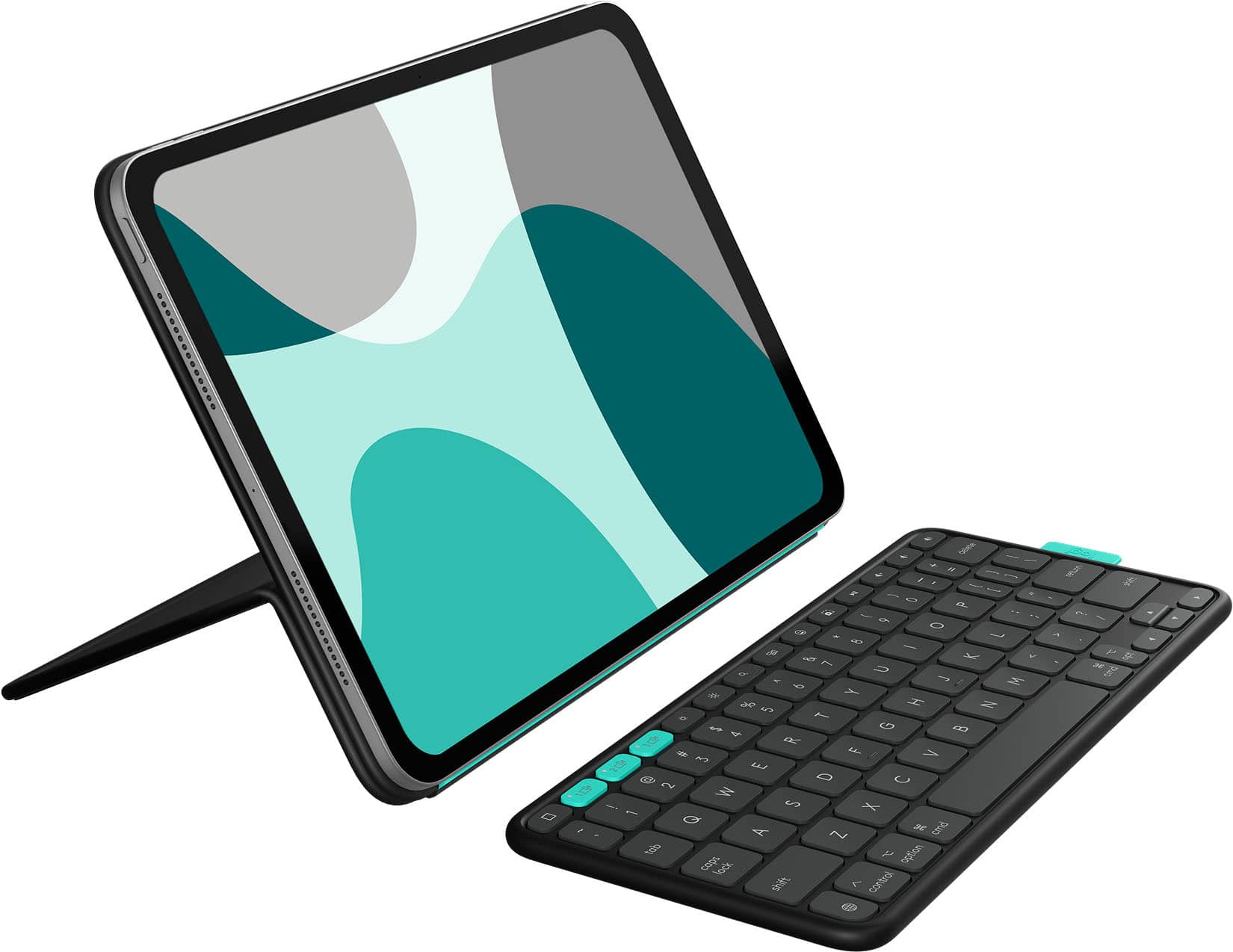
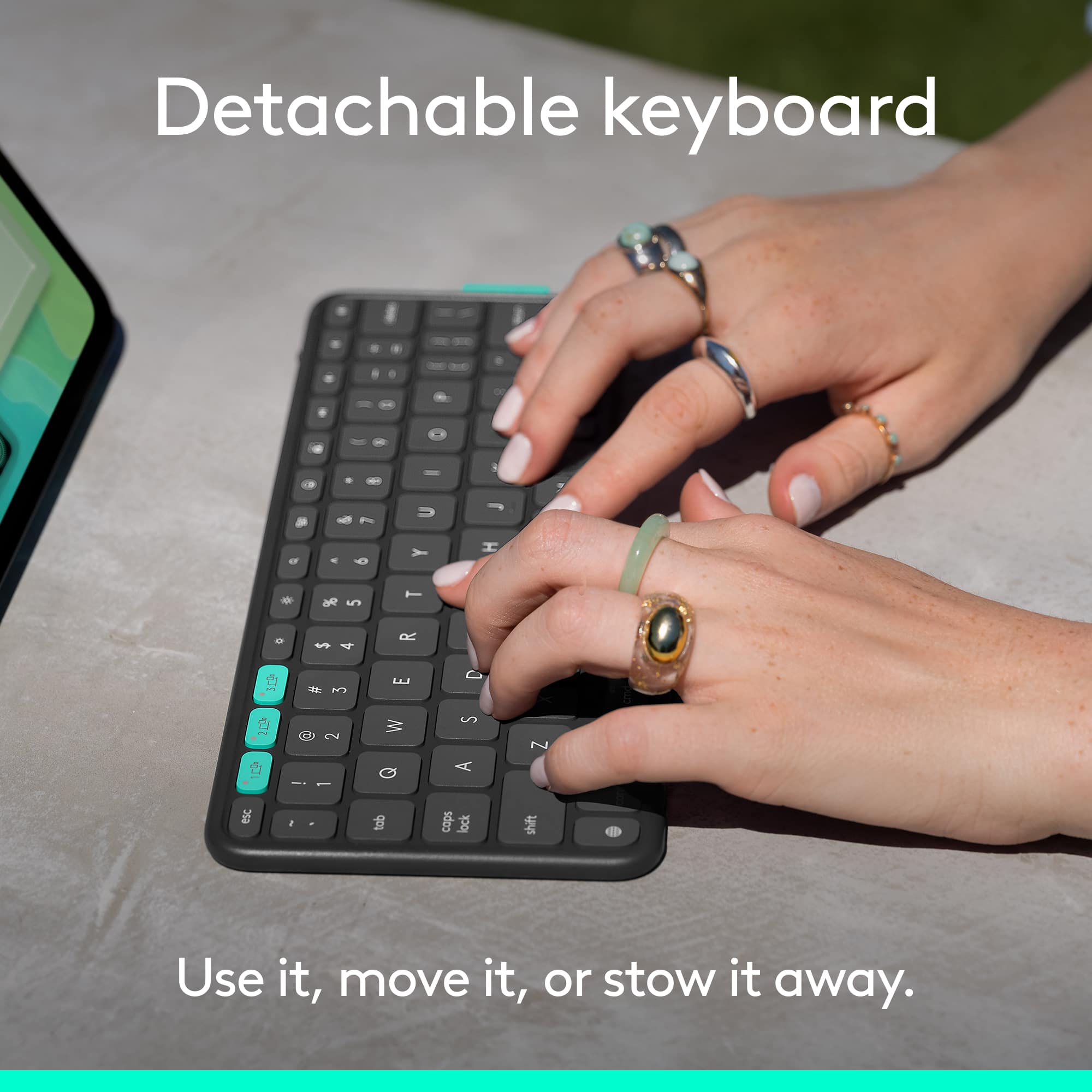
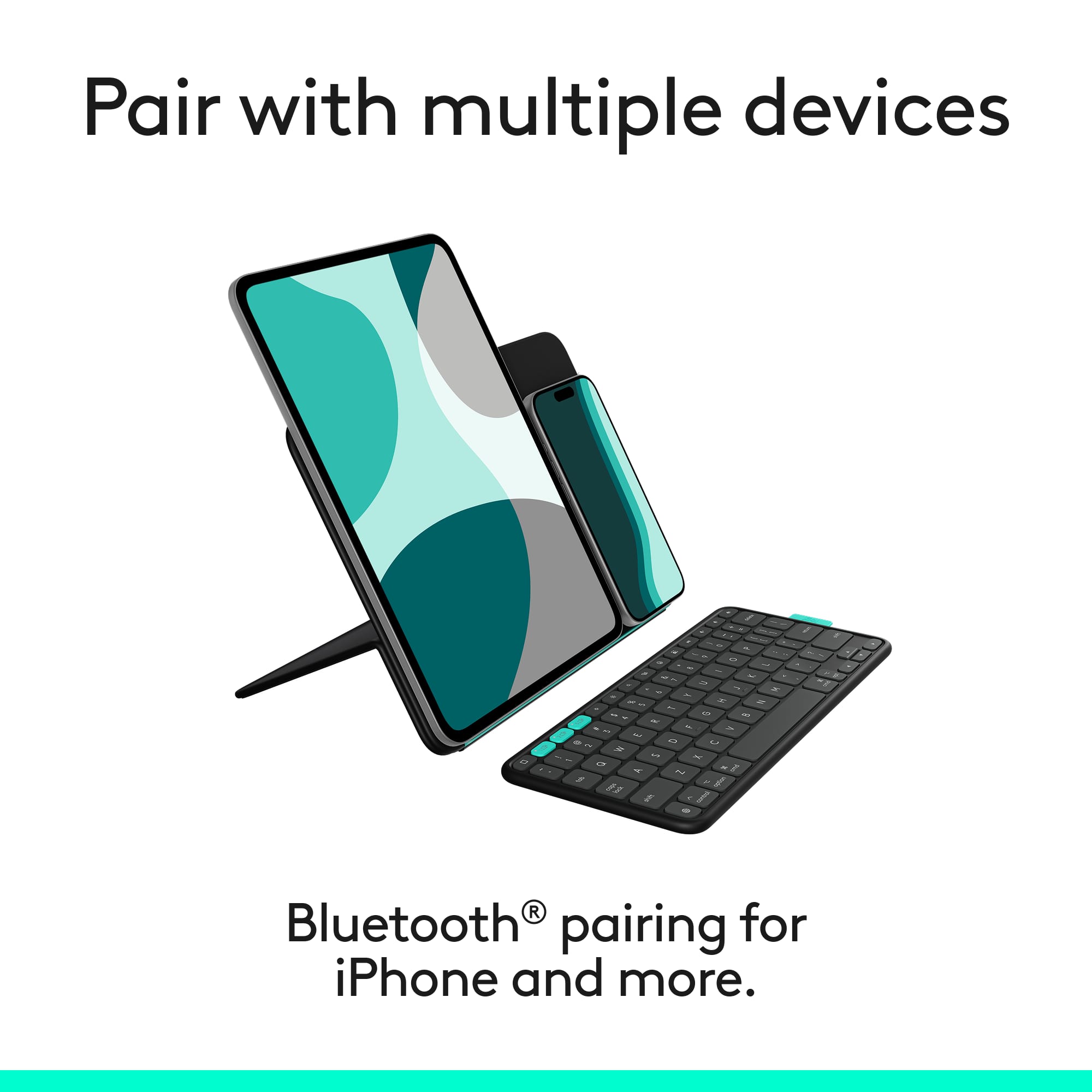
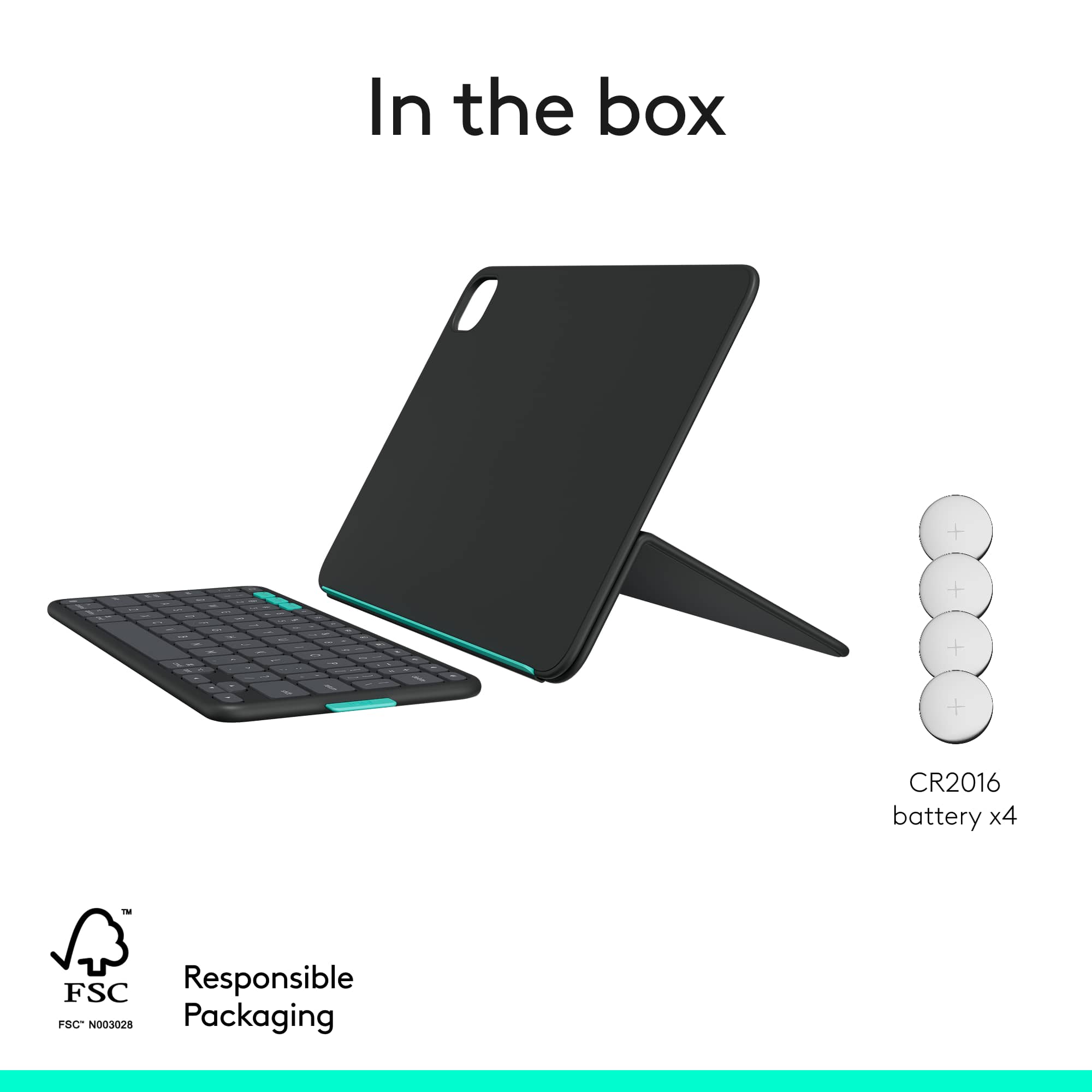
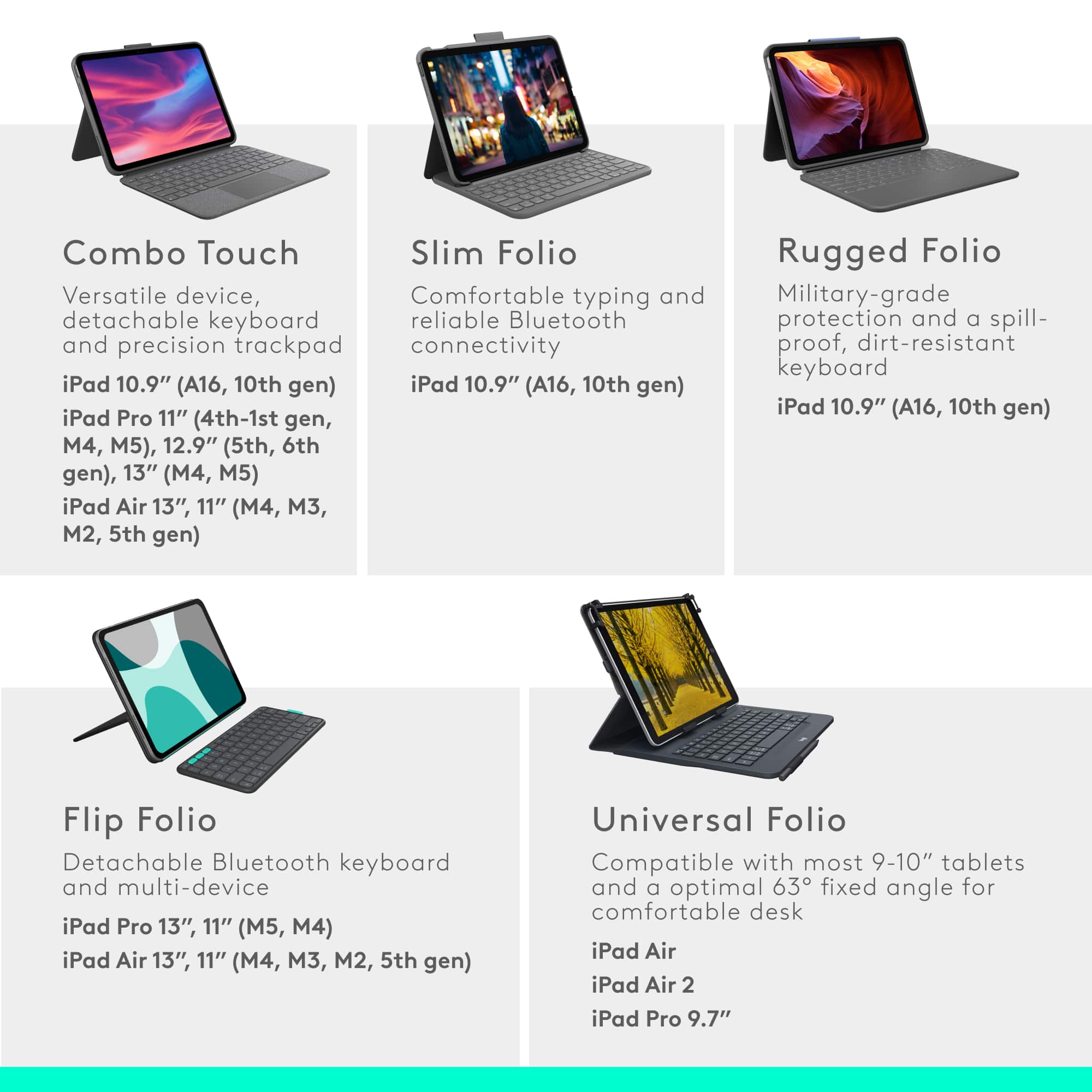
|Posted .This reviewer received promo considerations or sweepstakes entry for writing a review.In my opinion Logitech is my go to brand for any iPad case that I want for my device. I knew them previously for their mice and keyboards, but once I bought my first keyboard case for an iPad, I never looked for another brand. I actually prefer them over the OEM offerings. In the past, I have usually preferred the Combo Touch cases. They are the gold standard in iPad keyboard cases in my opinion and that is what I was using before I got this one. The Combo Touch is more expensive, but it was worth the cost for my usage. I didn’t want to compare that case to this one, but it was difficult not to. The Flip Folio is a different type of setup. First, the keyboard connects via Bluetooth as opposed to the Smart Connection of the Combo Touch. The box says the keyboard should last up to 2 years based on 2 hours use per day and I think the power switch needs to be turned off as well. When not in use, the keyboard attaches to the back of the case magnetically. It doesn’t seem to have a strong attachment, but it also never fell off during the couple of days that I’ve been using it. Unlike the Combo Touch, this case doesn’t provide any edge protection for the iPad. That concerns me a bit, but that also comes down to personal preference. I do like the stand and how it allows me to put my iPad in both landscape and portrait modes depending on how I intend to use it based on what I’m working on. There is a light green lip on the case that allows the tablet to stand in portrait mode. The magnets on the cover work very well and always remained in full contact with my iPad. The stand also has a lot of flexibility with viewing angles. I do wonder how well the cover will hold up over time when constantly folding and unfolding it, but only time will tell on that. The keyboard itself isn’t it a full-sized keyboard which I was aware of before ordering it, but it does offer the ability to connect to three devices and can be switched with the press of a button on the top row. I do like that feature a lot because I can use it with my Apple TV and not have to pull out the other Logitech mini keyboard that I normally use. You don’t have a trackpad with this case either and that is something that I have found useful on my Combo Touch. The keyboard itself is very responsive and I had no problems getting used to it. It is backlit and you can adjust the brightness on the keyboard. The top row has one key that I didn’t have on my Combo Touch. The emoji key. I thought that was a pretty cool feature, as I’ve found myself becoming more of an emoji connoisseur these days. The case has some decent weight to it, which I prefer, but it’s not too heavy either. I found it to be sturdy when I set it up and it never fell over, nor did it slide down or move when I was using it. I normally use my tablet when I’m sitting at the kitchen counter or relaxing on the couch, so having a detached keyboard isn’t necessarily the easiest thing to use in those situations. I honestly prefer the Combo Touch because I can turn the keyboard around and reconnect it to the Smart Connector and it provides a solid base for watching videos. I do think this is a solid case and would work well for most people. I would still recommend this case, but my personal preference is the Combo Touch.
I would recommend this to a friendBrand response from Logitech
Posted .We appreciate your detailed feedback on the Flip Folio Keyboard Case and your continued loyalty to Logitech, especially as a long-time fan of our Combo Touch cases. It's insightful to hear how the distinct features of the Flip Folio, like the multi-device Bluetooth connectivity and portrait mode, cater to different usage scenarios, even while the Combo Touch remains your personal preference for its integrated design and edge protection. This kind of comprehensive comparison helps us understand diverse customer needs and refine our offerings
- Cons mentioned:Weight
Unique keyboard case, but not without trade-offs
|Posted .This reviewer received promo considerations or sweepstakes entry for writing a review.I like that Logitech is trying something new here, but I’m not sure that the trade-offs it presents would be worth it to most people. This combo case adds considerable weight and heft, along with a clumsy kickstand design that creates enough of an inconvenience that I imagine most would be better served with Logitech’s more typical, integrated keyboard case. That said, if you’re the type of person who wants to create a mini desktop scenario when on the go with your iPad, detached keyboard and all, this could serve your niche well. __ Design __ On paper, I like the concept: A storable, compact keyboard at the ready paired with a case that also doesn’t obstruct attaching and charging the Apple Pencil (if you have one.) In many ways it achieves this. It does feel compact and a keyboard trying very hard to take up as little space as possible… but in making a cavity for the keyboard to nest into, it also feels overly thick, heavy and at odds with the super thin and light M4 iPad Pro it’s encapsulating. The rear panel seems thicker for sake of matching the front, but does add rigidity to allow using as a stand for your iPad in portrait mode. I appreciate the open sides on this case, it feels less restrictive than a snap on case. The edges extend beyond the iPad enough to protect it from normal bumps, though dropping it would likely not prevent either the iPad or keyboard from jumping ship. __ Execution and Quality __ When it comes to the whole execution of the idea, I don’t fully love it. For one, the main hinge is both wide and a bit loosely covered by the case's thin plastic outer material. As you bend it, it creates irregular creases that makes me a little concerned for how long this material will last under repeated flexing. At the corners is a similar potential issue. This same material is wrapped and tucked around each corner, forming small folds and wrinkles. It doesn’t exactly look cheap on a whole, but only time will tell if it’s durable enough to avoid holes, etc. It makes me a bit nervous, which is too bad, as the material otherwise feels nice and smooth in the hand. Next is the odd hinge design. Unlike other cases, the hinge needs to fold up before being flipped behind. It’s a strong hinge, so I found it to be an awkward dance requiring two hands to set up. Once bent, it makes for a nice adjustable support, storing and protecting the keyboard until you need it. I eventually got used to it, but it’s still not as simple to use as my other cases. The keyboard itself is decent. It has the textured, plastic-y feel of Logitech’s budget-style keyboards but feels decently comfortable to type on, nonetheless. The real selling point is that it’s a full-on bluetooth keyboard that’s along for the ride. While it’s about the same size as an integrated keyboard, the lack of trackpad makes it feel slightly smaller to type on. It has dedicated keys to quickly switch to controlling other devices, much like Logitech’s other keyboard offerings do … though I’m not sure why you’d want to in this iPad-focused context. Inside, its small cell batteries are not rechargeable, but offer 2 years of charge. __ Summary __ For the price, I can’t help but feel like you’re paying a premium to integrate a basic travel keyboard and a folio case. Separately, they’d be considerably less expensive for similar features. At the same time, I can see the desire to have less things floating around in a bag - and that’s what this design does. Whether or not it’s worth the added weight, thickness, and a less conventional kickstand design is somewhat subjective. While I also have concerns about durability, it feels nice and compact when closed and does what it sets out to do. *** Good Stuff *** - Nesting keyboard disguises itself into the case well, well-attached with magnets. - Compact feel overall. - Allows for connecting/charging Apple Pencil. - Outer material has smooth finish that feels nice in the hand. *** Less than Good Stuff*** - Kickstand hinge is overly strong and awkward to set up. - Wrapping material seems thin and folds irregularly at the hinge. Worried about longevity/durability. - Heavy and bulky. - Keyboard is decent, but has more in common with an entry-level keyboard in terms materials and feel. - Expensive for what it is.
No, I would not recommend this to a friendBrand response from Logitech
Posted .Your comprehensive review of the Logitech Flip Folio Keyboard Case for the iPad Pro 11-inch offers incredibly valuable insights into its unique design and practical trade-offs. We really appreciate your detailed breakdown, from the clever nesting keyboard and Apple Pencil compatibility to the noticeable added weight and the awkwardness of the kickstand hinge. Your observations about the material's potential longevity and the keyboard's entry-level feel are duly noted, helping us understand the areas where we can refine the user experience. It's clear this product caters to a specific niche, and your honest assessment helps others determine if it's the right fit for their mobile productivity needs!
Nice accessory to work with the iPad.
|Posted .This reviewer received promo considerations or sweepstakes entry for writing a review.This is a unique take on a iPad case. I am using it with the iPad Air (M2) and have tested it with my iPhone as well. The layout of everything is interesting between the flip folio and the keyboard. The case portion is very straight forward to figure out. The instructions are a bit confusing at first until you understand the what the pictures are trying to convey. Once you get it figured out you will easily understand how it works. There are two angles from which you can adjust, one that is almost 90 degrees and another that is about 45 degrees. The magnet that holds the iPad is pretty strong. You are not going to have any issues as far as the flip folio coming loose from the iPad. It takes a bit of force to separate them. The keyboard connection instructions are a bit more confusing with just pictures and no description. If it wasn't for the iPad explaining to enter the code shown on the screen on the keyboard and relying on the instruction pictures only, you'd be lost. There isn't any instruction as to how to dock the keyboard in the closed configuration. After some trial and error I found out that the keyboard goes face in against the flip folio in the space that is the same size as the keyboard. Aside from the lack of clear instructions this is a good product to compliment the 11" iPad Air(M2,M3),11" iPad Pro (M4) and the 11" iPad Air (5th generation). By itself folded it is just as thick and the iPad Air (without the keyboard attached. Attached to the iPad it doesn't add much to the thickness of the device. Even with the keyboard attached in the closed position it doesn't add much bulk, do to the keyboard being thinner than the iPad itself. As far as the keyboard goes, it is a pretty standard keyboard with a slight learning curve as to where to place your fingers to type normally. Most of the keys on the right side of the keyboard are smaller than a standard keyboard and you end up with unintentional keystrokes and characters, especially if your used to typing using the home row and every finger to type with. I understand this was done to fit the form factor of the iPad in landscape orientation. Shortcut keys are well thought out but there are two keys that open the emojis, not sure why. One key looks like an emoji and one key looks like a globe. I was expecting the globe to open a browser. The package claims a 2 year battery life for the keyboard batteries. This is based on 2 hour daily use. Not sure how much battery life you would get if you used it more often. I would like to see a rechargeable battery installed as this keyboard can support up to three devices connected via Bluetooth. iPad iPhone and a Mac. Even though the batteries are inexpensive for a 4 pack, the cost of the Flip Folio would be more inline with a rechargeable battery, than with consumable batteries. The power switch is in a somewhat hidden location on the top of the keyboard on the right side. Removing the battery tray is a bit of a challenge. You need a paperclip to slide two locks open and then you have to pry the tray with a fingernail to get it to pop free and slide out. Overall I like this product and can recommend it, even with it's quirks, I feel would make it a excellent addition to your iPad if you use it more as a laptop replacement.
I would recommend this to a friendBrand response from Logitech
Posted .Thank you for your detailed and insightful review of the Logitech Flip Folio Keyboard Case! We truly appreciate your feedback on its unique design, magnetic features, and multi-device connectivity. We're glad to hear you find it a good product that complements your iPad, and we value your candid observations on the instructions, keyboard layout, and battery choice.
- Pros mentioned:Design
Minimalist case with protection and portability
|Posted .This reviewer received promo considerations or sweepstakes entry for writing a review.The Logitech Flip Folio for the 11-inch version of the iPad Pro and iPad Air is a great minimalist case that comes with a lot of features. One of the problems with cases for the iPad is that if you want to take the iPad out to use as a bare device, it involves a lot of twisting and turning to get it out of the case. With this Flip Folio, the case magnetically attaches to the iPad and allows you to turn the iPad around to work in portrait mode. Most cases force you to use the iPad in landscape mode, but there are times you need to use it in portrait mode. The ingenious part of this design verse in other cases is the detachable keyboard. No longer do you need to have the keyboard basically attached to the iPad. You now can sit back further and at different angles and use the keyboard. The keyboard is run off a 2032 Cell battery, so the thickness of the package is minimal. The keyboard has an on/off switch to keep the battery drain down to a minimum. The case with keyboard can flip to the back of the iPad and you can hold the iPad in case. If you are one that takes care of your iPad, this might be ok. However, if you are sort of rough with your iPad, I would have concerns tossing around your iPad in this case because everything is held together by magnets. Another weird feeling with this Flip Folio is the way that you must bend and snap the Folio to make the iPad stand. I am sure Logitech has designed this to be snapped back and forth a ton, but the feeling you get when you snap the cover that holds the keyboard in half to create a stand makes me nervous. Another thing that this Flip Folio does not contain is a secure way of storing the Apple Pencil Pro. You are entirely reliant on the magnetic connection between the iPad and the pencil when you transport everything. Nevertheless, if you are in search of a iPad protector that still allows you to quickly have the ability to use your iPad bare, this Flip Folio is it.
I would recommend this to a friendBrand response from Logitech
Posted .Your review of the Logitech Flip Folio Keyboard Case for iPad Pro 11-inch accurately captures its design philosophy: a minimalist case with significant features. You highly value its magnetic iPad attachment that allows quick removal and versatile portrait mode viewing, a notable advantage over many cases. The detachable keyboard is a standout, offering freedom in positioning and a compact profile due to its CR2016 coin cell battery power. However, you express valid concerns about the all-magnetic security for both the iPad and the keyboard, especially for those who are "rough" with their devices, and the method of bending the folio to create a stand. The lack of a secure Apple Pencil Pro storage solution is also a practical consideration. Ultimately, you see it as ideal for users prioritizing quick access to a "bare" iPad while still having keyboard functionality.
Logitech never fails to bring true quality
||Posted . Owned for 3 weeks when reviewed.This reviewer received promo considerations or sweepstakes entry for writing a review.Exactly what I needed! This flip folio allows me to place my iPad in either orientation so apps that can only load portrait can be used. The magnetic keyboard is amazing, works perfectly and allows me to set my iPad back away when working in cramped quarters. I've had the original Logitech slim folio with keyboard since the purchase of my iPad 4 years ago, the keyboard sizes are similar, and it's still 100% functional after all the use and abuse.
I would recommend this to a friendBrand response from Logitech
Posted .It is wonderful to see how the versatile orientation of the Flip Folio is helping you navigate app-specific layouts with ease. We are also proud to hear your previous keyboard is still going strong after four years, and we look forward to this new model providing that same long-term reliability. If you ever need tips on maximizing your workspace with the magnetic keyboard, our team is always here to assist.
- Pros mentioned:Connectivity, Design, Ease of use
Game Changer for iPad Users!
||Posted .This reviewer received promo considerations or sweepstakes entry for writing a review.I’m loving my iPad with the Logitech FlipFolio! It’s super sleek, feels great to hold, and the cover protects my iPad perfectly. Typing and using it on the go has never been easier. It's so simple to switch between devices, it keeps me productive without interruptions! Definitely a game-changer for anyone who uses their iPad daily!
I would recommend this to a friendBrand response from Logitech
Posted .Hey! Cheers for the great review! We’re so pleased you’re satisfied. We’ll be ready to assist again anytime. Thanks for choosing Logitech!
- Pros mentioned:Ease of useCons mentioned:Weight
Good value
||Posted . Owned for 2 months when reviewed.This reviewer received promo considerations or sweepstakes entry for writing a review.I love my iPad holder and cover. Easy to use. The only thing I dislike is that it is very heavy and it does not have a secure pencil holder. It is magnetic to iPad but nothing to secure to iPad cover.
I would recommend this to a friendBrand response from Logitech
Posted .We’re happy to hear you love the usability of the case. Thank you for pointing out the weight and pencil holder concerns — we’ll take this feedback into account for future design improvements.
- Pros mentioned:Ease of useCons mentioned:Weight
A smart set of design trade-offs
||Posted . Owned for 2 weeks when reviewed.This reviewer received promo considerations or sweepstakes entry for writing a review.After having this a few weeks I'm pleased with it. Of course, all solutions in this space add weight to the iPad. But, the ability to take out the iPad or fold over the cover/keyboard means I am not losing convenience and the separate keyboard is the ultimate in adaptability to different locations for use. The stand solution is robust. At first it seems like you are going to break it when you try to adjust it, but you get used to it and trust it quickly.
I would recommend this to a friendBrand response from Logitech
Posted .Thank you for sharing your experience! We’re glad to hear you’re enjoying the flexibility, sturdy stand, and adaptable keyboard design of the Flip Folio. Your feedback truly means a lot and helps us continue improving our products.
- Pros mentioned:Design
Very useful and great quality
||Posted . Owned for 1 week when reviewed.This reviewer received promo considerations or sweepstakes entry for writing a review.I really like this product. It is very useful and makes using my device much more convenient. The build quality feels solid and the design is clean and practical. It is easy to use and works exactly as expected. Overall, I am very satisfied and would recommend it.
I would recommend this to a friendBrand response from Logitech
Posted .We’re so glad to hear you’re enjoying your Logitech experience. Your input helps us continue to deliver quality and reliability.
- Cons mentioned:Backlit keyboard
Awkward Combo of a folio and keyboard
|Posted .This reviewer received promo considerations or sweepstakes entry for writing a review.I have an iPad Air 5 and have used folios, cases and keyboards. This is not my favorite mix of any of them. Good: Form Factor On/Off switch on keyboard Keyboard multi pairing iPad screen protection Bad: No touchpad CR2016 batteries Not rechargeable keyboard Can't snap keyboard in place Keyboard could damage screen Well, I had high hopes for this folio but was let down with obvious design misses. Quickly, I realized that this was a very quirky folio. A sticker on the folio and another set of instructions in the box were absolutely needed. At first, I snapped my iPad onto the folio like I do with my Magic Keyboard. Then, I snapped the keyboard on the other side; pretty slick I thought. Then, I closed it and there's no tension, so the keyboard crashed right down on my iPad screen. Oof. Then, I was like - OK, how does this thing stand up? That's when I had to go to the instructions and took the iPad off the magnetic back. Bend the back? "It's very rigid, am I going to break this?" - came to mind. Then, it made sense; it bends then you flip it backwards and pop the iPad onto the back again and lean it back against the newly bent section. Cool? Now the keyboard - it just floats around in front of the iPad and there's no way to snap it to, or have it magnetically grab the bottom of the iPad. While it may be nice to be able to detach an attached keyboard, having it never able to be attached - to me, isn't what I wanted. The keyboard itself is exactly the same size of the Magic Keyboard (see 2 pic collage image), so it's a good size and typing is pretty simple. It lacks a touchpad yet it offers a few other 'keyboard' features that the Apple one doesn't have, including the App Switcher - which I find really helpful. If the keyboard is detached and there's no trackpad, you still have to reach to interact with the iPad. I'm not sure what they were going for here. Still on the keyboard. It's not rechargeable but there is an on/off switch if you were to remember to turn it off. It takes 4x CR2016 batteries. Not CR2032s, but CR2016s. Since it needs 4, it seem that these batteries come in multi packs so prepare to get some extras and toss them in your computer bag because you'll no doubt forget to turn this off. When the case is closed as a normal folio would be, the protection seems great. There's a keyboard sized rectangle on the outside of the folio. I thought: "Ah, this must be where the keyboard snaps to for travel!" Nope! The magnets repel on this exact space. If you slide it up a little, it does stick but it also gets in the way of the bend (see 2 pic collage image). I mean, there isn't much to read on this to know the target audience but a keyboard that doesn't stay attached and isn't easily attached to, or stored in the case, seems like it can be left/misplaced/forgotten more often than it's remembered. I can't possibly recommend this, unfortunately. Will I continue to use it? Maybe. The case is pretty nice overall. I'll probably use the keyboard for one of my headless machines if I need to interact with them.
No, I would not recommend this to a friendBrand response from Logitech
Posted .We're very sorry to hear that the Flip Folio Keyboard Case didn't meet your expectations and caused frustration due to its design, particularly the keyboard's attachment and battery type. We truly appreciate your detailed feedback and candid assessment of your experience with the product.
- Pros mentioned:Attachment strength
Great for Work or School
||Posted . Owned for 1 week when reviewed.This reviewer received promo considerations or sweepstakes entry for writing a review.Works great, love how the keyboard attaches magnetically with the case. 4 stare because I wish there was a more secure way to hold the apple pencil.
I would recommend this to a friendBrand response from Logitech
Posted .Thank you for your concise feedback! We appreciate you taking the time to share your experience with us, as every insight helps us refine our products and better serve our customers.
- Cons mentioned:Weight
A quality stand, but heavy
||Posted . Owned for 1 week when reviewed.This reviewer received promo considerations or sweepstakes entry for writing a review.I purchased this after two Apple Smart Folios failed due to very weak magnetic holders. The Logitech Folio is very sturdy, and the magnets hold the iPad and the accessory keyboard very well. However, if you are used to the lightweight of the Apple Smart Folio, this folio may disappoint as it is very heavy by comparison. Used without the keyboard, it feels about twice as heavy or more than the iPad itself. Some might find it too heavy for long term use if holding it like a book. Set on a table, no problem.
I would recommend this to a friendBrand response from Logitech
Posted .Thank you for sharing such a detailed comparison! We appreciate your feedback on the Logitech Folio's superior magnetic strength and stability, as well as your helpful heads-up regarding its weight for handheld use.
- Cons mentioned:Protection
Surprising little item
||Posted . Owned for 2 weeks when reviewed.This reviewer received promo considerations or sweepstakes entry for writing a review.Surprisingly good item, Logitech does well with detachable keyboards so it's a decent keyboard to have. The convenience of being able to switch between 3 different products and not having to charge the keyboard is really impressive. Only thing golding me back from 5 stars is how heavy the case becomes and that the kayboard may accidentally detach from the magnet if you arent careful
I would recommend this to a friendBrand response from Logitech
Posted .We appreciate your feedback regarding the weight and magnetic connection of the Flip Folio. To ensure the most secure fit, please verify that the iPad is fully seated in the protective shell, as this alignment is crucial for the magnetic hinge’s stability. If you feel the magnets aren't performing as expected, please contact our support team so we can evaluate the hardware for you.
- Cons mentioned:Weight

Amazing but not perfect
|Posted .This reviewer received promo considerations or sweepstakes entry for writing a review.[Employee of bestbuy] This folio case is a great option if you're mainly an iPad user but want a solid keyboard and case combo to handle some administrative work. The folio is well constructed. The keyboard is easy to type one. My only gripes with this product is that it does add some unwanted weight and thickness to the iPad. Although I can travel with this with only the iPad and keyboard while leaving the folio behind, the price would not make any sense to spend if I'm only going to use the keyboard. I love the size of the keyboard so if they made a solo keyboard I'd probably just go with that. For now, I'll keep the folio in case i need it and it may just need to be something I will get used to using in time.
I would recommend this to a friendBrand response from Logitech
Posted .Thank you for your detailed and thoughtful review! We're glad the folio and keyboard combo is serving your needs, and we truly value your insights on portability and design—feedback like yours helps us evolve and improve.
- Pros mentioned:Ease of use
I love it
Posted .This reviewer received promo considerations or sweepstakes entry for writing a review.I really like this ítem, is easy to use and cute. Es el mejor que he probado
I would recommend this to a friendBrand response from Logitech
Posted .Appreciate you taking the time to share! It’s awesome to know our product is working well for you. Thanks for choosing Logitech.
- Pros mentioned:Design
Good alternative to Magic Keyboard
||Posted . Owned for 4 months when reviewed.This reviewer received promo considerations or sweepstakes entry for writing a review.I really like this case. I've wanted one that allowed me to separate the iPad from the keyboard, but I had yet to find one I like. This one works like I want it. I can have the iPad separate on one surface, for example, while I have the keyboard in my lap. I like that option. One place where this kind of setup does NOT work, though, is as a true laptop. Having the iPad stand on your lap doesn't work unless you have a lot of room. So on a plane this is not the best option. But otherwise it does what it does well.
I would recommend this to a friendBrand response from Logitech
Posted .We truly appreciate you sharing your thoughts. It’s fantastic to hear the product is delivering as expected. Your feedback helps us grow and refine what we do. Thanks for choosing Logitech!
- Pros mentioned:Adjustability, Connectivity
Fits right
||Posted .This reviewer received promo considerations or sweepstakes entry for writing a review.I highly recommend this folio because I like that it is adjustable and bendable. I also like that the keyboard is Bluetooth and it can stick on to the case.
I would recommend this to a friendBrand response from Logitech
Posted .Awesome to hear you're loving the Logitech Flip Folio Keyboard Case for your iPad! Thanks for sharing how much you appreciate its adjustable, bendable design and the Bluetooth keyboard that sticks to the case. We’re thrilled it’s a great fit for you! Keep enjoying!
- Pros mentioned:Ease of use
Tablet
||Posted . Owned for 1 week when reviewed.This reviewer received promo considerations or sweepstakes entry for writing a review.Great product, easy to used, grea quality. Will recommend to friends
I would recommend this to a friendBrand response from Logitech
Posted .Thanks for letting us know how things are going. We’re happy the product is performing as expected. Your support means everything.
- Pros mentioned:Ease of use
Great for the price!
||Posted .This reviewer received promo considerations or sweepstakes entry for writing a review.I really like this product as I love the convenience it offers with not much more weight. Honestly I wish I got the Apple version with the keyboard as the stand is more versatile in my opinion but I saved about $130 bucks by getting this instead and I think that is worth it.
I would recommend this to a friendBrand response from Logitech
Posted .Thanks for the kind message! We’re happy our product is meeting your needs. Your feedback helps us keep improving.