Customer Ratings & Reviews


- Model:
- 920-010074
- SKU:
- 6455866
Rating by feature
- Value
Rating 4.5 out of 5 stars
- Quality
Rating 4.7 out of 5 stars
- Ease of Use
Rating 4.8 out of 5 stars
to a friend
Customers are saying
Customers are enthusiastic about the product's exceptional keyboard quality, customizable RGB backlighting, and ideal size, along with its ease of use, appealing design, and unmatched response time. However, some customers find the product to be overpriced. Other concerns include the key feel potentially becoming tiresome, subpar software, and a noticeable noise level.
This summary was generated by AI based on customer reviews.
Pricy
||Posted . Owned for 2 months when reviewed.This reviewer received promo considerations or sweepstakes entry for writing a review.Too expensive and the GX Blue switches take a decent amount of force to actuate. Not a problem for me but maybe for those that like linear or membrane keyboards.
No, I would not recommend this to a friendBrand response from Logitech
Posted .Hello Patrick. I'm sorry to hear about your experience with the G Pro keyboard. We will be taking this into consideration. Thank you for shopping Logitech. - Maggie from Logitech
No support by Logitech
||Posted . Owned for 1 month when reviewed.This reviewer received promo considerations or sweepstakes entry for writing a review.We were unable to get through to Logitech to fix color issues. During this difficult time with the Virus I can understand why but we needed a working keyboard.
No, I would not recommend this to a friendBrand response from Logitech
Posted .Hello Gamer! Sorry to hear you're having issues with your G Pro Mechanical Wired Gaming Keyboard. From what I understand, you seem to be having problems with your keyboard lighting. What I'd recommend, if you haven't done so already, is make sure you download the G Hub software https://www.logitechg.com/en-us/innovation/g-hub.html, connect your G Pro keyboard to your computer, then click on its picture that will appear on the G Hub software, then click Lightsync at the top left of the screen, and then assign colors and effect to your keyboard. that should help your with the color issues. - Mathieu from Logitech
perfect for gamers!
||Posted . Owned for 2 weeks when reviewed.This reviewer received promo considerations or sweepstakes entry for writing a review.perfect for gamers! very good addition to gaming set up!
I would recommend this to a friendBrand response from Logitech
Posted .Hi Cciissoo,
Thank you for your five-star review! It is greatly appreciated. Continue to enjoy your device. If you ever need assistance, please contact Logitech Support on the website.
LaShonda from Logitech
Overpriced keyboard but is good for its price tbh
||Posted . Owned for 1 month when reviewed.This reviewer received promo considerations or sweepstakes entry for writing a review.Bought it as a gift for my friend who streams his gameplay got better funny
I would recommend this to a friendGreat product
||Posted . Owned for 1 month when reviewed.This reviewer received promo considerations or sweepstakes entry for writing a review.Great aesthetic, wish it had a dedicated numbers bar on the side like most keyboards, but otherwise fits my theme
I would recommend this to a friendProbably a good keyboard
||Posted . Owned for 1 week when reviewed.This reviewer received promo considerations or sweepstakes entry for writing a review.Logitech stuff is generally pretty good so you can’t go wrong with any of their stuff
I would recommend this to a friendToo Loud
||Posted . Owned for 2 months when reviewed.This reviewer received promo considerations or sweepstakes entry for writing a review.Returned it. ITS TOO LOUD. The keyboard it’s good. Feels very tactile . But the noise is too much.
No, I would not recommend this to a friendLove it
||Posted . Owned for 1 week when reviewed.This reviewer received promo considerations or sweepstakes entry for writing a review.Good nice KDV edition …………………………..&:&&:&:&&:&&&&&&&&
I would recommend this to a friendGood purchase when it is on sale
||Posted . Owned for 1 week when reviewed.This reviewer received promo considerations or sweepstakes entry for writing a review.Quite responsive. The space bat stabilizer is better than my previous G413.
I would recommend this to a friendGreat Keyboard
||Posted . Owned for 1 month when reviewed.This reviewer received promo considerations or sweepstakes entry for writing a review.Looks and feels nice to use. No complaints so far.
I would recommend this to a friendConnection issues
||Posted . Owned for 3 weeks when reviewed.This reviewer received promo considerations or sweepstakes entry for writing a review.I've had this keyboard for a couple weeks and whenever I move it around or to the side, it disconnects in a weird way. The rgb still works but the keyboard doesn't type. I have to keep plugging the usb cable in and out until it eventually works. Not sure if it's the cable or keyboard at this point. I like the keyboard but this issue is annoying
No, I would not recommend this to a friendBrand response from Logitech
Posted .Hello Albert, we are sorry to hear about the issues you are experiencing with the G Pro wired keyboard. It sounds like a hardware issue, but luckily, the keyboard comes with a 2 year warranty. If you're still having issues and can't exchange it at the store of original purchase, you can submit a warranty ticket with us on our Support page. I'll attach a link to it at the end of this message. Thanks for being part of the Logitech family, have a great day. -Ricky | Logitech. https://support.logi.com/hc/en-us/articles/360059520333-Warranty-PRO-Keyboard
worth
||Posted .This reviewer received promo considerations or sweepstakes entry for writing a review.very nice but it took way too long to arrive. other than that it is a very quality product
I would recommend this to a friendDisappointing
||Posted . Owned for 4 months when reviewed.This reviewer received promo considerations or sweepstakes entry for writing a review.The stand on this keyboard is fragile and broke. Some switches were delayed - I had to swap them out
No, I would not recommend this to a friendBrand response from Logitech
Posted .Hello, I am sorry to hear about the issues you are having with the keyboard. Fortunately, it does have a warranty through Logitech, so we can get it replaced for you! Please visit the support page for this item on Logitech.com in order to start the claim process for a new one! I hope this helps. Thank you for taking the time to write this review, we appreciate the feedback.
Amazing keyboard
||Posted . Owned for 2 months when reviewed.This reviewer received promo considerations or sweepstakes entry for writing a review.Really good keyboard but I wish it came with a wrist rest.
I would recommend this to a friendBrand response from Logitech
Posted .Hey Danny!
Really happy you're enjoying your G815. This is the keyboard I'm currently using and it is definitely my favorite in our family of gaming keyboards. I ended up getting one of our MX Palm Rests to use with mine. Best Buy sells it for $19.99 if you decide want to go that same route. https://www.bestbuy.com/site/logitech-mx-palm-rest/6379615.p?skuId=6379615
-Jonathan from Logitech
Be careful
||Posted . Owned for 3 weeks when reviewed.This reviewer received promo considerations or sweepstakes entry for writing a review.I had to return this keyboard because it hurt my hand. My hands are also a bit sweaty and the paint came off certain key caps (wasd shift) I had a razer keyboard for under 2 years before I got this one and they paint never came off. You’d expect a higher quality product for the price you pay.
No, I would not recommend this to a friendBrand response from Logitech
Posted .Hi Jam760, Very sorry to hear about the comfort and wear issues you experienced with the G Pro TKL Wired Gaming Keyboard. At Logitech, it is our goal to ensure you are completely satisfied with your Logitech purchase. We take pride in the products and services we offer, and want our customers to enjoy them just as much as we do. To that end, the G Pro TKL Wired Gaming Keyboard does come with a 2 year limited hardware warranty. Glad that you were able to return your keyboard and hope that you were able to find something more to your liking. Thank you for giving Logitech a try and that you will give us a try again some time in the future. - Richard from Logitech
Douuble key presses on letter "u" key
||Posted . Owned for 1 month when reviewed.This reviewer received promo considerations or sweepstakes entry for writing a review.Have owned this keyboard for just over a month, and the "u" key is being typed twice if I type fast at all. It is not everytime, but, it is happening fairly frequently, and just happened when I just type: "Frequently" for this review...
No, I would not recommend this to a friendKeycaps loose, at least on the one i got
||Posted . Owned for 2 weeks when reviewed.This reviewer received promo considerations or sweepstakes entry for writing a review.Infuriated at how often the spacebar comes off when pressing it from the sides and not the center. If i lift it upside down and shake it the spacebar easily pops off.
No, I would not recommend this to a friendBrand response from Logitech
Posted .Hello samm! Sorry to hear you're having issues with a loose keycap on your G Pro Mechanical Wired Gaming Keyboard. I'll say this is definitely not something that should be, especially with the Pro Keyboard which is used by a lot of eSports players out there, so there might be something broken under the keycap or the switch itself. This product actually has a 2-year warranty on it from Logitech, so might be worth checking the product page https://www.logitechg.com/en-ca/products/gaming-keyboards/pro-mechanical-gaming-keyboard.920-009388.html and contacting the Support on our website. - Mathieu from Logitech

Logitech makes a huge step up in keyboards
|Posted .This reviewer received promo considerations or sweepstakes entry for writing a review.My very first gaming keyboard was a Logitech G15, which was membrane based with an LCD screen. For years, the combo of the G15 and an MX518 mouse were king of the hill in PC gaming. After at least a decade of use, without any failures to speak of, I felt it was time to try out a mechanical keyboard. At the time, Logitech was not known for quality mechanical boards - they used cheap keycaps and mostly MX Brown switches rather than more popular blues or reds. After a few years with several different brands, I took the chance to review this G Pro Blue clicky keyboard with RGB lighting - and I'm so happy I did. This keyboard is a huge step up in quality from previous Logitech keyboards, and I would also rate it as a step up in quality from higher priced keyboards from competing brands I've used recently. Overall build is just very premium feeling. The keys don't have the hollow sound that I expected at this price point, and compare favorably with much more expensive keyboards I've used. I've read that the switches are a new logitech branded GX Blue switch, and I felt that it compares well with Cherry MX Blues and Razer Greens. While my job is not dependent on my typing ability, I do feel that the keyboard will allow me to maintain the same low error rate and high WPM as other 'clicky' keys. The keycaps have a nice solid sound that may not be quite so annoying on web meetings and conference calls... though any clicky key is not ideal for that scenario unless you're showing off :) The RGB lighting is actually quite a bit more interesting that I assumed it would be. The effects are customizable, from simple solid colors, to wave effects, to an audio spectrum analyzer that is really neat. The 'framerate' on the key lighting is very smooth. It even impressed my wife! About the only thing 'missing' from this keyboard is macro keys, but it's hard to detract from the score when that's pretty much impossible to miss when you're shopping around. Give this Logitech G Pro a chance - you'll be glad you did.
I would recommend this to a friendNice aesthetics but poor functionality
||Posted .This reviewer received promo considerations or sweepstakes entry for writing a review.It looks great but the power cable is very sketchy and both my original purchase and the replacement both had issues where if you even so much as tapped the cable it would disconnect the keyboard.
No, I would not recommend this to a friendA solid pro keyboard for typing or gaming
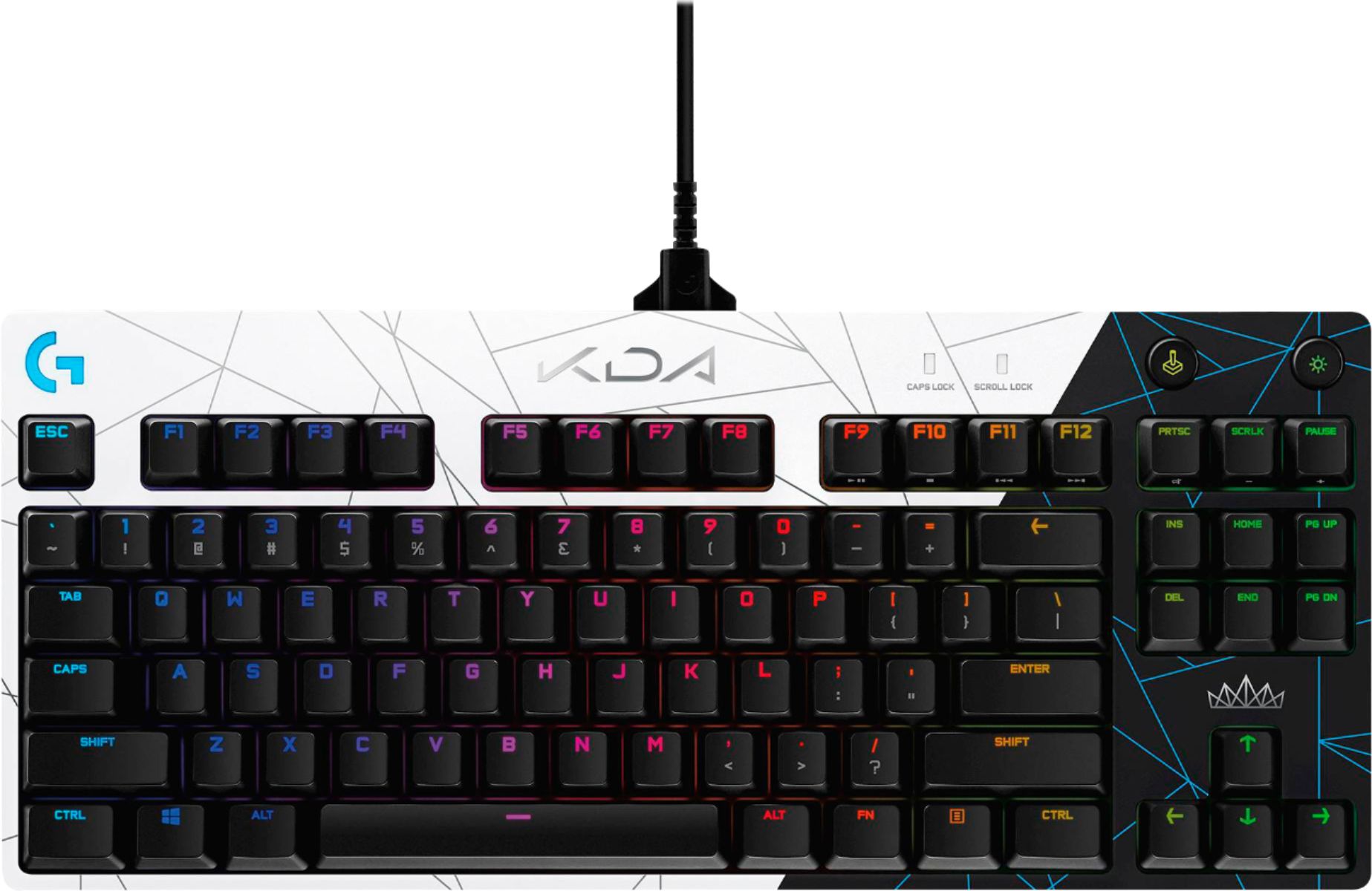
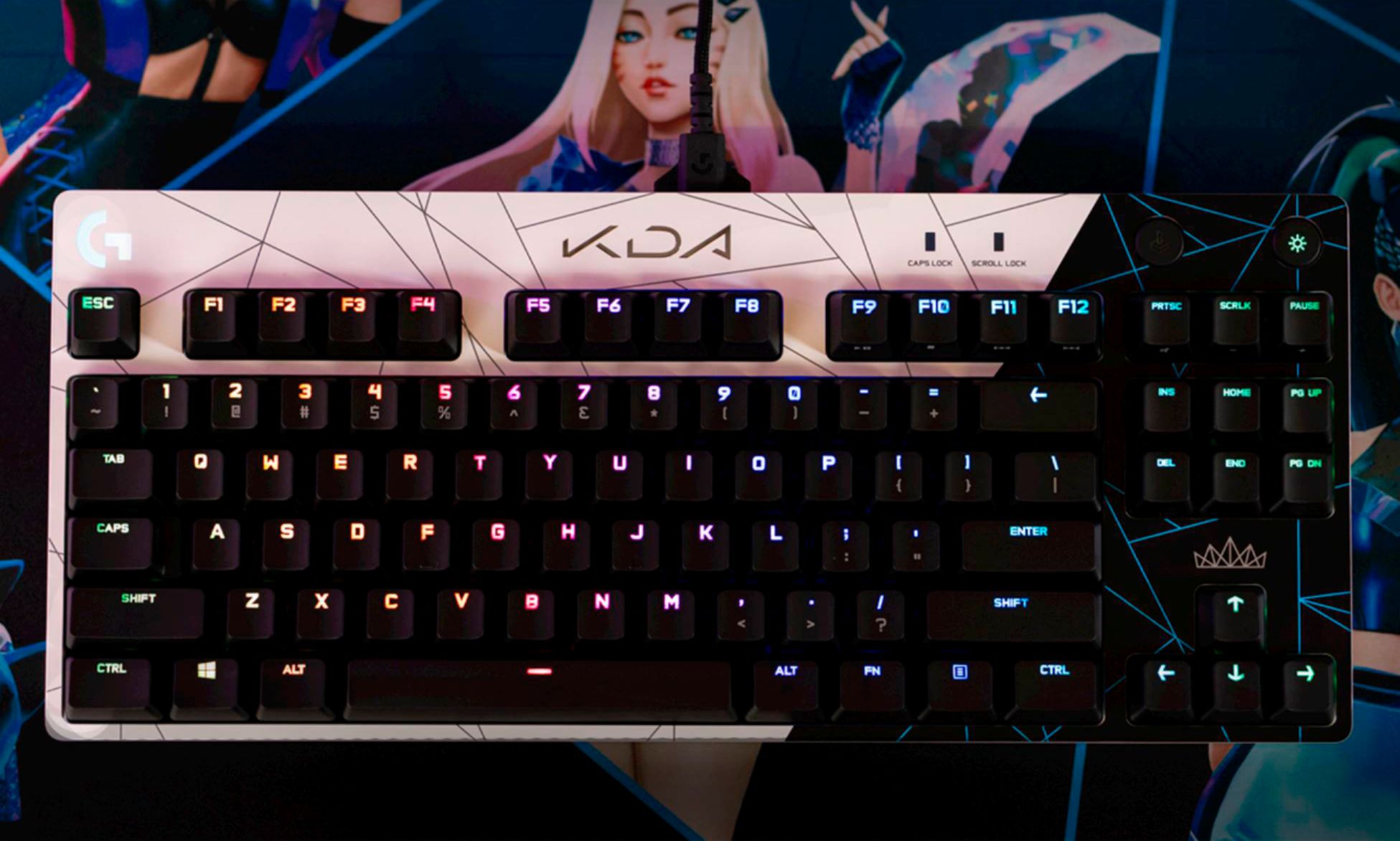
|Posted .This reviewer received promo considerations or sweepstakes entry for writing a review.Logitech’s new G Pro and G Pro X keyboards attempt to appeal to the ‘Pro’ gamer. Featuring RGB lighting, 26-key rollover, a simple TKL design, and blue GX switches - it appeals to the minimalist. Is Logitech’s second go at the ‘Pro’ series worth a look or is this another keyboard to pass on? Logitech’s G Pro line hit the ground a couple years ago, offering a full size and ten-key-less (TKL) design using Logitech’s ‘Romer-G’ switches. Since that time, Logitech has offered Romer-G in many keyboards. Romer-G switches have undergone a few generations and iterations, but they all center around Omron switch designs. Omron makes some of the best buttons/switches in the world, but the Romer-G switch design has run into a few design issues that beset it’s rise in the gamer world. With the second generation G Pro line, Logitech has made the decision to go with their own branded ‘GX’ switches. These switches are essentially Cherry MX clones made by Kailh (you can tell because of the Kailh brand imprinted on the switch). GX switches offer Cherry MX compatible keycaps, and the G Pro keeps a standard layout which makes replacement switches a breeze to install. In the case of the G Pro, the switch design is of the ‘Blue’ variety. This means that you get a loud and satisfying typing experience. The ‘Blue’ switch hasn’t really been associated with gaming, so it’s an interesting choice to offer as the only option on the non ‘X’ keyboard version. The Pro X lineup (not this keyboard) is a bit more expensive, but has one big advantage: swappable switches. Custom designed keyboards with various switch types used to be a boutique offering, but since that time user swappable switches have become a thing. I applaud Logitech for pushing this forward with the new Pro X lineup, but currently they appear to be limited to online only. Worth a look if you’re not a fan on the loud blue switch. So back to our ‘G Pro’ non-x variety keyboard. The layout, size, and design will feel quite familiar to anyone that purchased the Romer-G variety. The feel will be significantly different. I tried to like the Romer-G switch, but like many, I found it just too mushy for my tastes. The tactile variety I heard got a more refined feel, but I never tried one. The GX Blue switches are extremely crisp. I had a Kailh blue keyboard from years ago, and it was a bit of a hot mess. The GX Blue’s are extremely smooth, responsive, and uniform. These honestly feel as good or better than Chery Blues. So being blues they are extremely loud. My wife hates them, my kids want to slam their hands on them (because it sounds cool). They are the bane many an office worker’s existence. That said, they are one of the best if not the best typing experiences. The click gives a decent audible alert that you’ve successfully pressed the key. If you’re like me who bottoms out their keyboards, the increased actuation force (60g) combined with this feedback reduces my tendency to bottom out the keys, thus reducing overall impact. They aren’t as tiring to me as Cherry MX clears (which I have in a Pok3r keyboard). If you can stand the noise, and won’t have objects thrown at you by coworkers, this is a fine typing keyboard. Typing tests appeared to give me at least 4-5 extra WPM, although I found I struggled to keep up with my newfound speed, so give it some time and practice. The design of the keyboard is a no fuss TKL design. It’s plastic, but quite solid. The outer edge is The layout is excellent, dropping the number pad for a more ergonomic experience. If you haven’t tried a TKL, it brings your mouse so much closer, and opens up your desk space significantly. For most gamers, it’s a great tradeoff. If you really want a number pad, you can always key a USB version. The keyboard features a micro-usb connector with stabilizer. The stabilizer is optional, but the included cable has it, and it’s the same cable Logitech uses on many of its wireless mice. It’s an excellent design. Other than that, it’s pretty much a rectangle with 84 keys. There is a lighted G logo, caps and scroll lock LEDs, gaming mode button, and backlight control button up top. Speaking of lighting, there are hundreds of modes, it’s fully customizable, and pretty awesome. There is however limitations compared with other Logitech keyboards. Specifically the lighting has only one brightness, and compared to the Romer G switches, the lighting isn’t quite as good. Where the Romer-G could illuminate the shift mods, and allow the icons to be centered, the icons are pushed up top and subs are not illuminated at all on these GX switches. Still, the lighting is excellent if slightly limited. Another really cool feature of the keyboard is the 3 position feet. The rear feet can swing out to two different positions allowing the height to be customized to the user’s liking. I actually really preferred the slight slant on the first position, and I’ve never had a keyboard offer this before, so it’s really nice. Software wise, Logitech has really improved the feature set. Compared to the old Logitech G software, the new G hub is much more friendly. I really appreciate the ability to share lighting profiles with others, and the overall light control is excellent. Macros and key customization are nice and offer some great flexibility. Of course you can choose and customize both macros and lighting based on the active application. I don’t have a ton of use for this, but if you’re a heavy macro user, it could be pretty awesome. I wish Logitech would go the extra mile and include a travel case. Part of the niceness of the G Pro is the detachable cable, and compact layout. Both features mean toting this keyboard around is a breeze and having a bag/case or other mechanism to protect it in transport would have been a nice addition. Another thing missing that would have been ideal would be a wrist wrest. Something small, detachable could make it even more comfortable for long gaming/typing sessions. I used this keyboard for Starcraft 2 over the past couple weeks. I’ve tried some other Logitech keyboards, and this is my new favorite. I was skeptical of the blue keys at first, but it’s been a great experience and it makes me audiblize my APM, which I like. I found the keys and layout fit light a glove. I can’t say it made me a better player, but I ended up liking the GX blue keys more than I thought. Overall, there is a clear set of pros and cons over the old G Pro, but for true pro use, I believe there are only pros. Compared to the outgoing model the switch choice is more proven, key caps more available, and lighting sufficient. The cons really break down to switch choice (blue may not be your preference). For those that want more flexibility, look into the G Pro X line, as you can swap switches on those and they share the same build. Overall the G pro refresh is refreshing, and worth a look. The blue GX keys make an excellent gaming and typing experience and the lighting is on point. This keyboards look is also subtle and would fit in an office environments.
I would recommend this to a friend