Customer Ratings & Reviews
![The text on the image is grouped and corrected as follows:
* CAPS LOCK: GI ESC F1 F2 F3 F4 F5 F6 F7 F8 F9 F10 F11 F12 PRUNT SCRN SYSAG SCROLL LOCK PAUSE BLAR MI D G2
* ! 1 2 # 3 $ 4 % 5 A 6 & 7 * 8 ( 9 1 0 = + = INS HOME PAGE UP NUM LOCK / G3 TAB Q W E R T Y U I O P { [ } ] I / DEL END PAGE DOWN 7 HOME 8 9 PG UP + G4 CAPS LOCK
* A S D F G H J K L : ; ENTER 4 5 6 G5 SHIFT Z x C V B N M A > ? / SHIFT 1 END 2 3 PG DN ENTER G6 CTRL ALT ALT CTRL 0 INS DEL](https://pisces.bbystatic.com/image2/BestBuy_US/images/products/6083/6083509_sd.jpg)
![G613 G1 ESC F1 F2 F3 F4 F5 G613 G2 ~ ! 1 2 # 3 $ 4 % 5 V 6 G3 W E T TAB Q D F CAPS A S G4 LOCK logitech X C Z SHIFT F6 & 1 Y G V F7 F8 I 8 9 U / H 3 Wireless Mechanical Gaming Keyboard Drool-proof mechanical gaming keyboard ROMER-G TACTILE F9 F10 F11 Moc F12 OOL M - f M OE SCL 0 I 9 ) 1 / by AO DO 3 0 P ] 1 / . ENTER K L 1 a A 7RH2 2 < 1 M](https://pisces.bbystatic.com/image2/BestBuy_US/images/products/6083/6083509cv19d.jpg)
![The text on the image is as follows:
* G1: ESC, F1, F2, F3, F4, F5, F6, F7, F8, F9, F10, F11, F12, PRST, O, SYS, NS, SER, OUA, LOCK, PAUSE, BAL, HI, I, >N, G2
* G2: 1, 2, 3, 4, 5, 6, 7, 8, 9, 0, +, -, INS, HOME, PAGE UP, NUM LOCK, /, -, G3
* G3: TAB, Q, W, E, R, T, Y, U, I, O, P, {, [, ]}, I, I, DEL, END, PAGE UP, 7, HOME, 8, 9, PG DN, ENTER, G4
* G4: CAPS LOCK, A, S, D, F, G, H, J, K, L, I, i, a, e, ENTER, 5, 6, G5
* G5: SHIFT, Z, x, C, V, B, N, M, /, SHIFT, 1, END, 2, +, 3, PG UP, ENTER, G6
* G6: CTRL, ALT, ALT CTRL, 0, INS, DEL, DARS](https://pisces.bbystatic.com/image2/BestBuy_US/images/products/6083/6083509cv20d.jpg)

- Model:
- 920-008386
- SKU:
- 10111352
Rating by feature
- Value
Rating 4.4 out of 5 stars
- Quality
Rating 4.5 out of 5 stars
- Ease of Use
Rating 4.6 out of 5 stars
to a friend
Simple but works
||Posted . Owned for 1 month when reviewed.This reviewer received promo considerations or sweepstakes entry for writing a review.My, in particular, got defective, I need to return. The keys are sticky.
I would recommend this to a friendMiddle Age Users Only
||Posted . Owned for 2 months when reviewed.This reviewer received promo considerations or sweepstakes entry for writing a review.Bought this as a gift for my 13 year old niece, within days the keys started to pop off, couple of the keys refuse to stay in its place. I'm sure this a good keyboard for a middle age office worker but for someone who vigorously pounds the keyboard.
No, I would not recommend this to a friendBrand response from Logitech
Posted .Hello, I am sorry to hear about the keys popping off. This keyboard does come with a two year. Simply visit the support page for this item on the Logitech site in order to file a claim. I hope this helps! Thank you for taking the time to write this review, we appreciate the feedback.
-Danielle from Logitech

Lightning Quick Wireless Keyboard
|Posted .This reviewer received promo considerations or sweepstakes entry for writing a review.First off this keyboard is quite a bit heavy, so it's not going to slide around on you. The look and feel is very professional and sturdy. The mechanical keys are very responsive and I love the noise they produce over my old lightweight chicklet keyboard. There is virtually no lag with this thing, which is great for competitive games like League of Legends and Dota. It would have been nice to have the option of USB plug 'n play and some lights, but overall I am satisfied with this keyboard's performance.
I would recommend this to a friendDecent Keyboard, Way Too Expensive
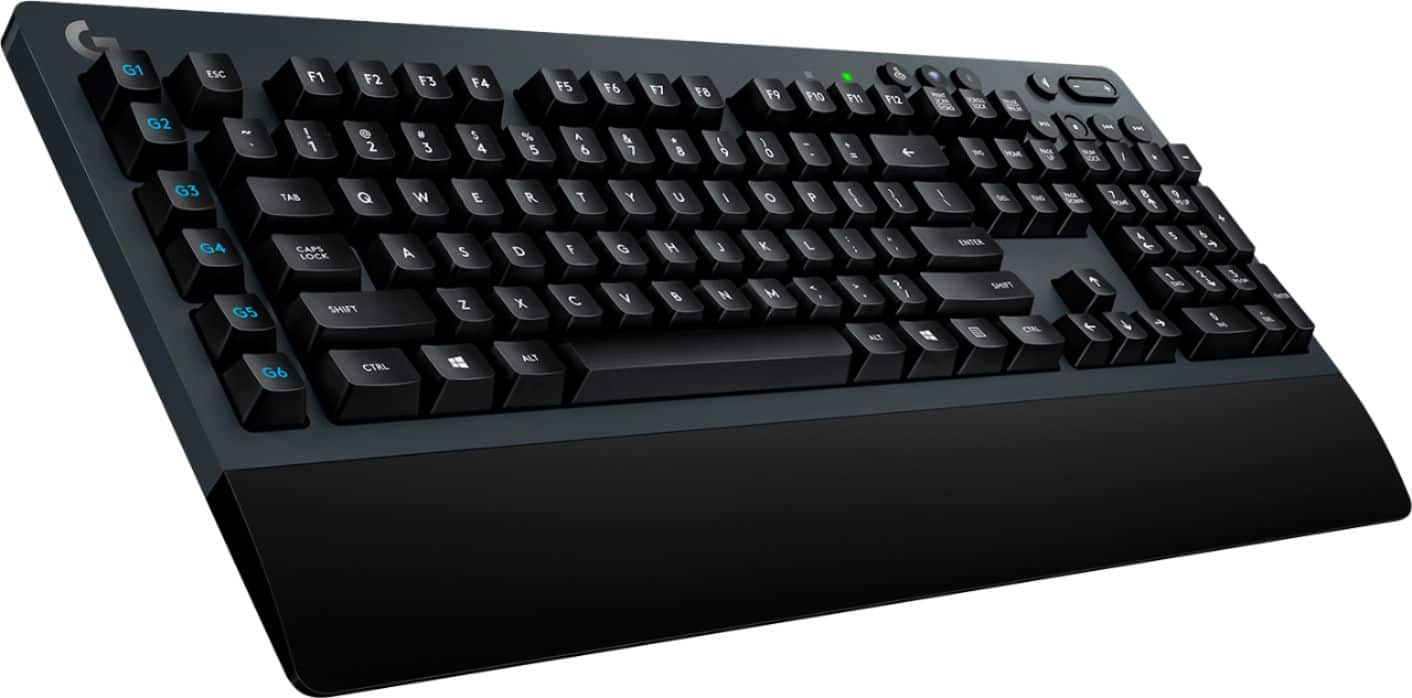
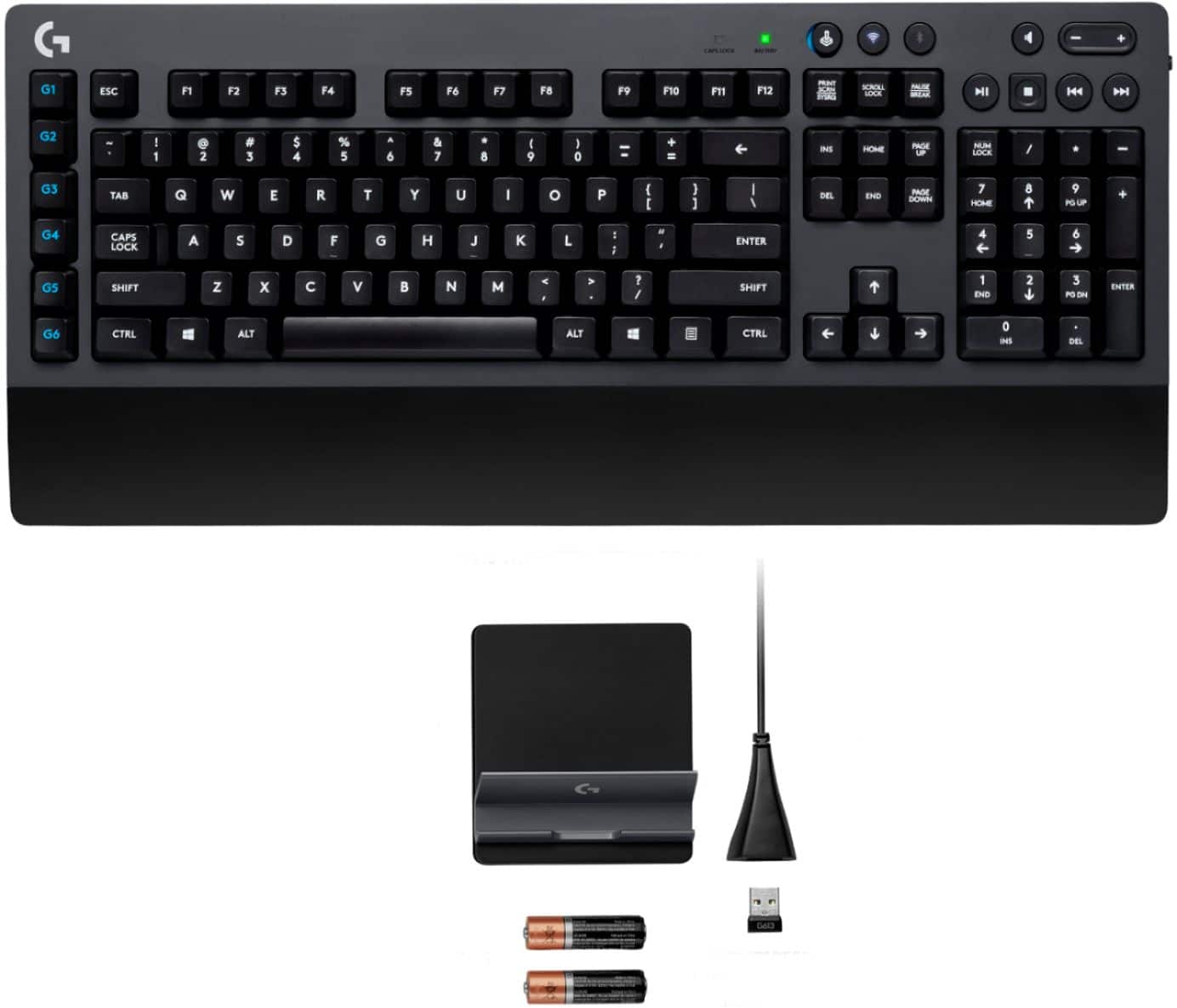
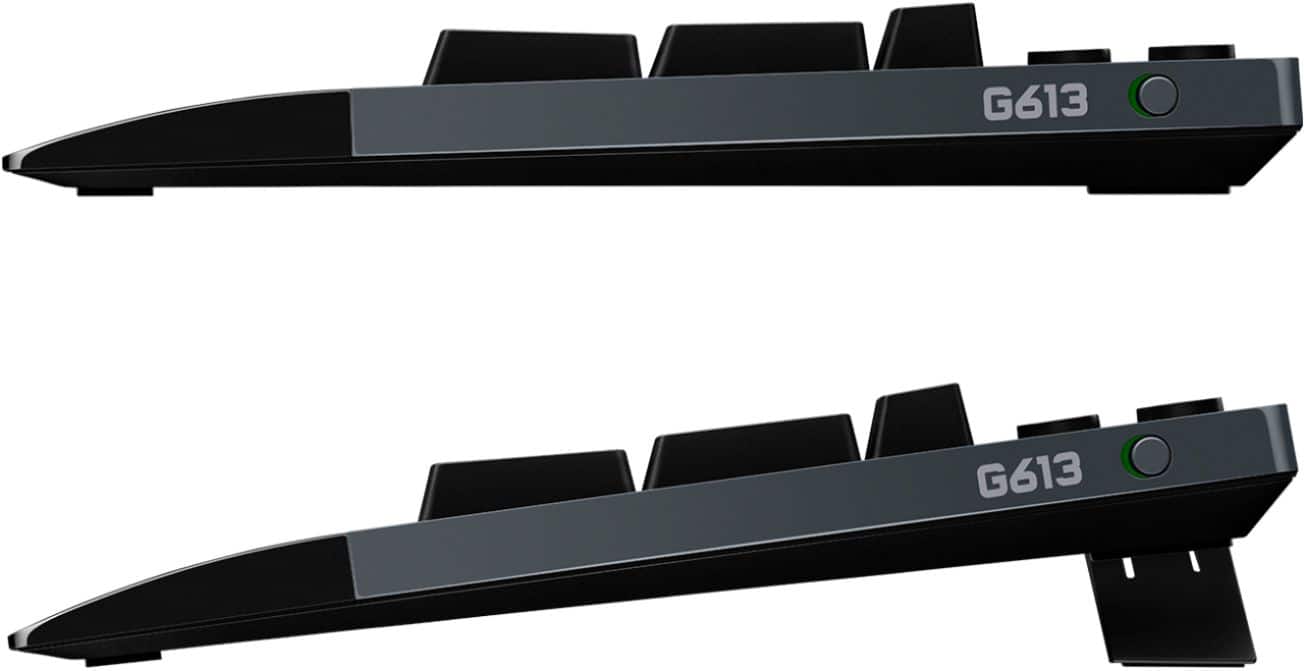
|Posted .This reviewer received promo considerations or sweepstakes entry for writing a review.Pro -Two wireless options (2.4 GHz dongle and Bluetooth) -Heavy with good rubber feet (won't slide around) -Nice mix of media control keys -Programmable G keys -Standby mode and adjustable poll rate to save battery -Comes with batteries and USB extension -USB dongle can be stored in battery compartment Con -Expensive -Poor tactile feedback -No backlighting -No NumLock indicator (light or otherwise) -Fixed palm rest -No padding on palm rest -Rest of the keys are non-programmable -LGS software doesn't work over Bluetooth mode -No RGB -Keycaps use cheap stickers -No dedicated calculator button (though you can program a G key to do it) -Media controls on right side of keyboard (meaning on mouse-hand side) -Standby mode requires time to turn back on -Annoying key rebound "twang" sound Overall The TL/DR of this is that the G613 is a good keyboard, but at $150 it falls behind what competitors offer in that same price range. Mechanical switch keyboards offer a level of durability and type-ability you can't get from cheap membrane keyboards. Wireless keyboards offer an increased level of freedom in portability and connectivity. A wireless mechanical keyboard then seems the holy grail of typing. The G613 uses Logitech's in-house Romer switches as opposed to the more common Cherry MX or Kailh mechanical switches. They're rated for 70 million strokes ( up from the 50 – 60 million offered by Cherry ), though no one will ever come close to reaching that level of wear. In terms of feel, the Romers are like a cross between Cherry red and brown switches. Actuation is still around 45g, but they almost feel completely linear like reds. There's a small tactile bump, but nothing close to that of a Cherry brown. Without that bump, I found the keys almost too easy to press and had quite a few accidental keystrokes ( I'm not a great typist, so touch typists probably won't care ). As someone who prefers Cherry brown switches, I don't like the feel of the board. Anyone wanting something like a clicky blue switch or the older buckling spring will be very dissatisfied with the Romer switch. Those preferring linear switches may find the small tactile addition pleasant, or may hate it since it's not perfectly linear. The board also has an annoying "twang" sound as the keys rebound, unfortunately. The board is quite heavy ( hopefully indicating a sturdy metal deck plate ) and has large rubber feet. These two things should prevent it slipping around even under the most enthusiastic typists. Outside of the main keys, you get six programmable G keys on the left side ( more on these in a bit ) and a good selection of volume and media control buttons above the tenkey. I would prefer the media controls on the left side as that's the hand that's almost always on the keyboard ( my right hand is usually on the mouse ). There's also no dedicated calculator button over the tenkey ( something I've come to quite like on my cheaper MS keyboards ). You can program a G key to do this, but then the calculator button is on the opposite side as the tenkey. The G613 has a wide palm rest, but there is not padding on it and it's not detachable. There's also no way to prop the board at an inverted angle, which many find to be a more comfortable typing position. The keycaps use cheap stickers instead of any sort of molding or engraving. Still, I've got plenty of cheap keyboards with stickered keycaps that I've never worn off. The Logitech Gaming Software ( LGS ) gives you some configuration control over the keyboard, but it's fairly limited compared to other companies' software. Only the G keys can be remapped or programmed, which is a big letdown for a "gaming" keyboard. Also, the LGS doesn't work at all when the keyboard is used over Bluetooth. The big selling point of the G613 is of course the wireless connectivity. And as far as wireless goes, having both a 2.4 GHz USB dongle and Bluetooth options are nice. It means the keyboard can work with your computer, phone, tablet, gaming consoles, and possibly even media streaming boxes ( would explain why the keyboard includes a phone stand ). Using the wireless and Bluetooth buttons at the top of the keyboard switches which protocol you want to use, which is nice for those few people who might need to switch back and forth between multiple devices or computers. Logitech claims the 2.4 GHz option can has a response time of 1ms, or a polling frequency of 1000 times a second. This is typical fare on wired keyboards and mice, so having it over a wireless connection is nice. However faster polling will also drain the batteries faster, so the configuration software lets you choose between 1ms, 2ms, 4ms, and 8ms polling to conserve power ( Bluetooth mode only supports 8ms, or 125 Hz ). The keyboard also comes with a USB extension cable to make sure the dongle gets full reception ( behind a steel tower case isn't ideal placement for the best signal ). However, there's a reason practically no one makes a wireless gaming keyboard: there's largely no need for it. Logitech's marketing for the G613 says things like "free yourself" and "no more limitations." However, the vast majority of keyboard/mouse gaming happens at computer desks where the keyboard doesn't move. So what's restrictive about a wired keyboard there? Unless you're in the tiny niche of gamers that use a gaming HTPC / Steam Box and use a lap desk on their couch for a keyboard, a wireless gaming keyboard isn't something a lot of people are clamoring for. Due to the wireless connectivity, maximum battery life becomes paramount. That means removing most things that drain power. The G613 doesn't just lack RGB lighting, it doesn't have any sort of backlighting at all. It doesn’t even have a NumLock indicator light. Like most wireless keyboards, it goes to sleep if it's not used for a few moments, then takes a few moments to wake back up. However since wireless radios are more expensive than a simple wired connection, you end up paying more for a keyboard that doesn't do a whole lot extra. If Logitech took out the so-called gaming specific stuff in the board ( 1ms response time, G keys, etc ), trimmed the size a little, and marketed this as a wireless mechanical switch productivity keyboard for around $100, it'd be a much better product. But if you don't care about a wireless keyboard ( which most gamers don't ) and are willing to spend $150, you can get a keyboard that has your mech switch of choice, backlighting ( often per-key RGB ), full key re-mapping and programmability, padded and detachable palm rest, and a NumLock indicator. Some will even have USB and audio pass through. If you can find this on sale for under $100, it's a decent enough keyboard for productivity and general purpose. But as a programmable gaming keyboard, it lacks too many features and is simply too expensive at $150.
No, I would not recommend this to a friendSpead alil more for a good wireless
||Posted . Owned for 2 months when reviewed.This reviewer received promo considerations or sweepstakes entry for writing a review.I have had trouble with purchasing a keyboard. Bought the $200 razor keyboard didnt like it, returned. Got this instead, 3 weeks later stoped working. Have to have wireless in my setup.
No, I would not recommend this to a friendBrand response from Logitech
Posted .Hi chris, thank you for your feedback! The G613 is backed by a 2-year limited hardware warranty. For support, please refer to: https://support.logi.com/hc/en-us/articles/360024152654 - Will, Logitech G.
Solid keyboard.
||Posted . Owned for 2 months when reviewed.This reviewer received promo considerations or sweepstakes entry for writing a review.Solid keyboard. No backlight but solid tactile response.
No, I would not recommend this to a friendBest Keyboard I've used, Not just for Gaming!
|Posted .This reviewer received promo considerations or sweepstakes entry for writing a review.I work and game from Home so I can say this keyboard is great for both. Disclaimer: This is the first "gaming" keyboard I have ever used. Wireless: -No detectable lag whatsoever with the Logitech's Lightspeed Wireless Connection -Great to be able to switch between Bluetooth and Lightspeed with the tap of a button to quickly move between your desktop and mobile device (cell phone stand included). -Battery life is claimed at 18 months, so it really shouldn't be an issue for anyone. Gaming: -The bread and butter of this keyboard is advertised as gaming. In that regard it is fantastic. Macro keys are easy to set up once the Logitech software is installed. Response time is the same as a wired keyboard, tested with multiple games. -Has a gaming switch to disable certain keys when you are gaming to avoid inadvertently switching back to windows and messing up your experience - this is a pretty simple idea that works well. -Probably the only real wireless gaming keyboard on the market right now that has no downsides to wired gaming keyboards. -No backlight - not really a con for me as I never really use a backlight anyways. Non-Gaming/Office performance -Best tactile feel I have experienced in a keyboard. Just the right amount of key travel and resistance for my taste. -Keys are quiet as well. -Media Keys are large and well positioned -Macro (G Keys) can be used to set up highly customizable macros for office use as well - launching apps, games, etc... -Wrist wrest is perfect for me and I find it to be very comfortable. As such I don't mind that it is not removable. -At over 3 lbs, this isn't really an ideal couch keyboard and is aimed more at your desktop. Overall, the best keyboard I have ever used wireless or otherwise, really can't go wrong with this one. If you're looking for a wireless gaming keyboard with no lag, this is the only choice as well.
I would recommend this to a friendToo big and heavy
||Posted .This reviewer received promo considerations or sweepstakes entry for writing a review.Bought this for a friend, it was too big and heavy for them
No, I would not recommend this to a friendSkip, get something better!
||Posted . Owned for 9 months when reviewed.This reviewer received promo considerations or sweepstakes entry for writing a review.Keys feel amazing. Now that we're done with the good. Here's the bad. Can't use it with Logitech's unifying receivers so you would need to have separate USB slots for each lightspeed device. The keys chatter which is apparently very common for this keyboard. (I'm literally taking forever to type this review). The GHub was designed by someone who's braindead. There is no firmware update which means they most likely gave up trying to fix this product.
No, I would not recommend this to a friendReturned, would not stay connected.
||Posted .This reviewer received promo considerations or sweepstakes entry for writing a review.I had to constantly "hard reset" this headset by removing the battery and pushing a reset button with a pin. I exchanged the headset for a different wireless one (void pro rgb) which was cheaper and fit much better. Would not recommend.
No, I would not recommend this to a friendJust not for me
||Posted .This reviewer received promo considerations or sweepstakes entry for writing a review.Easy to see up. Connected and it worked right away. My issue was the large keys had clunky feel and it made so much noise typing it was a distraction. Returned it to get soft key key board as I had before.
No, I would not recommend this to a friendGood but still lacking some things
|Posted .This reviewer received promo considerations or sweepstakes entry for writing a review.After opening the packaging, you will get two accessories: the USB extension cable for the wireless receiver and a handy mobile phone dock. The mobile phone dock can either be a nice addition or a marketing gimmick depending on how much value you get from it. The reason why the mobile phone dock was included is because of their Logitech ARX control software that lets you keep tabs on your system, manage different controls, etc. Actually, they’ve incorporated a built-in mobile phone dock on one of their older mechanical keyboards. Personally, I like the addition of a mobile phone dock as it is convenient. It has a rubber non-slip base and it is perfect for any mobile phone sizes. Others might not need this, but again, it is a nice accessory to have. Other than the previously mentioned accessories, you will also get the keyboard itself. It has a rather simple exterior and has a two-color scheme (black/gray). The main board itself has a gray layout with black keys and the attached wrist rest is colored black. Unfortunately, the wrist rest is non-removable and this can be an issue for some who do not want to use it. The Bluetooth and standard wireless works really well
I would recommend this to a friendEchoing in keyboard, poor customer service
||Posted . Owned for 1 month when reviewed.This reviewer received promo considerations or sweepstakes entry for writing a review.I returned this keyboard due to the metallic echo that would occur every time you hit a key and release it. Waited 3 weeks for Best Buy to finally issue a return
No, I would not recommend this to a friendBrand response from Logitech
Posted .Hi NJ20,
Thank you for your feedback. It is greatly appreciated. Sorry for any inconvenience. I'm glad they were able to get the issue resolved for you. If you ever need assistance, please contact Logitech Support on the website.
LaShonda from Logitech
Not the feel I was going for
||Posted .This reviewer received promo considerations or sweepstakes entry for writing a review.Functional yet not the tactile feel I wanted. I returned it and purchased a Razer Elite with Green Keys 2019 (like brown keys). Return process was great.
No, I would not recommend this to a friendKeys do not light up
||Posted .This reviewer received promo considerations or sweepstakes entry for writing a review.The advertisement suggested the key board was wireless and that the keys lit ip, but the keys do not light up.
No, I would not recommend this to a friendGod i wish i could give it 0 stars.
||Posted . Owned for 3 weeks when reviewed.This reviewer received promo considerations or sweepstakes entry for writing a review.This thing is utter garbage. I have had 4 keys just fall off for no reason. Not just the key caps either the whole little Mechanical key unit just broke into several small pieces. i've had this thing for about 3 weeks and do no recommend to anyone its cheap. Though i will say despite how cheap the "mechanical" keys are the wireless functionality worked really well.
No, I would not recommend this to a friendBrand response from Logitech
Posted .Hello GamesForAll! Sorry to hear you're having issues with your G613 Wireless Gaming Mechanical Romer-G Switch Keyboard. The Romer-G switches on the G613 are normally tested for 70 million key presses, but things can happen. We do provide a 2-year warranty on the keyboard though, so would definitely suggest you to check the product support page: https://www.logitechg.com/en-us/products/gaming-keyboards/g613-wireless-mechanical-gaming-keyboard.920-008386.html - Mathieu from Logitech
Good keyboard design could improve
|Posted .This reviewer received promo considerations or sweepstakes entry for writing a review.This keyboard functions well and is easy to install. Simply plug in USB or turn on Bluetooth to connect. It connects to your computer via bluetooth or the USB wireless adapter. both work well. The keyboard functions well for normal Windows functions. As far as gaming it is a great improvement to my old keyboard. The bluetooth is very responsive and I appreciate the louder click of the mechanical keys. Some of the bad features are the G hot keys - they are hard to reach and not convenient. They are about as difficult to reach as the F keys. Also the space key faces inward at an unusual angle and is slightly uncomfortable. All things considered this was a very good keyboard for gaming.
I would recommend this to a friendit works
||Posted .This reviewer received promo considerations or sweepstakes entry for writing a review.Felt cheap and had NO backlighting.....a big no-no for a gaming keyboard
No, I would not recommend this to a friendBrand response from Logitech
Posted .Hi JoeC, sorry to see you weren't satisfied with the G613 Gaming Keyboard. While it doesn't have backlit keys, it does have Lightspeed technology which is great for gaming with no lag! If you're looking for a keyboard that has RGB, check out the G413 or G513 keyboards!
Awful but it gets the job done
||Posted . Owned for 10 months when reviewed.This reviewer received promo considerations or sweepstakes entry for writing a review.Really hard to use and feels a bit cheap but works
No, I would not recommend this to a friendBrand response from Logitech
Posted .Hello Will,
I am sorry that you are not loving your new Logitech gaming keyboard. Although it is unclear why you find the keyboard particularly difficult to use, I must ask for your patience in adjusting to your new peripheral. Also, please get in touch with the Logitech support team if you feel that your keyboard is defective. https://support.logi.com/hc/en-us/requests/new?ticket_form_id=360000621393&mID=12920. Logitech appreciates your product insight. - Leo from Logitech
First one good second one bad
||Posted . Owned for 5 months when reviewed.This reviewer received promo considerations or sweepstakes entry for writing a review.I have purchased two of these and I was really impressed with the first one. The second one I have only used very lightly and the number pad was not even used. I now am using it more often and it has a broken 3 key that if it is even lightly hovered over it will register 5-10 of them.
No, I would not recommend this to a friendBrand response from Logitech
Posted .Hi, Very sorry to hear about he issues you're having with your second G613 and the broken "3" key on the number pad. At Logitech, it is our goal to ensure you are completely satisfied with your Logitech purchase. We take pride in the products and services we offer, and want our customers to enjoy them just as much as we do. If you are experiencing an issue, please click on one of the following links to learn more about the Logitech warranty. https://support.logi.com/hc/en-us/articles/360024918974-Warranty-G613. Hope this helps to resolve your issue. Thank you for choosing Logitech. - Richard from Logitech