Customer Ratings & Reviews
- Model:
- 920-009087
- SKU:
- 6360838
Rating by feature
- Value
Rating 4.3 out of 5 stars
- Quality
Rating 4.7 out of 5 stars
- Ease of Use
Rating 4.7 out of 5 stars
Customers are saying
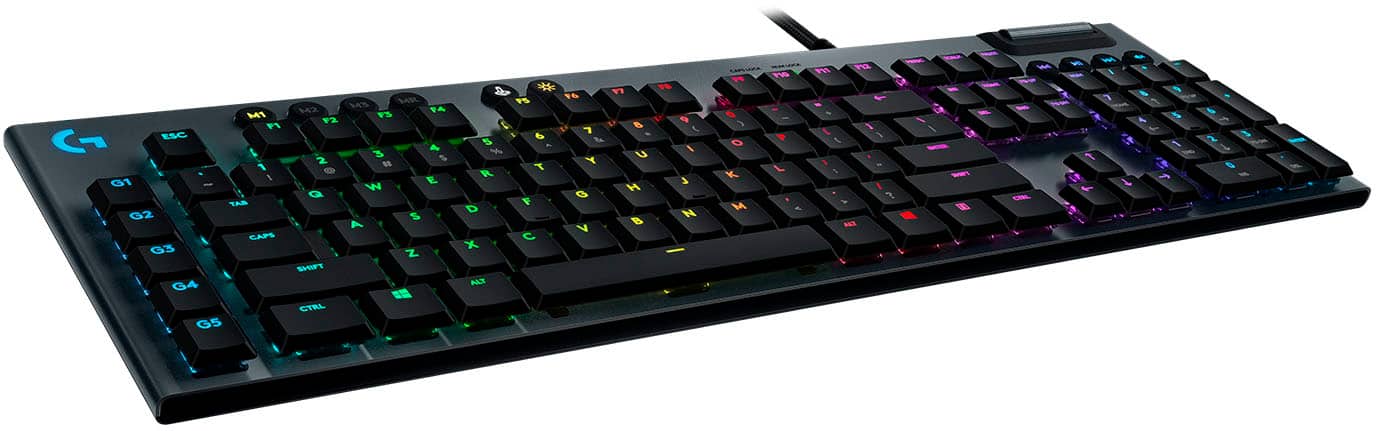
Customers express satisfaction with the G815 LIGHTSYNC keyboard's quality, key feel, and customizable RGB backlighting. Users appreciate its ease of use, design, response time, and convenient volume control. Criticisms include the product's high price, the software experience, the absence of a wrist rest, and the use of two USB ports. Overall, the keyboard is well-received for its performance and aesthetics.
This summary was generated by AI based on customer reviews.
- Pros mentioned:Keyboard qualityCons mentioned:Wrist rest

The keyboard, reinvented (for Logitech)
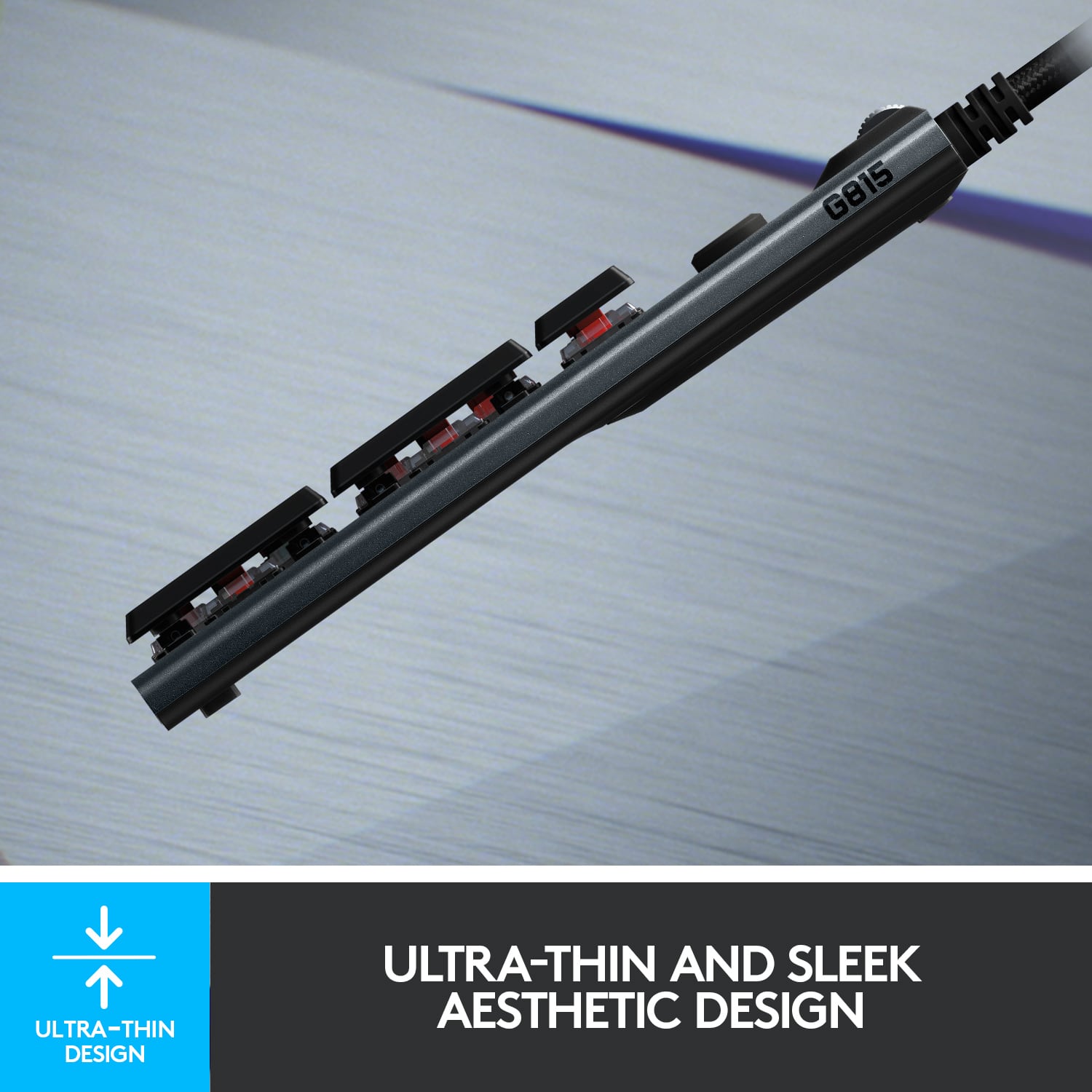
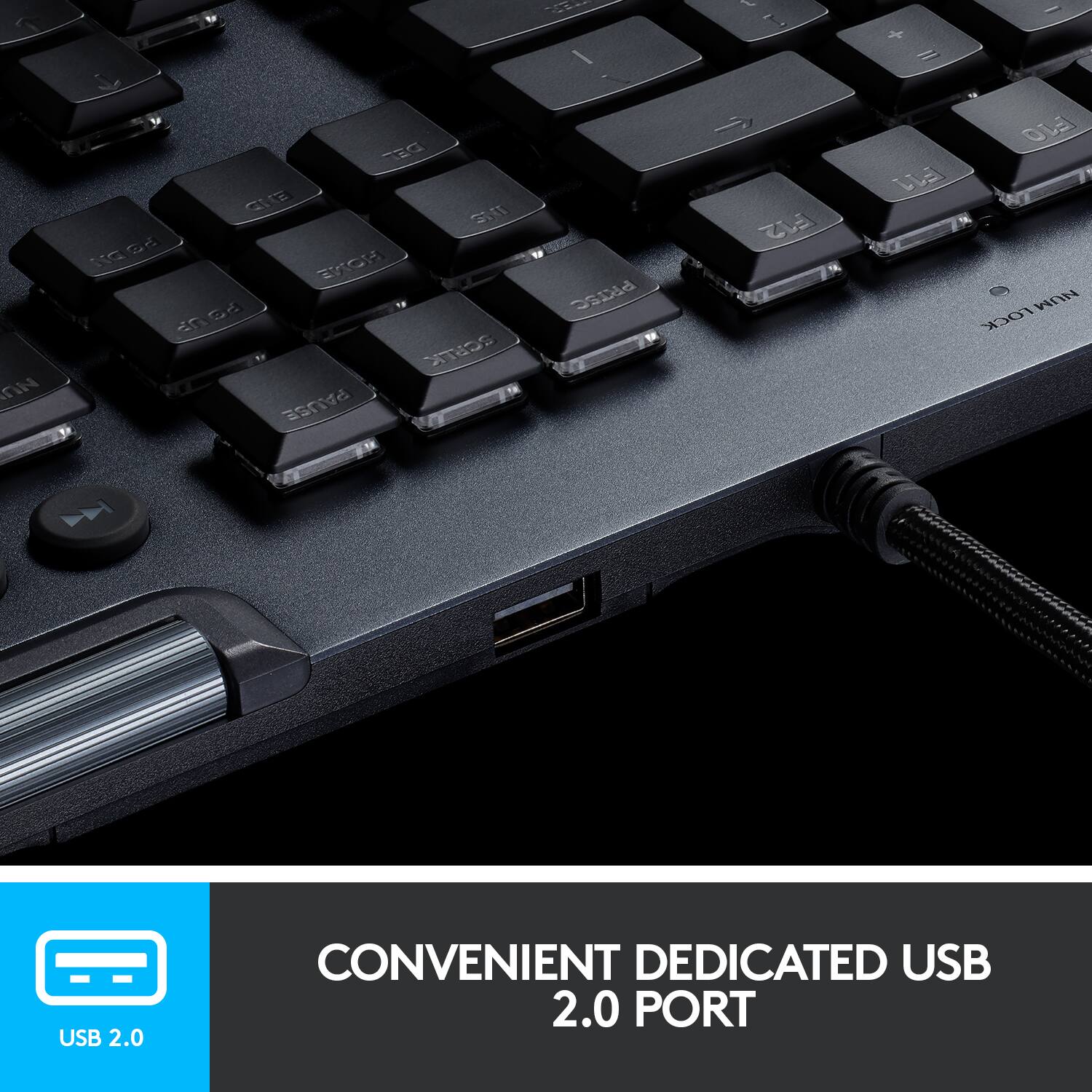
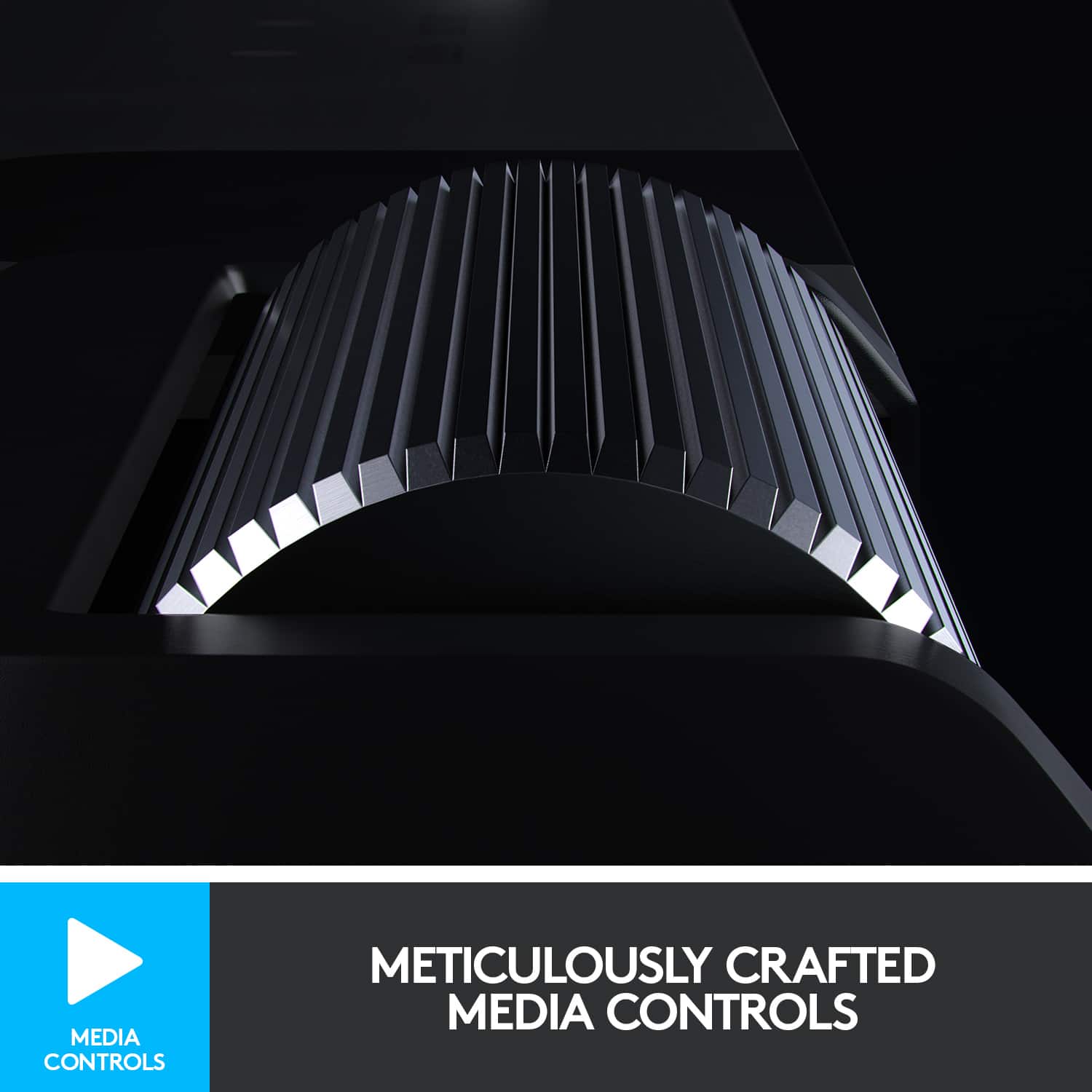
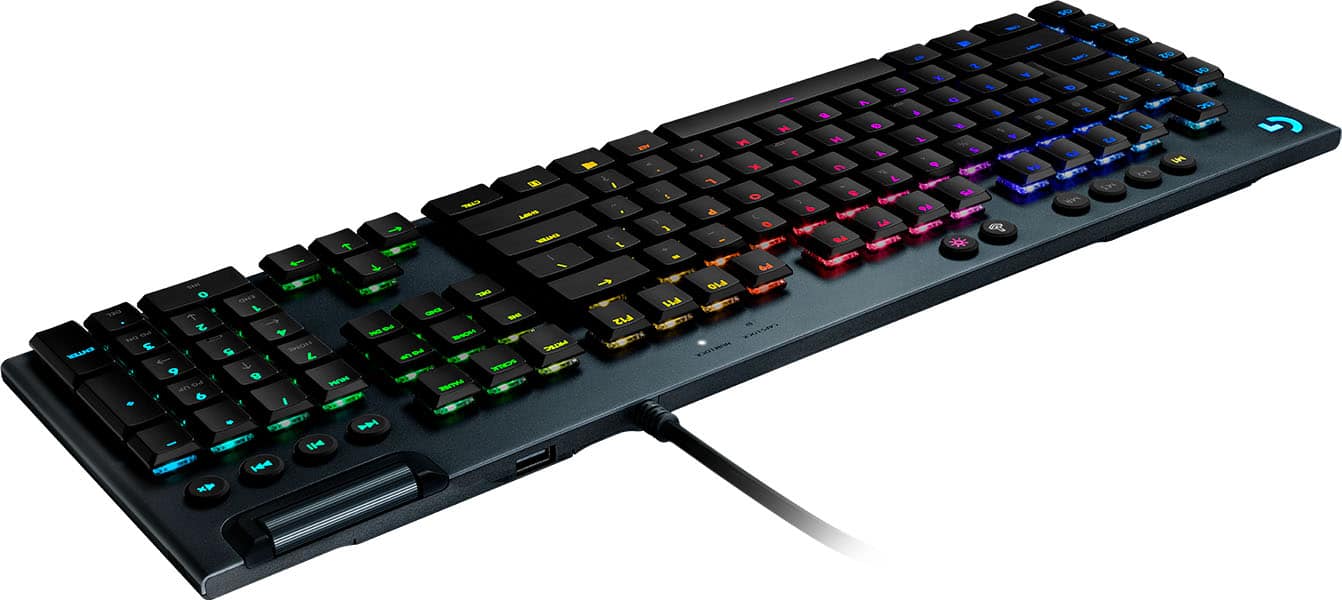
|Posted .This reviewer received promo considerations or sweepstakes entry for writing a review.Yes, I'm in on the RGB craze. On my primary gaming PC, I currently use all Razer-branded gear (keyboard, mouse, mousepad) and they all sync in harmony. I've used Logitech keyboards prior (the Orion) and it just felt...generic to me. Then, I seen the new G815 and G915 series of keyboards and I immediately started drooling. A definite pro for me is being slimline, as my Razer keyboard has always feel huge and take up a lot of desktop real-estate. I opted for the G815 because I needed a wired keyboard on my secondary gaming computer, which currently uses Logitech speakers and a G600 MMO mouse. I wanted to get this keyboard to complete the Logitech setup and possibly win me over and convert me to Logitech on my primary gaming PC as well! To my understanding, the primary differences between the G815 and G915 models is the 815 is wired and the 915 is wireless. Upon receiving the G815 keyboard and unboxing it, I was seriously impressed. This thing is SOLID and does not feel cheap. It's constructed from aircraft-grade aluminum and it's super slimline. It's boxed really well and the only issue I had were the twist-ties. Logitech, I don't know what you were thinking, but these twist ties were the spawn of evil. I spent a good 15 minutes trying to untwist them, to no avail. Then an extra 10 minutes trying to find a pair of pliers to snip them off. Wound up having to saw through them with a pair of scissors. Setup with super simple. There are two USB ports...necessary to power the keyboard and to act as a pass-through for the onboard USB port. In regards to the port, it's fine and works great. No issues. However, they placed it on the top part of the keyboard. I'd have much rather seen it installed on one of the sides, just for easier access. I also noticed that this keyboard does not include a wrist-rest, which I think for the price, is a major bummer... Once connected, it's defaulted to the "Wave" setting, so they keyboard is cycling the colors from left to right. I installed the Logitech G-HUB software and was amazed at how simple and nicely laid-out it was! It's super easy to access everything you need and make the necessary changes. I immediately changed it to "Cycle" mode, that way it just changes colors through the RGB spectrum. Just wanted a basic setting to test. There are also G1-G5 keys on the left in which you can use to run multi-button Macros, which is always handy, especially in MMO or any other game that uses complex controls or rotations. So far, I was super impressed with the keyboard, until I noticed that it was not syncing with my G600 mouse. Considering this mouse is still sold and is part of the G-series of devices and I'm using G-HUB, I expected everything to sync together, much like my Razer gear on my primary PC. I've done everything I knew to do - I even went in the G-HUB app and selected the "Sync Lighting Options" setting...but only the keyboard popped up to select. No mouse. So, my best guess is that either this G600 MMO mouse is just not compatible with the new series of Lightsync gear or that it's just a bug with G-HUB or maybe a firmware update to the mouse in the future will enable it to sync with this keyboard. What is really weird though, is that some games that control the lighting, like Fortnite, seem to sync everything, including the mouse. So, that does make me think it's just a bug in G-HUB. ***I e-mailed Logitech late Sunday and held off my review until today (Tuesday) for a response, but as of now, I've not received anything from them.*** I also did want to comment on the Media portion of this keyboard. I LOVE LOVE LOVE the media controls. They annihilate any other keyboard I've ever used, including the one on my Razer Huntsman Elite. The volume scroll wheel is made of metal and is so smooth and satisfying, it's enjoyable to just sit there and move it up and down, lol. All the other media keys (Play/Pause, etc) work great too! I'd say this is the first keyboard I've used where the Media portion worked out of the box without issue. Honestly, I love this keyboard so much, I would be tempted to replace all my Razer gear on my primary gaming PC with the G915 version of this keyboard and another G600 MMO mouse...but sadly, the sync issue killed that thought for me at the moment...unless they get it fixed. Now, I just wish Logitech would update the G600 mouse - that would be awesome. I was really hoping to hear something back from my e-mail to Logitech before posting this review. So, due to all of the above, I'm giving this a 4 star review. Don't get me wrong, the keyboard itself is 5-stars all the way, but the Sync issue between the keyboard and G600 mouse really bugs me. Take that and couple it with the location of the USB port and the fact that there's no wrist-rest included...I think a 4 star review is fair.
I would recommend this to a friend - Pros mentioned:Keyboard quality, Response time, Rgb backlighting
Low Rider of Keyboards
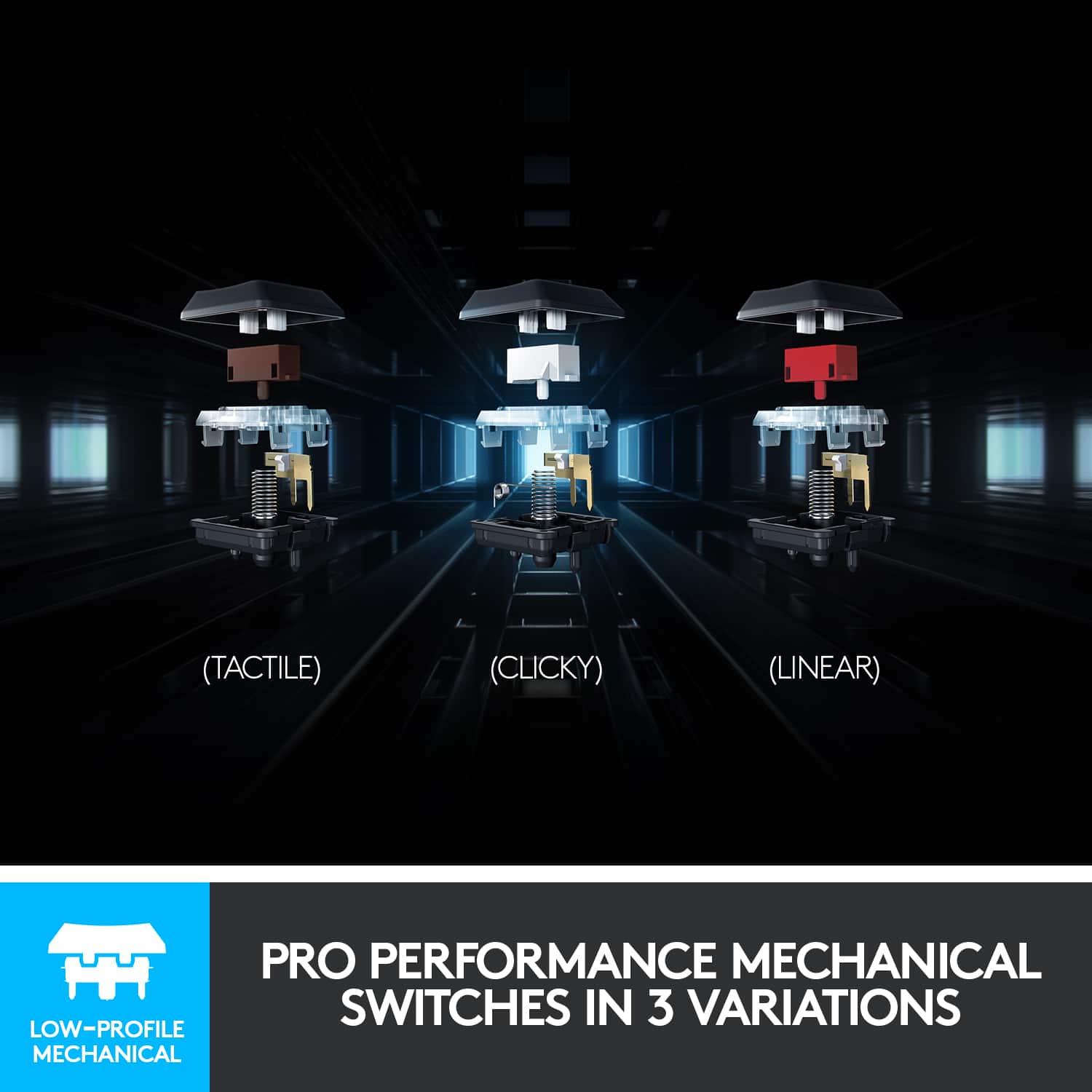
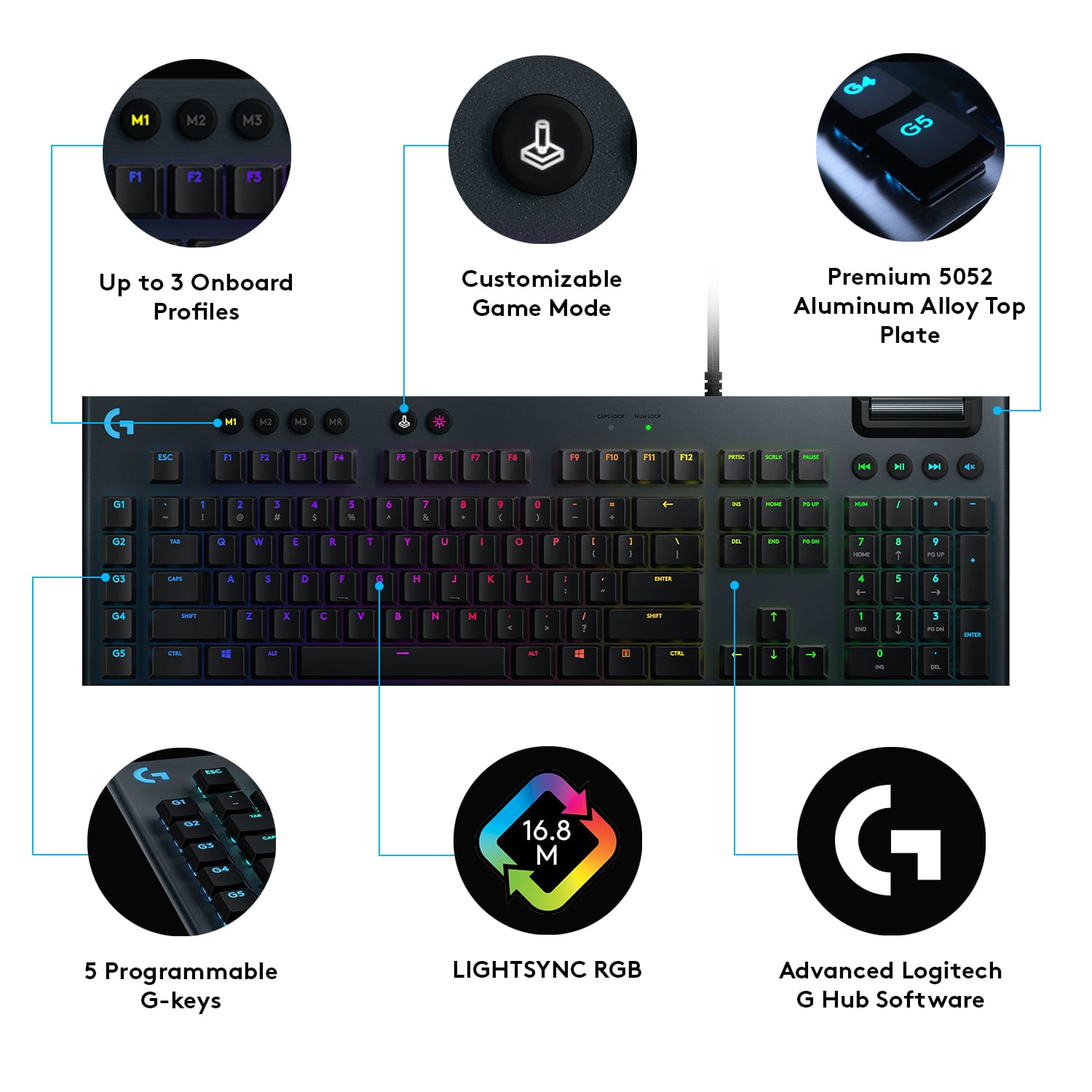
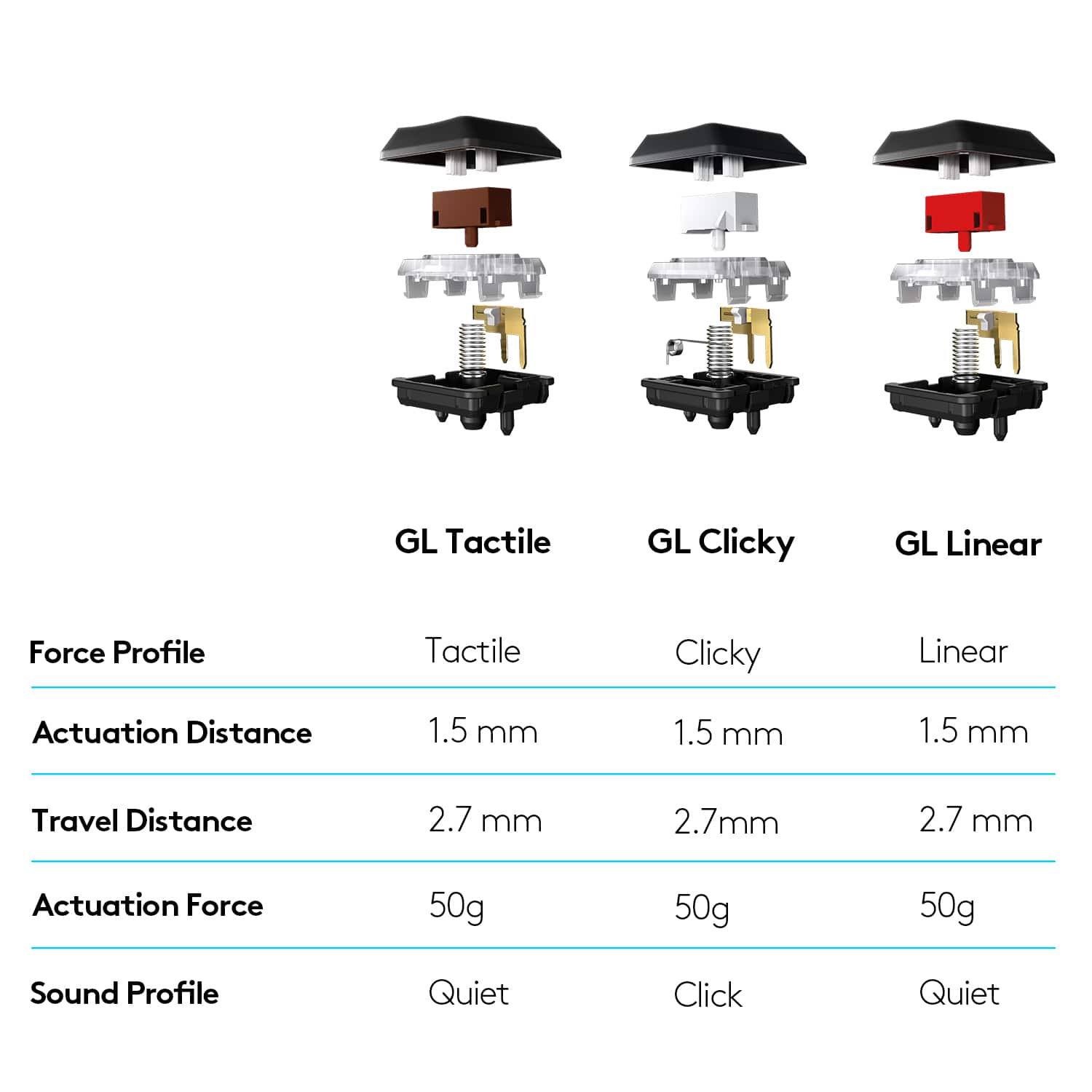
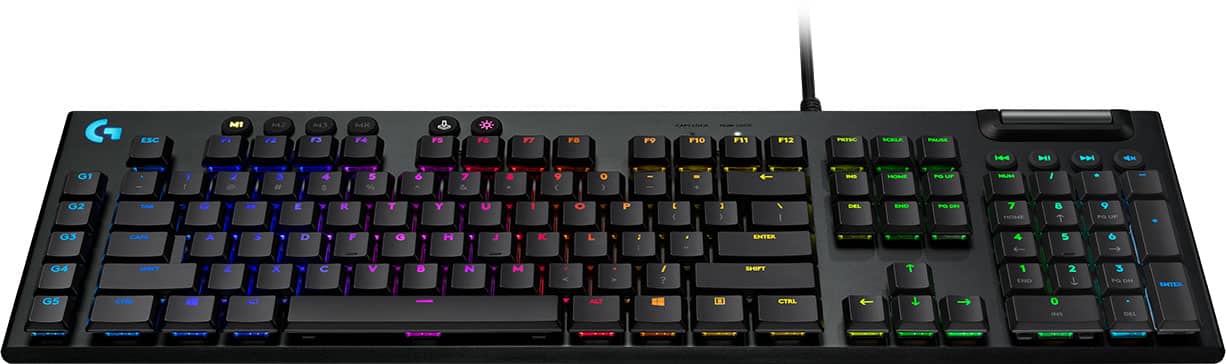
|Posted .This reviewer received promo considerations or sweepstakes entry for writing a review.---SETUP--- The setup of the G815 is quick and works as a plug and play device. The strength of this keyboard shines when you download the Logitech G Hub app for hardware accessories. ---FEATURES--- This keyboard features RGB with lightsync tech if you have other Logitech devices compatible with that, low-profile mechanical switches at half the height of regular keyboard switches for faster response time, extra thin (when compared to the G513 Logitech keyboard as pictured), USB passthrough, an easy-to-reach volume bar with media buttons, and 5 programmable G-Key commands. ---PERFORMANCE--- I’ll admit that at a glance, I thought slimmer meant I would struggle with typing and gaming. I’m glad I was proven wrong, as both felt like second nature quickly. Games like Overwatch, Call of Duty 4, and Hunt: Showdown felt extremely responsive and the lower profile of the keys made me feel like I responded quickly to unexpected situations. For games like Surviving Mars or RPGs like Skyrim, I enjoyed customizing the G-keys for often used shortcuts. Also, as a YouTuber, I appreciate being able to customize those keys for quick cut and paste shortcuts when video editing. ---EXPECTATIONS--- The product meets my expectations. It doesn’t come with the long padded wrist pad but if you don’t already have one, you won’t miss it. This keyboard comes in three versions: clicky, linear, and tactile. The review is based on the clicky version and the noise of each individual click is music to my ears. I was able to customize many of the colors and now they include special designs like the Matrix green # scroll or lightning simulated on the keyboard. What’s more, you can create your own design and share it. ---VALUE--- The price for the keyboard will be an investment for the daily PC gamer but you won’t regret your purchase. This is especially true if you use the same keyboard to edit video and images, thanks to the 5 programmable G-Keys. ---APPROVAL--- I highly recommend this keyboard for PC gamers that want to hear a confirmed sound with they keyboard press while using less force to press the keys due to the low profile of them. This is a whole new level of competitive keyboard.
I would recommend this to a friend - Pros mentioned:Keyboard quality, Rgb backlighting
One of the best keyboards I've used in a while
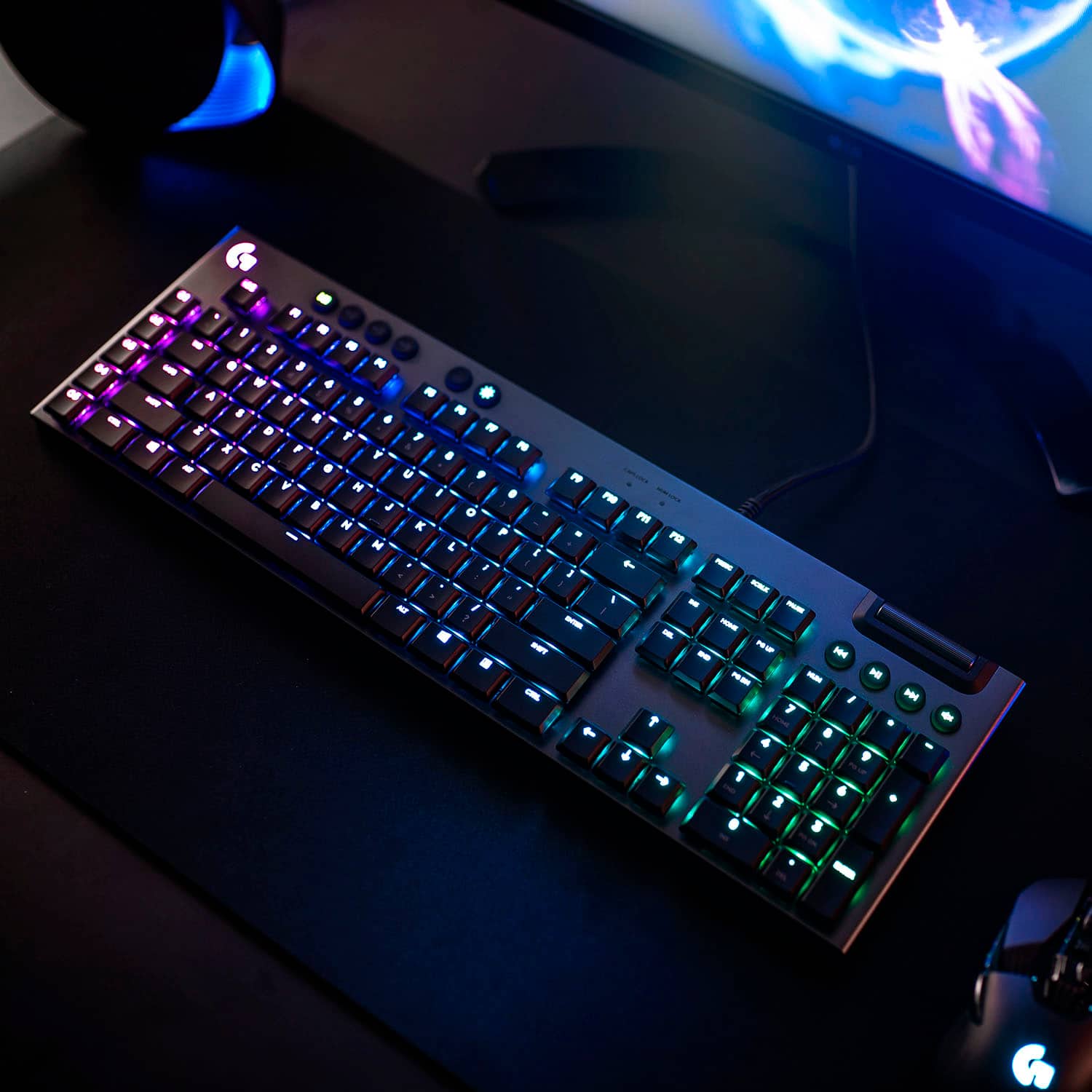
|Posted .This reviewer received promo considerations or sweepstakes entry for writing a review.I should preface this with the fact that I've recently owned 4 different mechanical keyboards, all of different makes, really trying to settle on the one that I like the best. Each one has had their share of oddities or issues, and maybe it is just that I was choosing keyboards with the wrong type of switch for my typing and game playing needs. First, the packaging. The packaging is average at best, a sleeve box slid over a black cardboard box with the keyboard inside and a small insert with literature. That's it. For a reasonably high-end keyboard you can see they put the effort into the product rather than the packaging from the second you lay hands on it. The keyboard itself is slim (more on that in a second), firm and reasonably heavy for its thinness due to the metal used across the top of it. That metal also lends itself to a high-end feeling product. The bottom has rubber feet that really prevent it from moving on your desk. There's a USB pass-through on the top of the keyboard so you can plug in something else (mouse, phone charger, whatever) however that does mean that should you choose to use it, you will consume 2x USB connections on your machine. I chose not to plug it in for now. The software is the Logitech G Hub, which I have issues with due to how it does the lighting sync between my various Logitech devices, but it does work, if they could massage out the few bugs it could be a very nice application. A quick note on the lighting, the RGB is bright, visible and easily customized. It looks great in any lighting. Now to the aforementioned slimness of the keyboard. Initially when you type on this is will hearken a bit to a laptop keyboard, albeit a very good, mechanical laptop keyboard, but the keys are thin, the keyboard itself is thin, and it may take a moment to get used to. Being that most of us use laptops in our daily lives anyways, the transition to this is not difficult. It is still a full size keyboard in that it has a full number pad on the side and F keys across the top, but it's really the thinness of the keyboard that lends to the laptop-esque feeling. I did not feel like this warranted a reduction in the number of stars I gave it because it was marketed as a slim keyboard and it comes down to user preference. I do wish it came with a wrist rest, but with the slim profile it really doesn't "need" one and again not worth taking away a star over as it was clearly a design choice and not an oversight. That said, the Logitech G815 is easily one of the best keyboards I've used in some time. The responsiveness is bar-none the best of them, it never misses a keystroke, even in high intensity play, the click and tactile response of the click from the mechanical switch is enough without being overly loud or jarring. Whether raiding in WoW, smashing in heads in Overwatch with Reinhardt or exploring the world in Assassin's Creed Odyssey, I've found that this keyboard really bridges a need I didn't realize I had with my previous keyboards, I feel no lag time at all with anything I've thrown at it. Despite the slim profile, it is extremely rigid offering nearly zero flex with even very spirited gameplay. All in all I would gladly recommend this keyboard to anyone in the market for a new mechanical keyboard, provided they understood that it is a slim keyboard.
I would recommend this to a friend - Pros mentioned:Keyboard quality, Rgb backlighting
Stellar keyboard for gaming and productivity.
|Posted .This reviewer received promo considerations or sweepstakes entry for writing a review.I have used numerous keyboard's over the past few years and this may truly be one of my favorites. My daily driver years ago was the OG Logitech G15. I had both revision's as well. Still have a revision 2 with the Orange/Amber back-light's to this day on a secondary computer. On my current gaming PC I was using a Corsair K65 and when I got this I had a K68 RGB, both excellent clicky cherry red keyboards. This Keyboard is something else. It's actually quite loud which doesn't really bother me after coming from Cherry Red switches in both my keyboards. It does seem a fair bit louder. The RGB on it is really nice and I like that there's 4 levels of it. controlling it through G--HUB is pretty easy and it integrates nicely with the G903 and PowerPlay mouse pad I already have. The G-Hub software does seem fairly user friendly. I haven't played around with it a lot though. As I had the LGS on it at the time I did have to restart my PC before it would charge my G903 Lightspeed mouse on the PowerPlay Mat. Once restarted though I had no issues. With the software I do appreciate the pre-loaded Backlight options. Some of them are definitely more Form over Function. I haven't setup any Macro's yet but I will probably do so at some point for a few games that I play like Diablo, APEX, Fortnite etc. One thing that is a drawback is the secondary actions of keys. It would be nice if when pressing the Shift key the secondary actions would illuminate. As it is, unless you're working with a light you're not going to be able to make out these actions as they are not illuminated with the rest of the key. This could be seen as a major limitation for some users, especially those that don't have the key's and actions memorized. It's will probably take a bit more getting used to but the difference in the low profile keys definitely makes a difference. I was going to consider using it for my work as a replacement to the Kingston HyperX I'm using but I think the GL Clicky keys would be a a fair bit too distracting to those around me. Don't get me wrong though, I love loud clicky keyboards. The biggest thing to overcome is the low profile nature of the keys. I find myself having a bit of trial and error with finger placement. One of the other reasons is the Caps Lock key which has the recessed style.on part of the key. I'm used to this being on the opposite side on the Enter Key so it throws me off. As for responsiveness so far though, I've found myself running into a greater amount less of mistype's on the keyboard. I played of good deal of Destiny 2 over the weekend to get a feel for the keyboard and I have to say, I think I may never go back to full height keys. If you're in the market for a fast responsive keyboard I'd say you need look no further. I wasn't able to get a decent photo with the backlight on sadly, rest assured though, it looks fantastic and it's plenty bright for any application.
I would recommend this to a friend - Pros mentioned:Keyboard quality, Rgb backlighting
Logitech does it again!
|Posted .This reviewer received promo considerations or sweepstakes entry for writing a review.I've tried a few clicky mechanical gaming keyboards, but I have to say this is my favorite so far! First, this keyboard is about 1/2 the depth of most others I've tried. I like the low-profile--it feels more like a standard keyboard. The keys are well-spaced and have just the right amount of give and click to feel durable, without being as tall as other keys. It's very responsive, and types quickly, and the games I've tried see very good response times as well. It feels durable, though some may see the 'depth' of the keyboard as a downside, since thicker keyboards tend to be much heavier. There are a good number of dedicated macro-keys. There are five on the far left of the keyboard (which is a perfect spot for gaming). It also has the usual array of media control keys, including a nifty volume dial on the upper right side of the keyboard. The neatest feature by far is the Logitech G HUB software (available on Logitech's website--instructions for the download are included). It has a cool array of light features---more than I've seen on any other keyboard. You can go through and 'color' each individual key, choose from a number of effects (the ripple effect might be my favorite, though it's a little distracting to game with), and even sync with other Logitech gaming accessories--I have it synced to my Logitech Mouse right now. It creates a pleasing environment and is neat when gaming in a dark room. I've included a couple of screenshots of the software. You can also create profiles for different games and save them. If you want different macros for a specific game, or just a different light-scheme it's easy to do with the software included. Whether you're a serious gamer or just want a cool keyboard for a work environment you can't go wrong with this one.
I would recommend this to a friend - Pros mentioned:Keyboard qualityCons mentioned:Wrist rest
Nice but needs improvement
|Posted .This reviewer received promo considerations or sweepstakes entry for writing a review.I’ve been a fan of Logitech devices for years, as far back as the Mouse Man mouse in the early 1990s. I’ve owned multiple other branded keyboards, mice, speakers, and none of them had drawn me back as well as the Logitech devices. If you were to look around our home now you would find a few different Logitech Keyboards, Mice, Speakers and other peripherals, you may be able to find one or two off branded items but that’s it. I was using a G910 gaming keyboard and have been using it since they first came out a few years back. I’ve never had any problems with it and it is still my favorite keyboard for gaming, “I’m mainly a FPS and RPG gamer, “going way back to the Commodore 64 days”. I’ve been playing The Witcher 3 “again” and that’s when I saw the news about the new line of Logitech keyboards were coming out and wanted to give the G815 a try. First Looks: The keyboard came well packed with only a simple instruction book, “G” sticker, that’s it. The keyboard itself is very slim and compact, “makes my G910 look huge”, but that’s a good thing. I’ve always found the 910 to be bulky and a little too wide, “I’ve gotten used to that” but do find myself pushing the keyboard left/right due to the width and trying to keep my mouse near, it just takes up a lot of space. The G815 is a lot narrower, the height is a lot less and the width is finally where it needed to be. Even with everything slimmed down the new G815 is no lightweight, it’s actually very sturdy and has a good heft to it, the 910 weighs in at 3.5lbs and the 815 at 2.5lbs, lighter but still pretty hefty for a keyboard. It also has some pretty thick rubber feet on the bottom and it won’t be sliding around my desk. There are two adjustable legs under side also, with two different heights, “I’m using the lowest right now”. The aluminum top half of the body is pretty thick and rigid; it’s going to be a breeze to clean off anything that gets on it. The first thing I noticed though is there isn’t a wrist rest included, and that’s something I’m used to having so if you want to get one ahead of time if you are replacing a keyboard that has a built in wrist rest like the 910 has. The attached cable is a little unusual too, it has a split end with two full sized USB connectors, looking closely they are marked with a keyboard symbol and a USB symbol, the second one with the USB symbol is for a USB port on the keyboard itself “didn’t even notice it at first” but you can plug in your mouse transmitter/receiver or mouse cable here. I’m currently using the G703 mouse wired and it works perfectly connected to the USB port on the keyboard. The layout of the keyboard is pretty good, most of the keys are in the same place except the 910 has a secondary row of programmable keys on the upper left side where the 815 does not. “I never used those keys so I’ll never miss them.” There are media keys just above the keypad, and above those is a volume roller, it’s a lot smaller in diameter than the one on the 910 but it’s a lot wider and very easy to use. My only complaint is the Num and Caps lock LED at the top is really bright white “you can’t miss it” and for me it’s distracting, I’ll be putting something over those to dim them down to a reasonable level. Software: The new G Hub software replaces the old Logitech Gaming software that was getting pretty old and hadn’t been updated since 2016, “It still worked well for my uses”. The new software is more streamlined and better looking and allows you to set the keyboard lighting to any of the presets or you can create your own custom one. Macros are easy enough to set up and there’s plenty of options for them. The only annoying thing I find is if I select a preset like “Echo Press” the change the colors to my liking, I cannot find how to save that because if you try out any other setting and then go back it reverts back to the default, hopefully that will be addressed in a future upgrade. Actual use: I already had the G Hub software installed and it’s a nice upgrade over the old gaming software.It’s easy to use and custom configure your back-light settings. Each key is full RGB and can be set to any color you prefer, or you can use one of the presets in the G Hub software. Typing on the keyboard is great; the keystrokes are shorter than the 910s and feel lighter because of it. The “clicky” feedback is exactly what I like, not to loud and has a nice subtle old school click to it. I’ve been playing Witcher 3, Fallout 4, and Skyrim on it and its working great. It’s not exactly the same feel as the 910 so it’s taking a little bit to get completely use to it. The keys on the 910 are very concaved / sculpted, and easy to find center. The 815s keys are slightly concaved but easy enough to find center on by feel. Conclusion: Unfortunately this isn’t a perfect keyboard “for myself or my wife”, my first complaint being the Num and Cap Lock lights are very bright white, and you cannot change or dim them in any way. I usually game in an unlit room and those two lights stick out like “a sore thumb”. This is something that for a keyboard of this price should not have been over looked. Those lights on the 910 are a nice blue that while cannot be changed are dim enough not to bother me. I solved this problem by placing some colored gel filter over them, shouldn’t have to do that. My wife saw that and made the same remark, “why are they so bright, it’s annoying”. The second big gripe is how the keys are back-lit “highlighted”, the lettering is not centered but off centered to the top of each key. The symbols on the numeric keys are not lit, and very lightly printed, if you happen to look down to find a symbol you won’t see it in a darkened room “should have your keyboard memorized anyway, but not good for an average typist”, my wife saw this and hated it. The rest of the keys like the “ ‘ : ? . ,” are all back-lit and printed upside down to every other keyboard I’ve ever used, nope not liking it, and another contention my wife has with this keyboard “she doesn’t want to use it and want’s the old 910 style keys. She did say though that typing on it was great, she really liked the short keystroke and how the keys feel, but if she has to glance down to find a specific key like the “{“then you aren’t going to find it, only the “[“ part is back-lit, so for her this keyboard is a no go and wants to use the 910 over it. I have a Mec 15 laptop that has mechanical keys, the keys are back-lit at the top just like this keyboard but they didn’t print them upside down, all keys and secondary symbols are printed side by side so everything is backlit and easy to find in a dark room, I wish the 815 were like that. For me, I don’t care for the positioning of the key labeling and how it’s reversed on those keys; I can live with it but don’t care for it at all. I do like typing and game play on it as the short keystroke is great, but these shortcomings mentioned should not be there on a keyboard that’s priced like this one. This is going to be one of those love/hate things where you just have to try out the keyboard itself and see if it's to your liking or not. If you don't mind the way the keys are printed and back-lit then you will really enjoy this new keyboard, I myself may end up going back to the 910 mainly for the way the keys are back-lit, otherwise typing on it is really good.
I would recommend this to a friend - Pros mentioned:Key feel, Keyboard quality, Response timeCons mentioned:Price, Software
Nice low profile mechanical keyboard
||Posted . Owned for 1 month when reviewed.This reviewer received promo considerations or sweepstakes entry for writing a review.I really wish i could give this a 3.5 star review instead of a 3 star. Pros: I personally love the feel of the keys as opposed to keyboards with taller keys that always feel wobbly. It is very solid construction, and very pretty. Response time is fantastic. Cons: If you rest you fingers on the keys a lot, or tap a key but not click it, You will get frequent errant key presses. This can be very problematic for many games or typing in general. Price. Its costly for mostly just getting the low profile switches over alternatives. Found the software to be clunky to use. Does not save RGB profiles to the keyboard, so you have to make sure the software loads before your custom scheme is activated. The keyboard has 3 store in it by default that can be selected when not running the software. but when running the software, you can only change the RGB through it, and not cycle through a a few different ones you select.
I would recommend this to a friend A Gaming Keyboard with Style
|Posted .This reviewer received promo considerations or sweepstakes entry for writing a review.I like the G815 keyboard a lot. It has a nice simple design that I really appreciate. It’s a very light keyboard, but it feels pretty durable. The typing and gaming experience on the clicky keys is excellent - they’ve got just the right amount of travel for me and an audible feedback that’s not too overwhelming. The 5 programmable keys are handy and the software gives you a lot of options for customization. I like the lighting effects, especially in games like Battlefield V that have their own specific profiles. The cable is decently long (6ft) and has a nice braided cover. It occupies 2 USB ports, 1 for the keyboard and 1 for the USB 2.0 passthrough, which I have my wireless mouse receiver connected to. There are some dedicated media controls above the number pad - those buttons are rubber, which I personally don’t like, but they work fine. There’s a wheel for volume control, which I appreciate, though it doesn’t feel as ‘substantial’ as I’d like. I’d recommend this to anyone looking for a good gaming keyboard that still has a sense of style. For another $50 it may be worth considering the wireless G915 as well, but if you go with the G815 I don’t think you’ll be unhappy.
I would recommend this to a friend- Pros mentioned:Keyboard quality, Rgb backlightingCons mentioned:Usb ports
IT COMES WITH A STICKER
||Posted . Owned for 3 weeks when reviewed.This reviewer received promo considerations or sweepstakes entry for writing a review.Great keyboard! If you havent guessed by now im writing this review on this keyboard, the clicky sound is wonderful, pressing the keys on this keyboard feel like youre tapping your finger on a clicky cloud. The customizable lighting effects are super cool, im not usually a fan of RGB anything as its too distracting and not really my thing, but i keep the backlights on and set it to a pattern that bursts when i type something, its actually kinda cool. The programmable buttons kinda got in my way at first and sometimes still do when i accidentally bump it it dosnt feel like a normal keyboard to put it that way, its actually larger but feels shorter because of the keys being at the end, you have 3 buttons to toggle different lighting effects (which are programmable but you can only pick one for the keyboards memory without the app being open which kinda sucks but it isnt that bad. I love the little volume roller its helped a ton, i really didnt realize how much i needed something like that until i got it and now i cant imagine a keyboard without it, i dont use the media control buttons under it tho, to me its a waste but it serves its purpose im sure. I use this keyboard for typing emails (yes how dull), talking to friends, and playing PC games (obviously). Overall this is a great keyboard as it says at the beginning but really i think the best feature is though it was pricier than any keyboard i ever bought, the construction, the fact that its metal (aluminum), and the feeling of the mechanical keys. My biggest gripe, it has two USB plugs which takes up more than one space (as if you couldnt count) in my PC which already has no space left for any more USB plugs, but thats not like a super killer. Oh yeah, it also comes with a big ol honkin sticker, if youre anything like me (god i hope not) thats the biggest reason to buy it
I would recommend this to a friend - Pros mentioned:Key feel, Keyboard qualityCons mentioned:Software
Excellent Mechanical Keyboard
||Posted . Owned for 3 weeks when reviewed.This reviewer received promo considerations or sweepstakes entry for writing a review.Bought a lot of mechanical keyboards over the years - this one is BY FAR my favorite. I have the G915 as well, but honestly don’t care for it as much as it’s wired sibling. I use it for business and school exclusively so gaming speed isn’t a need, but it still looks cool and performance is second to none. Love the pass-through charging port, something the 915 is missing. I love the clicks, but it;s not obnoxious…can’t hear them on conference calls and the low profile keys feel fantastic. Overall the keyboard has a very solid build feel to it. The software is a bit clunky, but makes setting up lighting schemes fun and the programmable keys are very useful. Highly recommend.
I would recommend this to a friend - Pros mentioned:Key feel, Keyboard quality, Rgb backlighting
Amazing clicky keyboard that doesnt break the bank
||Posted . Owned for less than 1 week when reviewed.This reviewer received promo considerations or sweepstakes entry for writing a review.The Logitech G815 is a great clicky keyboard that is not as expensive as its competitors. For those who like a clicky keyboard, these keys click super satisfyingly without being overly obnoxious. The RGB settings for this keyboard are great and most of the keys and buttons light up to the selected color (The only keys that do not are the settings keys like the 3 memory keys and the start-key disable button). The scrolling volume control is nice and compared to other keyboards it does not change the volume too much when scrolling just a little bit.
I would recommend this to a friend - Pros mentioned:Keyboard quality, Rgb backlighting
Great keyboard bad marketing
||Posted . Owned for 2 weeks when reviewed.This reviewer received promo considerations or sweepstakes entry for writing a review.This is an excellent keyboard I actually bought it by mistake I thought I was buying the wireless one from Logitech. That being said Logitech has a serious naming issue with its products and naming this lightsync and naming the wireless product lightspeed is really bad on them. Not to mention the product box is exactly the same. Really don't think it's fair to do to consumers and I feel like It doesn't do good. They may think their products are being recognized easier but it's really just making all their products mashed together and difficult to parse apart. That being said the keys are plasticky and cheap but can be replaced. Logitech competitors include extra keys and removal tool with their keyboards. I think Logitech needs to step it up here but the overall quality of the keyboard is great. I love the metal design and RGB lighting is great. What I would say is name the product differently than it's wireless counterpart or clearly indicate they are different products. Also include a few different keys for people who like to customize with different textures. Logitech software is really easy to use to create macros and even provides tips and ideas. I really do like the software that is why I am keeping all of my Logitech accessories. If you are interested in this keyboard I recommend you get the wireless model that way if you ever need wireless you have it and they are nearly the same price. Just my two cents Hope it helps.
No, I would not recommend this to a friendBrand response from Logitech
Posted .Thank you for your feedback on the G815 LIGHTSYNC Full-size Wired Mechanical Gaming Keyboard. We appreciate your insights and value your opinion.
- Pros mentioned:Key feel, Keyboard qualityCons mentioned:Price
It's just a Keyboard
||Posted . Owned for less than 1 week when reviewed.This reviewer received promo considerations or sweepstakes entry for writing a review.I enjoy a low profile keyboard; it helps with faster typing and is easier to clean due to the keys being short and falt. The typing experience is nice and all but man it's a pricey. There are many aluminium keyboard (clicky) that run much less and do all the same stuff. It's rather large also, more than most keyboard with a numpad. The custimization options are nice from the Ghub app. You can change each key color, mode buttons, and even the logo on the top left. The side G buttons were annoying and one of main reasons I returned it. I kept hitting G5 instead of Ctrl, to the point where I had to disable the keys; which seems counterproductive; it also adds extra inch and a half to the overall size. The type experience was pleasant and the keys were nice (seemingly resistent to finger oils and easy to wipe off). But overall, even on sale, it's not worth it for me. I can't justify having this when there are lesser priced options which work just as well. One thing I really did like though was the roller volume control, the thing worked percisely and was super convenient the way they have it set up. But I just end up changing the volume on my speakers or the with my mouse instead.
No, I would not recommend this to a friend - Pros mentioned:Keyboard quality
Best Gaming Keyboard
||Posted . Owned for 1 year when reviewed.This reviewer received promo considerations or sweepstakes entry for writing a review.The Logitech G815 is hands down the best keyboard I’ve ever used—it strikes the perfect balance between premium design, comfort, and performance. From the moment I unboxed it, the sleek low-profile build stood out. It feels sturdy with its brushed aluminum top plate, yet incredibly slim for a mechanical keyboard. The keys are responsive, and the low-profile GL switches make typing and gaming feel fast and effortless without the bulkiness of traditional switches. I use it for both work and gaming, and it transitions seamlessly between the two. The LIGHTSYNC RGB lighting is a standout feature—it’s not just bright, but also customizable to the smallest detail, making it easy to match my setup. The five dedicated G-keys are also a game-changer; I’ve set mine up for macros and quick commands, and they save me time every single day. Another detail that impressed me is the comfort. The key spacing is perfect, and even during long sessions, I don’t feel fatigued. Plus, the volume wheel is smooth and precise—a small feature, but one I now can’t live without. Overall, the Logitech G815 is more than a keyboard—it’s an experience. Whether you’re gaming competitively or just typing out daily tasks, it delivers on every level. It’s stylish, reliable, and worth every penny. I’d recommend it to anyone who wants a keyboard that not only performs but also elevates their entire setup.
I would recommend this to a friendBrand response from Logitech
Posted .Thank you for such an incredible and detailed review! We're thrilled to hear that the G815 LIGHTSYNC Mechanical Gaming Keyboard has exceeded your expectations across the board. From its premium low-profile design and responsive GL Clicky switches to the customizable LIGHTSYNC RGB and dedicated G-keys, it's built to deliver a seamless experience for both work and play.

- Pros mentioned:Key feel, Keyboard quality, Rgb backlighting
Great keyboard for gaming
||Posted . Owned for 1 week when reviewed.This reviewer received promo considerations or sweepstakes entry for writing a review.Light weight design, not a bulky keyboard. Keys are not loud and clunky. Like that you have a usb connection for a controller. Comes with a roller volume control, RGB light configs, and many more features.
I would recommend this to a friend - Pros mentioned:Key feel, Keyboard quality, Rgb backlighting
Great, sleek, comfortable keyboard
||Posted . Owned for 1 month when reviewed.This reviewer received promo considerations or sweepstakes entry for writing a review.I went from a Logitech G710+ mechanical board to this beauty. I opted for this keyboard instead of the 10-keyless because I happen to use the keypad quite often in my line of work. The keys are also configured in such a way that you can easily clean the keyboard. The clicks are satisfying and tactile. Programmable colors are customizable to individual applications. I have certain keys different colors based on what I have open. It's just a nice thing to have, and you can spend hours customizing. The G software for updates and other peripherals is really nice now. Overall, really happy with the keyboard. I'm sure it will last me many, many years.
I would recommend this to a friend - Pros mentioned:Key feel, Keyboard quality
Amazing build quality, great lighting, nice keys
||Posted .This reviewer received promo considerations or sweepstakes entry for writing a review.I normally don't love clicky keyboards because they're too loud, but this one is about on-par with tactile in terms of loudness. The keys don't echo too much, they are lighter quicker clicks. I tested all the keyboards at Best Buy and liked this one the most. I'm really glad I went with it. It is absolutely my favorite gaming keyboard I've ever owned, and it's my 5th keyboard (my other 4 were a Razer, 2 Corsairs, and a Steelseries). Can't comment on longevity until I'd had it a few years, but everything else is amazing. The look and feel is very high quality. The keyboard is thin, hefty, and beautiful. The lighting is AWESOME. You do not need any software for basic lighting configuration, unlike other gaming keyboards you can use a button combination on the keyboard to cycle between lighting configurations. The scroll wheel is smooth, the keys feel great, and the legs are REALLY nice. My old Razer and Corsair legs would always collapse randomly, but these legs pull out smoothly and lock into place. You can tell the quality is there. No slippage, no collapsing. My only complaint is no braided cable!
I would recommend this to a friendBrand response from Logitech
Posted .Hey! Hey there, thanks for the fantastic review of the G815! We're thrilled to hear you're enjoying it and that it stands out from your other keyboards. The quieter clicky GL Click switches are definitely a favorite among some gamers, and we pride ourselves on making a quality product that feels good to use.
- Pros mentioned:Key feel, Keyboard qualityCons mentioned:Price
Amazing low profile keyboard!
||Posted . Owned for 7 months when reviewed.This reviewer received promo considerations or sweepstakes entry for writing a review.My favorite keyboard that I have ever owned to date. I love it. Logitech makes top-notch quality products. I typically like the Logitech keyboards and mice better than the other major brands. I love this keyboard. The typing experience is amazing on this keyboard. Gaming on it is great too. But this keyboard types like a dream. The low profile keys are amazing to use. However, I do feel that this is a bit pricey for what your getting. I still recommend it but it shouldn't be this expensive. Great build quality and not many options in the truly low profile keyboard market. Hence is why they charge for a lot for this keybaord.
I would recommend this to a friend - Pros mentioned:Keyboard qualityCons mentioned:Price, Software
Awesome keyboard
||Posted . Owned for 1 week when reviewed.This reviewer received promo considerations or sweepstakes entry for writing a review.Well built. Took a bit of adjusting to the low profile but now typing is a joy with it. I originally got the linear but returned it for the clicky. It's click is noticeable but not annoyingly so. G-hub made making a custom moving blue wave on a white background easy to figure out. Unlike a lot of other people I haven't had any problem with G-hub. I just wish it would support older devices like my G700s mouse. Almost my only complaint is the lack of spare parts offered by Logitech. You have to go to places like ebay to get replacement keycaps. Speaking of keycaps, having unlit secondary key symbols was almost a deal breaker for me but I've learned to live with it. It's rather pricey. I got mine on a pre black friday sale. All in all I'm happy with it though.
I would recommend this to a friend - Pros mentioned:Keyboard quality, Rgb backlighting
Very pleased and exploring the rich features
||Posted . Owned for 1 week when reviewed.This reviewer received promo considerations or sweepstakes entry for writing a review.I am loving this keyboard. Never owned a mechanical keyboard before, and though designated as "clicky" I do not find it that loud. The lights are fun, and easily controlled with G HUB software. There's lots to learn with the software, but I had the lighting set up just the way I wanted within a day of purchase. I've been learning how to create macros, which I find very useful. The audio controls are awesome, work great with Spotify, instant response, and I mean instant. I have the two USB cords plugged into a pair of USB 3.2 inputs not being utilized on my motherboard. This is not an inexpensive keyboard, I wish it was cheaper, I was going to ding it one star for value, but the quality and support provide by Logitech is very high. I do wish they had better documentation, but I have been able to find information fairly readily. I really like it, best keyboard I've ever owned. Some people complain about the G HUB software, but I am finding it fairly use-friendly, though it does take some time; I learn something new everyday. There are plenty of YouTube video guides, and it's fairly intuitive as well.
I would recommend this to a friendBrand response from Logitech
Posted .Thanks for the positive feedback! We're glad you're enjoying the G815 LIGHTSYNC's features, especially the customizable lighting and ease of use with G HUB software. Our dedicated support team is always available to answer any questions you may have.