Customer Ratings & Reviews

- Model:
- 920-006385
- |
- SKU:
- 9163008
Customer reviews
Rating 4.7 out of 5 stars with 560 reviews
(560 customer reviews)to a friend
Customers are saying
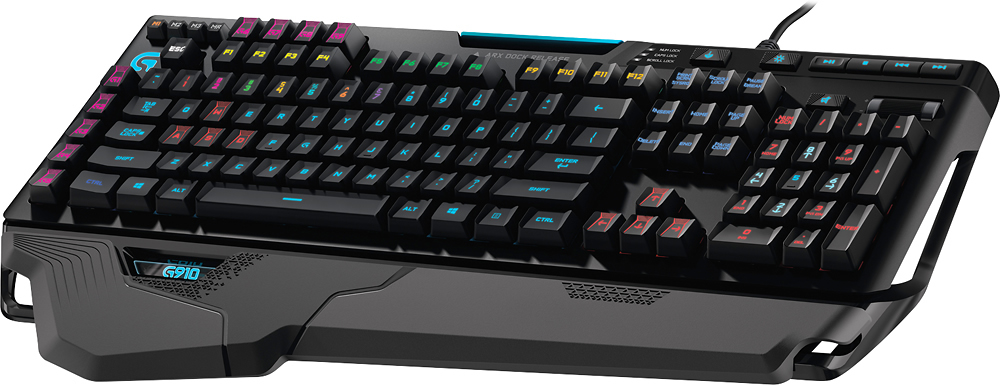
Customers are delighted by the G910 Orion Spark Mechanical Gaming Keyboard's high-quality keys, amazing key travel, and vibrant RGB backlighting. Many appreciate the keyboard's ease of use, extensive customization options, and fast response time. However, some customers find the price to be a significant drawback. The lack of USB ports is another frequently cited area for improvement.
This summary was generated by AI based on customer reviews.
Rated 3 out of 5 stars
Good while it lasts
||Posted .This reviewer received promo considerations or sweepstakes entry for writing a review.Lighting software is fairly complicated to use. LED's started to fail on some colors after 3.5yrs. Warranty is 2yr.
No, I would not recommend this to a friendRated 1 out of 5 stars
Good but broke in a months
||Posted .This reviewer received promo considerations or sweepstakes entry for writing a review.Good but broke in a month really good gaming keyboard
I would recommend this to a friend- Pros mentioned:Rgb backlighting
Rated 1 out of 5 stars
Not Good
||Posted .This reviewer received promo considerations or sweepstakes entry for writing a review.We bought this and hooked it up to a brand new computer. One it's wired, secondly it would just stop working. We would have to unplug it and plug it back in. During this time it wouldn't allow another keyboard to be recognized either. The cool lights are not worth the money or headache.
No, I would not recommend this to a friend - Pros mentioned:LightingCons mentioned:Arx dock
Rated 5 out of 5 stars
Point of view from a gamer used to mech keyboards
Posted .This reviewer received promo considerations or sweepstakes entry for writing a review.A little background about myself. I’m coming from the Razer Deathstalker, Razer Black Widow Ultimate 2013 & 2014, and Logitech G710+. My review is based on a comparison between those. PROS: -INDENTATIONS ON KEYBOARD: I’m going to start off by saying you will either love or hate the keys being indented. I originally thought it would hinder my typing because well, theoretically having a bump to cross to get to the next key would hinder type speed. I’m happy to say personally, since I lift my fingers up to get the next key anyway by a little bit, it has no effect on me. Unless you are gliding your fingers across the keys to get to the next key, the indentation should not effect you. However, the indentation does feel a little awkward because it won’t fit everyone’s finger properly. Essentially, if you have big fingers, this keyboard is going to feel a little strange. You might like it you might not. To me, the indentations were fine so I’m giving it a pro. -KEYS RESPONSE TIME: The keyboard response time is AMAZING. I have never seen a keyboard at this level where you don’t even really need to press down on the key and it registers what you are typing or doing in a game. A note: I brought this keyboard to work to try typing and working on it. On a gaming rig, you can do multiple presses at the same time. On my work computer, when I just put all my hand on a bunch of keys at once, it lagged and had to catch up and had Unresponsive message pop up sometimes. -KEY SPACING: I read some reviews that since they had to cram a lot of stuff on this keyboard, the key spacing was shrunken down. I can say that I definitely noticed that when compared against Razer Black Widow and Logitech’s G710+. However, it’s a good spacing change. It makes it easier to get to the keys faster. -MEDIA KEYS: There is no better keyboard out there than Logitech for dedicated media control. The windows disable key and all as well. There’s no better setup than the way Logitech did. -G1 to G9 KEYS: FINALLY! Razer did the side macro keys the best-all lined up. Logitech G910 did the same. The happy surprise I had was that there are G6 to G9 keys on top of the function keys. This makes it pretty nice when you are playing MMO games with 3 skill bar rows. Numbers for row 1, F1 keys for row 2, and G6 to G9 keys for row 3. A pity they didn’t make more although, I don’t know how you would do that properly cause that would be weird on a keyboard. -LIGHTING: I love that the lighting can be controlled very well – for instance what keys to light up in the dark for which game you are playing, or a spell having CD you can change it to red when it’s on CD and green when you can use it. HOWEVER: I think these are just aesthetics. Come on, we are gamers. We know where the keys are. We just need to see 1 letter and we’re good, or we can feel for the keyboard and know where to set our fingers. Still labeling this as a pro though, as it does look good. They can do a lot with this for “cool” look in the future. -USES ONLY 1 USB: Therefore, it doesn’t have a spare USB port on the keyboard. However, I like this way better. For some reason, companies haven’t used USB 3.0 on keyboard ports yet. To me, this was actually a PRO but for some it’ll be a con. -IT’S LOGITECH: I grew up with Logitech. Their keyboards and mice are top notch. I love that they preserved the quality and that it doesn’t double click letters. CONS: -ANGLE: I don’t know what it is, but the keyboard to me feels like it’s leaning away (meaning, it is higher closer to you but lower on top) regardless what wrist pad you use. I think the keyboard was designed this way, but normally I’m used to keyboards leaning towards you (meaning, it is higher on top and lower near you). -VOLUME ROCKER: Volume Rocker feels too smooth, not sure if I got a damaged one or not but the volume wheel on this compared to my Logitech G710+ feels too smooth. Logitech G710+ felt like it had more resistance when I moved the volume wheel up and down, which I personally prefer. -ARX DOCK: This is the cheapest piece of material I have ever seen. I can total see it snapping with use of my Galaxy Note 4 after long-term use. However, I am very surprised that my Galaxy Note 4 did fit. The other bad is it only works in portrait mode. I don’t know about you, but having a large phone in portrait mode on the back of my keyboard…yeah. -M1 M2 M3 KEYS: These are SMALL. I can understand why they are small but to make it worse, they are lower than the other keys. It is hard to get to them during fast action game plays. -WIRE: Why oh why, did you not make this a braided wire. It’s just a standard rubberized wire. Seriously. Why! -LOGITECH GAMING SOFTWARE: They have done massive improvements since I first used this. However, it’s nowhere near where it should be. Honestly, Razer’s Synapse is way better. But, Logitech is making huge strides and I wouldn’t be surprised if they beat Synapse or catch up. I labeled this as a con, but really it’s not. It’s just a con to me compared to the competition cause the competition to me does it better. FINAL THOUGHTS: Definitely making this my main keyboard. I love that I can type a little faster and the keys are very easy to get to. It may take a while to get used to the indentations and smaller spacing if you are used to Razer’s or Logitech’s old keyboards. Also, keep in mind again, the cons I wrote about this keyboard (for instance, fat fingers may not like the indentations). The cons to me, really isn’t a con. It’s just something new that will be extremely easy to get used to and not something that doesn’t work, thus making this entire keyboard setup a “I LOVE THIS THING!” gadget for me.
I would recommend this to a friend - Pros mentioned:Key feel, Lighting
Rated 5 out of 5 stars
Awesome Gaming keyboard
Posted .This reviewer received promo considerations or sweepstakes entry for writing a review.The lighting compared to my Corsair K70 is awesome my K70 was stuck with Red. The Keys feel great really responsive just got done playing Warface for about two hours or so. Along with Battlefield 3 the wrist rests I tried both of them out there is a longer one width wise and a shorter one I stuck with the shorter one and the Legs on the bottom of the keyboard up seems to help with the feeling of the wrist rest being too pronounced. You can remove the keys with I think any type of Key remover for cleaning out the keyboard later on. The Corsair one works just fine. I settled on a off Green Hue it looks amazing the keys have a resistance to them but they feel good to type with or WSAD with. Best Purchase I made in the past 6 months along with my 144hz BenQ I bought a few months back. The software is so easy to use it's not even funny...
I would recommend this to a friend Rated 1 out of 5 stars
2 years later keys stopped working.
||Posted .This reviewer received promo considerations or sweepstakes entry for writing a review.it seemed like a good keyboard at first, 2.3 years later 4 months out of warranty, this keyboard is doing strange things when typing from not recognizing shift to the 4 key double tapping when you hit it. I have tried troubleshooting and firmware updates and it was no help. The shift, escape, 4 , and left control keys are in such a bad shape that I have trouble logging into the computer and anything else that has a hidden password. Fortunately windows 10 has the little eye you click to see what you typed so that I can log into the PC on the first try. Replacing it with a Razer keyboard and not looking back
No, I would not recommend this to a friend- Pros mentioned:Key feel, LightingCons mentioned:Price
Rated 5 out of 5 stars
Stop wasting your time and Order this.
Posted .This reviewer received promo considerations or sweepstakes entry for writing a review.If you are reading the reviews, chances are you are looking at buying this piece of technology. I personally like logitech, but have always been slightly hesitant on their keyboards. There is nothing wrong with them, competitors just have so much to offer it seems. Then this bad boy came into the market and changed keyboards everywhere. I am typing right now, watching my fingers fly all over these keys, with their rainbow wave. It's awesome. Pro's: Mechanical (With a great sound) Colorful (think of a color, and this keyboard can do it) Comfortable (The palmrest is perfect) Gaming advantage (The Switches and the Design. The keys are designed to not allow your fingers to go flying onto unwanted keys, while the unique switches spring them back up) Easy Interface for customizing Cons: It is very costly (You are going to be using this for multiple hours a week for the next few years, you better not skimp a few bucks) Bottom Line: Single Most greatest gaming investment I've made since ascending to the Master Race. #PCMR
I would recommend this to a friend - Pros mentioned:Key feelCons mentioned:Usb ports
Rated 3 out of 5 stars
Great keyboard but.....
Posted .This reviewer received promo considerations or sweepstakes entry for writing a review.Great item, but it seems when logitech makes something new, they take away. I replaced my G19 for the G910 , and imo, the G19 is a better product. You get 19 G keys, a mini screen that does the same exact thing 'Arc' does, and then some, short of the wireless remote control. Most importantly, the G19 has two USB ports that came in handy for joysticks, phones/tablets, printers. It was just a nice add on to have. They took it all away, placed a phone stand where there use to be a full colored mini monitor. I mean you could watch YouTube on ur keyboard as a game was loading. This unit has very solid keys, and it's nice to be able to color code individual keys for game play at nite. The G keys are nice, but may not be enough if you play games like Battlefield 4 or CS :Go.....where a player can have a slew of loadouts the the 910 can't hold because of the fewer G keys.The Arc app is nice but really only good for pc stats.....that's when it works. I ordered the G700s mouse with my keyboard, and the Arc app says it does not support it. So the mouse controlling aspect of the Arc app is useless for me, and I have to manually program my mouse. Please, I am not knocking this keyboard, it is a very great product, but for the price and all the options you get with it, I think the G19 is far superior.
No, I would not recommend this to a friend Rated 2 out of 5 stars
Good but sticky space bar
||Posted .This reviewer received promo considerations or sweepstakes entry for writing a review.this product is greatbut as you see it like to make thespace bar stick im notedditing this so you can seewhat it does.
No, I would not recommend this to a friend- Pros mentioned:Keyboard quality, Rgb backlighting
Rated 5 out of 5 stars
Best RGB Keyboard atleast for me
Posted .This reviewer received promo considerations or sweepstakes entry for writing a review.This is my first RGB Mechanical Keyboard, though its different from regular Mechanical keyboards, i never felt differently and the overall experience is awesome. Though as stated the s/w is a little clumsy and a a lot of time is needed, i feel we are bound to that being it is so customizable. The only wish i had is it should have been equipped with audio jack and that would be great. Lastly, the volume slider is really cool.
I would recommend this to a friend - Pros mentioned:Keyboard quality
Rated 5 out of 5 stars
Beautiful keyboard
Posted .This reviewer received promo considerations or sweepstakes entry for writing a review.Picked up this beauty at the store for $89 as it was on sale at a great price. Now as a person that has had a cherry mx red keyboard for a couple years, this thing just feels absolutely incredible. At first I kind of shyed away as they weren't cherry mx switches, but rather their own Romer G switches. Don't let this be a let down, as it feels great and can compete with any other of the cherry switches; it is much stiffer than the reds, but feels even better for gaming and typing! The back lighting is simply beautiful; the other addition keys on the keyboard is nice too, even the volume scroll!
I would recommend this to a friend - Pros mentioned:Key feel, Rgb backlightingCons mentioned:Price
Rated 3 out of 5 stars
Was Expecting More
Posted .This reviewer received promo considerations or sweepstakes entry for writing a review.I had been using the Logitech G710+ and wanted to upgrade. I was expecting the G910 would have everything the G710+ had and more, but I was wrong. First, the cord is your standard length (and not braided) which is a problem for me, I have a big desk and an extra 2-3 feet makes a world of difference. Second, you can't dim the lights. Of course you can change them, which makes them darker, but I don't want the same brightness in the day as I do at night. Third, there is no pass-thru USB. Really? Come on Logitech, your "flagship" keyboard doesn't have all the bells and whistles? Pretty bummed. Now for the good. First, the Romer G keys are amazing and fairly quite. I love how quite they are. Second, there is no light seepage around the keys and they entire key is illuminated #something that drove me crazy on the Razar Blackwidow Chroma#. Third, you can make each key whatever color you want and independent of one another. Overall, it is a decent keyboard but at nowhere near the price point of $179.00. If you could combine the G710+ and the G910 together it would be amazing.
No, I would not recommend this to a friend - Pros mentioned:Keyboard quality, Rgb backlighting
Rated 4 out of 5 stars
Great keyboard that will last for years to come
Posted .This reviewer received promo considerations or sweepstakes entry for writing a review.Pros: - Great custom mechanical keys that doesn't have a whole lot of clicking - Very pretty RGB LED lights that's customizable with each key - Easy to use Logitech Gaming Software for keyboard customization - Solid build quality that feels durable Cons: - Logitech Arx Control app is currently pretty useless - Cannot set custom light settings per software execution; only 1 general setting is possible at the moment - No USB hubs on keyboard(this is a given, any more power and this keyboard would've needed its own power adapter) Overall a great keyboard, although a bit pricey. I don't think I can go back to a regular keyboard after using the mechanical one for a couple of days. This keyboard has the Logitech quality that people have grown to respect and love.
I would recommend this to a friend - Pros mentioned:Key feel, Keyboard quality
Rated 5 out of 5 stars
Awesome Keyboard!
Posted .This reviewer received promo considerations or sweepstakes entry for writing a review.I'm using it as I type this review! The mechanical keys are very satisfying to press while typing and gaming. The customization of gaming keys is great for gaming, I use them especially for Diablo III and I'm able to cast spells in the game much faster. Its very comfortable and the illumination customization is very impressive and fun!
I would recommend this to a friend - Pros mentioned:Keyboard quality
Rated 5 out of 5 stars
One of the best keyboards on the market .
Posted .This reviewer received promo considerations or sweepstakes entry for writing a review.This keyboard is one of the best you can get for the money. It's a mechanical keyboard with Logitechs own switches that were created with gamers in mind. If you are in the market for a keyboard that is not only responsive but elegant and multifunctional this is the right one to get. If you are a gamer, trust me when i say this, the switches used are better than Cherry Red used in many comparable products. The only thing i need to mention is that if you are coming from regular membrane keyboard or a laptop, it could take time to get used to. But there is a reason, why gamers and regular people pay premium for good keyboard. They last long, the build quality is good and most importantly the comfort is grate! After all, this is Logitech. P.S. Yes, you can change color of every single button on it using provided software. Or you can turn them completely off.
I would recommend this to a friend - Pros mentioned:Key feel, Keyboard quality
Rated 5 out of 5 stars
Excellent keyboard
Posted .This reviewer received promo considerations or sweepstakes entry for writing a review.Excellent keyboard, built very well. Keys take time to get use to and are much quieter than the mechanical counterparts. UPS messed up my original order's shipping but BestBuy sent a replacement without question, great customer service from an excellent company!
I would recommend this to a friend Rated 1 out of 5 stars
45 days, then nothing.
||Posted .This reviewer received promo considerations or sweepstakes entry for writing a review.They keys were comfortable, but after just 45 days the keyboard does not work on any of my 3 laptops and my desktop.
No, I would not recommend this to a friend- Cons mentioned:Usb ports
Rated 5 out of 5 stars
Very good "GAMING" keyboard
Posted .This reviewer received promo considerations or sweepstakes entry for writing a review.This is a gaming keyboard! It is meant to be used as a gaming keyboard. Works great for what it is made for, but I do use it as a pc keyboard, which it is good for. The key setup just isn't that good for reg. typing. Those who rated low and use it for everyday pc usage have the wrong keyboard. It just wasn't made for reg. everyday pc usage. The only thing I wish it had was usb port(s) on it, for say a cell phone or to plug in a tablet for the Arx control feature (doesn't need to be but just to keep the battery charged up).
I would recommend this to a friend - Pros mentioned:Key feel, Rgb backlightingCons mentioned:Price
Rated 2 out of 5 stars
Okay keyboard. That's about it.
Posted .This reviewer received promo considerations or sweepstakes entry for writing a review.Pros: -The lighting system is customizable and very easy to make changes to -I do enjoy the actuation force required to press the keys, very comfortable -The ARX (ARK?) software is a nice concept, it still needs work however -The logitech gaming software is very easy to work with -The lightning is very vibrant and bright, easily adjusted on the fly Cons: -Why is there a small G910 hole where my hand/wrist go? This is just a space for dead skin to accumulate requiring additional cleaning time -The keys are proprietary, no customizations such as o-rings are possible -The key shape. I consider this a con because I don't like the shape of the keys. I believe this would vary from user to user but I think they're great for gaming, not so great for typing. I understand that this is a gaming keyboard but I still need to be able to type and do other things on my desktop. -The ARX (ARK?) dock. As other users have stated, this is a cheap piece of junk. It really cheapens the feel of the overall fairly well built keyboard -Second piece of poor build, the wrist rest. On my it didn't sit quite flat on my desk. This mean the rest always seemed to have a certain level of rocking on the edges. I expect better from A. Logitech, whom I love, and B. a 180 dollar keyboard. -No onboard storage. I don't like this. The reason I don't is the special lighting effects won't be saved if I'm working on my computers bios, dual booting linux, or simply taking the keyboard to use on another computer. I don't consider this a huge problem, except that other lower priced mechanical keyboards have this feature and this is really the top of the list as far as price. Overall thoughts: I think my overall opinion of this keyboard is heavily swayed by the price. Everything I think is missing or poor with this keyboard I think to myself, this is the most expensive (one of) keyboard. Why is this missing (this meaning whatever feature I'm thinking about). I don't feel like this is a higher build quality of keyboard when compared to the logitech G710 or 710 plus. The quality of this is lower. Although it does have the benefit of programmable RGB backlighting, and does have faster response keys according to logitech, I simply did not notice an improvement in my actual game play. I will admit, I do like the shape of the keys for gaming, but I do not think they're enough of an improvement to say that they are a must have for gaming. My primary reason for giving this only 2 stars is that for the price I feel there are better keyboard options. I personally almost never like razer products, but I believe the Blackwidow chroma is a better keyboard. I say this with a heavy heart because I do love logitech products. All my other gaming peripherals are logitech. I want to like this product as much as their others, but its quality is not up to typical logitech standard. I think this is an average attempt at a keyboard. I give it two stars because the price is simply too high. If this board were priced at say 150, or even 129.99 I would say its worth it. However, the corsair K70 is a much better keyboard despite their software being junk, and the chroma has better features and better quality. I would pass on this one.
No, I would not recommend this to a friend - Pros mentioned:Keyboard quality
Rated 5 out of 5 stars
Best keyboard owned
Posted .This reviewer received promo considerations or sweepstakes entry for writing a review.This is by far the best keyboard I have ever owned. Before I received this keyboard I had the Corsair cherry mx brown K70 keyboard. The keys were loud and tons of typos when just typing normally. I was about to give up on Logitech after my last keyboard which was the G510s as I had several keys that would not actuate when pressed. The Orion Spark is a keyboard worth checking out and totally worth the money spent. I may even buy a second one just to have as a backup..
I would recommend this to a friend