Customer Ratings & Reviews

- Model:
- 920-006385
- |
- SKU:
- 9163008
Customer reviews
Rating 4.7 out of 5 stars with 560 reviews
(560 customer reviews)to a friend
Customers are saying
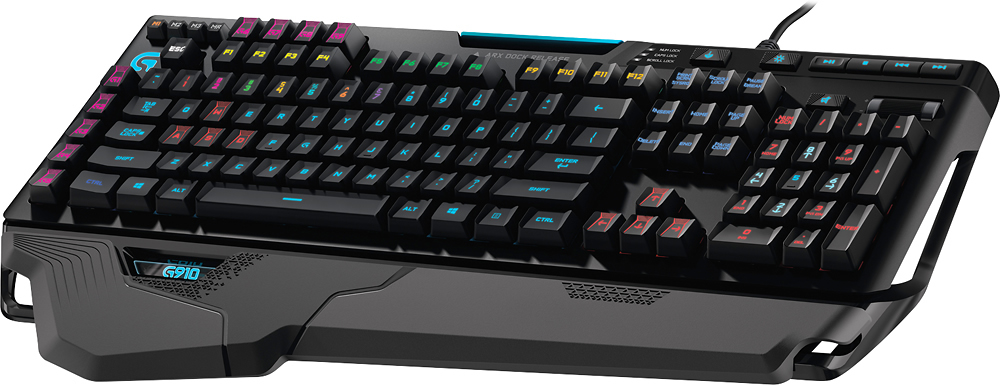
Customers are delighted by the G910 Orion Spark Mechanical Gaming Keyboard's high-quality keys, amazing key travel, and vibrant RGB backlighting. Many appreciate the keyboard's ease of use, extensive customization options, and fast response time. However, some customers find the price to be a significant drawback. The lack of USB ports is another frequently cited area for improvement.
This summary was generated by AI based on customer reviews.
Rated 5 out of 5 stars
Nearly Perfect Overall Keyboard
Posted .This reviewer received promo considerations or sweepstakes entry for writing a review.The primary things I was looking for in a keyboard was that it was mechanical, good for both gaming and typing, not too loud, had back-lighting, and had individual keys for music and volume control. This keyboard is one of the only ones that had everything I was looking for. The other was the G710+, but I couldn't get over the orange boarded around the "G" keys on that one. Pros: - Heavy with rubber on bottom. You have to put some serious force on this to make this thing slide. - Lighting customization. You can program the keys to any color you want and save up to 6 custom colors besides the 10 standard ones. - Rubbery feel on keys. The material on the keys feels great and provides just enough grip so your fingers don't slip while allowing you to move them around easily. - Separate music and volume controls. Don't need to use a FN key to change volume or songs like most other mechanical keyboards. - Fast reaction time. They keys register as soon as you hit it. The force feels just right to me, in line with Cherry MX Orange switches, but quieter and faster than any of the Cherry's I've tried. - Quiet. Even makes less noise than my old membrane keyboard. Cons: - EXPENSIVE. This is one of the most expensive mechanical keyboards I've seen. For me I was debating between this, the G710+, and the Razer Blackwidow Chroma Stealth. I hated the orange boarder on the left of the G710+ and lack of music controls on the Razer, so G910 was worth it to me. - Indentations in the keys. All the keys have trapezoidal indentations that are phenomenal for gaming, but for general typing they take a little getting used to. After about an hour of use I got the "feel" for it and was able to type normal, perhaps even faster than normal, but it wasn't instantaneous. - No lighting control for "M" and music/volume control keys. Like another review mentioned, you can't change the color of the "M" keys or music/volume control keys. For me it doesn't bother me much, but is kind of stupid since you can make custom colors for all other keys. - ARX Dock kind of pointless for me. They should have made it so it can charge your phone. Overall, I feel the Pros greatly outweigh the Cons, at least for me personally. I got used to the indentations fast enough. The other Cons I just mentioned for you all, they don't bother me that much. Price sucks but for me it was totally worth it.
I would recommend this to a friend- Pros mentioned:Lighting
Rated 5 out of 5 stars
Beautiful keyboard awesome software
Posted .This reviewer received promo considerations or sweepstakes entry for writing a review.The colors are configurable down to the key the button layout is changeable from an app on your phone which also gives real-time performance info about your computer on your GPU and CPU. But the keyboard itself looks incredible the buttons have a pretty good mechanical feel and they are quiet compared to many mechanical keyboards. Overall it was a good purchase.
I would recommend this to a friend - Pros mentioned:Key feel, Rgb backlighting
Rated 5 out of 5 stars
Awesome Keyboard
Posted .This reviewer received promo considerations or sweepstakes entry for writing a review.I have really enjoyed this keyboard. The mechanical keys take some getting use to since I used a slim keyboard from Logitech. I haven't had any problems with the software that helps control the G-keys and the key lighting.
I would recommend this to a friend Rated 4 out of 5 stars
Almost Perfect Gaming Keyboard
Posted .This reviewer received promo considerations or sweepstakes entry for writing a review.I just unboxed my G910 and in short, let me say that Logitech has built themselves an awesome new flagshipkeyboard. There's a lot to love but there's also at least one flaw. I also own a Logitech G19 which I've had for years so my view of the G910 comes with a good basis for comparison. Right out of the box, this thing tells you it's well made. It feels extremely solid, hefty and well made. I'm really enjoying the feel of the RomerG switches which come across as very responsive without the distracting clicking noises that some other mechanical key switches have. The Logitech gaming software allows you to do some cool things with one major exception which I'll mention in a second. It's clear that the lighting has received a lot of attention from Logitech: there's so much more than the ability to customize your keys with different colors. You can definitely do that but there are also different lighting modes like: light waves, starfield simulations, etc. It has the ability to record (using heat maps) the keys you press most often and how long you press them. I'm not sure why you'd ever actually use most of these modes but the point is that a lot of effort went into showing you how customizable the lighting and lighting effects can be. This is why it's so BAFFLING to me that they would actually prevent you from customizing ALL of the lights on the keyboard. You read that right, you can't, as in can not, customize all of the lights on the keyboard. The onboard lights for Caps/Scroll/Num locks and all of the multimedia key indicators are permanently stuck in logitech's new light blue color. I don't know if this is permanent or if they can fix it with a firmware update but it's a real buzz kill (at least to me) to an otherwise awesome experience. You can spend hours customizing the look of your new Orion Spark but at the end, no matter what colors you've chosen to appear under your chosen circumstances, you're always going to have at least 7 little blue lights that distract from whatever look you were trying to create. It's so disappointing to me that I'm at war with myself over whether to keep the keyboard or return it. My old G19 may not have been as customizable but at least I got to pick an overall color for the entire board. At this point, I haven't done any testing with the ARX interface but if I keep the board, maybe I'll write an update on that feature. I know most of you will say that the performance is more important than the lighting. For everyone who feels that way, I absolutely 100% recommend this keyboard for you. On the other hand, for those who like to tweak something til it's exactly the way you want it, you might want to wait and see if Logitech fixes this with an update or maybe someone else comes up with another keyboard that does the trick for you. -Wyzer
I would recommend this to a friend- Pros mentioned:Keyboard quality
Rated 5 out of 5 stars
awesome deal
Posted .This reviewer received promo considerations or sweepstakes entry for writing a review.just picked this up today. it is my first mechanical keyboiard. its a huge upgrade over my old razrer. keys feel solid. by far the best part for me is the customizable LED backlit keys. i configured them to match the rest of my system
I would recommend this to a friend - Pros mentioned:Keyboard quality
Rated 5 out of 5 stars
Great keyboard
Posted .This reviewer received promo considerations or sweepstakes entry for writing a review.This is an awesome keyboard. I'm glad my local best buy had it. Online it said it did not. I saw this when I went in.
I would recommend this to a friend Rated 5 out of 5 stars
The keyboard i have been waiting for
Posted .This reviewer received promo considerations or sweepstakes entry for writing a review.I have been looking for a good mechanical keyboard for some time, ie cherry switches. don't really care for razor products, and looked into all the others. what it comes down to is the key presses feel great. not to hard not to soft, and not to loud. the software is straight forward and easy to use. the ARX app is nice with slick display and works well and is super easy to hook up to your computer. The lighting is perfect and with no light "bleed" onto the other keys. this gives you a chance to individually pick the color for each key. not only is that cool but it is very useful. i can just highlight the keys i use per game and that is more helpful than you think. the only down side is now my wife wants one.
I would recommend this to a friendRated 5 out of 5 stars
Amazing keyboard!
Posted .This reviewer received promo considerations or sweepstakes entry for writing a review.This is my first official gaming keyboard, and I love the raised sides on the keys! It is great for playing in the dark! ;) My old keyboard was just a standard keyboard, and now that I have this one I would never choose go back! The only "downside" is having to download the software for the keyboard's programming off the site, but that's not a big deal, quick and easy, just be aware of this when purchasing. :)
I would recommend this to a friend- Pros mentioned:Key feel
Rated 5 out of 5 stars
Best. Keyboard. Ever.
Posted .This reviewer received promo considerations or sweepstakes entry for writing a review.The G910 Orion Spark is flat out the best keyboard I have ever used, and not just for aesthetic reasons. The layout, the pitch/angles between each row, the responsiveness, the distance the keys travel when pressed, and the concave tops of each key make the keyboard the most ergonomically comfortable keyboard I've ever found. The Logitech engineering team did an amazing job! And then all the advanced features, like lighting options, programmable macros, media controls, etc., are implemented beautifully.
I would recommend this to a friend Rated 4 out of 5 stars
Good gaming keyboard if priced right
Posted .This reviewer received promo considerations or sweepstakes entry for writing a review.If you like versatility with lights, this is the one for you. It has a relative big footprint with the wrist rests. It may take a while to get used to the keys' feel but this may not really be a keyboard for typists. I like the feel of the wasd keys and the row of macro keys on top. It does look nice.
I would recommend this to a friendRated 5 out of 5 stars
Great keyboard
Posted .This reviewer received promo considerations or sweepstakes entry for writing a review.I love this keyboard. The LEDs are a nice touch. Never had an issue with Logitech, and this keyboard keeps that trend going.
I would recommend this to a friendRated 3 out of 5 stars
Elite Switches, Junk Software
Posted .This reviewer received promo considerations or sweepstakes entry for writing a review.Most money I've ever paid for a keyboard, reviews were great, Romer switches are choice... Lighting looks good... "SOFTWARE IS A JOKE". Logitech needs to fix this, fast.... Switching custom colors between profiles is impossible without a third party software, when this was was advertised, as well as my selling point. Great Keyboard, junk software. C.
I would recommend this to a friend- Pros mentioned:Key feel, Rgb backlighting
Rated 5 out of 5 stars
Great Keyboard
Posted .This reviewer received promo considerations or sweepstakes entry for writing a review.Great gaming keyboard with controllable lights an nice tactile keys
I would recommend this to a friend Rated 5 out of 5 stars
i like it
Posted .This reviewer received promo considerations or sweepstakes entry for writing a review.awesome keyboard with great roamer switches, i like it because it's not as ridiculously loud as other mechanical keyboards
I would recommend this to a friendRated 1 out of 5 stars
Lacks Basic Functionality
Posted .This reviewer received promo considerations or sweepstakes entry for writing a review.About the only thing I liked on this keyboard was the mechanical switches. Besides that everything else is pretty bad... so where do i start. 1)Non-replaceable caps. The brilliant guys over at logitech paired a mechanical switch that lasts 70 million clicks with laser printed keycaps that will only last a few million clicks before they begin to wear down. There are no 3rd party manufacturers to buy replacement caps from and no guarantee that logitech will sell replacement caps in the future. So the board might look good for a year or two but after that it will look like trash for the rest of those remaining 60 million clicks left in it. 2) Lack of pass throughs. Pretty strait forward there are no audio jack or usb passthroughs. This is a feature most subpar 50 dollar keyboards have. Not having this limits the functionality of this keyboard. 3) Incomplete Software. Yes you do have per key lighting of any color you want however there is no way to save and link lighting schemes to profiles or applications. When I'm playing a game I don't want the same lighting on the keyboard that I'd want to have in Microsoft word. But guess what if you want different lighting you have to go into the software and change it every time. This baffles me because the g510s that is $100 allows you to bind colors to profiles and programs and the flagship g910 can't do this. Without this ability the rgb lighting loses any practical use because the user will eventually get tired of manually changing the lighting and go with a single lighting setup. Apparently Logitech did claim on a reddit thread they were addressing this issue but that was back in November and when I return this keyboard on 1/4/15 there was still no fix to this. 4) Non-braided cord & horrible wrist rests. I mean come on my wife's cheap $35 sharkoon fire glider has a premium braided usb cable no excuses on this one and the wrist rest only supports one of your wrist last I checked I have 2 wrists. So in the end you have to ask yourself what did I really get for my $190 purchase ($179+tax). I loved the feel of the mechanical switches and tried to convince myself this was a good product. But, after 10 days of use i realized that this keyboard's basic functionality from a hardware and rgb lighting perspective didn't warrant that premium I paid for it and ended returning the keyblard. I question why logitech spent time and resources on a arx control application instead of refining the lighting software to make it more useful. I can't help but think that they will release a g910-2 in a year or two that addresses all the issues this keyboard fell short on.
No, I would not recommend this to a friendRated 5 out of 5 stars
Good keyboard
Posted .This reviewer received promo considerations or sweepstakes entry for writing a review.I bought this keyboard for my daughter to replaced a razor keyboard that broke after a year so hope this one will work longer but so far she enjoys it.
I would recommend this to a friendRated 5 out of 5 stars
Best mechanical there is.
Posted .This reviewer received promo considerations or sweepstakes entry for writing a review.I've owned Razer and Corsair in the past but this one is responsive, bright, and a real pleasure to use. Highly recommend this one!
I would recommend this to a friendRated 1 out of 5 stars
Glittery Garbage
Posted .This reviewer received promo considerations or sweepstakes entry for writing a review.The Romer keys in my opinion are nice. The fact that you can not set up a per profile color setup for each game is mind boggling. The logitech software is pretty much useless. This piece of junk is going back to BestBuy. If you want a piece of hardware that you can actually customize keep looking.
No, I would not recommend this to a friendRated 1 out of 5 stars
Junk
Posted .This reviewer received promo considerations or sweepstakes entry for writing a review.Logitech said it had a "Catastrophic Hardware Failure"....by plugging it in. QUALITY! Logitech recommended I return the defective product to Best Buy and request an exchange after owning it for less than 10 hours and never using it.
No, I would not recommend this to a friendRated 1 out of 5 stars
Don't buy if you are using window 8.1.
Posted .This reviewer received promo considerations or sweepstakes entry for writing a review.Due to issues with Windows 8.1 logitech gaming software is not available. Waited days for logitech to respond to my customer support request. Told it was not supported. Funny that's not what us said on the box. Going back to best buy.
No, I would not recommend this to a friend