Customer Ratings & Reviews
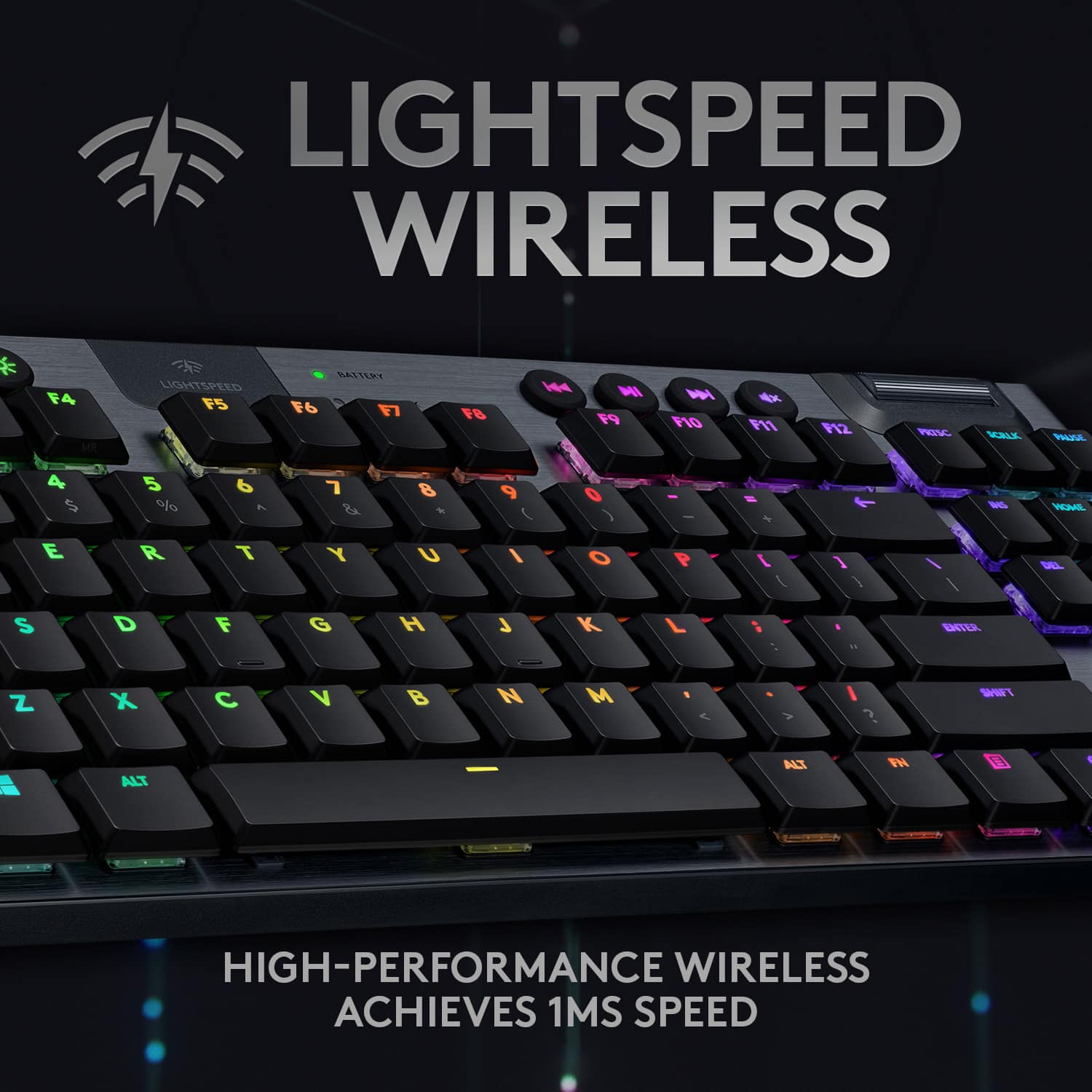
![The text on the image is already grouped and correctly spelled. It reads:
"LIGHTSPEED BATTERY CAPS LOCK K NI x ESC F1 F2 F3 F4 F5 F6 F7 F8 F9 F10 F11 F12 PRTSC SCRLK PAUSE - 1 2 3 # 4 $ 5 % 6 A 7 8 9 ( 0 ) - + INS HOME PG UP TAB Q W E R T Y U I O P [ { ] DEL END PG DN CAPS A S D F G H J K L ; ENTER SHIFT Z X C V B N M A > I ? SHIFT CTRL ALT ALT FN CTRL TKL G/915 TKL"](https://pisces.bbystatic.com/image2/BestBuy_US/images/products/b5efd26c-f360-4501-9ddd-133cf753b425.jpg)


- Model:
- 920-009529
- SKU:
- 6414195
Rating by feature
- Value
Rating 4.1 out of 5 stars
- Quality
Rating 4.8 out of 5 stars
- Ease of Use
Rating 4.9 out of 5 stars
Customers are saying
Customers express satisfaction with the keyboard's high-quality build, long battery life, and customizable RGB backlighting. Many appreciate its compact size and the satisfying clicky feel of the switches, although some find the price to be a drawback. The software also received criticism for being less user-friendly.
This summary was generated by AI based on customer reviews.
Great keyboard, faulty engineering.
||Posted . Owned for 2 weeks when reviewed.This reviewer received promo considerations or sweepstakes entry for writing a review.After only three days of use the crtl key started to get stuck for a $230 keyboard this is not right. Currently have a spport ticket with Logitech to get this resolved. However, it is one of the best typing keyboards I have ever owned.
No, I would not recommend this to a friend- Pros mentioned:Battery life, Keyboard quality, Rgb backlighting

Amazing Gaming Keyboard
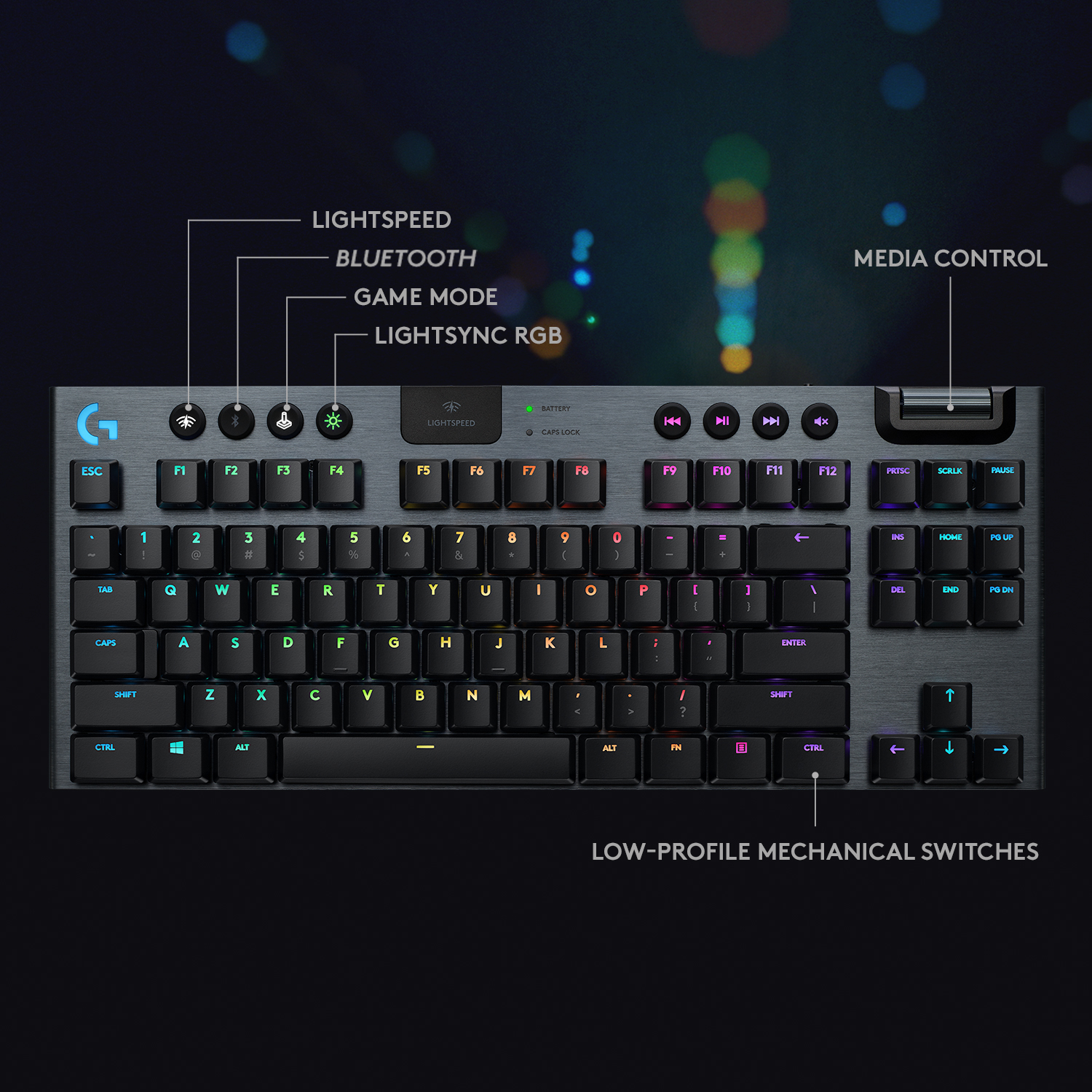
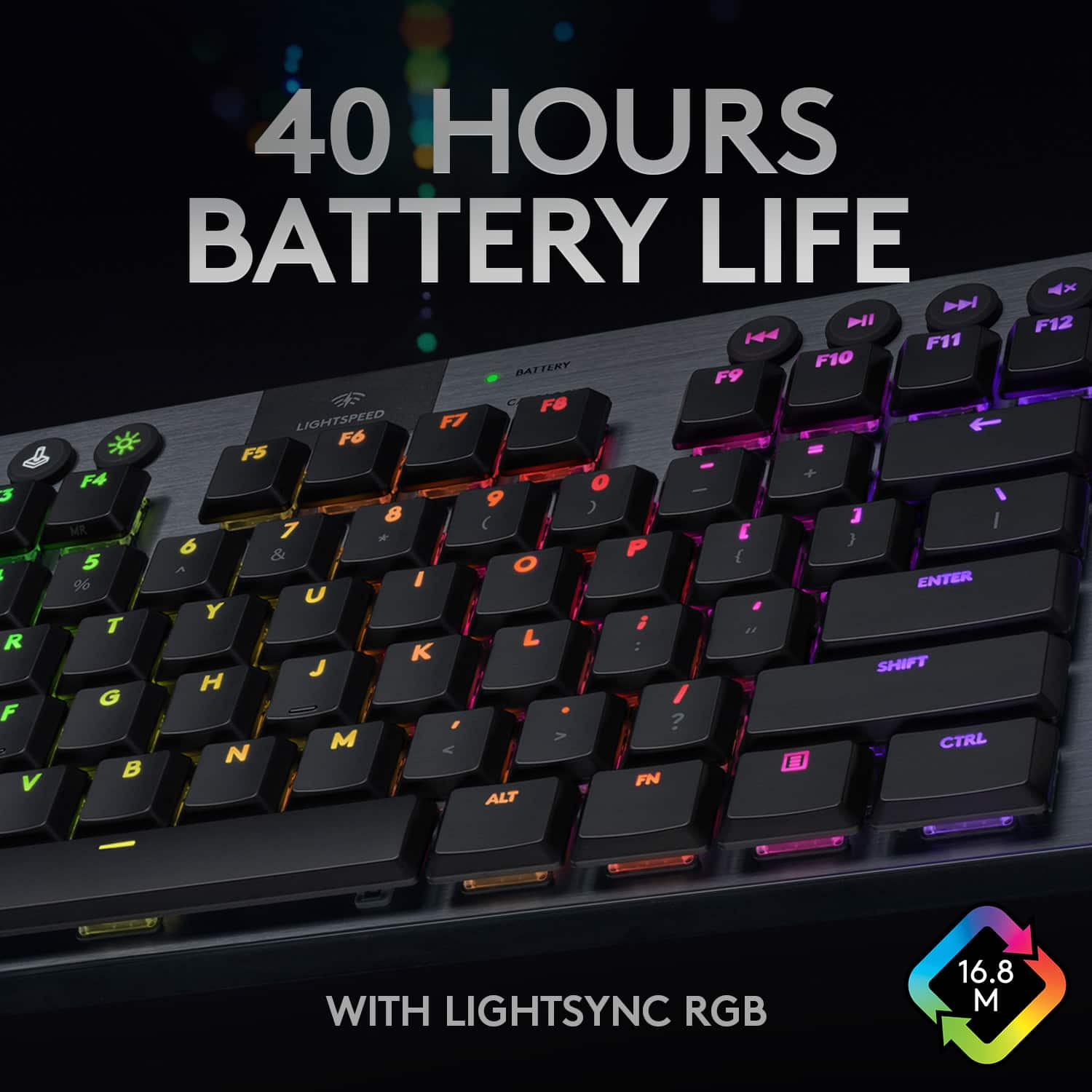
|Posted .This reviewer received promo considerations or sweepstakes entry for writing a review.Day 1, First Impressions: The G915 TKL is a huge step up from my older keyboard. This keyboard is the TKL variant, which means it is smaller and gives me more space for my mouse and anything else on my desk. It also has a volume wheel which makes adjusting the volume really simple. It has Pause/Play, Volume Mute, Skip forward, and skip backward keys for music and other forms of media. The brightness adjust is useful if you start to feel eyestrain from the keyboard's brightness, as well as helps keep the battery alive longer. The setup was extremely simple. Turn the keyboard on, plug in the USB connector, and press the LIGHTSPEED button at the top. The switches included (GL Clicky) feel amazing when typing and gaming, and are satisfying to listen to. They are also not too loud. The key caps are much smaller than a normal keyboard, which takes some getting used to at first, but after 30 minutes to an hour they feel perfect. The RGB lighting is vibrant and can be dimmed (Mentioned Earlier) and it can be changed using the G Hub Software. It was instantly recognized by the G Hub Software and easy to customize. Can be run either wired or wireless. Both the lighting and the overall delay is almost exactly the same no matter which way you are using the keyboard. The Bluetooth function works as intended, and connected to my phone with ease. Also works for anything else that uses Bluetooth devices. Feels durable and is lightweight compared to other keyboards, making it easy to take with you. Reactiveness of the keys is very quick and will be tested later to get a better estimate, but to the eye it looks to be near instant. Has a compartment on the back of the keyboard for the USB piece to be safely stored while charging/use in wired mode to help prevent loss of the USB. Zero complaints and overall an amazing first experience! Day 2, Tests and Other Thoughts (Wired/Wireless): The keyboard in both wired mode and wireless mode has around a 1ms response time, and you can't notice the delay at all by eye alone. First con: the buttons (F1-F12) are in groups of 4 rather than in a row, making it harder to do certain things in games like Minecraft (Change The Perspective and Whatnot). Battery Life: So far the battery hasn't gone down past 80% and is working perfectly. The auto dim feature works great! It keeps the batteries at a low usage, and extends the life they have. Media Keys and Other Additional Keys: Media keys work great and do what is expected of them, and I didn't realize how useful media keys are until I got this keyboard. The mute all audio button is a great way to quickly stop all audio rather than taking headset off or using the volume wheel to cut audio. The dim button helps save on battery life when not needed. Gaming mode is a great way to disable unneeded keys, but I don't use it too often. It is still useful. Bluetooth button works as expected, and it turns on the Bluetooth function. Day 3, Daily Use So Far: No issues with connections have happened yet, and the keyboard works as intended every time it turns on. Battery life is still great and hasn't gone lower than 60%, which is very impressive given the 40 hour lifespan at full brightness. Daily use with the added media keys and volume wheel has been amazing and allows me to keep to what I am doing without doing a ton of extra steps. Day 4, Percentage Checking: I started the day with 65% battery life at 8:50am. At 1:50pm, the battery is at 51% without taking a break. Within 5 hours, only 14% was lost. I will be fully charging this keyboard tonight to test the full extent of the battery life the next day. Basically leaving it on with lights at full brightness for the whole day. Day 5, Power Consumption and Testing (Starting from 100%) Starting today once the keyboard reaches 100%, I will leave on the keyboard, in use or not, to test battery life. Starting time and %: 8:00am, 100% 10:22am, 99% 12:35am, 94% 2:59pm, 81% 7:30pm, 78% 9:26pm, 73% Overall, I great gaming keyboard that is compact but delivers. Would recommend this to anyone!
I would recommend this to a friend - Pros mentioned:Battery life, Keyboard quality, Rgb backlighting
Great sleek keyboard at price!
|Posted .This reviewer received promo considerations or sweepstakes entry for writing a review.This is my 1st TKL board as I always like to have number pads, but the idea of a clicky keyboard for my Surface Pro Laptop/Tablet intrigued me. The Surface Type Cover is fine for what it is but for longer typing it becomes kind of a pain. I clicky keys don't have the same feel of full size clicky mechanical switchs (obviously) but even with short travel I was able to get up to my usual speed in no time and they feel and sound good. I am not a fan of the smooth semi shiny keys. With the amount I type I foresee a shine developing on these quickly but that remains to be seen. Build quality is solid. Nice brushed aluminum deck with no flex or creaking noises. Which is surprising given how slim this overall package is. Logitech knocked it out of the park with the build quality of this guy. There are 2 sets of risers to adjust to different angles (4 Degrees and 8 Degrees) the highest setting on a desk works fine for me. Volume control barrel is smooth and quick. I am not an avid user of RGB but I do like the option to have some of my keys a certain color to differentiate them in my periphery. I keep my keys at a static green which is most pleasing to my eyes and reminiscent of old school phosphor screens. Typing this review on this board is quite a pleasure and it is quite lappable. At first the G915 refused to be detected by the GHub software. and the keyboard was cycling the colors of the rainbow on my desk. I mainly use my Surface Pro as my computer at work to keep my personal emails and files off my work computer/network. I did not like. At first I was having issues getting the GHub software to recognize the keyboard, but once it was updated to the June 1, 2020 update package, it detect my keyboard right away! The GHub does offer a lot of customization once the G915 is detected. There is a decent list of common macro/commands that can be dragged over to individual F-keys. After periods of inactivity the keyboard will go to sleep, but the keyboard wakes up quickly and there is no delay in normal typing/usage. There are essentially 3 ways to connect the keyboard, via the wireless receiver, bluetooth or wired. There is a nice The game mode button shuts off certain keys so they don't interfere with gaming sessions. I have used it with and without it enabled and it doesn't make much difference to me since I rarely had the problem. I wonder if that button is mappable to another function. Though all the F-keys are programmable with commands or macros so it's a button I will rarely use. Lastly, battery life. I have been using the G915 for a little under a week. I did not charge it out of the box (came about 85% charged) and I am down to about 30% (I may have bumped the power when I was using it plugged in for about 15mins). Which brings me to my biggest gripe... MicroUSB on brand new EXPENSIVE keyboard. I have been migrating every bit of tech I can over to USB C. This was the first thing I looked at when I opened the box and I was very disappointed. That being said I ALWAYS have a USB C to MicroUSB adapter for the stubborn devices that and this board is rated to go 30hrs straight at full brightness so dropping the brightness down should last me a good bit between charges. On a wireless keyboard this slim, it's pretty impressive. This is an expensive keyboard, but what you get is a well built, sleek, deck that will hopefully last a long time.For the price I do wish they included a travel case/sleeve. I will have to find something to keep the keys safe during the times transport it in my bag when I shove other things in there from time to time. I am a bit of a keyboard addict and like trying different types of switches. This deck has definitely earned a place in the standard rotation of boards I will regularly use.
I would recommend this to a friend Awesome
||Posted . Owned for more than 2 years when reviewed.This reviewer received promo considerations or sweepstakes entry for writing a review.Awesome thanks so very yyyttttttthoughtful I’ll be sure of this one thanks for sharing the recipe I love
I would recommend this to a friendNot 200$ + keyboard
||Posted . Owned for 1 week when reviewed.This reviewer received promo considerations or sweepstakes entry for writing a review.Keys do not feel mechanical. Low profile switches are slow.
No, I would not recommend this to a friend- Pros mentioned:Battery life, Keyboard quality, Size
Click, click, click
|Posted .This reviewer received promo considerations or sweepstakes entry for writing a review.This is the first mechanical keyboard that I've ever owned and I love it. I use it for both work and games. The response is awesome. I like the feel of actually hitting the key and getting a click response. The sound reminds me of a typewriter. The size is compact. I like that its not bulky. The weight is surprising. This is heavier than I expected from a smaller keyboard. It seems to be constructed well. It has an aluminum top case which makes this look very attractive. The lights are a great. You can adjust the brightness which is helpful. The battery lasts a very long time. I was able to use it for a few days without charging it. It has the ability to program the F keys at the top. I don't particularly use this feature but I'm sure there are people that do. You can connect this keyboard 1 of 3 ways, by bluetooth, direct connect, or by usb. Very nice to have so many options. Back to the lights, if you download the Logitech G Hub software, you are able to actually the lights to sync with games, music, or videos. Very cool. I think this keyboard is awesome and am so happy to own one. Its nice to get a good key response when I need it. 100% would recommend to anyone looking into mechanical keyboards.
I would recommend this to a friend - Pros mentioned:Battery life, Keyboard qualityCons mentioned:Price
Interesting But Not Good Enough
|Posted .This reviewer received promo considerations or sweepstakes entry for writing a review.With the Power Play gaming mouse pad taking up more room than anticipated, the chance to try Logitech’s G915 TKL became an opportunity to see if sacrificing the number pad is worth the space saved. My desk has a keyboard drawer, which limits how much room I have to place a mouse pad and a keyboard side by side. Its worth will vary depending on how your desktop is designed and set up. The G915 TKL, as a mechanical keyboard, does not use CherryMX switches. By design, since it is a low-profile keyboard, it uses Logitech’s own switches. As such, there is a difference in key travel and other intricacies when compared to CherryMX. I have opted for Logitech’s “clicky” model. But when directly comparing that and my other keyboard (using CherryMX Brown), I find that the tactile bump is rather minimal, to the point that it’s barely there. I have grown used to using enough force to ensure that I press down on a key. However, it takes little effort to register a keystroke. If I were to describe this, I would say that it feels mushy. Whether or not this is because of the switch design or the low profile design is beyond me. That mushy feel, even after two days of usage, only raises my skepticism on whether or not the keyboard is good for me. The upside to going wireless is not having to deal with wire routing. The downside is obviously battery lifespan. Combatting this are some power saving functions built into the keyboard. The RGB lights can be turned off. And its brightness can be adjusted in 4 stages, with the 5th turning the lightings off. The lights are dimmed after 1 minute of idle and turn off 5 minutes after that. After 11 minutes of idle, the keyboard disconnects to further conserve power. This seems reasonable and there isn’t any perceivable delay on waking up after it disconnected. After around 2 days, battery level went from full charge to around 75%. In my opinion, this isn’t too bad since there are ways to stretch the battery life a little longer. With 3 ways to connect the keyboard, I have focused only on its Lightspeed wireless connection. USB connection works as expected and is only used when the keyboard requires a charge. Lightspeed, while great on mice, seems to have a limit. With the Power Play gaming mouse pad, it also has a Lightspeed receiver to minimize the distance from it and the mouse itself. However, that receiver does not work with a Lightspeed keyboard. That in itself is strange. And Logitech does not document this anywhere or make this well known to the consumers. Searches on Google turn up nothing but a general conclusion that a Power Play mouse pad will not connect to a Lightspeed keyboard. One would think that this should have been possible to do. If you have a Power Play mouse pad or plan on getting one, make sure to keep this in mind when looking at a Lightspeed keyboard. Connection via Lightspeed is as speedy as it should and I see no perceivable latency when it comes to general typing or gaming in general. But because the keyboard itself requires a charge every so often, it’s impossible to rid oneself of that USB cable needed to charge it. Wire clutter will still be an issue simply because these wireless devices require a recharge. Configuring and setting certain customizations in GHub is fairly straightforward. While I went for a simple and straightforward color wave, you can set individual keys to their own color. This is a nice visual aesthetic and I’ve no complaint on it. Overall, the G915 TKL is an intriguing mechanical keyboard. Transitioning from one switch design to another takes getting used to. It took me around a month to get used to my previous keyboard. As far as its asking price, I am very skeptical. A keyboard of this design does not seem like it’s worth the price it retails at. There are other keyboards out there that can offer just as much for less and they use familiar key switches. Good: Slim profile, compact, ten-keyless design Bad: tactile key switch isn’t tactile, mushy feel, too expensive Ugly: that pricetag Verdict: can’t recommend.
No, I would not recommend this to a friend - Pros mentioned:Battery life, Keyboard quality
Great battery life, GHub is rate-limiting factor
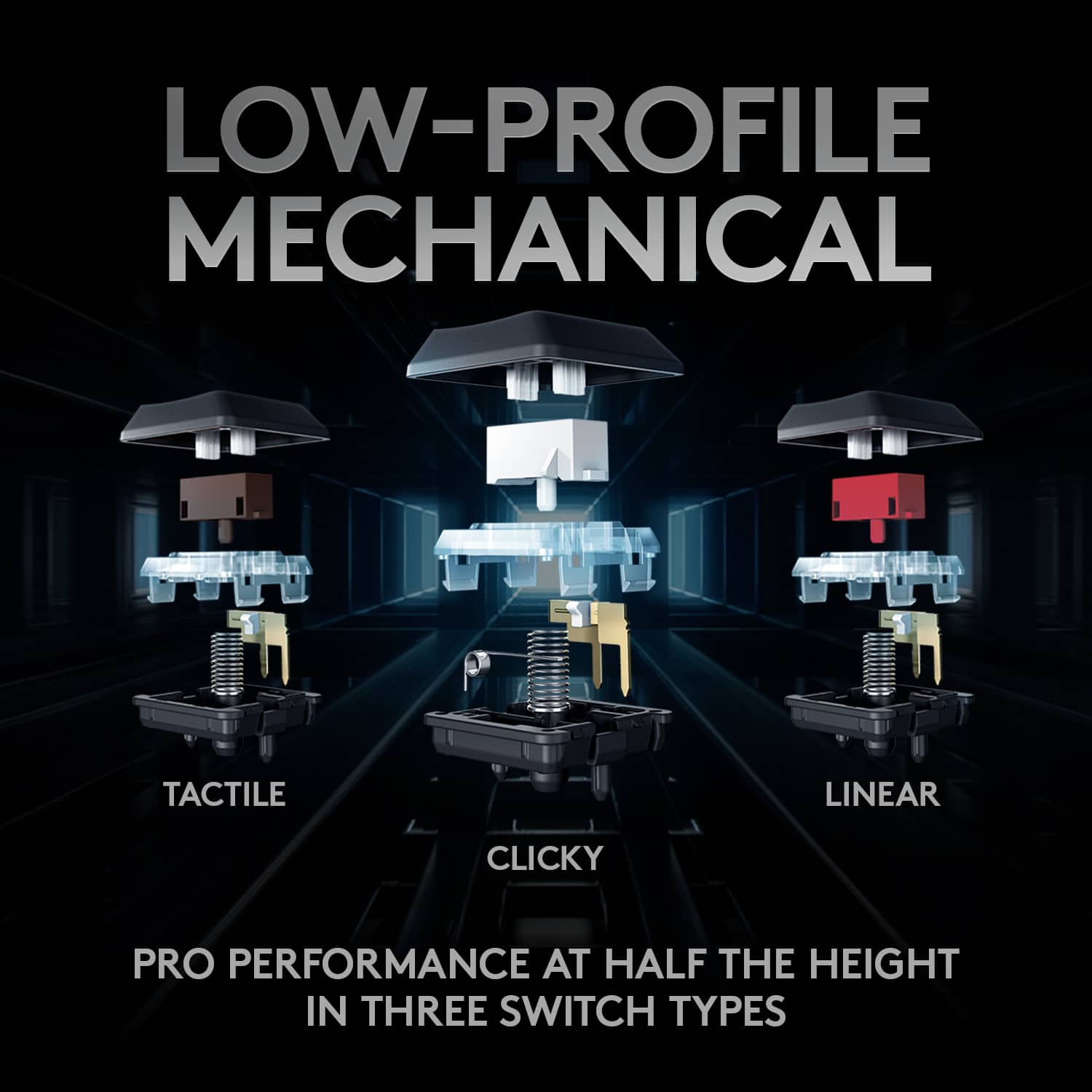
|Posted .This reviewer received promo considerations or sweepstakes entry for writing a review.The Logitech G915 TKL is a slim, compact, and wireless keyboard. The battery life on it is 30 hours on full RGB brightness. When you order the keyboard you can pick your switch from: GL Clicky, GL Tactile, or GL Linear. The charging cable is a Micro USB cable. When I was setting my keyboard up in the Logitech G HUB I was having trouble getting the G HUB to update to the newest software, and I had to go through a long process to finally connect it. All the keys on the Logitech G915 TKL are customizable to their own colors in the Logitech G HUB. The volume scroll wheel on the top right of the keyboard is good to have and easy to use. With the keyboard you can either use Logitech Lightspeed or you have the option to use Bluetooth. Overall the Logitech G915 TKL is a very good keyboard with its slim design and insane battery life.
I would recommend this to a friend - Pros mentioned:Battery life, Keyboard quality
Almost perfect.
|Posted .This reviewer received promo considerations or sweepstakes entry for writing a review.Ok. This is really a 4-½ star keyboard. Great, but it could use a few minor improvements. First, the feel is fantastic. This thing is a joy to type on. You can use it all day pounding out code and then use it to game all night. It is small, low-profile, and well-built. The great thing is the clicky sound of the keys. But that is also a weakness, if you have anybody near who might be distrubed by the noise. I love the sound that this board makes. The top deck is actually metal (probably aluminum). While the bottom is plastic, it feels solid. It has a good amount of heft that will keep it anchored on your desk. There is on-board memory four four RCB color profiles, or you can let the app take care of that, depending on which program you are running. It works either wirelessly with a USB dongle, OR you can use Bluetooth (nice touch). There is a separate volume knob on the upper-right, and dedicated media keys. You can control the brightness level, and get 40 hours or so of power on high brightness, up to almost 200 hours on low brightness. If you turn the backlight off, over 1000 hours of battery life are possible! This is ALMOST the perfect wireless keyboard. It is only missing a few small things. It could use a column of dedicated macro keys. To define a macro, you have to sacrifice one of your function keys along the top -- not good if the game uses those keys. Also, on the number keys, only the numbers light up. The shifted function (special characters) are just painted on. Finally the charging port is micro-USB. That is so 2010. In this decade, there is no excuse not to use USB-C for anything in this price range. If Logitech had fixed these things, I truly feel that they would have the perfect wireless keyboard.
I would recommend this to a friend - Pros mentioned:Battery life, Rgb backlighting
Clicky switch gaming keyboard
|Posted .This reviewer received promo considerations or sweepstakes entry for writing a review.Pros- -It has the lightspeed wireless technology from Logitech which has only a 1ms delay. -Very sleek and thin design, also has customizable RGB lighting -40 hours of battery life, and it charges to full within 4 hours, it will automatically go to sleep if you're not using it which conserves the battery life for a long time, and will instantly wake back up as soon as you hit a key. -Has media controls to control volume, pause and skip music, etc. -Has mechanical switches with 3 options of tactile, clicky or linear. Overall this keyboard is very nice, the only con I can see is that it is at a pretty high price point.
I would recommend this to a friend - Pros mentioned:Keyboard quality
everything is great besides the keycaps
Posted .This reviewer received promo considerations or sweepstakes entry for writing a review.first off , connecting this device was very simple. little pricey but i really do like how the keyboard feels when i type, its response time is very nice. the keyboards base feels very sturdy and you just feel most of the quality. one thing i do have a problem with is the keycaps. the seem very fragile as i had one break off already. trying to find replacement keycaps for this keyboard wasn,t so fun either. honestly if it wasnt for the keycap quality it would be a 5 star.
I would recommend this to a friend - Pros mentioned:Battery life, Keyboard quality
Best keyboard
Posted .This reviewer received promo considerations or sweepstakes entry for writing a review.Defiantly worth the money. I’m a big guy(6”5) and I have huge hands and this keyboard is seamlessly the best keyboard I have ever touched or seen. I love this thing, I highly recommend it to anyone out there debating on getting it. You won’t regret it. Battery life is super good too.
I would recommend this to a friend - Pros mentioned:Keyboard quality, Wireless
Excellent gaming keyboard, zero latency
|Posted .This reviewer received promo considerations or sweepstakes entry for writing a review.My one complaint is the use of USB micro as opposed to USB C everything else screams premium. There is zero latency in gaming when using the Lightspeed proprietary wireless connection and honestly the Bluetooth wireless connection is fine for windows work. While the bottom is plastic the top is anodized aluminum and the keyboard looks and works great! The clicky keys are exactly what I want in my keyboards. The overall size aids in portability too.
I would recommend this to a friend - Pros mentioned:Battery life
Great TKL but at a premium
|Posted .This reviewer received promo considerations or sweepstakes entry for writing a review.Overall this is a great Logi kb that you know and love. But for gaming in particular, this has the perfect size and customization that you want but when it all comes down to it, if it's something you can afford off the bat. Gamer gear is a big market. I know this. I know that if someone gets some gear and it doesn't get the results you want, you will hear it from the community in a flash fire news wire. I mean the keys are decent, but make noise when the keyboard moves. That alone makes it seem cheaper than what you pay. The setup is straight forward to either using the dongle for wireless, bluetooth or OG wire. The kit comes with all you need. The battery life is decent with the ability to adjust the brightness to save on the battery. Another little negative is that the connection here is micro USB rather than USB C, which I am surprised about. I have the MX wireless set up at work and that recharges with USB C. Not sure what happened there. However, using the KB with games and basic typing works great as it should. The form factor and color is updated and modern. Also there is little to no instructions on the box or enclosed. So there's that. I know there's a keyboard and you can go to the site to get the manual, but just basic what's in the box and a better quick start guide would help in this case. The boxing is minimal. As most modern Logi peripherals are, they use less plastics and paper to pack which is good thing. And the use of twist ties are none in this packaging and I am indeed grateful. I have paired and connected this to a laptop via dongle and also used this as a bluetooth keyboard for my TV. There should be a TV interface here other than the media scroll wheel which controls the volume. It works, but with the bluetooth there is a slight lag. Not horrible, but it is there. There is none when connected to the laptop via dongle or wired. So would I recommend it? I have to say yes! With the caviat of if you like the Logi setups and quality and don't mind spending a decent amount on a KB. Comparing the market for wireless gaming keyboards, the pricing is pretty much in line with it's competitors IMO.
I would recommend this to a friend Made the best KB BETTER!
|Posted .This reviewer received promo considerations or sweepstakes entry for writing a review.OK, so I don't actually have the best KB (G915) but I have its sister, the G815. I love the lowprofile keys the almost make it feel like I'm doing a 1 inch punch in games. The travel from top to activation is about 1.5mm and the click comes at 1.6mm; full travel from top to bottom is about 2mm. I can't say what my other KBs distance is but the Logitech lowprofile keys are better than any I've tried, and I've tried just about every one. What makes the G915 TKL better is that without the 10 keys pad I can keep the KB & mouse closer together. I suffer from severely impinged shoulders and don't like resting so keep irritating them by working out. During gaming time I'd have to angle my full size KB a bit so that I can relieve some of the stress from my shoulders. By removing the 10 keys I can push the KBM closer and keep a more natural position. Along with the 10 keys you also lose the 5 macro keys on the left (compared to the fullsized G915). They do allow you to use the F1-F4 as macro and macro record keys, so not a big trade off especially if you have a mouse with a ton of buttons (one reason why losing the 10keys isn't so bad any more). The battery is supposed to last 40hours but I haven't run it a full course yet and still have 60% with a few hours gaming and general computer use. Going Bluetooth will drop the battery life a bit but I haven't tested it. The KB is hooked up with my gaming PC so no need to use BT. You can even use the G915TKL as a wired KB if you choose. Switching from wired to wireless is almost instantaneous. This feature will come in handy on those times I forget to recharge. Only downside is that is uses old microUSB. It doesn't really need the speed of USB C, but it would make for easier cable management to not have to reintroduce a microUSB cable back to my set up. So as far as twitch gaming goes, I haven't felt any noticeable lag. I'd really couldn't tell the difference from wired to wireless. Logitech's LS tech is so good that I've gone completely wireless using the G915TKL and a G604 (it just fits my hand better than the G502LS). The only thing that's more of a nit-picky thing than a real issue is that the colors, especially yellows, just aren't as bright and "yellowish" as other keyboards I've tried. Most colors are dialed down just a bit, even on my G815. Like I said, not a big issue for me. I really have no idea how Logitech can improve on the G815-G915 series so I'm real curious to see what they do next year. They've got a tough job trying to top perfection!
I would recommend this to a friend- Pros mentioned:Keyboard quality
Excellent quality, compact keyboard
|Posted .This reviewer received promo considerations or sweepstakes entry for writing a review.I love this keyboard! I have the full sized G915 wireless, and was looking to save some space on my gaming desk. This TKL version does a great job at saving space, while not skimping on any of the features of the full size model. I still have my media keys, volume wheel, and excellent lighting and wireless peformance...just in a smaller package. I have been a longtime Logitech fan, and these new G915 wireless models are excellent.
I would recommend this to a friend Very solid mechanical keyboard
|Posted .This reviewer received promo considerations or sweepstakes entry for writing a review.Overall, the latest wireless mechanical keyboard from Logitech is a great addition to anyone's keyboard collection. Finally, Logitech has started using different switch types for their keyboards, namely from Kailh, which is a great addition for its keyboards. This allows the keyboard to have a very nice feel, with the tactile bump on the bottom, but maintain some modding ability. The sound is very clean and crisp, if that’s important to you, and the white box switches aren’t as loud as other clicky switches, either. Plus, If you ever want to switch out the key-caps, having the Kailh Low Profile "Choc" White switches makes this easier in the long run. Although, Logitech‘s stock key caps feel nice enough. The low profile design of the keyboard in the keys makes it very sleek, looks very nice, and makes it lighter as well. never use a low profile keyboard, they’ll be a little bit of a change, But once you’re used to it you’ll find that less distance between key-presses can actually help for longer gaming or typing sessions.There’s enough buttons like the volume slider, function keys, to make this feel like a full-size keyboard. Really, there isn’t much to dislike about this particular keyboard. The battery life is solid, the switches are a perfect choice for every day use, The RGB works well, the build quality is excellent, and it gets Logitech support. There’s not much else you need to recommend a keyboard, even though it’s slightly on the expensive side.
I would recommend this to a friendGood Keyboard, Clicky switches missing some feel.
|Posted .This reviewer received promo considerations or sweepstakes entry for writing a review.I would have to say for a keyboard that is very portable, takes up little room, and is build surprisingly well Logitech has done a very good job here. The overall build quality is much better than I had anticipated with very little flex in the keyboard at all, and with a profile that is so thin, that is very surprising. I was pleasantly surprised also by the quality of the backlighting. Most of the time if you have a wireless backlit keyboard you run into an issue where the backlighting is super dim so that battery life can be prolonged. But with this keyboard that's not an issue. The key backlighting can be super bright if you want it to be. However I will say if you are one who turns off the backlight and you are not a touch typist, you might have some issues seeing the key legend with the backlight off. For the key switches, while they are mechanical and feel miles better than any membrane keyboard there is a little less tactile feel than I would prefer out of a "Clicky" switch type. I'm not sure if this is because of the low profile nature of the keys or if its just Logitech key switch that has a little less click than I would like. I was also pleasantly surprised that while using the keyboard wirelessly with the included lightspeed dongle there seems to be almost no discernable difference in response times than if I had just plugged the keyboard into a USB cable instead. And that leads me to the one main reason I gave this keyboard a 4 star review instead of 5, it's the year 2020, why does this keyboard still have micro USB on it instead of USB-C? It makes no sense that a modern computer accessory like this would not have USB-C, it's a far better connecter and much harder to damage overall. Other than that one glaring issue I really enjoy this keyboard, the nice slim profile fits well on almost any desk, and its small size makes it easy to toss in a backpack and take with you on the go which is a nice added bonus I feel.
I would recommend this to a friend- Pros mentioned:Rgb backlighting
Love this gaming keyboard!!
|Posted .This reviewer received promo considerations or sweepstakes entry for writing a review.Love the feel of the keys and the sound. Comes with Ghub so you can customize the coloring. Lightening connection as well so wireless is smooth and quick.
I would recommend this to a friend It just feels right
Posted .This reviewer received promo considerations or sweepstakes entry for writing a review.This one is worth the money. It just feels nice to type on and the noise from the "clicky" model is just right. It's not too loud and not too quiet. Everything just feels right. This keyboard will probably need a firmware update out of the box.
I would recommend this to a friend