Customer Ratings & Reviews
![The text on the image reads:
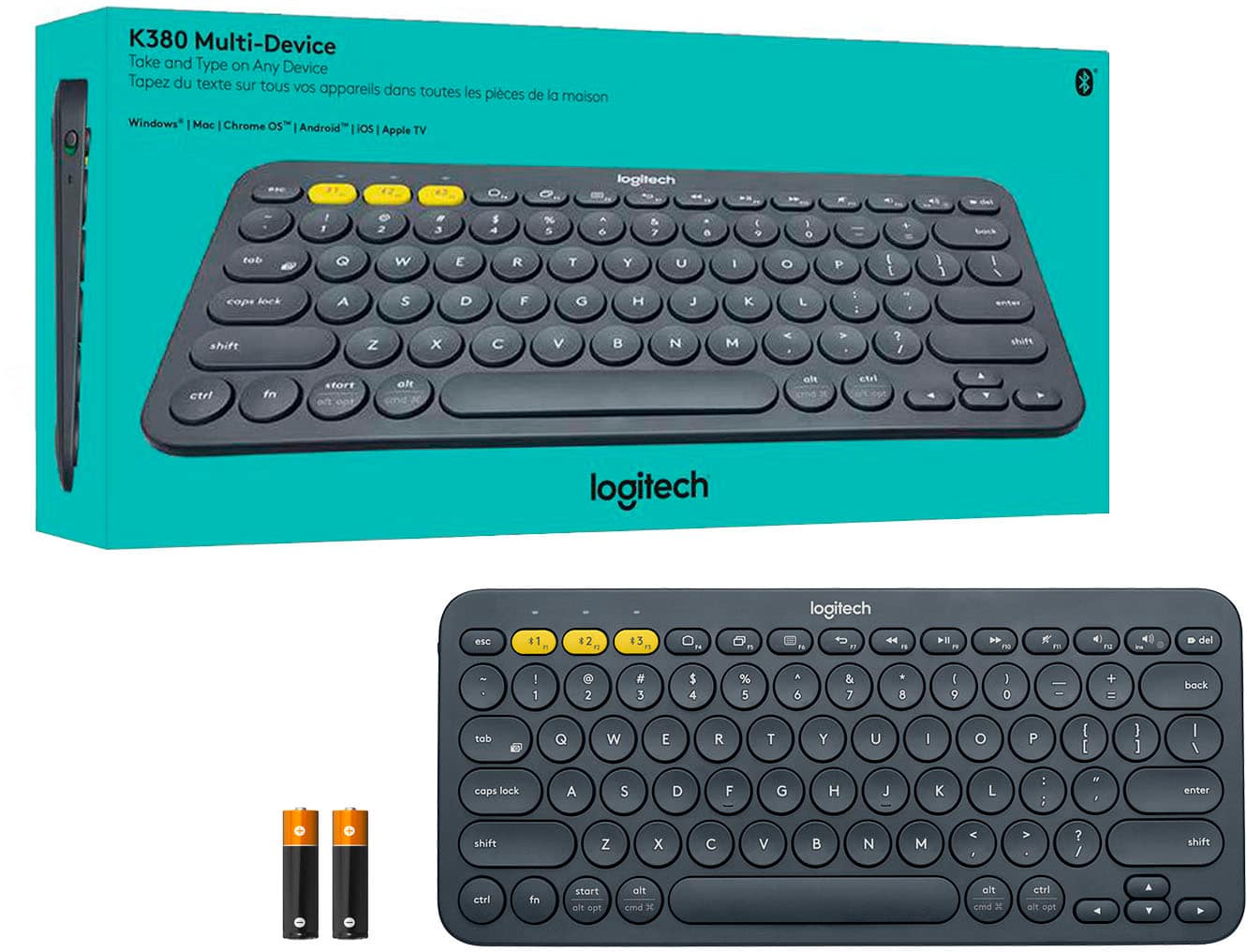
( esc logitech % 1) 4 del t 44 114 P W F 3 E 1 18 1 $2 FS F4 PS 1 12 * I - + block $ % A & 0 = 1 = 11 @ 8 9 1 ! 4 O 5 6 2 9 3 1 1 enter 1 / O P ] 1 T Y U E W - Q : @ tab L I # J K ; G H - D F ? S > A < I caps lock M 1 V Ctrl Z X alt / cmd shift / alt start 3 cmd fn alt t ctrl shift A 1 4 4](https://pisces.bbystatic.com/image2/BestBuy_US/images/products/4415/4415400_sd.jpg)






- Model:
- 920-007558
- |
- SKU:
- 4415400
Customer reviews
Rating 4.7 out of 5 stars with 3581 reviews
(3,581 customer reviews)Rating by feature
- Value4.7
Rating 4.7 out of 5 stars
- Quality4.7
Rating 4.7 out of 5 stars
- Ease of Use4.7
Rating 4.7 out of 5 stars
Customers are saying
Customers praise the K380 TKL Wireless Scissor Keyboard's ease of use, compact size, and compatibility with multiple devices. Positive feedback also highlights the keyboard's comfortable typing experience, lightweight design, and long battery life. Many appreciate its attractive price point and reliable connectivity. The overall quality and pleasant key feel are also frequently cited as strengths.
This summary was generated by AI based on customer reviews.
Rated 5 out of 5 stars
Replaced Crappy Magic Keyboard
Posted .This reviewer received promo considerations or sweepstakes entry for writing a review.Used Apple's instructions to clean my magic keyboard so of course that broke the keyboard. Bought this for a third of the price - and am very happy I did. It feels more solid than the Apple keyboard. I like the feel of the keys more than the magic keyboard, and it works! Something to note - when my magic keyboard broke and I bought this, I didn't realize that I still had to logon to my iMac in order to enable this keyboard. Seeing that my magic keyboard was broke, I had to buy another wired ($15 Logitech keyboard) to just enter my password. Oh well, now I have a backup.
I would recommend this to a friendRated 5 out of 5 stars
Great device.
Posted .This reviewer received promo considerations or sweepstakes entry for writing a review.Wonderful. Connects easily, works well. Really like that I can use it on 3 devices: iPad and iPhone.
I would recommend this to a friendRated 5 out of 5 stars
Nice keys and reliable
Posted .This reviewer received promo considerations or sweepstakes entry for writing a review.Touch keys are nice and fast switch between 2 laptops
I would recommend this to a friend- Pros mentioned:Size
Rated 5 out of 5 stars
Love it
Posted .This reviewer received promo considerations or sweepstakes entry for writing a review.compact and easy to use. works with ipad 6th generation
I would recommend this to a friend - Pros mentioned:Ease of use
Rated 5 out of 5 stars
Working and traveling.
Posted .This reviewer received promo considerations or sweepstakes entry for writing a review.Perfect for remote working and traveling. Great for iPad.
I would recommend this to a friend Rated 4 out of 5 stars
Good and durable keyboard, not so good paint job
Posted .This reviewer received promo considerations or sweepstakes entry for writing a review.This is a very good cheap keyboard with multi device connection. Logitech never missed the mark, I can't believe you actually paying a premium for the brand name here but it's just so good. One thing that I would like for this to be better is that the pain coat fades away after few years of use. The key works just fine, but the paint coat that's the issue.
I would recommend this to a friendRated 3 out of 5 stars
Bluetooth keyboard
Posted .This reviewer received promo considerations or sweepstakes entry for writing a review.Good product. Works great. Easy to connect. Would buy again
I would recommend this to a friendRated 5 out of 5 stars
Best Keyboard Yet
Posted .This reviewer received promo considerations or sweepstakes entry for writing a review.I bought this to replace a broken apple magic keyboard and it is an ever keyboard. The 3 bluetooth channels are a huge plus, allows me to use a single keyboard on my work laptop, my MacBook, and my iPad, all of which I use simultaneously with the press of a button.
I would recommend this to a friendBrand response from Logitech
Posted .Thank you for sharing how much you're liking the K380 Multi-Device Bluetooth Keyboard and how easy it's been to use with your various devices. If you haven't done so, I highly suggest that you use Logitech's Options software which will help your K380 run optimally and allows you to customize buttons. Here's a link to the download: https://support.logi.com/hc/en-us/articles/360024851333--Downloads-K380-Multi-Device-Bluetooth-Keyboard. Hope that you found this helpful and that all continues to go well. Thank you for choosing Logitech. - Richard from Logitech
Rated 4 out of 5 stars
Good, but space bar squeaks
Posted .This reviewer received promo considerations or sweepstakes entry for writing a review.Bought this one to replace the same keyboard that was super old. It still worked, but because it was really old, the letters on a lot of the keys had rubbed off. This new keyboard works great except the space bar squeaks which makes it noisy when trying to type during meetings. Haven’t figured out a way yet to stop the squeaking.
I would recommend this to a friendRated 3 out of 5 stars
Too small
Posted .This reviewer received promo considerations or sweepstakes entry for writing a review.Although this keyboard was sleek and compact, it was too small for my hands
I would recommend this to a friendRated 5 out of 5 stars
This is the keyboard to get
Posted .This reviewer received promo considerations or sweepstakes entry for writing a review.This is a great product. No issuses connecting, can connect to three different devices. Performance is great.
I would recommend this to a friendRated 3 out of 5 stars
Reasonable
Posted .This reviewer received promo considerations or sweepstakes entry for writing a review.Pretty Nice item for the price they're selling it for.
No, I would not recommend this to a friendRated 5 out of 5 stars
Must get
Posted .This reviewer received promo considerations or sweepstakes entry for writing a review.Nice to have on my side Bluetooth connection is seem less. Definitely worth it.
I would recommend this to a friendRated 2 out of 5 stars
Keyboard may not work with PC's
Posted .This reviewer received promo considerations or sweepstakes entry for writing a review.this keyboard is very sturdy and good to use. I love it. I really wanted it to work. However, mine doesn't work on my PC. The bluetooth disconnects frequently and there is "stuttering" where you get dozens of the same letter. I bought two of them and neither worked. I spoke with Logitech multiple times and all they said is that if it worked on an iPad, but not my PC, that they wouldn't replace it. Best Buy refunded my purchase price. I bought another keyboard with a dongle and it works perfectly.
No, I would not recommend this to a friendBrand response from Logitech
Posted .Hello KXRo, Very sorry to hear about the connectivity issues you had with the K380 and your PC. Very glad that you were able to find another keyboard that works perfectly---hopefully it was a Logitech one. We appreciate the feedback and hope that you'll continue to choose Logitech for all your future need. - Richard from Logitech
Rated 3 out of 5 stars
Circular keys are bad
Posted .This reviewer received promo considerations or sweepstakes entry for writing a review.Good keyboard, but the circular keys are not ideal, you could get used to them but i dont as this is extra just in case keyboard
No, I would not recommend this to a friendRated 2 out of 5 stars
so close but so far
Posted .This reviewer received promo considerations or sweepstakes entry for writing a review.tl;dr: wears out quickly i want to like this keyboard, the idea is great - small and universal - but as someone who lives at the keyboard, it just doesn't hold up, the keys are wearing out after a few months. the WORST thing is that it handles low battery terribly. the bluetooth connection gets bad and it gets locked into a keypress for HUNDREDS of keystrokes. this could actually be really bad in some situations. and unfortunately that's the first warning sign you have that you need to change batteries. time to buy a new one..
No, I would not recommend this to a friendRated 3 out of 5 stars
This thing works!!
Posted .This reviewer received promo considerations or sweepstakes entry for writing a review.Am typing this review on it. Works OK except bluetooth craps out sometimes.
I would recommend this to a friendRated 2 out of 5 stars
Regret
Posted .This reviewer received promo considerations or sweepstakes entry for writing a review.cheap junk. awful keyboard. battery lid falls off really easily, no screenshot button, button fell off after 2 weeks, something rattling inside, big lag. worth maybe $5 to $10 dollars. big mistake buying this heap
No, I would not recommend this to a friendRated 2 out of 5 stars
Doesn’t connect
Posted .This reviewer received promo considerations or sweepstakes entry for writing a review.No troubleshooting instructions for connecting to my TV’s Browser and since it doesn’t connect automatically, troubleshooting is needed.
No, I would not recommend this to a friendRated 1 out of 5 stars
WASTE OF MONEY
Posted .This reviewer received promo considerations or sweepstakes entry for writing a review.A PIECE OF CRAP! Everytime I go to type or connect , it takes ages and often doesn't even connect. I would not buy this item if I were you- and spend the extra money to get your keyboard fixed or purchase another brand. I went out of my way to write this- because it just took me another 10 minutes out of my life to try connect once again.
No, I would not recommend this to a friendBrand response from Logitech
Posted .Hi Michelle,
Thank you for your feedback. Sorry you are having issues with your keyboard. Here are possible solutions:
The connection between the keyboard and the USB receiver can be lost for several reasons, including:
• Low battery charge
• Moving the USB receiver from one USB port to another
• Moving the USB receiver to another computer
• Plugging the USB receiver into a USB hub, KVM switch or other unsupported device. (NOTE: Your USB receiver must be plugged directly into your computer.)
• Using your wireless keyboard on metal surfaces
• Radio frequency (RF) interference from other sources
If your keyboard is not working, the problem is likely to be a lost connection. The connection between the keyboard and the USB receiver can be lost for several reasons. Make sure you have fresh batteries in your keyboard. Make sure your keyboard is turned on. Make sure the USB receiver is securely plugged directly into a working USB port on your computer. Turn your computer on download the correct version of Logitech SetPoint Mouse and Keyboard Software.
If you need further assistance, please contact Logitech Support on the website.
LaShonda from Logitech