Customer Ratings & Reviews
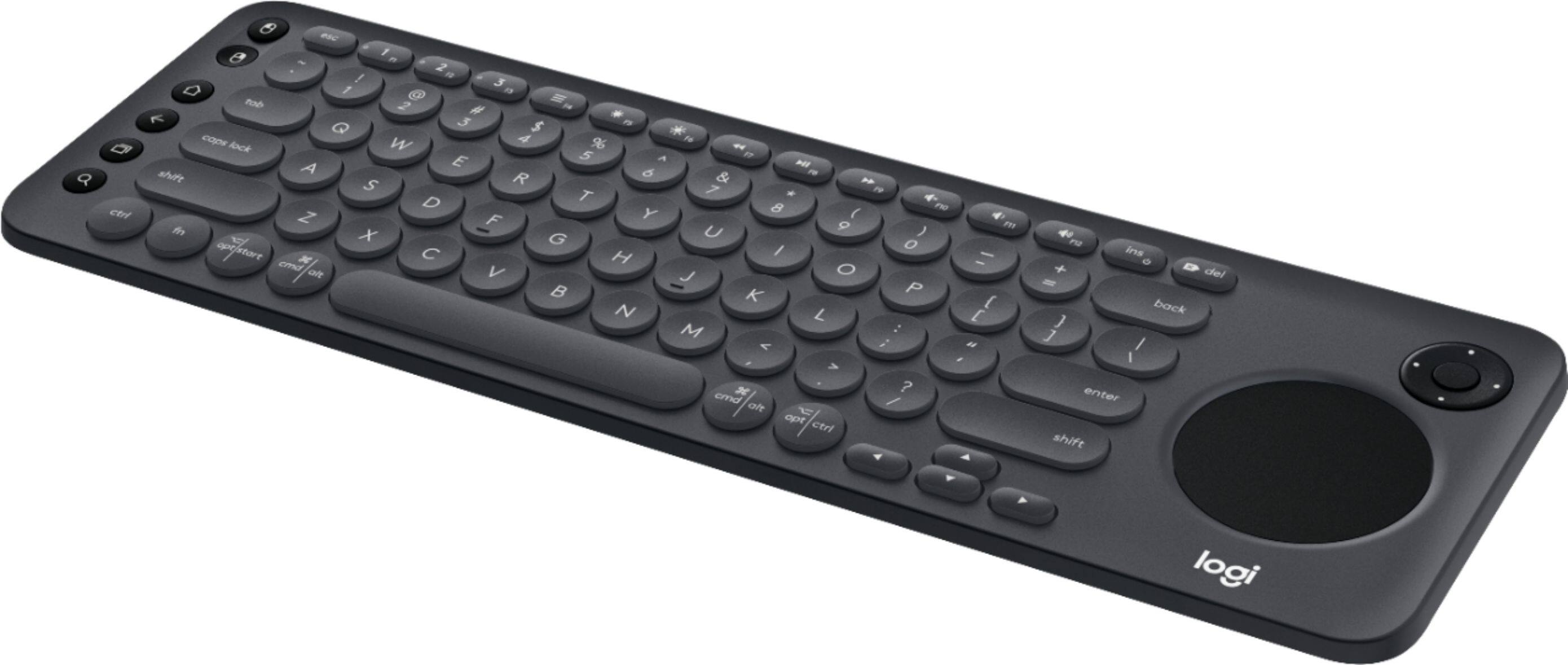
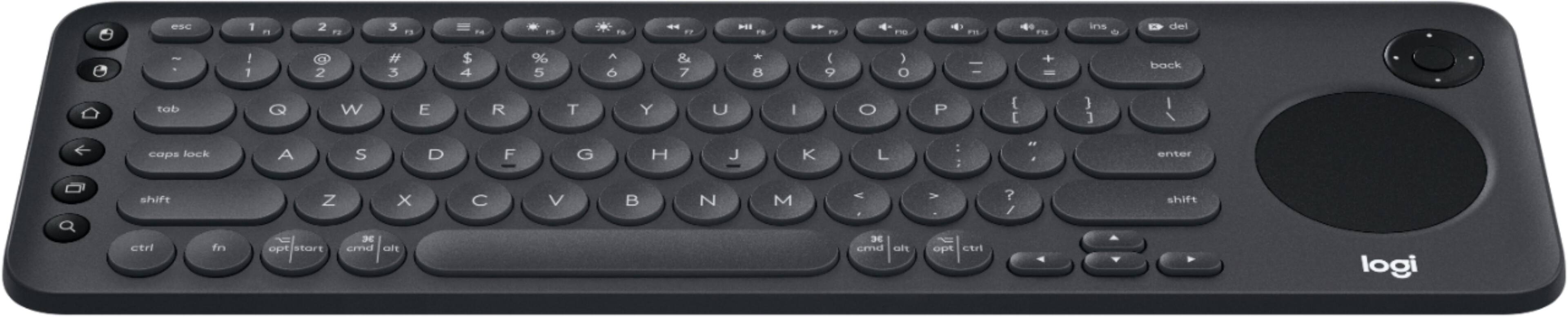
![The image shows a close-up of a keyboard with the text "esc 1 F 2 P2 3 F3 M4 P5 F6 4 F7 I F8 4 P9 F10 FI! F12 ins O * del ! 1 2 # 3 $ 4 % 5 A 6 & 7 * 8 ( 9 ) 0 - - + = back tob Q W E R T Y U I O P { [ ] ] I / caps lock A S D F G H J K L : ; < . > ? / shift ctrl fn opt start x cmd alt x cmd alt opt ctrl logi" written on it. This text is likely a description or instructions for using the keyboard.](https://pisces.bbystatic.com/image2/BestBuy_US/images/products/6282/6282604_sd.jpg)

- Model:
- 920-008822
- SKU:
- 6282604
Rating by feature
- Value
Rating 4.3 out of 5 stars
- Quality
Rating 4.6 out of 5 stars
- Ease of Use
Rating 4.4 out of 5 stars
Customers are saying
Customers are positive about the K600 TKL Wireless TV Keyboard's ease of use, convenient touchpad, and compact size. Many appreciate its wireless functionality, compatibility with smart TVs, and lightweight design, making it easy to transport. However, some customers find the price to be a bit high and have experienced compatibility issues with certain TV models. The overall user experience is largely positive, focusing on the keyboard's usability and convenience.
This summary was generated by AI based on customer reviews.
- Pros mentioned:Touchpad

Works but know what you are getting...
|Posted .This reviewer received promo considerations or sweepstakes entry for writing a review.This keyboard paired easily with my Windows PC but I was never able to get it to pair with my high end TV. I was really hoping to get it to work for that. The TV has bluetooth and that did not work either. In the instructions it says they recommend it use the USB dongle for your TV. I tried that as well. If you have a mid grade TV with the USB port on the actual TV then I suspect it would work. I think for the few times that you would need a keyboard for your TV then this should work well. The keys responded well and the built in trackpad was okay. Remember to remove the sticker from the keyboard on the far left and it will reveal several higher function keys. The software it has you download for Windows is the new standard Logi software and works quite well.
I would recommend this to a friend Awesome keyboard
|Posted .This reviewer received promo considerations or sweepstakes entry for writing a review.This Logitech keyboard is the one for all uses. Obviously it is essentially just a wireless keyboard but its compatability across devices make this a must have. For tv and pc, it connects through a usb dongle, so your tv needs to have a usb port. It has great connectivity and response. It also connects through bluetooth to your phone or tablet so you can use the keyboard to type on those devices. What makes this keyboard great is the touchpad and d-pad. The touchpad clicks for left mouse clicks, but there is also 2 buttons on the left side for left and right clicks. You can use the d-pad to scroll up and down webpages. The battery cover is easy to remove comes with a spot to store the usb dongle if travel with it. Overall the keyboard is great and I love it. The only thing is the on and off switch is a bit annoying to flip as it is flush and you almost need a fingernail to flip it on and off.. but that is really just a minor issue. Would definitely recommend.
I would recommend this to a friendSlightly oversized, highly useful
|Posted .This reviewer received promo considerations or sweepstakes entry for writing a review.The k600 is a great little keyboard for not only a smart TV, but on the go use as well. I'm using mine with a Sony Bravia 900f and it works great! Makes typing and navigation a breeze... Using the standard remote is a bit of a chore. All that being said, it's a bit bulky for use in the living room. It takes up a lot of space on a coffee table, and we struggle with finding a place to store it that doesn't get in the way. It's for some heft to it which could be seen as a pro and a con. Pro: it doesn't get kicked around or fall over easy (and it feels solidly made). Con: it's bulky and difficult to grab off the table in a hurry. In all, if you feel you need a keyboard on your smart TV then it's a pretty good buy. The track pad is onboard and makes navigation a breeze.
I would recommend this to a friendSome of the coolest Tech I have around the house
|Posted .This reviewer received promo considerations or sweepstakes entry for writing a review.I have a Sony PlayStation, but I haven't tried to hook it up to that yet. I also have a Google pixel XL 2 haven't tried to hook it up to it yet but I did hook it up to my 2016 and 2017 Sony 4K TVs. I opened a few apps and the thing works seamlessly I can type I can navigate and I can switch between TVs depend upon what room I'm in. this is not a must-have but for those of us that have to log into more than one app when we first get a TV it's a nice bonus plus the other function keys on the keyboard make everything all the more seamless and easy.
I would recommend this to a friendA more than capable keyboard
|Posted .This reviewer received promo considerations or sweepstakes entry for writing a review.I have this connected to 2 Sony UHD Smart TVs running Android and a PC as well (all through Bluetooth). This works great in a decently lit room, but the keyboard suffers having to remember the layout of many of the specialty keys in a dark room. This can't be said enough, but some sort of back-lighting would make a world of difference in useful this keyboard is. I really have no other complaints, as the K600 works great and has functionality for a variety of devices
I would recommend this to a friendLost of function in a small footprint
|Posted .This reviewer received promo considerations or sweepstakes entry for writing a review.I have been on the hunt for a small feature rich keyboard to work with my smart tv and this is a gem. It has the features and functions that allow me to control my streaming services and internet browsing with ease. Probably the biggest feature for me is the ability to switch between devices. I can switch between my TV/Streaming service to my mobile device by hitting a button! One keyboard, multiple devices equals tech nirvana!
I would recommend this to a friend- Pros mentioned:Keyboard size
A "Must Have" for your Smart TV!
Posted .This reviewer received promo considerations or sweepstakes entry for writing a review.My only regret is that I waited 3 months after getting my Samsung 65" Q8 to get this keyboard. It was so frustrating trying to move the cursor around and make text entries letter-by-letter with the cursor. I now have a 65" UHD computer monitor, easily usable just sitting in my recliner! What a pleasure for web surfing, email, online purchasing, YouTube, etc., not to mention how convenient it is just for watching TV and movies, with all the basic controls (pause, play, fast forward, etc.) I do agree with another reviewer ... a lighted keyboard would have been nice for when the room is darkened, but that's my only complaint. For me, this has been a real game changer, and has enabled me to truly enjoy my TV 10X more by being able to really use all the "Smart TV" features.
I would recommend this to a friend A decent keyboard mouse...
Posted .This reviewer received promo considerations or sweepstakes entry for writing a review.Hard to left vs right click until you get use to it. Feels great in your hands though great shape and weight. Can connect to multiple devices at same time and you can switch between them easily. Not for the non techie person though as some of the features are annoying to setup.
I would recommend this to a friendA good idea, but...
Posted .This reviewer received promo considerations or sweepstakes entry for writing a review.I love the feel of the keyboard. As someone else said, it's a lot like a good laptop keyboard. If it worked with a Samsung TV model that Logitech says it supports, it would be great. As it is, I can only pair it to my MacBook Pro and my iPhone. It's not the keyboard itself that seems to be the issue. It's the support that the company provides for it. As the saying goes, it just doesn’t seem ready for prime time. Here's my experience: 1. Following the directions, I had problems pairing it with my supported Samsung TV using the Unify dongle that comes with the K600, so I went to their Support site. There's almost nothing there about the K600. There's no information on what to do if pairing it to a supported TV doesn't work. Whenever I tried to pair mine to my TV, it paired to my computer instead. I tried turning off my computer and then pairing to the TV, but that didn't work, either. There's no information on resetting it back to factory settings. I know that it somehow will work with the TV because right after I plugged the dongle into the TV and was unwrapping the keyboard by holding the trackpad, the TV responded right away. If I could reset it, I think I could get it to work properly. By the way, whenever I've tried to pair the TV with this keyboard, they were about a foot apart. 2. Because I had problems during setup at k600setup.logi.com (the setup web page), I clicked the "?" button. I then clicked "How do I know I connected my keyboard correctly?" That link took me directly to the Logitech home page. There's no Help section on the Logitech home page. 3. When you use k600setup.logi.com to set up the keyboard for your TV and your laptop, they both map to Easy Switch key #1. There's no way to change that during setup. These setups should ask which key to use and not override previous mapping without asking. Using the current versions of those web pages leads to setting up both over and over again, with no way out. My hunch is that you should go through the TV setup first, and then pair your computer with Bluetooth mapped to key #2 or #3, without using the setup page. It took at least an hour to figure that out. 4. I realize that this is going to sound dumb, but there's no information ANYWHERE about actually *using* Easy Switch. They just repeatedly mention that the keyboard has this feature. They don't say "Just tap the key" anywhere on their website, in the setup web pages or in their Logitech Options software. I assumed that I had to tap and hold the key. Doing that screwed up the pairing. Then I tried holding down the Fn key and then an Easy Switch key. That didn't help, either. The K600 may be totally familiar to Logitech engineers, marketers and executives, but it’s totally new to me. I had to find a YouTube video of a trade show demo to learn that all I had to do was tap. I had the time and the perseverance to try and figure this out. Most folks would have just returned the product, which costs both Best Buy and Logitech money and lost sales. 5. I tried putting fresh batteries in the keyboard and going through setup again. That didn't seem to make a difference. Other issues: 1. There's absolutely no reason (other than marketing) to ask for someone's age and gender when registering and product. Those questions should be totally optional and it should be clear that they're optional. Asking customers to upload their receipt is also a questionable request. Logitech does not need to know what else I've purchased or anything else on the receipt. All they need to know is that I've purchased a Logitech product from a legitimate reseller. A privacy statement doesn't override a questionable request for information. 2. The links within the Logitech Options application (which you need to use the keyboard) don't seem to be maintained. When I tried to log in there, first it didn't recognize my email address and password that I’d previously set up on their website. Then, when I tried to reset my password, I got a message that said, "Something went wrong. Please try again later." This has gone on for the past few weeks. My Internet connection was rock solid all of the times I tried to do this. See the attached photo. 3. Logitech should add information someplace on locating the serial number for each of their products. Sometimes it's only on the box. Sometimes, it's only on the battery door. Other times, it's only on the item itself. I shouldn't have to waste my time figuring this out and looking through everything. It was on the bottom of the Logitech mouse I have. It was on the battery door of the previous Logitech keyboard I had. It's only on the box for the K600. Since having the serial number is critical to registration, I shouldn't have to hunt through everything to find it. 4. Since it's extremely likely that someone would throw away or recycle the box, the serial number should be directly on each and every item. 5. There are ads on the setup web pages. Ads during the online setup of any product are just plain annoying and make me LESS likely to buy what's advertised. If I responded to the ad instead of completing the setup, I would end up with something that didn't work and would have to start from scratch. I also would have to see the ad again. If I run into problems with setup (like I did), I have to see the ads again and again and again. 6. I went to their Community Forum looking for help, but quickly found that I can't filter the articles in the Community Forum in any logical way. The Filter dropdown next to the Follow button shows a list, but the dropdown isn't wide enough to show more than 3 characters, no matter how big or wide the screen is. There's no way to make the dropdown wider. I therefore can only filter it by: All Una Que Que That's all it says. It looks that way in current versions of Safari, Firefox, Opera and Chrome with macOS 10.12.6 (Sierra). It also looks that way on my iPhone 8 with iOS 12.1. See the attached photo. (https://community.logitech.com/s/topic/0TO31000000UKNmGAO/keyboards) This is just a keyboard. It shouldn't take hours and hours and hours to guess how to set it up, even with following all of the directions.
No, I would not recommend this to a friendBrand response from Logitech
Posted .Hi, sorry to see you're having connectivity and functionality issues with your K600 keyboard. Based on what you shared in your review, I would suggest you file a claim since you do have a 1 year limited warranty that can be claimed to get a replacement sent to you: https://support.logi.com/hc/en-us/articles/360025079913-Warranty-K600-TV-Keyboard. Hope that helps.
Best Buy Review
Posted .This reviewer received promo considerations or sweepstakes entry for writing a review.Great very helpful. Thanks for updating by code. They were great on providing me with a timely code for me to easily get a password. I am now updated. Thank you for the warranty. So glad you made it so easy for me and the rewards are helpful.
I would recommend this to a friendTerrible trackpad
Posted .This reviewer received promo considerations or sweepstakes entry for writing a review.The trackpad is much smaller than you think, seems like a cost cutting measure. Scrolling feels like an endless task of swiping. Best off with my msoft all in one media keyboard.
No, I would not recommend this to a friendBrand response from Logitech
Posted .Hello, we are sorry to hear that the trackpad was not sufficient for your needs. The trackpad size is to keep the overall form factor for the keyboard as compact, small and portable. We hope you have found a suitable replacement in the Logi family.