Customer Ratings & Reviews
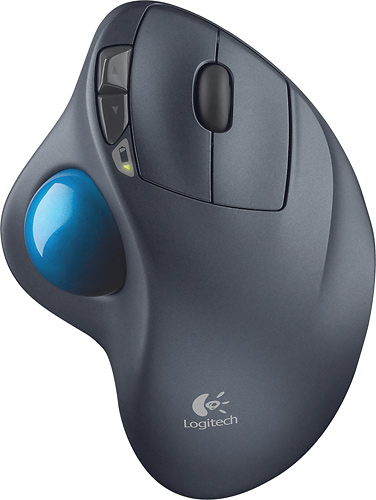
- Model:
- 910-001799
- |
- SKU:
- 1260761
Customer reviews
Rating 4.7 out of 5 stars with 6320 reviews
(6,320 customer reviews)Rating by feature
- Value4.6
Rating 4.6 out of 5 stars
- Quality4.7
Rating 4.7 out of 5 stars
- Ease of Use4.7
Rating 4.7 out of 5 stars
Customers are saying
Customers are impressed with the M570 Wireless Trackball Mouse's ease of use, wireless functionality, and ergonomic design. Many appreciate the trackball feature and report positive experiences with battery life and the mouse's size. While some users mention needing space and potential button issues, the overall feedback highlights the product's ease of use and comfort. The responsiveness and accuracy are also frequently praised.
This summary was generated by AI based on customer reviews.
- Pros mentioned:Ease of use
Rated 5 out of 5 stars
Best mouse ever
||Posted .This reviewer received promo considerations or sweepstakes entry for writing a review.Excellent mouse, love the mini unifier, and how portable it is. Great update to the older red ball version. Ball doesn't easily pop-up if dropped like with the red version. Fits hands a little nicer than the older version and much smoother scrolling and movements on screen. Love the battery indicator and the quick jump buttons. Overall a great buy, have one for each of my computers.
I would recommend this to a friend - Pros mentioned:Battery life, Ease of use
Rated 4 out of 5 stars
Fantastic Trackball
||Posted .This reviewer received promo considerations or sweepstakes entry for writing a review.This model is by far the best I have ever used.... easy to clean, fast reaction, smooth operation, long lasting battery..... Highly recommended!!!
I would recommend this to a friend - Pros mentioned:Wireless
Rated 5 out of 5 stars
2nd Best Trackball
||Posted .This reviewer received promo considerations or sweepstakes entry for writing a review.Years ago we had a Microsoft trackball device similar to this one with a red ball that was just a bit easier since it was placed on the top, but it's out of production and used ones still working sell for a high price. Fortunately, Logitech produces this one and it's wireless with a USB receiver that works fabulous. Would not want to be without it.
I would recommend this to a friend - Pros mentioned:Ease of useCons mentioned:Space
Rated 5 out of 5 stars
Excellent for smooth (and glass) desktops
||Posted .This reviewer received promo considerations or sweepstakes entry for writing a review.I have a glass slide-out keyboard drawer on my desk at home. It's too close to the return on the left and a bit narrower than I would have made it. I found myself creeping to the right to avoid bumping the return, creating an awkward angle for moving a conventional mouse. The space available for the optical mouse was small, so I found myself constantly lifting it and returning it to where I started to move the pointer farther. The Trackball Mouse sits in one place, doesn't move or require a lot of space to operate. It takes a little while to get comfortable using one's thumb to guide the pointer, but it feels natural pretty quickly. So, I guess one doesn't have to invent a better mousetrap... just a better mouse.
I would recommend this to a friend - Pros mentioned:Ease of use, Ergonomics
Rated 5 out of 5 stars
Works very well, may take some getting used to.
||Posted .This reviewer received promo considerations or sweepstakes entry for writing a review.I had not used a trackball device before this one, only computer mice, for moving the cursor around and selecting objects and text to move or modify. It took a little while even to realize that it wasn't necessary to move the trackball device at all. It can sit stationary while in use, 'cause the track ball itself does all the moving of the cursor. The buttons to the right of the ball fall under your index and middle finger, respectively, and function just as the left and right "click" functions do on a mouse. Once you get used to it's easy to use and I think it allows the operating hand to rest more than a mouse does. I haven't checked whether track balls are made for those who favor using their left hand to do these things, but I only saw the right-hand oriented one on display, so if it does exist the left-handed version must be a special order item.
I would recommend this to a friend Rated 4 out of 5 stars
Good Performing Trackball, Should be Bluetooth.
||Posted .This reviewer received promo considerations or sweepstakes entry for writing a review.This unit was purchased to replace a 10 year old Logitech Trackman Wheel, which is the usb-wired trackball that the M570 is based on. Considering the sheer number of hours the old unit was used, I can only hope this new wireless unit lasts at least half as long. Starting off, the M570 is slightly smaller in all dimensions than the old unit, and has more rounded edges. This makes it fall to hand slightly better, but Is taking some time to adapt. The marble is not as smooth/glossy as the old one, so it doesn't spin as freely, which makes it feel like junk has built up on the glides, so that is a negative. The extra two buttons have limited use on a mac and fall in a location where my finger used to click the older left button, so that's taking some getting used to. This is not a bluetooth device, which is a negative. It uses it's own radio transmitter that takes up a usb port. Luckily, it seems to work plugged into an apple wired keyboard so I'm not giving up any of the 4 ports on my Mac. The unit performs as a thumb-based trackball should, and being so similar to the trackman wheel is the main reason I chose it. There are very few good trackballs out there, and even fewer include a scroll wheel, which I considered a requirement. The unit was on sale at BestBuy.com for $20 off, and the local store matched that price without me having to mention it. I also got another $5 off thanks to their competitive price matching policy when I showed the same unit on sale from amazon. It was easy to find in my local BestBuy store, as it was with the desktop computer accessories on a logitech-branded display.
I would recommend this to a friend- Pros mentioned:Ease of use
Rated 5 out of 5 stars
Great mouse for everyone.
||Posted .This reviewer received promo considerations or sweepstakes entry for writing a review.Very easy to use and takes up very little space. Perfect for small desks.
I would recommend this to a friend - Pros mentioned:Ease of use
Rated 5 out of 5 stars
Great product
||Posted .This reviewer received promo considerations or sweepstakes entry for writing a review.Comfortable, easy to connect and use. Accurate movement
I would recommend this to a friend - Pros mentioned:Ergonomics
Rated 5 out of 5 stars
better than the original
||Posted .This reviewer received promo considerations or sweepstakes entry for writing a review.I have upgraded from a corded version of this same mouse and it seems like the cordless is more accurate and more responsive. I really like the ergonomic feel and ability to use this on any surface. Would buy again.
I would recommend this to a friend - Pros mentioned:Ease of use
Rated 5 out of 5 stars
Yes, it's a stationary mouse!
||Posted .This reviewer received promo considerations or sweepstakes entry for writing a review.It allows you to use your laptop anywhere with the convenience of using a mouse....without a desk or mouse pad. I don't know how I functioned so long without it. It's perfect for individuals with hand/arm/shoulder impairments as it requires only the use of your fingers to operate. Once you use this mouse, you will never go back to the traditional kind.
I would recommend this to a friend - Pros mentioned:Ease of use
Rated 5 out of 5 stars
Better than expected!
||Posted .This reviewer received promo considerations or sweepstakes entry for writing a review.I actually bought this item while in a rush thinking I had picked up a mouse. However, once home I gave it a try anyway and to my surprise I like it much better than a mouse. It works especially well when I'm on the couch using my TV for a monitor and no longer require a mousepad or room to move a mouse around. I'm not sure I'll go back to a mouse after this!
I would recommend this to a friend - Pros mentioned:Battery life, Ease of use
Rated 5 out of 5 stars
good mouse for tight spaces
||Posted .This reviewer received promo considerations or sweepstakes entry for writing a review.My keyboard and mouse sit in a pull out drawer in my desk; there isn't any room to move a mouse around. A trackball fits my use case perfectly. And, Logitech makes a solid mouse. The batteries last a long time before needing to be replaced. This one replaced a earlier Logitech unit that lasted 4 or 5 years before it began getting erratic. (I may need to buy another one when they go on sale to keep as a back up -- trackballs seem to get rarer and rarer.) You do need to pop the track ball out occasionally to clean out the "gunk" that builds up around the contact points. Otherwise the gunk begins to interfere with the smooth rolling of the ball. This can be done without any tools.
I would recommend this to a friend - Pros mentioned:Ease of use, Ergonomics
Rated 5 out of 5 stars
Let you thumb do the hard work
||Posted . Owned for 1 year when reviewed.This reviewer received promo considerations or sweepstakes entry for writing a review.I love the Logitech M570 Trackballs. This is my second one that I use on my All-In-One (I still use the other M570 with my laptop). Once you get used to scrolling with your thumb, you'll hate mice forever. There is no rolling around on the desk-- it just stays where you want it. I bought my old first Logitech corded trackball when i was playing the game Descent. i found it much easier than a mouse or even a joystick. My thumb's been happy ever since. Now that I'm using cordless versions, they're even more convenient.
I would recommend this to a friend - Pros mentioned:Battery life
Rated 5 out of 5 stars
Super Relief from Carpal Tunnel Symptoms
||Posted .This reviewer received promo considerations or sweepstakes entry for writing a review.The Logitech Unifying is great as I can use this device across multiple machine in different places. This is my second M570 Trackball. The other lasted over 6-years with 4-8 hours of constant use per day. Super long long battery life using only 1 AA battery even with my heavy usage.Very precise control for drawing & drafting as I am a heavy MS Visio user.
I would recommend this to a friend Rated 5 out of 5 stars
Great mouse
||Posted .This reviewer received promo considerations or sweepstakes entry for writing a review.I am on my computer probably 12+ hours a day and speed is important to me. This trackball mouse is the best solution I found and you never need to move it. You might need to get use to it (I didn't have to) but it's the best! It has the scroll wheel that can be pushed in and then you can scroll using the ball which I recently found out (I have bought 3 of these over past 7-8 years). Only negative I can say about it is the rubber feet in the bottom are stuck on, which is fine as they will stay on for a long time. But I move my laptop often and bring the mouse with it and have had one of them fall off so the grip on my glass table is not as good. Solution was to super glue it back on and problem solved. The last issue is if you have any dirt or oily fingers from eating or something, the ball won't spin as smooth and skip kinda.. NOT a BIG DEAL AT ALL as normally I do not eat and get stuff on the ball. The good news is it is very simple to pop the ball out and roll it in your shirt and then pop it back in and it is back to smooth scrolling :-). Love the mouse and just bought a second for my other computer . It comes with a gray warrantee, I think 2 or 3 years. Give it a try, I can't go without it :-)
I would recommend this to a friend- Pros mentioned:Ergonomics
Rated 4 out of 5 stars
Ball mouse
||Posted .This reviewer received promo considerations or sweepstakes entry for writing a review.Hard to get use to just moving a ball around. It is large for people with big hands and I don't get hand cramps from using it.
I would recommend this to a friend - Cons mentioned:Wrist pain
Rated 5 out of 5 stars
It is a great experience!
||Posted .This reviewer received promo considerations or sweepstakes entry for writing a review.This track ball mouse really help release the pain of my wrist. I am heavily using mouse in my work everyday, and that cause the pain of my wrist. When I switched to this track ball, it greatly reduced the movement comparing to the traditional mouse. It requires a few days to get used to this kind of mouse, but after that it is amazing!
I would recommend this to a friend - Pros mentioned:Battery life, Ease of use, Wireless
Rated 5 out of 5 stars
Great Trackball Mouse - No Wires!
||Posted .This reviewer received promo considerations or sweepstakes entry for writing a review.Love this wireless track-ball mouse. Comfortable hand position and easy to use. No wires is great keeping a cleaner work area that has limited space. Batteries are long lasting.
I would recommend this to a friend - Pros mentioned:Ease of use
Rated 5 out of 5 stars
Desperate!!!
||Posted . Owned for 3 weeks when reviewed.This reviewer received promo considerations or sweepstakes entry for writing a review.I am extremely happy with this purchase! After my surgery for Carpal Tunnel, the first thing I needed to change was my apple wireless mouse. I Never really paid any attention to it because I did have tendentious so no second thought to my mouse until one night after spending one hour on my computer my hand was in lots of pain. I told my son and he suggested this Wireless Trackball Mouse. I've been using it for about 4 months now, the palm of my hand rest comfortably on the arched mouse and no need to be moving it around because i use my thumb to move the cursor where i want it. GREAT FIT! LOVE IT!
I would recommend this to a friend - Pros mentioned:Battery life, Trackball
Rated 5 out of 5 stars
I've used roller balls before,This one is the best
||Posted .This reviewer received promo considerations or sweepstakes entry for writing a review.I bought this a little over a month ago, and it's the beat roller ball I've ever had (and I've had four before this one). I didn't have to do anything for set up, just plugged in the wireless receiver into the USB port and turned on the computer, and I was up and running. This ball is so smooth and easy to move, no sticking, no roughness, it just rolls along with very little effort from your thumb. The forward page and back page are on the left side of the main control buttons, the top button is the forward page and the bottom button is the back page, you no longer have to move your fingers to the left and then way over to the right , their right their together. So, far after 5 weeks I haven't had to change the batteries yet, and I use this 12 to 14 hours a day. I'll tell you if you buy this, you won't be sorry.
I would recommend this to a friend