Customer Ratings & Reviews
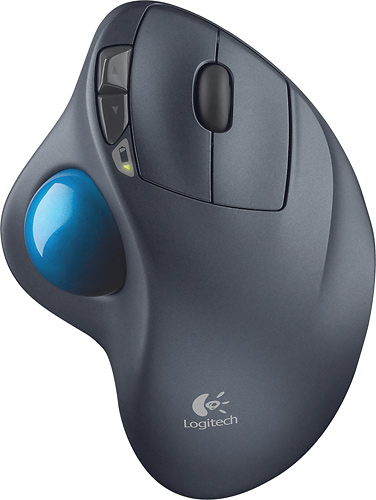
- Model:
- 910-001799
- |
- SKU:
- 1260761
Customer reviews
Rating 4.7 out of 5 stars with 6320 reviews
(6,320 customer reviews)Rating by feature
- Value4.6
Rating 4.6 out of 5 stars
- Quality4.7
Rating 4.7 out of 5 stars
- Ease of Use4.7
Rating 4.7 out of 5 stars
Customers are saying
Customers are impressed with the M570 Wireless Trackball Mouse's ease of use, wireless functionality, and ergonomic design. Many appreciate the trackball feature and report positive experiences with battery life and the mouse's size. While some users mention needing space and potential button issues, the overall feedback highlights the product's ease of use and comfort. The responsiveness and accuracy are also frequently praised.
This summary was generated by AI based on customer reviews.
- Pros mentioned:Ease of use
Rated 5 out of 5 stars
Good mouse for arthritic hands.
||Posted .This reviewer received promo considerations or sweepstakes entry for writing a review.I bought the trackball mouse to have better control on my laptop as I was having difficulty with the built in pad mouse on it. The trackball works better with my partially crippled hands.
I would recommend this to a friend - Pros mentioned:Ease of use
Rated 5 out of 5 stars
Great mouse
||Posted .This reviewer received promo considerations or sweepstakes entry for writing a review.I have been using this mouse for the last 2 years. This is an excellent mouse. Easy to use and very comfortable to use. The design completely eliminated all my wrist pain.
I would recommend this to a friend - Pros mentioned:Ease of use, Ergonomics
Rated 5 out of 5 stars
Nice Upgrade
||Posted .This reviewer received promo considerations or sweepstakes entry for writing a review.Lots of computer work editing library catalog records requires good ergonomics. This comfortable mouse with a trackball does the trick. A bit of a learning curve, but then smooth sailing. No setup problems, easy to adjust. I'd tried another less expensive mouse (another brand) touting its ergonomic design, but it was a bit clunky. Passed it off to a friend. On the other hand, I wasn't willing to spring for the $100+ E***** mouse!
I would recommend this to a friend - Pros mentioned:Ease of use
Rated 5 out of 5 stars
Works well for using on couch, in bed etc...
||Posted .This reviewer received promo considerations or sweepstakes entry for writing a review.I decided to get a trackball for my laptop while using it on the couch and in bed. I works perfectly for using a laptop where a mouse wouldn't work well since I do not have to move it around.
I would recommend this to a friend - Pros mentioned:Wireless
Rated 5 out of 5 stars
Greatest Inventio
||Posted .This reviewer received promo considerations or sweepstakes entry for writing a review.I love my wireless Logitech trackball mouse. Couldn't function without it. My hand and wrist don't hurt like the regular mouse that you move around. The only thing that moves is your thumb.
I would recommend this to a friend - Pros mentioned:Battery life
Rated 5 out of 5 stars
greatest trackball made.
||Posted .This reviewer received promo considerations or sweepstakes entry for writing a review.been using logitech trackball for years. wouldn't use any thing else.the shutoff saves battery life to , in most cases, a year. the uni connect is always positive and connects right away.
I would recommend this to a friend Rated 5 out of 5 stars
Great Trackball for Carpel Tunnel
||Posted . Owned for 1 week when reviewed.This reviewer received promo considerations or sweepstakes entry for writing a review.My wife has had surgery for Carpel Tunnel syndrome and she started using trackballs vs. mice for a few years. She wanted an inexpensive trackball that could be taken to school with her to leave on her desk and should it disappear, it wouldn't hurt the pocket book to purchase a new one. Does a great job, accurate, and feel really good in her hands.
I would recommend this to a friend- Pros mentioned:Ease of use
Rated 5 out of 5 stars
Logitech Trackball, the answer to replace touchpad
||Posted .This reviewer received promo considerations or sweepstakes entry for writing a review.I wanted to find an alternative to the touchpad, which is painfully slow and can be very touchy! The Logitech Trackball M570 is the solution, as it can be used on any surface, which is very handy with a laptop! It takes a little bit of getting used to, but is very fast and accurate, moving the cursor. with a slight movement of the thumb! I would never go back to a regular mouse or a touchpad
I would recommend this to a friend Rated 4 out of 5 stars
One of the best trackball options, with caveats
||Posted .This reviewer received promo considerations or sweepstakes entry for writing a review.If you're interested in a trackball, chances are that you're aware that you have to clean it out regularly, accept that fact, and are simply assessing your options. I don't like finger-rolled trackballs, so this model is about the only one readily available. I have had three total of this model, and currently actively own two--one for my home laptop ad the other for work. Overall, they work great and don't eat up batteries too badly--but I also turn mine off when not in use. The only problem I have experienced in only one of them was that it suddenly began double-clicking for every click. That was a pain, but I read about others who had this problem and found a workaround, which added a little more maintenance work. Ultimately, you have to decide whether the extra work a trackball represents (minimal in my mind) is offset by the benefits: You don't move your wrist, you can get more precise control over the pointer, and it will confuse the heck out of anyone who has never used one before!
I would recommend this to a friend- Pros mentioned:Wireless
Rated 5 out of 5 stars
Responsive easy to use trackball
||Posted .This reviewer received promo considerations or sweepstakes entry for writing a review.I have used a thumb style trackball for close to 10 years. Much prefer a trackball over a standard mouse. No moving around, sits in one place by the keyboard. Started out with a wired model of course. First time I looked at a wireless trackball, I was not impressed with the responsiveness of the mouse. But now with this model, it is as fast and responsive as any wired mouse. Love this trackball, and wireless lets my move it anywhere I want. This is great.
I would recommend this to a friend - Pros mentioned:Ergonomics
Rated 4 out of 5 stars
Love it. Hate it.
||Posted .This reviewer received promo considerations or sweepstakes entry for writing a review.I bought this trackball in an attempt to reduce the elbow pain I was suffering whenever I spent too much time doing mouse-intensive work (such as video editing). On the good side, the pain was pretty much gone after about 3 days of using this instead of a Logitech Revolution. It's fairly easy to get the hang of, and looks nice enough. OK - now for the frustrations, and there are quite a few. The ball is suspended on 3 plastic bearings, and these accumulate debris. If you don't remove the ball every few days and clean these out, the motion becomes stiff, sticky, and unusable. The pointer motion is quite precise in small areas, but if you need to move your pointer to the other side of the desktop on a dual monitor system, it takes about 3 motions where you roll the ball, then have to lift your thumb and roll again. Some better acceleration determination would be useful. Having used multi-button Logitech mice for a long time, this one feels like there are a shortage of extra buttons. I like to have back/forwards, and then program 2 buttons for copy/paste as well as the usual left/center/right clicks. An extra couple of button located below the ball where I can press them with my thumb would be great. Perhaps my biggest frustration is with the scroll wheel. It's like something from 20 years ago. Logitech's scroll wheels on just about every mouse over the last 10 years has allowed rapid scrolling. I don't understand why that can't be added to this trackball. I use that feature so frequently in spreadsheets / database management, that losing it is almost enough to endure the pain exacerbated by the old mouse. My solution has been that I generally have both on the desk - the trackball for most tasks, and an MX Revolution for the times when I really need the extra buttons and scroll features. Would I recommend it? Yes, if you have elbow pain that you need to resolve. No, if you want a productivity enhancing pointing device.
No, I would not recommend this to a friend Rated 5 out of 5 stars
This is the best trackball (mouse) on the market!
||Posted .This reviewer received promo considerations or sweepstakes entry for writing a review.I've used nothing but this Logitech trackball for the past 8 years. We were able to buy this for my grandson's first computer at a great price - as Best Buy matches prices. We love it!
I would recommend this to a friend- Pros mentioned:Ease of use
Rated 4 out of 5 stars
Still the best.
||Posted .This reviewer received promo considerations or sweepstakes entry for writing a review.This is still the best trackball I have used. If there is little space on your desk, this is for you. It is easy to get use to and very responsive. Fits your hand very well.
I would recommend this to a friend - Pros mentioned:Ease of use
Rated 5 out of 5 stars
You will never go back!
||Posted .This reviewer received promo considerations or sweepstakes entry for writing a review.I use this mouse for work and have fallen in love with it! I have not purchased my own for personal use. Once you get used to the trackball you will never want to use a normal mouse again.
I would recommend this to a friend - Pros mentioned:Ease of use
Rated 5 out of 5 stars
must have
||Posted .This reviewer received promo considerations or sweepstakes entry for writing a review.I love this mouse especially as I hate to fight with a mouse for me its easy to use my wife likes the original style comes with a unifying usb allowing you to connect up to 6 different items
I would recommend this to a friend - Pros mentioned:Ergonomics
Rated 4 out of 5 stars
Are you tired of chasing a mouse around?
||Posted .This reviewer received promo considerations or sweepstakes entry for writing a review.I liked my mouse but was thinking is there something more ergonomic than it was. I picked the trackball up for a try. At first I didn't care for it much but still stuck with it. Now it is second nature and I find that it does eliminate some of the arm stress that I had been experiencing.
I would recommend this to a friend - Pros mentioned:Ease of use, Wireless
Rated 5 out of 5 stars
My Favorite Mouse!
||Posted . Owned for less than 1 week when reviewed.This reviewer received promo considerations or sweepstakes entry for writing a review.This is my favorite mouse! I love the wireless option and once you become used to using the ball with your thumb, I don't think you will ever go back to a conventional mouse. This is the 3rd or 4th one that I have purchased. You came move the cursor around quickly with your thumb without having to run the mouse around on the desk.
I would recommend this to a friend - Pros mentioned:Wireless
Rated 5 out of 5 stars
Best ergonomic mouse
||Posted .This reviewer received promo considerations or sweepstakes entry for writing a review.Have used these Logitech thumb 'mice' for several years - saves my shoulder/arm/wrist. Just purchased this wireless version to go with my laptop. Very happy with it.
I would recommend this to a friend - Pros mentioned:Ease of use
Rated 5 out of 5 stars
Carpal tunnel free mouse!
||Posted .This reviewer received promo considerations or sweepstakes entry for writing a review.I started a new desk job, sitting in front of a computer and processing and not really moving much. This job was new for me since my previous job was a receptionist at a vet clinic that required me to get up and down and moving all the time. I would be at a computer but never same position with no movement, not even a phone to have to pick up. I was enjoying not having to be on my feet for a change but something started to bug me, I was getting very painful in my right arm. So painful after a few weeks at this job I couldn't sleep because my arm was so painfully numb! Over the weekend the pain would go away, so I knew it was from work. I soon realized that I hovered my fingers while working on my cheap work mouse that they supplied us. Imagine lifting your pointer finger for 12 hours a day in a statue-like position day in and out. So once I realized it was my mouse that was causing the pain I went out to get a new one. I tested the shape and ease of use on EVERY mouse I could...then I found it! This mouse fits your hands natural position, on its SIDE!! The buttons aren't super sensitive so I can rest my fingers on the buttons without clicking on things I don't want to. I now don't have to keep my arm tense from moving all the time because the ball is my pointer, not my hand movement! Ever since I got the mouse, ALL the pain in my arm went away and has not come back since!!! I now understood how people got carpal tunnel syndrome, and what a horrible thing it is! If you have pain in your arm like I did, this is the perfect mouse for you!!! Its the answer I was looking for and worth every penny!!!! Its a little more than most but its a small price to pay instead of future wrist surgeries from getting carpal tunnel!!!!!
I would recommend this to a friend - Pros mentioned:Wireless
Rated 5 out of 5 stars
Best mouse server
||Posted .This reviewer received promo considerations or sweepstakes entry for writing a review.This trackball is the best mouse you will run across! I have been using this type for about 10 years. I just bought my grandson and granddaughter one for Christmas.
I would recommend this to a friend