Customer Ratings & Reviews
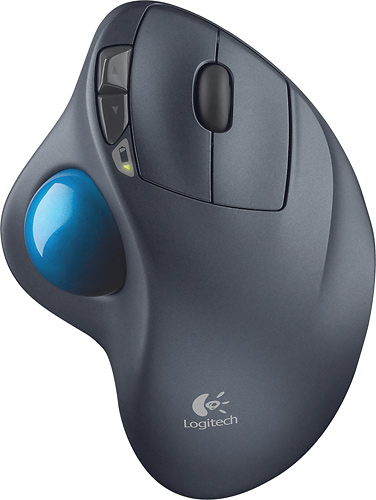
- Model:
- 910-001799
- |
- SKU:
- 1260761
Customer reviews
Rating 4.7 out of 5 stars with 6320 reviews
(6,320 customer reviews)Rating by feature
- Value4.6
Rating 4.6 out of 5 stars
- Quality4.7
Rating 4.7 out of 5 stars
- Ease of Use4.7
Rating 4.7 out of 5 stars
Customers are saying
Customers are impressed with the M570 Wireless Trackball Mouse's ease of use, wireless functionality, and ergonomic design. Many appreciate the trackball feature and report positive experiences with battery life and the mouse's size. While some users mention needing space and potential button issues, the overall feedback highlights the product's ease of use and comfort. The responsiveness and accuracy are also frequently praised.
This summary was generated by AI based on customer reviews.
- Pros mentioned:Battery life, Ease of use
Rated 5 out of 5 stars
THUMBS up
||Posted .This reviewer received promo considerations or sweepstakes entry for writing a review.I've used Logitech trackballs for years now, and this wireless version is by far the best. My recent purchase was for my home PC, having been using one with my laptop for years. It's replacing a corded version - but the battery life of the cordless is so good now it's worth losing the cord. The size is perfect to rest my whole hand on, and the only maintenance is to occasionally remove the ball and clean the tiny ball bearings inside. Overall excellent product.
I would recommend this to a friend - Pros mentioned:Battery lifeCons mentioned:Button quality
Rated 4 out of 5 stars
Smooth and comfortable trackball
||Posted .This reviewer received promo considerations or sweepstakes entry for writing a review.I've been using trackballs almost since I started using computers. This one is definitely the best to date. It's a huge leap forward in comfort over the previous generation of trackballs from Logitech. I own quite a few of these, one for every computer I have and I will say they last a good while. I've only retired one that I was using for probably around 2 years (can't remember but it was the very first one I bought when this model first released). I only retired it because the buttons were getting a little squishy instead of having a firm click. It is still 100% usable though as I have it still as a backup for my servers when I need to access them directly. The tracking is very precise. I even prefer this trackball over gaming mice when playing games. And owning probably around 8 of these currently I think I can safely say the quality control is pretty good because I haven't had any with any defects. The battery life is amazing, a single AA battery lasts for over a year! I really can only think of two downsides to this trackball. One, it collects a little more lint and such than a standard mouse. I'm guessing this is due to the trackball being in the air so dust falls down into the crack easier, and also it picks up small amounts from your thumb when using it. That is ok though, because the ball is very easy to pop out and clean. The other downside, and this one is a little more annoying, is that it uses Logitechs proprietary wireless dongle. I really wish they would have simply made this thing bluetooth even if it would have sacrificed some battery life. It would be much more convenient with the majority of laptops these days coming with bluetooth, to not have to use up a USB slot for the dongle. It would also make it much easier to use with tablets that might only have one or no USB slot.
I would recommend this to a friend - Pros mentioned:Ergonomics, Wireless
Rated 4 out of 5 stars
Cool Tracking Device - Maybe not be for everyone
||Posted .This reviewer received promo considerations or sweepstakes entry for writing a review.I used a track ball pointing device 15 years ago and remember them being useful for most applications. I also remember them collecting dust on the rollers fairly quick which caused them to become a pain to clean and maintain. Additionally the oil from my fingers would get all over the ball and that would cause problems with accuracy of the pointer as well. Fast forward to today... I felt a bit of nostalgia buying this device. The main difference here is the roller-ball is operated by the thumb versus your index & middle finger for instance so that takes some getting used to, especially if you're transitioning from a traditional mouse. The plus though, is that your wrist gets a break (or a nice rest rather) and that could help those who tend to suffer from carpal tunnel. This device is wireless which is pretty great for those of us who despise wires snaking everywhere. The smal low profilel usb dongle is a Logitech Unifying one so you can pair multiple logitech unifying compatible devices to it. The one con I have with this device so far is (and it may just be a personal thing) that it's somewhat difficult to get this device to be in the most natural angle without having to keep shifting it around. Sometimes I feel like my thumb is going to cramp up and that might just be because I'm not used to this device yet, or maybe I have an unusually long thumb? I don't know, but I hope that feeling will go away eventually! I am a motion graphics designer and video editor and this device works fairly well... again, it may take some getting used to so if you're in the middle of a big project with a tight deadline, you might want to stick with your old mouse... or if you're daring, go for it and give it a try. You can always switch back to your preferred method of pointing at things on the screen. I took away 1 star because I think there is definitely some room for improvement in the ergonomics dept. (maybe moving the ball more to the center). The learning curve might be really awkward for some people especially if they've never used a track-ball before. Otherwise, this device works well as an alternate pointing device to your mouse or a trackpad. I would recommend this device to anyone who might be suffering from carpal tunnel or those who just like playing will cool gadgets. This will definitely look cool on your desk.
I would recommend this to a friend - Pros mentioned:Battery life, Ease of use
Rated 4 out of 5 stars
Solid Quality Trackball, Proprietary Interface
||Posted .This reviewer received promo considerations or sweepstakes entry for writing a review.This is basically the old trackman wheel with a radio interface instead of a hardline usb cable. Don't think that you are freeing a USB port by switching, you now have to use Logitech's proprietary radio interface which means plugging a USB dongle into a port. Since Bluetooth is so common these days, there is no reason Logitech couldn't have released a universal bluetooth device. Usability, this is an excellent thumb-operated trackball with 5 user programmable buttons and a scroll wheel (which is button #5 as well.) Battery life seems to be decent, I turn the trackball off each night but leave it on during the day when the computer is turned on (8-10 hours/day.) Logitech's software is okay on a Mac OS X system, and is required to program the 3 extra buttons. Without their app, you still have left/right click buttons and the scroll wheel; but not the scroll wheel button or the two small forward/back buttons next to the left click button. I've noticed that this unit collects dust on the rollers for the trackball much faster than the old wired unit, and those rollers are plastic instead of metal, so I am cleaning it more carefully and often than in the past.
I would recommend this to a friend - Pros mentioned:Ease of use
Rated 5 out of 5 stars
The Best Mouse There Is
||Posted .This reviewer received promo considerations or sweepstakes entry for writing a review.I have used a Trackball for several years now; starting with a hardwired version and now wireless. Both operate the same. The advantage is not having to move the traditional mouse all over the place and finding a surface that it works on. It takes a bit of getting used to initially since there is more thumb action required rather than wrist action. I think it is more accurate than a traditional mouse. Once you get used to the Trackball (5 minutes) you won't go back. Since it is a stationary design I can put it anywhere on my desk--if I lean forward to squint at the screen I just plop it further back on my desktop towards the screen, if I lean back from the screen then I just pull it to the edge of the desk (or even put it on my leg)--I don't have to worry about a mouse pad! The 2 negatives is (1) the life-span--about 2-3 years--the little nubs that the ball rotate on tend to wear down and make the Trackball a little herky-jerky and (2) you need to frequently pop out the ball and clean those little nubs from the accumulated dust bunny buildup (it's easy to do and only takes a second). The longevity thing is not a problem for me because I love the overall performance of the Trackball.
I would recommend this to a friend - Pros mentioned:Battery life, Ease of use
Rated 5 out of 5 stars
Logitech TrakBall (wireless)
||Posted .This reviewer received promo considerations or sweepstakes entry for writing a review.I was very skeptical about this purchase. I had always heard that battery operated pointer devices ran thru batteries like mad. I am incredibly pleased to report that this is NOT the case. It seems to be very economical with battery usage and I anticipate a long time yet before a cell change is necessary. It works wonderful, just like my old wired thumb-operated trakball. I despise using any kind of a conventional mouse so this is a great alternative. The thumb control is very precise as you might imagine. I hope they never go out of style! Also, BestBuy was very reasonable on the purchase price... one reason I risked the purchase in the first place. Don"t hesitate to buy this one if you are a trakball user or just a mouse user who wants better control.
I would recommend this to a friend - Pros mentioned:Ease of use, Ergonomics, Wireless
Rated 5 out of 5 stars
Excellent for track ball users
||Posted .This reviewer received promo considerations or sweepstakes entry for writing a review.I have always used a wired track ball instead of a mouse. The Logitech wireless track ball is awesome. Ergonomically pleasing, no wires and very portable. I give it 5 stars. Best track ball yet.
I would recommend this to a friend - Pros mentioned:Ease of use, Ergonomics
Rated 5 out of 5 stars
Great Trackball Mouse
||Posted .This reviewer received promo considerations or sweepstakes entry for writing a review.I have three of these trackballs and have never had a problem. They are easy to use and are great for tight spaces where you don't have much room to move a mouse. It's also easy on the arm.
I would recommend this to a friend - Pros mentioned:Battery life, Ease of use
Rated 5 out of 5 stars
First Trackball Mouse
||Posted .This reviewer received promo considerations or sweepstakes entry for writing a review.Not the most experienced with these but it's easy to use, even for a beginner like me. Picked this up to ease tension for my wrists while also keeping me awake at work lol. It's fun to move the ball around, it gives a different experience. I recommend cleaning the ball at least once a week to keep it rolling smoothly. I heard some people play games w/ this mouse, so I thought I'd give it a try. It's hard but it's definitely possible. I don't recommend using it for FPS games. Overall, I enjoy using this mouse. One month in and the OEM battery still working fine. (make sure to turn off the mouse when AFK)
I would recommend this to a friend - Pros mentioned:Battery life, Ease of use
Rated 5 out of 5 stars
Great IR mouse
||Posted .This reviewer received promo considerations or sweepstakes entry for writing a review.Great IR mouse. Great price. I've used several different types of IR mouse brands and models but this one is probably the best I've found, especially at this price. The ball at the thumb is a plus for me, with the wheel between the left and right buttons is so easy to navigate. We have several of these--one for each of our computers and laptops. They are durable. They take a four foot dive onto a ceramic floor often and keep on working like nothing happened (ok, maybe I have to chase a little ball every once in a while--it is easy enough just to pop back in). The battery (AA) lasts a very long time. It isn't a gaming mouse, but it a very good working mouse. We love ours.
I would recommend this to a friend - Pros mentioned:Ease of use, Trackball, WirelessCons mentioned:Wrist pain
Rated 5 out of 5 stars
Better than a mouse
||Posted .This reviewer received promo considerations or sweepstakes entry for writing a review.I had been using a wireless mouse for a number of years and wanted to change to a trackball. I looked on the Best Buy website to see what trackballs were available and I found that this Logitech trackball was on sale. So I bought it. I like the fact that you do not have to move the trackball around to move the cursor on the screen. This prevents getting a sore wrist from moving a mouse.
I would recommend this to a friend - Pros mentioned:Ease of use, Ergonomics
Rated 5 out of 5 stars
No tennis elbow with this mouse
||Posted .This reviewer received promo considerations or sweepstakes entry for writing a review.I have used this style of mouse for years. First got when my office desk wasn't very ergonomic and my elbow started aching from the angle I had to keep moving my old fashion mouse around the pad. I read some mouse (mice?) reviews and bought my first trackball mouse. Miraculously my elbow really did quit hurting - eliminating the whole arm movement was AWESOME! Had to leave my old trackball behind when I changed job but bought this one for my new job (so I can take it with me if I leave) Highly recommend. BTW - you have to learn finger movements on the trackball but it's a quick learning curve.
I would recommend this to a friend - Pros mentioned:Ease of use
Rated 5 out of 5 stars
Great mouse for little desktop space
||Posted .This reviewer received promo considerations or sweepstakes entry for writing a review.I've used a roller mouse for years although not for everyone my reasoning was because I had limited desktop space and didn't want to have to deal with the constant movement of the mouse. Ever since finding the roller ball mouse I've never gone back to a basic mouse. I've even bought one for my desk at work even though I have a plenty of space. It's easy to take care of, works great for those with limited space and has great feel and action. It's precise for the everyday use even for FPS games.
I would recommend this to a friend - Pros mentioned:Ease of useCons mentioned:Space
Rated 4 out of 5 stars
Get It
||Posted . Owned for 3 weeks when reviewed.This reviewer received promo considerations or sweepstakes entry for writing a review.I needed a trackball as I didnt have space for a mouse. This one does the trick. It does take a little getting used to and I do have to scroll quite a bit when going from one screen to the next but it is responsive and accurate. The range is pretty good as well as I have the laptop about 6 feet from where the trackball is sitting. Decent price and feels good.
I would recommend this to a friend - Pros mentioned:Battery life, Ergonomics
Rated 4 out of 5 stars
Nice standard features, though not a mouse
||Posted .This reviewer received promo considerations or sweepstakes entry for writing a review.The M570 feels quite natural with my hand at rest upon it though overall I am unsure of the best ergonomic use. My only serious complaint for this device is that it doesn't feel so natural for click-and-drag. Admittedly, I should be using the scroll click for most such operations (drag-to-scroll). I am torn deciding between resting my hand or perching my hand like a spider. I think I have some thumb fatigue, but I don't know if that's from this device or playing games on my smartphone. I must admit when I purchased this product I thought it was a mouse with ball option (minor complaint 1). Actually it's just a trackball with mouse-like shape, buttons and ergonomics. This is the first trackball option which I enjoyed that was greater than the size of a grape and felt comfortable to me. For small desk spaces or as a second mouse peripheral, I recommend the M570. Personally I use this trackball between my mouse and keyboard. I can place it right next to the keyboard due to it's stationary nature. I trust the battery life and the Logitech Unifying receiver with all Logitech mouse accessories — in previous mouse devices, the batteries have lasted 6 months to a year easily and the Unifying receiver provides a one-computer-to-many-device connection. As mentioned on Wikipedia, using this Logitech Unifying receiver for a many-computer-to-one-device connection or a many-to-many connection is not practical (minor complaint 2). http://en.wikipedia.org/wiki/Logitech_Unifying_receiver In all, I am quite pleased with this purchase. Aside: I have not had a good experience with battery life or wireless connection for any Logitech, Microsoft or cheaper wireless full-size keyboards — malfunction and/or eat batteries; seems they were all garbage within a year or so.
I would recommend this to a friend - Pros mentioned:Ease of use
Rated 5 out of 5 stars
I hate mice. I love this trackball
||Posted .This reviewer received promo considerations or sweepstakes entry for writing a review.This is my first trackball mouse, and I really like it. I love that it just sits in one spot and I don't have to worry about it sliding around and moving on the screen. The responsiveness is great, no lag. It does take a little bit to get used to the trackball, and maybe adjusting the responsiveness, but I think it's worth it. The feel is great, and I love the extra side buttons. Overall it's well designed and functions perfectly.
I would recommend this to a friend - Pros mentioned:Battery life, Ergonomics, Trackball
Rated 5 out of 5 stars
90% as good as the MX Ergo for half the price
||Posted . Owned for 2 weeks when reviewed.This reviewer received promo considerations or sweepstakes entry for writing a review.This trackball is 90+% as good as the MX Ergo that Logitech sells all day long for twice the price as this trackball. I have come back to trackballs after some time away from them, as I've started to get some RSI-type pain in my wrist. To try to keep my wrists from getting worse, I've invested in a trackball and have been more concerned with ergonomics overall. I use the MX Ergo at work (work paid for it) and this M570 at home (I paid for it). The MX Ergo has some advantages like Bluetooth support (helpful for laptops with limited USB ports for the dongle) and adjustable angled foot, but for half the price I'd buy the M570 all day long. Battery life is so robust with the M570, I don't count the rechargeable battery in the MX as a plus - I've had to charge my MX at work already, while my M570 at home shows full charge even with still using the included batteries.
I would recommend this to a friend - Pros mentioned:Battery lifeCons mentioned:Space
Rated 5 out of 5 stars
Excelent mouse for office work and tight spaces
||Posted .This reviewer received promo considerations or sweepstakes entry for writing a review.I use this for work. I have to visit several locations through out the week and sometimes I have to work in a limited space so cant use a regular mice and this is PERFECT for it. I would not recommend it for gaming but for office work is great!! Battery life has been great since it seems to go into sleep mode if you dont turn it off - I've left it on for days already and the included AA battery is still going strong.
I would recommend this to a friend - Pros mentioned:Ease of use, Ergonomics
Rated 5 out of 5 stars
Best Trackball I've ever used....
||Posted .This reviewer received promo considerations or sweepstakes entry for writing a review.I bought this to replace the same model (which, after years of abuse...finally went on the shelf). After 20 yrs. of heavy PC use, I have used many different models and/or brands, and the smooth action, durability and ergonomics of the M570 are unmatched. New trackball users may have to get used to the action, but you're shoulder, elbow and wrist will thank you.
I would recommend this to a friend - Pros mentioned:Battery life, Wireless
Rated 5 out of 5 stars
Almost Identical to its wired counterpart
||Posted .This reviewer received promo considerations or sweepstakes entry for writing a review.I've had the Trackball for about a month now, but I've been using Logitech Trackman Trackball mice for about 10 years. The buttons on the wired mouse were starting to double click, so I figured it would be time to invest in a new one and take the plunge into wireless, Bluetooth-connected devices for my PC. It's been wonderful. The single AA battery has showed no signs of weakening. The buttons respond, and the scrolling is as smooth at my wired mouse. It takes a while to get used to having "Back" and "Forward" browsing buttons, but they're a nice luxury when you do get used to using them. The responsiveness is instant. The ball has stayed clean and hasn't collected any desk junk or grease, or whatever it is that used to accumulate on my old mouses' ball contact points. It's also really nice to be able to lean back in my chair and surf the internet with the mouse on my lap, or chair arm, something that was a hassle with the wired mouse and its cord. Lazy, yes. Convenient, definitely!
I would recommend this to a friend