Customer Ratings & Reviews




- Model:
- 920-004536
- SKU:
- 11066760
Rating by feature
- Value
Rating 4.7 out of 5 stars
- Quality
Rating 4.5 out of 5 stars
- Ease of Use
Rating 4.7 out of 5 stars
Customers are saying
Customers have good things to say about the product's ease of use, keyboard quality, and wireless functionality. Many also appreciate its excellent price and long battery life, noting its convenient size. The only minor concern raised by a small number of users is occasional lag.
This summary was generated by AI based on customer reviews.
Not impressed
||Posted . Owned for 1 week when reviewed.This reviewer received promo considerations or sweepstakes entry for writing a review.The design looks fine but this combo did not ship with the usb receiver so cannot use.
No, I would not recommend this to a friendBrand response from Logitech
Posted .Hello, I am so sorry you were not able to locate the USB. We sometimes hide it in the bottom of the mouse where the battery compartment is for safe keeping. If you are still unable to find it, let us get that replaced for you! This combo does come with a 3 year warranty. Here is the link to file a claim for a new receiver: https://support.logi.com/hc/en-us/articles/360024926554-Warranty-Wireless-Combo-MK270. I hope this helps! Thank you for taking the time to write this review, we appreciate the feedback.
A PIECE OF JUNK.
||Posted . Owned for 3 weeks when reviewed.This reviewer received promo considerations or sweepstakes entry for writing a review.Purchase two of these keyboards within two months at two difference stores.Piece of junk.
No, I would not recommend this to a friendBrand response from Logitech
Posted .Hi redtop, thank you for your feedback! This should not be the case, as the MK270 is backed with a 3-year limited hardware warranty. For support, please refer to: https://support.logi.com/hc/en-us/articles/360026084174 - Will, Logitech.
Totally useless
||Posted . Owned for less than 1 week when reviewed.This reviewer received promo considerations or sweepstakes entry for writing a review.Shipped with out a USB dongle to connect to my keyboard.
No, I would not recommend this to a friendBrand response from Logitech
Posted .Hello, Glen! I'm sorry to hear about your experience with the MK270 combo! If you haven't already, make sure to check inside of the battery compartments of both the keyboard and mouse. If you have already done this, I would then recommend reaching out to our support team here https://support.logi.com/hc/en-us/requests/new?ticket_form_id=360000621393 to file a warranty claim. The MK270 has a 3-year limited hardware warranty. Thank you for the feedback about the USB receiver! I will be passing this along. - Maggie from Logitech
Not great
||Posted . Owned for 1 month when reviewed.This reviewer received promo considerations or sweepstakes entry for writing a review.Not great, glitchy, better ones out there for sure, beat buy changed it no problem
I would recommend this to a friendBrand response from Logitech
Posted .Hey Momo, sorry to hear that you are unsatisfied with the MK270 Wireless Keyboard and Mouse. We are always looking for ways to improve our products, so we appreciate your review. It is always great to ensure your MK270 is cleaned, properly connected, and closer to the USB receiver to ensure connectivity is strong. Logitech has so many great products catered to it's customers that i'm sure you'll find the right fit! If you ever have additional feedback or questions regarding Logitech products, feel free to visit https://support.logi.com/hc/en-us Thanks, -Logitech
- Pros mentioned:Keyboard quality, Wireless
Awesome keyboard
Posted .This reviewer received promo considerations or sweepstakes entry for writing a review.This keyboard is so nice and smooth. i love that the keys are not obnoxiously loud when i type and that its simple with no wires to connect to. the mouse is ok, i prefer to use my other wireless mouse so i just use the keyboard with the usb connected to the computer and turn off the original mouse it comes with.
I would recommend this to a friendBrand response from Logitech
Posted .We're thrilled to hear you're enjoying your Logitech MK270 Wireless Keyboard! It's fantastic to know that the quiet, smooth keys and wireless freedom are making your typing experience so positive. We designed it for exactly that kind of simplicity and comfort.

Not worth it
||Posted . Owned for 2 months when reviewed.This reviewer received promo considerations or sweepstakes entry for writing a review.I do not like this keyboard. It's cheap and doesn't always function properly.
No, I would not recommend this to a friendBrand response from Logitech
Posted .Hello MammaBearto4! I'm sorry to hear about your experience with the MK270 combo. I would recommend reaching out to our support team here https://support.logi.com/hc/en-us/requests/new?ticket_form_id=360000621393 to submit a warranty claim, if the keyboard isn't functioning properly. I will definitely be passing along your feedback. Thank you for the review! - Maggie from Logitech
Stop working suddey
||Posted . Owned for 7 months when reviewed.This reviewer received promo considerations or sweepstakes entry for writing a review.Only use for a few times and stop working after 1 month
No, I would not recommend this to a friendBrand response from Logitech
Posted .Hello Wendy,
I am sorry that you are having issues with your new Logitech MK270. I recommend you update the firmware on the Logitech website, and if the problem persists, don't hesitate to contact the Logitech support team for personalized assistance. Logitech appreciates your product review. - Leo from Logitech
Wear issues
||Posted . Owned for 1 year when reviewed.This reviewer received promo considerations or sweepstakes entry for writing a review.Keyboard did it wear well. I don’t recommend....
No, I would not recommend this to a friendBrand response from Logitech
Posted .Hey there Teleworker, I'm sorry to hear that you had some issues with your MK270. If you have any specific issues, please be aware that the device has a 1 year Limited hardware warranty, and for more information you should visit our support site. -Weston from Logitech
Two keys not working
||Posted . Owned for 1 month when reviewed.This reviewer received promo considerations or sweepstakes entry for writing a review.Have to return it. Professor says that two keys are not working.
No, I would not recommend this to a friendBrand response from Logitech
Posted .Hello, I am so sorry to hear that some keys were not working. Next time, let us replace it as this comes with a 3 year warranty through Logitech. You can locate any warranty info for our devices on the device's support page on the Logitech site. Thank you for taking the time to write this review, we appreciate the feedback.
-Danielle from Logitech
Doesn't Work Well With HP
||Posted . Owned for 3 weeks when reviewed.This reviewer received promo considerations or sweepstakes entry for writing a review.Does not work well with my HP. Had to go back to wired mouse and keyboard
No, I would not recommend this to a friendBrand response from Logitech
Posted .Hello Bolivar80,
Thank you for choosing Logitech and for taking the time to review the MK270 mouse and keyboard combo. I am sorry that you have experienced issues with your combo not working well with your HP computer; I would like to help. Please check that your computer has the latest software updates and if you have not already done so, I recommend downloading the Logitech “SetPoint” software for customization and updates. I also recommend running the “Connection Utility” software where you can check for Firmware updates. If you are still experiencing issues after these steps and restarting your computer, please use the “Connection Utility” software to reestablish the connection between the USB Nano receiver with the mouse and keyboard. I hope these suggestions will resolve the issue that you experienced. These downloads and further support are available on the Logitech support page. I have attached a link below. For further support, please visit the Logitech website.
Best regards,
John at Logitech
https://support.logi.com/hc/en-us/articles/360024158874--Getting-Started-Wireless-Combo-MK270
It stop working
||Posted . Owned for 1 month when reviewed.This reviewer received promo considerations or sweepstakes entry for writing a review.I bought the combo 10/10/19 it stopped working 11/11/19 now im upset there were no neglect
No, I would not recommend this to a friendYou get what you pay for
||Posted . Owned for 3 weeks when reviewed.This reviewer received promo considerations or sweepstakes entry for writing a review.The shift key gets stuck and number 8 key sometimes does not work.
No, I would not recommend this to a friendBrand response from Logitech
Posted .HiDatagirl,
Thank you for your feedback. Sorry you are having issues with your keyboard. Here are possible solutions:
Before you clean your device: Unplug it from your computer and make sure it’s turned off. Remove the batteries. Keep liquids away from your device, and don’t use solvents or abrasives. Use compressed air to remove any loose debris and dust between the keys. To clean the keys, use water to lightly moisten a soft, lint-free cloth and gently wipe down the keys. If you need further assistance, please contact Logitech support on the website.
LaShonda from Logitech
To bad
||Posted . Owned for 3 months when reviewed.This reviewer received promo considerations or sweepstakes entry for writing a review.DONT BUY IT KWY STOP WORKING IN MIDDLE PF SOMWTHING THET WORK AGAIN
No, I would not recommend this to a friendBrand response from Logitech
Posted .Hello Chik0. I'm sorry to hear that you're unhappy with the MK270 mouse and keyboard combo. Please visit our support site with questions and issues: support.logi.com
-Charlton at Logitech
Product came without usb connector for keyboard
||Posted . Owned for 3 weeks when reviewed.This reviewer received promo considerations or sweepstakes entry for writing a review.Product cane without connector found inside mouse. I have another Logitech and it works fine
No, I would not recommend this to a friendUnfortunate.
||Posted . Owned for less than 1 week when reviewed.This reviewer received promo considerations or sweepstakes entry for writing a review.Sent without the USB to link to the Computer. Unable to use at all.
No, I would not recommend this to a friendBrand response from Logitech
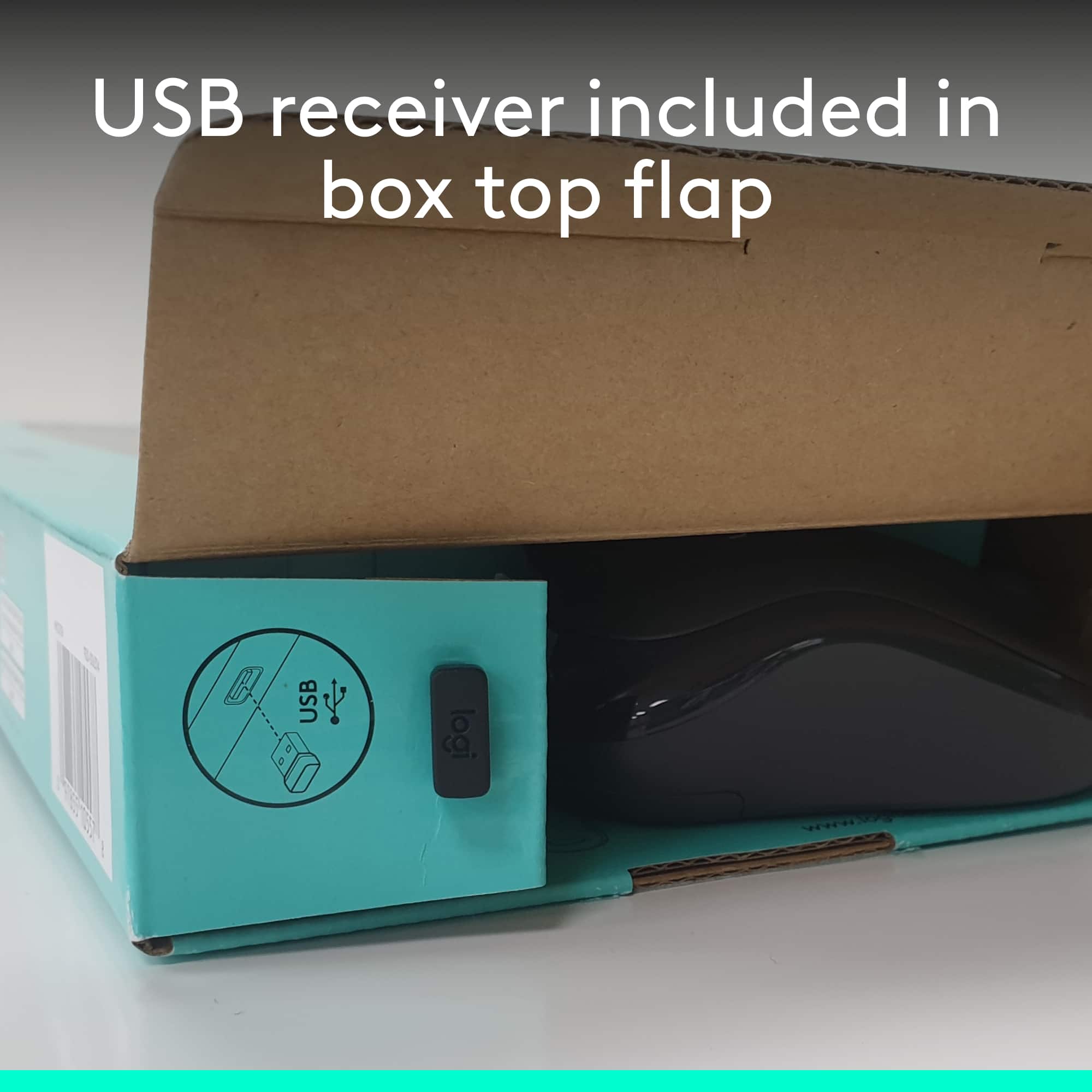
Posted .Hello and I apologize that your mk270 was missing the dongle when you received it. It's normally located in a small slot in the packaging at one end of the box, so I would recommend if you still have the box checking the other side. If it's still missing, please feel free to contact us via our support site for assistance with possibly receiving a new dongle.
Not worth the headache
||Posted . Owned for 5 months when reviewed.This reviewer received promo considerations or sweepstakes entry for writing a review.Long delays typing and appearing on the screen. The mouse only worked half the time.
No, I would not recommend this to a friendNon-Delivery
||Posted . Owned for 3 weeks when reviewed.This reviewer received promo considerations or sweepstakes entry for writing a review.As of April 10, 2020 (20 days from purchase date), product has not been delivered.
No, I would not recommend this to a friendBrand response from Logitech
Posted .Hi! Sorry to see you're having shipping related issues with your MK270. Please contact Best Buy to find out why you haven't received your shipment. Also, Ii you have any questions, please check out the Logitech support page at https://support.logi.com/hc/en-us/articles/360024158874.
Keyboard
||Posted . Owned for 1 month when reviewed.This reviewer received promo considerations or sweepstakes entry for writing a review.Did not use because of limited inputs on TV. Make sure yours has enough.
No, I would not recommend this to a friendBrand response from Logitech
Posted .Hi Marty, So sorry to hear about the issue you're having with the MK270 Wireless Keyboard and Mouse. You mentioned that you didn't use the MK270 because of limited inputs on your TV? This is made for Windows-based PC's and Mac OS---it won't work with your TV or won't function fully. Logitech does have the K600 which is designed to be used with Smart TV's. To see if your TV will be compatible, here's a link for a Compatibility Check https://www.logitech.com/en-us/promo/k600-tv/smart-tv-compatibility-checker.html. Hope you found this useful and that it finds you doing well. Thank you for being a Logitech customer. - Richard from Logitech
W and E keys not working.
||Posted . Owned for 2 months when reviewed.This reviewer received promo considerations or sweepstakes entry for writing a review.Changed batteries and it still isn't working. Bought it in Jan. Not Good.
No, I would not recommend this to a friendLogitech - M270 Wireless Keyboard and Mouse - Blac
||Posted . Owned for 2 weeks when reviewed.This reviewer received promo considerations or sweepstakes entry for writing a review.Would not recommend this product. The zero key would always stick.
No, I would not recommend this to a friendBrand response from Logitech
Posted .Hi Keyboard, thank you for your feedback! This should not be the case, as the MK270 is backed with a 3-year limited hardware warranty. For support, please refer to: https://support.logi.com/hc/en-us/articles/360024158874 - Will, Logitech.