Customer Ratings & Reviews
![esc ! i 1 tab caps lock shift F1 2 Q A aas E4 F3 F2 $ % # 4 5 3 E R W F S D X C Z FS A 6 T G V F6 & 7 Y H B 17 * 8 U J N logi HI FI0 P9 FB ) - ( - 9 0 o P I K L > < M I P + = { [ A : I : ? I alt cmd3 2 0 3 10% 1 F12 page home up backspace ins page I delete end down } ] / enter shift ctrl fn opt^= Q I * / clear 8 9 + 7 pg up home 5 6 4 , 4 2 3 enter 1 dn pg end = 0 del ins ctrl start opt alt cmd](https://pisces.bbystatic.com/image2/BestBuy_US/images/products/6571/6571662_sd.jpg)



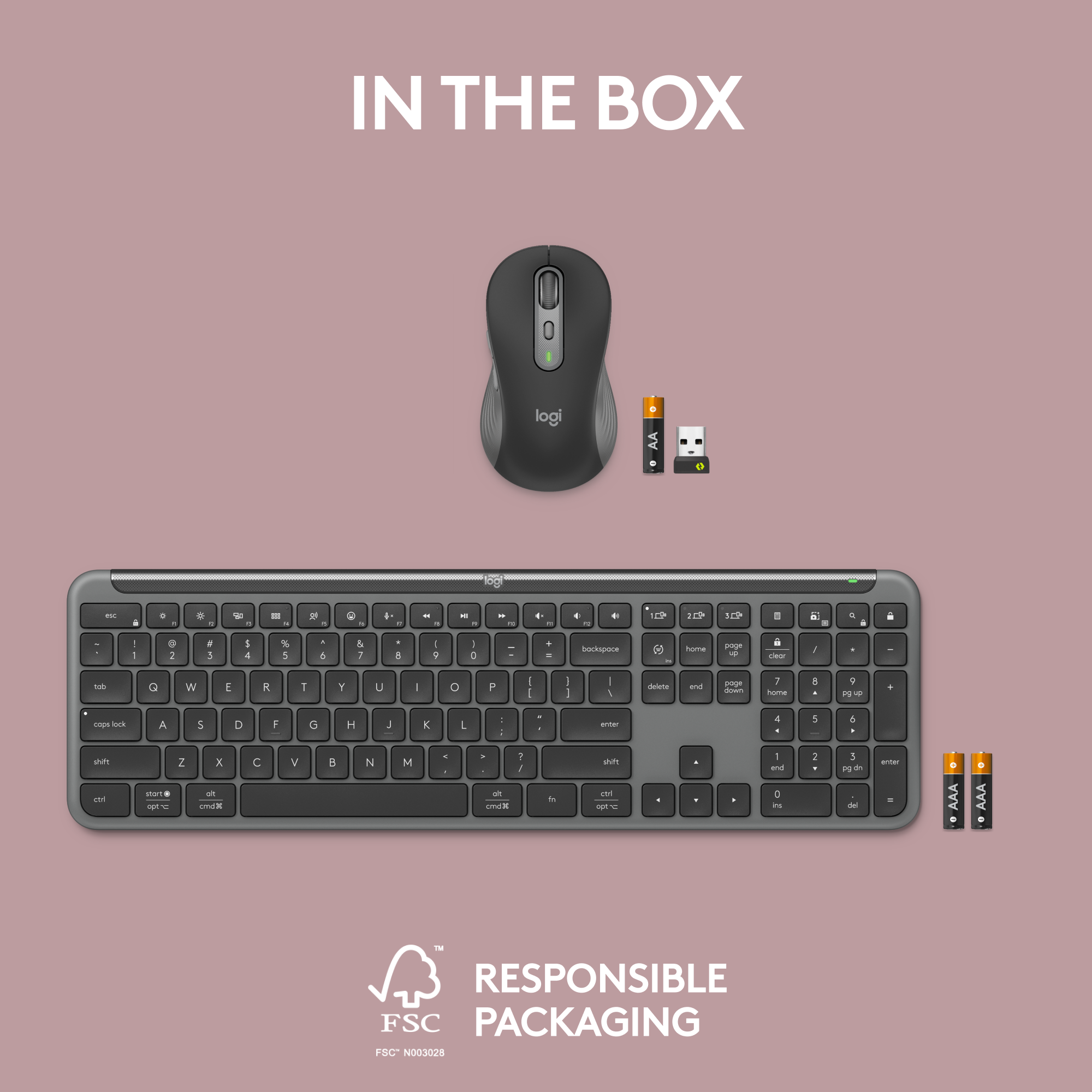


- Model:
- 920-012425
- SKU:
- 6571662
Rating by feature
- Value
Rating 4.7 out of 5 stars
- Quality
Rating 4.8 out of 5 stars
- Ease of Use
Rating 4.8 out of 5 stars
Customers are saying
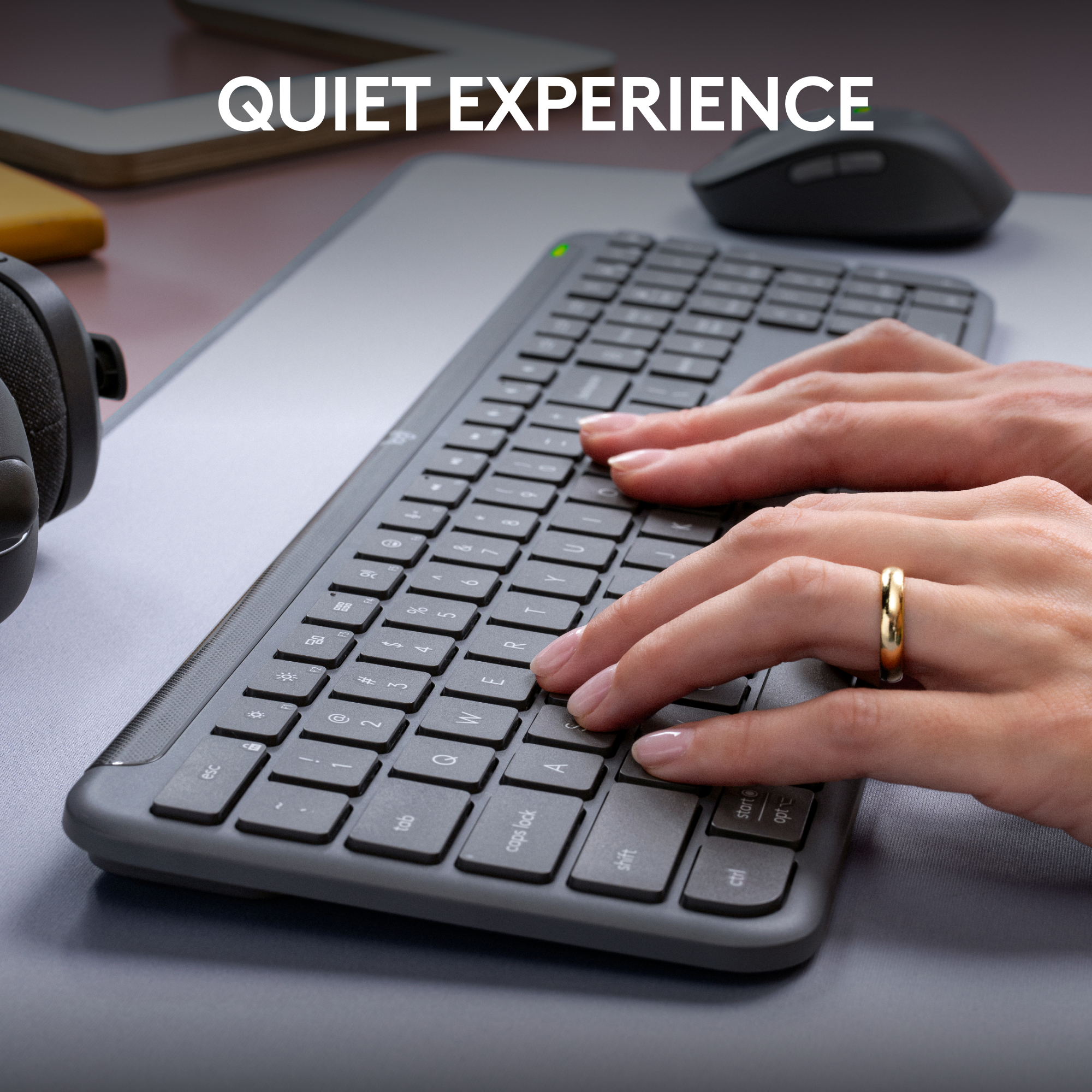
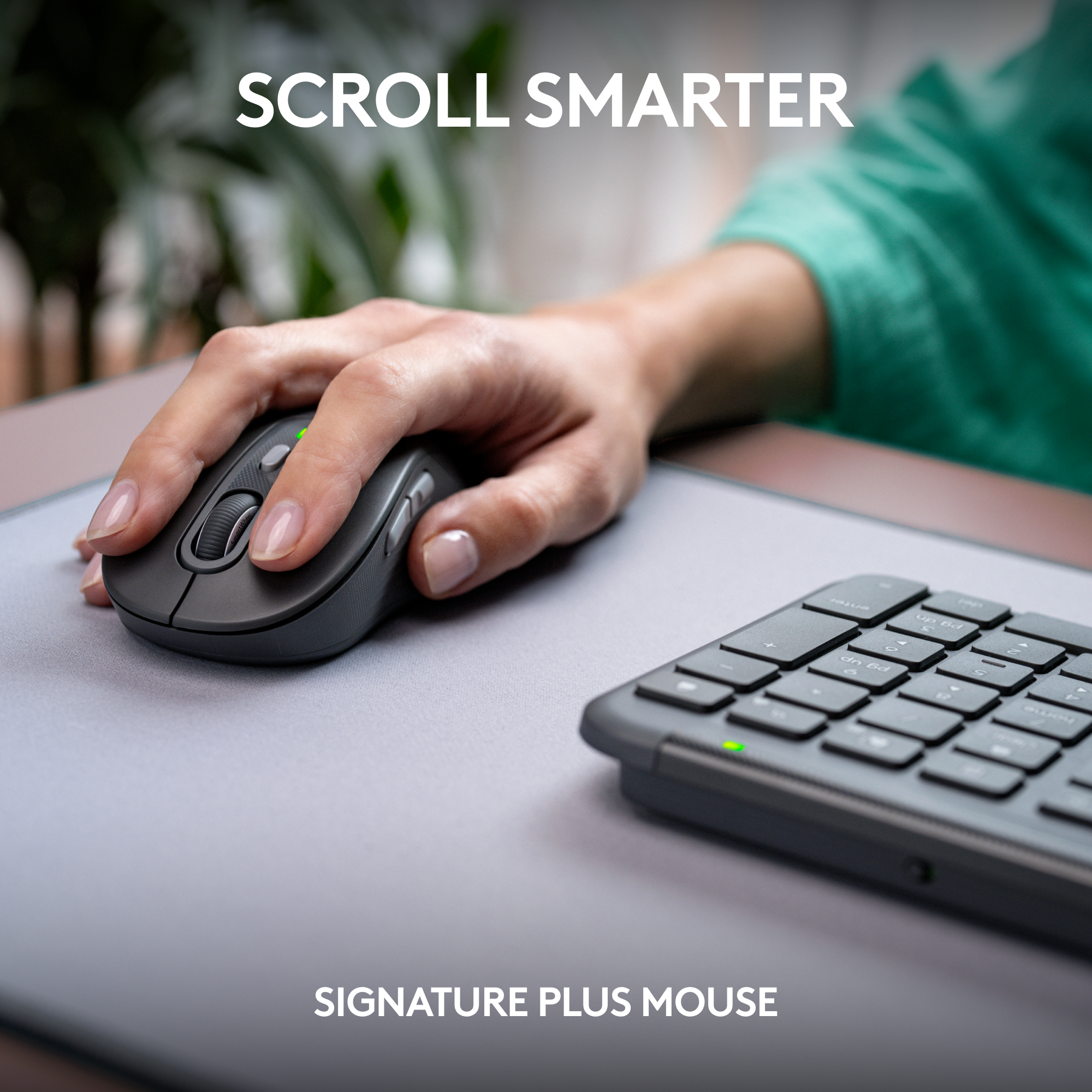
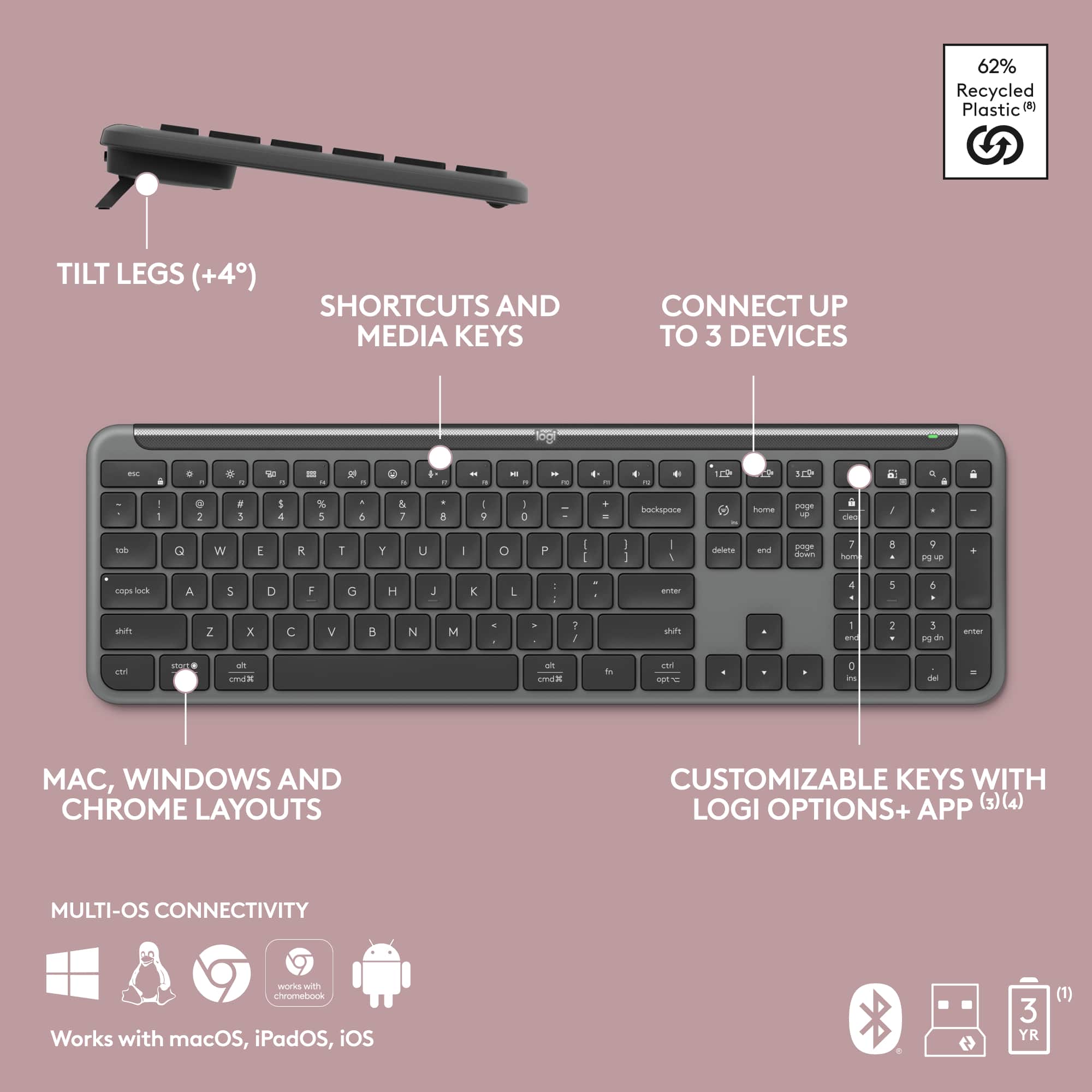
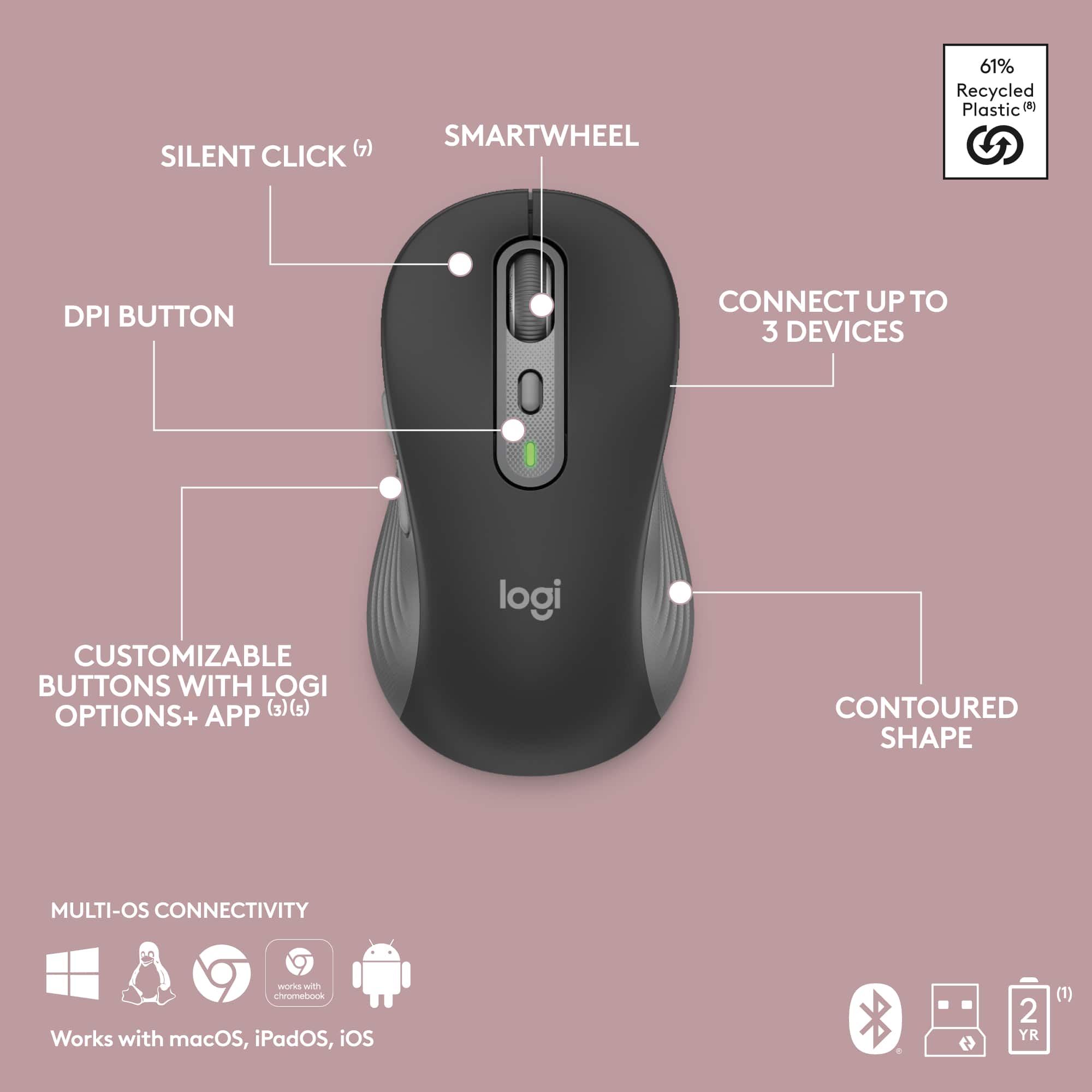
Customers often highlight the MK955 Signature Slim Keyboard and Mouse Combo for its impressive keyboard and mouse quality, ease of use, and reliable connectivity across multiple devices. The long battery life of both devices is also a frequently praised feature. Additionally, the silent scroll wheel is appreciated by users.
This summary was generated by AI based on customer reviews.
- Pros mentioned:Battery life
Logitech MK955 Wireless Mouse & Keyboard
||Posted . Owned for 1 month when reviewed.This reviewer received promo considerations or sweepstakes entry for writing a review.Logitech always does a great job! Its crazy how Quite & Soft the mouse clicks are, don't know if I am using the mouse at all sometimes haha. The Slim Keyboard is Great with its quite typing and Soft Keys. The other thing I love is the fact that the battery life is superb! I have had these for little over a month with daily use, and the batteries are still at 90%.
I would recommend this to a friendBrand response from Logitech
Posted .Thank you for your wonderful feedback on the Logitech MK955 Signature Slim Combo! We’re thrilled you enjoy the quiet, soft keys, smooth clicks, and impressive battery life.

- Pros mentioned:Battery life, Connectivity
Great product
||Posted . Owned for 7 months when reviewed.This reviewer received promo considerations or sweepstakes entry for writing a review.The Logitech Wireless Keyboard is a premium option that delivers on all fronts. From its sleek design and exceptional typing experience to its versatile connectivity and impressive battery life, it is a keyboard that meets the needs of a wide range of users.
I would recommend this to a friendBrand response from Logitech
Posted .We're thrilled to hear you consider the MK955 a premium option that delivers on all fronts! It's fantastic that you're enjoying the sleek design, exceptional typing experience, versatile connectivity, and impressive battery life. We appreciate you recognizing its ability to meet the needs of a wide range of users. Thank you for your excellent feedback!
- Pros mentioned:Battery life
Great for a budget
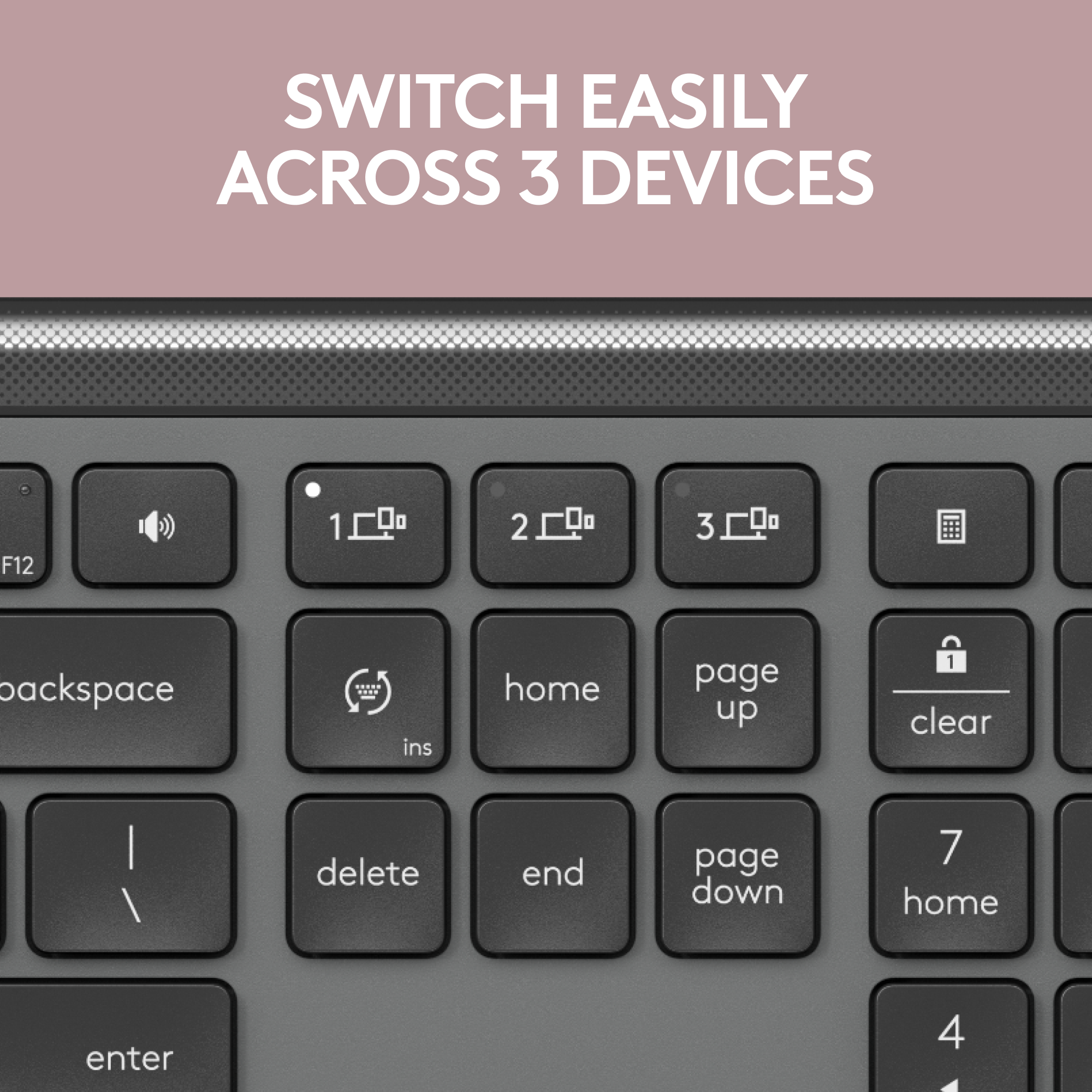
||Posted . Owned for 1 year when reviewed.This reviewer received promo considerations or sweepstakes entry for writing a review.Great keyboard/mouse for work and portability. Both support multiple devices to make it easy to switch between multiple devices with a push of a button. Great battery life too, almost a year and haven't had to change once.
I would recommend this to a friendBrand response from Logitech
Posted .We appreciate your support and are happy to hear the Logitech MK955 Signature Slim Keyboard and Mouse Combo is serving you well. Your feedback helps us improve every step of the way.
- Pros mentioned:Connectivity
Logitech - MK955 Signature Slim Full-size Wireless
||Posted . Owned for 1 week when reviewed.This reviewer received promo considerations or sweepstakes entry for writing a review.I needed a new keyboard and I love this one. The feel of it is awesome. It's easy to type with my long nails. It was easy to connect to my computer. It also looks great and the lifts in the back to give an angle are perfect for me.
I would recommend this to a friendBrand response from Logitech
Posted .Thanks for the great feedback. We're glad the MK955 Signature Slim Combo is delivering the comfort, style, and ease of use you were looking for. It's great to hear the design works well with your typing style and setup preferences.
Awesome
||Posted . Owned for 3 weeks when reviewed.This reviewer received promo considerations or sweepstakes entry for writing a review.Excellent!! As described, work very fast, you wont regret buying this wonderful mouse and keyboard
I would recommend this to a friendBrand response from Logitech
Posted .It’s fantastic to hear that you’re satisfied with your Logitech product. We strive to deliver quality and reliability, and your feedback reassures us that we’re on the right path. Thanks for your continued support—we’re lucky to have you with us.
Keyboard Great - Mouse Not So Much
||Posted . Owned for 2 weeks when reviewed.This reviewer received promo considerations or sweepstakes entry for writing a review.5 stars for the keyboard. 1 star for the mouse. The keyboard is surprisingly heavy, not great for travel but really nice once setup and using. I did not realize the Function keys were setup like a laptop where I would need to hold Function key to access F1, F2, etc. But FN + ESC does reverse the keys, so 5 stars. The mouse is COMPLETELY UNUSABLE. Just dragging the mouse along my mousepad the buttons click. There's barely a click. The lightest tap and you're clicking. I mostly needed a keyboard anyway. Plus, I don't think I've ever found a combo where I liked/loved both. I'm usually forced to buy separately.
I would recommend this to a friendBrand response from Logitech
Posted .Thank you for your feedback on the MK955 Signature Slim Full-size Wireless Keyboard and Mouse Combo. We appreciate you taking the time to share your experience.
Love It
||Posted . Owned for 2 weeks when reviewed.This reviewer received promo considerations or sweepstakes entry for writing a review.Love the sleek look. It features extremely quiet typing & clicking. Great purchase and great product from Logitech.
I would recommend this to a friendBrand response from Logitech
Posted .That's great to hear! The Logitech MK955 sounds like a stylish and functional keyboard and mouse combo. The quiet typing and clicking would be a plus for those who appreciate a peaceful working environment.
- Pros mentioned:Battery life, Connectivity, Keyboard quality
Perfect Keyboard & Mouse Combo for Serious Product
||Posted .This reviewer received promo considerations or sweepstakes entry for writing a review.This is easily one of the best keyboard and mouse combos I’ve ever used. The keyboard has a slim, premium feel with excellent key travel, making typing comfortable and accurate even during long work sessions. The quiet keys are a huge plus fast, responsive, and virtually silent, which makes a noticeable difference in a professional workspace. The mouse is equally impressive: smooth tracking, precise control, and very comfortable for extended use. Both devices connect instantly and stay rock solid without lag or dropouts. Switching between Windows and Mac is seamless, which is a major advantage when managing multiple systems for work. Battery life has been excellent, the build quality feels solid, and the minimalist design looks great on the desk without taking up unnecessary space. For productivity, comfort, and reliability, this combo punches well above its price point. If you spend hours at a computer and want something quiet, efficient, and well designed, this is an easy recommendation.
I would recommend this to a friendBrand response from Logitech
Posted .Your feedback means a lot to us, and we’re so glad to hear you’re enjoying your Logitech device. We work hard to create products that make life easier and more enjoyable, and it’s great to know we hit the mark. Thanks again for your support!
Keyboard stopped working after first use
||Posted . Owned for 1 month when reviewed.This reviewer received promo considerations or sweepstakes entry for writing a review.Keyboard won’t turn on. It does not even have a power button. It’s not connecting or doing anything. I have a government laptop, so I can’t install any software to troubleshoot. It worked fine upon initial set up, and the mouse is still working, but the keyboard is dead. Only used it once. Checked the batteries. Changed the USB port for the LogiBolt connection. Nothing. Will have to return. Super disappointed.
No, I would not recommend this to a friendBrand response from Logitech
Posted .Hey! We're sorry to hear about the problems you experienced with the Logitech MK955. That sounds very frustrating, and we apologize for the inconvenience. We recommend reaching out to our social care team via email at socialcare@logitech.com with your
- Name:
- Email Address:
- Country:
- Product Name:
- Brief description of issue:
- Pros mentioned:Keyboard quality, Noise level

Supremely flexible, reliable setup for production!
|Posted .This reviewer received promo considerations or sweepstakes entry for writing a review.Quick Overview ================================= If you have multiple devices (work, play, testing?) and want fast-switching between them without a physical KVM or multiple keyboards, give the Logitech MK955 a look. It includes a low-profile, full-sized keyboard and mouse with seamless switching between 3 devices. Overall build ================================= If you've used any recent Logitech products, you know they're great everyday computing devices that you can rely on. Sure, they also offer their "G" line of gaming keyboards and mice, but we're talking about productivity here. This review is looking at the MK955 set which includes a full-sized keyboard and mouse that use Logitech's Option+ software to tie 3 devices together seamlessly. Made of recycled plastic, the mouse and keyboard feel solid. Much better than some of their older, compact keyboards I use for smart TVs. Since I've made the switch to "ten keyless" (TKL) keyboards recently, this feels pretty big on my desk, but it's still pretty light and includes adjustable feet to get the right angle for typing. On each device, you have 3 buttons to switch between devices. My main PC is paired to the mouse and keyboard via the Bolt receiver, but devices 2 and 3 are just a tap away and paired by Bluetooth. Performance ================================= If you're used to mechanical keyboards, this may take a bit of an adjustment, but if you're coming from a laptop keyboard, this will feel right at home. The keys are large, silent, and comfortable. Compared to my Logitech G mechanical keyboard it was a big step in terms of key travel, but it was close to my Thinkpad Bluetooth keyboard that was built like a laptop's keyboard. I think in this day and age, most people have used plenty of laptop keyboards (membrane or scissor) and can adjust just fine. The fact that these are quiet (not like my MX blues!) is a plus in working environments. Using BT to switch between my devices had me spoiled. I usually have my main keyboard/mouse setup and 2 separate "all in one" keyboard/pointer/touchpad devices attached to my secondary/tertiary computing devices. In this case, everything could be swapped easily with the push of a button! I really did love how this made it much more seamless for me to switch between devices and it honestly made me use my other devices more. I'm trying to learn more Linux and get familiar "living" in that environment, but grabbing the other keyboard to displace my main one was a bit of a hassle. This makes it all very seamless. I also have a USB KVM that can provide similar functionality, but there's a jarring "pause" as my connected USB devices switch from one device to another. The mouse is an ambidextrous-style - not the contoured gaming-mouse-style - which is fine. The mouse includes two side buttons that are customizable via the Logitech Options+ software and instead of a tilt-wheel for horizontal scrolling, you can hold down one of the side buttons and scroll. I don't use that feature often so that was acceptable. Tracking on multiple surfaces like a desk mat, wooden desk, and granite countertop were just fine with no issues. Just like the keyboard, switching between computing devices was super-easy and really enabled me to use my other devices more than I did in the past. Conclusion ================================= If you have the desk space and have multiple computers for work and personal usage (note, I didn't say gaming because you may want something else for that), this could be the setup for you! The fact that the MK955 is comfortable, reliable, flexible and quiet is great from a productivity perspective, especially if you're trying to work while other people are sleeping! I figured this would be a useable but temporary setup, but I'm taking a hard look at this as my main setup (outside of gaming) because the seamless flexibility really has me using my other computing devices more!
I would recommend this to a friendBrand response from Logitech
Posted .Hey! Thanks for the in-depth MK955 review! We love how it streamlines your multi-device workflow with easy switching and quiet typing. Glad it feels familiar! Your feedback helps us a lot, and we'll share it with the team.
- Pros mentioned:Battery life, Keyboard quality
This New Slim Keyboard & Mouse Standard Performs!
|Posted .This reviewer received promo considerations or sweepstakes entry for writing a review.Logitech is a beloved manufacturer renouned for producing premium quality keyboards, mice, gaming hardware & other top-of-the-line computer accessories & peripherals. Their latest product release is the MK955, a Signature Slim Full-size Wireless Keyboard and Mouse Combo. Designed to perform with Mac or Windows, it features extremely quiet typing & clicking, plus it connects with 3 computers or tablets with the touch of a button. The mouse & keyboard connect effortlessly using Bluetooth. An included modern Bolt receiver provides an additional connection option that replaces the older unifying receiver from yesterday. To connect, simply choose the profile, then press & hold the button until the LED flashes rapidly. You can quickly switch control of a desktop, laptop & tablet, for example. The Mouse uses 1) AA Alkaline battery; the keyboard uses 2) AAA Alkaline batteries. I actually prefer this to rechargeable peripherals in this application, because the batteries perform a long time under heavy use. Continued computing draws a lot of power & requires frequent recharging on a rechargeable mice & keyboard; since this is my business computer, battery power is preferential. CONCLUSION: The mouse is shaped beautifully & fits most hands very well; the keyboard is whisper quiet & is sure not to bother your office neighbor. While the keys are not backlit, this combo offers just about everything you would want to control 3 devices & earns my highest recommendation.
I would recommend this to a friendBrand response from Logitech
Posted .Hey! Thanks for your informative review of the Logitech MK955 Signature Slim Keyboard and Mouse Combo! Your insights are valuable for us as we continuously strive to improve our offerings.
- Pros mentioned:Keyboard quality, Noise level
Not Perfect Yet
|Posted .This reviewer received promo considerations or sweepstakes entry for writing a review.I paired this keyboard/mouse with my HP Envy notebook (Windows 12), my Apple (macOS 14.1) MacBook Air and my Lenovo P12 Tablet (Android 13) via Bluetooth. I like having a full size keyboard with my devices, and I almost always use a mouse versus a trackpad. I've been doing this for over 20 years. Improvements keep happening. Many of my past keyboards were very light or very thin. The Logitech K830 is one of my favorite keyboards (I must have 5 or 6) but I can only pair it with a single computer and the keys have too little of an indentation and there is no kbd inclination (and is not a full size kbd). The MK995 Keyboard has some weight too and it has little feet that pop-up out from under the bottom to give some kbd inclination. And the keys have a bit more travel than any of my notebooks and the K830. The keyboard is powered by 2 alkaline batteries that they claim should last 3 years. The mouse is powered by a single alkaline battery that they say should last 2 years. The keyboard has a great feel to it, and is VERY quiet. The bit of weight that it has gives it a solid stiff feel, no twist (again more solid then the K830). Switching between different computers is done by simply hitting one of three keys over where the pgUp/pgDn are located. Because the different OS's deal with the "windows" or "option"/"cmd" key differently Logitech has labeled the key key more like an Apple keyboard than a windows keyboard (but the number of keys is more like a windows keyboard). There's really no right answer, but their approach felt comfortable, yet I had to look at the keys adjacent to the space bar as they are not the same physical layout as an Apple keyboard. The one thing that I missed was a keyboard backlight. As soon as my office got dark, I looked for a key or sequence to turn it on, well don't bother, it does not have back lighting (like the K830 does). I've been traveling with a Logitech MX Anywhere 2 for quite some time. I don't mind it as my desktop mouse, but it is a tad small for my hand. However the mouse with the MK995 is a huge improvement. It is almost an inch longer and probably 1/2" taller. Overall it better supports my hand without me cupping my fingers. In addition the texture around the side of the mouse feels nicer to the touch than the texture on the MX mouse. And the wheel on the mouse is taller and longer than the MX mouse, and it spins more freely (but no right left scrolling (which I rarely used, so I don't miss, and it's not supported by Apple or Android)); it just feels better. And the MK995 has a bit more weight to it than the MX mouse. However, to switch the mouse to another computer you have to turn the mouse over and push a single button that moves from computer 1 to 2 to 3 to 1... Not nearly as easy as pushing a single key on the keyboard. I'd think that with their supplied software, it should be possible for a single button to be set up to switch both at the same time. Having to turn the mouse over is a hassle. When selling the keyboard and mouse together Logitech could better unify the packaged pair. But using the mouse on any of the 3 OS's it worked exceptionally. I changed my notebook to use the Logi Bolt receiver to see if I could tell the difference from the BT connection, I really could not. And I could not try it on my MacBook Air as it only has USB-C connections. In summary the keyboard is excellent (but does not have backlighting), it feels better than almost any keyboard I've ever used. The mouse is excellent, but changing between computers is clumsy, it should be possible from the top of the mouse or unify with keyboard changes. The size of the mouse is much better for a desktop setting (not a travel mouse).
I would recommend this to a friendBrand response from Logitech
Posted .Hey! Thanks for your in-depth review of the Logitech MK995 keyboard and mouse combo! Your insights are valuable, especially for highlighting the pros and cons of using it with different devices and operating systems. We appreciate you mentioning the comfortable typing experience, quiet keys, solid build quality, and larger mouse size. Feedback on areas for improvement, like the lack of keyboard backlight and cumbersome multi-device switching on the mouse, is also helpful for future product development.
- Pros mentioned:Battery life, Keyboard quality
Very nice customizable keyboard and mouse
|Posted .This reviewer received promo considerations or sweepstakes entry for writing a review.The Logitech K950 Keyboard and M750 Mouse arrived well packed in a sturdy box. Batteries were included. The keyboard takes 2 AAA batteries and the mouse takes 1 AA battery. The mouse battery arrived with 60% charge. The keyboard batteries were at 100%. It’s easy to access both battery compartments. Having used both a battery powered and a USB charging mouse, I prefer the battery. While USB charging sounds better for the environment, mine is a hassle to use because it’s difficult to tell when the mouse needs charging, and with a lot of use, it needs to be charged very frequently. I can easily see the battery status of the Logitech keyboard and mouse in both the PC settings and the Logitech app. From prior experience, I shouldn’t need to change the batteries very often. I really needed a new wireless keyboard. My 10 year old Logitech keyboard is working fine, but whenever I would set up a second computer, I had to take the dongles out of one computer and put them in the other. Invariably I’d need to go back and do something at the first computer and would forget that there was no keyboard and mouse. This Logi keyboard should solve all those problems. I can connect it and the mouse to up to 3 devices via Bluetooth. The new keyboard has flip up feet which is great because I can’t type fast on a flat keyboard. The new keyboard is a full 2 inches longer than my old one. I guess that makes it “full size” vs “compact”. The letter area is the same size and so is the number area. The difference is the area between the letters and numbers. The up, down and sideways arrows moved there, along with the keys that control the Bluetooth. The mouse is also larger than I’m used to. It’s ½ inch wider and longer than the standard size. The app is pretty basic, but not as glitchy as the last version I used. The mouse wheel and buttons can be customized in the app. The top mouse button changes the pointer speed, but I didn't find it to be very helpful. Only two speeds can be set and pressing the button switches between them. I’ve never had the need to use 2 pointer speeds, but maybe there is a use that I haven’t discovered. The side buttons can be customized for functions like copy and paste and horizontal scrolling, but I haven't been able to get them to work properly. I just tried the button I thought I’d set to copy and instead it backed me out of this document - even though I have horizontal scrolling turned off. Even if I get the copy and paste buttons to work, I think copy and paste with the side buttons will be harder than doing it the traditional way. I have to hold the mouse down firmly in order to push a side button. Holding the mouse down and pushing a button while trying to not click takes more effort than right clicking to copy and paste. Easier than customizing the mouse to copy and paste is customizing the middle set of keys on the keyboard. I created a shortcut in the app so that “end” is Ctrl+C, “page down” is Ctrl+V and “page up” is Ctrl+X. That works really well. In that middle section of keys there is also a language switch key that works if more than one language is defined on the computer. If not needed for that purpose, that key can also be customized as a keyboard shortcut. A light comes on when Caps Lock is activated, and I also get an on-screen notification of the Caps Lock status. When the monitor wakes up, the active Bluetooth key lights up for a few seconds. It’s easy to switch between connected devices by pressing the appropriate Bluetooth key. The function keys double as mute/unmute, dictation, Emoji menu, sound mute, volume up and down, calculator, screen snip and a lot more. The screen snip is much easier than doing windows key+Shift+S - especially since the keyboard doesn’t have a “windows” key. The emoji key also has symbols like © and °. I’ve been typing on the 950 keyboard for about an hour now and I don’t think I’ll have any problem getting used to the larger size. I don’t have any trouble typing letters or using the number pad, but it is a longer reach from the letters to the numbers. The del key on the number pad is giving me the biggest problem. It’s 2 inches away from where it used to be and I keep hitting the O key instead. And the added 2 inches in length makes it difficult to fit the keyboard into my small space. But I do like the keyboard. It’s kind of soft and the keys are quiet. There was one really annoying thing that almost made me go back to my old keyboard. I tend to rest my left little finger on the bottom edge of the keyboard when I’m thinking about what to type next. On this keyboard my finger rests on the Start key that opens the Microsoft start page. I was getting tired of having to close that window over and over again. It must be a common problem, because there is a way in the App to disable the Start key (and others). With that done, everything is working smoothly. The only persistent problem I’m having is with the mouse. Sometimes it stops working and there is no cursor. I think it loses its Bluetooth connection. If I shake it or lightly tap it, it comes back to life. I’m at day 3 of testing now, and that’s the only issue I’ve discovered. I do have one wish for the keyboard. Since so many keys can be customized, it would nice if the key label could change to match the customization. Since they don't, I have a temporary sticky note to remind me which key is now Copy, Cut and Paste. But overall, it's a very nice keyboard and mouse combo.
I would recommend this to a friendBrand response from Logitech
Posted .Hi there, Thanks for the detailed MK950/M750 review! We appreciate your feedback on Bluetooth connection, comfort, customization & battery life. We'll consider your suggestions on side button customization and keycap indicators. Glad you find it a great combo! Your insights are valuable for us as we continuously strive to improve our offerings.
- Pros mentioned:Battery life, Keyboard quality
Awesome keyboard and Mouse Combo
|Posted .This reviewer received promo considerations or sweepstakes entry for writing a review.This full sized keyboard is good looking, solidly built and it has some heft to it. However, the heft makes it more planted on the desktop with the help of five rubberized feet. The rear feet folds in/out which can be used to raise or lower the back of the keyboard by another 1/4”. It has power switch which will help with the battery life which is rated for 36 months for the keyboard. The keyboard layout works well with Macs. It has buttons for screen brightness, Mission Control, Launchpad, media and volume controls. There’s an emoji button and dictation buttons too.A lot more key travel than the Mac keyboard. It is quiet but the clicking sound that it makes is satisfying. It has a Caps lock indicator light. Logi Options+ lets you customize the buttons on the keyboard and mouse. Lots of customization options. There’s also a feature called Flow which lets you control multiple computers much like the Universal Control on the Mac but Flow lets you control Windows and Mac computers which is helpful for me because I use both Mac and Windows. You can connect up to 3 computers/devices and easily switch between them. The mouse looks good and works really well. I have a MX Master 3S but I don’t mind using this M750 L for my daily use even though it is nowhere close to being more comfortable that than the MX Master. It’s precise enough for simple daily work and it glides smoothly across my mouse pad. Clicking is very quiet and easy to click. Again, you can customize the buttons with the Logi Options+ app. I like this keyboard better than the Mac keyboard. If somehow Apple would allow Logitech to include the TouchID, this would be my keyboard for my Mac.
I would recommend this to a friendBrand response from Logitech
Posted .Hello! Thanks for the detailed review of the Logitech MK955 keyboard and mouse combo! We appreciate your highlighting its strengths and how it addresses your needs better than the stock Apple keyboard. We'll consider your feedback on Touch ID integration for future products.
- Pros mentioned:Ease of use, Keyboard quality
A Perfect Business Setup
|Posted .This reviewer received promo considerations or sweepstakes entry for writing a review.The MK955 is mice/keyboard combo that lacks virtually nothing. Below are my thoughts: [PROS] Sleek & Pleasant: The low profile build allows for the keyboard to be sized perfectly for the workplace and home offices. The spacing saving design leaves an adequate amount of room for the desk without compromising the typing experience. The mouse is extremely comfortable for an 8-hr workday and glides with ease across my mousepad. Functionality in Abundance: The keyboard has a full layout with all the useful, common shortcuts needed for everyday use. Furthermore, everything can be tweaked and enhanced through the Logitech+ Options app. Through this program, I'm able to customize keys and the buttons for each device for my needs. Ease of Use: Getting set up and switching among devices has been pretty seamless. I use Windows for my main workstation, but I like to switch to my Mac when I need to do certain tasks. With the tap of a button, I'm able to transition to another device without issue. [CONS] Non-Rechargeable Battery: This is all about preference. Some desire not to have to purchase batteries for their devices. For me, this is not an issue given that the capacity of rechargeable batteries dwindle over time and will need to be replaced eventually. Given that these devices can maintain their usage for over a year makes the lacks of a charging functionality insignificant. [CONCLUSION] This Logitech MK955 is robust combo in a slim package. I can do everything I need without being compromised in any way. I would highly recommend this pair for daily, business use.
I would recommend this to a friendBrand response from Logitech
Posted .Hello! Thanks for your comprehensive review of the Logitech MK955 Signature Slim Full-size Wireless Keyboard and Mouse Combo! We especially appreciate you highlighting both the pros and cons, including your take on the non-rechargeable batteries. It's valuable feedback that helps potential customers make informed decisions. We're glad you find the MK955 to be a robust combo that fits your business needs perfectly!
- Pros mentioned:Connectivity, Keyboard quality
Premium Bluetooth slim keyboard and mouse combo
|Posted .This reviewer received promo considerations or sweepstakes entry for writing a review.The Logitech MK955 Signature Slim Wireless Keyboard Mouse Combo is a sleek and portable solution for your typing and navigation needs. Designed with precision, Logitech offers seamless connectivity across three different devices, whether via Bluetooth or the included Logi Bolt wireless USB receiver. With the accompanying Logi Options app, customization becomes effortless, allowing users to tailor keys, buttons, and shortcuts for both Windows and MacOS systems, ensuring optimal configuration. Crafted with a premium touch, both the keyboard and mouse have a sophisticated design and feel. The mouse fits comfortably in hand, boasting a satisfying weight and premium scroll wheel and buttons. Despite its slim profile, the keyboard doesn't compromise on key feel, offering a tactile typing experience with adequate travel. However, if you are an enthusiast of mechanical keyboards, it may not give enough tactile feedback for you. The Logi Options app enhances functionality further, enabling users to assign custom actions to keys and toggle between preset options or standard function keys. Whether you're a professional seeking efficiency or a casual user prioritizing comfort and style, the Logitech MK955 Signature Slim Wireless Keyboard Mouse Combo delivers on all fronts, making it a worthwhile investment.
I would recommend this to a friendBrand response from Logitech
Posted .Hey, Absolutely! Great review of the MK955! You clearly captured its strengths: design, connectivity, customization, comfort, and typing experience. Thank you for mentioning the app and target audience - valuable insights!
- Pros mentioned:Battery life, Connectivity, Keyboard quality
Great Keyboard and Mouse Combo
||Posted . Owned for 1 month when reviewed.This reviewer received promo considerations or sweepstakes entry for writing a review.I think this keyboard and mouse combo hits the sweet spot for value. It feels very premium, was really eash to connect to multiple computers, and has all the functionality you could need. I honestly prefer this over the higher end models because it has just regular batteries so no need to recharge it or worry about battery degradation. Theres no backlight so it uses very little power and the batteries are proving to last a very long time. The Logi+ app/program lets you see battery health and also provides a lot of customization for mapping the keys on both the keyboard and mouse.
I would recommend this to a friendBrand response from Logitech
Posted .Thank you for the wonderful review of the MK955! We're thrilled you're enjoying the premium feel, ease of connection, and functionality of this keyboard and mouse combo. We especially appreciate your feedback on the battery life and customization options in Logi Options+. It's great to know it's a great value for you!
- Pros mentioned:Keyboard quality
Slim, quiet and well built.
|Posted .This reviewer received promo considerations or sweepstakes entry for writing a review.The keyboard is a slim and compact full-size keyboard. It is sleek and solidly built. Because of this, I don't need a wrist rest. Typing on the keyboard has a very nice feel, the travel is perfect and very confident. By default, the insert key of the keyboard is set to switch language, switch between English and Japanese for example. I am used to using that key for copy and paste so that is weird for me, luckily, the Logi Option+ app allows me to change it back to being an insert key. The mouse is perfectly sized for my hand, ergonomic too. Very comfortable to hold. The mouse left and right buttons are sturdy and quiet. Making muffled low frequency thud sound. Other buttons do not have the same characteristic though. The mouse sensor tracks movement very well, I can feel it is linear when you move slowly and accelerate when you move fast but there is no setting to adjust the acceleration/deceleration, the Logi Option+ only allows you to adjust one parameter, speed. The scroll wheel of this mouse has SmartWheel feature, you can scroll line by line, good for computer games and if you flick it or try to scroll fast, it switches to fast and smooth mode like flywheel though I wish there is a button for me to manually switch the mode because scrolling up is difficult to have it switch to fly mode. The Flow feature let me use two computers with just one keyboard and mouse, when I move the mouse pointer to the edge, and beyond, the mouse and keyboard automatically switches to the other computer. Setting up this feature is very easy too. Just install Logi Option+ to first computer, pair the mouse and keyboard to the first computer then install Logi Option+ to the second computer, pair the mouse and keyboard to the second computer. Make sure both computers are on the same network and click on the Flow tab in the Logi Option+ app and follow the instruction on screen. The mouse and keyboard can pair up to three computers so setting up Flow is just another simple steps. When switching computer using Flow, it does show 1 or 2 seconds of delay. Sometime the keyboard did not switch back and you have to press the Easy-switch button. One big thing making this not the best keyboard is it has no back light, it may not be important to some but it is to me. For this and also because there is no way to manually switch the scroll wheel to fly mode, I am not giving five stars.
No, I would not recommend this to a friendBrand response from Logitech
Posted .Hello, Thanks for the detailed review of the MK855 combo! We appreciate you mentioning the features you like and areas for improvement, like backlighting and scroll wheel control. We'll share this feedback with the product team.
- Pros mentioned:Battery life, Keyboard quality, Noise level
Very Nice Combo Set
||Posted . Owned for 1 month when reviewed.This reviewer received promo considerations or sweepstakes entry for writing a review.bought the Logitech MK955 keyboard and mouse combo from Best Buy and couldn’t be happier. The keyboard is slim, quiet, and comfortable with a full layout, and the mouse clicks almost silently. Setup was quick, and I love being able to switch between devices using Bluetooth or the included receiver. Battery life is excellent, and the build feels solid. The only small drawback is the device-switch button on the bottom of the mouse, but overall this is a fantastic, reliable combo at a great value. Highly recommend!
I would recommend this to a friendBrand response from Logitech
Posted .We're delighted to learn you're happy with the MK955 Signature Slim Wireless Keyboard and Mouse Combo! Thanks for sharing your thoughts and feedback; it's invaluable as we work to enhance our products.
- Pros mentioned:Keyboard quality
A great and flexible combo with some twists.
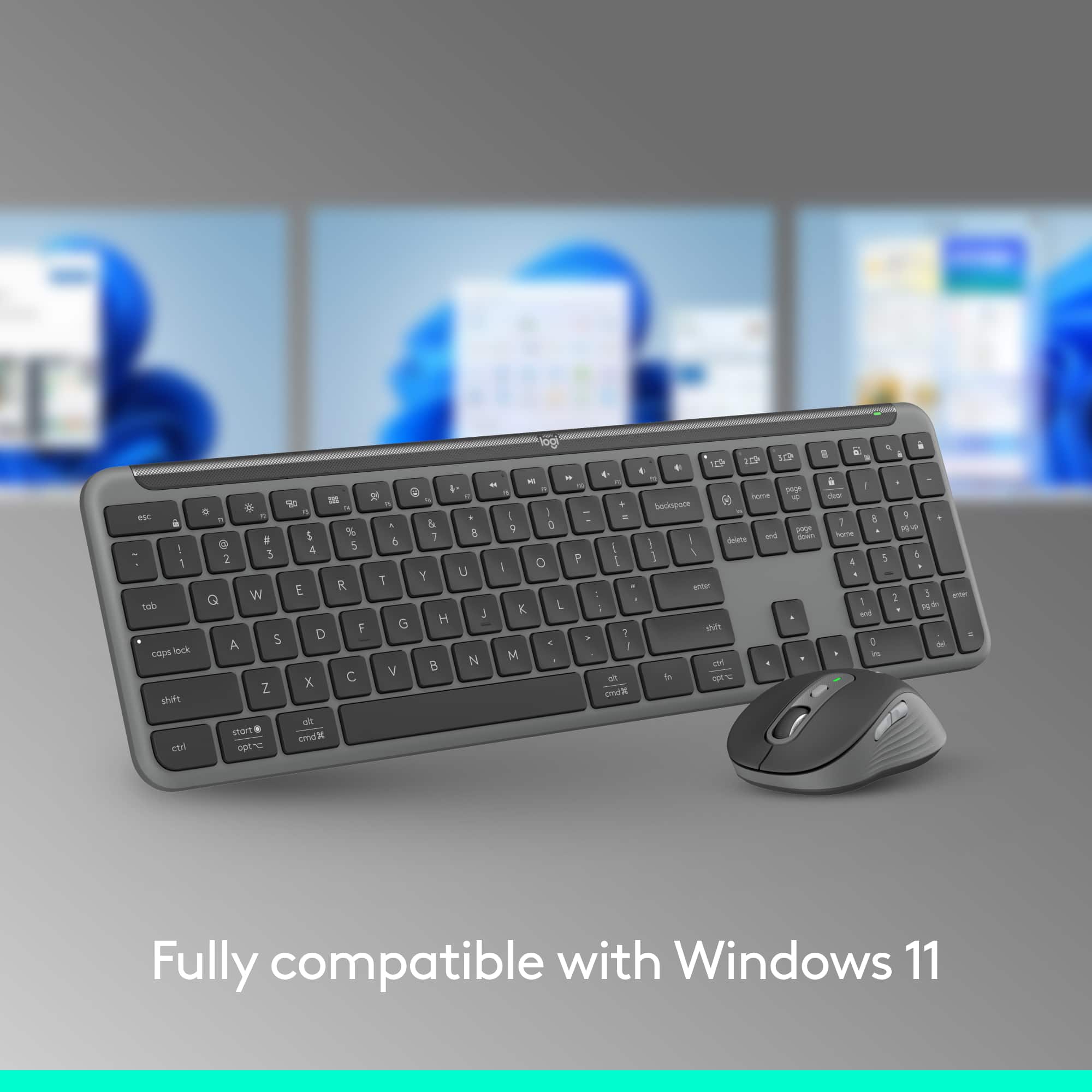
|Posted .This reviewer received promo considerations or sweepstakes entry for writing a review.Logitech has been making quality peripherals for decades, and this combo continues that trend. This is a solid mouse, and a solid keyboard with some unexpected changes. First, the big selling point is that Logitech is switching over to the new “Bolt” USB receiver instead of the old “Unifying” receiver. So these devices cannot be paired with an old unifying receiver, but can be freely paired with any Bolt receiver that you happen to have. But since Bolt is basically (as near as I can tell) a variant of Bluetooth, this mouse and keyboard can also pair nicely with any Bluetooth computer, phone, or tablet. The mouse is rather plain but well-performing. I find that it fits my large hands well, but I use a claw grip. It is mostly ambidextrous, but there are two buttons on the left side that will be useless to a southpaw. There is a scroll wheel that does the expected vertical scrolling, but holding the side button can enable horizontal scrolling. The “Logi Option+” software will allow you to easily customize the DPI and buttons, and a button below the scroll wheel allows toggling between two DPI settings. This is not advertised as a gaming mouse, and testing shows the poll rate to be around 135 Hz. There are three buttons on the bottom that allow it to control up to three different devices, and I can confirm that it works well with the included Bolt receiver as well as pairing up with an Android tablet via Bluetooth. The buttons are also quiet, so you are unlikely to disturb your neighbor. The keyboard is a much more interesting device. Unlike the mouse, it is not “plain” at all, but has some curious features. First, the great. It looks nice and feels as good to type on as any non-mechanical keyboard that I have used. It too can pair with up to three different devices, and works well on a PC using the Bolt receiver, as well as working perfectly with the Android tablet. However, the thing that makes this keyboard interesting is the extra keys and some of the functions that are mapped to the buttons. Although this is capable of working with both Windows and Mac, I am used to seeing a dedicated Windows button. However, this has a button with that functionality, but it is labeled “Start/Opt.” It works great, but might confuse those used to looking for the Windows logo on the key. I suppose this is to make it work more seamlessly with a Mac, but I don’t own one so I can’t test this. The “Alt” key also has the Apple “cmd” label and logo on it, so this keyboard would fit in much more with a Mac environment (maybe for use with an iPad). The keys feel nice, and they are also quiet, if that matters. Given that I prefer to game on a computer with loud clicky blue switches, I don’t care about the noise level, but some do. But the fun doesn’t stop with abandoning the Windows logo. The top row of “F” keys defaults to specialized functions that includes keys for arranging window, volume and transport controls, and even a dedicated emoji button. Fortunately, tapping fn+esc brings back the usual Windows “F” keys. Over the right-hand numeric keypad are other unique buttons. There is a button that brings up a calculator in Windows, as well as a screen snapshot button, and a search button. Finally, the “ins” button that is over the cursor key cluster is not actually insert any more. It now apparently lets you switch languages, but the insert functionality is accessed by holding down the “fn” button first. While I seldom use the insert key, I would never use a language-switching key, so I am dubious about the utility of this key. Fortunately, the Logi Options+ software lets you remap this key to just be insert. For both the keyboard and mouse, pairing to a Bluetooth computer is as simple as selecting the profile and then holding the button until the light starts rapidly blinking. This works great for a simple Bluetooth pairing. However, it would appear that pairing to a different Bolt receiver necessitates using the Logi Options+ software, which is only available for Windows and Mac. So pairing with another Bolt receiver does not seem to be an option while using Linux or any other alternative OS. Not a big deal for most people, but it should be mentioned. So overall, if being able to easily switch between different devices via USB or Bluetooth is beneficial, then this combo should be seriously considered. If you have both a computer and a tablet on your desk and want to be able to rapidly switch back and forth, then this will allow you to do so easily. The Logi Options+ software also supposedly allows you to seamlessly move a mouse pointer between different computer and even copy files between them. I would assume that both need their own screen and both to be using the Logi software, but I have not tried it. Still, given the name behind it, I would expect it to work well, just only with Windows and Mac.
I would recommend this to a friendBrand response from Logitech
Posted .Hello! Thanks for the in-depth review of the Logitech MK955 combo! We appreciate you pointing out its strengths like multi-device connectivity, comfort, and quiet keys. Your feedback on keycap labeling across OS helps us improve clarity for future users.