Customer Ratings & Reviews
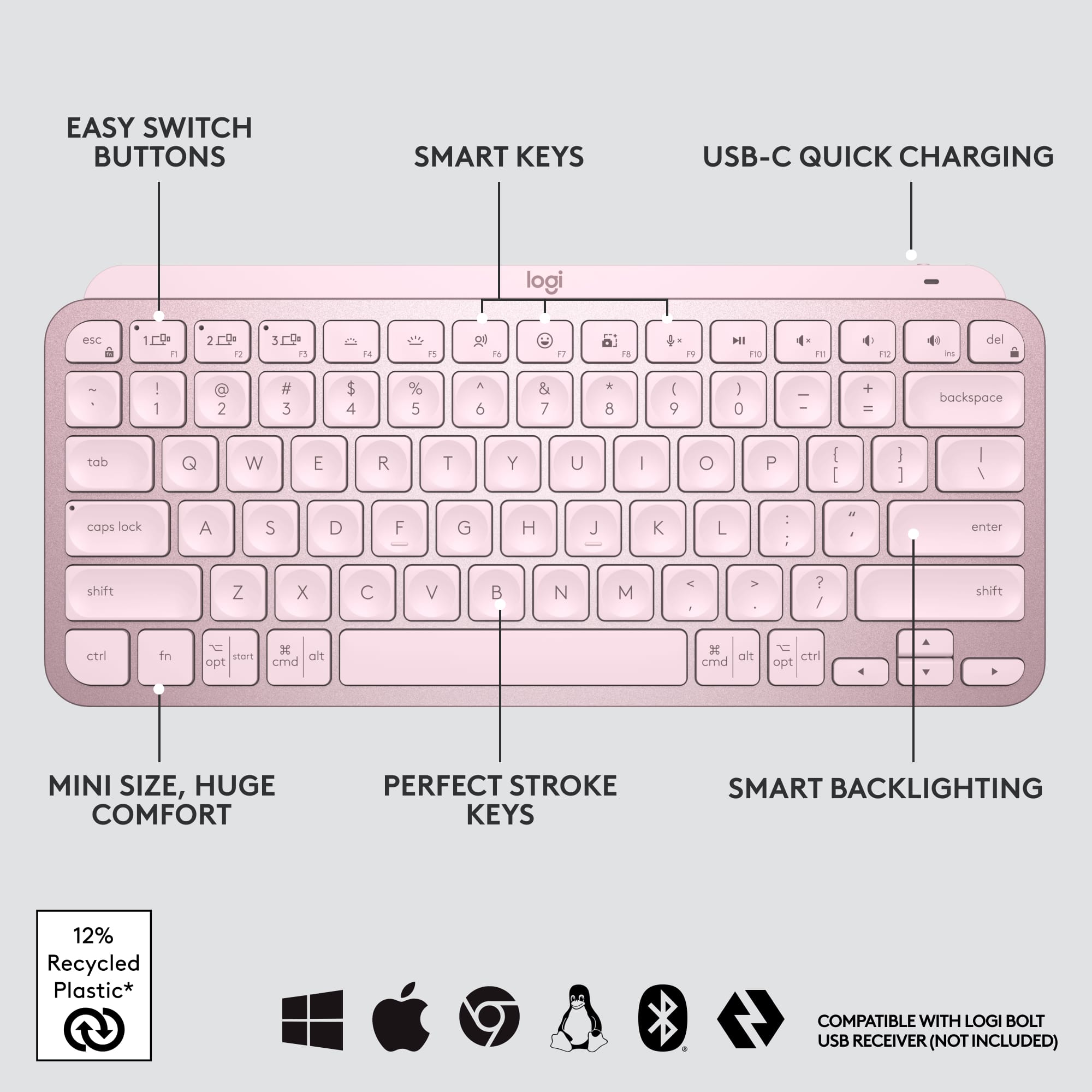
![The text on the image is a list of keys on a keyboard. Here is the corrected and grouped text:
1. Esc
2. F1
3. F2
4. F3
5. F4
6. F5
7. F6
8. F7
9. F8
10. F9
11. F10
12. F11
13. F12
14. Ins
15. Del
16. ~
17. !
18. 1
19. @
20. 2
21. #
22. 3
23. $
24. %
25. ^
26. &
27. 7
28. *
29. 8
30. (
31. )
32. 0
33. -
34. +
35. =
36. backspace
37. tab
38. Q
39. W
40. E
41. R
42. T
43. Y
44. U
45. I
46. O
47. P
48. {
49. [
50. ]
51. caps lock
52. S
53. D
54. F
55. G
56. H
57. J
58. -
59. K
60. L
61. :
62. ;
63. "
64. J
65. enter
66. shift
67. Z
68. X
69. V
70. B
71. N
72. M
73. ,
74. >
75. ?
76. /
77. shift
78. ctrl
79. fn
80. start
81. opt
82. H
83. alt
84. cmd
85. H
86. alt
87. cmd
88. ctrl
89. opt](https://pisces.bbystatic.com/image2/BestBuy_US/images/products/6478/6478159_sd.jpg)


![1. logi
2. esc 1 2 3 4 5 6 7 8 9 0 - = backspace
3. tab Q W E R T Y U I O P [ ] \
4. caps lock A S D F G H J K L ; ' enter
5. shift Z X C V B N M , . / shift
6. ctrl fn opt alt cmd
7. MULTI-DEVICE, MULTI-OS](https://pisces.bbystatic.com/image2/BestBuy_US/images/products/e563c254-4b09-453f-a596-db8b270b59a9.jpg)
![USB-C QUICK CHARGING
F9 F10 F11 F12 ins del
( 9 ) 0 - + = backspace O P { [ } ] \](https://pisces.bbystatic.com/image2/BestBuy_US/images/products/4ba47143-9573-4c40-9018-df94b6892919.jpg)

![IN THE BOX
logi
esc 1 2 3 4 5 6 7 8 9 0 - = backspace tab Q W E R T Y U I O P [ ] \ caps lock A S D F G H J K L ; ' enter shift Z X C V B N M , . / shift ctrl fn opt alt cmd
Responsible Packaging FSC™ FSC® N003028](https://pisces.bbystatic.com/image2/BestBuy_US/images/products/6177db92-9bf5-4933-9264-5b70b886f806.jpg)
- Model:
- 920-010474
- SKU:
- 10840948
Rating by feature
- Value
Rating 4.5 out of 5 stars
- Quality
Rating 4.8 out of 5 stars
- Ease of Use
Rating 4.7 out of 5 stars
No more fatigue in hands after work
||Posted . Owned for 4 months when reviewed.This reviewer received promo considerations or sweepstakes entry for writing a review.Absolutely love this keyboard, compact design truly helps from straining hands & wrists.
I would recommend this to a friendBrand response from Logitech
Posted .Thank you for your wonderful feedback! We're so pleased to hear that the compact design of the MX Keys Mini is helping to prevent strain in your hands and wrists after work. It's great to know you absolutely love it!

Best Keyboard IT Approved!
||Posted . Owned for 8 months when reviewed.This reviewer received promo considerations or sweepstakes entry for writing a review.By far the best keyboard I have ever used. I’ve worked in IT for over 20 years. I recommend this for anyone whether your in IT or working from home.
I would recommend this to a friendBrand response from Logitech
Posted .Thank you for your fantastic feedback on the Logitech - MX Keys Mini! We're thrilled to hear it's exceeded your expectations, especially with your extensive IT experience. The MX Keys Mini's design is clearly resonating with a wide range of users.
- Pros mentioned:Size
love this Keyboard.
||Posted . Owned for less than 1 week when reviewed.This reviewer received promo considerations or sweepstakes entry for writing a review.love this Keyboard. Saves spaces and looks great. Good Price
I would recommend this to a friend - Pros mentioned:Keyboard quality
Ideal small keyboard
||Posted . Owned for 1 month when reviewed.This reviewer received promo considerations or sweepstakes entry for writing a review.Great for a crowded desk & traveling- solid feel & well constructed
I would recommend this to a friend Looks Great
||Posted . Owned for less than 1 week when reviewed.This reviewer received promo considerations or sweepstakes entry for writing a review.Very sensitive in a good way, Can see the keys in low light and it looks great
I would recommend this to a friendBrand response from Logitech
Posted .Thank you for your amazing review of the Logitech MX Keys S for Mac keyboard! We're thrilled to hear that you appreciate its sensitivity, design, and backlit keys. Your positive feedback means a lot to us as we continue to provide exceptional products that enhance your computing experience.
MX Keys
||Posted . Owned for 3 weeks when reviewed.This reviewer received promo considerations or sweepstakes entry for writing a review.Best keys for the price! This is an awesome backlit keyboard. Perfectly and easily syncs with other devices.
I would recommend this to a friendBrand response from Logitech
Posted .Hey! We're thrilled you're enjoying the MX Keys Mini TKL! The MX Keys Mini is designed to deliver a premium typing experience in a compact form factor. We're glad you find the keys comfortable and appreciate the convenience of backlit keys for low-light environments.
Recommend
||Posted . Owned for 3 months when reviewed.This reviewer received promo considerations or sweepstakes entry for writing a review.Definitely the best keyboard on the market. The keys are quiet and smooth. I switched from an Apple keyboard.
I would recommend this to a friendBrand response from Logitech
Posted .Hey there! Thanks so much for the kind words about the MX Keys Mini! We're thrilled to hear you're enjoying the quiet, smooth typing experience - it's definitely a big switch from Apple keyboards.
- Pros mentioned:Keyboard quality
Excellent keyboard -- lousy price
||Posted . Owned for 1 month when reviewed.This reviewer received promo considerations or sweepstakes entry for writing a review.Excellent keyboard -- lousy price -- go for the larger MX keys at the same price
I would recommend this to a friend Order for delivery
||Posted . Owned for less than 1 week when reviewed.This reviewer received promo considerations or sweepstakes entry for writing a review.Great customer service, Everything arrived when it should
I would recommend this to a friendBrand response from Logitech
Posted .Thank you for your review of the Logitech MX Keys S for Mac! We're glad to hear that you're satisfied with your purchase and the customer service experience.
Good keyboard
||Posted . Owned for 3 weeks when reviewed.This reviewer received promo considerations or sweepstakes entry for writing a review.Great product easy to use. Easy to connect via Bluetooth. I love how the lights go off until you bring your hand close to it
I would recommend this to a friendBrand response from Logitech
Posted .Thank you for your positive feedback on the MX Keys Mini TKL Wireless Bluetooth Scissor Keyboard! We're glad to hear that you appreciate its ease of use, Bluetooth connectivity, and proximity-based lighting feature.
Ok
||Posted . Owned for 2 weeks when reviewed.This reviewer received promo considerations or sweepstakes entry for writing a review.Shift + Space (on the connected keyboard) fixed the mixed keys. As the keyboard came with a different language configuration.
I would recommend this to a friendGreat keyboard
||Posted . Owned for 1 month when reviewed.This reviewer received promo considerations or sweepstakes entry for writing a review.Does what it’s supposed to do. Good ergonomics. Helps where I need a keyboard extended out away from my laptop.
I would recommend this to a friendBrand response from Logitech
Posted .Hi there, We appreciate your feedback on the MX Keys Mini TKL! It's great to hear that you find it ergonomic and functional, especially for extending your workspace away from your laptop. Thanks for letting us know!
Nice keyboard but not durable.
||Posted . Owned for 8 months when reviewed.This reviewer received promo considerations or sweepstakes entry for writing a review.It's a really good bluetooth keyboard option that can pair with up to 3 devices. The keys are caved in to fit your fingertips, and key travel is very minimal. I bought it as an ergonomic keyboard that doesn't take up much space. However only a few months in, the space key is very squeaky on each use. It seems it's definitely not one to last you too long, which is a shame given how expensive it is.
No, I would not recommend this to a friendBrand response from Logitech
Posted .That's disappointing to hear! Clean the button/key with compressed air and check if that helps. If the issue still persist, please provide your information to our support team by emailing socialcare@logitech.com. Name – Email address – Country – Product name – Brief description of the issue –
Give it a try
||Posted . Owned for 2 weeks when reviewed.This reviewer received promo considerations or sweepstakes entry for writing a review.It's great. It does just aboout everything i need. I wish i could change it from led to rgb. And i wish the keys were a tad higher and felt like linear cherry reds instead of clicky. But it's great for what it is -a secondary keyboard for my extra peripherals that can travel with me as i go from room to room or place to place. Better than the k380 if you are serious.
I would recommend this to a friendGood choice
||Posted . Owned for 3 months when reviewed.This reviewer received promo considerations or sweepstakes entry for writing a review.I like the good quality and smooth keyboard switches.
I would recommend this to a friendBrand response from Logitech
Posted .We appreciate your positive feedback on the Logitech MX Keys Mini TKL! We're glad you enjoy the smooth keystrokes and quality build. Thank you for choosing Logitech!
- Pros mentioned:Battery life
Great keyboard
||Posted .This reviewer received promo considerations or sweepstakes entry for writing a review.Great product, battery last forever on a single charge.
I would recommend this to a friend Great Documentation Technology
||Posted . Owned for 3 weeks when reviewed.This reviewer received promo considerations or sweepstakes entry for writing a review.Best tool that allows me to take accurate notes without creating a distraction to those involved in meetings...all done via Bluetooth drectly to my document app on cellphone in my pocket.
I would recommend this to a friend- Pros mentioned:Ease of use, Size
Great keyboard!
||Posted . Owned for 1 month when reviewed.This reviewer received promo considerations or sweepstakes entry for writing a review.Love this keyboard! Compact full size! Easily switch between 3 devices! The typing is smooth and natural! Worth every penny!
I would recommend this to a friend - Cons mentioned:Price
Too Expensive for what it is.
||Posted . Owned for 1 month when reviewed.This reviewer received promo considerations or sweepstakes entry for writing a review.Too expensive for what it is. I wouldnt recommend. Being the same price as the full keyboard that comes with the new dongle is a slap in the face to users.
No, I would not recommend this to a friend Beautiful Little Keyboard!!
||Posted . Owned for less than 1 week when reviewed.This reviewer received promo considerations or sweepstakes entry for writing a review.Its a great Mini Keyboard.For years I have use the Apple one but honestly there is no comparison with Logitech’s MX KEYS its a statement of quality and great feel for typing . Its expensive but for me worth any penny spend for!!
I would recommend this to a friend