Customer Ratings & Reviews
![The text on the image is a list of keys on a keyboard. Here is the corrected and grouped text:
1. Esc
2. F1
3. F2
4. F3
5. F4
6. F5
7. F6
8. F7
9. F8
10. F9
11. F10
12. F11
13. F12
14. Ins
15. Del
16. ~
17. !
18. 1
19. @
20. 2
21. #
22. 3
23. $
24. %
25. ^
26. &
27. 7
28. *
29. 8
30. (
31. )
32. 0
33. -
34. +
35. =
36. backspace
37. tab
38. Q
39. W
40. E
41. R
42. T
43. Y
44. U
45. I
46. O
47. P
48. {
49. [
50. ]
51. caps lock
52. S
53. D
54. F
55. G
56. H
57. J
58. -
59. K
60. L
61. :
62. ;
63. "
64. J
65. enter
66. shift
67. Z
68. X
69. V
70. B
71. N
72. M
73. ,
74. >
75. ?
76. /
77. shift
78. ctrl
79. fn
80. start
81. opt
82. H
83. alt
84. cmd
85. H
86. alt
87. cmd
88. ctrl
89. opt](https://pisces.bbystatic.com/image2/BestBuy_US/images/products/6478/6478159_sd.jpg)


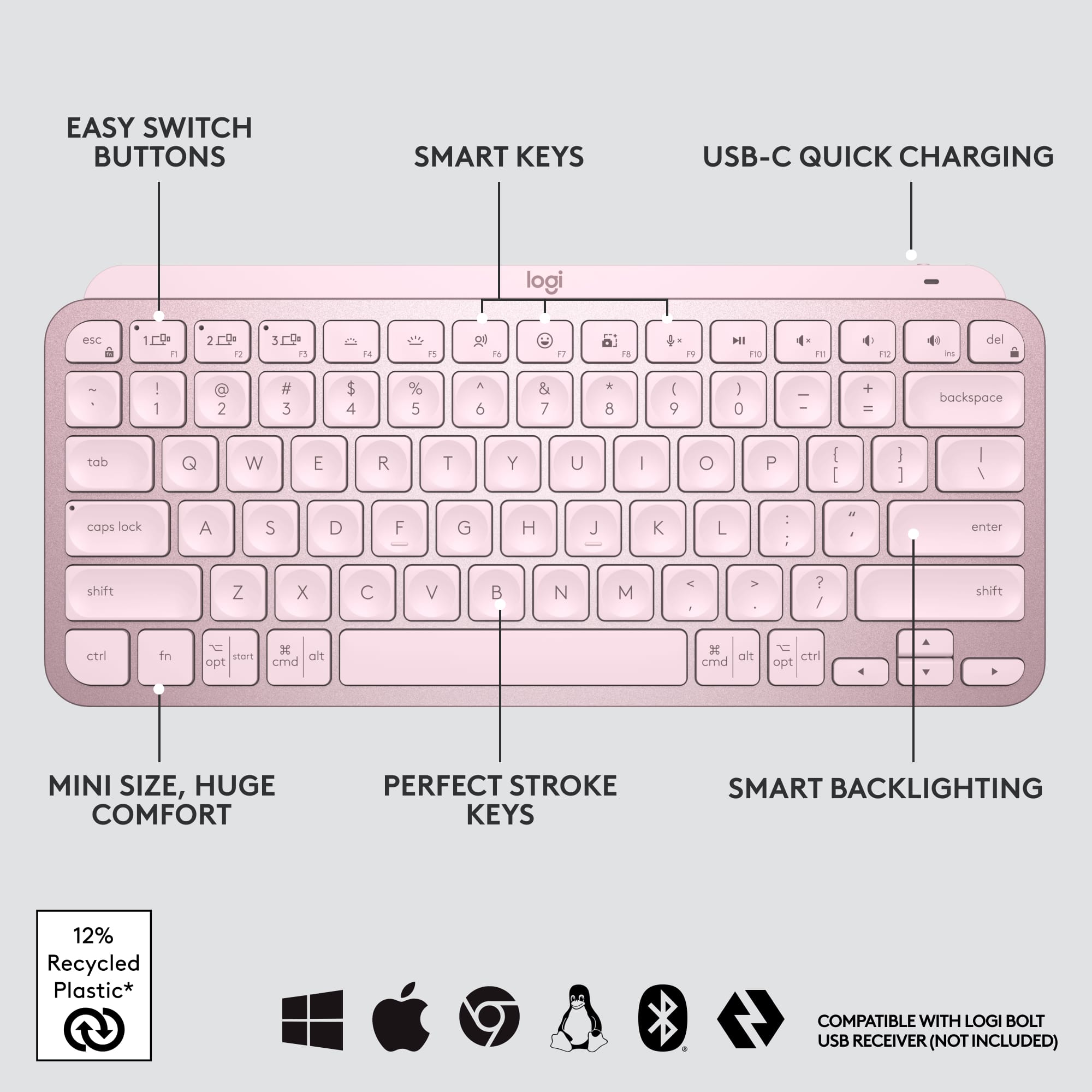

![1. logi
2. esc 1 2 3 4 5 6 7 8 9 0 - = backspace
3. tab Q W E R T Y U I O P [ ] \
4. caps lock A S D F G H J K L ; ' enter
5. shift Z X C V B N M , . / shift
6. ctrl fn opt alt cmd
7. MULTI-DEVICE, MULTI-OS](https://pisces.bbystatic.com/image2/BestBuy_US/images/products/e563c254-4b09-453f-a596-db8b270b59a9.jpg)
![USB-C QUICK CHARGING
F9 F10 F11 F12 ins del
( 9 ) 0 - + = backspace O P { [ } ] \](https://pisces.bbystatic.com/image2/BestBuy_US/images/products/4ba47143-9573-4c40-9018-df94b6892919.jpg)

![IN THE BOX
logi
esc 1 2 3 4 5 6 7 8 9 0 - = backspace tab Q W E R T Y U I O P [ ] \ caps lock A S D F G H J K L ; ' enter shift Z X C V B N M , . / shift ctrl fn opt alt cmd
Responsible Packaging FSC™ FSC® N003028](https://pisces.bbystatic.com/image2/BestBuy_US/images/products/6177db92-9bf5-4933-9264-5b70b886f806.jpg)
- Model:
- 920-010474
- SKU:
- 10840948
Rating by feature
- Value
Rating 4.5 out of 5 stars
- Quality
Rating 4.8 out of 5 stars
- Ease of Use
Rating 4.7 out of 5 stars
- Pros mentioned:Keyboard quality
Good for the style.
||Posted . Owned for 1 month when reviewed.This reviewer received promo considerations or sweepstakes entry for writing a review.It works well and feels really good for a chicklet style keyboard.
I would recommend this to a friend Nice Keyboard
||Posted . Owned for 3 weeks when reviewed.This reviewer received promo considerations or sweepstakes entry for writing a review.Great accessory for my freshman college student. Pairs well with his Macbook
I would recommend this to a friendBrand response from Logitech
Posted .We're so glad to hear that the MX Keys Mini is the perfect fit for your freshman's Macbook! It's a great way to help them stay organized and productive while making a stylish statement. Thank you for your feedback!
Very Nice, But...
||Posted . Owned for 1 month when reviewed.This reviewer received promo considerations or sweepstakes entry for writing a review.Very nice keyboard. Very responsive with a good feel to the keys. The only reason why I took a star off was because I wish it was just a skosh bigger. I have medium size hands and it still is causing me to make many typing mistakes because it is a bit small making it crowded. I'll have to get used to it.
I would recommend this to a friendIt’s ok
||Posted .This reviewer received promo considerations or sweepstakes entry for writing a review.I personally don’t like this keyboard I will stick to Apple.
No, I would not recommend this to a friendBrand response from Logitech
Posted .I understand that the Logitech MX Keys Mini TKL Keyboard was not the right fit for you, and that you prefer sticking with Apple's keyboard design. We apologize for any inconvenience caused and appreciate you taking the time to share your feedback with us.

- Pros mentioned:Keyboard quality
Great product
||Posted . Owned for 3 weeks when reviewed.This reviewer received promo considerations or sweepstakes entry for writing a review.Gave it a three star because the backlighting. Wish it had an option to keep it stay on. And also it’s only white no rgb. Besides that built quality are super durable
I would recommend this to a friend Logitech keyboard
||Posted . Owned for 1 month when reviewed.This reviewer received promo considerations or sweepstakes entry for writing a review.Works absolutely flawlessly. I've had my logitech for a month or so and 0 problems with it. If i ever need another one definitely getting a second.
I would recommend this to a friendgood for price
||Posted . Owned for 2 months when reviewed.This reviewer received promo considerations or sweepstakes entry for writing a review.solid product, works well, new out of package would recommend.
I would recommend this to a friendBrand response from Logitech
Posted .Thank you for your positive feedback on the Logitech MX Keys S for Mac! We appreciate you highlighting its value and performance. Your satisfaction is important to us.
- Pros mentioned:Battery life, Keyboard quality
Best Bluetooth Keyboard I’ve Owned
||Posted . Owned for 1 week when reviewed.This reviewer received promo considerations or sweepstakes entry for writing a review.Great battery life and tactile response. The backlighting and dedicated emoji key is a plus
I would recommend this to a friend Just get this one
||Posted . Owned for 1 week when reviewed.This reviewer received promo considerations or sweepstakes entry for writing a review.Cheaper than apple’s keyboard and just as good. Feels premium.
I would recommend this to a friendBrand response from Logitech
Posted .We're so glad to hear that you love your MX Keys S for Mac! It's our goal to create products that are not only affordable but also provide a premium experience. Thank you for your kind words.
A nice new Logi keyboard
||Posted . Owned for 2 weeks when reviewed.This reviewer received promo considerations or sweepstakes entry for writing a review.A little heavy, but better than others. Had other Logi keyboards in the past but this one is nice, compact and great key response/ feedback.
I would recommend this to a friend- Pros mentioned:Keyboard quality
Satisfied
||Posted . Owned for 1 month when reviewed.This reviewer received promo considerations or sweepstakes entry for writing a review.I was advised by an ergonomics consultant to switch to a compact keyboard, so I bought this as alíame that could be used on Windows and Mac. The build quality is good and so is the typing experience. The concave key caps are nice and comfortable. There’s a huge difference when compared to cheaper keyboards. The only frustrations I have are that it sometimes has trouble connecting to Windows when the computer is locked - when that happens, I have to use an old wired keyboard to log in, then the MX connects fine. And I miss having the Home and End keys, but that’s just a consequence of the compact form factor. All in all I’m pretty satisfied. I like the rose color as well, it’s a nice change from the normal black and silver.
I would recommend this to a friend - Pros mentioned:Size
Good blue tooth Keyboard
||Posted . Owned for 1 year when reviewed.This reviewer received promo considerations or sweepstakes entry for writing a review.I would say this is good but did not have much time to experience because it was difficult to connect to Mac during initial setup. The feel and size is good.
I would recommend this to a friend - Pros mentioned:Size
Doesn't take up space and battery lasts long
||Posted . Owned for 1 month when reviewed.This reviewer received promo considerations or sweepstakes entry for writing a review.I really like this keyboard! It has flat key caps and are closer together than the regular MX Keys but one thing to note is that the F keys are actually line up to the number row. If the other alignment used to bother you on the regular Mx Keys then I recommend getting this one for: -lighter weight -smaller for bags, backpacks, and satchels (travel friendly) -more color choices (needed the pink!) -dictation key is such a life saver (multitasking)
I would recommend this to a friend Good
||Posted . Owned for 3 weeks when reviewed.This reviewer received promo considerations or sweepstakes entry for writing a review.Works as advertises, one star off because I prefer not to use Bluetooth and the 2.4 GHz option for this is the logi bolt connector and they don't include it in the box. Limits mouse options if you only want one connector.
I would recommend this to a friendQuiet and responsive
||Posted . Owned for 3 weeks when reviewed.This reviewer received promo considerations or sweepstakes entry for writing a review.Nice, quiet, good responsive feel to it. Connected easily even without the Logitech software. Nice for a small desk!
I would recommend this to a friendPerfect side Kick for drawing tablets!
||Posted . Owned for 1 month when reviewed.This reviewer received promo considerations or sweepstakes entry for writing a review.Super useful when used on the side of my Huion Drawing tablet. I used it for short keys access while painting on Krita or Corel Painter. I would not use this to type. It's too small and not ergonomic. I rather use my regular big keyboard when working.
I would recommend this to a friendLogitech peripherals are all I'll use
||Posted . Owned for 3 weeks when reviewed.This reviewer received promo considerations or sweepstakes entry for writing a review.Logitech quality. Simple to pair. Looked for the unify receiver and I didn't see the specs. Luckily had a bluetooth connection. Only issue is cannot access UEFI and a weird repeating issue, but that could be my bluetooth
I would recommend this to a friendNice little keyboard
||Posted . Owned for 1 month when reviewed.This reviewer received promo considerations or sweepstakes entry for writing a review.Great keyboard! I like the small keys. I can type faster on them.
I would recommend this to a friendBrand response from Logitech
Posted .Thanks for the feedback on the MX Keys Mini TKL! We're happy to hear you find the compact size and smaller keys help you achieve faster typing speeds. Those are great benefits of the mini design!
Love it
||Posted . Owned for 2 weeks when reviewed.This reviewer received promo considerations or sweepstakes entry for writing a review.I have no regrets buying this overly expensive (in my opinion) keyboard but I love it. Originally I bought the little brother to this keyboard and hated the hard nature of depressing the keys and ended up returning it for the MX mini.
I would recommend this to a friendDelivers as Promised
||Posted . Owned for 1 month when reviewed.This reviewer received promo considerations or sweepstakes entry for writing a review.Keyboard performs as advertised. I am very pleased with the function to use the keyboard on multiple computers.
I would recommend this to a friend