Customer Ratings & Reviews






- Model:
- 910-007500
- SKU:
- 10986386
Rating by feature
- Value
Rating 4.6 out of 5 stars
- Quality
Rating 4.9 out of 5 stars
- Ease of Use
Rating 4.8 out of 5 stars
Relieve mouse tension and feels great!
||Posted . Owned for 2 months when reviewed.This reviewer received promo considerations or sweepstakes entry for writing a review.Have been using a vertical mouse for a while and it has almost eliminated any discomfort I had while working at the computer. as this was more of the conventional "flat" style I was concerned. So far, have had no problems and it fits comfortably in my hand and works effortlessly.
I would recommend this to a friendBrand response from Logitech
Posted .We’re happy to hear you’re enjoying the Logitech - MX Master 3S Bluetooth Edition. We truly appreciate you taking the time to share your experience! Your support means a lot to us.

Comfortable & ergonomic
||Posted .This reviewer received promo considerations or sweepstakes entry for writing a review.One of the most comfortable mice I've held. Connects well and clicks are essentially silent.
I would recommend this to a friendBrand response from Logitech
Posted .Thank you for the great feedback! We're delighted the MX Master 3S delivers both comfort and quiet performance—it's wonderful to hear it's working so well for you.
Best mouse for Mac!
||Posted . Owned for 1 month when reviewed.This reviewer received promo considerations or sweepstakes entry for writing a review.Needed a mouse, for my Mac, that had extra features and support. The Logitech MX Master M3 is the perfect mouse & I highly recommend it.
I would recommend this to a friendBrand response from Logitech
Posted .Thanks for your thoughtful review. It’s great to know our product is living up to your expectations. Your support helps us keep delivering quality.
- Pros mentioned:Overall performance
Great mouse
||Posted . Owned for 2 weeks when reviewed.This reviewer received promo considerations or sweepstakes entry for writing a review.I always love the Logitech mouse’s. They are great and smooth.
I would recommend this to a friendBrand response from Logitech
Posted .Thanks for the kind words. We're glad our mice continue to deliver the smooth performance you love.
Bought for Dad
||Posted .This reviewer received promo considerations or sweepstakes entry for writing a review.Best mouse every, bought another one for my Dad who used a crappy mouse for his job
I would recommend this to a friendBrand response from Logitech
Posted .Thank you for sharing such thoughtful feedback! We’re thrilled to hear the MX Master 3S has made such a difference for your dad’s work, and it’s wonderful that you trusted it enough to gift him one too.
Great and flexible mouse
||Posted .This reviewer received promo considerations or sweepstakes entry for writing a review.This is the second MX Master 3S that I have purchased. My only nit is that I had to purchase this one because the last one died after the extended warranty expired... I like that i can use across my Windows PC and Mac when on my desk as if they were connected.
I would recommend this to a friendBrand response from Logitech
Posted .Thank you for your feedback! We appreciate your continued trust in the MX Master 3S and your insights on durability—it’s great to know its cross-platform flexibility enhances your workflow, and your note helps us improve longevity.
- Pros mentioned:Battery life, Button functionality, Connectivity

The *same* MX Master 3S at a cheaper price.
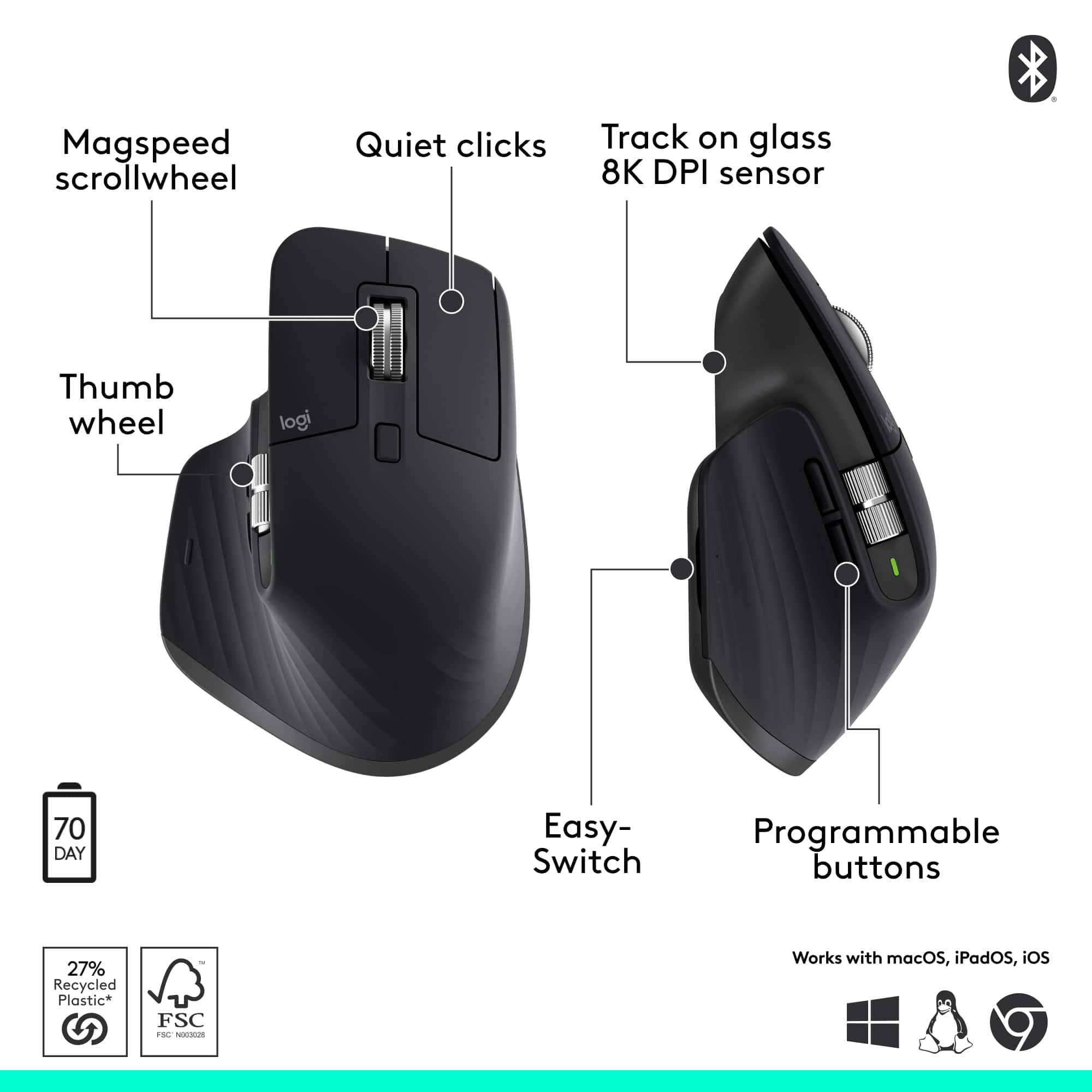
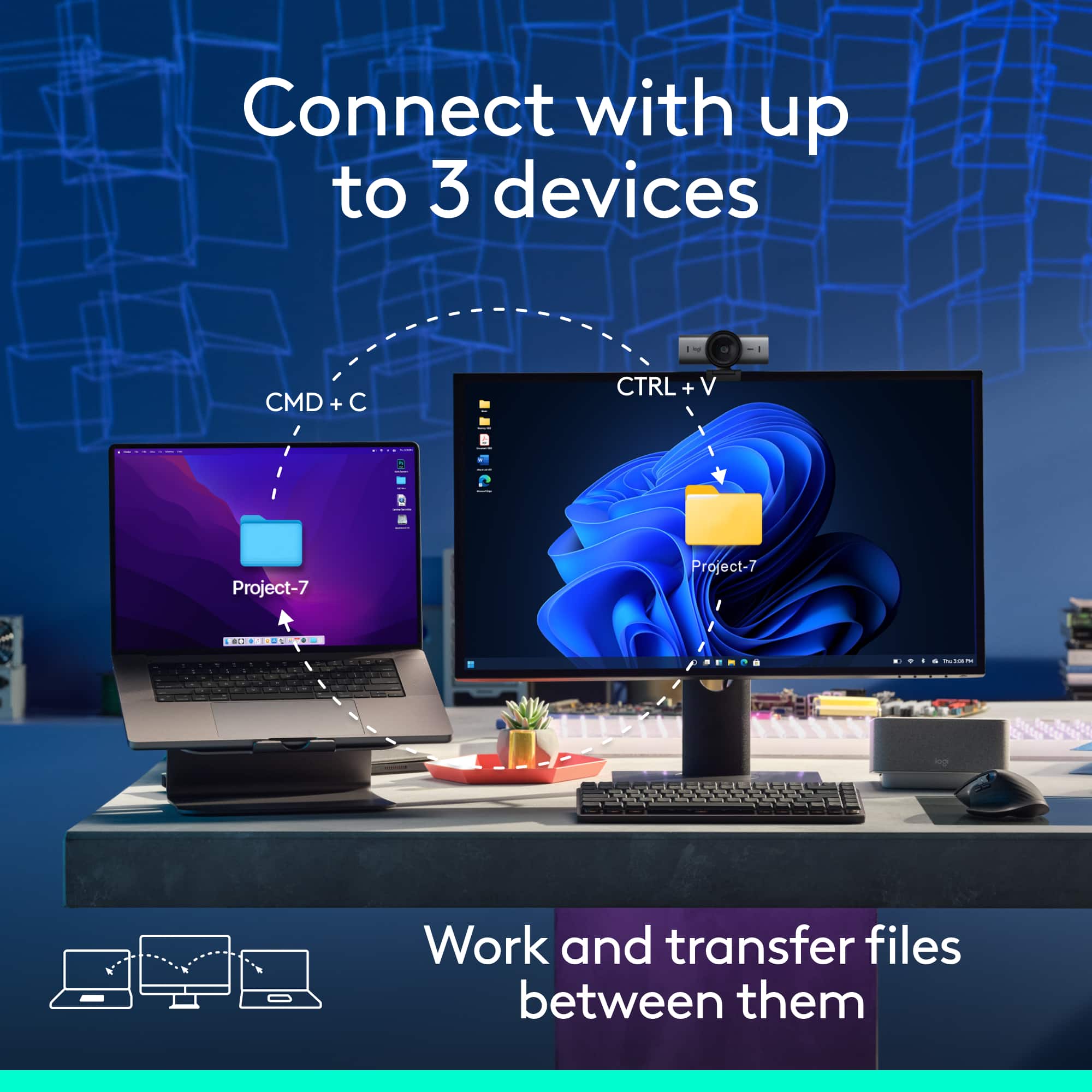
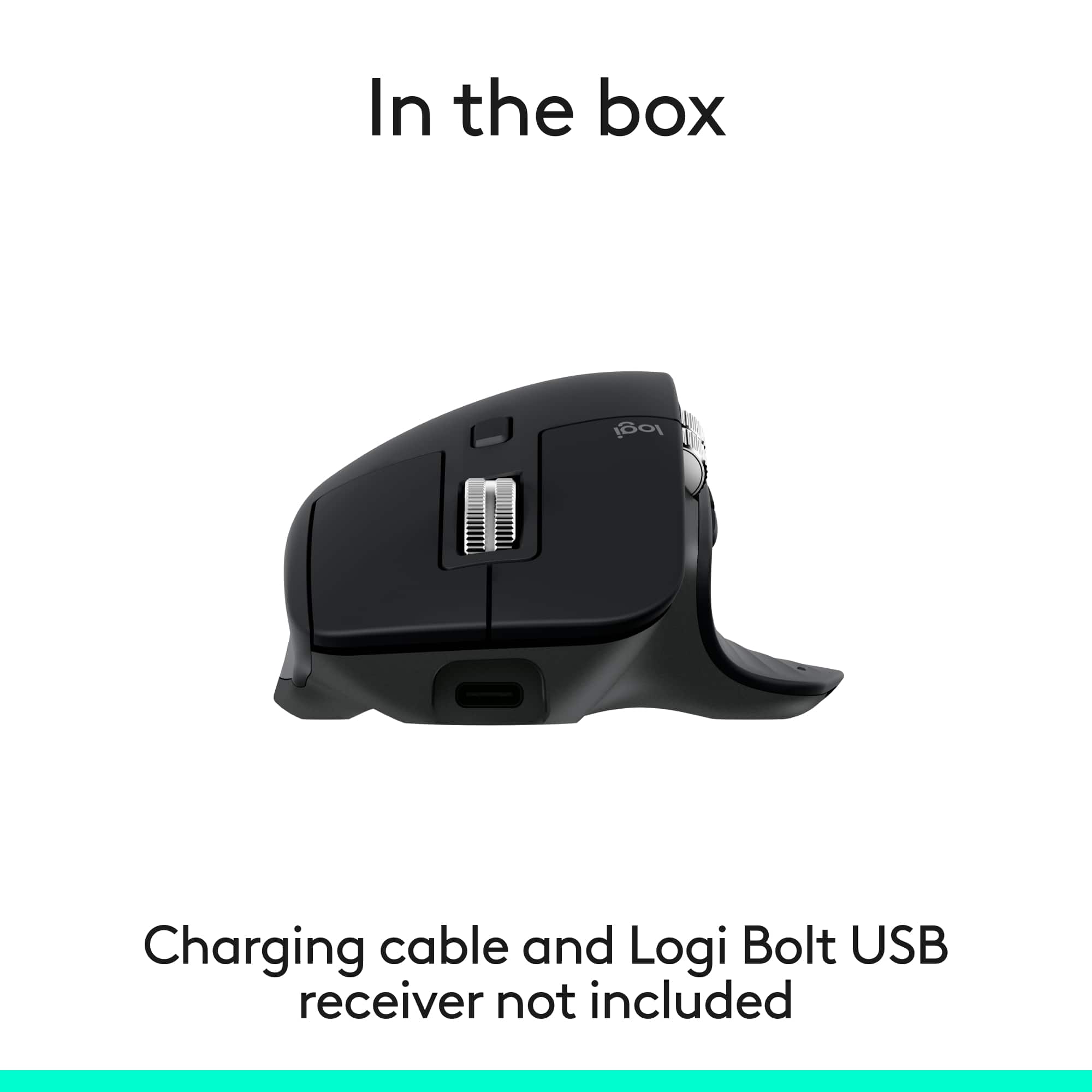
|Posted .This reviewer received promo considerations or sweepstakes entry for writing a review.Pros: -Mouse can be used on virtually any surface, including glass -Ergonomic; comfortable with any grip -Very silent -Pairs with up to 3 devices so you can switch between them (can only use with one device at a time) -Long battery life -Very smooth scroll and thumb wheels -Extremely customizable when used with Logitech's Options+ software -Logitech Flow allows use of mouse between up to 3 PCs at the same time and copy/paste across them -8000DPI sensor for quicker movement on high resolution displays -Cheaper than version with Bolt receiver Cons: -May be jarring to users of the older MX Master series mice at first due to all the changes they made -145Hz polling rate means it's not made for serious gamers -Flow only compatible with Windows and MacOS -(for left-handed people) It's a right-handed mouse I won't bury the lede. The MX Master 3S Bluetooth Edition is the MX Master 3S *without* the Bolt receiver or USB cable included, so you get it at a cheaper price. Out of the box, it readily connects via Bluetooth. If you already have a Bolt receiver, you can pair it with this "Bluetooth Edition" mouse since the receiver pairs multiple devices like the Unifying receiver it replaced. You'll need your own USB-C cable to charge it. Thanks to its ergonomic design, it never feels uncomfortable using the MX Master 3S. It's tall enough and curved in the right way to allow your hand and fingers to naturally rest on it. The soft rubberized texture of the base provides a comfortable feel. I've used the mouse all day and my wrist never feels tired from it. What's new to the MX Master 3S that was absent from the Master MX 3 that preceded it are the silent left and right click buttons. What was once the loudest parts of mouse, on the 3S it's now the most quietest. The amazing thing is, it still feels tactile. It doesn't feel mushy or suppressed. You'll feel the click like you always do. It's just A LOT less noisy. The change is so dramatic that you may hate initially, like I did. I wanted a silent mouse, but when I first used the 3S I instantly felt regret and frustration. My brain was so used to expecting a sound when I click that when I didn't with the 3S it felt extremely jarring to me. I think I may have been clicking harder than I needed to out of reflex. Fortunately, within a half hour, maybe an hour at most, I got used to the silent click and wound up falling in love with it like I thought it would. Oh my GOD, I WISH I had this 20 years when I was up using a computer during late hours when my parents expected me in bed. The left/right click buttons aren't the only thing that's gone quieter. The scroll wheel is also a lot more quiet, even in ratchet mode, where the wheel has tactile "steps" when you spin it. The back/forward side buttons are also relatively quiet. All in all this mouse seems to be designed to work quietly. The loudest part of the mouse is probably the thumb button. None of the buttons feel cheap. They all have a pleasant tactile responsive feel. No soft mushy feel. No sticky feel. The thumb button is easier to find and on the MX Master 3S than the 2S and older because it has a very slight bump to help feel your way to locating it. It also feels easier to press because there is now a groove on the side of the mouse to allow the button to be pressed deeper. You won't accidentally press it while resting your thumb there because of where the button is placed, in the center of the base of mouse on the left side. It's hard for me to explain. It's not easy to press the button by accident, but it's easy to press the button when you need to. There are 2 wheels on the mouse, the scroll wheel in between the left/right click buttons for scrolling with your index finger, and the thumb wheel on the side for scrolling with your thumb. There is no longer the rubberized coating on the wheels but they still have a good feel to them. I like this change as I imagine the wheel will be easier to clean over time as it collects dirt and grime. The rubber from the older versions made it tougher to clean as dirt would stick to it. Now it's just all steel. The thumb scroll wheel is now placed above the back/forward buttons instead of beside them. Thanks to this, the thumb scroll wheel is in its own row and the wheel is now wider making it more easier to use than ever before. The scroll wheel has SmartShift, which automatically switches the scroll wheel from line-by-line scrolling to hyper-fast scrolling when you scroll faster. Or you can use the Shift wheel mode button below the scroll wheel to switch between Ratchet (tactile steps) and Free spin (no tactile steps) immediately. With the use of Logitech's Options+ software, the mouse is extremely customizable. Every button on the mouse can be remapped. You can even map buttons for specific applications only, instead of making the changes global. With Options+ you can also change the speed of both wheels, as well as change the direction of the scrolling of the wheels. You can also change the pointer speed by changing the sensor range. The range is from 200DPI to 8000DPI by steps of 50 DPI. The default DPI out of the box, and without the Options+ software is 1000DPI. I found 8000DPI way too fast and frenetic for me to be precise with it with my use case, even though I have a 3 monitor setup with 4K monitors, but this may be helpful for others with a more expensive setup like a multi-monitors using 8K monitors which have twice as many pixels, making the average mouse pointer feel slower with the default sensor. The higher DPI sensor would allow the mouse pointer speed to move faster. The Options+ software is also where you can set up the MX Master 3S with Flow. Flow allows you to use and control multiple computers with Options+ also installed seamlessly. Switch to another computer by simply moving your cursor to the edge of the screen. Flow also allows your to copy and paste content between those computers. However, since Flow is dependent on the Options+ software, it's only compatible with Windows and MacOS. So there is no first-party solution from Logitech for Linux, Android, or iOS. Whereas "MX" meant the mouse employs Darkfield technology to allow tracking on virtually any surface, the "Master" means the mouse is able to pair with up to 3 devices. With a button found under the mouse, you can switch between those 3 devices. Logitech claims it has a battery life of up to 70 days, carefully wording it so that 70 days is their claim max point. So don't expect 70 days. The reality is, how long it lasts will vary depending on the user and how they use it. So, if you're a previous MX Master 2S or Master 3 user, expect the same amount of battery life as that. Perhaps the average user will get 45-50 days out of it. For someone like my mom, who is elderly and not on the computer as much, 70 days is definitely possible. This is thanks to how power efficient the mouse is. It goes into sleep mode after a long period of inactivity. I have never felt the need to power my mouse off. The mouse charges via USB-C but the cable is NOT included. 3 minutes of charging will give you about a full day's worth of use. You can see the battery percentage through the Options+ app or bluetooth if you have it connected via bluetooth. And it only reports the battery percentage in intervals of 5%. So the 35% battery I'm seeing now actually means 31% to 35%. The mouse can also connect to a Bolt receiver, which is NOT included. If you already have one from a different device, you can add the MX Master 3S Bluetooth Edition to that same Bolt receiver. The battery indicator on the MX Master 3S is just a single LED, albeit larger and easier to see. On the MX 2S and older, there were 3 LEDs so you could see the battery level. With one LED, you can now only see whether the battery is above 10% (green), below 10% (red), or charging (blinking). I honestly don't think this is that bad because when it turns red, that's your reminder to charge it or else it will die. And being in the red with 10% will give you 3 days of extensive usage to do it, which is plenty of time. For loyal MX Master mouse users coming from the 2S or older, you may be in for a real unpleasant shock from all the changes they've made to the 3S. But give it time and you'll fall in love with it like I did. With the cheaper price it's perfect if you don't want to use up a USB port or already have a Bolt receiver. And as of 8/1/2025 it's on sale at Best Buy and a no-brainer to me. Get it on sale while you can! It's a steal.
I would recommend this to a friendBrand response from Logitech
Posted .Thank you for the incredibly detailed and insightful review! We're thrilled the MX Master 3S Bluetooth Edition has impressed you—your feedback is a huge help to others exploring the upgrade.
- Pros mentioned:Ergonomics
Mouse
||Posted . Owned for 1 week when reviewed.This reviewer received promo considerations or sweepstakes entry for writing a review.The mouse is very ergonomic, and the price was just right.
I would recommend this to a friendBrand response from Logitech
Posted .Thanks for the great feedback! We're glad to hear the MX Master 3S is delivering ergonomic comfort and value. We appreciate your support.
Love it
||Posted . Owned for 1 month when reviewed.This reviewer received promo considerations or sweepstakes entry for writing a review.I love this mouse! Very comfortable and responsive.
I would recommend this to a friend- Pros mentioned:Overall performance
Tanks
||Posted .This reviewer received promo considerations or sweepstakes entry for writing a review.Exelent …………………………………………………………………………………………………………..
I would recommend this to a friendBrand response from Logitech
Posted .Thanks so much for the kind words! We're thrilled to hear you're enjoying the mouse. Here's to smooth scrolling and quiet clicks all the way!
- Pros mentioned:Ergonomics
Good mouse
||Posted . Owned for 2 weeks when reviewed.This reviewer received promo considerations or sweepstakes entry for writing a review.Good and fast scrolling Bluetooth mouse. Feels right in your hand
I would recommend this to a friendBrand response from Logitech
Posted .Thanks for the great review! The MX Master 3S really nails that perfect-in-hand feel and lightning-fast scroll. Glad it’s hitting all the right notes for you!
Squeak squeak!
||Posted . Owned for 3 weeks when reviewed.This reviewer received promo considerations or sweepstakes entry for writing a review.Very good mouse. Super customizable and very comfortable to use for extended periods. Got it on a nice sale
I would recommend this to a friendBrand response from Logitech
Posted .Thank you for your fun and thoughtful feedback on the Logitech MX Master 3S! We’re glad you’re enjoying its comfort, customization, and performance—especially with that great sale find.
- Pros mentioned:Ergonomics
Mouse
||Posted . Owned for less than 1 week when reviewed.This reviewer received promo considerations or sweepstakes entry for writing a review.Good control. Good buy, nice and solid. Feels good in your hand.
I would recommend this to a friendBrand response from Logitech
Posted .Thanks for the great feedback! We're glad the MX Master 3S delivers the control and solid feel you were looking for. It’s designed to fit comfortably and perform smoothly, so it’s awesome to hear it’s hitting the mark. Enjoy every click!
Love it, but wouldnt pay full price
||Posted .This reviewer received promo considerations or sweepstakes entry for writing a review.I wouldnt pay full price, but i got them on sale. I am not sure what companies think these days, totally over priced. But sinnce i got them on sale, love the mouse, precise and functional.
I would recommend this to a friendBrand response from Logitech
Posted .We’re grateful you took the time to share your thoughts. It’s wonderful to know our product is meeting your expectations.
- Pros mentioned:Overall performance
Awesome for Mac and iPads
||Posted .This reviewer received promo considerations or sweepstakes entry for writing a review.Love it, I use it for my MacBook Pro and my iPad Pro daily.
I would recommend this to a friendBrand response from Logitech
Posted .Thanks for the love! We're so happy to hear the MX Master 3S is fitting right into your daily routine with your MacBook Pro and iPad Pro. It’s awesome to know it’s making your workflow smoother and more enjoyable. Keep on scrolling! 🚀
Would recommend. Great moise
||Posted . Owned for 1 month when reviewed.This reviewer received promo considerations or sweepstakes entry for writing a review.This mouse totally changed the game for me when using my Macbook Air. Good bye track pad, hello super productivity! Smooth glide, great feel and just a super nice mouse.
I would recommend this to a friendBrand response from Logitech
Posted .Thanks for the encouraging feedback! We’re glad the product is working well for you. Your support helps us keep innovating.
- Pros mentioned:Connectivity
Good buy
||Posted .This reviewer received promo considerations or sweepstakes entry for writing a review.A great mouse which allows to connect to 3 different devices.
I would recommend this to a friendBrand response from Logitech
Posted .Hey! Thanks for the feedback! The MX Master 3S really shines with its multi-device connectivity and ultra-smooth performance. Glad it’s making your workflow more seamless!
- Pros mentioned:Overall performance
Might be best mouse I’ve used
||Posted .This reviewer received promo considerations or sweepstakes entry for writing a review.Solid all around, no complaints and comfortable to use.
I would recommend this to a friendBrand response from Logitech
Posted .Hey! Thanks for the feedback! The MX Master 3S blends ergonomic design, ultra-fast MagSpeed scrolling, and whisper-quiet clicks for a smooth, all-day experience. Glad it’s been a solid performer for you!
Nice Bluetooth mouse
||Posted .This reviewer received promo considerations or sweepstakes entry for writing a review.It’s a very nice Bluetooth mouse that works perfectly with my Apple MacBook and possesses a quality battery. The only downside is it doesn’t come with the cable to charge it but the charger cable can be found at Logitech and is pretty inexpensive.
I would recommend this to a friendBrand response from Logitech
Posted .Thank you for your feedback on the MX Master 3S Bluetooth Edition mouse. We’re glad it works seamlessly with your MacBook and appreciate your note on the charging cable!
Logitech MX MASTER 3S bluetooth Edition
||Posted . Owned for 3 weeks when reviewed.This reviewer received promo considerations or sweepstakes entry for writing a review.Excelent quality as usual Logitech live up to the reputation no issues easy set up highly recomend a little expensive what you get what you pay for
I would recommend this to a friendBrand response from Logitech
Posted .It’s fantastic to hear you’re enjoying Logitech - MX Master 3S Bluetooth Edition. We truly appreciate you taking the time to share your experience!