Customer Ratings & Reviews





- Model:
- 910-007500
- SKU:
- 6633199
Rating by feature
- Value
Rating 4.6 out of 5 stars
- Quality
Rating 4.9 out of 5 stars
- Ease of Use
Rating 4.8 out of 5 stars
Customers are saying
Customers find value in the product's excellent ergonomics, solid overall performance, and stable wireless connectivity. They also appreciate its impressive battery life, quiet operation, and silent button functionality. However, some users find the product to be a bit heavy.
This summary was generated by AI based on customer reviews.
- Pros mentioned:Battery life, Connectivity, Ergonomics

Comfortable and Excellent Features
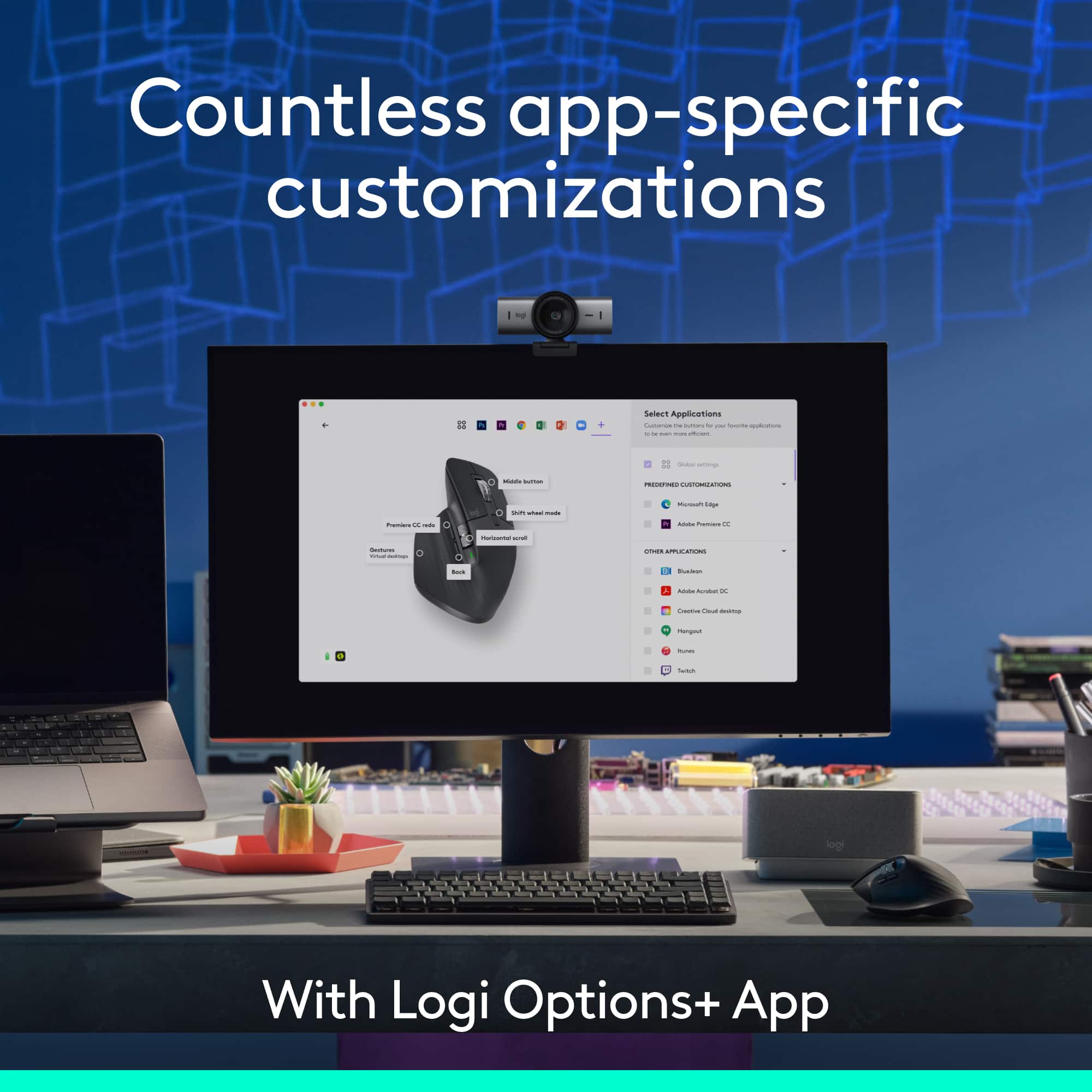
|Posted .This reviewer received promo considerations or sweepstakes entry for writing a review.Anyone using a mouse has likely come across the Logitech brand. They have long established themselves as a leader in peripherals. The MX Master 3S is no different. It excels in its design and comfort. Not only is the mouse easy to use, but it also has incredible battery life and great software to compliment the excellent hardware. - Setup Pairing this with my computer was very easy. Especially as an addition to my other Logitech accessories. It immediately showed up in the Options+ software and was ready for me to use within seconds. - Software Some of the software features are, I think, often overlooked. For instance, having special button configurations based on whichever software you're currently using. Like having the side-scroll wheel being used to navigate my timeline in video editing software. Then, cycling tabs in my web browser. Having the option to easily configure these per app is extremely useful. - Hardware This is where the 3S really shines. It is extremely comfortable to use. Even for long work days. It has excellent battery life, and even if you do run low on battery, you can get a couple hours' worth of charge in about a minute. It's incredibly good. The response from the mouse is also excellent. Working on any surface I have tried, from glass to my larger desk mat. It is also very quiet on clicks. I can barely hear it myself, and I'm sure my coworkers can't hear it at all. Overall, this is an easy mouse to recommend. Pros: Comfortable, easy setup, excellent battery life and fast charging, great software Cons: Might be a bit pricey for some use cases
I would recommend this to a friendBrand response from Logitech
Posted .Thanks so much for the thoughtful review! We're thrilled to hear the MX Master 3S is making your workflow smoother and more comfortable. Your feedback on setup, software, and hardware means a lot. We’ll keep pushing to make every detail count.

Comfortable mouse for gaming, work, or other tasks
||Posted . Owned for 3 weeks when reviewed.This reviewer received promo considerations or sweepstakes entry for writing a review.A great mouse for gaming and fits my hand really well.
I would recommend this to a friendBrand response from Logitech
Posted .Thank you for your feedback! We’re glad the MX Master 3S delivers both comfort and performance for your gaming experience.
Great Mouse.
||Posted . Owned for 1 month when reviewed.This reviewer received promo considerations or sweepstakes entry for writing a review.Excellent mouse. Great sensitivity, crisp and fast for scrolling large documents.
I would recommend this to a friendBrand response from Logitech
Posted .We’re really grateful for your thoughtful review. It’s wonderful to know that our product is delivering the performance and ease of use you were hoping for. Hearing from satisfied users like you keeps us motivated. Thanks for choosing Logitech!
- Pros mentioned:Battery life, Button functionality, Connectivity
Another Superior Mouse by Logitech
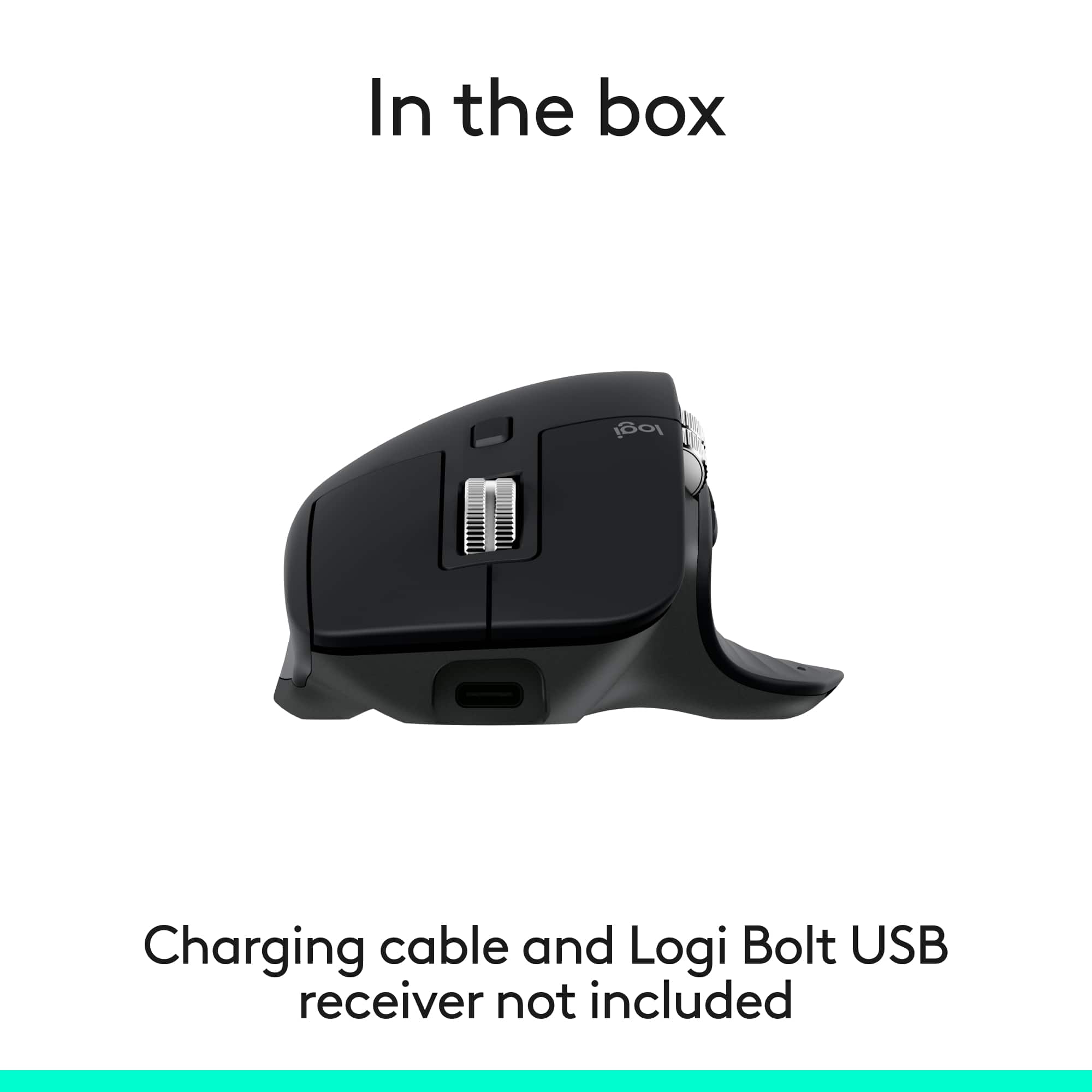
|Posted .This reviewer received promo considerations or sweepstakes entry for writing a review.Logitech's MX Master Mouse is just what I need for a simple but multi-function system in my workspace. The package includes the mouse and paperwork. The mouse comes with a manufacturer's 1-year warranty. PROS: ----------- * Connects via Bluetooth (BT) quickly and easily. * The user should download the Logi Options+ program to get the full ability to personalize how you want your to operate. This is the first mouse I have used that had the side wheel which is great for scrolling things left/right when they don't fit on the screen horizontally. I didn't like the direction I had spin the wheel to move the screen, so Logi Options+ allows this to be inverted. You can make each button on the mouse perform nearly any function you'd like. They also have pre-determined functions depending on the program you are using (Excel vs AutoCAD, for example, perform differently). * Has the ability to BT to 3 different devices. The mouse has a button on the bottom that can be used to switch between devices. * Has the ability to be turned off in order to save battery power. * I only use on Windows 11, but this keyboard can work on multiple OS's: Windows, macOS, most Linux4 devices, iOS, and Android. * Has a great rubbery feel that keeps the mouse in place in your palm. * The mouse fits very comfortably in my right hand even though I have used mice that can be used in either hand. * Movement is pretty precise with Logi Options+ helping me get the most out of my movements. * There is barely any noise when pressing the mouse buttons. You can feel it, but barely hear it. The same applies with the main wheel. * Logitech claims this mouse is outfitted with the most accurate sensor ever. Movement between my 3 side-by-side-by-side monitors is made pretty easy with this mouse. * This mouse tracks well on practically any surface, so you may not need that mouse pad anymore. * The "freewheel" mouse function is pretty cool. You can spin the vertical wheel in either direction (up or down), and it will allow you to scroll at insane speeds until you stop the wheel (or until it stops on its own). Logitech calls it the "magspeed scrollwheel." I use this quite frequently for extremely long and vertical Excel files. CONS: ----------- * No USB-C charging cable provided. OTHER OBSERVATIONS: ----------- * When charging, there is a green LED on the mouse that has a breathing light sequence to indicate it is charging. When complete, the breathing sequence will stop. * Logitech claims up to 70 days on a full charge & 3 hours from a 1-minute charge; however, that may depend on the charge amount you're getting (ie. 1A vs 2A) * In addition to the buttons you can see, there is also a thumb button which I discovered in the Logi Options+ program which can show all applications and what screen they are located on. This was pretty cool to watch and is quite different from the basic ALT-TAB key sequence you can use to see all open windows. With this mouse function, it shows the same thing but on all 3 windows but only shows the programs active on those windows. That's a pretty neat feature. * Compatible with Logi Bolt USB unifying receiver, but the dongle is not included in this package. CONCLUSION: ===================== Overall, this mouse is quite unique and really expands what you can do with buttons all placed in perfect locations. The Logi Options+ app is easy to use and offers a number of combinations you can do to make the mouse do exactly what you want. If you want versatility, this mouse provides that. If not used to an odd-shaped mouse, it may take some getting used to, but so far, the experience has been positive. Great job, Logitech!
I would recommend this to a friendBrand response from Logitech
Posted .Thank you so much for your detailed and thoughtful feedback! We're thrilled to hear the MX Master 3S has enhanced your workspace experience. Your insights on its features and performance are incredibly valuable. We truly appreciate your support and enthusiasm!
- Pros mentioned:Battery life, Button functionality, Connectivity
Comfortable, Configurable, Chage Lasts Forever
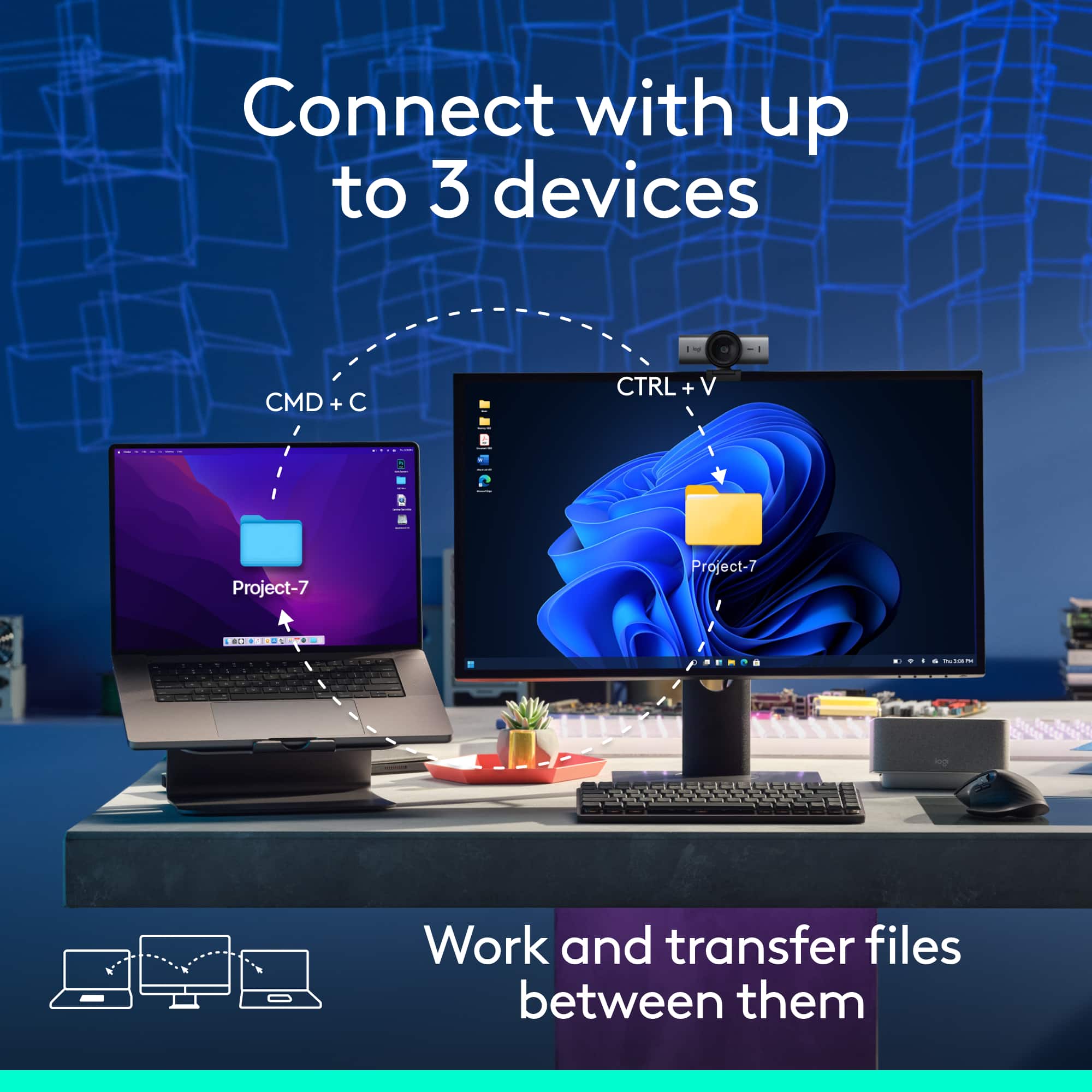
|Posted .This reviewer received promo considerations or sweepstakes entry for writing a review.Highlights: * Same great mouse but connects via BTLE by default. * Long battery life - up to 70 days on a full charge. * Comfortable to hold and reach all buttons. * Tons of buttons and app-specific customizations. * Quiet clicks. * Recharges via USB-C (cable and charger not included). * 1 minute charge for 3 hours of use if battery dies. * Convenient Mac/Windows app for setup. * Compatible with Mac, iOS/iPadOS, Windows, Android, ChromeOS and Linux. * Can pair and quickly switch between 3 connections. Room for Improvement: * Quieter buttons are not as “clicky”. * Setup instructions are a black sticker on the underside. Setup: Setup couldn’t be easier… once you flip the mouse over and find the quick setup sticker. I’m way too accustomed to having printed Quick Start Guides or User’s Manuals in the box. This mouse simplified things so much that all you need to know is on a sticker that covers the bottom of the mouse. Once you flip the mouse over and see the sticker, the rest is a breeze. As with most rechargeable things, you should probably charge the mouse fully before setting it up. No USB-C cable or adapter are provided, but nearly any will work. Plug it in and the LED by the side scroll wheel starts throbbing. When the light is out, the mouse is done charging. Slide the physical switch on the bottom to On and the mouse is automatically in pairing mode for device 1 of 3. Pair the mouse to your operating system of choice using the normal Bluetooth pairing methods. This mouse natively expects a Bluetooth Low Energy (BTLE) connection and supports but doesn’t include the Logitech Bolt receiver. As long as your device has BTLE, it should work. This includes most Mac, Windows, iOS, iPadOS, ChromeOS, Android and Linux devices among others. If one of your devices runs Windows or Mac, you can install the Logi Options+ app to set up a ton of customizations for every button on the mouse, enable the ability to virtually share your mouse between multiple computers running the Options+ app by dragging the cursor between them, and even set up app-specific button settings. The majority of mouse functions work without any app-based customizations, but the app is really helpful. This mouse can be paired to up to 3 different devices. With the exception of Logi Flow (a feature you set up in the Options+ app on Mac or Windows), the mouse connects to one of the 3 devices at a time. There’s a button on the bottom of the mouse to choose the device connection by number you want to use or set up. Pairing to or connecting to a different device is as simple as tapping that button to select that numbered device first and then doing your normal mouse things with that other device. Usage: This mouse is an update to the MX Master 3 in that it has quieter “clicks” so the mouse isn’t as noisy for yourself or others nearby. The “Bluetooth Edition” part of this mouse means that instead of coming with the Logi Bolt USB receiver but also working with Bluetooth, it expects Bluetooth and the Bolt USB receiver is optional (not included). Otherwise, this mouse is just as comfortable and configurable as the prior generation (the MX Master 3). I have relatively small hands but have no trouble comfortably reaching all of the buttons. Keep in mind that this is not an ambidextrous mouse - righties only. I haven’t been using it long, but the battery level meter shown in MacOS as well as in the Logi Options+ app indicates it still has a full charge. If it ever does drain without warning and you still need to work, a quick 1 minute charge gets you 3 hours of mousing. You can also plug it in to USB-C to use it like a corded mouse if necessary while it charges. Charge it during a quick coffee break or over lunch and you probably will be good for months of use. The Options+ app is nicely designed and has the ability to represent and configure multiple Logitech peripherals. Each button can be set up for general use and app-specific settings let you remap buttons or even scroll speeds for your favorite apps. The two scroll wheels are nicely weighted, metal and knurled for easy turning. The main scroll wheel even has a magnetic clutch to switch between ratcheted and free-spinning at your command or automatically depending on how far you’re scrolling. While I appreciate the new quieter clicks, that also makes the buttons a little less affirmatively clicked. This is something I’ll get used to. They still work as expected- just will less noise and click. I expected a quick setup guide but the sticker on the bottom did the job once I found it. Absolutely no other complaints. This is a fantastically comfortable, configurable and capable mouse for up to 3 devices. It lasts forever on a charge and an a quick 1 minute sip of power will get you going in a pinch. If a mouse is your pointing device of choice, you can’t go wrong with this one!
I would recommend this to a friendBrand response from Logitech
Posted .Thanks so much for the detailed review! We're thrilled to hear you're enjoying the MX Master 3S and its seamless setup, long battery life, and multi-device versatility. Your feedback on the quieter clicks and setup sticker is noted—we’re always looking to improve. Happy scrolling, and we hope it keeps powering your productivity for a long time!
- Pros mentioned:Battery life, Button functionality, Connectivity
Very comfortable with great features
|Posted .This reviewer received promo considerations or sweepstakes entry for writing a review.I have had a few Logitech mouses and they all have performed flawlessly. This one is no different and easy to setup. I first connected it to my iPad Air, it worked totally fine but not all the buttons worked. You need to have the Logitech program to fully setup the mouse. I then connected it to my windows 11 laptop and downloaded the Logitech program. This program allowed me to fully setup the buttons and preferences for this mouse. You can also customize the mouse to have different functions when using different windows programs like, word, excel, etc. So when you’re flipping through these programs the mouse buttons will automatically change to your preferences. I really like this feature as I like having different setups for working in excel versus using a web browser. Another cool feature is you can have this mouse connected to two computers at the same time. When you move the mouse to one edge of a computer monitor it will jump to the other computer, no need to push the button on the bottom of the mouse to change. You can also copy a file from one computer and past it to your other computer which is really nice and helpful. The feel of this mouse is soft and very comfortable to use. I like the ergonomic setup of it and the buttons are easy to use. The scroll wheel has two modes, if you slowly scroll it gives you a click feeling, if you start to scroll really fast the click turns off and it rolls really quickly. You can also disable the click all together, but I like the click feel. The side scroll I thought would get in the way and cause random side scrolling issues due to its placement, however it has not been an issue at all. Overall, I really like this mouse and it’s a pleasure to use on a day to day basis. The built in battery should last a year which is great, but is also easy to charge with the built in usb port.
I would recommend this to a friendBrand response from Logitech
Posted .Hey! Wow—thank you for such a thoughtful and comprehensive review! We’re thrilled to hear the MX Master 3S is living up to your expectations and enhancing your workflow across devices.
- Pros mentioned:Battery life, Button functionality, Connectivity
Magnificent mouse for creators
|Posted .This reviewer received promo considerations or sweepstakes entry for writing a review.I absolutely love this mouse. It's ergonomic and has lots of useful features. I love that it has both vertical and horizontal scrolls wheels. I also love that it can pair with multiple Bluetooth devices. The "button" in the thumbgrip is also quite useful (although the gestures are a little finicky). The gestures necessitate pressing down on the thumbgrip and moving the mouse forward or side to side to trigger different actions. I found that it didn't always correctly register my movements though. Simply pressing down on the thumbgrip (without using any additional movements to trigger gestures) worked fine though. I do a lot of casual graphic design projects, and this mouse is absolutely great for my workflow. I am extremely pleased with it. I do wish that this mouse came with a unifying receiver in addition to Bluetooth. I tried pairing this via Bluetooth with my older Mac, but it wasn't recognized at startup. It wasn't until I logged into my Mac that the mouse started working. Apparently this has something to do with the way Macs load third-party Bluetooth drivers at startup. A unifying receiver would have gotten around this issue. I had no issues pairing and using this mouse via Bluetooth on my Windows machines. So far, battery life seems to be awesome. I charged this mouse once overnight, and I've been using it on a daily basis for more than a week, and it's still going strong. I love this mouse.
I would recommend this to a friendBrand response from Logitech
Posted .Thanks for the detailed review! We're thrilled the MX Master 3S is powering your design work so smoothly. Your feedback on gesture control and Mac pairing is super helpful—we’ll keep working to improve compatibility and functionality.
- Pros mentioned:Battery life, Button functionality, Connectivity
Great Side Roller, 5 Actions/Button, Comfortable!
|Posted .This reviewer received promo considerations or sweepstakes entry for writing a review.The MX Master 3S is a very comfortable general purpose mouse with up to five actions per button, roller for your thumb, and powerful configuration software. Design This may be the most comfortable mouse I ever used. My hand just fits in it perfectly. I like the size as well as the design and the way my hand fits in it. It's not a light weight mouse but I think it feels very comfortable to use. The buttons are very quiet when pressed but you can feel that they've been pressed. I like the feel of all the buttons. The mouse wheel gently clicks from one position to the next. If you flick it it spins frictionlessly, which is cool, so it changes modes automatically. Press the small button just below, closer to you, and it changes the mode from the light clicking to frictionless. For the thumb, it has forward and back buttons, but above that is a configurable roller for your thumb and below your thumb is a button you press with the side of your thumb, by pressing down to towards the desktop. The roller has a very different feel than the wheel. No clicking as you roll but you won't move it by accident, it's also not hard to turn, but I think well calibrated. The bottom has three lights, 1, 2, and 3, for each computer it's connected to. There's a button to toggle between the three, or hold it done to activate pairing mode for that connection. I love being able to have it paired with up to three computers at a time and switch between them so easily. This is Bluetooth only, as far as what's included, no USB transceiver is included. But it is compatible with the Logitech Unifying transceivers and Bolt transceivers (Both symbols are on the bottom of this mouse, I didn't test them though. I would expect Bolt to work but would think Unifying may be too old.). You need to provide a USB C cable to charge it since it does not come with one. Features - 8,000 dpi darkfield sensor, can work on glass - Light click scrolling or frictionless scrolling, auto or manual switching - Roller for your thumb - Extra button below your thumb, by default it can be used to easily switch tabs in Chrome or Edge, for instance. - Very configurable via Logi Options+ Windows application - Clicking is very quite but easy to feel Logi Options+ You will want to install this to get the most of out of the mouse there are many configuration options. For instance, you can disable the auto frictionless scrolling if you want - remember, there's a manual button for that. You can also set how hard you need to flick to activate the frictionless scrolling. Then again, if you like the auto frictionless scrolling you can change what the manual scroll shift button so it does something else. I mapped the roller to pan in my audio editing application - which is very cool. You can also map the button under your thumb to anything you want. The default brings up the Windows Task View. If you press it and move the mouse up, it opens the Start menu. If you move the mouse left, right, or down it does one of three other actions. I mapped the main action (no movement) to "Delete" when I use my Audio editor. It switches mapping automatically when I change to the application and that mapping saves me time. There are tons of actions you can apply and with Gestures (as described above), it's like you have many more buttons, up to five (for directions of movement plus no movement) actions per button. It's not a gaming mouse so the sensor tops out at 8k and there's no control for how many reports per second, but for most people, most of the time, none of that matters. Right now I'm using it at 92% (3200 DPI) and it's perfect. I can now use the mouse wheel to zoom in our out and the thumb roller on the side to scroll forward or backward in the file I'm editing. You can also use Options+ to configure Flow. Flow let's you pair a mouse and keyboard to two computers at one time. Both devices need to be Logitech and support Flow. Then you can move the mouse from the screen of one device to the screen of another device, like it's a second monitor, but it actually is changing computers and moves the keyboard to that computer too. You can transfer profiles from one computer to another by exporting them on one computer and importing them on the other. When adjusting the DPI (Pointer Speed), it shows a % until you're over 50% or 4000 DPI. Then you switch it to 8K mode to go higher. This will also show lower DPI settings, which may be helpful to see. You may want to turn off the 8K mode if you're at 4000 DPI or less, once you get the setting you like, as I think that saves power. Battery Life The battery life seems excellent! I've used it around 24 hours through the last week and it's still at 90% from it's first full charge. The box says you can use it for three hours after 1 minute of charging and a full charge will last up to 70 days. Summary The fit and feel the mouse, buttons, wheel, and roller is great, but the configurability of all those buttons and the extra roller really add value. If you're looking for a great mouse for getting work done and using it day in and day out, with it feeling comfortable, I think this is a mouse you should try!
I would recommend this to a friendBrand response from Logitech
Posted .Wow—thank you for such a detailed and thoughtful review! We're thrilled the MX Master 3S is delivering comfort, versatility, and productivity just the way it’s designed to. Your insights are incredibly helpful and much appreciated.
Resets profiles often, frustrating
||Posted . Owned for 3 weeks when reviewed.This reviewer received promo considerations or sweepstakes entry for writing a review.It's really nice, however, the progammable buttons have ro be reprogammed over and over. I have different application (Photoshop, Illustrator, etc. With different profiles through the Logi+ app, however, it gets confused and resets itself. Frustrating first world problem, I know, but this mouse isn't cheap.
No, I would not recommend this to a friendBrand response from Logitech
Posted .Thank you for your detailed feedback. We are pleased to know that you are satisfied with the overall quality of the mouse; however, we regret the inconvenience caused by the programmable buttons frequently resetting, particularly when using multiple application profiles through the Logi options+ software. We understand how frustrating this can be, especially given the premium nature of the product. To address this issue, we recommend reaching out to our social care team via email at socialcare@logitech.com with your
- Name:
- Email Address:
- Country:
- Product Name:
- Brief description of issue:
- Pros mentioned:Battery life, Connectivity, Ergonomics
No dongle in this edition, but still a great mouse
|Posted .This reviewer received promo considerations or sweepstakes entry for writing a review.## Bluetooth Edition This particular variant of the popular Logi MX Master 3S mouse is the "Bluetooth edition". This simply means that no Logi Bolt dongle is included in the box (and, for some reason, no USB-C charging cable, either). Most laptops and tablets can support a Bluetooth mouse, so this is likely a non-issue for most people. Besides, with many laptops transitioning to only USB-C ports, it looks kind of silly to have a USB-C to USB-A adapter *and* Logi Bolt receiver hanging off the side of your sleek laptop. Like the "regular" edition, there is a button on the bottom of the mouse that lets you alternate between 3 different Bluetooth pairings. For example, you can pair this laptop with your PC, your Mac, and your iPad without needing to unpair and re-pair when you switch devices. Simple tap the button on the bottom and an LED light cycles through 1, 2, and 3 to indicate which pairing is currently active. ## Design The MS Master 3S mouse is one of the most comfortable mice I've used and I've been a fan of this model for years. My hand doesn't fatigue as easily as it does with typical mice and it can stay comfortable through the work day. My whole hand rests comfortably on the mouse and the buttons are easy to reach without any weird hand contortions. However, it's important to note that this mouse is designed for right-handed individuals only. The two main buttons click comfortably and quietly, and the scroll wheel and be set to either freely spin for rapid scrolling, or use a traditional line-by-line "notched" scroll effect. There is also a horizontal scroll wheel near your thumb, as well as a "back" and "forward" buttons which works like clicking the "back" and "forward" buttons in your browser. I've found that the mouse moves accurately on basically any surface. It even works great on my couch cushion! ## Settings Logitech's Options+ software allows you to customize the buttons and settings, but the mouse can be used without needing to install anything. However, with the software, you can remap buttons to launch apps, change the configuration based on the application you're using, and use Logitech's Flow feature that allows you to move your mouse across multiple computers. ## Battery Life The mouse can last up to 70 days on a single charge and is easily recharged with a standard USB-C cable. Unlike Apple's Magic Mouse, it can be charged and used at the same time. ## Summary The Logi MX Master 3S Bluetooth Edition ditches the dongle but keeps everything that makes this mouse a productivity powerhouse. While it skips out on a USB-C charging cable (oddly enough), it supports easy switching between 3 paired devices. Ergonomics are great: even long workdays feel manageable thanks to its contour-hugging design. The scroll and click functions are quiet, smooth, and versatile, with a bonus horizontal wheel for added control.
I would recommend this to a friendBrand response from Logitech
Posted .Thanks for sharing your thoughtful take on the Logi MX Master 3S Bluetooth Edition! It’s great to hear how it balances sleek design and multitasking prowess, even if it plays hard to get with a USB-C cable. The ergonomic comfort and smooth controls definitely sound like a win for productivity power users.
- Pros mentioned:Connectivity, Ergonomics, Overall performance
An excellent mouse with many capabilities
Posted .This reviewer received promo considerations or sweepstakes entry for writing a review.Wow! This is an awesome mouse. I bought this on sale during Cyber Monday, and after only a few hours of use, I'm very impressed with the features that are available to users. Moving from a smaller, 7-year-old Logitech M720 wireless mouse, the MX Master 3S is larger, so it fits my hand better and is very comfortable over several consecutive hours of use. Scrolling speed is variable (I've set it as 1800 DPI), and I've programmed the scroll and push buttons through the Logi Options+ app. Your thumb has a place to rest so you're not dragging it across your mouse pad like with other mouses. I still have a lot to learn, like how to set it up for individual apps. Some reviewers have a concern about its weight, but I've found it moves more easily than my M720. I'm using it with my MacBook Air M3 and so far have had no Bluetooth connectivity problems. Plus, you can charge it while using it. The 3S seems to be well built, so
I would recommend this to a friendBrand response from Logitech
Posted .It’s wonderful to hear that our Logitech MX Master 3S Bluetooth Edition Mouse is meeting your needs. Your feedback is incredibly valuable and helps us continue to innovate. Thanks for being part of the Logitech community.
- Pros mentioned:Battery life, Button functionality, Ergonomics
Quiet Powerhouse
|Posted .This reviewer received promo considerations or sweepstakes entry for writing a review.The Logitech MX Master 3S Bluetooth Edition has quickly become my go-to mouse thanks to its ergonomic design and refined performance. It fits comfortably in my hand, making long hours feel less taxing, whether I’m drafting emails or working through spread sheets. Its quiet click feature adds an unexpected luxury—perfect for shared spaces or taking notes while on a video call. The customizable buttons are a huge productivity boost, letting me tailor my setup to fit the way I work. I also love that it connects effortlessly to three separate devices, allowing me to toggle between machines without missing a beat. Another standout is the accurate tracking on any surface, powered by its 8K DPI precision sensor. Whether I’m working on wood, glass, or a standard desk pad, the response is consistently smooth. Battery life is no slouch either: it delivers up to 70 days on a full charge. And while the USB-C charging cable isn’t included, I appreciate the fast and modern charging standard. Final Verdict Yes, it’s a bit of a splurge—but with top-tier comfort, customizable functionality, whisper-quiet performance, and power that lasts for weeks, the MX Master 3S earns its place in any serious workspace. You won’t be disappointed. Logitech really knows how to make quality devices. When I look around my office, both at home and work, all I use now are Logitech keyboards, mice, and webcams.
I would recommend this to a friendBrand response from Logitech
Posted .Thank you so much for the thoughtful review! We're thrilled to hear the MX Master 3S has become your go-to companion for work and productivity. From the ergonomic comfort to the quiet clicks and seamless multi-device connectivity, it’s great to know the features are making a real impact in your day-to-day. We truly appreciate your loyalty to Logitech across your workspace—it means the world to us.
- Pros mentioned:Connectivity, ErgonomicsCons mentioned:Weight
Very Comfy
||Posted . Owned for 1 month when reviewed.This reviewer received promo considerations or sweepstakes entry for writing a review.Wireless mouse with a comfortable, right-hand ergonomic shape. Ultra-fast scrolling is the standout—great for long documents and spreadsheets. Quiet clicks make it easier to use in shared offices, meetings, or late-night work. Bluetooth connectivity keeps desk setup simple and works well across modern devices. The grip and button layout feel tailored for all-day use, not quick gaming sessions. Custom buttons can streamline common tasks once you set them up to your workflow. Tracking is reliable on most desk surfaces, though glass can be hit-or-miss. It’s heavier than basic mice, which many people like for control but not everyone will. The price is higher, but the build and day-to-day usability can justify it for frequent users. Best for knowledge work and multitasking; less compelling if you only need a basic mouse.
I would recommend this to a friendBrand response from Logitech
Posted .Thanks for sharing your positive thoughts about the Logitech - MX Master 3S Bluetooth Edition Performance Wireless Optical Mouse! We're happy to hear it's working well for you and appreciate your continued support.
- Pros mentioned:Battery life, Ergonomics
Logitech MX Master 3S-A Power-Packed Performer
|Posted .This reviewer received promo considerations or sweepstakes entry for writing a review.The Logitech MX Master 3S Bluetooth Performance Wireless Mouse is exactly what you need if you're looking for a flagship mouse from Logitech. I already own two MX Master mice (the original version of the MX master series) and was very happy with them—but this new model is a significant upgrade in every way. The ergonomics, feel, and overall comfort have noticeably improved compared to the earlier versions. The battery life is impressive, and it charges via USB-C, which is great. While the mouse uses Bluetooth for connectivity, it’s also compatible with Logitech’s Bolt receiver (although this was not included in the box). I also noticed that the USB-C charging cable wasn't provided, which would’ve been a helpful addition—but that’s not a big issue since USB-C cables are quite common nowadays. Usage and Performance The scrolling experience is excellent, and the clicks are nearly silent—soft and gentle, making for a very pleasant user experience. The mouse glides smoothly and comes equipped with an 8K DPI sensor. Personally, I find 8K DPI unnecessary for most tasks, so I keep the sensitivity at around 50%, but it’s a great option for users working with ultra-high-resolution displays or large multi-monitor setups. The mouse includes all the standard buttons found in the MX Master series, and what’s great is that every button is fully customizable for each application using the Logi Options+ software. This makes the overall setup highly tailored and efficient. One of the standout features is Logitech Flow. If you have a compatible keyboard and use multiple computers—whether it's a combination of Mac and Windows or two of the same—you can control both systems using just this mouse and keyboard. You can even copy and paste files or content between them seamlessly. Just drag the cursor to the edge of one screen, and it transitions to the next computer. This feature is incredibly useful for people like me who switch frequently between a personal laptop and a work PC. The scroll speed is super smooth, and the build quality is excellent. It has a soft rubberized texture that feels premium and reduces hand fatigue during long use. Overall, this mouse is extremely comfortable and packed with all the features anyone could ask for. In short, this is one powerful, feature-rich mouse that delivers on all fronts. Highly recommended.
I would recommend this to a friendBrand response from Logitech
Posted .Thank you for such a detailed and thoughtful review! It’s fantastic to hear how well the mouse fits into your workflow and that the upgrades have made a noticeable difference. From comfort and customization to seamless multi-device control, it sounds like it’s truly elevating your experience. Really appreciate you sharing all the insights!
- Pros mentioned:Battery life, Connectivity
Pretty much the perfect mouse. Full stop.
|Posted .This reviewer received promo considerations or sweepstakes entry for writing a review.Honestly, my title says it all. I am an off-and-on user of Logitech products. Typically, good quality and useful, but for some things I may go with another brand for one reason or another. Not with this mouse. This has been my mouse of choice for as long as it has been released…and I moved from the prior iteration…and from the one before that. It just works for me. It is very comfortable to use, and it has a nice “heft” to it. Not heavy, and it may seem counterintuitive, but the weight and shape just feel good in the hand as well as to use. It glides easily pretty much on any surface, and all the buttons are well-placed, responsive, and quiet. Very quiet. Further, all the buttons are well thought out. The inclusion of their scroll wheel, thumb wheel, thumb button, front and back buttons, and center button give me a great level of control over things without having to nearly literally lift a finger. Of course, it all comes together via their Logi Options+ software package which really allows you to dig in, customize, and set things up to best suit your needs. I can’t stress enough to do this. Not only do use have macro control of the buttons, but you can set application specific uses as well. It really unlocks a lot of utility. As does the fact it works with most OS’s, can connect to up 3 devices, and work across multiple devices at the same time. This version of the mouse is Bluetooth only, which quite honestly should suit everyone. I have, to this point, seen zero difference between this and their USB version (this one is compatible with the Logi Bolt USB receiver however). Connectivity has been completely without issue, and battery life has been outstanding. Charging is so infrequent and quick it simply won’t be a concern. Additionally, you can always check the charge level in the software if need be. I guess the only possible dig here is they do not give you a USB-C charging cable. Personally, I am fine with it, as it is one less cable, and I am particular with the cables I use, but on some level, someone may need one. Just something to note. In the end, this is just a great mouse, and I think it should work for just about anyone and everyone. Again, full stop. For all you can do and get out of it, I really think the value is there.
I would recommend this to a friendBrand response from Logitech
Posted .Thank you for such a thoughtful and detailed review—it’s clear this mouse truly fits your workflow and comfort preferences. We're thrilled to hear how well it performs for you, from the design and button layout to the seamless connectivity and customization through the software. Your insights will definitely help others looking for a reliable and versatile tool. Appreciate you taking the time to share your experience!
- Pros mentioned:Connectivity, Ergonomics
Catch this Mouse!
|Posted .This reviewer received promo considerations or sweepstakes entry for writing a review.Taking this mouse out of the box, the first thing I noticed was it was much larger than my previous mouse, so I was a bit worried about my small hands. However, it fits in my hand perfectly and comfortably. To get started it was easy to pair with my windows 11 PC and then install the Logi Options + software. With the software you can customize the buttons and the wheels along with check the battery power and see the list of computers you have programmed to each of the 3 options for the Easy-Switch. The last interesting feature of the software that I haven't been able to try is Logi Flow. This allows you to control multiple computers by moving the cursor to the edge of the screen to switch. You can then transfer files between the two computers with copy and paste! So, after seeing all these cool features it comes down to feel. As I mentioned, the design is perfect for my smaller sized hand and ergonomically perfect for me to use for long periods comfortably. Besides being comfortable it’s very quiet. So quiet, it’s now got me looking for Logitech keyboards to partner with it, so the keyboard is just as quiet as the mouse. The last feature I'll comment on is battery life. It’s chargeable with a USB-C connection and a charge lasts for hours of use. It also has a power button to conserve battery life while traveling. Overall, I couldn't be happier with this mouse and will look at the matching keyboard next!
I would recommend this to a friendBrand response from Logitech
Posted .We’re thrilled to hear how well the mouse fits your hand and lifestyle—comfort and quiet performance are exactly what we aim for! Thanks for highlighting the software features too. We’d love to help you find the perfect keyboard to match your setup.
- Pros mentioned:Button functionality
One of the best mice you'll ever use
|Posted .This reviewer received promo considerations or sweepstakes entry for writing a review.I've used Logitech products for years, both at work and at home. I find their products to be the best, hands down. I've tried all kinds of other brands, mostly "gaming" input devices, and they always fall way short on performance and feel. The Bluetooth edition of the MX Master 3S is no exception. I currently use several different versions of the MX Master series on all my PCs. This mouse is fantastic. It has a really great feel to it. For starters, it's quite weighty. You don't get the impression that it's flimsy by any means. The coating on it is very grippy and feels a bit rubbery. This helps you keep a good solid grip on it, even if you've been gaming for a long time and your hand gets sweaty. I really like the black color of this one, the others I own are dark gray. The fact that it's a Bluetooth mouse means you'll be able to use it with pretty much any device you want (not only computers). I was able to pair this one with my machine in about 10 seconds. Actually, after I turned it on, Windows found it and put out a pop-up asking if I wanted to connect to it. It can't possibly be any easier. This mouse can be paired with up to three different devices, and the way you do that is to press the button on the bottom and choose either device 1, 2 or 3, and then put it in pairing mode. After you've paired your devices, all you need to do is press the button to select any of the three devices to use it with. Beside being one of the most comfortable mice you'll ever use, it has a lot of buttons you can assign to do pretty much whatever you want them to. Aside from the Left, Roller Wheel and Right buttons, there are two buttons right below the thumb wheel, and another more subtle button on the lower part of the thumb rest. One of my favorite features is the thumb wheel. This is so nice to have, and once you use for the first time you'll wonder how you ever got along without it. You can set it up for horizontal scrolling, zooming, volume, tab navigation or keyboard shortcuts. For large spreadsheets, the scrolling assignment is invaluable. The position and layout of each button are well placed and convenient to reach with your thumb. The buttons are very quiet as well, almost silent in fact. Anyone on a computer all day long will appreciate not having to listen to the click, click, click, click all day. The weighted mouse wheel is the nicest I've ever used. It's made out of metal which allows you to spin it easily, and it will keep spinning seemingly indefinitely. Scrolling through long web pages or digital user manuals takes far less time and effort. There's a button on top to select either freewheel or indent rolling. The spin feature works best in freewheel, but is more controlled in indent mode. As icing on the cake, this mouse is rechargeable with a USB-C connector. No more running out of batteries at the worst possible moment. There's also a status LED that will show you when you need to charge (before it's too late). It will also let you know when it's fully charged. Combining the MX Master 3S with the Logi Options + app lets you do things like see the battery charge percentage and assign buttons along with other settings. In short, combining the mouse and the app will allow you to customize your mouse setup the way you would like to use it, whatever way that is. Logitech products have never let me down, and I also have several of their wireless (and lighted) keyboards that I absolutely love as well. I can't say enough about the setup and performance of their products!
I would recommend this to a friendBrand response from Logitech
Posted .Your enthusiasm and in-depth insights are truly appreciated—thank you for such a thoughtful review! It’s fantastic to hear how the mouse’s comfort, build quality, and versatile features have seamlessly supported your workflow. The seamless device pairing and customization options seem to have really hit the mark for you. We’re so glad it’s earned a place in your tech lineup and made such a difference in your everyday setup!
- Pros mentioned:Battery life, Connectivity, Ergonomics
Top Mouse
||Posted . Owned for 1 month when reviewed.This reviewer received promo considerations or sweepstakes entry for writing a review.One of the best mouse I use, everything is at top quality. No single detail was left out of attention, the design, the buttons old and new, the Bluetooth multi-connection, the battery life, make this mouse a totally recommended purchase.
I would recommend this to a friendBrand response from Logitech
Posted .Thank you for your wonderful feedback! We’re thrilled the Logitech MX Master 3S Bluetooth Edition delivers top quality in design, buttons, multi-device connectivity, and battery life. Your strong recommendation means a lot and highlights its excellence.
- Cons mentioned:Weight
A purchase I'd 'Redo'
|Posted .This reviewer received promo considerations or sweepstakes entry for writing a review.I’ve used Logitech mice for a while now, but this is my first time with one from the MX Master lineup — and honestly, I get what all the fuss is about. The Easy-Switch feature is hands down my favorite part. I bounce between a Mac, a PC, and a Chromebook most days, and being able to switch between them with just a click on the button located on the underside of the mouse is super handy. Once you get used to that, it’s hard to go back. One thing I didn’t expect to like as much as I do is the scroll wheel. There’s this mode shift button that lets you switch between the traditional clicky scroll and a smooth free-spin — and I actually use both depending on what I’m doing. It’s one of those little touches that just makes the mouse feel smarter. I spend a lot of time in Excel and doing some video editing, so having the horizontal scroll was a big differentiator for me. Makes getting around big timelines or spreadsheets way less of a pain. I’m still messing around with the side buttons. Right now I’ve got them set to undo/redo, which works great, but I keep going back and forth on whether I should switch them to copy/paste. Either way, it’s nice being able to customize them to what you need. If I had one small nitpick, it’s the feel of the mouse. It’s lightweight, which is fine, but part of me wishes it had a bit more heft. It doesn’t feel cheap, but the coating or material doesn’t scream “high-end” either. It’s hard to explain — it works great, just doesn’t quite have that premium feel I expected for something in this range. Overall, I’m glad I picked it up. It’s been solid for everyday work, especially if you use more than one device. Once you get used to how seamless it all works, it’s tough to go back to anything else.
I would recommend this to a friendBrand response from Logitech
Posted .Thanks for your detailed and insightful review of the MX Master 3S! It's clear that features like Easy-Switch, the dual-mode scroll wheel, and horizontal scrolling have made a real difference in your workflow. Your take on the customization options and ergonomics adds real value for anyone considering the upgrade. It’s great to hear the performance more than makes up for it. Appreciate you sharing your experience!
- Pros mentioned:Battery life, Connectivity, Ergonomics
Great Quality Mouse
||Posted .This reviewer received promo considerations or sweepstakes entry for writing a review.Great overall mouse; I use it as a teacher and have charged it only once in the last month. Good connection, great design, and feel.
I would recommend this to a friendBrand response from Logitech
Posted .It’s always a pleasure to hear from satisfied users. Thanks for sharing your experience—it helps us keep doing what we love.