Save up to 50% on 3-Day Sale deals.Ends 12/7.Shop now

Skip to content
Gift Ideas
Main Content

Customer Ratings & Reviews
Your price for this item is $109.99
The comparable value price is $119.99

Customer reviews

Rating 4.8 out of 5 stars with 2251 reviews

Rating Filter

Rating by feature

  • Value

    Rating 4.6 out of 5 stars

  • Quality

    Rating 4.8 out of 5 stars

  • Ease of Use

    Rating 4.8 out of 5 stars

95%
would recommend
to a friend
The vast majority of our reviews come from verified purchases. Reviews from customers may include My Best Buy members, employees, and Tech Insider Network members (as tagged). Select reviewers may receive discounted products, promotional considerations or entries into drawings for honest, helpful reviews.
Page 8 Showing 141-160 of 2,251 reviews
  • Rated 5 out of 5 stars

    Great product. Highly recommend!

    |
    |
    Posted . Owned for 1 week when reviewed.
    This reviewer received promo considerations or sweepstakes entry for writing a review.

    Great product. Highly recommend. Price is decent as well.

    I would recommend this to a friend
  • Rated 1 out of 5 stars

    Not so great after all

    |
    |
    Posted . Owned for 5 months when reviewed.
    This reviewer received promo considerations or sweepstakes entry for writing a review.

    One of the most acclaimed mice. So much for all the hype. Does not work with a cable. Only works on Bluetooth. With Bluetooth does not really work well on a Mac. It’s erratic. Low DPI. Works great in Windows. But given the price tag not worth it. Disappointed with this purchase. I want to return this. I will say the ergonomics are good, but without the basic functionality it does not feel like a good mouse

    No, I would not recommend this to a friend
    • Brand response from Logitech
      Posted .

      We apologize for the inconvenience and disappointment you've experienced with the Logitech MX Master 3S. To ensure you have a satisfactory resolution, we recommend reaching out to our social care team via email at socialcare@logitech.com with your
      - Name:
      - Email Address:
      - Country:
      - Product Name:
      - Brief description of issue:

  • Rated 5 out of 5 stars

    The Ultimate Productivity and Gaming Mouse

    |
    |
    Posted . Owned for 1 month when reviewed.
    This reviewer received promo considerations or sweepstakes entry for writing a review.

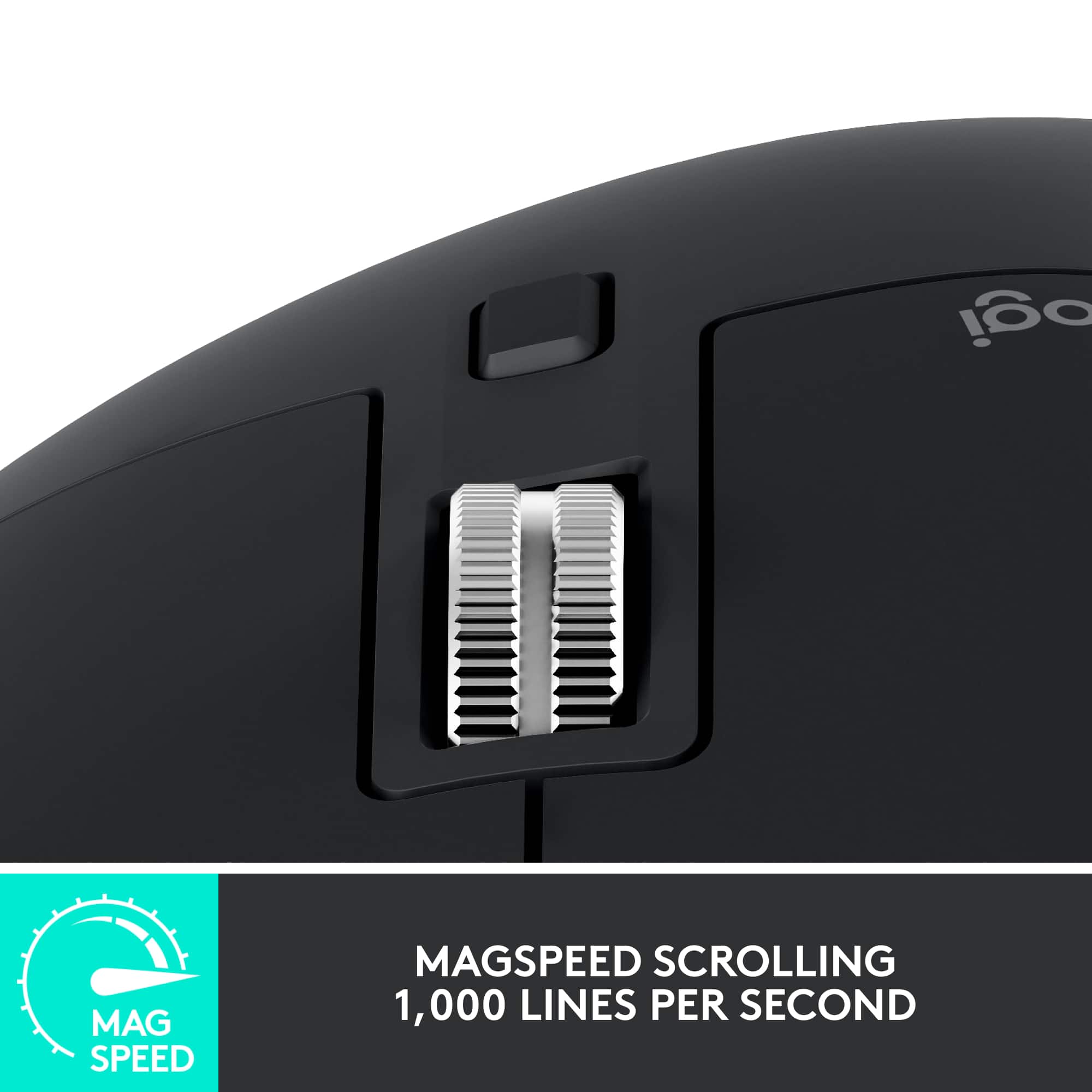
    I bought this mouse as a late Christmas gift after debating which brand and model to choose as a replacement for my Microsoft Explorer Mouse. After reading many reviews, I decided on the Logitech MX Master 3S Wireless Laser Mouse, and I must say—it has exceeded my expectations. This mouse is fast, responsive, and incredibly smooth. The MagSpeed scroll wheel allows for precise scrolling or lightning-fast navigation when needed, making it great for both productivity and gaming. I also appreciate the plentiful buttons and customization options, which let me open applications and execute shortcuts using button combinations with mouse movements—just like the mouse it replaced. One thing to be aware of is hand placement as the scroll wheel is sensitive and can be easily spun. The Logi Bolt USB receiver included with the mouse is a great addition, as it allows multiple Logi Bolt-compatible devices to connect without taking up extra USB ports. Additionally, the mouse supports Bluetooth connectivity, making it useful for pairing with presentation devices, tablets, or other non-USB devices. While I haven’t had the need to use Bluetooth mode yet, it’s nice to have that flexibility. One of the key reasons I chose this mouse is its built-in rechargeable battery, which is charged via a USB-C port located at the front. Thanks to this placement, the mouse remains fully functional while charging. Battery life is excellent—at the time of writing this review, it’s still at 70% charge, and I haven’t had to recharge it since fully charging it on the first day of use. Only time will tell how many cycles the battery lasts, but so far, I’m impressed. I have large hands, and I find this mouse comfortable to use. The ergonomic design fits naturally in my palm, reducing hand fatigue even during long work or gaming sessions. The build quality feels premium, with a nice weight that gives it a solid, high-end feel. I paired this mouse with the Logi MX Mechanical Full-Size Wireless Mechanical Keyboard (Tactile Switches), and together, they create a seamless, efficient, and comfortable setup for both productivity and gaming. If you're looking for a high-performance wireless mouse with customizability, great battery life, and ergonomic comfort, the MX Master 3S is worth the investment.

    I would recommend this to a friend
    • Brand response from Logitech
      Posted .

      Thank you for such a thorough and thoughtful review of the MX Master 3S! We're thrilled to hear it's exceeded your expectations and is proving to be a worthy replacement for your previous mouse. We're especially glad you're enjoying the MagSpeed scroll wheel, customization options, and ergonomic design. Your insights on hand placement, the Logi Bolt receiver, Bluetooth connectivity, and battery life are incredibly helpful. We're also delighted to know it pairs perfectly with your MX Mechanical keyboard. We appreciate your detailed feedback and are confident you'll continue to enjoy your MX Master 3S for a long time! Logitech

  • Tech Insider Network Member

    Rated 5 out of 5 stars

    Still the best mouse for productivity.

    |
    Tech Insider Network Member
    Posted .
    This reviewer received promo considerations or sweepstakes entry for writing a review.

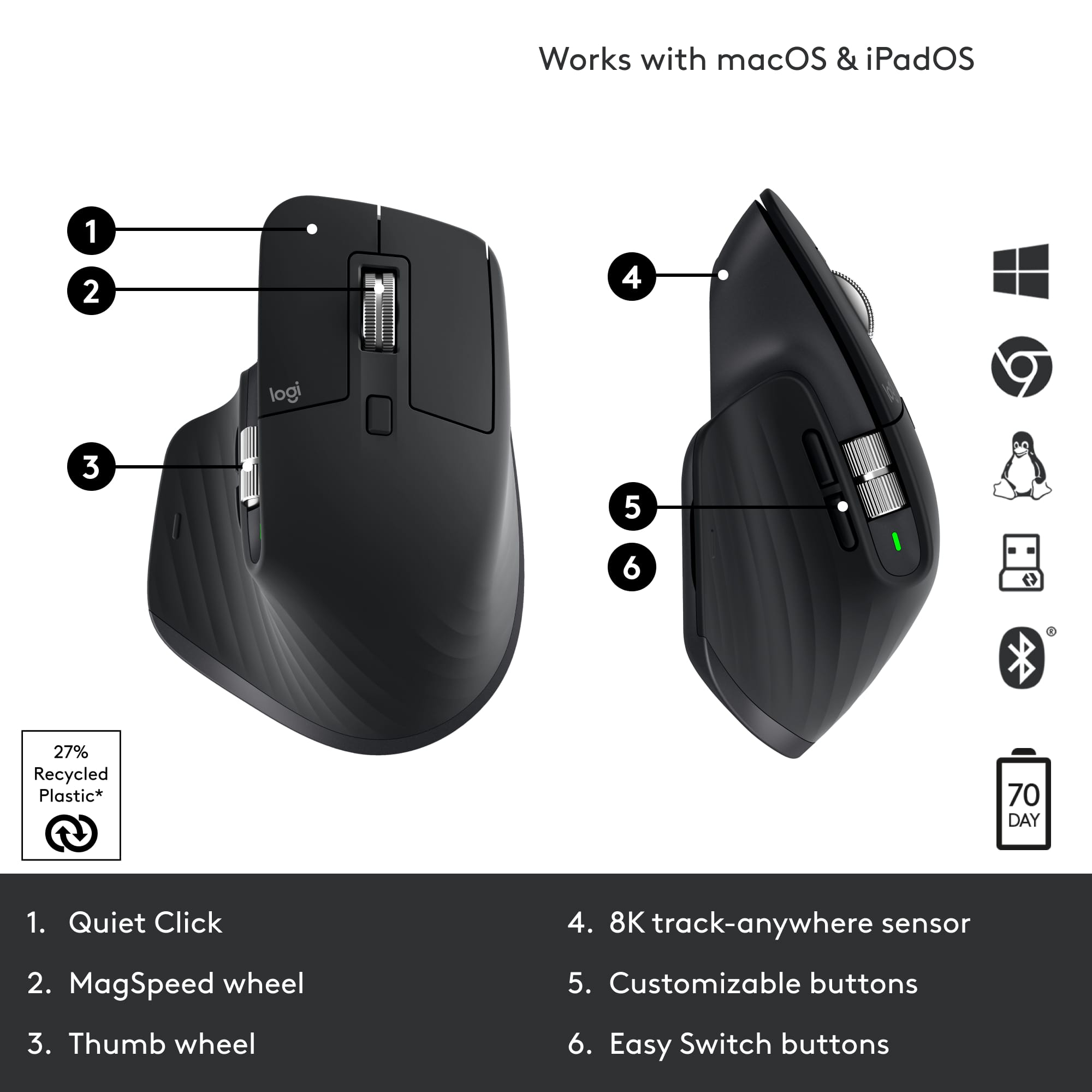
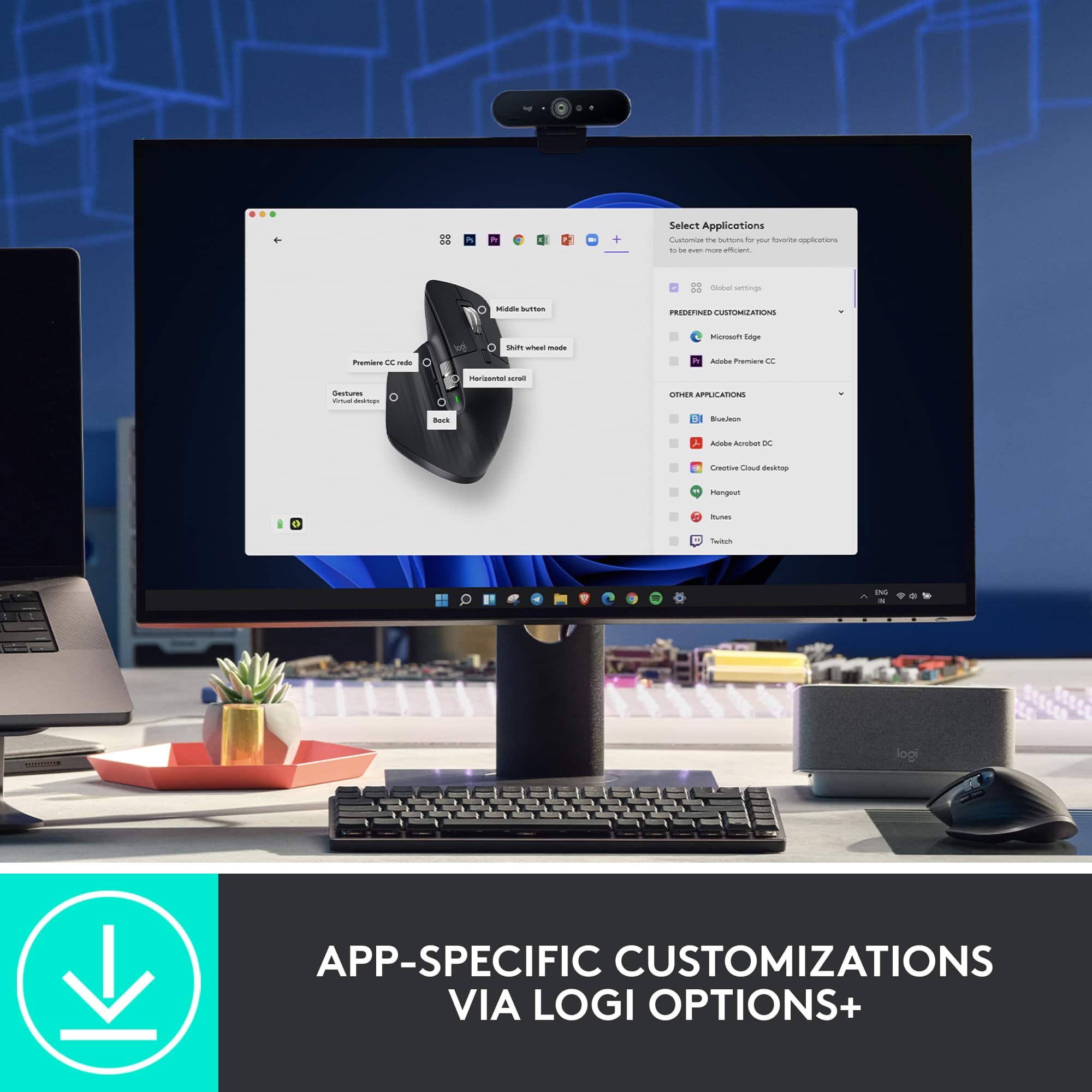
    I have been using the original MX Master since it came out a few years ago as my daily driver for work. I have also skipped the past versions as well. So, on first impressions, the fundamental design remains almost the same. It is still for right-handed people, the thumb rests comfortable on the rubber “winglet”, it promotes a “palm rest” use, and has similar weight. There are also significant changes. The side-scroll wheel is larger, the back-forward buttons are now below it, and the scroll wheel is larger and all metal. I will say that I do prefer the back-forward buttons on the side as they seem a bit out of place under the side-wheel. The right-left buttons are smaller but are pushed forward a bit more and the right one protrudes further. I had to get used to it, but it only took a few hours before things became second nature. Overall, I find the ergonomics comfortable for my medium-sized hands. I tried connecting via USB-C wired, Bluetooth, and the included 2.4Ghz receiver across a Windows laptop, an iOS tablet, and an Android tablet. All connected properly with no issues. Switching between them is a breeze by pressing the buttons below the mouse. According to Logitech, the battery life can last for 70 days, and it seems that this may be true since I’ve been using it for days and it still shows up as full. Plus, the mouse features quick-charging where 1 minute provides 3 hours of use -very nice! The buttons and wheels are very responsive, and I am grateful that they are very quiet -useful while late night browsing! The underside allows for easy gliding across several surfaces (hard or soft). The mouse is easy to pick up and drop easily as well. While I might not be fully sold on the placement of the forward-back buttons, they make it easy to move between web pages. Since I work heavily with spreadsheets and data, the MagSpeed scroll wheel is of great benefit. The same goes with the side-scroll wheel. Managing long websites, text, and video editing becomes so much easier. Just in case the stock settings do not do it for you, Logitech provides the Logi Options app, where you can easily customize the buttons, add macros, adjust the gesture button and scroll wheels specific to the software or program, and even device being used. I especially appreciate changing the DPI. There you can manage all compatible Logi devices as well. At the end of the end Logitech has got a great thing going with the MX Master series. While there’s nothing wrong with the original, I am glad that now the MX Master 3s features USB-C, great battery life, and super quiet buttons. It may be pricier than other options, but what it brings to the table is well worth it in my opinion.

    I would recommend this to a friend
    • Brand response from Logitech
      Posted .

      Hello insomniak1,
      I am glad that you are enjoying the MX Master 3S. Thank you for writing a detailed review of your experience with the MX Master 3. Logitech appreciates your product review. - Leo from Logitech

  • Rated 5 out of 5 stars

    Performance with Comfort

    |
    |
    Posted . Owned for 3 weeks when reviewed.
    This reviewer received promo considerations or sweepstakes entry for writing a review.

    The MX Master 3S has been a game changer for my daily workflow. As someone who works long hours at a desk, I appreciate how comfortable and well designed this mouse is. The ergonomic shape fits naturally in the hand and the quiet clicks make it ideal for a focused work environment. The MagSpeed scroll wheel is incredibly smooth and accurate, perfect for navigating through large documents and spreadsheets. I also really value the customizable buttons and the seamless device switching. It’s clear this mouse was built with productivity in mind. The battery life is impressive. I charged it once when I got it and haven’t had to worry about it since. It took a couple of days to adjust from a standard mouse but now I can’t imagine going back. If you're looking for a reliable high performance mouse that delivers comfort and control, the MX Master 3S is absolutely worth it.

    I would recommend this to a friend
    • Brand response from Logitech
      Posted .

      We're delighted to hear the MX Master 3S has significantly enhanced your workflow with its comfort and precision. Your detailed feedback on the ergonomic design, quiet clicks, and MagSpeed scroll wheel truly highlights what makes this mouse a productivity powerhouse. It's fantastic to know the seamless device switching and impressive battery life have also made such a positive impact. Logitech

  • Rated 1 out of 5 stars

    LogitOptions+ Software is a joke.

    |
    |
    Posted . Owned for 1 month when reviewed.
    This reviewer received promo considerations or sweepstakes entry for writing a review.

    Nice hardware, shame it does not work reliably on Apple Silicon.

    No, I would not recommend this to a friend
    • Brand response from Logitech
      Posted .

      That's disappointing. Try reinstalling the software and if the issue persists don't hesitate to connect with Logi Support, where our dedicated team is ready to find the perfect solution for you.

  • Tech Insider Network Member

    Rated 5 out of 5 stars

    Perfect Mouse for Work

    |
    Tech Insider Network Member
    Posted .
    This reviewer received promo considerations or sweepstakes entry for writing a review.

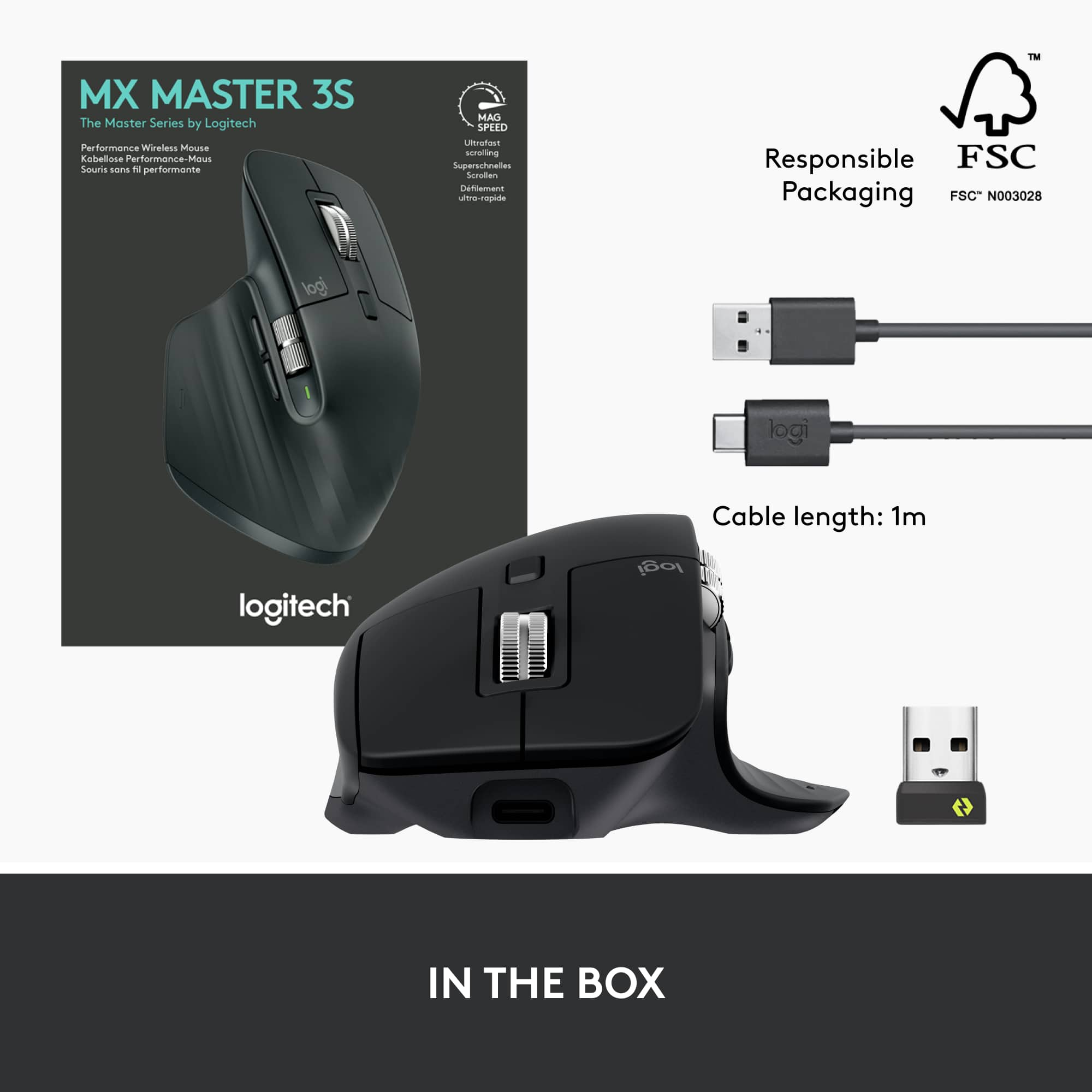
    The MX Master 3S is my new favorite mouse for work. It’s extremely comfortable to use, has solid performance over Bluetooth or Logi Bolt, the side scroll wheel has a lot of convenient uses, and the battery lasts long enough that I never have to worry about charging. For productivity focused work it feels like the peak. Getting into the box, you get the mouse, a charging cable, and a Logi Bolt receiver. It should be noted the Logi Bolt receiver is somewhat new and not compatible with older Logitech devices that used the Unifying receiver. Something to keep in mind if you are already using other Logitech devices with an existing receiver. I set the mouse up first using the Logi Bolt receiver and the mouse appears to be pre-paired to it out of the box, so there was nothing for me to do but plug it into an existing USB-A port. Running the setup through the Logi Options+ software I was able to make assignments on each button and set up application-specific profiles. It is unfortunate that the Logi Options+ software isn’t compatible with all of Logitech’s mice and keyboards; currently I still need to use the older Logitech Options for my K680 keyboard. I’ve been using the MX Master 3S for a couple of weeks now and have used it as my primary work mouse for about a week. I’ve used it interchangeably over Bluetooth and with the Logi Bolt receiver in a relatively crowded office environment and the performance has been flawless in both cases. I cannot really point to a difference in using the mouse with the Bolt receiver or over Bluetooth. I think I might notice a little bit less latency over Bolt, but the difference is almost imperceptible. The first thing I noticed was how comfortable it was. It feels like it’s perfectly sculpted for my hand and the soft-touch plastic helps a lot as well. The side scroll wheel feels well positioned and I don’t have to strain my hand to get to it. The main scroll wheel feels similar to the MX Anywhere 3 and transitions seamlessly from stepping scrolling to free-wheeling and it felt really easy to dial in exactly the speed I wanted for the email or document I was working on. The primary left and right click buttons are very quiet, but there’s a tactileness to them that never makes me question whether or not I’ve clicked. With the software installed, the mouse will automatically switch profiles for applications you have loaded, which I think might work well for some people, but for me it was a little jarring to have the side scroll wheel flipping between tabs on Chrome only to then be adjusting volume or changing cells somewhere else. Thankfully, this is easy to turn off. There is also a button on the thumb rest that opens up some gesture controls. I didn’t get much use out of the gesture controls myself, but they work well enough. The cursor tracks smoothly across a variety of surfaces, though I can’t say I noticed too much of a difference turning the 8K sensor mode on. The standard mode (which is what the previous MX Master 3 has) is probably what most would use I’d imagine. The battery life has been excellent for me. I’ve used it for several full days and not seen the percentage drop at all. It’s quoted at 70 days by Logitech and I’m inclined to believe that. It’s certainly long enough that charging is never really on my mind. Before the MX Master 3S I was using the MX Vertical ergonomic mouse. I like that mouse a lot and ergonomics are important to me, but I’m considering switching to the MX Master 3S full time now just for the sheer amount of productivity features it gets me.It’s no gaming mouse and if you’re a lefty you’re out of luck, but for work I haven’t used anything better.

    I would recommend this to a friend
    • Brand response from Logitech
      Posted .

      Hello SamG,
      I am glad you are happy with your new MX Master 3s. Thanks for taking the time to leave such a detailed product insight for others to refer to. I agree, the MX Master 3S is comfortable and has all the productivity features that most users need. Logitech appreciates your product review. - Leo from Logitech

  • Tech Insider Network Member

    Rated 5 out of 5 stars

    Have a 2S? You will love this upgrade!

    |
    Tech Insider Network Member
    Posted .
    This reviewer received promo considerations or sweepstakes entry for writing a review.

    Logitech doesn't need any introduction and I have been an avid user of Logitech computer accessories for as long as I can remember. I have been working as a Mechanical Design Engineer for more than 10 years now and Logitech is the only brand that I use for my mouse. I spend 90% of my time at job using mouse to 3D design stuff on software such as Creo, NX and SolidWorks. I cannot even imagine using any other brand mouse. I started with G602 that had 9 programmable buttons and anyone with even a little design experience can understand how much of a life saver that mouse is. Unfortunately, that started giving some issues after more than 5 years of service and I replaced it with MX Master 2S and OMG, that was a game a changer too. I agree, it didn't have as much programmable buttons but I still was able to make full use of few that are provided. The MX Master 2S was a fantastic mouse, but I had two complaints about it: 1) It used Micro USB instead of Type C and 2) the thumb wheel and navigation buttons were hard to use. The MX Master 3S fixes both those problems. The thumb wheel now has a very high quality feel to it and is very easy to spin around, and they've moved the navigation buttons lower down to make them easier to press with your thumb. The main scroll wheel has also been made quieter, and somehow even more fun to use. As before, this mouse works on pretty much all surfaces, can connect to 3 devices, and can connect by either bluetooth or a USB dongle. I've had no issues using it on both a Mac and PC. Logitech claims a battery life of 70 days, and while I obviously haven't been able to test that out yet, if the MX Master 2S is anything to go by, you can expect great battery life on this mouse too. The 3S has significantly better placement for my average sized hands. On the 2S, it required pulling my thumb so far back, that it initially felt like my thumb was going to dislocate. On the 3S that isn’t a problem. The vertical scroll wheel is great. Feels much better than the scroll wheel on the 2S, but it may take some fiddling with the Logitech Options program to get it to automatically switch to free scrolling based on your desired speed. The default setting switches it too easily, and the jump from ratcheted scrolling to free scrolling speed is significant. You might find yourself wanting to just scroll a few lines faster, and then suddenly you’re all the way at the bottom of a webpage. It's a big upgrade from Master 2S. However, if you own a Master 3, getting a 3S would not be much of an upgrade for you. The only difference between the two are that 3S has a 8000 DPI sensor where as 3 has 4000 DPI sensor. The other difference is that Logitech claims that 3S has 90% quieter clicking than 3. There is no question the placement of the back and forward buttons has been improved as well as the horizontal scrolling wheel as compared to 2S. The tracking also seems more precise. The gesture button is also vastly improved and now has an actual physical button. This mouse unequivocally earns a high five stars rating from me, along with my honest and very hearty recommendation. You will never see a mouse more ergonomic and comfortable to use than this one!

    I would recommend this to a friend
    • Brand response from Logitech
      Posted .

      Hello MacUser,
      I am glad that you are enjoying the MX Master 3S. Thank you for writing a detailed review of the product. I agree, the added features such as 8K DPI and USB type C are great. I will record your product insight and pass it on. Logitech appreciates your product review. - Leo from Logitech

  • Tech Insider Network Member

    Rated 5 out of 5 stars

    Logitech MX Master 3s Mouse Simply Rocks!

    |
    Tech Insider Network Member
    Posted .
    This reviewer received promo considerations or sweepstakes entry for writing a review.

    I’m very experienced with the MX Master Mouse (having owned the original MX Master), which worked perfectly on Windows. I recently bought a brand-new MacBook Pro M1 Pro with the Silicon ARM Chip, and I also bought the MX Master 3 Mouse. Unfortunately, the Logitech Options software you download in order to program the mouse didn’t work with the MacBook Pro, which was a major disappointment. Until just recently, Logitech still hadn’t optimized the Intel based software for the Logitech Options App (the app you use to program functionality on the mouse) to run on the Silicone ARM technology of a MacBook Pro, so sadly, even with Logitech Technical support help, I had to return it. To Logitech’s credit, days after returning the mouse they sent me an updated link they said would work with an MX Master 3 on a Silicon ARM Based MacBook Pro. I stored the link hoping I’d get another opportunity to use a MX Master. That day came when I got the newest MX Master 3s. So, did it work? Yes, yes it did! Using the updated Logitech Options Installer, it installed perfectly, and I was able to program the mouse to my specific needs. To say I’m a Happy Camper is an understatement. Now that I’ve gotten the pre-story out of the way, let’s talk about this mouse. If you’ve never had the pleasure of owning a Logitech MX Master Mouse, you simply have no idea what you’re missing. It may seem odd to wax enthusiastic over a mouse, but the MX Master is worthy of such praise. And this newest MX Master 3s even more so. It’s now even more ergonomic. It just fits your hand so perfectly. It’s made of premium plastics (recycled to save the planet) and this version doesn’t show fingerprints. They come with a battery which lasts a LONG time. A very LONG time. The new MX Master 3s can go up to 70 days on a single charge. My original MX Master lasted a long time as well, so I have every expectation the 3s will live up to what Logitech claims. You need to go to Logitech.com and download the Logitech Options App. It is very easy to use and lets you customize so many aspects of the mouse. You can change the pointer speed. You can Program the second scroll wheel on the side of the mouse. I use it as volume up and down. You have two buttons underneath the second scroll wheel, which I have programmed as forward and back. And there’s yet another button where your thumb rests, which I’ve set up for Universal Control. You can choose from many other options to suit your workflow. The primary scroll wheel is magical. There’s the traditional mouse click we’re all used to. And a tap of the button behind the wheel, releases what Logitech calls Magspeed. The wheel is magnetic and has no, none, zip friction. You can scroll faster than you’ve ever scrolled before. And the scroll wheel also can be clicked and programmed for a number of functions. I have mine programmed to zoom, which is very cool. The mouse can be paired with up to three different devices and all you need to do is tap the pairing button on the bottom of the mouse to switch between paired devices. This mouse can scan up to 8000 DPI, for ultra-smooth and accurate scrolling. The mouse can connect with Windows, Chrome, Linux, iPadOS , Android and MacOS. And if you don’t have Bluetooth, it does come with a USB Receiver. One of the best upgrades over previous MX Master Mice is how unbelievably quiet the 3s is. You can’t hear the wheels scroll. More importantly, you can’t hear the right or left mouse clicks. How refreshing to have a mouse which does so much, yet so incredibly quiet. If you haven’t gathered from what I’ve written, I’m quite enamored with the Logitech MX Master 3s. They took everything that was already good in previous MX Master Mice and improved it significantly. And now, I’m able to use it on a MacBook Pro M1 Pro Silicon ARM Based laptop. Is it worth the price of admission? Yes, yes it is. Just get one. You simply won’t regret it.

    I would recommend this to a friend
    • Brand response from Logitech
      Posted .

      Hello RBrylawski,
      I am glad that you are enjoying the MX Master 3S. Thanks for being patient and working with the Logitech support team to finmd a solution to your issues. Also, thank you for taking the time to write a detailed review of your experience with Logitech's product and customer service. Logitech appreciates your product review. - Leo from Logitech

  • Rated 5 out of 5 stars

    Logitech MX Master 3S Wireless Laser Mouse – A Gam

    |
    |
    Posted . Owned for 1 month when reviewed.
    This reviewer received promo considerations or sweepstakes entry for writing a review.

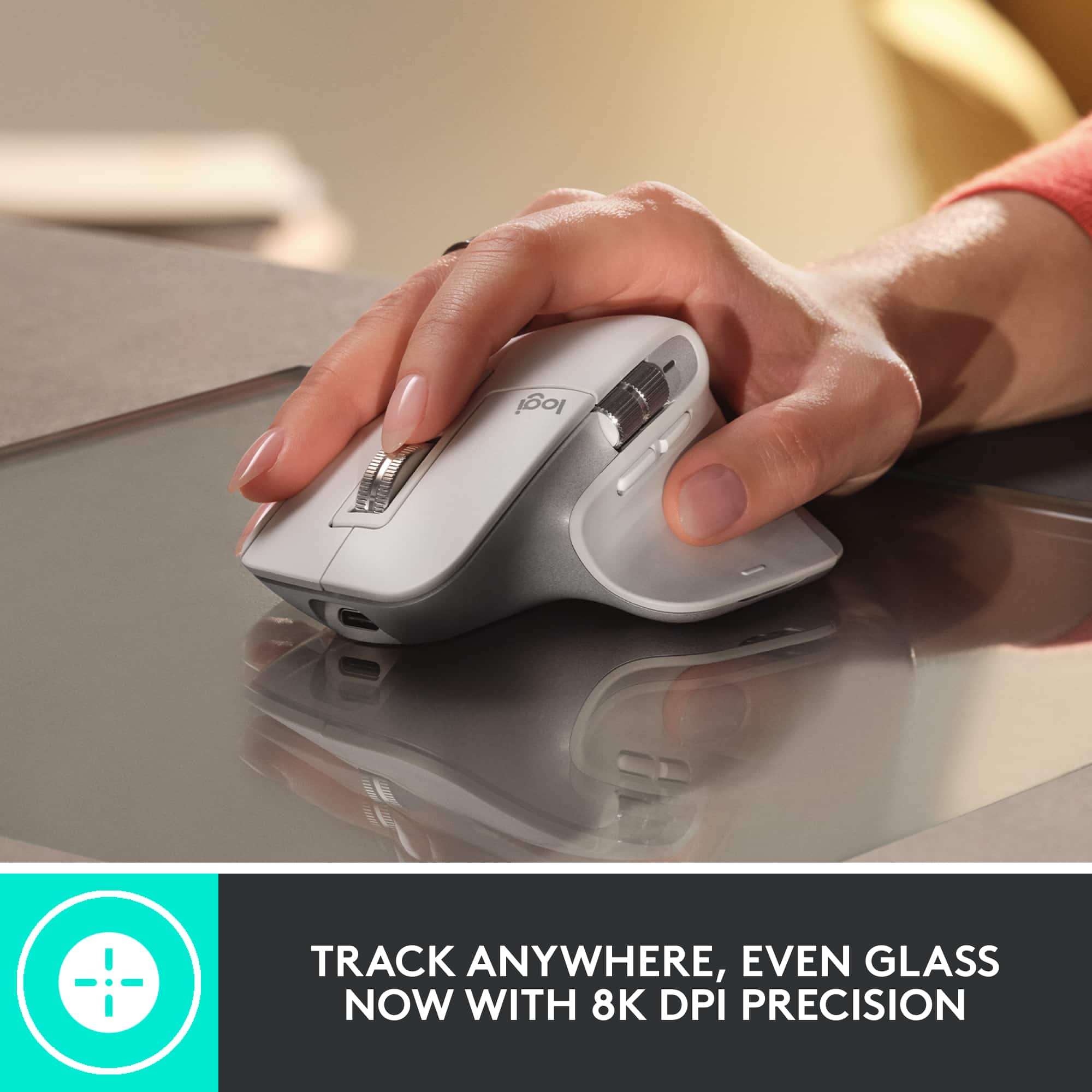
    Logitech MX Master 3S Wireless Laser Mouse – A Game-Changer for Productivity The Logitech MX Master 3S is, without a doubt, one of the best wireless mice available for power users, professionals, and anyone who demands precision, comfort, and efficiency from their tech tools. Design and Comfort: Right out of the box, the MX Master 3S impresses with its sleek, ergonomic design. The mouse fits naturally in your hand, with soft-touch materials and a contoured shape that offers excellent support for long hours of use. The button layout is intuitive and easily customizable, and the thumb rest adds to the overall comfort, making it a great choice for both casual and extended use. Performance: The 3S version comes equipped with Logitech’s advanced 8,000 DPI sensor, which offers smooth, precise tracking on nearly any surface. Whether you're working on a desk, a glass tabletop, or a wooden surface, the sensor adapts seamlessly. The mouse also features the signature ultra-fast scrolling wheel, which is a dream for navigating long documents or web pages. With just a flick of the wheel, you can move through content at lightning speed—ideal for productivity tasks. Battery Life & Connectivity: Battery life is impressive, lasting up to 70 days on a full charge (depending on usage), and recharges quickly via USB-C. The mouse can be connected via Bluetooth or the included USB receiver, making it versatile for different setups. The ability to switch between multiple devices (up to 3) with the Easy-Switch buttons is a huge productivity boost, especially for those who work across computers, tablets, or even a combination of devices. Customization & Features: The MX Master 3S offers a lot of customization options through Logitech’s Options software. You can assign specific functions to each button, set gestures for easy access to tasks, and fine-tune the scroll speed. Plus, the Quiet Click buttons provide a satisfying yet silent click experience, which is a big plus for users who work in shared spaces. Conclusion: If you're looking for a premium, versatile, and comfortable wireless mouse that offers incredible precision and useful features, the Logitech MX Master 3S is hard to beat. Whether you're a designer, developer, or just someone looking for a reliable mouse for daily tasks, this mouse delivers performance, comfort, and style in spades. Highly recommended!

    I would recommend this to a friend
    • Brand response from Logitech
      Posted .

      We're delighted that you appreciate the ergonomic design and the comfort it provides during long work sessions. Our focus on user comfort is paramount, and we're glad you find the soft-touch materials and contoured shape to be a winning combination. Logitech

  • Rated 5 out of 5 stars

    Best mouse for work

    |
    |
    Posted . Owned for 1 year when reviewed.
    This reviewer received promo considerations or sweepstakes entry for writing a review.

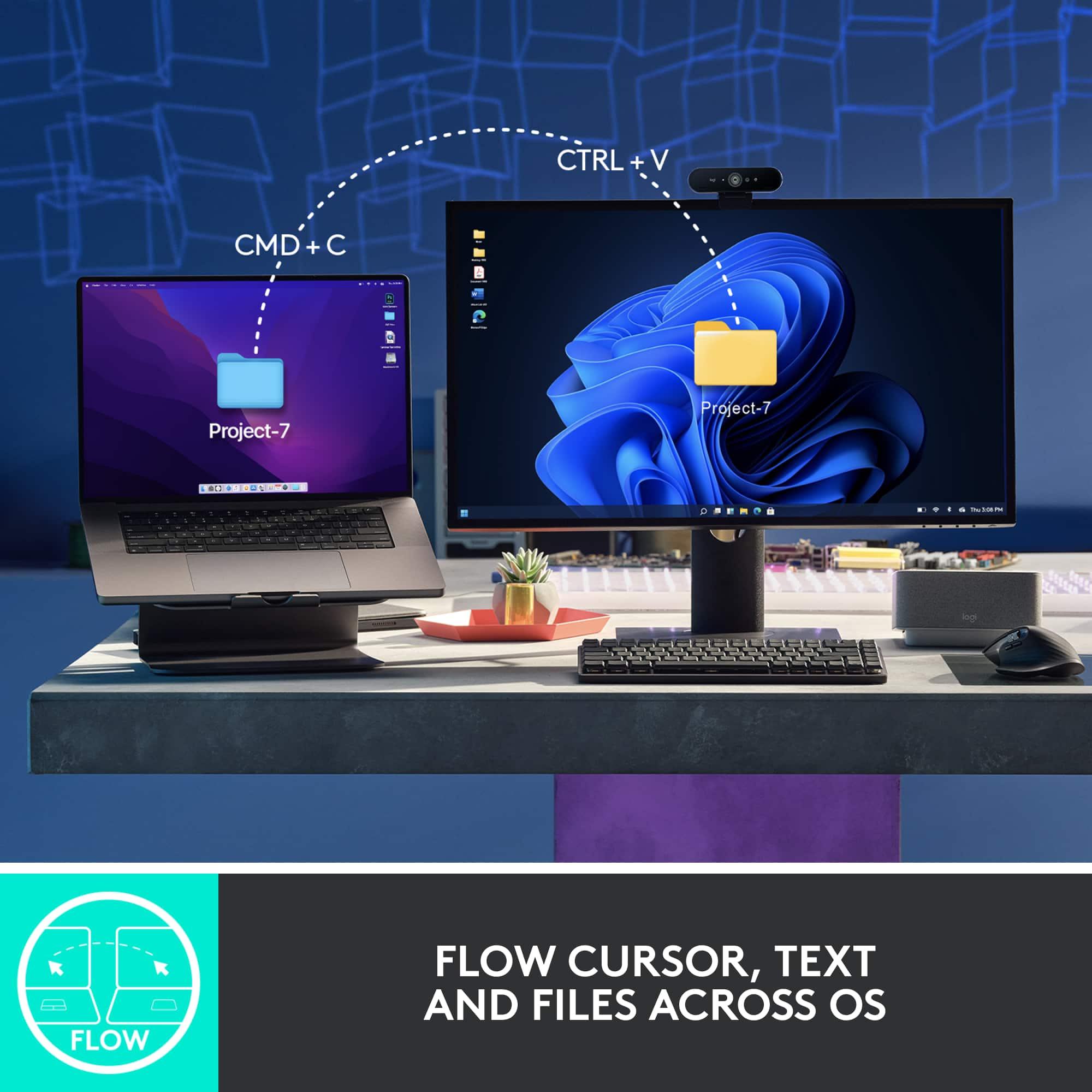
    Easily the best mouse for office work. The second scroll wheel makes navigating through Excel super easy. It’s highly customizable and has plenty of buttons to handle pretty much anything you need. The battery life is solid, and it charges quickly too. You can use it for light gaming, but it’s on the heavier side—so if you care about your wrist, maybe not ideal for long sessions. One of my favorite features is the ability to copy and paste between multiple connected devices (you can pair up to 3 at once). Super handy!

    I would recommend this to a friend
    • Brand response from Logitech
      Posted .

      Thanks for the detailed review. We're thrilled the MX Master 3S is hitting the mark for your office workflow—from the precision of the second scroll wheel to the seamless multi-device control. It's built for power users who value customization, speed, and smart functionality. Appreciate you sharing how it fits into your day. Logitech

  • Tech Insider Network Member

    Rated 5 out of 5 stars

    Comfortable and Quiet

    |
    Tech Insider Network Member
    Posted .
    This reviewer received promo considerations or sweepstakes entry for writing a review.

    Truly one of the most comfortable mice I've ever used. I've been using Logitech's MX Master Mouse 2 for a few years now, and I've had nothing but good experience with it. This updated version is no different. The first thing that really jumps out at you is just how quiet it is. While you may not necessarily think about how loud mouse clicks are, this mouse will make you realize just how loud they used to be. Each click feels great but is very quiet. It's almost inaudible. That's not to say that there's any question as to whether you've clicked though, it is still very easy to tell when you've clicked the buttons, they're just almost silent. The material of the mouse is very nice too. It has an almost soft touch feel that's very nice. That along with the quietness gives the mouse a very premium feel. The position of the side wheel has taken a little getting used to, as I was so used to the MX Master Mouse 2, and this one is positioned a bit higher it seems. If you've used an MX Master before, you'll know they also have this great feature of where you can kind of spin the middle mouse button wheel quickly and it will switch from a click-y type of scrolling to a free-moving wheel for quicker scrolling. This new one has the same option, but again, the operation of the switch between types is very quiet. It has other great features too, like being able to connect to 3 different devices and quickly switching between them. Logitech's software for customizing the mouse is also great and easy to use. If there is anything that I can maybe complain about with this mouse, is that the soft touch material is kind of a magnet to dust and fuzz. Pros: Premium feel, extremely quiet, very precise and responsive, great software and customization Cons: Soft touch can be a magnet for dust/fuzz

    I would recommend this to a friend
    • Brand response from Logitech
      Posted .

      Hello dustinw,
      I am glad that you are enjoying the MX Master 3S. Thanks for leaving such a detailed product insight. I agree, the MX Master 3S is quiet, precise, and the Logitech Option+ gives excellent customization options. Logitech appreciates your product review. - Leo from Logitech

  • Rated 5 out of 5 stars

    The Ultimate Productivity Mouse

    |
    |
    Posted .
    This reviewer received promo considerations or sweepstakes entry for writing a review.

    The Logitech MX Master 3S is hands-down the best mouse I’ve ever used. It’s incredibly comfortable for long hours of work, and the build quality feels premium. The ultrafast scrolling feature is a game-changer for navigating long documents or spreadsheets — super smooth and efficient. It connects flawlessly via USB-A, and the wireless performance is rock solid with zero lag. The customizable buttons and ergonomic design make multitasking and switching between apps seamless. Plus, it’s nearly silent when clicking, which is a huge bonus in a quiet work environment. If you're serious about productivity and want a mouse that can keep up, this is the one to get. Logitech nailed it.

    I would recommend this to a friend
    • Brand response from Logitech
      Posted .

      Thank you so much for your truly outstanding and detailed feedback on the Logitech MX Master 3S Wireless Mouse!

      We are absolutely thrilled to hear that you consider it "the best mouse you’ve ever used" and "The Ultimate Productivity Mouse." It's incredibly rewarding to know that the comfort for long hours, premium build quality, the game-changing ultrafast scrolling, and flawless wireless performance are making such a significant difference in your daily work.

      We're also delighted that you appreciate the customizable buttons, ergonomic design, and the bonus of nearly silent clicking in your work environment.

      Your strong recommendation that "Logitech nailed it" truly means a lot to our team. We're so happy the MX Master 3S is keeping up with your serious productivity needs!

      We hope you continue to enjoy a seamless and efficient experience with your mouse. Logitech

  • Rated 5 out of 5 stars

    The Ultimate Productivity Mouse

    |
    |
    Posted . Owned for 4 months when reviewed.
    This reviewer received promo considerations or sweepstakes entry for writing a review.

    The Logitech MX Master 3S Wireless Laser Mouse has quickly become an essential part of my daily workflow. From its ergonomic design to its advanced features, this mouse truly stands out as one of the best productivity tools I’ve ever used. Comfort and Design: The ergonomic design is one of the first things you’ll notice. It’s incredibly comfortable, fitting perfectly in my hand, which makes long hours at the computer much easier. The textured surface provides a secure grip, and the overall build quality is excellent, with a sleek and professional look. Performance: Performance-wise, the MX Master 3S is outstanding. The ultra-fast scrolling feature is a game-changer, allowing me to breeze through long documents and web pages with ease. The scroll wheel is smooth and responsive, and the ability to switch between ratcheted and free-spinning modes with a click is extremely convenient. The laser sensor is precise and works flawlessly on a variety of surfaces, including glass, which is a huge plus for those who don’t always use a mousepad. The customizable buttons and gesture controls are incredibly useful for multitasking, and they significantly speed up my workflow. Battery Life: The battery life is another highlight. It lasts for weeks on a single charge, and when it does need charging, the process is quick and easy with the included USB-C cable. Plus, you can use the mouse while it’s charging, so there’s no downtime. Connectivity: The Bluetooth and USB receiver options provide flexibility in how you connect, and switching between devices is seamless. I use it across multiple devices, and the transition is smooth every time. Verdict: Overall, the Logitech MX Master 3S is an exceptional wireless mouse that excels in every category. Whether you’re a professional looking for a reliable productivity tool or simply someone who appreciates quality peripherals, this mouse is well worth the investment. I highly recommend it to anyone in need of a top-tier wireless mouse.

    I would recommend this to a friend
    • Brand response from Logitech
      Posted .

      Thank you for your in-depth review of the Logitech MX Master 3S wireless mouse. We're delighted to hear that it has become an essential part of your daily workflow. Your positive feedback on its comfort, performance, battery life, connectivity, and overall value is greatly appreciated. We're proud to know that the MX Master 3S is exceeding your expectations.

  • Rated 4 out of 5 stars

    Feels premium, okay battery.

    |
    |
    Posted .
    This reviewer received promo considerations or sweepstakes entry for writing a review.

    It feels high quality with good weight. Buttons are quiet and the metal scroll wheels are super smooth. The the software is easy to program, but can get annoying with notifications. My only complaint is the mediocre battery life. I use it for about 8 hours per day and have to recharge it every couple of weeks. At least the charge port is in a good location.

    I would recommend this to a friend
    • Brand response from Logitech
      Posted .

      That's wonderful to hear! We're thrilled you find the Logitech MX Master 3S to feel premium with its high quality, good weight, quiet buttons, and super smooth metal scroll wheels. We're also glad the software is easy to program, and we appreciate your feedback on the battery life, even while acknowledging the convenient charge port location. Logitech

  • Rated 5 out of 5 stars

    Elevate Your Productivity

    |
    |
    Posted . Owned for 1 month when reviewed.
    This reviewer received promo considerations or sweepstakes entry for writing a review.

    The Logitech MX Master 3S Wireless Laser Mouse in sleek black is a masterpiece of ergonomic design and functionality. After using this mouse for an extended period, I can confidently say that it's a game-changer for productivity and comfort. Ergonomic Excellence (5/5): The MX Master 3S is an ergonomic masterpiece. It fits comfortably in your hand, with a sculpted shape that supports your hand and wrist, making long hours of work a breeze. The textured thumb rest adds an extra level of comfort and grip, ensuring that the mouse feels like an extension of your hand. Ultrafast Scrolling (5/5): The standout feature of this mouse is the ultrafast scrolling wheel. It allows you to scroll through documents and web pages at lightning speed or switch to a precise click-to-click mode when needed. The MagSpeed scrolling technology is incredibly smooth and precise, making it a joy to use. Customizable Buttons (5/5): With a generous number of customizable buttons, the MX Master 3S caters to your individual needs. Whether you're a designer, programmer, or power user, you can configure the buttons to perform specific functions and streamline your workflow. The ability to switch between devices with the Easy-Switch button is particularly handy. High-Precision Sensor (5/5): The laser sensor on this mouse is incredibly accurate, tracking on virtually any surface with precision. Whether you're using it on a mouse pad, a glass table, or even your jeans, it delivers a smooth and consistent tracking experience. Impressive Battery Life (5/5): The MX Master 3S boasts an impressive battery life that keeps you working without interruptions. With a full charge, it can last for weeks, even with heavy daily use. The USB-C charging port ensures fast and convenient recharging. Cross-Platform Compatibility (5/5): This mouse seamlessly works with multiple devices and operating systems, including Windows, macOS, and Linux. The Logitech Options software enhances the customization and functionality, allowing you to fine-tune the mouse to your preferences. Premium Build Quality (5/5): The MX Master 3S exudes quality in its build. It feels solid and durable, and the scroll wheel and buttons have a satisfying click and tactile feedback. The matte finish on the mouse not only looks elegant but also resists fingerprints and smudges. Conclusion: In conclusion, the Logitech MX Master 3S Wireless Laser Mouse in black is a versatile and ergonomic powerhouse that redefines the way you work and interact with your computer. Its ergonomic design, ultrafast scrolling, customizable buttons, and remarkable precision make it an essential tool for professionals, creatives, and anyone who values productivity and comfort. The MX Master 3S is not just a mouse; it's a productivity enhancer that elevates your computing experience to new heights. Whether you're navigating through spreadsheets, editing photos, or just browsing the web, this mouse is a true game-changer.

    I would recommend this to a friend
  • Tech Insider Network Member

    Rated 5 out of 5 stars

    The most comfortable mouse for work so far

    |
    Tech Insider Network Member
    Posted .
    This reviewer received promo considerations or sweepstakes entry for writing a review.

    I spend a ton of time at the computer screen - easily 12+ hours a day and always looking for ways to improve ergonomics. This mouse is as close to ideal as it gets. Amazingly precise sensor that is tracking at 8k DPI resolution and able to work on most surfaces, scroll wheel with ability to unlock it for "free wheeling" and scroll thru huge documents and customizable side wheel, side buttons and a thumb button! Side buttons can be programmed for a standard Forward/Back in browsers to Audio Mute/UnMute + Camera On/Off in teleconferencing applications. Thumb button combines with the mouse movement so you can decide what happens when you press it and then move up, down and side to side. Battery life is impressive - I've used this mouse for a week of everyday work - had not have to charge it yet. Charging is done via the USB-C port and allows you to continue working. Software - mouse is configurable via Logitech Option Plus (not the older Logitech Options) and Options Plus is not compatible with the previous generation devices so you might need both until you upgrade all gear. Same goes for a receiver - it's a new kind (not a Unifying receiver anymore) so you may need both or just use this mouse in a Bluetooth connectivity mode. Overall - I'm loving it, no wrist pain, super sensitive, comfortable and VERY quiet! No mouse click sound, but still have a great tactile feedback.

    I would recommend this to a friend
    • Brand response from Logitech
      Posted .

      Hey there, thanks for this great, and very detailed, review! We really appreciate your feedback. Let us know if you have any issues in the future, and thanks for choosing Logitech! -Weston from Logitech

  • Rated 5 out of 5 stars

    Ergonomic, Quiet, and Super Precise

    |
    |
    Posted .
    This reviewer received promo considerations or sweepstakes entry for writing a review.

    The Logitech MX Master 3S is hands down my favorite mouse for work and creativity. It’s super comfortable with a perfect ergonomic design, and the quieter clicks are a nice upgrade. The scroll wheel is smooth and precise, making long scrolling sessions effortless. Battery life lasts forever, and switching between multiple devices is seamless. Worth every penny if you want a premium, reliable mouse.

    I would recommend this to a friend
    • Brand response from Logitech
      Posted .

      Pleased to know that the MX Master 3S is a favorite mouse for work and creativity. Its ergonomic design is crafted to support the hand and fingers throughout the day. The quieter clicks were a focus during development, which makes for a less distracting work environment. Logitech

  • Rated 5 out of 5 stars

    Amazing mouse

    |
    |
    Posted . Owned for 1 month when reviewed.
    This reviewer received promo considerations or sweepstakes entry for writing a review.

    The Logitech MX Master 3S is hands-down the best wireless mouse I’ve ever used! From the moment I started using it, the ergonomic design stood out—it fits perfectly in my hand, making long hours of work feel effortless and comfortable. The ultrafast scrolling is a game-changer. It glides through long documents and web pages with incredible speed and precision, and the scroll wheel adapts seamlessly between ratchet and free-spinning modes. Whether I’m working on detailed projects or navigating large files, this mouse handles it all with ease. Another standout feature is the customizable buttons and the Logi Options+ software that allows me to tailor the mouse to my workflow. It has greatly improved my productivity, especially with the side scroll wheel that makes switching between tasks even more efficient. The laser tracking is exceptional—I’ve used it on multiple surfaces, and it’s flawless every time. Add to that the long battery life and smooth wireless performance, and this mouse becomes an essential tool for any professional or creative. If you want a top-tier mouse that combines comfort, speed, and precision, the MX Master 3S is unbeatable!

    I would recommend this to a friend
    • Brand response from Logitech
      Posted .

      Thank you for your amazing review of the Logitech MX Master 3S mouse! We're thrilled to hear that it's the best wireless mouse you've ever used and has exceeded your expectations. Your positive feedback means a lot to us as we continue to create exceptional products that elevate your computing experience.

  • Rated 5 out of 5 stars

    Elevate Your Productivity

    |
    |
    Posted . Owned for 11 months when reviewed.
    This reviewer received promo considerations or sweepstakes entry for writing a review.

    The Logitech MX Master 3S Wireless Mouse has truly transformed my computing experience. This mouse is a productivity powerhouse with its impressive features and sleek design. Design and Comfort: The MX Master 3S boasts an ergonomic design that fits perfectly in my hand. The sculpted shape and soft-touch materials make it comfortable to use for hours on end. The mouse's build quality is exceptional, exuding a premium feel. Ultrafast Scrolling: The standout feature of this mouse is its ultrafast scrolling capability. Navigating through lengthy documents or web pages is a breeze with the hyper-scrolling wheel. The option to switch between ratchet and free-scroll modes adds versatility to its usage. Precision and Customization: The laser tracking technology ensures precise cursor movement on various surfaces. The customizable buttons and programmable gestures are a game-changer, allowing me to tailor the mouse to my workflow. The ability to switch between multiple devices seamlessly is a boon for multitasking. Long Battery Life: The MX Master 3S's battery life is remarkable. A single charge lasts for weeks, and the quick recharge feature means I never have to worry about downtime. The convenience of USB-C charging is a welcomed modern touch. Versatility and Performance: Whether I'm working on spreadsheets, editing photos, or simply browsing the web, this mouse adapts effortlessly. The software provides ample customization options, and the smooth scrolling and responsive buttons enhance my efficiency. Conclusion: In a world where productivity matters more than ever, the Logitech MX Master 3S Wireless Mouse stands out as an exceptional tool. Its comfort, precision, and advanced features make it a must-have for professionals and enthusiasts alike. While it may come at a slightly higher price point, the enhanced productivity and seamless performance it offers make it worth every penny. If you're looking to elevate your computing experience, this mouse is an investment you won't regret.

    I would recommend this to a friend