Customer Ratings & Reviews


- Model:
- 920-012154
- SKU:
- 6556756
Rating by feature
- Value
Rating 4.4 out of 5 stars
- Quality
Rating 4.8 out of 5 stars
- Ease of Use
Rating 4.8 out of 5 stars
Customers are saying
Customers recognize the product's high keyboard quality, impressive battery life, and speedy wireless connectivity as significant advantages. They also appreciate its customizable RGB lighting, compact and portable design, and the vibrant color options, along with a high-quality carrying case. However, some customers find the product to be a bit pricey, and there are mixed opinions regarding the brown switches.
This summary was generated by AI based on customer reviews.
- Pros mentioned:Battery life, Keyboard quality

The Newest Member to my Lightspeed Family...
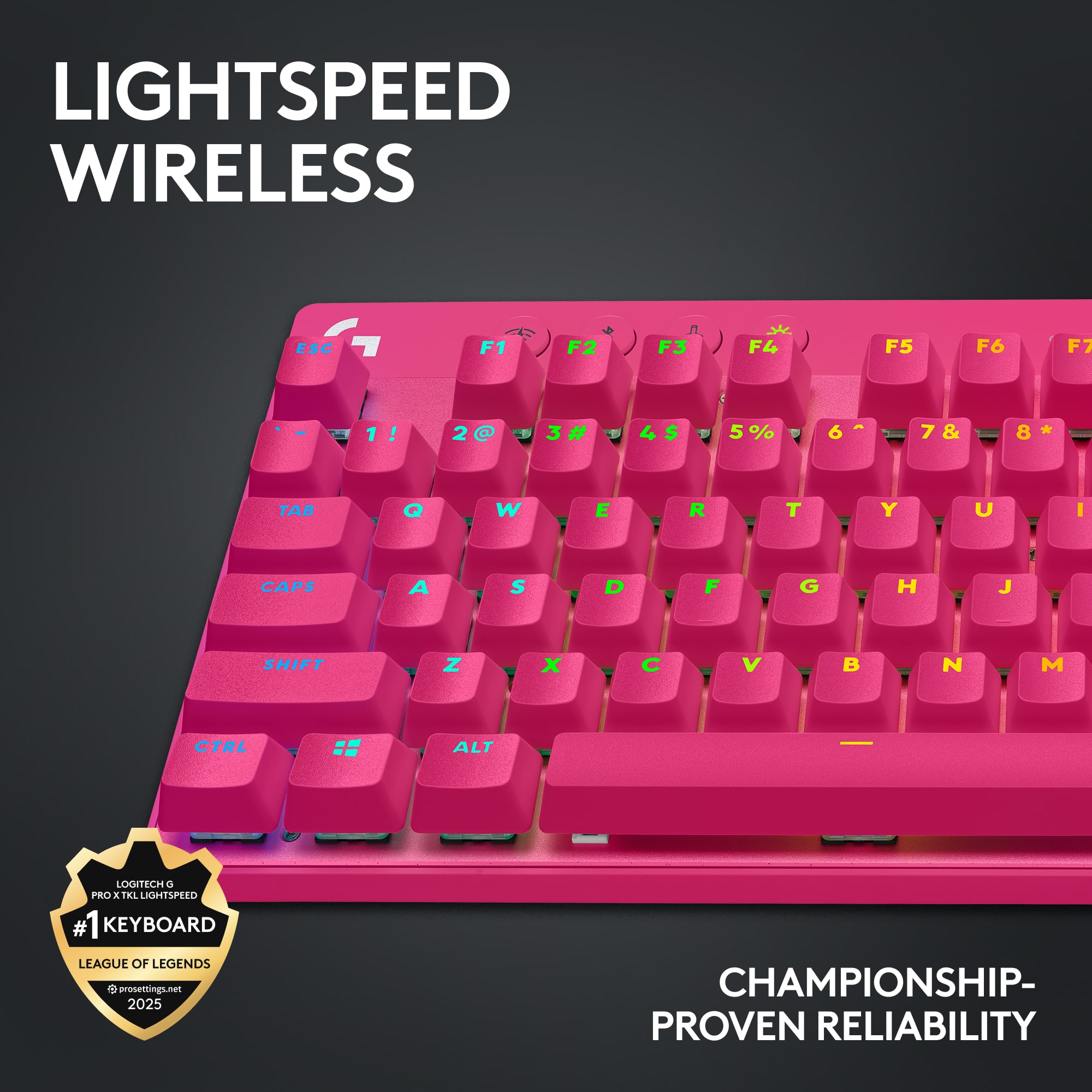
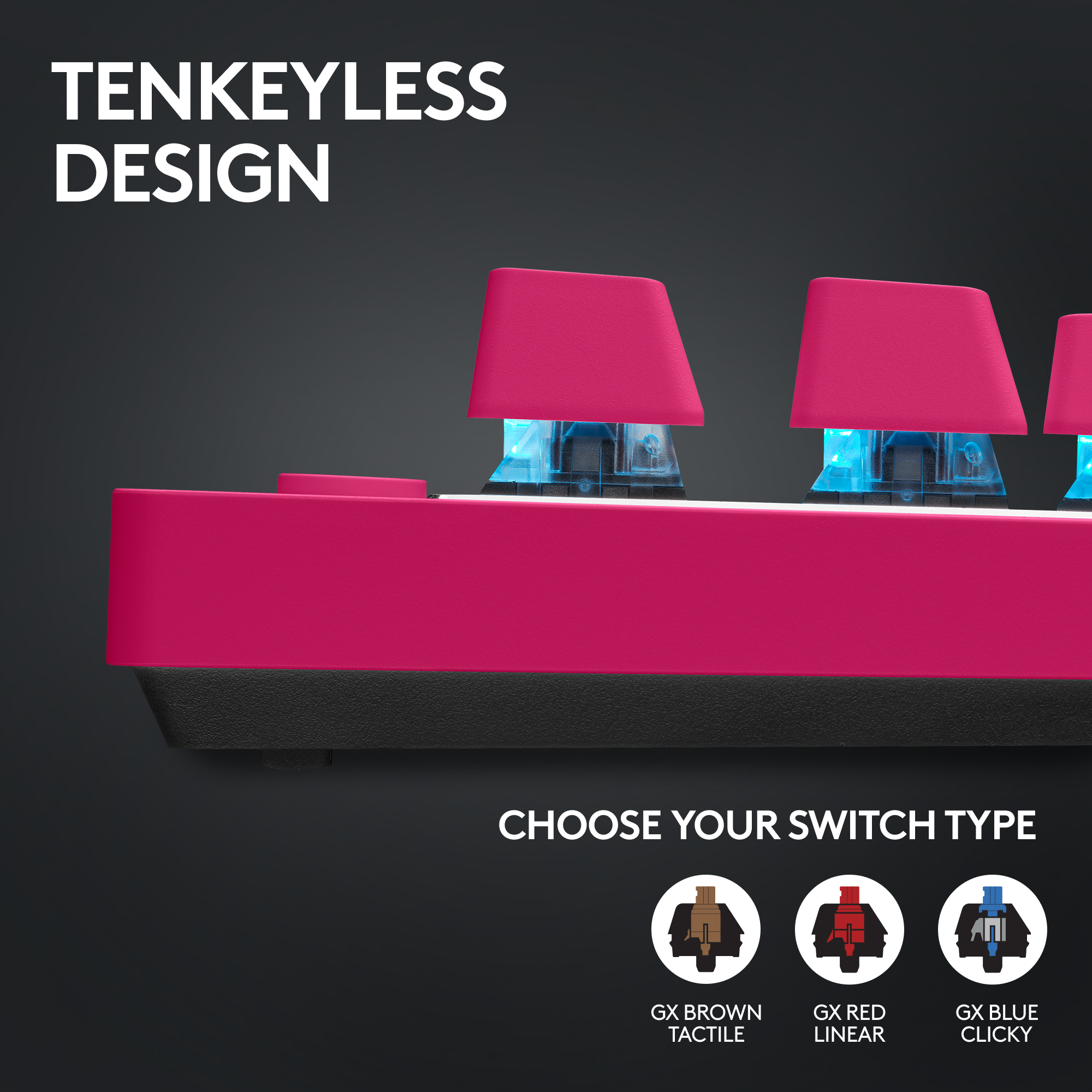
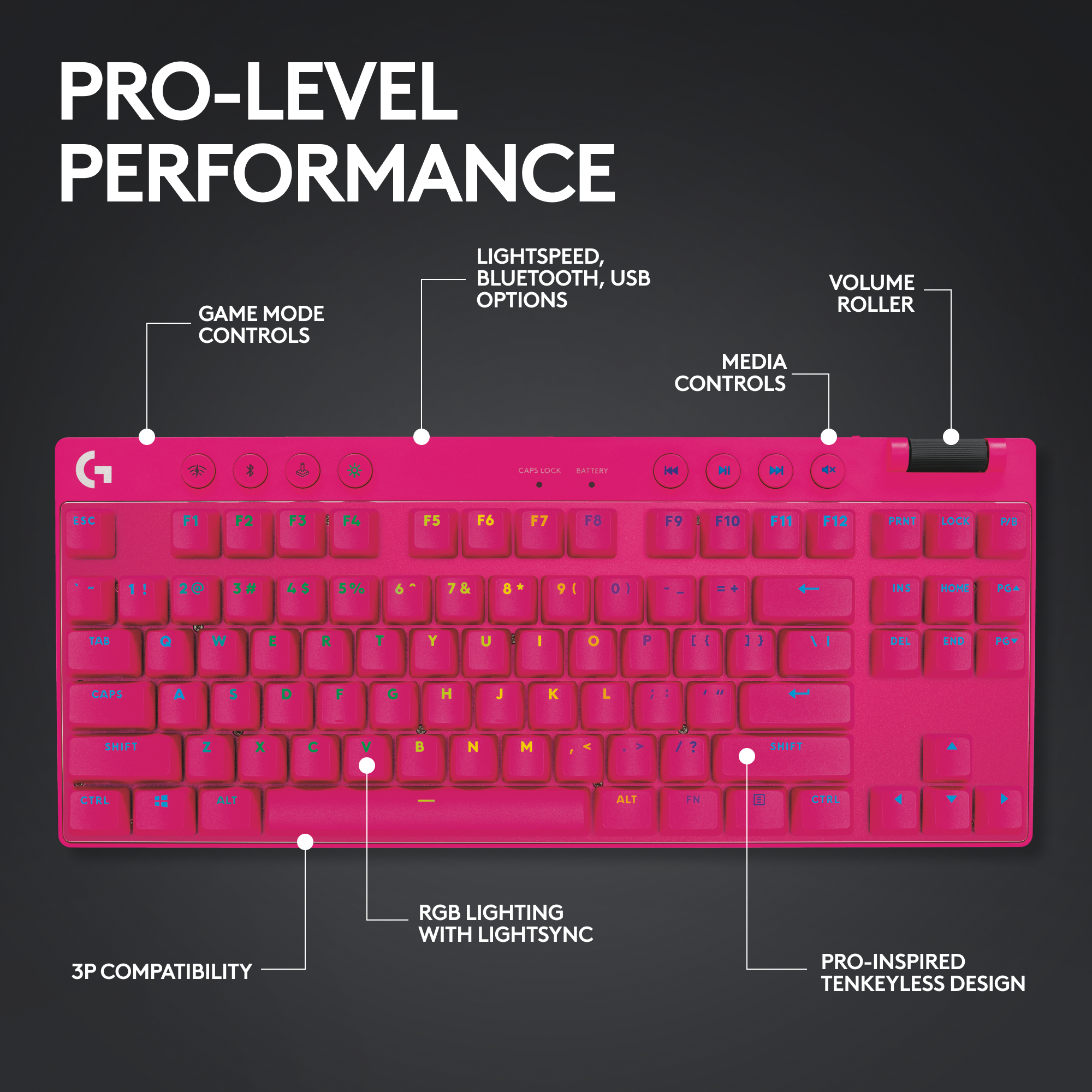
|Posted .This reviewer received promo considerations or sweepstakes entry for writing a review.Logitech has been my mainstay for keyboard and mouse accessories, with generations of the legendary G502 gracing my desk (currently using the G502x, sitting on a Logitech Powerplay charging mousepad), and until recently working and playing on my second copy of the G915 TKL Linear, which has been my favorite keyboard to date. The Lightspeed technology platform has brought an entirely new level of wireless gaming for the last few years, and one of the things about the G915 specifically that surprised me is that the honeymoon period really never ended. I dove in and out of different keyboard brands prior, moving on when I saw a new form factor or technology caught my eye. Logitech has real staying power for the investment, and I’m excited to see if the new Logitech G Pro X TKL remains as durable a gaming partner over time as my G915 did. Out of the box, the G Pro X comes with a really nice (and sturdy) looking hardshell travel case with a custom formed interior to sit the keyboard, cord and dongle. This is a pretty nice add you wouldn’t normally see when purchasing a keyboard, and an appealing one for on-the-go folks who value the portability aspects of it. Once removed from the case, you can really start to see where Logitech evolved their design from the G915 generation. Whereas the G915 aesthetics were focused on an almost hyper-thin body with low profile keycaps, the G Pro X comes back to a pretty stout design profile, both in the keyboard base unit as well as the more traditional keycap heights. It is definitely has some girth I have not been used to, but not an unpleasant change at all. The new build remains in the TKL (ten key less) profile, eliminating the numpad keys and returning some ample real estate back to your desktop along with some ergonomic benefits. As small as this keyboard is, very much like the case it comes in…it is stout. There is no bend to it at all, and the ample weight (form both a healthy sized battery and quality build components) give it a real premium feel. A matte aluminum top plate with a brushed silvered edge sets the top surface off from the plastic that wraps the underside, which has five rubber pads that contact the desktop, and two legs with dual height options. There is also a recessed slot on the underside to store the USB receiver. Super functional, and super familiar if you are coming from the Logitech family of boards to begin with. Worth noting a plus and a drawback on the cord, Logitech has upgraded the connection to USB-C (finally) but has downgraded from braided to rubber sheathing. Nothing huge, but I think braided cords are inherently more durable. As with the G915, the very top of the keyboard is adorned with four soft rubber settings buttons on the upper left side - Lightspeed/BT/Game mode/lighting brightness – as well as four media buttons on the upper right. There is a volume scroll wheel on the upper right which is similar to the G915, but has changed from metal to plastic. The Dual Shot PBT keycaps are a noticeable departure from the low-profile ones I have been used to, but that isn’t a negative. As much as I love my G915, there was a tradeoff in the low-profile keycaps that rendered a wobbly feel to some of the larger keys (spacebar, shift, etc). The dual shot PBT caps eliminate any of that feeling, while providing a deeper and more confident action. I’m also trading from a linear switch to a GX Brown tactile switch, which is a completely different feel, but I have used MX Browns in the past and you get that great sound and solid feedback with the bump halfway down. The beauty of the new lineup is that Logitech has offerings for all comers in terms of switch preference – Linear, Brown and Blue – so if you like your action defined and tactile or you prefer a more smooth and stealthy type of feedback, your bases are covered with choices to pick from. For note, the keycaps and switches are not hot-swappable for those that desire further personal upgrades and customization to their keyboards. From a power perspective, they promise up to 50 hours on Bluetooth, a little less on Lightspeed, but I haven’t really seen any major dents in my power levels having me believing otherwise in the short time that I’ve had it to test. The Lightspeed/BT toggling capability remains a huge plus from prior designs, allowing for accessibility and enhancing the portability aspects as you can connect to anything with Bluetooth capabilities. As with Logitech’s legacy offerings, the full functions of the board are accessed using their G hub software. As I’ve owned different components for a few years, the Hub picked the new board right up and provided the same suite of tools that allow for pretty dynamic customization of LED lighting effects, macro-mapping to the F keys up top and setting custom profiles for each piece – or you can seamlessly synch all of you Logitech components to the same profile to get a uniform LED effect. Sky is the limit for some of the design options, down to the individual key. As I noted years ago when I tested and reviewed my G915, from an overall performance and expectation standpoint, the G Pro X delivers and kills it in many ways. Lightspeed remains the real deal, I can’t even realistically talk to the lack of latency or lag because it just doesn’t exist in any way that I can detect it. You won’t find a better wireless setup that responds as good, if you are just jumping into the cord-cutting pool. I fully welcome the newest member of the Lightspeed family to my gaming experience, I hadn’t given a thought to budging off of the G915 as my daily driver, but Logitech provided a new form-factor to me that has me excited about the new honeymoon, hopefully effortlessly lasting as long as the last one did.
I would recommend this to a friend - Pros mentioned:Battery life, Keyboard quality
My New Favorite Gaming Keyboard
|Posted .This reviewer received promo considerations or sweepstakes entry for writing a review.I didn’t think I’d be as stoked on the G PRO X TKL as I ended up being, but this is absolutely my favorite gaming keyboard by a pretty wide margin compared to everything I’ve used in the past. I’ve had a few Logitech gaming keyboards that I’ve always liked, but felt they were a bit overpriced for what they were and I don’t feel that way at all about the G PRO X TKL. It feels like it really exudes the quality I would expect for the asking price, especially with touches like an included carrying case.. It looks great and the gaming experience on the tactile switches is fantastic. Battery life has also been solid for me. The box includes the keyboard, a USB receiver, a USB-C charging cable, an extension adapter for the receiver, and a carry case. I was really surprised to see the carrying case and while I personally won’t be toting this keyboard around very much, it’s of extremely high quality and packages all of the accessories within it, so if you have a portable setup it’s easy to take this thing along. Coming from the G915 TKL, I was happy to see Logitech make the switch from micro-USB to USB-C for the charging/data connection on the keyboard as the G915 was one of the last PC accessories I was still actively using with micro-USB. The keyboard is made of mostly plastic, though I believe the slightly raised plates the switches and keycaps rest on is metal. It feels very well built and solid. The keys have minimal wobble and the extra media/function keys feel nice to press as well. As with most of Logitech’s other gaming keyboards there is also a volume wheel on the top right corner and this also feels great and rotates smoothly. The keyboard can lay flat on your desk, but also has adjustable feet that can be set to 4 or 8 degree angles. I have mine set at 4 degrees. I’m a big fan of the overall look of this keyboard in the matte black color with the small chrome accent; it’s extremely attractive and looks great on my desk. One thing I did notice with the metal top plate though, at least around the arrow keys where I could actually touch it, is that it can be just a bit of a fingerprint magnet. It’s not egregiously so and through normal use you probably won’t be making a ton of contact there anyway, but I did end up wiping that area down with a damp microfiber cloth to get it looking extra clean again. Getting the keyboard setup and configured requires the Logitech G Hub software, which I’m well aware of through the previous keyboards and current mouse that I use. The G Hub software isn’t anything that special, but it’s unobtrusive and doesn’t bombard you with ads and notifications for other software features and products like some other gaming peripheral software does. The software allows you to set various customizations on the keys and lighting. For me I don’t use a lot of custom key mapping, so I can’t comment on that experience very much. I generally set my lighting to just plain old white, but I do let the game profiles that exist auto load as it always adds an extra level of immersion in those games. I did also learn through the software that the Lightspeed receiver used by the G PRO X TKL can also be used to pair certain mice to the same receiver, which is nice if you have one of those as it will save you from having to use an additional USB port, but it seems mostly just compatible with more recent G PRO mice and not my G703 unfortunately. Gaming on the G PRO X TKL has been a great experience for me. I’ve used GL Clicky and GL Linear switches on Logitech’s low profile gaming keyboards, but this is my first experience with Tactile switches from Logitech and for the first person games I’ve been playing most recently I’ve really been enjoying the experience of using these. I’m completely immersed in my games and the keyboard just melts into the background for me while I’m using it. I do really enjoy the sound the tactile switches make as well and though I do enjoy typing on it, the sound could be annoying for anyone in the vicinity. I’ve been on the Lightspeed wireless connection the whole time I’ve been using the keyboard and with the receiver plugged in behind my PC I haven’t had any indications of a shaky connection at all, which reflects my experience with other Logitech mice and keyboards that use the Lightspeed wireless receiver. Battery life so far seems to be mostly in line with the 50 hours Logitech quotes on their website. With the lighting at full brightness I’m at 88% battery after around 10 hours of use. Overall I’m absolutely enamored with this keyboard. Aesthetics are important to me as well as function and the G PRO X TKL has both in addition to a great design and build. Spendy to be certain, but I think as a product it earns its price tag.
I would recommend this to a friend - Pros mentioned:Battery life
Very responsive and precise
|Posted .This reviewer received promo considerations or sweepstakes entry for writing a review.Typing or playing game with this keyboard is a pleasure. Key press feels solidly well made. Very responsive and precise. Comes with 2 device pairing lightspeed receiver but cannot pair with MX Master 3 mouse, can only pair with G mouse or Pro mouse. Also comes with a very strong and durable carrying protective case. To fully use the keyboard, you have to install the Logitech G Hub app. In the app, there is a app settings link and a device settings link, both uses same gear icon which is a bit confusing at first. And from app settings page you can go to device settings page via My Gear link. On home tab of the app, you see your device, click on the device does not go to the device settings but go to device page with 4 tabs at the left, lightsync, assignments, game mode and at the bottom, device settings. Getting confused for me initially. Pressing the Lighsync tab will let you change the lightning effects. The app does show preview of each effect when you select them and it is reflected on the keyboard immediately. Lightsync has some preset options: fixed, breathing, color cycle, color wave, ripple - it is like stone drop into a pond, starlight will have random key change color to mimic a star, Audio visualizer will move with sound currently playing. There is freestyle option - you can assign any color for any key. Lastly, animations option - will include effects like lightning, ocean wave etc. You can also copy and make modification. Using the app you can pair your compatible devices to sync their effects. In the assignment mode, you can only change assignment for the G keys which are the F keys when you use the FN key. Press the FN key to toggle between F key or G key, the FN key will change color to indicate it is now in G key mode but it revert back to previous color after you press a G key so now you don't know if you are in G key mode or F key mode. This is unlike laptop keyboard where you have to hold down the FN key to activate the F key second function. In game mode page, you can disable keys. Certain keys are disabled by default such as the windows key. When you press the game mode button, those keys will be disabled, if you press on the disabled key, the game mode button will flash. Keys are well spaced, 20mm horizontally and 19mm vertically. Keys are pretty tall from table, the lowest is 32mm tall from table top and the highest is 37mm, palm rest is a must for me. Each key travel about 4mm. The printing on the key cap uses short form such as P/B, it means pause / Break and Lock means scroll lock. When light is off, it is off after 5 minutes of inactivity by default, I cannot see the key lettering. See picture as proof. To turn on the light, click on the Lightsync button. So it does not have the capacitive sensor that turn on light when your hand is close to the keyboard. Continue pressing the Lightsync button will cycle through the brightness level and off. When the keyboard is in sleep mode, the app will say the keyboard is inactive. Battery life is very good, after 2 days of active use, I still have 85%.
I would recommend this to a friend - Pros mentioned:Battery life, Keyboard quality
Logitech has delivered a gamers dream keyboard!
|Posted .This reviewer received promo considerations or sweepstakes entry for writing a review.Logitech has been a leader of gaming accessories for PC and Game Consoles for some time now. Over the last decade alone, I’ve owned at least 5 other Logitech gaming keyboards for the various generations of PC’s I’ve built. The Logitech G PRO X TKL LIGHTSPEED Wireless Gaming Keyboard is a portable, ten-keyless, premium mechanical keyboard. It’s compatible with both PC and Mac, and allows for an impressive lagless connection over USB, using the Lightspeed wireless connectivity, and Bluetooth. These impressive ways to connect make this perfect for those who want to perhaps use the keyboard for your Gaming PC with Lightspeed, and then use it on the go with your Gaming Laptop over bluetooth. In the box, you’ll find a premium storage case, the enclosed keyboard wrapped in a premium like protective padding, a USB A to C cable, the Lightspeed USB adapter, and a USB C adapter that can be used to connect to the included USB cable. This allows for placement of the LIGHTSPEED adapter closer to your keyboard. The bonus of doing so, means you can also use the same cable to charge the keyboard while using it. The Logitech G HUB software is used to program the various features. I found this worked on both Windows and MacOS (current generation M2 MacBook Pro). You have a variety of programmable options, such as lighting effects, creation of custom macros via assignments, and saving to on-board memory (to name a few). The variety of preset lighting effects offer enough variety, that I barely made it through customizing my own. I was happiest with the lighting and color wave effects. The keyboard also features a volume wheel, and the F Keys on Mac impressively mirrored the F Keys of the Mac keyboard; allowing, for instance, brightness controls. You can also customize the keys to perform other keypresses, and even assign macros for use in games. The keys are responsive, allowing for no lag gameplay, while offering a satisfying key press that doesn’t require a lot of pressure. I found the keyboard to be quickly responsive during FPS and MMORPG games, allowing me to feel more confident playing with each key pressing win. You can tell Logitech is aiming for the “Pro” gamer, while also making this an easy pick for a new gamer all the same. The feel of the keyboard is high quality, with a metal top casing and a solid 50-ish hours of battery life. I was easily able to use the keyboard over multiple gaming day sessions before the breathing effect I set came on. Even when charging, you can simply plug it straight in using the included USB cable, and keep on gaming. Am I happy with this Logitech Keyboard? Absolutely, it’s now my primary gaming keyboard for my gaming PC, and I’ve already taken it on a work trip with my gaming laptop. If you’re just looking for an easy to use, plug & play keyboard, this is a great choice with a potential for more. New gamer, and advanced gamers alike, will love this keyboard.
I would recommend this to a friend - Pros mentioned:Keyboard quality, Size
Loving it!
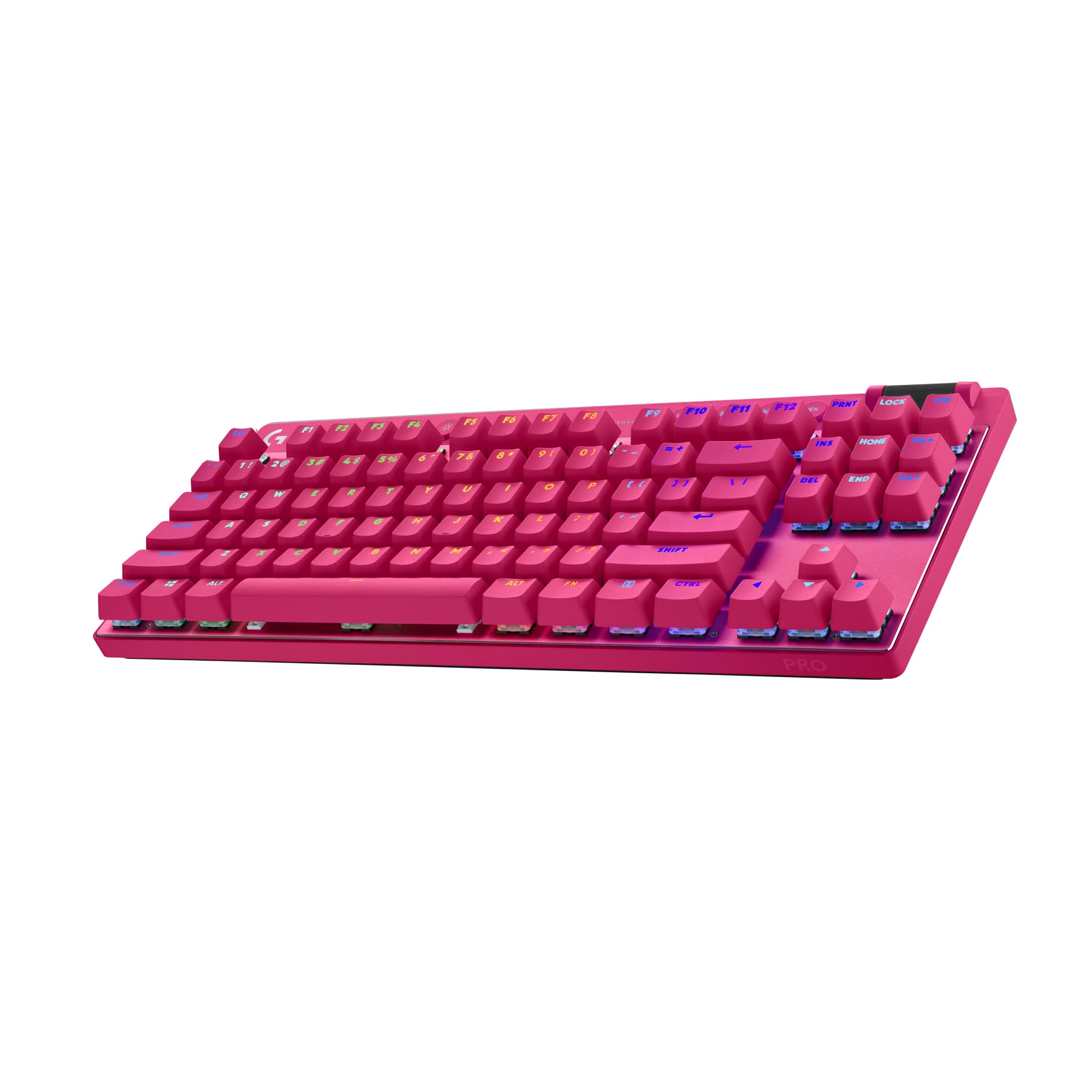
||Posted .This reviewer received promo considerations or sweepstakes entry for writing a review.I bought this keyboard because I wanted a wireless keyboard without the 10key number pad on the side so it'd be shorter and fit my setup better. If I need the number pad, I can just reach up to my laptop proper where it sits in it's stand. I'm loving the keyboard so far, the keys feel nice, love the sounds they make when typing. Loving the backlighting and how easy it is to change the colors and stuff. As for the gaming aspect... I haven't really gamed with it at all and I have only poked at the whole settings for such things. ALSO I LOVE the color! lol And was super amused that at the time of purchase that this magenta keyboard was on sale for cheapter than both the white or black versions.
I would recommend this to a friendBrand response from Logitech
Posted .We appreciate you sharing your positive feedback about the Logitech - PRO X TKL LIGHTSPEED Wireless Mechanical Tactile Switch Gaming Keyboard! We're glad it's meeting your needs, and thank you for your support.

- Pros mentioned:Battery life, Keyboard quality
Heavy and responsive
|Posted .This reviewer received promo considerations or sweepstakes entry for writing a review.When I first picked this thing up, I could have swore that the keyboard was made of solid steel. This thing, with the included case, has some weight to it. It is a little less than 4lbs, but not what I expected on such a small wireless keyboard. With that though, it feels very rigid and isn’t going to slide across the desk. Then, on top of that, it has full RGB backlight with the tactile keys, certainly more than your average wireless keyboard. With the G Hub software, you can really get into customizing, changing keys up, adding macros and then most of that being saved to the on-board memory so you can use it on a computer without G-Hub installed. Plus, it has about 55 hours of battery life, this is pending usage as it can stretch out more if you don’t use it all that often. One thing though, they changed the connectivity options. Now, with the Lightspeed adapter, you can have 1 keyboard and 1 mouse connected of very specific models. While the older unifying adapter could have multiple of several various products. Now I have to have a separate adapter just for my trackball because it is MX and not G. So, instead of having multiple USB ports for small wireless adapters, I use Bluetooth, but that limits some of the advanced settings of the keyboard. Regardless, it is still pretty responsive and the keybindings, macros and game mode settings still work the same. Overall, if you get a matching G Pro mouse to work with the same adapter, this is a really nice and solid keyboard. Compared to my older Logitech wireless keyboard, I feel like I actually type faster and more accurately with the tactile feel and sound of the keys. Plus, being in a dimly lit room, having that backlight really makes it helpful when you are trying to remember where that one key that you rarely use is. And, with the easy swap between Bluetooth and Lightsync, you can easily link to different devices.
I would recommend this to a friend - Pros mentioned:Battery life, Rgb lighting
Top notch TKL gaming keyboard!
|Posted .This reviewer received promo considerations or sweepstakes entry for writing a review.If you’re looking for a premium portable gaming keyboard, this is it! It could also live its life at a desk and work extremely well also, but then you’d be missing out on the keypad (if you’re in to that sort of thing) but more importantly, using the ridiculously awesome case that is included. I’ve never seen a keyboard come with a case, let alone one so robust. It’s legitimately something hard enough and nice enough that I wouldn’t have any issues putting a mobile gaming system into. The RGB is very nice, decently bright considering its wireless, and you have the option to dim it or turn it off when you’re not using it (battery life is great too, couple hours of gaming with max brightness “waving” LEDs and I was still over 80%) . I was blown away by the GHUB software telling you about how much power it takes for running the LEDs. The fact that it works with both Bluetooth and the included wireless dongle is a bonus, and both are very responsive. (I wouldn’t use Bluetooth to game though, as it can introduce a fair bit more input latency) The keys have a great feel and sound, (I’m a sucker for clicky switches, but this tactile ones are top notch!) and due to the fact that it is just a “TKL” board, it still feels full size while just typing or gaming. If you’re in the market for a top tier portable gaming keyboard, Logitech has you covered!
I would recommend this to a friend - Pros mentioned:Battery life, Keyboard quality
Logitech - PRO X TKL LIGHTSPEED Wireless
||Posted . Owned for 1 week when reviewed.This reviewer received promo considerations or sweepstakes entry for writing a review.I'm extremely happy with Logitech - PRO X TKL LIGHTSPEED Wireless keyboard - it has completely transformed my gaming setup! From the moment I started using it, the performance has been nothing short of outstanding. The tactile switches feel incredibly responsive and satisfying with every keystroke, giving me confidence and precious whether I'm in an intense FPS match or typing up work. The lightspeed wireless connection is rock-solid-zero input lag and stable even during long gaming sessions which is everything you want from a competitive keyboard. The compact tenkeyless design strikes the perfect balance between performance and desk space and the RGB lighting with LIGHTSYNC looks amazing. Customizing effects and profiles through the software was fast and intuitive and the lighting really adds a vibrant personal touch to my setup. Battery life has exceeded my expectations, and the build quality feels premium and durable. I also love that it's easy to take with me to LANs or gaming event. Overall, this keyboard has quickly become my go-to-choice - highly recommended it to any PC gamer looking fir wireless performance without compromise! Again HIGHLY RECOMMENDED!!!
I would recommend this to a friendBrand response from Logitech
Posted .We’re really grateful for your thoughtful review. It’s wonderful to know that our product is delivering the performance and ease of use you were hoping for. Hearing from satisfied users like you keeps us motivated. Thanks for choosing Logitech!
- Pros mentioned:Battery life, Keyboard quality, Rgb lighting
Logitech - PRO X TKL LIGHTSPEED Wireless Mechanica
||Posted . Owned for 3 weeks when reviewed.This reviewer received promo considerations or sweepstakes entry for writing a review.I recently got my hands on the Logitech PRO X TKL LIGHTSPEED Wireless Mechanical Gaming Keyboard, and I couldn't be more satisfied with it! This keyboard has completely elevated my gaming experience with its responsive tactile switches and incredible wireless performance. The build quality is top-notch, and the compact tenkeyless design saves space while maintaining a sturdy feel. The tactile switches provide just the right amount of feedback, making both gaming and typing enjoyable. I love the customizable LIGHTSYNC RGB lighting, which adds a vibrant touch to my setup and allows for personalized effects. Battery life is impressive, and I appreciate the wireless convenience—there’s no lag, and it feels just as responsive as a wired connection. The software for customization is user-friendly, letting me easily adjust key assignments and lighting profiles. Overall, the Logitech PRO X TKL keyboard is a fantastic choice for gamers who want a high-performance, stylish, and reliable keyboard. I highly recommend it!
I would recommend this to a friendBrand response from Logitech
Posted .We're thrilled to hear that you're loving the PRO X TKL LIGHTSPEED! Your feedback is greatly appreciated. We're glad to know that it's enhancing your gaming experience with its responsive performance and customizable features. Thank you for choosing Logitech.
- Pros mentioned:Battery life, Keyboard quality, Wireless
Logitech PRO X TKL LIGHTSPEED Wireless Keyboard
||Posted . Owned for 1 month when reviewed.This reviewer received promo considerations or sweepstakes entry for writing a review.The Logitech PRO X TKL LIGHTSPEED is a premium choice for gamers seeking a wireless mechanical keyboard. Its TKL (tenkeyless) design saves desk space without sacrificing performance. The tactile switches deliver a satisfying, responsive feel, ideal for gaming and typing. The LIGHTSPEED wireless technology ensures a lag-free experience, and the option for wired use adds versatility. With LIGHTSYNC RGB, the customizable lighting is vibrant and immersive, syncing perfectly with your games or setup. Battery life is impressive, lasting up to 50 hours on a full charge. The build quality is excellent, featuring a sleek, durable design with adjustable tilt angles. However, the lack of dedicated macro keys may deter some advanced gamers. The PRO X TKL is a solid investment for those prioritizing performance, aesthetics, and wireless convenience.
I would recommend this to a friendBrand response from Logitech
Posted .Thank you for your comprehensive review of the Logitech PRO X TKL LIGHTSPEED Wireless Keyboard. We appreciate you highlighting its premium design, responsive tactile switches, lag-free wireless performance, and impressive battery life. We also value your feedback regarding the lack of dedicated macro keys, which we will take into consideration.
- Pros mentioned:Rgb lighting
Very decent wireless-only gaming keyboard.
|Posted .This reviewer received promo considerations or sweepstakes entry for writing a review.I was surprised to see that a quality storage case was included. It’s made of fabric and quite sturdy, which I have no doubt will protect the keyboard well. It also comes with a USB-C-to -USB-A charging cable and the wireless dongle with a USB-C adapter. The keyboard itself looks like any other tenkeyless keyboard. However, I appreciate the dedicated media buttons and volume rocker, which is a bit loose in my opinion. There is also a row of special functions for lightspeed, Bluetooth, gaming, and RGB modes. I like that there are two levels for raising the keyboard and an area that can store the wireless dongle underneath. The keyboard has some weight, and combined with the carrying case, can become a bit cumbersome to carry around. However, the weight makes it very stable on any surface. The typing experience is satisfying in my experience. The key caps are well-spaced and have very decent travel. The activation point feels just right and there is no need to push hard. The PBT caps feel smooth and pleasant to fingertip and full presses. This keyboard features brown switches which bring a nice balance between being clicky and somewhat quiet. For productivity, I did not make too many typing mistakes, but I do miss the numpad. For gaming, the keyboard works just as well. I appreciate the lightspeed mode which eliminates lag and makes the keyboard feel almost but not quite like a wired unit. The gaming mode deactivates keys around the WASD keys to prevent accidental process, which is a very welcome feature for me. One thing that would’ve made this keyboard standout is for it to have hot-swappable switches. Being a gaming keyboard, it features the now-ubiquitous RGB lighting. It is quite bright and can be adjusted via the companion app. By the way, the robust app provides a myriad of information and an extensive set of options such as battery level, firmware updates, RGB control, per-key assignments, macros, and additional gaming modes. The battery life is OK. I was able to use it exclusively for a week until it needed recharging. This is where some disappointment came in. This keyboard is solely designed for wireless use. That’s right; upon connecting the included cable to a PC port, there is no wired mode. The keyboard must be on and connected via Bluetooth or the dongle, which is a strange design decision in my opinion. In the end, I think this is a very well-made 65% keyboard. However, being marketed as a “pro” device, I would’ve liked Logitech to implement more creative options such as hot-swappable switches and a wired mode for best performance, as I’ve seen with comparable units within this price range.
I would recommend this to a friend - Pros mentioned:Battery life
Phenomenal Keyboard
||Posted . Owned for 1 week when reviewed.This reviewer received promo considerations or sweepstakes entry for writing a review.I used to dislike the idea of using a wireless keyboard for gaming purposes because of input delay, but the wireless keyboards of today have gotten really good and fast. I play a lot of Geometry Dash, which is a game well-known for timings and frame-perfect inputs on the hardest levels. When I use this keyboard, I can't feel the delay, and it does not negatively affect my ability to play in any way. I also really like how this keyboard has a wired option in that you can plug it into your computer and still use it (internal rechargeable battery). The switches themselves are very subjective, but I personally like the GX Brown Tactile switches because they're a good balance of clickiness and softness, and they provide a good feel. I also like the volume wheel on the top right of the keyboard and the simple low-profile action buttons on the top row (mute, pause, forward and back, lighting, Bluetooth, etc.) The other big win for this keyboard is the case it comes in. It's a very sturdy hard shell case that makes the keyboard very portable and protected. Overall, this keyboard is a great buy. The only qualm I have about it is the price, but if you get it on sale, it's a phenomenal value. I would definitely recommend this keyboard to others.
I would recommend this to a friendBrand response from Logitech
Posted .Your incredibly detailed feedback on the Logitech PRO X TKL is truly insightful! It's fantastic to hear that this keyboard has completely transformed your view on wireless gaming, especially with demanding titles like Geometry Dash, thanks to its imperceptible delay. We're thrilled you appreciate the versatility of the wired option, the satisfying feel of the GX Brown Tactile switches, and the thoughtful design of the volume wheel and media controls. The robust hard shell case for portability is also a feature we're proud of, enhancing its overall value. While acknowledging your note on the price, we're genuinely pleased you consider it a phenomenal value, especially on sale, and would highly recommend it!
- Pros mentioned:WirelessCons mentioned:Switches
Soldered switches but still a solid choice ! ! ! !
||Posted . Owned for 1 year when reviewed.This reviewer received promo considerations or sweepstakes entry for writing a review.Awesome keyboard, highly recommend especially paired with a Logitech mouse so you can share the same USB dongle for simplicity. The Logitech G app got controlling the devices and RGB etc is pretty good super straightforward and easy to use. Only complaint is that the switches are soldered to the board so you can only swap key caps not the switches themselves unless you wanna tweak out with a soldering iron hah. I’m happy with the switches that came with it and just ended up swapping the keycaps to ceramic keys from cerakey that are pretty dope they fit great on these switches, I just had to add a rubber band to the space bar for some more spring back because the ceramic space bar was so heavy it was dropping after pressing not wanting to spring back but the rubber band works great it springs right but just loop one around the posts before installing the spacebar so it has some extra resistance. There are some cool smaller companies if you want to go super custom and have swappable switches and stuff but for a solid choice from a “big” brand like Logitech if you want a mechanical keyboard you won’t be disappointed this thing has been rock solid for me.
I would recommend this to a friendBrand response from Logitech
Posted .We're delighted you're enjoying the PRO X TKL! It's great to hear about the seamless integration with a Logitech mouse and the user-friendly G app. We appreciate your detailed feedback on the soldered switches and your creative solution with the ceramic keycaps. Your recommendation for a reliable, 'rock solid' keyboard from Logitech is highly valued!
- Pros mentioned:Battery life, Keyboard quality
Well worth the money
||Posted . Owned for 1 month when reviewed.This reviewer received promo considerations or sweepstakes entry for writing a review.I have been using Logitech for a while after swapping brands around when I started PC gaming. I have an older wired version of this keyboard and I really liked it, so naturally I started to switch to wireless as the Lightspeed products compete with the wired options for peripherals. This keyboard is sturdy, it feels good to use, and is the right amount of clicky for me as it's slightly muted compared to other louder keyboards. The battery does last a while even when I forget to turn it off. One of my favorite features is the lightspeed gear will pair to one receiver. So I use one USB receiver for my mouse, keyboard, and headset. I cannot recommend this enough!
I would recommend this to a friendBrand response from Logitech
Posted .Thank you for your enthusiastic and detailed feedback on the Logitech PRO X TKL LIGHTSPEED Wireless Mechanical Tactile Switch Gaming Keyboard! We're thrilled to hear it's been a great experience for you, especially coming from a long history of using Logitech products. We appreciate you highlighting its sturdiness, comfortable feel, satisfying key clicks, long battery life, and the convenient single-receiver pairing for multiple LIGHTSPEED devices. We're so glad you highly recommend it!
- Pros mentioned:Battery life
great keyboard
||Posted .This reviewer received promo considerations or sweepstakes entry for writing a review.An absolutely fantastic choice for mechanical keyboard that doesn't take up too much space, doesn't require significant battery charging and works great for both gaming and productivity purposes. It's obviously a little pricey compared to other keyboards and isn't what I would buy for value purposes per se but the quality of the keys and "keyboarding experience" more than makes up for that to me.
I would recommend this to a friendBrand response from Logitech
Posted .That’s a glowing endorsement—and well deserved! The Logitech PRO X TKL LIGHTSPEED really hits the sweet spot for serious gamers and multitaskers alike. With its tenkeyless layout, it frees up desk space without sacrificing functionality, and the GX Brown tactile switches offer that satisfying feedback for both rapid-fire gaming and long typing sessions
- Pros mentioned:Battery life, Wireless
Favorite keyboard
||Posted . Owned for 1 year when reviewed.This reviewer received promo considerations or sweepstakes entry for writing a review.Great battery life, no delay with the wireless aspect. Great keyboard.
I would recommend this to a friendBrand response from Logitech
Posted .We appreciate you highlighting the consistent wireless performance and battery life of the PRO X TKL. Our goal is to provide tournament-level reliability without the cables, and it’s great to see it’s hitting the mark for your setup. Enjoy the precision of those tactile switches!
- Pros mentioned:Keyboard quality, Rgb lighting, Wireless
A Dream to Game On.
||Posted . Owned for less than 1 week when reviewed.This reviewer received promo considerations or sweepstakes entry for writing a review.I went from the Steelseries Apex Pro to this Logitech with brown switches and it's actually unbelievable how this is the cheaper keyboard. Everything about this is premium. It's so much more reliable to use wirelessly, looks and sounds amazing and above all feels like a dream to type and game on. 100% recommended.
I would recommend this to a friend - Pros mentioned:SizeCons mentioned:Price
Great keyboard
||Posted . Owned for 1 month when reviewed.This reviewer received promo considerations or sweepstakes entry for writing a review.I love the portability and size of this keyboard. It stays on my desk most of the time but being able to move it when I need too is a huge plus. A little pricey for the size.
I would recommend this to a friendBrand response from Logitech
Posted .Thank you for your feedback on the Logitech - PRO X TKL LIGHTSPEED. We appreciate you highlighting its portability and compact size. We understand your perspective on the pricing and will consider your feedback for future product development.
- Pros mentioned:Rgb lighting, Size
Great small keyboard
||Posted . Owned for 1 month when reviewed.This reviewer received promo considerations or sweepstakes entry for writing a review.Excellent smaller keyboard, if you don't need the 10 key this unit is great - RGB lighting great clicks, small profile and it's a little less money than the 10 key
I would recommend this to a friendBrand response from Logitech
Posted .Thank you for your feedback! We’re glad the Logitech PRO X TKL LIGHTSPEED keyboard impressed you with its compact design, great feel, and value.
- Pros mentioned:Battery life
Logitech PRO X TKL
||Posted . Owned for 1 month when reviewed.This reviewer received promo considerations or sweepstakes entry for writing a review.Great Keyboard, has long battery life. and protective case for travel.
I would recommend this to a friendBrand response from Logitech
Posted .We’re grateful you took the time to share your thoughts. It’s wonderful to know our product is meeting your expectations.