Customer Ratings & Reviews
![a - I 1 2 # 3 $ 4 % 5 A 6 & 7 8 9 ) O = - delete tab W E R T Y U I O P [ ] I / cops lock A S D F G H J K L : : return shift Z X C V B N M < > ? / shift ctrl - option x cmd x cmnd option](https://pisces.bbystatic.com/image2/BestBuy_US/images/products/6408/6408701_sd.jpg)
- Model:
- 920-009703
- SKU:
- 6408701
Rating by feature
- Value
Rating 4.6 out of 5 stars
- Quality
Rating 4.7 out of 5 stars
- Ease of Use
Rating 4.7 out of 5 stars
Customers are saying
Customers frequently mention the high-quality backlit keyboard, its ease of use, and excellent battery life as significant advantages. The protective case is also a plus for many users, along with its slim and fitting design. While some find it adds weight or bulk, others appreciate its lightweight nature. The price point is also frequently cited as favorable.
This summary was generated by AI based on customer reviews.
A waste of money.
||Posted . Owned for 1 month when reviewed.This reviewer received promo considerations or sweepstakes entry for writing a review.A complete waste of money. The keyboard constantly malfunctions.
No, I would not recommend this to a friendBrand response from Logitech
Posted .Hi Cassandra, sorry to hear that you are unsatisfied with your Slim Folio Pro Keyboard Case for Apple. We are always looking for ways to improve our products, so we appreciate your review. Please see these quick tips for troubleshooting: Make sure the iPad is connected and fully seated in the case and if the keyboard has an On/Off switch, turn it on. If no LEDs appear or if the LED is red, you’ll need to charge your keyboard.
On your iPad, make sure Bluetooth® is on.
Select Settings > Bluetooth > On. Then, select “iPad” from the Devices menu.
Press the Bluetooth® connect button on the keyboard for two seconds until the status light blinks. The keyboard is discoverable.
In the iPad Bluetooth® menu, select your discoverable keyboard to connect.
If your iPad requests a PIN, enter it using the keyboard (not on the iPad), then press ENTER on the keyboard.
SmartConnector
Make sure the SmartConnector on the iPad and top of the keyboard is clean and free of debris.
Verify that the iPad is in the case properly to allow the SmartConnector to align with the connector on the keyboard.
Place the iPad to allow the SmartConnector to attach (there is a small magnet that will keep it in place).
If the issue persists, perform a soft reset of your iPad. To perform a soft reset, press and hold the power button and the home button until the iPad restarts and the Apple logo appears. After rebooting, confirm that your keyboard is connected to the iPad and then test it.
Make sure your iPad is up to date with the newest iOS:
Plug your iPad into power and connect to the internet with Wi-Fi.
Tap Settings > General > Software Update.
Tap Download and then Install and follow the on-screen instructions.
Once the updates are installed, the iPad will restart. Confirm that your keyboard is successfully connected and then test it. I hope this information assists you Cassandra.
If you ever have additional feedback or questions regarding Logitech products, feel free to visit https://support.logi.com/hc/en-us Thanks, -Logitech
do not purchase
||Posted . Owned for 4 months when reviewed.This reviewer received promo considerations or sweepstakes entry for writing a review.all the buttons fell off and didn't work. not happy at all
No, I would not recommend this to a friendBrand response from Logitech
Posted .Hi Sara, Thank you for your feedback. Sorry for any inconvenience. If you ever need assistance, please contact Logitech Support on the website. LaShonda from Logitech
- Pros mentioned:Battery life, Keyboard quality

Great Keyboard
|Posted .This reviewer received promo considerations or sweepstakes entry for writing a review.There are some pros and some cons to this case. Logitech makes great products some of my favorite are their keyboard and mouses. That being said, one of the biggest pros to this case is the keyboard. It offer great key travel and feedback. It is a traditional keyboard most people are used to and makes it great for someone wanting a laptop experience out of their iPad. The case is pretty slim overall considering it packs a full size keyboard but it is not as slim as some other cases on the market. The keyboard uses Bluetooth and connects seamlessly. Some other great features are that it has sleep wake function and it shuts off the keyboard if you flip the case around. Battery life is great and i have not had to charge it yet. One of my person favorites is that it charges off of USB-C (although one is not included) but the same charge used to charge the iPad will charge it. All of this being said their are a few disadvantages to this case. The first thing that i do not like is that it does not cover the sides completely. Although the case still does offer protection if dropped it could potentially be scratched. I also do not like the choice of material used on the outside of the case because it is easily scratched and finger print magnet. The last thing i wish was included was track pad however it is not a huge deal because you can easily connect a Bluetooth mouse. Even with the few cons of this case it is still one of the best cases you can buy for the iPad pro. I would mainly recommend anyone who needs to productivity of a keyboard like college students or business professionals.
I would recommend this to a friend - Pros mentioned:Battery life, Keyboard quality
Well thought out keyboard
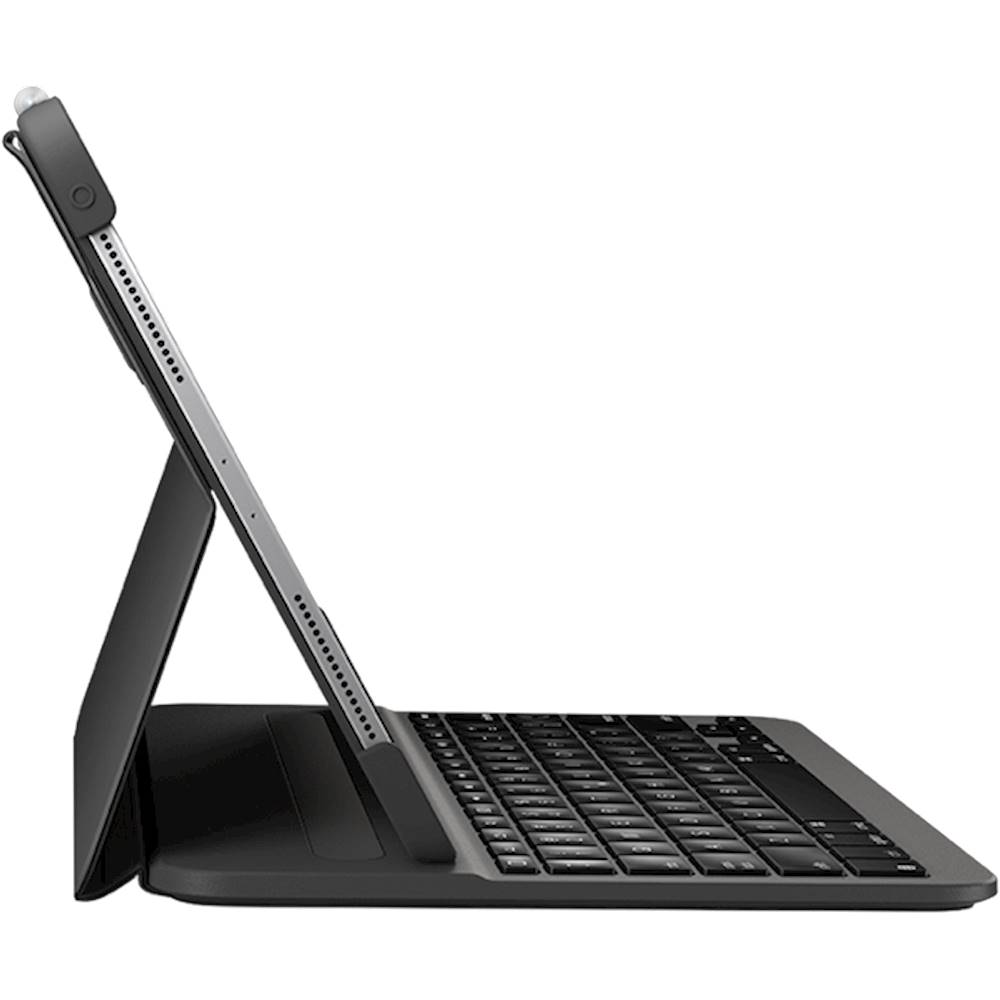
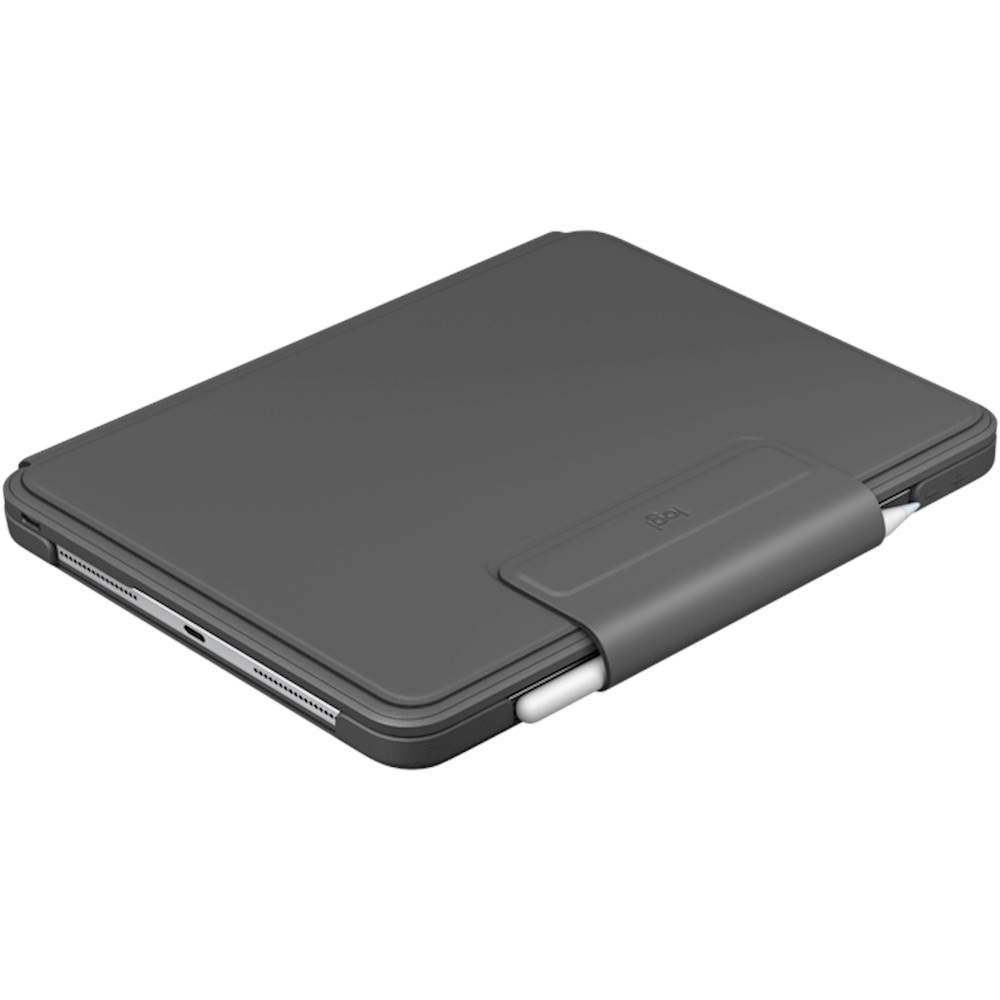
|Posted .This reviewer received promo considerations or sweepstakes entry for writing a review.I was excited to receive this new addition to my iPad Pro 12.9” tablet. Logitech has created an incredible combination with this keyboard and their new Pebble mouse for iPad. The first thing that I noticed is the loop that goes over the magnetic pencil. It holds the magic pencil in place when transporting. The magnetic pencil is very nice but also very prone to falling off without something like this to hold it in place. The next feature that makes this very nice is the backlit keyboard. The keys light up nicely and the feel is very high quality. The connectivity is seamless via Bluetooth and there is no lag. There is also a home key that is lacking with many keyboards and I always appreciate that Logitech provides one. It’s important to note that the newer iPads support mice now and this keyboard does not have a built in trackpad. This is an area where I felt that it came up a little short. If the tablets want to compete with laptops, a mouse is important. Logitech has introduced a new Pebble mouse that works well and when combined with this keyboard, it makes it very much like a laptop. The iPad fits securely and easily into the keyboard case. It is sturdy and will do a great job protecting the iPad Pro. There is really only one viewing angle as the Bluetooth will disengage if it isn’t seated properly. The good news is that the angle is very good for viewing and additional angles really aren’t that necessary. This is a very nice keyboard and will make an iPad even nicer to use. It charges quickly and holds a charge for a very long time.
I would recommend this to a friend - Pros mentioned:Battery life, Keyboard quality
A Great Option for Heavy Keyboard Use
|Posted .This reviewer received promo considerations or sweepstakes entry for writing a review.I use my iPad Pro 3rd gen for everything work related. I compose reports, remote into my computer at work, send emails, and access the web on a daily basis. It is important to have a keyboard that is easy to type on, is backlit, protective, and is comfortable. On all four of these requirements for me, my needs are met by the Slim Folio Pro. It is light without feeling cheap, it provides more than adequate protection, the keyboard is backlit and very pleasant to type on, and I’ve not had it lose connection with my iPad yet. It is a refreshing upgrade from a competitor’s case I was using, which was difficult to type on and was rather bulky. I’ve also used the Apple Smart Keyboard, but it lacks backlighting and didn’t feel as comfortable. Anyhow, I feel like you can buy this keyboard case with confidence. It was easy to sync via bluetooth with my iPad Pro. Battery life lasts for literally months. Typing on it is like typing on my HP Spectre laptop. The keys have a nice feeling to them but are relatively quiet while still providing a tactile feel. Highly recommended as a great value.
I would recommend this to a friend - Pros mentioned:Battery life, Keyboard quality
Remarkable Case for the iPad Pro 12.9"
|Posted .This reviewer received promo considerations or sweepstakes entry for writing a review.The Logitech - Slim Folio Pro Keyboard Case for Apple® iPad® Pro 12.9" is an outstanding companion for the iPad Pro. It makes using an amazing device even more spectacular. The case is durable and well constructed. Some highlights of the Logitech - Slim Folio Pro Keyboard Case for Apple® iPad® Pro 12.9" are: The keyboard - the keys are comfortable and responsive. They also feature a backlit function which is excellent for operating in low light conditions. The bezel is well crafted and functions exceptionally well. It opens and closes with precision, protects the iPad and even provides a space for the Apple Pencil. The battery life of the case is great. It last for hours of continuous use, even with the backlit keyboard enabled. The case is easy to charge, and the standby time is amazing. So you don't have to worry if you don't use the case for days at a time. It will be ready when you need to use it. I highly recommend the Logitech - Slim Folio Pro Keyboard Case for Apple® iPad® Pro 12.9". It will greatly enhance you experience with the iPad Pro.
I would recommend this to a friend - Pros mentioned:Battery life, Keyboard quality
Great case/keyboard for your iPad Pro!
|Posted .This reviewer received promo considerations or sweepstakes entry for writing a review.With iPads being so versatile, it is always great to have a product like the Logitech - Slim Folio Pro Keyboard Case to protect and make your iPad Pro much more functional. The Logitech - Slim Folio Pro Keyboard Case is lightweight and looks great. Connection is very simple, so anyone can do it. The keyboard has a backlight display, and although it is a compact keyboard it is easy to type with. The case has a magnetized holder that automatically powers on the keyboard. There is a stow pouch for your apple pencil that tucks away neatly when folded. The case feels nice and sturdy and the only thing that I would worry about in case of a fall would be the keyboard, as that is composed of, what appears to be, hard plastic. The Logitech - Slim Folio Pro Keyboard Case has been great for online classes, and I can definitely see this replacing my laptop for school purposes. The charge lasts a long time, and the keys are very responsive. I would definitely recommend the Logitech - Slim Folio Pro Keyboard Case.
I would recommend this to a friend - Pros mentioned:Ease of use, Keyboard quality
Great Keyboard
|Posted .This reviewer received promo considerations or sweepstakes entry for writing a review.This is a fantastic keyboard. Fit and feel is very nice. Set up was a breeze. And the magnetic strip that makes the keyboard connection is strong and secure. The keyboard is very much like a laptop and I love the fact that it lights up. (3 settings) The case holds the iPad very securely and has an opening for the pencil as well. I like the fact that the magnetic latch secures the pencil when you close the case. That pencil isn't going anywhere. The case is not flimsy like other cases I have used. It seems to hold up nice two regular use. The outside has a nice smooth soft touch feel. It would be cool if you could change the angle of your keyboard to the iPad. Maybe a future feature Logitech? Overall a fantastic keyboard / case that you really can't go wrong with. Thumbs up Logitech!
I would recommend this to a friend - Pros mentioned:Ease of use, Keyboard quality
Great Keyboard for the iPad Pro
|Posted .This reviewer received promo considerations or sweepstakes entry for writing a review.I would like to start off by saying the build quality of this keyboard is top notch. When setting up to my iPad it was quick and easy. No issues at all. The keys have backlighting, which helps when typing on my iPad in dark environments. It comes with 2 levels of brightness. The keys have very good key travel, and feel really good to type on. Another plus are the function keys which are a huge benefit. The flap that covers the pen holder magnetically locks the keyboard in place while transporting it, and the flap can also magnetically flip to the back while in use. It also has a pen holder built into the flap as well. My only gripe is the case providing only one viewing angle, and a funny smell that took a few days to wear off. Other than that, I really enjoy using this case with my iPad Pro.
I would recommend this to a friend - Pros mentioned:Keyboard qualityCons mentioned:Weight
needed keyboard for iPad Pro with little but
|Posted .This reviewer received promo considerations or sweepstakes entry for writing a review.It works nicely in a sense connection is simple, typing feels comfortable better than a $500 range notebook keyboard I would say. I am able to perform multitasking switching while writing document wit little caveat for being iPad. What is noticeable is its backlit keys is impressive in the dark leading to smooth experience. What is lacking is for being price point doesn't come with charging cable, upon connected doesn't have battery indicator, then while charging doesn't charge the iPad, and for last it is bulky from star point of desired expectation. In the attachment display folded, in the dark, and comparison with MacBook Pro 15".
I would recommend this to a friend - Pros mentioned:Keyboard qualityCons mentioned:Weight
Great case, a little heavy
Posted .This reviewer received promo considerations or sweepstakes entry for writing a review.I really like this product. The magnetic keyboard is very convenient and clever. I especially enjoy that the Bluetooth disconnects when the screen and the keyboard are not magnetically connected. I took one star off because it is much heavier than any other case I have ever used for my iPad (although I think it is more durable as well).
I would recommend this to a friend - Pros mentioned:Keyboard quality
Looks & works great, highly recommend
Posted .This reviewer received promo considerations or sweepstakes entry for writing a review.Absolutely love it! Keyboard is easy to use. The magnetic hold on the iPad is strong and doesn’t slip. My only wish is that it has a more secure pencil holder that also allows it to charge. It sticks to the iPad pretty well, but not extremely secure if carrying around. It has a pocket to hold the pencil, but doesn’t allow charging at the same time. Overall, it is awesome!
I would recommend this to a friend Great protection for your iPad
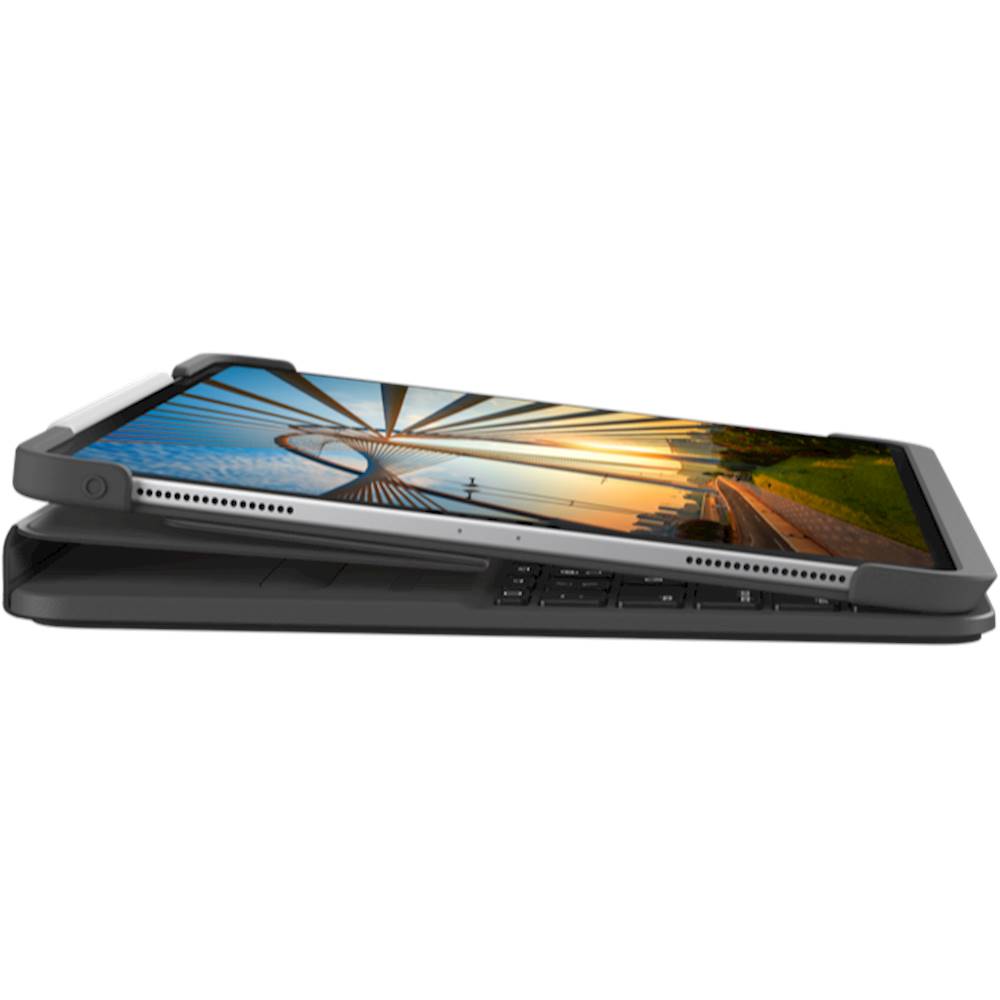
|Posted .This reviewer received promo considerations or sweepstakes entry for writing a review.The Logitech - Slim Folio Pro Keyboard Case for Apple® iPad® Pro 12.9" (3rd and 4th Gen) - Graphite is a great keyboard case for your iPad Pro. I actually have the 11" one also, so when I upgraded to the 12.9" iPad Pro this was my first choice! I have the Apple Pencil, so I really like that it has a flap that keeps it nice and snug when I'm on the go, or not using the iPad. It also helps a lot with the protection aspect of the case keeping the front and back nice and securely closed. The flap magnetically attaches to the case when folded over, so it makes it easy to quickly fold it over or unfold it. It also keeps the flap nice and snug against the case when unfolded. The case is well-made and has a quality feel to it. The surface has a nice satin feel to it. When in keyboard mode, it has a strong magnetic grip that keeps the iPad securely in place while typing, or moving the iPad around the typing surface. The keyboard stays in place even if you pick up the iPad, which makes moving from one area to another nice and quick. The chiclet style keyboard feels quite nice. The keys have a good amount of resistance, and have a nice tactile feel when returning to place after pressing a key down. They have a nice smooth texture. The backlighting is awesome! Great for low-light environments. The top row of keys provide some nice functionality. I use them quite often for minimizing my current app, or bringing up the active app selection screen. You can also adjust the backlighting, bring up or close the on-screen keyboard, control media with forward/backward/pause/play keys, control the iPad speaker volume, quickly lock the iPad, control the Bluetooth pairing mode, and check the battery status with an indicator light. The rubber bumpers on each corner of the case where the iPad is inserted into offer a good amount of protection for falls. The iPad is very snug once fitted into them! It took a bit of effort to get the iPad seated, so if you have poor hand strength you might need assistance. The Bluetooth connection works great. The keyboard turns on when the iPad is in the upright position once it's magnetically seated, and remains off otherwise, so when in tablet mode there isn't any risk of accidental key presses. Overall, this is an excellent keyboard case for your iPad Pro. I would highly recommend to anyone!
I would recommend this to a friendTop-notch quality at an equally impressive price..
|Posted .This reviewer received promo considerations or sweepstakes entry for writing a review.My wife uses her ipad pro for everything from work-related tasks to killing free-time via drawing and any number of other art-based activities. Her one gripe when she upgraded from the last-gen to this gen was that one of her favorite cases (not the previous model of Slim Folio) wasn't available and she simply couldn't see spending $300+ on the one offered by Apple, and even then that is more of a stand than a "case." So here we are with the latest Slim Folio from Logitech. The first thing I noticed about it compared to previous cases is the feel/weight of it. This thing (while in fact "slim") definitely has a nice heft to it. But, it comes across more as a feeling of quality than that of bulk. You really feel like if you drop your ipad that it will be fine. Now, after having used it for a few weeks my wife and I have both noticed that in certain positions it will start to get a little tiring, but it's a worthy trade off considering the protection/features that weight comes along with. Along with the protection, those features are a full-sized, backlit keypad including your usual iOS shortcuts, a holder for the Crayon from Logitech or the Pencil from Apple, as well as your expected/typical bluetooth connectivity. All those things wrapped up in the Slim Folio are bound to add some heft. Again, worthy trade off. The case itself has 3 positions; upright, sketch, and read. Those are rather self-explanatory but I'll quickly cover them. Upright gives you your traditional laptop profile, sketch folds down, and read folds over/back similar to a spiral notebook in feel. Quality, fit and finish, materials, are as to be expected from Logitech. Everything has a very nice feel to it, nothing feels like an after thought and you get the impression that this thing will last you a good number of years if you happen to keep your devices that long. I don't give out many 5-star reviews, but there aren't any glaring flaws or drawbacks to buying the Slim Folio, even at full price. The only thing that comes even remotely close is the weight, but I've covered that enough. Just keep it in mind if you think it will be an issue with your use of your ipad.
I would recommend this to a friend- Pros mentioned:Keyboard qualityCons mentioned:Weight
Open and shut case!
Posted .This reviewer received promo considerations or sweepstakes entry for writing a review.It adds some weight wich I don’t mind being a big guy. The overall best case I had on a tablet period. And the keyboard is remarkable.
I would recommend this to a friend Heavy But Nice to Type on
|Posted .This reviewer received promo considerations or sweepstakes entry for writing a review.Thus far I’ve been using my 12” iPad Pro with the Apple Keyboard Folio, so most of my point of reference is to that. Straight off the bat, I will say that the Logitech is a much, much better typing experience. The Apple keyboard has very low-travel keys and makes a loud clacking sound. The Logitech, by comparison, is much more like typing on a decent laptop keyboard with a more familiar feel and nearly silent keys. Also, the Logitech is backlit, which the Apple keyboard is not. There are backlight keys which allow you to set the lighting to medium, full or off as needed. If you’re someone who has a lot of meetings in dimly lit rooms with projectors, you know how important backlighting becomes in a hurry. The case itself if very hefty. While the Apple case is extremely thin and attaches with magnets it doesn’t exactly instill confidence that it will protect the iPad. The Logitech is obviously much more protective, but also adds additional thickness and weight. With the case on my iPad is about the thickness of my MacBook Air and is even heavier. While it makes the iPad less portable it does provide much more protection and I don’t worry about it in my backpack as much. This one attaches around the entire bottom and top two corners. I have an edge-to-edge screen protector on my iPad and the case does not interfere with it. Getting it in and out of the case is a little troublesome, but nothing too bad. I take the iPad out when I’m just reading. Logitech says you can fold the keyboard back for reading mode, but honestly it’s too thick and heavy for that. If your main use is using your iPad as a laptop replacement, this is perfect! The keyboard is paired through Bluetooth and pairing was easy and worked the first time. When you put it into laptop mode the keyboard comes on automatically and is available immediately. There’s virtually no delay once it turns on. I also like the top row of special keys with a home button, media controls and volume controls. There really aren’t many drawbacks, other than the weight. The ability to use it in more than one angle would be nice. Also, now that the iPad has the ability to use a mouse I wish it had a trackpad built in. Also, I’m concerned about how the finish will look after some time. It appears to be the same rubberized surface my Apple folio has, which has worn down and looks nasty. Even some tiny nubs on the bottom corners to lift it off the table would be nice. IF you’re looking for a keyboard case and don’t mind the extra weight I would not hesitate to choose this one over the pricy Apple Keyboard Folio, as it’s actually more functional and easier to type on. However, if you want to keep your iPad svelte and light, you may not be perfectly satisfied. I do find the feel of the keyboard makes up for the weight though!
I would recommend this to a friend- Pros mentioned:Keyboard quality
The Logitech Slim Folio Keyboard is A Hit
Posted .This reviewer received promo considerations or sweepstakes entry for writing a review.My son bought me this keyboard case for Christmas and I love it. The connection is awesome, it goes from sleep to connected instantly after the iPad is positioned over the magnetic strip, there is no lag time, the keys are nice and smooth while typing, the backlit keyboard makes it easy to type in dim lighting, and the function keys are a plus, something you don’t get on the magic keyboard.
I would recommend this to a friend Excellent compromise
Posted .This reviewer received promo considerations or sweepstakes entry for writing a review.The case checks all the boxes although it does have one drawback (I’ll get to that). If you’re looking for a case that legitimately protects you $1,000+ investment and provides a flexible keyboard, then I’m not aware of a better alternative. This case is super easy to use, made well, offers a lot of flexibility for various use scenarios and the keyboard is really exceptional. The keyboard paired very easily and has never lost a connection. There are various details the Logitech built into this that speaks to it’s quality. For instance, there’s a small bumper along the same surface that contains the keyboard which keeps the iPad screen from rubbing against the keyboard when the case is closed. Because of that, you really don’t need a screen protector. The only drawback is this thing is anything but “Slim”. It’s not too heavy but it’s the thickness of a typical laptop. That said, if you want true protection for your IPad I’m not sure where you could’ve cut out some bulk. The Apple keyboard is much sleeker but that didn’t seem to offer any real protection if you were to drop your device in any way. It’s also considerably cheaper.
I would recommend this to a friend- Pros mentioned:Battery life
Highly recommend this1
Posted .This reviewer received promo considerations or sweepstakes entry for writing a review.This keyboard is excellent! I would definitely buy it again. I’ve had it four months now and just recharged the battery.
I would recommend this to a friendBrand response from Logitech
Posted .Hello there, Thanks for the fantastic review of the Logitech Slim Folio Pro keyboard! It's rewarding to hear you love it and the battery life is living up to expectations. For months on a single charge is impressive!
- Pros mentioned:Ease of use
Great Accessory
Posted .This reviewer received promo considerations or sweepstakes entry for writing a review.The Keyboard was easy to attach and connect to the Ipad. Makes travelling much easier than lugging around a laptop!
I would recommend this to a friend