Customer Ratings & Reviews




- Model:
- MCA950800V019
- SKU:
- 6579989
to a friend
Customers are saying
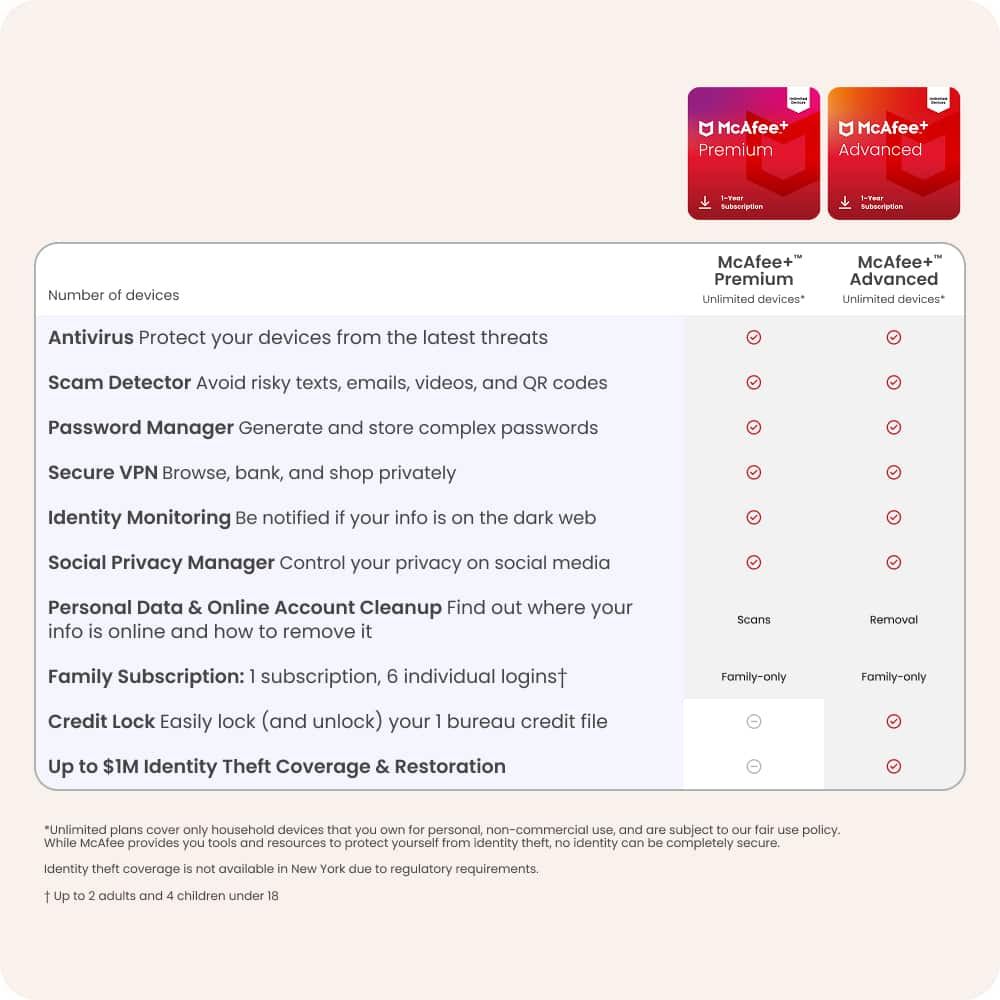
Customers recognize McAfee+ Advanced Family as a comprehensive security solution, appreciating its VPN, protection capabilities, ease of use, and data cleanup features. Users also find the installation process straightforward and value the inclusion of parental controls. However, some customers have expressed concerns regarding the user-friendliness of the interface. Despite this, the software is generally well-regarded for its robust anti-virus, spam, and firewall protection.
This summary was generated by AI based on customer reviews.
- Pros mentioned:Anti-virus, Data cleanup, VpnCons mentioned:Interface

Too Good to be True
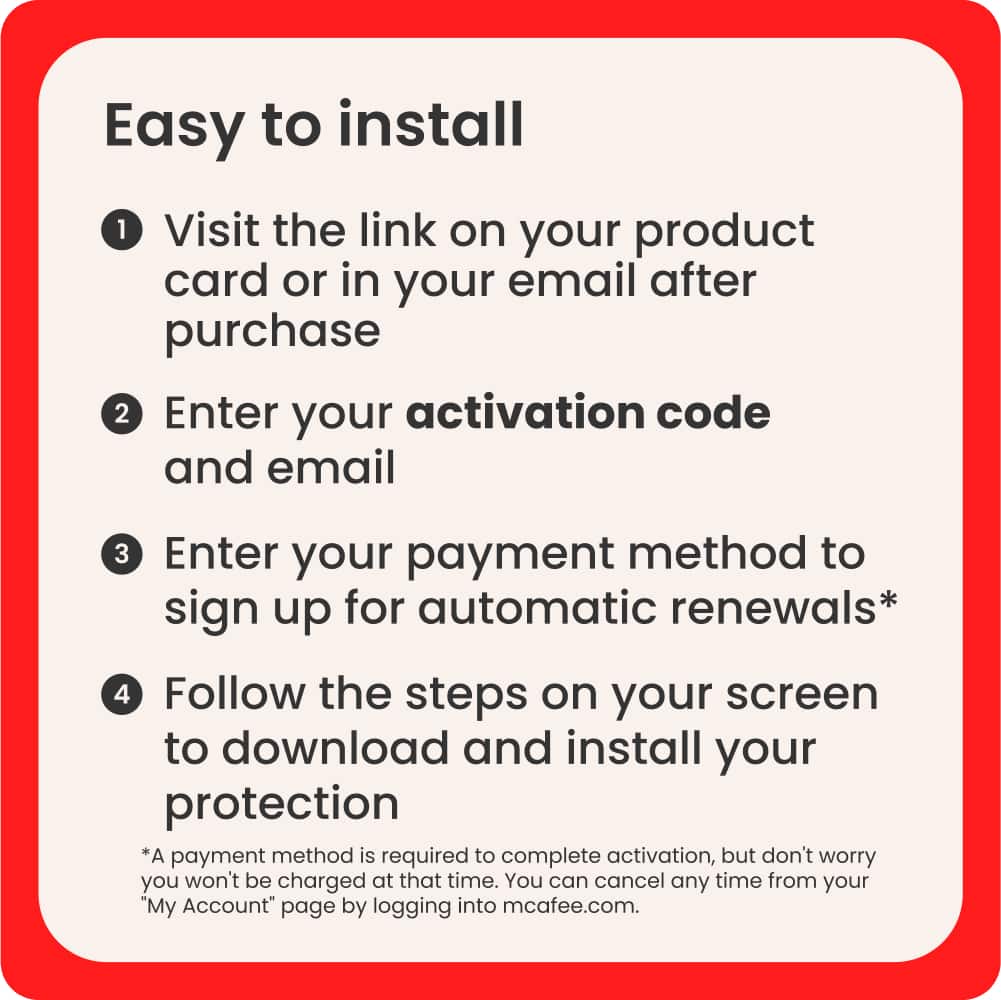
|Posted .This reviewer received promo considerations or sweepstakes entry for writing a review.Technology has changed quite a bit over the years and I wanted to test the McAfee+ Advanced Family subscription. What stuck out to me was all the features and the unlimited devices that you can setup with the service. I wanted to see if it lives up to the hype. First, I installed the application on my laptop, desktop and mobile phone with the activation code McAfee provided. Pretty seamless experience so far. I was able to get setup fairly easy, but McAfee tried to get me setup on auto renewal by adding a credit card. I was able to get pass this step after reading the fine print. I was able to download the McAfee desktop application. Fist thing I did was run a manual anti-virus scan. I tested the Secure VPN feature as well. For some reason, it wouldn’t allow me to update my virtual location. I had to hit the circle to the right of the location to change the location. The location option would always grey out for some reason. I then reviewed the Protection dock with the application and here I found several more useful options to scan and monitor my CPU. One thing to note is McAfee has way too many individual apps. For me to utilize the many features that the subscription has, there are four separate applications. In my opinion McAfee should find a way to bake some of the features into one main application. Also, the interface isn’t user friendly. Its sometimes difficult to get to the areas within the application that you need. Pretty clunky at best. I had no issues setting up identity monitoring, personal data cleanup and credit monitoring within the web interface. I did however have to start over from scratch by hitting the home button when setting up each service. There was no back option. This caused a level of frustration and made me want to get out of the application all together. I like all the options that the McAfee+ has. I would like the navigation menu and overall design to be more polished and user friendly. The number of applications needing to be downloaded to take advantage of all the features are way too many. Until these areas are addressed, I cannot recommend this product.
No, I would not recommend this to a friend - Pros mentioned:Ease of use, Vpn
Great on desktop and mobile
|Posted .This reviewer received promo considerations or sweepstakes entry for writing a review.The software has been greatly simplified over the years and is overall uncluttered in the latest release. Most included features are extremely easy to access and use. There is also very little clutter and ads in this version, which is extremely welcome as the software is mostly unobtrusive. The number one perk is to be able to use it on unlimited devices. Installation: The process is very straightforward. After entering your key (digital version), I downloaded the file and installed it as normal with a reboot after. The software was ready to go after. I do recommend you go into Windows Defender and turn on “Periodic Scanning” as an extra layer of protection as it does not interfere with the McAfee software. Use: As stated, the software is very straightforward as per my screenshots. Most of the included features are included in the software and the only web-based features are Identity Monitoring, Online Account Cleanup, and Password Manager. These are all optional. I find that it does not use too many resources (processor time) but does average at about 300mb of RAM usage which I do not consider too bad. I also tested it on mobile and I was surprised how good the software is on android. Aside from the usual VPN and virus scans (which you may or may not need as some brands include that in their phones), there are many extra features such as social media scans to ensure your accounts are set up properly for your level of interaction, online account cleanup (allowing you to tie a google or yahoo login account and have it scan which accounts you use it to log in are secure or not), credit monitoring (vantage 3), identity restoration, and so much more. I was very surprised by the mobile version as it has more features than the desktop version. You will have to be ok with giving up a lot of access to personal information in order to gain access to all these features though so that is up to you.
I would recommend this to a friend - Pros mentioned:Vpn
Very good product
|Posted .This reviewer received promo considerations or sweepstakes entry for writing a review.Downloading / installing the software is easy and you should do it on multiple devices (phones, computers and tablets). My only installation complaint is that it wants you to setup auto renewal. You can bypass this. Then you will need to enter a lot of information: email addresses, phone numbers, usernames, etc… It is much easier to enter this information on a computer vs. a phone. One warning … if you have any other McAfee subscriptions (including free versions with computer purchase) it can be a mess. You should uninstall other versions and start with a clean install after rebooting. They can consolidate multiple accounts if you call McAfee at 866-622-3911. After you have installed the software and entered your information, you will need to review the results. McAfee will show you data breaches and other vulnerabilities. Next review each item and then change passwords as needed. McAfee also will start removing your info from the web and will recheck it every 3 months. It should check monthly. Still one of the best features they have. It is not included in every version and it should be. The VPN feature is very handy and easy to use. I turn it off to use one program that is not compatible, otherwise it works great. You can decide which modules to activate under My Protection. The unlimited devices is great. So many of us have desktops, laptops, tablets and phones in our family and limiting to just a few devices means that you have to pick which devices are the most important. Any device can be the weakest link in a network. And 6 users will be enough for most families. The $1 million identity theft coverage and assistance is an added benefit. It is not perfect and they need to stop the upsells and auto-renewal. Just sell me a great product without having to add anything. Too many versions.
I would recommend this to a friend - Pros mentioned:Protection
I’ve Been Hacked! What Next?
|Posted .This reviewer received promo considerations or sweepstakes entry for writing a review.BACKGROUND: To say “I have been hacked” is an understatement. My most recent data breach is courtesy of AT&T where in first quarter 2024 my Name, Email Address, SSAN, Home Address, Phone Numbers, Account Numbers with Passwords, along with other assorted Personal Data was release to the “Dark Web”. Also, similar personal data points were exposed over the years from Capital One Credit Card in 2019, Equifax Credit Bureau in 2018, OPM in 2015 (our Federal Government who facilitated my FEMA security clearance), BCBS Medical Insurance in 2014, and Yahoo in 2013, 2014, and again in 2016. Adding to the above “familiar entities” are these lesser known: Nuance Communications Shared Radiology in 2023, UNC Wilmington Blackbaud in 2020, and TrueFire in 2020. (Bottom line: If you have accounts, even if you are not “online”, just expect them to be hacked. Not your fault, it’s the companies managing your data that appear to fail at their jobs of protection of your personal data.) Because of the above breaches, I am currently utilizing two data monitoring services paid for by AT&T and by OPM. But these agencies only notify you of a current data breach, with neither actually removing your exposed data on the Dark Web. Therefore, when I was offered the chance to try out the McAfee+ Advanced Family ID Theft Coverage & Internet Security Software, that offers assistance with removing individual’s exposed data from the Dark Web, I jumped at this opportunity. INSTALLATION: Simple enough and I was able to install without issues from the emailed 25-digit activation code. Since I was also installing the included McAfee Virus Protection, I did remove my existing virus software not wanting to experience any application conflicts. DUAL SETUPS: There are actually two setup processes. First is the application loaded on your device (example: my laptop), the second is a McAfee online web site account. They somewhat work in tandem where you can access your online site account through your device application options. VIRUS PROTECTION: Because I ran my previous virus application prior to the McAfee installation to verify my laptop was “clean”, I did not expect the McAfee to find any viruses. Ran both the McAfee “Quick Scan” (nothing found), then the “Full Scan”, again nothing found. Note that to continue to use the McAfee free Virus Protection, you must keep a credit card on file for auto-billing when your 1-year subscription expires (my Autorenewal Price: $219.99). SECURE VPN: Initially I configured “Turn on VPN – All The Time (Recommended)”. But this caused an immediate issue when I was trying to order an online Pizza and not being about to complete the online credit card payment. Error encounter was “transaction_hostedpayment_xxx refused to connect”. Suspecting the VPN was blocking the payment, I then tried to just turn off the VPN by way of the Task Bar hidden McAfee ICON options “Turn Off VPN”. But as soon as I would turn that off, it would come right back on when attempting to pay with a credit card. The workaround was in McAfee Setup, VPN Settings, and change “Turn on VPN – All The Time (Recommended)” to “Turn on VPN – Never”. Once VPN was off, it stayed off, and I could pay for dinner. Now if I want VPN on, I need to use the Task Bar Hidden McAfee ICON to turn on VPN, and then turn off when necessary. MONITORING: There are a few different monitoring services offered: Transactional, Credit, and Identity. I setup up for Identity monitoring and currently have a 592 out of 1000 score (fair). I have 101 accounts found with assorted risk assignments. Of the 7 High Risk, all of those are used by me at least weekly, if not daily. So, I will not be closing those accounts out. Others I use monthly, so those will be staying too. But there are numerous online accounts that I no longer use, and it would be beneficial to have those closed out with my personal data removed. One method is a McAfee upgrade at $79.99 additional fee and my subscription renewal fee is increased to $279.99. That option has McAfee handing the removal process on my behalf. And I am considering signing up for this McAfee upgrade letting them handle the removal of the sites that I no longer use. The alternative method is to self-manage the account removal by sending the company an email, stating I have used their services in the past, have an existing account, and wish for them to close the account removing all of my personal data. Then follow up to verify if they actually did what I asked. If I only had a few accounts to close out, then doing it myself would make sense. But due to a large number of accounts, paying for the upgrade makes sense. DATA BREACHES: Identity monitoring will also provide you with all of your Dark-Web data breaches; I showed 44. All of these were known to me from my two other credit monitoring services. But this application was able to provide me with a second look before I “addressed” the breach. Therefore, if you are not currently utilizing a credit monitoring services, this software could be an acceptable option. NOTE: At the moment, I will not be using the Transactional monitoring service due to McAfee requiring my banking accounts, credit card accounts, driver’s license, medical, etc. account information. I get it and understand that requirement providing all of my personal information so it can be monitored. But currently I am not ready to provide that information out to another online account. If/when my current credit monitoring services are no longer paid by others, then I will consider using McAfee’s Transactional monitoring service. PROTECTION CENTER: This is a McAfee online application that at times denies me access to my online account. Error: “You don't have permission to access "http---id_mcafee_com/authorize?" on this server. To work around this error, I must close all of my open web tabs, clear my browser history, then try again. The other intermittent issue I encounter is the non-connection, with a blue drawn circle, that will display a continual loading state that never ends. I have not determined what causes these issues, but whatever they are, they are very annoying. PERSONAL DATA CLEANUP: “We found 26 profiles containing your data across the sites we scanned. Request to remove your data have automatically been sent and you can track their progress below. 12 Removed, 14 Removal Requests in Progress.” OK, this single service may well be worth the price of admission. And I must continue to check back to see if/when the other 14 profiles are removed. Note that McAfee acknowledges that if/when profiles are removed, that will not prevent them from reoccurring. But you can begin the process again. BOTTOM LINE: Now I could go on listing other feature and services available, all are provided in the Features and Spec portion of the Best Buy site. But suffice it to say, the “Dark Web” is always pursuing individual’s data and will continue to be a challenge to proactively stop your data from being exposed, or reactively being removed. Recognize that hackers are in nature one step ahead of the those trying to prevent data breaches. Once one acknowledges this fact, then take whatever proactive measures are within your comfort zone, will you be somewhat protected or able to reduce your hacked data from being from being obtained and used by others. To that end, the McAfee+ Advanced Family ID Theft Coverage & Internet Security Software is a viable option to consider for both proactive, and reactive (removal) of your online data. RATING: This application is not without its faults, but does provide enough protection, along with data clean up options to warrant McAfee’s services, especially if able to purchase on sale. I believed it has earned itself a solid 4-Star Rating. .
I would recommend this to a friendBrand response from McAfee Team
Posted .Thank you for the detailed review! Appreciate you testing the software so thoroughly. We'll be sure to pass along your feedback/issues to our team to resolve. Thanks!

- Pros mentioned:Anti-virus, Vpn
Excellent Antivirus & Internet Security. Poor UI.
|Posted .This reviewer received promo considerations or sweepstakes entry for writing a review.I have been a user of the McAfee Privacy and Identity Guardian and was very happy with that. I wanted to try this because it is advertised as an all-in-1 package for the whole family. While the key components of this software work very well, I feel there are some major design and user interface issues using this for an entire family. I installed the McAfee Advanced Family on 1 phone (Samsung Android 14, One UI 6.1) and 3 laptops (Windows 11). I am going to break down my review into the 3 key areas that this software addresses separately below: 1) Anti-virus and Internet Security (Anti-virus, VPN, and WiFi Security scan): I found all of these features worked very well on all of the Windows 11 and Android devices they were installed on. The Anti-virus scans worked quickly and monitored all of the devices in the background without consuming too many resources. I did encounter 1 false positive (a competitors App), which I feel is average. However, on the downside, every time I ran the Full Scan the Anti-virus froze all 3 of my PCs or I encountered an error message. Finally, I didn't encounter any slowing or connectivity problems with the VPN on any of my devices. It doesn't have as many options as other full scale VPNs, but for my purposes it works perfectly fine. 2) Online Identity / Account Monitoring and Cleanup (Text scam alerts, Obsolete account scans, Social media alerts, Data-broker site cleanup): This is one of the areas which I believe the McAfee Advanced Family excels. If I were to give this a separate grade, it would be an A+++. The Data Broker cleanup is simply amazing. You enter your relevant information (name, DOB, addresses, email addresses, and phone numbers) and it scans many of the top data brokers for your information. It then requests the data broker remove your information, ending some of the scam phone calls, etc. It only runs once per quarter, but I used this over the last year and within 6-9 months all traces of my information have been removed now. On the downside, you are primarily limited to 1 person, not the whole family. You can enter 2 names, but only 1 date of birth. I wish this allowed you to enter each family member and run scans for each of them. The Social Media alert works well and this provides recommendations of how to change your social media settings to prevent scams. It showed me some things I wasn't aware of. Lastly, the obsolete account monitoring and cleanup work very well too. They show you online accounts you've created and may have forgotten about and identity if they are risky or not. You have to manually request those accounts to be deleted, but they give you help on how to get them closed. There were quite a few that they identified which I had forgotten about a long time ago. 3) Credit and Identity Theft Monitoring (Credit score monitoring, Bank transaction monitoring, ID theft/Data breach monitoring, Security freeze, and ID theft restoration): I haven't had any problems with Identity Theft, so I can't say how well this works. Based on their reputation, they should perform very well to restore your identity and recover anything lost. They provide up to $1,000,000 insurance for the account owner as well as all members of your family. They also provide you with your current Transunion credit score and the factors that lead to it. I wish they would show how it has changed over time. Summary: There are some key issues with this software that caused me to rate these 3 stars instead of more. First, this is primarily for 1-person, but the software can be installed on other individuals devices. The Credit and Identity Theft Monitoring is only for 1-person. It doesn't allow you to have more than 1 SSN. It would at least be nice to add your spouse, so they would be notified of data breaches, etc. The same issue also applies to the Online Identity / Account Monitoring and Cleanup. Lastly, the Anti-virus and VPN is installed by 1 Windows App and 1 Android App. So if I install the Android App on my spouse and children's phones, they will see my Credit Score, etc. On the Windows App, they have to log in to my account to see that information. I feel for this to be truly Advanced Family, McAfee needs to allow you to setup each family member and define their relationship. For example, create an App in both Android and Windows that my minor children can only run the anti-virus or turn the VPN on or off. They should see or have access to any of the financial credit reporting information. Also, allow my spouse's App to have access to her credit reporting, data breach, etc. information. So, while the individual pieces work well for an individual, this needs a lot of work before I would install this on the rest of my families devices. Lastly, the full retail price for this implementation is too expensive and at this time, I cannot recommend this for a family.
No, I would not recommend this to a friendBrand response from McAfee Team
Posted .Thank you for the feedback! We're glad you like our enhanced privacy and identity features. We will pass along your feedback regarding the account setups for our "Family" plans. Thanks again!
- Pros mentioned:VpnCons mentioned:Interface
Some features hidden behind Auto-renew Paywall
|Posted .This reviewer received promo considerations or sweepstakes entry for writing a review.--- SETUP --- After entering the code in the activation McAfee website, you are asked to install a program on your computer and you can start getting protection right away. --- FEATURES --- Unlimited laptop and tower PC devices, unlimited mobile devices, one single login, VPN, identity theft protection, anti-virus scan, text scam protection and prevention, account monitoring, credit score protection and tips on improving your security score. --- EXPECTATIONS and PERFORMANCE --- The installation of the app was quick and seamless. Once you install the software, you log in and the app will give you tips on where to get started. I began by manually doing an antivirus scan. The computer I ran it on is relatively new and I only use it for work and gaming, so it didn’t find anything to concern me with. I turned on the VPN, which is a great feature to include in antivirus software. The only thing that I couldn’t do was change the region. VPN defaulted to US, but when I tried to change country, or specify what part of the US, it would show me a message as to why I needed VPN, then revert my VPN to US again. However, the VPN software does work. There are additional steps to protect different aspects of your online browsing. You can download a browser extension to catch things as you browse. You can also enter information that will be used by McAfee to scan the internet and see what websites have your name, usernames, age information and other personal data. It will do a search once every three months. For me, it initially found about 12 websites that had information and McAfee automatically requested that those websites remove my information from their database. I will be getting reports as action is taken from those sites.You can do something similar for identity theft. One of my favorite features to use exists on the mobile phone app. In the mobile app, you can set up text scam prevention. McAfee will scan phone numbers that aren’t in your contact list or that have previously been declared as spam and prevent them from reaching you. This has reduced the # of people who text with a simple, “Hi.” trying to get me to respond back. Two things that I don’t like about the app. The first is the unfriendly user interface and its reliance on the website to turn things on or off for certain features. The user interface can be more straightforward. Instead, for some things, you click on and you can do what you want within the installed software. In other cases, instead of turning on or off a feature, you are redirected to the website where you have to log in a second time and then search for what you want to do there. Why can’t it all exist in the local software that was installed instead of being taken to the website? The second thing that I didn’t appreciate from McAfee is how they hide some features behind a paywall even though you have already paid for the service. By buying the software, you will be asked to enter credit card information or use PayPal to continue. There is a workaround if you download the software from the website directly, so be aware of that if you want to avoid entering any type of payment information. I went ahead and entered it because I’m always interested in knowing how easy it is to cancel out of subscription-like services. McAfee will send you two reminders, one that is 60 days before your renewal and one that is 30 days from your renewal. You can cancel the auto-renew the same day that you install the software and continue to use it up until your expiration date. However, in doing so, McAfee penalizes you by removing from you two features: Continuous protection and Annual PC Tune-Up. They are labeled as “exclusive auto-renewal membership benefits.” The product is good enough on its own that I feel it is unnecessary to hide two features behind an auto-renewal paywall. These two experiences are what warrant a 3 star review and a non-recommendation to my friends and family. --- APPROVAL --- The software functionality is good for one person (even though it says family, some features that require online scam protection only allow for one person to enter their information, not the entire family) and their multiple devices. The user interface is not ideal, and features are hidden behind an auto-renewal paywall. If neither of these two things bother you, then you’ll enjoy your protection. However, this is a product I cannot recommend in its current state to friends or family members.
No, I would not recommend this to a friendBrand response from McAfee Team
Posted .Thank you for your detail review and feedback! We'll be sure to pass along this information so we can improve the experience.
Protect your data, identity and browse privately!
|Posted .This reviewer received promo considerations or sweepstakes entry for writing a review.I haven't been one to typically install antivirus software onto my devices because in the past they used to hog up so much system resources that they would bog down my computer, also I feel like I am pretty secure while on the internet and act responsibly and dont visit or click suspicious links. But I was drawn to trying out this software because it offers protection for an unlimited devices. ie.. I can install it and use the license on my macbook, windows laptop and my android tablet. Also the subscription offers a VPN which is pretty much essential now, especially if you live in states that are starting to block access to certain websites. It also removes trackers from your devices and offers personal data cleanup. It also provides identity monitoring and a password manager. Honestly this is such a great value for all the services it provides. The VPN alone is worth it for me. I've been using it to protect myself from trackers while online. The VPN allows you to choose which country (server) you would like to establish your connection to. I like to choose sweden , norway or england sometimes so that I can browse those countries Netflix streaming library lol. A cool little tip if you enjoy watching shows and movies from other countries that might not be available in your location. Anyway... The software was especially easy to install onto my windows laptop, and doesnt bog down my system at all. It runs cleanly and unobtrusively. You can set it to turn on your VPN everytime you start up your machine or you can turn it on manually. The antivirus has a "realtime scan" function which i believe automatically scans your machine for threats while you are online. I game on my laptop while the software runs in the background and it hasnt affected its performance one bit. If you're looking for a great all in one protection suite for you and your loved ones, then I highly recommend this. It has everything you need to protect your information, your identity, your machine and a VPN! all for a great price. Its a bargain considering you can install it on as many devices as you need.
I would recommend this to a friend- Pros mentioned:Ease of use
Good product at a reasonable price for my family
||Posted .This reviewer received promo considerations or sweepstakes entry for writing a review.Works great..easy to install..easy to share with family.
I would recommend this to a friend - Pros mentioned:Protection
great software
||Posted . Owned for 3 weeks when reviewed.This reviewer received promo considerations or sweepstakes entry for writing a review.I have used this software for a long time and it has provided the needed protection I have needed for all my laptops, tablets, and phones.
I would recommend this to a friend - Pros mentioned:Protection, VpnCons mentioned:Interface
Questionable Practices, but less invasive
|Posted .This reviewer received promo considerations or sweepstakes entry for writing a review.I have had more antivirus applications both free and paid than I can keep count of at this point, each of them has various levels of support and success, the latest in this long line is McAfee+ Advanced Family, and here are my thoughts. Installation: Pretty unobtrusive, which is wonderful honestly, so many antivirus applications have banners and even self-created ads that are always in your face that it's almost a wonder people even still bother to pay for them if the paid versions have as much disruptive stuff as the free ones. That's not to say this one is perfect, it does have a reminder banner or two that pops up when installation is complete, but all-in-all it's a lot less annoying than some other antivirus applications that I've used. Activation: Being that purchasing this comes with a year of protection, I wasn't *terribly* surprised that it asked for a credit card at the outset to set up auto-renewal, this is standard practice in the Antivirus application world... What DID surprise me is that on the page with the credit card entry, while it did have an option to move forward without entering the card number, there was statements on that page that were clear that without a credit card on file you would be giving up some features of the software, but it wasn't clear what those features are, despite the fact it stated repeatedly that I would not be charged anything due to the activation code. To me this is a shady business practice. I paid for a thing, I expect to get that thing, yet if I dont give them my card I don't get all the features? This is not ok with me. The second part of it, when reading the fine print, is that as of the time of this writing the auto-renewal was excessively expensive. For anyone that has used any form of paid antivirus over the last 30 years, they always run deals, auto-renewal is NEVER, and I truly mean NEVER the best deal, no matter how many times they throw some sort of coupon at you when you try to set it up or cancel it. Wait for a sale at your favorite computer hardware or software retailer and buy it that way, DO NOT PAY FOR AUTORENEWAL, it's highway robbery, that goes for McAfee and every other antivirus company in the business. Do not forget, they are using the data collected from your machine(s) to update their product, yet you are paying them to do it. Usage: All of these antivirus programs are moving to easier to use interfaces, some of them are so dumbed down that if you need to get to an advanced feature, such as allowing an application through the firewall or preventing auto-scan of an application or folder, that it takes changing the interface to the 'advanced' interface then muddling through it to find those options. This is where McAfee excels. The easy interface and the advanced interface are one in the same, you dont need to activate a wholly different interface to get to the other options, you just navigate the menu on the left, while the easy interface is the main buttons in the middle. This is almost reason enough for me to keep them and the biggest reason I'm giving them 4 stars instead of 3 due to the shady business practices. Protection: McAfee routinely rates near the top, if not THE top of the antivirus rating sites, and the current iteration is no different, av-test.org has given it the highest rating available and has continued to, even when some of it's biggest competitors have fallen a little behind. If you're looking for a clean installation, relatively light footprint and good protection, McAfee is one of the best, but I'll repeat myself, do not bother paying for auto-renew, just buy it again next year from your favorite retailer on a massive discount sale, they always happen. VPN: It does include a VPN with the service, and in my experience it works well, although I'm not a big fan of the 'disable your internet until the VPN is re-established' function, but that can be turned off. A nice feature is that it has a 'virtual location' VPN which can make you appear as though you're in another country, however it does not make it so you can appear as though you're in another state. With certain state laws being different in the US in terms of online content, it feels like a miss that you can't just place-shift inside the US rather than having to leave the US with that function. Family member protection: It's a relatively new function for these antivirus programs to include identity protection, some of the big names in the business have purchased other companies to provide this service, they all work in relatively the same way, so if this is a feature that is important to you, this one allows you to monitor your whole family and it's pretty easy to set up. It will help do darkweb monitoring, financial monitoring and other similar functions Overall: Despite some shady business practices (which can be avoided), McAfee still remains near the top of the pack for protection. If you know what you're getting into and want good protection, it's near the best in the business, just dont get the auto-renew, and they should be ashamed of themselves for only enabling all features of auto-renew with a credit card on-file is enabled. Recommending it is a toss up, my vote is yes, just be informed as to what you are purchasing.
I would recommend this to a friend How Can This Be Corrected
||Posted .This reviewer received promo considerations or sweepstakes entry for writing a review.It makes me sign in every time or sends ads as if I don’t have a active account
I would recommend this to a friendSuggest this Anti Virus Program
||Posted . Owned for 7 months when reviewed.This reviewer received promo considerations or sweepstakes entry for writing a review.Great Anti Virus Program for more than one Computer Or Phone. I would suggest this to Anyone that needs Complete coverage of any online system.
I would recommend this to a friend- Pros mentioned:Vpn
Great holistic protection
||Posted . Owned for 3 weeks when reviewed.This reviewer received promo considerations or sweepstakes entry for writing a review.Great VPN and personal data features. This is a reliable holistic AV product.
I would recommend this to a friend Exactly what I expected and paid for
||Posted .This reviewer received promo considerations or sweepstakes entry for writing a review.This was exactly what I expected and paid for. I was able to use this to extend my subscription on my existing McAfee installation.
I would recommend this to a friendMcAfee Protection
||Posted .This reviewer received promo considerations or sweepstakes entry for writing a review.Bought a plan to protect my Mac laptop and my other Apple products with the McAfee plan. Great deal!
I would recommend this to a friendHeath Gill
||Posted . Owned for 3 weeks when reviewed.This reviewer received promo considerations or sweepstakes entry for writing a review.I have the protection downloaded on one machine, but it is not allowing me to download onto another computer
I would recommend this to a friendMcAfee Advanced Family Protection
||Posted .This reviewer received promo considerations or sweepstakes entry for writing a review.This is a great value for all the electronics you can cover.
I would recommend this to a friendSis Glen
||Posted . Owned for 2 weeks when reviewed.This reviewer received promo considerations or sweepstakes entry for writing a review.I bought it to security for our computers - I will not fill out another rating - I do not want to explain myself for buying something this the low rating - not because of the product
I would recommend this to a friend- Pros mentioned:Protection, Vpn
Protection for everything
|Posted .This reviewer received promo considerations or sweepstakes entry for writing a review.The McAfee + Advanced Family software is really a one stop shop for security. Asides from the usual internet security, you have account monitoring, data breach lookup, VPN and more. Unlike security software that I have used in the past, I haven't found this to slow down my computer. Installing the software is a breeze. I really like how well the account monitoring and data breech lookup work. I found over 30 data breeches involving my email address! Thankfully nothing involving more sensitive data. You can also use the data removal to request removal of your info from a ton of websites that may not be suspicious, but I would bet you had no idea were watching you. You also have parental controls. Keep in mind this is a family plan so keeping your information secure across various devices is easy to do. Social Privacy Manager is not available for all platforms. However, if you are a Chrome or Edge user you can use this feature. I haven't used a VPN in a while and I had forgot how nice that is to have. Gives that extra peace of mind while browsing. Overall, this is easily the best antivirus/security software I have used so far. Highly recommended!
I would recommend this to a friend Remotely managed installation catastrophic
||Posted . Owned for 1 month when reviewed.This reviewer received promo considerations or sweepstakes entry for writing a review.The title says it all, I will be discontinuing the service as soon as possible,
No, I would not recommend this to a friendBrand response from McAfee Team
Posted .Hi there, we apologize for any inconvenience. Our team would be happy to help, please contact us at mcafee.com/support so we can help solve any issues you're having.