Customer Ratings & Reviews



- Model:
- QSZ-00001
- SKU:
- 6379627
Rating by feature
- Value
Rating 4.4 out of 5 stars
- Quality
Rating 4.5 out of 5 stars
- Ease of Use
Rating 4.4 out of 5 stars
Customers are saying
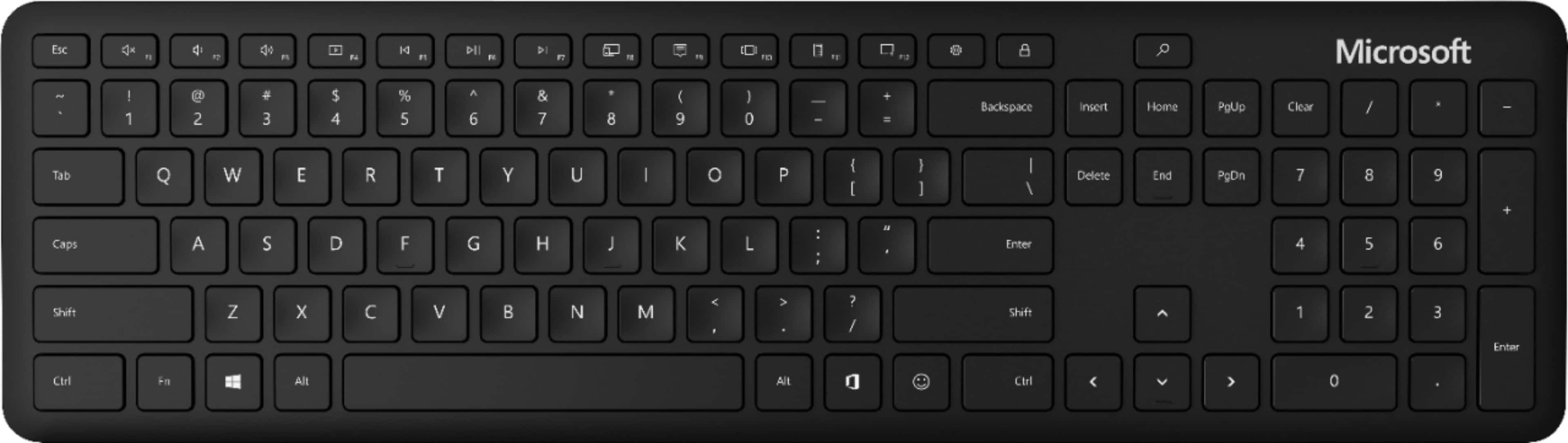
Customers value the Full-size Wireless Bluetooth Keyboard for its wireless connectivity, easy setup, compact size, quiet keys, and affordable price. They appreciate the convenience of not having to deal with wires, the simplicity of connecting the keyboard to their devices, and the portability of the device. While some customers have concerns about the lack of a caps lock indicator light, compatibility issues with Mac devices, and the build quality, overall, customers are pleased with the keyboard's performance and find it well-suited for their work-from-home needs.
This summary was generated by AI based on customer reviews.
Light and smooth
||Posted . Owned for 1 week when reviewed.This reviewer received promo considerations or sweepstakes entry for writing a review.It's light and the keys have a good press - not clicky but also not mushy. Battery life could be bettwr.
I would recommend this to a friendKeyboard
||Posted . Owned for 9 months when reviewed.This reviewer received promo considerations or sweepstakes entry for writing a review.Great keyboard for work, daily use. Smooth and durable.
I would recommend this to a friendNo Typing Noise!
||Posted . Owned for 3 weeks when reviewed.This reviewer received promo considerations or sweepstakes entry for writing a review.I bought this open box and could not be happier. The keyboard was easy to set up and use. And no annoying clicking noises!
I would recommend this to a friendGreat for what I use it for
||Posted . Owned for 2 weeks when reviewed.This reviewer received promo considerations or sweepstakes entry for writing a review.I use it to register Amazon Fire 7 tablets because at 76 years of age the little keyboard on the Fire is to small for me to use. So I use the keyboard to type in the data to register my Amazon Fire 7's. Since I bought ten of them it's worth the money.
I would recommend this to a friendGreat functionality and easy to use.
||Posted .This reviewer received promo considerations or sweepstakes entry for writing a review.Worked well right out of the box and was instantly recognized by my Surface Pro 6. I really appreciate the long battery life, meaning that I don’t have to remember (or more typically, forget) to switch it on and off.
I would recommend this to a friendBrand response from MicrosoftOutreachTeam
Posted .Out of the box connectivity is great! We're really happy that you're enjoying the battery life, as well.
Tom
Microsoft Customer Care
Serviceable Keyboard
||Posted . Owned for 2 months when reviewed.This reviewer received promo considerations or sweepstakes entry for writing a review.Although it is comfortable to type with, it unforunately suffers from frequent hiccups and delays. It also just keeps buttons held down from time to time, especially when playing high-end games. It also lacks an on and off switch. It also takes AAA batteries. It is definitely built for productivity, not games. Don't get it for the latter purpose. Cheers.
No, I would not recommend this to a friendPO OFFICER
||Posted . Owned for 3 weeks when reviewed.This reviewer received promo considerations or sweepstakes entry for writing a review.Overall great keyboard. The one issue I have is that there are not lights at the caps lock tab and other tabs to indicate which mode they are in.
I would recommend this to a friendSilent
||Posted . Owned for 1 month when reviewed.This reviewer received promo considerations or sweepstakes entry for writing a review.The best part of this keyboard is that its keys are very silent, so when I used it at night is perfect. Of course the office 365 key and the emoticon key are a plus. No bluetooth plug required if your computer comes with bluetooth system.
I would recommend this to a friendWorks fine but will not work with original ps4!
||Posted .This reviewer received promo considerations or sweepstakes entry for writing a review.Bought to use with ps4 based on other reviews that said it worked great for this purpose. Turns out it will not work with the original ps4 so maybe the slim or pro. Aside from that it’s great for my tv, tablet, and phone so still put to good use
I would recommend this to a friendMicrosoft keyboard
||Posted . Owned for 2 months when reviewed.This reviewer received promo considerations or sweepstakes entry for writing a review.Works good for my occasional use during work from home days. Occasionally there is some lag though unsure if that is from the keyboard or my computer
I would recommend this to a friendBrand response from MicrosoftOutreachTeam
Posted .Hey there,
Whether at home or in the office, we're happy to be a beneficial addition to your modern workspace. Thank you for sharing your experience! We're sorry to hear you've had an occasional issue with connectivity, and would like to offer some help. Below is a link to our collection of resources, created to assist our users in troubleshooting any issue they may be encountering. Find all the help you need, here: https://support.microsoft.com/en-us/topic/troubleshoot-problems-with-your-microsoft-mouse-or-keyboard-5afe478d-6402-d72b-93b9-e4235fd5c4cd
Best,
Brad - Microsoft Customer Care
Great Value for Basic Functionality.
||Posted . Owned for 9 months when reviewed.This reviewer received promo considerations or sweepstakes entry for writing a review.Quick pairing and similar key feel to the built in laptop keyboard. The keys do tend to collect debris pretty easily but retain function with regular cleaning.
I would recommend this to a friendgreat
||Posted . Owned for 3 weeks when reviewed.This reviewer received promo considerations or sweepstakes entry for writing a review.easy use fast tablet now more functional lat keybard nt all keys wrk s this what y get if i dnt ct and aste the characters that dnt have wrking keys
I would recommend this to a friendGreat ergonomic keyboard.
||Posted . Owned for 1 month when reviewed.This reviewer received promo considerations or sweepstakes entry for writing a review.Well built, works just right. Very happy with this keyboard. Highly recommended. Good quality and gets the job done. Checked out several other keyboards, and this one was the best……………………………..
I would recommend this to a friendenough different than a std keyboard to make it un
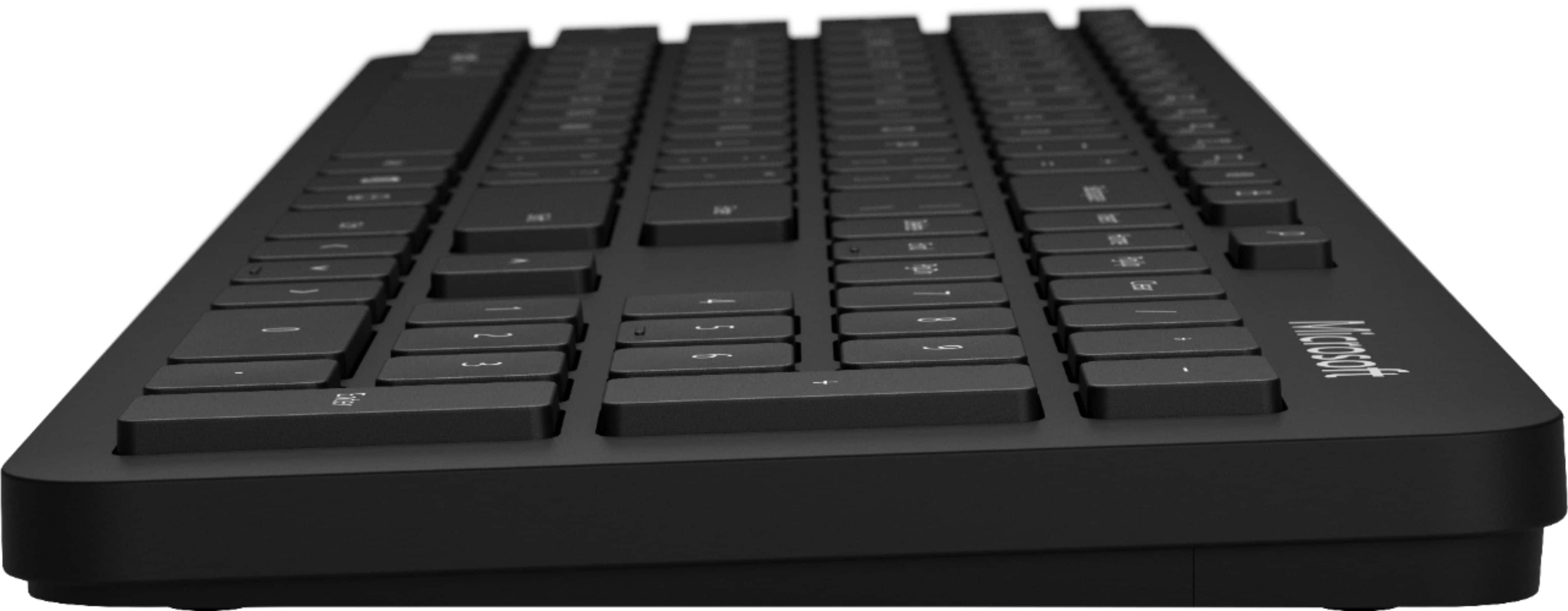
||Posted . Owned for 1 year when reviewed.This reviewer received promo considerations or sweepstakes entry for writing a review.Who would have thought that inability to adjust the keyboard angle would be a deal-breaker? But it is. There are no adjustable feet on the bottom of the unit to raise the angle, which makes the keyboard useless. Sure, I can kludge some feet underneath, but at this price, I shouldn't have to mod the keyboard. Also, doesn't have std ctrl/fn/alt key configuration, which makes it awkward to use.
No, I would not recommend this to a friendNo lag
||Posted . Owned for 3 weeks when reviewed.This reviewer received promo considerations or sweepstakes entry for writing a review.Love it no lag, but would have given 5 stars but there are no leg stands, and can be problematic for people who suffer from carpal tunnel.
I would recommend this to a friendBrand response from MicrosoftOutreachTeam
Posted .We're very glad that you're having a good experience with your new Bluetooth Keyboard. Thanks for the great feedback.
Tom
Microsoft Team
- Cons mentioned:No backlight
NOT GREAT NOR GOOD. FAULTY
||Posted . Owned for 1 week when reviewed.This reviewer received promo considerations or sweepstakes entry for writing a review.This keyboard is missing basic functions 1. No backlight, so you will not be able to clearly see your keys in the evening. 2. No kickstand, this keyboard only lays flat. You will not be able to adjust height in back. 3. No CAP light. You will never be able to tell if your CAP is locked or not until you start typing as there is no CAP light on key. 4. Numbers PAD is not compatible with macbook. Number pad is constantly doing a double type on numbers ie, if I 69 on numbers pad, it reads 6969. In order to make it go not do double you have to type the numbers slowly. 5. Spacing of keys feels slightly off. I've has this keyboard for almost three weeks and still can't get the hang of placement and I've been typing on keyboards for a living.
No, I would not recommend this to a friend Good keyboard
||Posted . Owned for 1 month when reviewed.This reviewer received promo considerations or sweepstakes entry for writing a review.I purchased this keyboard to pair with my surface pro laptop. Pairing was easy and keyboard is great. The only downside to this keyboard would be the ability to adjust the height or angle u type. But overall I recommend.
I would recommend this to a friendkeys too flat
||Posted . Owned for 1 month when reviewed.This reviewer received promo considerations or sweepstakes entry for writing a review.returned as keys too flat for me --- good product, just not good for me.
No, I would not recommend this to a friendpairing issues
||Posted . Owned for 3 weeks when reviewed.This reviewer received promo considerations or sweepstakes entry for writing a review.New - In the box, but there was no instruction leaflet and no model # on the device to identify it. Finally found a small bluetooth button on the bottom to push to get it to pair. Pairs well with my laptop. Will not pair with my desktop, even though bluetooth appears to be working. When it works, the tactile feel and execution as a keyboard are good.
No, I would not recommend this to a friendBrand response from MicrosoftOutreachTeam
Posted .Hey there,
Thank you for taking a few minutes to outline your experience for us. We're sorry to hear you have run into pairing issues with your new Microsoft Bluetooth Keyboard. For instruction on how to solve all of the most common issues, we recommend visiting the following link to our collection of helpful tutorials and how-to guides: https://support.microsoft.com/en-us/topic/troubleshoot-problems-with-your-microsoft-mouse-or-keyboard-5afe478d-6402-d72b-93b9-e4235fd5c4cd
Best,
Brad - Microsoft Customer Care
Works great
||Posted . Owned for 5 months when reviewed.This reviewer received promo considerations or sweepstakes entry for writing a review.This keyboard works really good I use this keyboard instead of the keyboard built onto my laptop it is much easier to use it does not come with the wireless USB chip you will need to purchase this separately
I would recommend this to a friend