Customer Ratings & Reviews
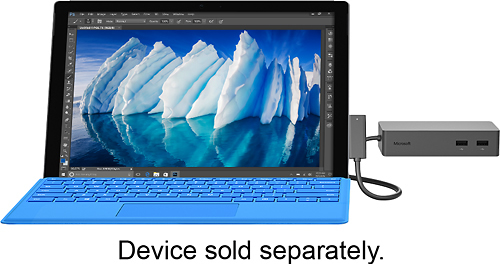
- Model:
- PD9-00003
- SKU:
- 4561910
Rating by feature
- Value
Rating 4.2 out of 5 stars
- Quality
Rating 4.7 out of 5 stars
- Ease of Use
Rating 4.7 out of 5 stars
Customers are saying
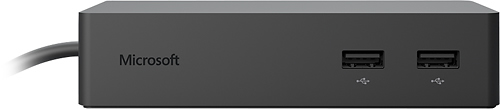
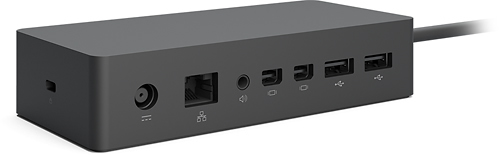
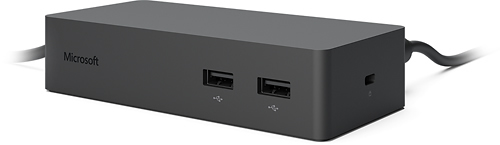
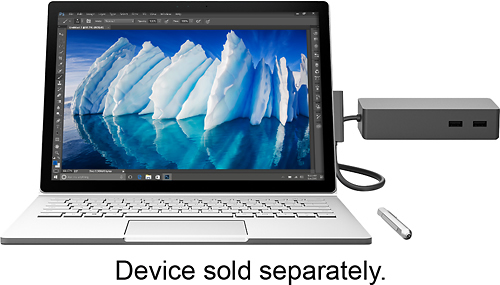
Customers are enthusiastic about the Surface Dock's ease of use, abundant USB ports, and ability to support multiple monitors. Many appreciate its compact size and compatibility with Surface devices, while also finding the improved connectivity and charging capabilities beneficial. However, some customers find the price to be high and the weight a bit cumbersome. A shorter-than-ideal cable length was also a recurring point of feedback.
This summary was generated by AI based on customer reviews.
- Pros mentioned:Usb ports
Surface Dock
||Posted .This reviewer received promo considerations or sweepstakes entry for writing a review.Works great for external monitors. Extra USB ports a plus.
I would recommend this to a friend - Cons mentioned:Weight
Great accessory but too heavy.
||Posted .This reviewer received promo considerations or sweepstakes entry for writing a review.This surface dock is great but it could be lighter.
I would recommend this to a friend Well made and works great
||Posted .This reviewer received promo considerations or sweepstakes entry for writing a review.I needed a central location for all my interface products to my surface Pro. I was tired of hanging wires everywhere. This docking station is well-made and does the job. I wish it had some sort of way to mount closer to the computer and provide some sort of stand. But all in all I’m glad I bought it I have no issues
I would recommend this to a friend- Pros mentioned:Ease of use
Works as advertised
||Posted .This reviewer received promo considerations or sweepstakes entry for writing a review.Works are promised. Easy hook and operation. Recommended.
I would recommend this to a friend - Pros mentioned:Monitor support
Very capable
||Posted .This reviewer received promo considerations or sweepstakes entry for writing a review.I have this laptop hooked up to two HD monitors through the dock and everything work quite well. I do like that this dock charges the laptop during use as well with only the one cable.
I would recommend this to a friend - Cons mentioned:Weight
Great
||Posted .This reviewer received promo considerations or sweepstakes entry for writing a review.Great product, only issue is weight. Does what it is supposed to do.
I would recommend this to a friend - Pros mentioned:Monitor support
Very useful
||Posted .This reviewer received promo considerations or sweepstakes entry for writing a review.Dock makes it so easy to use a 2nd monitor for multitasking
I would recommend this to a friend - Pros mentioned:Usb ports
Great Product
||Posted .This reviewer received promo considerations or sweepstakes entry for writing a review.Works great nice to have all the extra plug ins....
I would recommend this to a friend - Pros mentioned:Monitor support
A must have...ish
||Posted .This reviewer received promo considerations or sweepstakes entry for writing a review.When I first saw the dock, I thought, 'What were they thinking?!" It's a brick, attached to a brick, that attaches to your surface by a cable. I mean, just looking at it on a desk, it looks like a catastrophe. But after hooking it up, hiding the power brick, it doesn't look half bad. It's nice you can move around a little bit with the cable attached. You're not so restricted like the previous dock. The whole point, in mind, was to make the surface able to project to two different monitors, which worked great with the lock-in dock. I dunno, i'm rambling, it looks and works ok, but it's a must have to really get the job done with the surface.
I would recommend this to a friend - Pros mentioned:Monitor support
Great product.
||Posted .This reviewer received promo considerations or sweepstakes entry for writing a review.Works great every time. It even works with two monitors!
I would recommend this to a friend - Pros mentioned:Usb ports
Xlnt doc
||Posted .This reviewer received promo considerations or sweepstakes entry for writing a review.Great doc,recommend updating before using the ports.
I would recommend this to a friend - Pros mentioned:Ease of use
Great addition to my surface
||Posted .This reviewer received promo considerations or sweepstakes entry for writing a review.Thi really converts my laptop/tablet into a desktop
I would recommend this to a friend - Pros mentioned:Ease of use
really work
||Posted .This reviewer received promo considerations or sweepstakes entry for writing a review.worked right away. no problems. recommend as helpful!
I would recommend this to a friend - Pros mentioned:Ease of use
Easy to set up
||Posted .This reviewer received promo considerations or sweepstakes entry for writing a review.This dock works as advertised and is easy to set up and take down.
I would recommend this to a friend Perfect Surface Pro 4 addition
||Posted .This reviewer received promo considerations or sweepstakes entry for writing a review.Works seamlessly. A must for using Surface at work
I would recommend this to a friend- Pros mentioned:Size
Incredibly convenient!
||Posted .This reviewer received promo considerations or sweepstakes entry for writing a review.So much more compact that our first docking station!
I would recommend this to a friend - Pros mentioned:Size
Small and pwerfull
||Posted .This reviewer received promo considerations or sweepstakes entry for writing a review.Very compact unit that hides neatly away from work area.
I would recommend this to a friend does not work properly with 2 Displayport Monitors
||Posted .This reviewer received promo considerations or sweepstakes entry for writing a review.After I tried to hook up 2 display port monitors to this, I searched online and found that a lot of people have the same issue... even if you can get it to work, when you disconnect and reconnect it there are issues trying to get both displays to work, I also had issues when my surface book went to sleep. .. what does work is set your surface device to NOT go to sleep when on AC power, only have one monitor plugged in when you connect the dock to your surface device, mirror your surface screen to that display, set it to only use the external display, then plug the 2nd monitor in to the dock station. when you disconnect it, unplug the second display first wait a few seconds then disconnect the surface device. Also on the forums I read where a lot of people buy a DP to HDMI adapter to hook up one of your displays. Apparently the only problem is with 2 Display port monitors... Hopefully Microsoft will update the Surface Devices or the Dock so this is not an issue some time... I am not holding my breath...
No, I would not recommend this to a friendBrand response from MicrosoftOutreachTeam
Posted .Hello aaront, Thank you for being a Surface customer! Your feedback on Surface Dock is extremely important to us and we are always working hard to optimize your Surface experience. In the meantime, please check out this support site that may help you to resolve the external monitors issues you are experiencing: https://www.microsoft.com/surface/en-us/support/hardware-and-drivers/troubleshoot-docking-station-surface-dock?os=windows-10
If you need further help, please contact our Customer Support through the Support Web Portal: www.support.microsoft.com . We apologize for any frustration this has cause and hope this was helpful to you.
- Pros mentioned:Size
Compact size
||Posted .This reviewer received promo considerations or sweepstakes entry for writing a review.Takes less space than regular SP3 docking station. Highly recommended.
I would recommend this to a friend - Pros mentioned:Ease of use
Helpful tool.
||Posted .This reviewer received promo considerations or sweepstakes entry for writing a review.Really helps transitioning from mobile use to desktop scenarios.
I would recommend this to a friend