Customer Ratings & Reviews



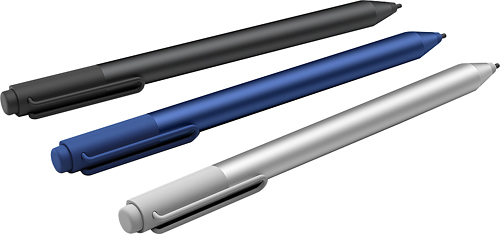
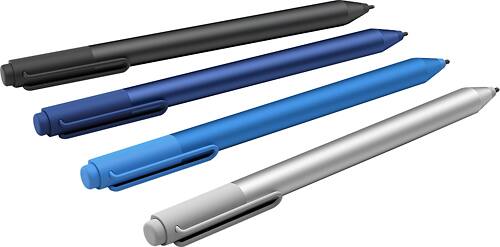
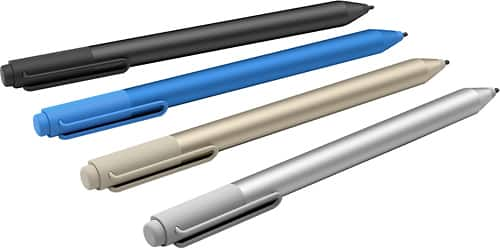
- Model:
- 3XY-00011
- |
- SKU:
- 4562010
Customer reviews
Rating 4.6 out of 5 stars with 1635 reviews
(1,635 customer reviews)to a friend
Customers are saying
Customers frequently mention the Surface Pen's ease of use, responsiveness, and compatibility with Surface devices as significant advantages. Many appreciate the multiple tips and the pen's comfortable feel and lightweight design. However, some customers express concerns about the price and occasional battery life issues. A few also cite minor problems with pairing and button functionality.
This summary was generated by AI based on customer reviews.
Rated 5 out of 5 stars
Perfect Pen for my Surface Pro
Posted .This reviewer received promo considerations or sweepstakes entry for writing a review.Perfect Pen for my Surface Pro. It accurately reflects my writing on my Surface.
This review is from Microsoft - Surface Pen - Silver
I would recommend this to a friend- Pros mentioned:Compatibility
Rated 5 out of 5 stars
Improved very much so
Posted .This reviewer received promo considerations or sweepstakes entry for writing a review.I've been with Microsoft for years now and I had the surface pro 3 pen and I thought that was pretty cool but the surface pro 4 pen wow so much better way quicker, much smoother writing and way more accurate. when I got my Surface Book it worked seamlessly and I love the color and the pen tip kit pretty cool not bad for 60 bucks
This review is from Microsoft - Surface Pen - Blue
I would recommend this to a friend - Pros mentioned:Stylus, Tips
Rated 5 out of 5 stars
Easy to use
Posted .This reviewer received promo considerations or sweepstakes entry for writing a review.I really enjoy this version of the Surface pen. I like that the end of the pen acts like an eraser. The 1st version of the pen you had to hold a button on the side of the pen to erase. I also like the interchangeable tips. These come in handy for drawing and doodling.
I would recommend this to a friend - Pros mentioned:Ease of useCons mentioned:Price
Rated 4 out of 5 stars
Easy writer
Posted .This reviewer received promo considerations or sweepstakes entry for writing a review.We started using the surface pro at work and wanted a good stylus to use. I found an open box and purchased. It works like a dream and makes using the program smoother. We have small areas that have to be checked or selected and this stylus makes it much easier to navigate. The only draw back is that it is a bit overpriced.
I would recommend this to a friend Rated 4 out of 5 stars
The right Pen.
Posted .This reviewer received promo considerations or sweepstakes entry for writing a review.The right pen. The size is better than other stylus I used. It feels and weight like a regular pen. Great buy.
This review is from Microsoft - Surface Pen - Silver
I would recommend this to a friendRated 4 out of 5 stars
works well, but erasing is slower
Posted .This reviewer received promo considerations or sweepstakes entry for writing a review.It works well but, personally, I don't like the technique of using the top of the pen as an eraser. I find it slower than using the button on the old pen. Sure, it is similar to an old style pencil, but so what? Clearly this is a matter of personal preference, but it's one thing to be aware of.
This review is from Microsoft - Surface Pen - Silver
I would recommend this to a friend- Pros mentioned:Responsiveness
Rated 4 out of 5 stars
Great pen if your looking for replacement/back-up
Posted .This reviewer received promo considerations or sweepstakes entry for writing a review.This is a great pen especially if your an artist like my wife, who uses the surface-pro as an impromptu (but actually legitimate) tablet for drawing. I've only heard great things from her, especially that compared to the prior surface pro pen, it has way better and more reponsice pressure sensitivity, though less buttons do make reconfiguring controls more difficult.
I would recommend this to a friend - Pros mentioned:Ease of use
Rated 5 out of 5 stars
"Nice addition"
Posted .This reviewer received promo considerations or sweepstakes entry for writing a review.Purchased along with my MicroSoft Surface Pro 4 for $20.00 off original price and boy am I glad I did. I cannot stop using it with my tablet. What a worthwhile purchase!
This review is from Microsoft - Surface Pen - Silver
I would recommend this to a friend - Pros mentioned:Tips
Rated 5 out of 5 stars
helps with school
Posted .This reviewer received promo considerations or sweepstakes entry for writing a review.I am engineering major so when I draw on my surface for projects the pen helps with plans, also with the different tips I can shade and make with stand out more. It is worth it to buy the pen with the tablet.
This review is from Microsoft - Surface Pen - Blue
I would recommend this to a friend - Pros mentioned:Ease of use
Rated 4 out of 5 stars
Great Pen for Surface
Posted .This reviewer received promo considerations or sweepstakes entry for writing a review.My first pen did not work, but was replaced when returned. The pen automatically syncs when the laptop is on and integrates with OneNote as well as some other apps. It allows you to click to take a screen shot and save it to OneNote.
I would recommend this to a friend - Pros mentioned:Ease of use
Rated 5 out of 5 stars
Best stylus on the market!
Posted .This reviewer received promo considerations or sweepstakes entry for writing a review.This is by far the greatest stylus I've ever used! Works excellently with the Surface 3 and fits wonderfully in my hand! Absolute necessity with the Surface tablets!
This review is from Microsoft - Surface Pen - Silver
I would recommend this to a friend - Pros mentioned:Ease of use
Rated 4 out of 5 stars
Good pen, Nice touch
Posted .This reviewer received promo considerations or sweepstakes entry for writing a review.I really like this pen. I don't use it all the time but when I need it, it just works. I like how it knows the pen is in your hand so you can lean your hand on the screen without it interfering.
This review is from Microsoft - Surface Pen - Silver
I would recommend this to a friend - Pros mentioned:Ease of use
Rated 5 out of 5 stars
Awesome Pen
Posted .This reviewer received promo considerations or sweepstakes entry for writing a review.I love the new pen. It is way more intuitive to use than the old one, and the larger magnetic strip makes it easier to keep it attached to my Surface.
I would recommend this to a friend - Pros mentioned:Ease of use
Rated 5 out of 5 stars
Works perfectly
Posted .This reviewer received promo considerations or sweepstakes entry for writing a review.I purchased this pen for my Surface 3 and it works perfectly! I also love that it comes with the extra pen tips, and it's a great price!
I would recommend this to a friend - Pros mentioned:Ease of use
Rated 5 out of 5 stars
Awesome
Posted .This reviewer received promo considerations or sweepstakes entry for writing a review.In happy that I purchased this product is because it's more convenient to have than touching the screen with your fingers.
I would recommend this to a friend - Pros mentioned:Ease of use
Rated 5 out of 5 stars
The pen makes it easier to use the pro.
Posted .This reviewer received promo considerations or sweepstakes entry for writing a review.I really like it! Makes signing documents easy for my customers & for myself.
This review is from Microsoft - Surface Pen - Blue
I would recommend this to a friend - Pros mentioned:Compatibility
Rated 5 out of 5 stars
Works great
Posted .This reviewer received promo considerations or sweepstakes entry for writing a review.I like it better than the first pen and is compatible with surface pro 3.
This review is from Microsoft - Surface Pen - Gold
I would recommend this to a friend - Pros mentioned:Ease of use
Rated 5 out of 5 stars
Love it
Posted .This reviewer received promo considerations or sweepstakes entry for writing a review.So glad I purchased this pen for my surface 3, makes it easier to navigate!
This review is from Microsoft - Surface Pen - Silver
I would recommend this to a friend - Pros mentioned:Compatibility
Rated 5 out of 5 stars
Works Great
Posted .This reviewer received promo considerations or sweepstakes entry for writing a review.It works seamlessly with Surface Pro 3 as a replacement for my old stylus.
This review is from Microsoft - Surface Pen - Silver
I would recommend this to a friend - Pros mentioned:Ease of use
Rated 5 out of 5 stars
Very smooth pen
Posted .This reviewer received promo considerations or sweepstakes entry for writing a review.Surface pen very handful. Long battery life easy to write on my surface
This review is from Microsoft - Surface Pen - Blue
I would recommend this to a friend