Customer Ratings & Reviews

- Model:
- EYU-00001
- SKU:
- 5859100
Rating by feature
- Value
Rating 4.3 out of 5 stars
- Quality
Rating 4.7 out of 5 stars
- Ease of Use
Rating 4.7 out of 5 stars
Customers are saying
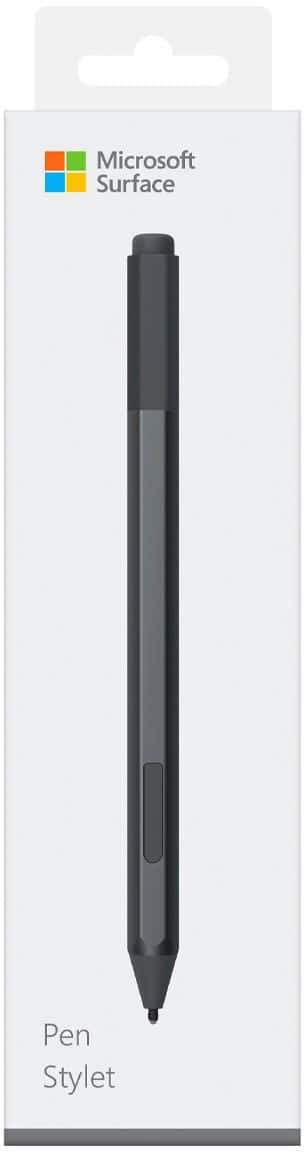
Customers love the Surface Pen for its ease of use, overall performance, and compatibility with devices like the Surface Go. Many appreciate its accuracy, comfortable weight and feel, and sleek design, with some also highlighting the availability of different colors and the convenient eraser feature. However, some customers find the pen to be a little pricey and have concerns about the tip durability, while others have noted issues such as lag and the lack of a clip, as well as the magnet strength.
This summary was generated by AI based on customer reviews.
- Pros mentioned:Ease of use
Ms surface pen
||Posted .This reviewer received promo considerations or sweepstakes entry for writing a review.Working good so far. It makes taking notes easier as I can write or draw on the screen.
I would recommend this to a friend - Pros mentioned:Drawing
great for what it is
||Posted . Owned for 2 months when reviewed.This reviewer received promo considerations or sweepstakes entry for writing a review.I use it for drawing more then writing. it is great at what it is.
I would recommend this to a friend Great pen
||Posted . Owned for more than 2 years when reviewed.This reviewer received promo considerations or sweepstakes entry for writing a review.I love this pen. If your touch screen device has a screen protector, sometimes finger sensitivity goes down. This pen more than amkes up for it.
I would recommend this to a friend- Pros mentioned:Overall performance
The pen you need
||Posted .This reviewer received promo considerations or sweepstakes entry for writing a review.This pen works so well with the Surface Pro I have.
I would recommend this to a friend - Pros mentioned:Overall performance
Good for a first timer
||Posted .This reviewer received promo considerations or sweepstakes entry for writing a review.Got this one with the computer I got one of my kids
I would recommend this to a friend - Pros mentioned:Compatibility
Microsoft surface pen
||Posted . Owned for 3 weeks when reviewed.This reviewer received promo considerations or sweepstakes entry for writing a review.The Microsoft surface pen works really well with the Microsoft surface tablet.
I would recommend this to a friend - Pros mentioned:Overall performance
Pen
||Posted . Owned for 1 week when reviewed.This reviewer received promo considerations or sweepstakes entry for writing a review.Works great with the surface book! Good quality and easy to use.
I would recommend this to a friend - Pros mentioned:Ease of use
First time using a pen with a computer.
||Posted .This reviewer received promo considerations or sweepstakes entry for writing a review.Pen takes a while to get used to, but once I got the hang of it, everything is smooth!!
I would recommend this to a friendBrand response from MicrosoftOutreachTeam
Posted .Hi there,
Thanks for choosing to give Surface Pen a try! We're delighted you're loving to use this unique tool with your Surface device. If you haven't already, check out our handy tips for making the most of Windows Ink: https://support.microsoft.com/en-us/help/17207/windows-10-use-windows-ink.
Cheers,
Jessica
Surface Customer Care
Great accessory!
||Posted .This reviewer received promo considerations or sweepstakes entry for writing a review.This pen is awesome. It comes in 4 different colors and is super sleek and versatile. I like that faux eraser that actually deletes content from your screen. I got mine in burgundy and I love it!
I would recommend this to a friendBrand response from MicrosoftOutreachTeam
Posted .Hi there,
We're delighted to hear you're loving your Surface Pen! We're so happy you found a color that you love to suite your style. The eraser certainly is a nice natural touch that helps you navigate your Surface device with ease. Thanks for the great shout-out!
Kind regards,
Jessica
Surface Customer Care
- Pros mentioned:Overall performance
This does things in a style
||Posted .This reviewer received promo considerations or sweepstakes entry for writing a review.This thanksgiving deal included the pen with surface 6. Its a great tool to work with.
I would recommend this to a friend - Pros mentioned:Ease of use
Good
||Posted . Owned for 5 months when reviewed.This reviewer received promo considerations or sweepstakes entry for writing a review.Don’t use it very often. Easy to use and convenient when I need it
I would recommend this to a friend My Pen
||Posted . Owned for more than 2 years when reviewed.This reviewer received promo considerations or sweepstakes entry for writing a review.When you trying to get something right and the the finger ain't working use this surface pen it works wonders
I would recommend this to a friend- Cons mentioned:Price
Works as described
||Posted .This reviewer received promo considerations or sweepstakes entry for writing a review.This replacement is too expensive. Microsoft should drop the price to about $30.00. But then again, the purpose of any business is to make the customer part with as much of his money as possible. If you lose a pen, you don't have a choice. Just guard your pen with your life. The YES below is because there is no alternative. Sorry.
I would recommend this to a friend Great for designing
||Posted .This reviewer received promo considerations or sweepstakes entry for writing a review.I love working with my surface pen especially when I’m using a brush of some sort. It’s magnetized so it sticks to the surface pro pretty well. Best to keep both in bag of some sort if your traveling with them. Connected almost instantly when I powered my laptop on.
I would recommend this to a friend- Pros mentioned:Compatibility
Great accessory for the tablet
||Posted .This reviewer received promo considerations or sweepstakes entry for writing a review.The pen feels very natural and responsive. It is a great accessory for the Surface tablet.
I would recommend this to a friend Use it more than I thought
||Posted .This reviewer received promo considerations or sweepstakes entry for writing a review.Great pen. The response and precision is so good, it’s like using a pen. When I purchase the SB2 I was concerned I wouldn’t use the feature. It’s a work tool, not something to draw/paint with. But, I have to say that I use it more than I thought I would. Always connected, always on. It just works!
I would recommend this to a friendBrand response from MicrosoftOutreachTeam
Posted .Hi there,
We're delighted to hear about how you were pleasantly surprised with all the great features of your new Surface Pen. Thanks for sharing your experience with the community! We hope you're getting to utilize all Windows Ink has to offer. If you haven't already, check out our great tips here: https://support.microsoft.com/en-us/help/17207/windows-10-use-windows-ink.
Kindly,
Jessica
Surface Customer Care
Great
||Posted . Owned for 1 year when reviewed.This reviewer received promo considerations or sweepstakes entry for writing a review.This is a very smooth, reliable pen with several key weaknesses. I also own the ThinkPad Active Capacitive Pen and the Wacom Bamboo Ink Smart Stylus, the latter of which provides both N-Trig and Wacom technologies, and I have used these styluses on three separate devices.
I would recommend this to a friend- Pros mentioned:Ease of use
Works great if you use pens alot
||Posted . Owned for 1 year when reviewed.This reviewer received promo considerations or sweepstakes entry for writing a review.Easy to carry and great when you have to sign online statements.
I would recommend this to a friend There's no replacement for the best
||Posted . Owned for 1 month when reviewed.This reviewer received promo considerations or sweepstakes entry for writing a review.I purchased a Surface Book 3 specifically for the amazing drawing experience one gets when pairing it with the Surface pen. It feels incredibly smooth compared to alternatives and all the extra features make perfect sense. I always have it attached to my laptop.
I would recommend this to a friendBrand response from MicrosoftOutreachTeam
Posted .Hello Grace,
We're delighted that you've found Surface Pen to be a great complement to your Surface Book 3. It's great to hear that it's been comfortable and smooth to use for drawing, too. Thank you for sharing your experience; we hope you continue to enjoy using it.
Cheers,
Chuck
Surface Customer Care
Surface Pen is great
||Posted . Owned for 3 weeks when reviewed.This reviewer received promo considerations or sweepstakes entry for writing a review.This pen works great. It is very responsive and easy to use. Makes taking notes easy and reminds me of when we used to write regularly. I love the quick motions that allows for opening whiteboard and sticky notes.
I would recommend this to a friend