Customer Ratings & Reviews

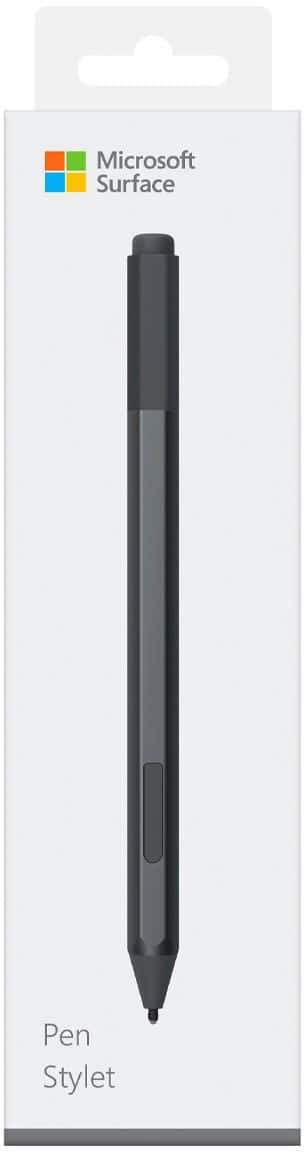
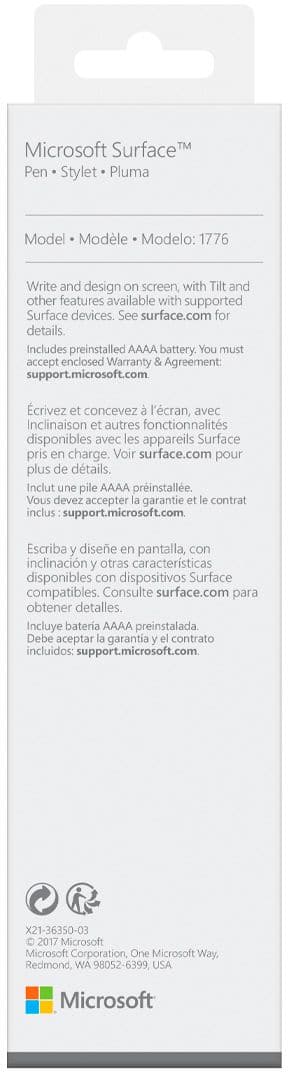
- Model:
- EYU-00001
- SKU:
- 5859100
Rating by feature
- Value
Rating 4.3 out of 5 stars
- Quality
Rating 4.7 out of 5 stars
- Ease of Use
Rating 4.7 out of 5 stars
Customers are saying
Customers love the Surface Pen for its ease of use, overall performance, and compatibility with devices like the Surface Go. Many appreciate its accuracy, comfortable weight and feel, and sleek design, with some also highlighting the availability of different colors and the convenient eraser feature. However, some customers find the pen to be a little pricey and have concerns about the tip durability, while others have noted issues such as lag and the lack of a clip, as well as the magnet strength.
This summary was generated by AI based on customer reviews.
Buenísimo
||Posted . Owned for 1 month when reviewed.This reviewer received promo considerations or sweepstakes entry for writing a review.It’s very practical and usable for my self and I’m using it all the time
I would recommend this to a friendBattery life
||Posted . Owned for 3 weeks when reviewed.This reviewer received promo considerations or sweepstakes entry for writing a review.This is a great own . I mean I don't use it as much as I want to at the moment but I feel that it gets the job done . But for how much I used it . Barely even got 2 hours of battery life out of this .
I would recommend this to a friendGreat accessory!
||Posted . Owned for 1 week when reviewed.This reviewer received promo considerations or sweepstakes entry for writing a review.This makes certain tasks that much easier. Love that it works as a mouse and a keyboard. Much needed tool to go with our computer.
I would recommend this to a frienddoes what you'd expect
||Posted . Owned for 3 weeks when reviewed.This reviewer received promo considerations or sweepstakes entry for writing a review.It writes. It scrolls. It highlights. It erases. It attaches to the pro with a magnet (only drawback is it's eaaaaaaasy to knock off on accident. I had to search the inside of a couch for it, once).
I would recommend this to a friendAmazing pen.
||Posted .This reviewer received promo considerations or sweepstakes entry for writing a review.I feel like without the pen the laptop is boring. Like what’s the point of having a touchscreen laptop if you don’t have the pen! It’s worth it in my opinion.
I would recommend this to a friendSurface pen
||Posted . Owned for 3 weeks when reviewed.This reviewer received promo considerations or sweepstakes entry for writing a review.Great accessory. Didn’t think I didn’t need it it but it proved its usefulness
I would recommend this to a friendComfortable Grip and Smooth Drag
||Posted .This reviewer received promo considerations or sweepstakes entry for writing a review.This is like writing a large gel pen: smooth and comfortable. The side button takes some getting used to, but the "eraser" end is a wonderful addition.
I would recommend this to a friendSurface Pen
||Posted . Owned for 1 month when reviewed.This reviewer received promo considerations or sweepstakes entry for writing a review.This is a much need accessory for the Surface Pro well worth the money - the staff at best buy at my store is the best!
I would recommend this to a friendUse for student videos
||Posted .This reviewer received promo considerations or sweepstakes entry for writing a review.I use this to make math and annotation videos for my students at school. It’s very responsive and is the closest I’ve gotten to to actual feel of a real pen.
I would recommend this to a friendFor Samsung
||Posted . Owned for 1 month when reviewed.This reviewer received promo considerations or sweepstakes entry for writing a review.I bought this pen to go with my Samsung 2 in 1 Alphaflex that has Windows Ink installed. The laptop did not come with an S-pen nor did Samsung's S-pens work. This was the only I could find.
I would recommend this to a friend- Pros mentioned:Drawing, Ease of use
Simple and easy to use
||Posted .This reviewer received promo considerations or sweepstakes entry for writing a review.Great product! Simple and easy to use. Drawing or writing, it feels like a pen.
I would recommend this to a friend Who needs ink? Not me.
||Posted . Owned for less than 1 week when reviewed.This reviewer received promo considerations or sweepstakes entry for writing a review.For someone with big hands, I need this pen. It makes the surface experience so much better. Must have for note taking.
I would recommend this to a friendBEST TOOL FOR THE SURFACE
||Posted . Owned for 3 weeks when reviewed.This reviewer received promo considerations or sweepstakes entry for writing a review.LOVE THIS PEN! TURNS MY SURFACE INTO WHATEVER I WANT IT TO BE! WORKS VERY WELL. ONLY DOWN SIDE IS ITS BATTERY POWERED
I would recommend this to a friendGreat addition to your computer
||Posted . Owned for 3 weeks when reviewed.This reviewer received promo considerations or sweepstakes entry for writing a review.The surface pen was a nice addition to my new computer. Absolutely amazing during “interactive”presentations.
I would recommend this to a friend- Pros mentioned:Ease of useCons mentioned:Magnet strength
Love it
||Posted .This reviewer received promo considerations or sweepstakes entry for writing a review.Definitely a great product! Easy to use. Wish the magnets works better though.
I would recommend this to a friend Nice addition to my Microsoft Surface Pro 2
||Posted .This reviewer received promo considerations or sweepstakes entry for writing a review.Neat option to use with my new Microsoft Surface Pro 2. It is fun to use as a writing tool. Also very useful in doing basic searches on the internet.
I would recommend this to a friendDoes its job!
||Posted .This reviewer received promo considerations or sweepstakes entry for writing a review.I really enjoy this pen. My one complaint is that my handwriting is slightly messier than normal - may just be due to it being an electronic (not actual pen & paper). But I use it daily to take notes in class! It's great.
I would recommend this to a friendBrand response from MicrosoftOutreachTeam
Posted .Hi there,
Thanks for sharing your honest feedback about Surface Pen. We're glad this has been a great tool for you to use for note-taking. If you're looking for more ways to utilize your Surface Pen, try checking out all Windows Ink has to offer here: https://support.microsoft.com/en-us/help/17207/windows-10-use-windows-ink.
Kindly,
Jessica
Surface Customer Care
Surface Pen
||Posted .This reviewer received promo considerations or sweepstakes entry for writing a review.The Surface Pen works as expected. It glides smoothly on the Surface Go and feels like writing on paper. Best tablet writing experience I have had to date.
I would recommend this to a friendBrand response from MicrosoftOutreachTeam
Posted .Hi Vince,
We're delighted to hear the Surface Pen has been a great addition to your Surface Go experience! If you're interested in making the most of your Surface Pen, check out all Windows Ink has to offer here: https://support.microsoft.com/en-us/help/17207/windows-10-use-windows-ink.
We hope you continue to enjoy!
Cheers,
Jessica
Surface Customer Care
Great pen for daily work
||Posted .This reviewer received promo considerations or sweepstakes entry for writing a review.The pen attached to your surface clipboard adds additional functionality is very convenient to carry a pen with you where ever u go without any hassle.
I would recommend this to a friend- Pros mentioned:Ease of use
Artist friend
||Posted .This reviewer received promo considerations or sweepstakes entry for writing a review.I love using this pen. It is super easy to sync with my Microsoft surface, and I can start using right away. Everytime I click the back button of the pen I am asked what I would like to do with the tool, ensuring I am in the appropriate program. I also love that it does not have to be a Microsoft program to use. I use this the most with Adobe post production programs. The one thing I would change is a better way to secure it to the computer then a magnet. That is why I had to purchase a replacement in the first place
I would recommend this to a friendBrand response from MicrosoftOutreachTeam
Posted .Hi Mickey,
Thanks for leaving us your honest feedback. We're always looking for ways to better our designs to fit our customers needs, so your thoughts are highly appreciated! We're glad to hear you are loving using your Surface Pen. We have a lot of neat features available with this device. If you would like to explore even more apps that are compatible with your Surface Pen, check them out here: https://www.microsoft.com/en-us/store/collections/windowsinkcollection/pc?rtc=2.
Kind regards,
Jessica
Surface Customer Care