Customer Ratings & Reviews

- Model:
- EYU-00001
- SKU:
- 5859100
Rating by feature
- Value
Rating 4.3 out of 5 stars
- Quality
Rating 4.7 out of 5 stars
- Ease of Use
Rating 4.7 out of 5 stars
Customers are saying
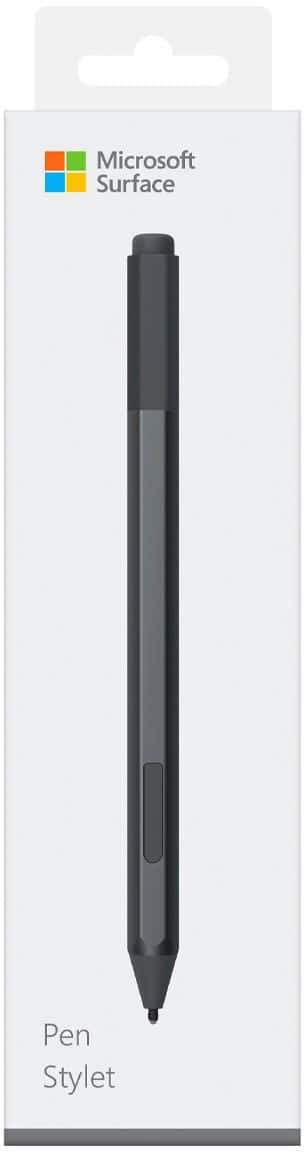
Customers love the Surface Pen for its ease of use, overall performance, and compatibility with devices like the Surface Go. Many appreciate its accuracy, comfortable weight and feel, and sleek design, with some also highlighting the availability of different colors and the convenient eraser feature. However, some customers find the pen to be a little pricey and have concerns about the tip durability, while others have noted issues such as lag and the lack of a clip, as well as the magnet strength.
This summary was generated by AI based on customer reviews.
Awesome
||Posted . Owned for 7 months when reviewed.This reviewer received promo considerations or sweepstakes entry for writing a review.Perfect addition and alternative to touch screen. You don't even have to make direct contact with screen.
I would recommend this to a friendExcellent Pen
||Posted . Owned for less than 1 week when reviewed.This reviewer received promo considerations or sweepstakes entry for writing a review.Excellent pen to go with the surface pro 8. Precision is key here
I would recommend this to a friendExcellant sevice. Great product.
||Posted .This reviewer received promo considerations or sweepstakes entry for writing a review.Best Buy is my first stop whenever I need electronics. From T.V.s to laptop computers, I have also patronized Best Buy. Keep up the good work
I would recommend this to a friendWorks great!
||Posted . Owned for 11 months when reviewed.This reviewer received promo considerations or sweepstakes entry for writing a review.This pen is perfect for labeling measurements on the pictures taken for his job sites!
I would recommend this to a friendPurchase of Microsoft pen
||Posted . Owned for 1 month when reviewed.This reviewer received promo considerations or sweepstakes entry for writing a review.I like the Microsoft surface pen a lot. First time I have used one. It will help with my note taking in college.
I would recommend this to a friendTablet Pen
||Posted .This reviewer received promo considerations or sweepstakes entry for writing a review.I got this pen and recommend this it. The pen tip hasn't broken and doesn't scratch your tablet screen.
I would recommend this to a friendNice Pen for Digital Arr
||Posted . Owned for 1 month when reviewed.This reviewer received promo considerations or sweepstakes entry for writing a review.Great pen especially if you want to do some serious digital artwork!!
I would recommend this to a friendGreat accessory to the Surface!
||Posted .This reviewer received promo considerations or sweepstakes entry for writing a review.While I need to invest more time to understand the mechanics of the pen I love using it, the little bit that I currently do. I do LOVE that it "sticks" to the Surface on the edge so it's right there.
I would recommend this to a friendBrand response from MicrosoftOutreachTeam
Posted .Hi there,
We're thrilled you're loving your Surface Pen. To help you get started, we have some handy tips and tricks to show you how to interact with your Surface Pen. Check them out here: https://support.microsoft.com/en-us/help/4036281/surface-how-to-use-your-surface-pen.
We hope you have fun exploring all the Surface Pen has to offer!
Cheers,
Jessica
Surface Customer Care
A must for the Surface Pro
||Posted . Owned for 2 weeks when reviewed.This reviewer received promo considerations or sweepstakes entry for writing a review.The Microsoft Pen is a must for the Surface Pro. My only complaint is it’s not rechargeable. Instead it uses AAAA batteries.
I would recommend this to a friendCool extra
||Posted .This reviewer received promo considerations or sweepstakes entry for writing a review.While this is not a necessity, it is such a cool extra feature. It can do so many things with the computer so easily. A great gift idea!
I would recommend this to a friendGreat pen overall
||Posted . Owned for 1 month when reviewed.This reviewer received promo considerations or sweepstakes entry for writing a review.Marked a star off because the eraser button features only work if you reconnect the pen every time the computer shuts off. Pen always stays connected and works great though! I love it
I would recommend this to a friendBrand response from MicrosoftOutreachTeam
Posted .Hi Kane,
We're delighted to hear you've been enjoying your new Surface Pen! In regards to the issue you described with trying to use the eraser function of your pen, we highly recommend trying some of the troubleshooting methods found at this link here: https://aka.ms/AA4rbrg.
We sincerely hope that helps, and thanks again for leaving a review for Surface Pen!
Best,
Heather
Surface Customer Care
great pen
||Posted . Owned for 3 weeks when reviewed.This reviewer received promo considerations or sweepstakes entry for writing a review.love the pen and how it contrast with the keyboard. I love how it attaches like a magnet to the side of PRO.
I would recommend this to a friendSuperior sketchable pen
||Posted .This reviewer received promo considerations or sweepstakes entry for writing a review.Bought this with new Surface laptop. As compared to the older model I have (still works), this one has such a light, nuanced touch.
I would recommend this to a friendGood for drawing
||Posted . Owned for 11 months when reviewed.This reviewer received promo considerations or sweepstakes entry for writing a review.Love the pen, helps in my design work. It's very sensitive, maybe too powerful... Haha, still love it.
I would recommend this to a friendSurface Pen
||Posted .This reviewer received promo considerations or sweepstakes entry for writing a review.I purchased this pen for my work tablet, It is a great asset for me especially using CAD and taking notes. I recommend this for all Microsoft Surface users.
I would recommend this to a friendBrand response from MicrosoftOutreachTeam
Posted .Hello – Thank you for recommending it to others. We hope you continue to enjoy using your Poppy Red Surface Pen. Cheers, Erica Surface Customer Care
- Pros mentioned:Ease of use
Easy to use
||Posted .This reviewer received promo considerations or sweepstakes entry for writing a review.Still learning how to best use it for my needs. But light and easy to use. Very responsive with the surface.
I would recommend this to a friendBrand response from MicrosoftOutreachTeam
Posted .Hey there,
Thanks for leaving a review! Be sure to read on how to use Surface Pen, to be sure you are using it to its full potential: https://support.microsoft.com/en-sg/help/4036281/surface-how-to-use-your-surface-pen.
Best,
Rachel
Surface Customer Care
Must have
||Posted . Owned for 6 months when reviewed.This reviewer received promo considerations or sweepstakes entry for writing a review.Love this digital pen. I use it everyday teaching from home. It definitely simplifies my work life.
I would recommend this to a friend- Pros mentioned:Ease of use
Very easy to use
||Posted .This reviewer received promo considerations or sweepstakes entry for writing a review.The pen is light to the touch and easy to use on the tablet.
I would recommend this to a friend Surface Pro Pen
||Posted . Owned for 1 month when reviewed.This reviewer received promo considerations or sweepstakes entry for writing a review.The pen works well. The magnetic feature allows it to be attached to the side and kept up with easily.
I would recommend this to a friendPen
||Posted . Owned for 1 month when reviewed.This reviewer received promo considerations or sweepstakes entry for writing a review.Work great with my surface and easy to storage by magnet on side of laptop
I would recommend this to a friend