Customer Ratings & Reviews


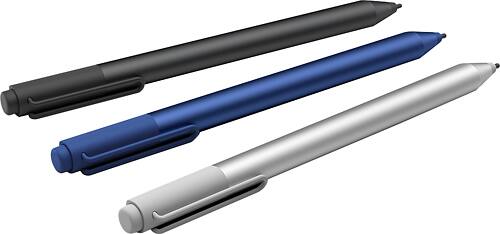
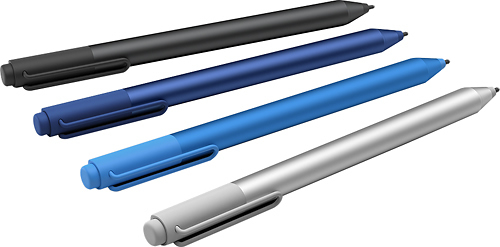
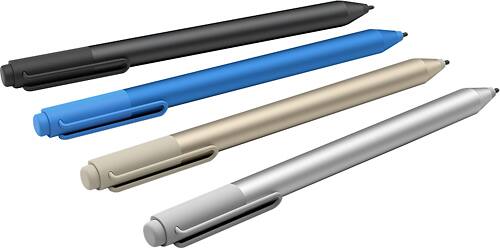
- Model:
- 3XY-00021
- |
- SKU:
- 4562012
Customer reviews
Rating 4.6 out of 5 stars with 1635 reviews
(1,635 customer reviews)to a friend
Customers are saying
Customers frequently mention the Surface Pen's ease of use, responsiveness, and compatibility with Surface devices as significant advantages. Many appreciate the multiple tips and the pen's comfortable feel and lightweight design. However, some customers express concerns about the price and occasional battery life issues. A few also cite minor problems with pairing and button functionality.
This summary was generated by AI based on customer reviews.
- Pros mentioned:Ease of use
Rated 4 out of 5 stars
good
||Posted .This reviewer received promo considerations or sweepstakes entry for writing a review.good easy to use. clear instructions. variety of points styles
This review is from Microsoft - Surface Pen - Black
I would recommend this to a friend Rated 4 out of 5 stars
Great dedign
||Posted .This reviewer received promo considerations or sweepstakes entry for writing a review.So I purchased the new stylus pen to replace the one I misplaced that actually came with my Surface Pro 3 and I'm extremely happy with the design and how it feels and I am extremely happy with the design and how it feels and there's a little bit of learning curve given the difference between the buttons but it does seem like they improved it!
I would recommend this to a friend- Pros mentioned:Ease of use
Rated 4 out of 5 stars
Good stylus
||Posted .This reviewer received promo considerations or sweepstakes entry for writing a review.Good pointing device replacement. Easy to use. Easy to lose.
This review is from Microsoft - Surface Pen - Black
I would recommend this to a friend - Cons mentioned:Price
Rated 4 out of 5 stars
Good feel, a little expensive.
||Posted .This reviewer received promo considerations or sweepstakes entry for writing a review.It works great, but it is a little expensive for what it is.
This review is from Microsoft - Surface Pen - Silver
I would recommend this to a friend - Pros mentioned:Ease of use
Rated 4 out of 5 stars
Easy to use pen
||Posted .This reviewer received promo considerations or sweepstakes entry for writing a review.I bought the stylus to go with my MS Surface pro 4. It works fine, although I haven't had many occasions to use it yet. But, I can see it being very useful for taking notes, marking phrases on a page or drawing.
This review is from Microsoft - Surface Pen - Silver
I would recommend this to a friend - Cons mentioned:Price
Rated 4 out of 5 stars
A little ex-pen-sive
||Posted .This reviewer received promo considerations or sweepstakes entry for writing a review.The pen is very useful, but ex-pen-sive for my novice use.
This review is from Microsoft - Surface Pen - Silver
I would recommend this to a friend - Cons mentioned:Price
Rated 4 out of 5 stars
Great pen
||Posted .This reviewer received promo considerations or sweepstakes entry for writing a review.A bit expensive but it's worked very well and very happy
This review is from Microsoft - Surface Pen - Black
I would recommend this to a friend - Pros mentioned:Stylus, Tips
Rated 5 out of 5 stars
Good replacement for my old Surface 3 pen
||Posted .This reviewer received promo considerations or sweepstakes entry for writing a review.Good replacement for my worn out Surface 3 pen. Multiple tips give more flexibility. Easier to erase stuff with the back eraser bit. Fewer buttons to figure out as well.
I would recommend this to a friend - Pros mentioned:Ease of use
Rated 5 out of 5 stars
great tablet/ computer pen
||Posted .This reviewer received promo considerations or sweepstakes entry for writing a review.Using the pen as a substitute for clicking or touching screen is easy. It will also be used for sketching / drawing on screen. We are still learning to use it.
This review is from Microsoft - Surface Pen - Silver
I would recommend this to a friend - Pros mentioned:TipsCons mentioned:Lag
Rated 5 out of 5 stars
The perfect complement
||Posted .This reviewer received promo considerations or sweepstakes entry for writing a review.great sensitivity, I didn't felt any lag, the tips that come with the pen are very nice to draw. And its really nice to be able to use it in many products.
This review is from Microsoft - Surface Pen - Black
I would recommend this to a friend - Pros mentioned:Ease of use
Rated 4 out of 5 stars
Great Pen, Useful
||Posted .This reviewer received promo considerations or sweepstakes entry for writing a review.Very easy to use. Love the new screen shot option.
I would recommend this to a friend - Pros mentioned:Ease of use, Stylus
Rated 5 out of 5 stars
Great pen
||Posted .This reviewer received promo considerations or sweepstakes entry for writing a review.I love this pen. It works well with my surface pro 3. The pen comes with an eraser on its flat edge just like a normal pencil. So easy to use and comfortable.
This review is from Microsoft - Surface Pen - Black
I would recommend this to a friend - Pros mentioned:Responsiveness
Rated 4 out of 5 stars
Better than last years!
||Posted .This reviewer received promo considerations or sweepstakes entry for writing a review.Microsoft really hit the nail on the head with this surface pen! It's more responsive, magnetic, and just seems to feel better in hand than the surface pen I bought when I purchased my Surface 3.
This review is from Microsoft - Surface Pen - Black
I would recommend this to a friend - Pros mentioned:Ease of use
Rated 4 out of 5 stars
Essential Must Have
||Posted .This reviewer received promo considerations or sweepstakes entry for writing a review.The pen allows for a versitility par to none that allows for greater functionality (I.e. signing forms, drawing in depth and accuity) and it's wonderful for handwriting over typing class notes
This review is from Microsoft - Surface Pen - Black
I would recommend this to a friend - Pros mentioned:Responsiveness
Rated 5 out of 5 stars
Nice pen for drawing on the Surface
||Posted .This reviewer received promo considerations or sweepstakes entry for writing a review.Bought this to go along with a Surface 3. It paired easily and works as it should. For now, pressing the eraser button launches One Note (reportedly, this is expanding with a future update to Windows 10). Pen itself works fine. For apps that support it, pressure sensitivity works pretty well, although probably not quite as accurate as a real pencil or pen. I have not tried the additional pen tips, but I appreciate them being included. Would definitely recommend getting some kind of accessory to let you keep this with the surface (my case comes with a pen loop, which is great).
This review is from Microsoft - Surface Pen - Silver
I would recommend this to a friend Rated 4 out of 5 stars
Good pen, not worth the upgrade.
||Posted .This reviewer received promo considerations or sweepstakes entry for writing a review.The new surface pen is well built, like always. But if you already have a Surface Pro 3 pen, then you should keep it. While it's nice to have an eraser on the new pen, the button placement for right click can be awkward at sometimes. None the less, it's a nice pen, and works perfectly with my Surface Pro 3.
This review is from Microsoft - Surface Pen - Black
I would recommend this to a friend- Pros mentioned:Stylus
Rated 4 out of 5 stars
Exactly what you expect
||Posted .This reviewer received promo considerations or sweepstakes entry for writing a review.Chances are, if you are looking for a stylus for a Microsoft Surface, you have already used one before. There is no discernible difference or upgrade from the factory model that ships with the Surface Pro 4. I would recommend, however, anyone who has a prior iteration of the product, or who has the tablet without the stylus, immediately get the Microsoft stylus for Surface Pro because it integrates seamlessly with a very Innovative and intuitive design language. I cannot imagine using this computer without it which may be a good thing or a bad one depending on your needs. Regardless, if you own a Surface you have half a product until you acquire the stylus accessory.
I would recommend this to a friend Rated 4 out of 5 stars
Great look and feel!!!
||Posted .This reviewer received promo considerations or sweepstakes entry for writing a review.Just like the Apple Pencil, the Surface Pen has it’s ups and downs. Don’t get me wrong, it’s a quality device and I love holding it like a regular pen all day long while I’m working. The clicking button/eraser works about 75% of the time, but that could be software updatable issues. The right click button is strange to use and not natural (left handed). Other than those snags, the surface pen can be a useful tool to have. The screen shot and markup within OneNote and I think that is the feature I use the most. The erase on the top of the pen is crazy accurate compared to my Apple Pencil that erases whole portions of drawings.
This review is from Microsoft - Surface Pen - Silver
I would recommend this to a friendRated 4 out of 5 stars
Microsoft Surface Pen for college
||Posted .This reviewer received promo considerations or sweepstakes entry for writing a review.Microsoft - Surface Pen - Black was purchased for my daughter for her college laptop computer. She has really enjoyed being able to make notes during lectures in her classes, and uses the Surface Pen to draw for fun during her free times. The 4 interchangeable stylus tips are great for making drawings.
This review is from Microsoft - Surface Pen - Black
I would recommend this to a friend- Pros mentioned:Ease of use, Responsiveness
Rated 4 out of 5 stars
Surprised!
||Posted .This reviewer received promo considerations or sweepstakes entry for writing a review.I was not sure about stylus pens and writing on tablets. Had a hard time in the past. However, this stylus is very responsive and works nice. It's easy to sign and complete documents.
This review is from Microsoft - Surface Pen - Silver
I would recommend this to a friend