Customer Ratings & Reviews


- Model:
- 3XY-00021
- SKU:
- 4562012
to a friend
Customers are saying
Customers frequently mention the Surface Pen's ease of use, responsiveness, and compatibility with Surface devices as significant advantages. Many appreciate the multiple tips and the pen's comfortable feel and lightweight design. However, some customers express concerns about the price and occasional battery life issues. A few also cite minor problems with pairing and button functionality.
This summary was generated by AI based on customer reviews.
- Pros mentioned:Tips
Works great
||Posted .This reviewer received promo considerations or sweepstakes entry for writing a review.Got it so my daughter could take notes on her surface! But she can also draw with it!! The extra tips do wonderful!!
I would recommend this to a friend - Cons mentioned:Battery life
It's a Surface Pen, Silver Style
||Posted .This reviewer received promo considerations or sweepstakes entry for writing a review.There pen works just like it says it will work. It's my third one because they keep breaking but I need them to work my Surface. The list one broke after I changed the battery in it. After I bought this one, Microsoft agreed to replace my 2nd one that broke. It's taken them 3 months to do, but at least they replaced it. The Microsoft Store at Best Buy was no help, basically just directed me to the website. Buy it because you need it, not because you want it.
I would recommend this to a friend - Pros mentioned:Compatibility, Ease of use
need pen for writing
||Posted .This reviewer received promo considerations or sweepstakes entry for writing a review.great pen, my son takes all his school notes on computer. This was one of the reasons we buy this computer!
I would recommend this to a friend Good pen for surface pro 3
||Posted .This reviewer received promo considerations or sweepstakes entry for writing a review.This is a nice pen for surface pro 3. Works as advertised. Comes with extra tips which is a plus, although I probably won't use them and might lose them.
I would recommend this to a friend- Cons mentioned:Price
Perfect replacement
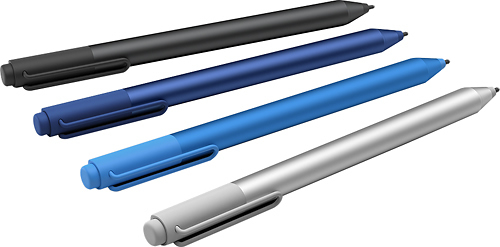
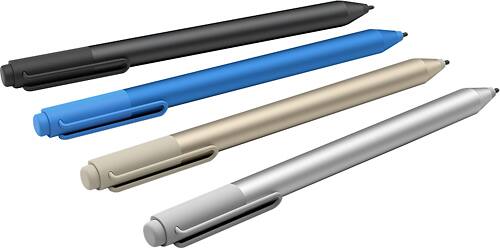
||Posted .This reviewer received promo considerations or sweepstakes entry for writing a review.The perfect replacement for my surface pro pen which was not working properly. Great choice of colors. Just wish they weren't so expensive.
I would recommend this to a friend Unimpressive for the price
||Posted .This reviewer received promo considerations or sweepstakes entry for writing a review.The pen was listed as compatible with SP3, but calibration is a major headache. I have to delete the old calibration data and recalibrate the pen every couple of days or it would be 2 inches off on the bottom and screen edges. I realized the out of calibration when i couldnt do anything with the taskbar. Not impressed with the ergo and to date, I still don't know how to properly hold, so I can press the button without looking at it. Not sure if the button was positioned for the index finger or thumb. My index fighter gets tired and thumb puts the pen in awkward position. The eraser double click sometimes work but i don't even bother anymore. Construction and weight is outstanding.
No, I would not recommend this to a friendBrand response from MicrosoftOutreachTeam
Posted .Hello LightScannerUser, The Surface Pen has a Limited hardware warranty which includes service on hardware and covered accessories for 1 year from the date of purchase. Please contact us so we can assist you with a possible replacement at: https://www.microsoft.com/surface/en-us/support . We apologize for any frustration this has caused and hope this was helpful to you.

- Cons mentioned:Price
Better than the included surface pen
||Posted .This reviewer received promo considerations or sweepstakes entry for writing a review.I bought this as a replacement to my lost surface pen. The included tips make drawing and using the pen x10 better. It's a tad bit pricey.
I would recommend this to a friend A must have tool for architects like me!
||Posted .This reviewer received promo considerations or sweepstakes entry for writing a review.This digital stylus / pen, pencil, paint brush, gives you the accuracy and feel of the real physical tools.
I would recommend this to a friendGreat pen for surface
||Posted .This reviewer received promo considerations or sweepstakes entry for writing a review.I would recommend this item to anyone that has a surface pro 4 and has a business it's very convenient at anytime to use I'm so happy I got it for myself I deserve the best so it's anyone else
I would recommend this to a friendStylus is fine cost is insane
||Posted .This reviewer received promo considerations or sweepstakes entry for writing a review.This is not a shot at Best Buy because the price is way too high for this everywhere. There is no reason for this to cost so much, but if the one you have breaks or gets lost you have no choice but to buy a new one and they know that.
I would recommend this to a friend- Pros mentioned:Stylus
Works as expected
||Posted .This reviewer received promo considerations or sweepstakes entry for writing a review.It works as expected. I think the pen tip options work well for different writing styles. It seems to be the best stylus on the market.
I would recommend this to a friend - Pros mentioned:Tips
Great pen
||Posted .This reviewer received promo considerations or sweepstakes entry for writing a review.I owned an older cheaper one. This new one came with new tips and is heavier. I really like it.
I would recommend this to a friend - Pros mentioned:Responsiveness
Much better pen than the one for the surface 3.
||Posted .This reviewer received promo considerations or sweepstakes entry for writing a review.When I first started to look for a back-up pen for my surface pro 3 I thought of just buying the same pen again but after looking into some reviews about the pen that came with the surface pro 4 I thought of trying it out. And it was totally worth it, the pen is much more responsive with my surface and I don't have to press down as hard on screen since the pressure sensitivity is really great. Definitely an automatic buy if anyone especially an artist (like me) is looking for a replacement/back-up pen for their surface.
I would recommend this to a friend Surface pro 4 pen
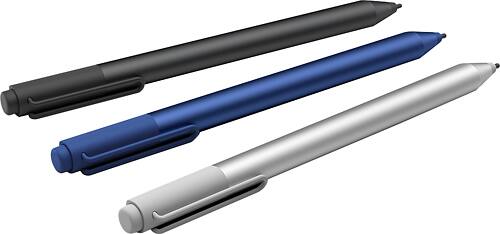
||Posted .This reviewer received promo considerations or sweepstakes entry for writing a review.Got this for my son pro 4 pen had to be blue to match his surface. He loves everything about it. Magnetic so it stays changeable tips awesome it has it all. Definitely recommend this.
I would recommend this to a friend- Pros mentioned:Ease of use
The perfect complement to your Surface Pro
||Posted .This reviewer received promo considerations or sweepstakes entry for writing a review.Best pen ever...... At the beginning I was hesitating about getting the pen. It is a expensive gadget, however since I am forcing myself to use a tablet and be paperless I give this guy a shot, thinking in the additional value to write down in the tablet as in a traditional notebook. OMG...it is incredible what you can do with the pen in combination with the Tablet, One click turns your Surface on and in goes straight to One Note.
I would recommend this to a friend - Pros mentioned:Ease of use
Great surface pen
||Posted .This reviewer received promo considerations or sweepstakes entry for writing a review.I really like the feel of the pen and the way it writes. Easy to use and easy to write with.
I would recommend this to a friend Does what it's supposed to, plus extra tips.
||Posted .This reviewer received promo considerations or sweepstakes entry for writing a review.I thought I would miss the two buttons on the old stylus, but I don't. The rear button functioning like an eraser works intuitively and the extra points of pressure are really nice.
I would recommend this to a friend- Pros mentioned:Ease of use, Stylus
Great for SP3 pen replacement
||Posted .This reviewer received promo considerations or sweepstakes entry for writing a review.I bought this because I wasn't happy with my SP3 pen. The SP4 pen is far better and has a nice eraser to make erasing more unique.
I would recommend this to a friend Love the eraser on the top side
||Posted .This reviewer received promo considerations or sweepstakes entry for writing a review.This eraser function on the top side of the pen is so nice! I wish all programs could use this feature. So far, I've only used on powerpoint and onenote and it works really well.
I would recommend this to a friend- Pros mentioned:Compatibility, Ease of use
Great tool for your surface
||Posted .This reviewer received promo considerations or sweepstakes entry for writing a review.Always carry a spare, I not a big pen fan but this works and is perfect with my surface
I would recommend this to a friend