Customer Ratings & Reviews


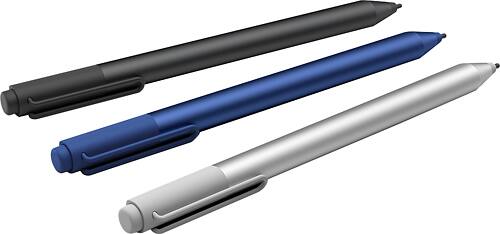
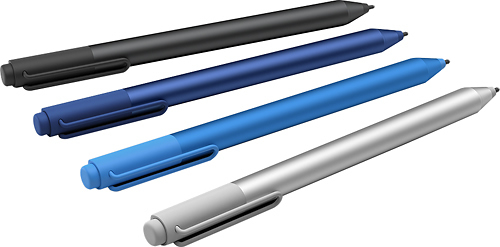
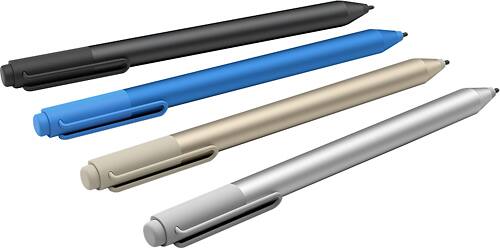
- Model:
- 3XY-00021
- |
- SKU:
- 4562012
Customer reviews
Rating 4.6 out of 5 stars with 1635 reviews
(1,635 customer reviews)to a friend
Customers are saying
Customers frequently mention the Surface Pen's ease of use, responsiveness, and compatibility with Surface devices as significant advantages. Many appreciate the multiple tips and the pen's comfortable feel and lightweight design. However, some customers express concerns about the price and occasional battery life issues. A few also cite minor problems with pairing and button functionality.
This summary was generated by AI based on customer reviews.
- Pros mentioned:Compatibility
Rated 5 out of 5 stars
Best pen
||Posted . Owned for more than 2 years when reviewed.This reviewer received promo considerations or sweepstakes entry for writing a review.I would only recommend this stylus for any surface computer. I've tried other ones but this is far most the best choice.
This review is from Microsoft - Surface Pen - Black
I would recommend this to a friend Rated 5 out of 5 stars
Worth the price
||Posted .This reviewer received promo considerations or sweepstakes entry for writing a review.The surface pen is much better than the iPad pencil. It works with writing, drawing and editing. I have both and the surface pen does a lot more.
This review is from Microsoft - Surface Pen - Gold
I would recommend this to a friendRated 5 out of 5 stars
Pen is Great!
||Posted .This reviewer received promo considerations or sweepstakes entry for writing a review.We bought a Surface Pro 3 and didn't think we would need a pen since the screen is a touch screen. However, after we played around with the Pro, we discovered that there were many areas that a mouse, or in this case, a pen, would be beneficial. You had to constantly zoom to click on an item and drag and drop didn't always go as planned. We got the Pro mainly to manipulate pictures and videos easily, but we really needed a mouse or pen to work efficiently. Once we had the pen, things were back to working smoothly. For us, the pen was a necessity.
This review is from Microsoft - Surface Pen - Gold
I would recommend this to a friend- Pros mentioned:Tips
Rated 5 out of 5 stars
SURFACE PEN
||Posted .This reviewer received promo considerations or sweepstakes entry for writing a review.I needed a new pen for my Surface since I lost my last one in NY. Got this one and love it. It has different heads for different writing types.
I would recommend this to a friend Rated 5 out of 5 stars
SURFACE PEN
||Posted .This reviewer received promo considerations or sweepstakes entry for writing a review.THE SURFACE PEN IS A LOT BETTER THAN THE OLDER VERSION. I AM ABLE TO DRAW BETTER IN FINER DETAILS. I WILL SEE IF THE BATTERY LIFE LAST AS LONG.
This review is from Microsoft - Surface Pen - Black
I would recommend this to a friend- Cons mentioned:Pairing
Rated 4 out of 5 stars
does what it's suppose to do.
||Posted .This reviewer received promo considerations or sweepstakes entry for writing a review.Although I was not able to pair the first pen I purchased to my Surface, the Microsoft Store replaced it with a new one and successfully paired it. I have been enjoying it hassle free!
This review is from Microsoft - Surface Pen - Silver
I would recommend this to a friend - Pros mentioned:Ease of use
Rated 5 out of 5 stars
LOVE THIS PRODUCT
||Posted .This reviewer received promo considerations or sweepstakes entry for writing a review.THIS PEN IS VERY FUNCTIONAL AND OPERATES VERY WELL. I LOVE THE WAY IT GLIDES SO SMOOTHLY ON THE SURFACE EVEN WITH THE SCREEN PROTECTOR ON IT.
This review is from Microsoft - Surface Pen - Silver
I would recommend this to a friend Rated 5 out of 5 stars
Better than the Pro 3 Pen!
||Posted .This reviewer received promo considerations or sweepstakes entry for writing a review.Great "feel," no tap tap sound that was the problem with the Pro 3 version. On par with iPad Pro's Pencil! I ordered both the Surface Pro and the Surface Studio to use in tandem. Got the pen along with the Surface Pro 4 when it was selling for $400 off, great value! Microsoft is going to really give Apple a run for its money. That a computer $3000-45000 sells out during pre-sale is an indication of how much folks are willing to pay for a well-designed product. Don't know why the iMac 5K retina doesn't come as a touch screen with the Pencil!
This review is from Microsoft - Surface Pen - Black
I would recommend this to a friend- Cons mentioned:Bluetooth
Rated 4 out of 5 stars
No batteries required
||Posted .This reviewer received promo considerations or sweepstakes entry for writing a review.The batteries power the to click button to wake your surface or snap a screenshot. You can turn blutooth off and all the touch and writing functions still work including click
I would recommend this to a friend Rated 5 out of 5 stars
Love it!
||Posted .This reviewer received promo considerations or sweepstakes entry for writing a review.This is such a wonderful creation. I got rid of all my notebooks and had them all digitized. This pen feels and works like an actual pen.
I would recommend this to a friend- Pros mentioned:Ease of use
Rated 5 out of 5 stars
Easy to set up and pair
||Posted .This reviewer received promo considerations or sweepstakes entry for writing a review.This pen works just like it is supposed to. The pairing and set up procedures are intuitive..... you don't have to read the instructions.
This review is from Microsoft - Surface Pen - Silver
I would recommend this to a friend - Pros mentioned:Ease of use
Rated 5 out of 5 stars
Pretty cool
||Posted .This reviewer received promo considerations or sweepstakes entry for writing a review.Still trying to figure it out but it's very easy writing on the screen ! I think it'd necessary to have but I see why it's sold separately
This review is from Microsoft - Surface Pen - Silver
I would recommend this to a friend - Pros mentioned:Responsiveness
Rated 5 out of 5 stars
Pleased with the performance
||Posted .This reviewer received promo considerations or sweepstakes entry for writing a review.Very precise and responsive. I'm quite impressed. However, I don't use it very often, so not sure if I need to buy it in the first place.
This review is from Microsoft - Surface Pen - Silver
I would recommend this to a friend - Pros mentioned:Stylus
Rated 5 out of 5 stars
Does what it is suppose to do!
||Posted .This reviewer received promo considerations or sweepstakes entry for writing a review.The thing I love most about this pen is that it feels expensive and looks nice. The eraser feature is awesome, would definitely recommend.
This review is from Microsoft - Surface Pen - Black
I would recommend this to a friend - Cons mentioned:Bluetooth
Rated 3 out of 5 stars
I want to love it...
||Posted .This reviewer received promo considerations or sweepstakes entry for writing a review.For what it is, it's a nice pen. Great size/weight balance. The eraser-like feel of the end is a nice touch. The problem comes when you compare it to, say, the Apple Pencil. You have to forcibly apply enough pressure so the internal contacts connect. This means light shading is nearly impossible. Also, no tilt sensing. I also had issues with flaky bluetooth. This problem could have been related to the surface pro tablet, as I don't recall having to many issues with bluetooth with the first tablet/pan I tried.
This review is from Microsoft - Surface Pen - Silver
No, I would not recommend this to a friend Rated 5 out of 5 stars
Works Great
||Posted .This reviewer received promo considerations or sweepstakes entry for writing a review.Works great, works as expected. I had no problems. Great for drawing, and it draws better than keyboard trackpad. I highly recommend it.
This review is from Microsoft - Surface Pen - Gold
I would recommend this to a friend- Pros mentioned:Stylus
Rated 5 out of 5 stars
Nice pen
||Posted .This reviewer received promo considerations or sweepstakes entry for writing a review.My daughter lost my original stylus. I'mm sure they're the same stylus as the original but this one feels better and seems to work better.
This review is from Microsoft - Surface Pen - Black
I would recommend this to a friend - Pros mentioned:Ease of use
Rated 5 out of 5 stars
Super accessory
||Posted .This reviewer received promo considerations or sweepstakes entry for writing a review.It took some time to learn its actual uses but now I can use it all the time. Especially for taking notes or marking up pages, etc.
This review is from Microsoft - Surface Pen - Silver
I would recommend this to a friend - Pros mentioned:Tips
Rated 5 out of 5 stars
Better than the original
||Posted .This reviewer received promo considerations or sweepstakes entry for writing a review.Bought this after losing my other surface pen. This pen feels more natural and I love that you're able to change the tip of the pen.
This review is from Microsoft - Surface Pen - Silver
I would recommend this to a friend - Pros mentioned:Stylus
Rated 4 out of 5 stars
Solid
||Posted .This reviewer received promo considerations or sweepstakes entry for writing a review.Granted I am using the pen on the previous gen model of the surface so I feel it is missing a few features, but over all this is a solid stylus and really compliments my workflow.
This review is from Microsoft - Surface Pen - Black
I would recommend this to a friend