Customer Ratings & Reviews


- Model:
- EYU-00025
- SKU:
- 5859102
Rating by feature
- Value
Rating 4.3 out of 5 stars
- Quality
Rating 4.7 out of 5 stars
- Ease of Use
Rating 4.7 out of 5 stars
Customers are saying
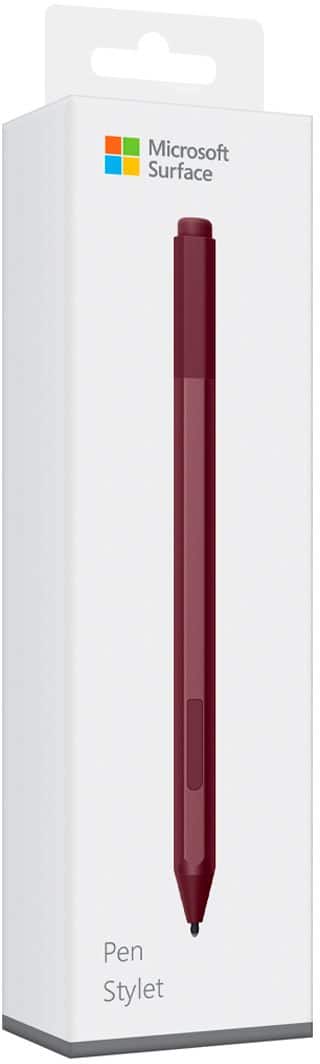
Customers praise the Surface Pen for its ease of use, overall performance, and compatibility with devices like the Surface Go. Many appreciate its suitability for drawing, good battery life, comfortable weight and feel, and sleek design, with some specifically loving the available colors and accuracy. However, some customers find the pen to be a little pricey and have concerns about the tip durability, while others have noted issues such as lag, the absence of a clip, and weak magnet strength.
This summary was generated by AI based on customer reviews.
Great quality!
||Posted . Owned for 1 month when reviewed.This reviewer received promo considerations or sweepstakes entry for writing a review.Works so well with the Microsoft pro 6 I got it with and so I highly recommend it if you are buying the Microsoft pro. Or really any Microsoft. It magnets to the side so not super easy to lose.
I would recommend this to a friendBrand response from MicrosoftOutreachTeam
Posted .Hi there,
Thanks for recommending Surface Pen to the community! We're delighted to hear that this has been an excellent addition to your experience with Surface Pro 6. We hope you continue to love this incredibly versatile tool!
Cheers,
Jessica
Surface Customer Care
Good pen
||Posted .This reviewer received promo considerations or sweepstakes entry for writing a review.But I need the holder, because I put on my shirt no only on my surface!\
I would recommend this to a friendBrand response from MicrosoftOutreachTeam
Posted .Hi there,
Thank you for reviewing the Surface Pen. We'd love to hear more about how the Pen rates in your eyes, aside from needing the pen holder. Feel free to reach out to us at [email protected], so we can get more feedback and continue this conversation.
Kindly,
Victoria
Surface Customer Care
not good with surface
||Posted . Owned for 1 month when reviewed.This reviewer received promo considerations or sweepstakes entry for writing a review.Since the surface does not lay flat the pen is useless.
No, I would not recommend this to a friendGreat pen
||Posted .This reviewer received promo considerations or sweepstakes entry for writing a review.This pen responds well. It almost feels as if you are writing on paper. I like that you can actually see where you are writing and that it glides across the screen. Great addition to the Surface Go.
I would recommend this to a friendneeded
||Posted .This reviewer received promo considerations or sweepstakes entry for writing a review.it works for some people. i do use it but it is really not necessary !!
I would recommend this to a friendGreat quality
||Posted . Owned for 6 months when reviewed.This reviewer received promo considerations or sweepstakes entry for writing a review.The surface pen has always impressed me. The latest generation handles well, is very pressure-sensitive, and is comfortable. The lack of pocket clip makes it more comfortable to hold in hand.
I would recommend this to a friend- Cons mentioned:Tip durability
Pen not working properly
||Posted . Owned for 1 month when reviewed.This reviewer received promo considerations or sweepstakes entry for writing a review.The pen does not work. You can still click the button and the options will come on the screen. However the tip of the pen no longer functions to point or draw and it is brand new.
No, I would not recommend this to a friend Worth LESS than "worthless"
||Posted .This reviewer received promo considerations or sweepstakes entry for writing a review.I was told by the Best Buy associate that sold me the HP laptop, that this pen would work with it (vs the Bamboo brand). So, it was gifted to me, but I could not get it to work with any of the programs on my HP! I found out (later) that HP makes their own pen. Of course, one can never reach a live person (@ HP or MS) to find out what is keeping them from interacting with each other! On top of all of this, there is no actual way to identifiably shut down the pen or turn it on....waste of battery power without physical removal of battery! VERY DISAPPOINTED WITH THIS ITEM, & I want to make sure the world knows it is a waste of $$$ if trying to interface with other than MS computers. If you can't use an item, it is "worthless".
No, I would not recommend this to a friendSo many great uses
||Posted .This reviewer received promo considerations or sweepstakes entry for writing a review.I dabble in drawing and the surface and stylus is very responsive for drawing. I liked it way better than a Wacom. Also the Surface allows handwriting to type and the ability to write on documents for college.
I would recommend this to a friendsurface pen dissappointment
||Posted .This reviewer received promo considerations or sweepstakes entry for writing a review.the look of the pen is great, but no way to attach it to my surface without it easily being knocked off. i enjoyed using it when it worked now cannot get it to connect to my surface, having lots of issues with it. They need to come up with better set up for pen to attach on surface computer.
No, I would not recommend this to a friendBrand response from MicrosoftOutreachTeam
Posted .Hi Tammy,
We're sorry to hear that you have been having these issues with your Surface Pen, as it is not the usual experience our customers have! We'd love to help you out and work through what might be happening between your Pen and Surface device. Please send us an email at SurfaceCustomerCare@microsoft.com, and we can help you out.
Kindly,
Victoria
Surface Customer Care
Great pen.
||Posted .This reviewer received promo considerations or sweepstakes entry for writing a review.Great pen does what it says it would do. I just wished they would use another battery type than AAAA. Those can be a bit hard to find sometime when out of town. plan a head and keep extras.
I would recommend this to a friendVery comfortable to use
||Posted . Owned for 1 month when reviewed.This reviewer received promo considerations or sweepstakes entry for writing a review.Unlike most stylists this pen feels like an actual pen and makes writing easy and comfortable. The magnet is very strong as well and it secures to the surface pro even though a case.
I would recommend this to a friendEssential
||Posted .This reviewer received promo considerations or sweepstakes entry for writing a review.This is a great stylus. that is my opinion that all tablets should come with a excellent stylus such as this. This is basically the equivalent of a mouse for a computer. It's a no-brainer accessory for this platform. They should come with the tablet, not separately.
I would recommend this to a friendGreat pen.
||Posted .This reviewer received promo considerations or sweepstakes entry for writing a review.I bought this as a gift, however it does not work on an asus laptop so I had to return it. Mine works great on my surface pro. It was my mistake. I researched the item & thought it would work.
I would recommend this to a friendEasy to use
||Posted .This reviewer received promo considerations or sweepstakes entry for writing a review.The clicker was pretty neat that you can double click and opens a notepad for you that you can quicky write something. The pen is also like a magnet and it can just stick to the side of the pro
I would recommend this to a friendAwesome
||Posted .This reviewer received promo considerations or sweepstakes entry for writing a review.I used to be a galaxy note user for years so I'm familiar with the pens. The surface pen feels like a real pen, I'm still getting used to the surface but I think the pen is a must for anyone with a surface.
I would recommend this to a friendMeh, doesn’t work to well
||Posted .This reviewer received promo considerations or sweepstakes entry for writing a review.Bought this with a Surface pad however it worked ok.
No, I would not recommend this to a friendWorks fine right up until it doesn't
||Posted . Owned for 1 month when reviewed.This reviewer received promo considerations or sweepstakes entry for writing a review.Only lasted 6 weeks before the writing tip quit working. (Tried replacing tip, battery, etc.) On its way back to Microsoft for a warranty replacement.
No, I would not recommend this to a friendMust Have!
||Posted .This reviewer received promo considerations or sweepstakes entry for writing a review.Excellent tool for using on 2 in 1 laptop PC. I have MS-Surface Book 2. I use this all the time for note-taking on OneNote, as well as for marking up PDF files with DrawBoard applications.
I would recommend this to a friendBrand response from MicrosoftOutreachTeam
Posted .Hi Marc,
Thanks for sharing with the community about how you like to use the Surface Pen. In combination with the Surface Book 2, the Surface Pen certainly transforms your tablet experience, allowing for you to navigate your device like you would a pen and paper. We hope you continue to discover all there is to love about the Surface Pen!
Cheers,
Jessica
Surface Customer Care
no battery
||Posted . Owned for 1 week when reviewed.This reviewer received promo considerations or sweepstakes entry for writing a review.Purchased open box pen. came quickly however no battery in it. called my store and was told I needed to purchase a new battery myself. A little off putting. I couldn`t tell me if new ones came with a battery or not.
No, I would not recommend this to a friend