Customer Ratings & Reviews

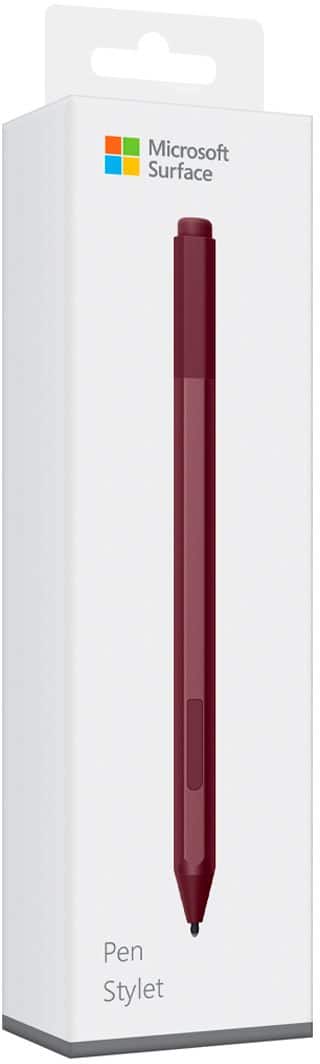

- Model:
- EYU-00025
- SKU:
- 5859102
Rating by feature
- Value
Rating 4.3 out of 5 stars
- Quality
Rating 4.7 out of 5 stars
- Ease of Use
Rating 4.7 out of 5 stars
Customers are saying
Customers praise the Surface Pen for its ease of use, overall performance, and compatibility with devices like the Surface Go. Many appreciate its suitability for drawing, good battery life, comfortable weight and feel, and sleek design, with some specifically loving the available colors and accuracy. However, some customers find the pen to be a little pricey and have concerns about the tip durability, while others have noted issues such as lag, the absence of a clip, and weak magnet strength.
This summary was generated by AI based on customer reviews.
good
||Posted . Owned for 1 year when reviewed.This reviewer received promo considerations or sweepstakes entry for writing a review.Havent had any problems with it...works great and gets the job done
I would recommend this to a friendWorks very well
||Posted . Owned for 3 months when reviewed.This reviewer received promo considerations or sweepstakes entry for writing a review.Solid pen, my daughter loves it and uses it all the time for school projects.
I would recommend this to a friendGreat product.
||Posted . Owned for more than 2 years when reviewed.This reviewer received promo considerations or sweepstakes entry for writing a review.It is the best stylus pen in build, quality, and useability.
I would recommend this to a friendUnhappy customer
||Posted . Owned for 6 months when reviewed.This reviewer received promo considerations or sweepstakes entry for writing a review.This device has been trouble since I purchased it, it only worked for me a month and stop working, had it serviced with the Greek Squad team and was informed that there was a malfunction with this device and I needed to take it back to a Microsoft store and I feel that this is a very inconvenience to me and now I have to get a new pen for my Microsoft pro.
No, I would not recommend this to a friendMy smart pen
||Posted .This reviewer received promo considerations or sweepstakes entry for writing a review.I love being able to take notes and convert my writing to text in a searchable word doc!
I would recommend this to a friendIts a best thing microsoft implemented
||Posted . Owned for 3 weeks when reviewed.This reviewer received promo considerations or sweepstakes entry for writing a review.It is so productive for presentations and my creative tasks Using all the time
I would recommend this to a friendImproved Pen with 4,096 pressure points
||Posted .This reviewer received promo considerations or sweepstakes entry for writing a review.Improved 4,096 pressure points, helps me to draw pictures, write to do list etc.
I would recommend this to a friendGreat addition to the surface
||Posted . Owned for 1 month when reviewed.This reviewer received promo considerations or sweepstakes entry for writing a review.This was a gift for my son. He loves it! He uses it with games and apps.
I would recommend this to a friendWaste.
||Posted . Owned for 1 month when reviewed.This reviewer received promo considerations or sweepstakes entry for writing a review.Doesn't stay connected. Rarely Works. Waste of money.
No, I would not recommend this to a friendnice addition
||Posted .This reviewer received promo considerations or sweepstakes entry for writing a review.Makes using the surface go, practical. Haven't quite figured out the right-click button option. I can't seem to get that to work all the time.
I would recommend this to a friendBrand response from MicrosoftOutreachTeam
Posted .Hi Allen,
Thanks for giving the Surface Pen a try! We're thrilled you're loving it so far. For some helpful tips on how to use your pen, check out these handy tips: https://support.microsoft.com/en-us/help/4036281.
Cheers,
Jessica
Surface Customer Care
Love it!
||Posted . Owned for 3 weeks when reviewed.This reviewer received promo considerations or sweepstakes entry for writing a review.Great pen, nice touch, ease of tip. Nice grip. Hope the Samsung is as nice.
I would recommend this to a friendFun!
||Posted .This reviewer received promo considerations or sweepstakes entry for writing a review.I haven't had much reason to use it for editing yet, but it's great for scrolling!
I would recommend this to a friendIt's a pen worth having
||Posted . Owned for 1 month when reviewed.This reviewer received promo considerations or sweepstakes entry for writing a review.Works great. Worth the purchase. Better than having to use your finger.
I would recommend this to a friendMust Have
||Posted .This reviewer received promo considerations or sweepstakes entry for writing a review.If you have a surface this is a must have, makes using it much more efficient.
I would recommend this to a friendNot my gig. Pencil at the golf course works fine.
||Posted .This reviewer received promo considerations or sweepstakes entry for writing a review.The Pen dose what it says but bouncing between touch screen, mouse and pen is less effective than planned. Using shapes looks more profecinal.
No, I would not recommend this to a friendBrand response from MicrosoftOutreachTeam
Posted .Hi Todd,
Thanks for the feedback. If you should need additional support with your Surface Pen, check out troubleshooting options here: https://support.microsoft.com/en-us/help/4023523/surface-troubleshoot-microsoft-surface-pen. We're always happy to help you get your devices in tip-top shape!
Kind regards,
Jessica
Surface Customer Care
No pen inside the box
||Posted .This reviewer received promo considerations or sweepstakes entry for writing a review.They gave me empty box. No pen inside. I don’t know how they run their business like that
No, I would not recommend this to a friendGreat product
||Posted .This reviewer received promo considerations or sweepstakes entry for writing a review.Great product but my daughter has lost two of them. Wish it would retract when done using. But great to the touch.
I would recommend this to a friend- Cons mentioned:Clip
Does not have clip
||Posted .This reviewer received promo considerations or sweepstakes entry for writing a review.This is the first pen of three i bought that does not have a clip. Very easy to misplace for this reason
No, I would not recommend this to a friendBrand response from MicrosoftOutreachTeam
Posted .Hi Franzia,
Thanks for the feedback. We will be sure to share it with our team for review. We appreciate you taking the time to leave a review.
Best,
Amanda
Surface Customer Care
Meh
||Posted . Owned for 1 year when reviewed.This reviewer received promo considerations or sweepstakes entry for writing a review.Feels very cheap. If you want to use this for drawing, don’t. Get an iPad and Apple Pencil for Pro create.
No, I would not recommend this to a friendGreat Pen
||Posted .This reviewer received promo considerations or sweepstakes entry for writing a review.I love the new pen, being able to touch and hover the screen without using my fingers!
I would recommend this to a friendBrand response from MicrosoftOutreachTeam
Posted .Hi there,
Kudos for calling out the hover feature of the Surface Pen! We love it too and we're glad you are finding it useful. Thanks for taking the time to leave these kind words.
Take care,
Amanda
Surface Customer Care