Customer Ratings & Reviews

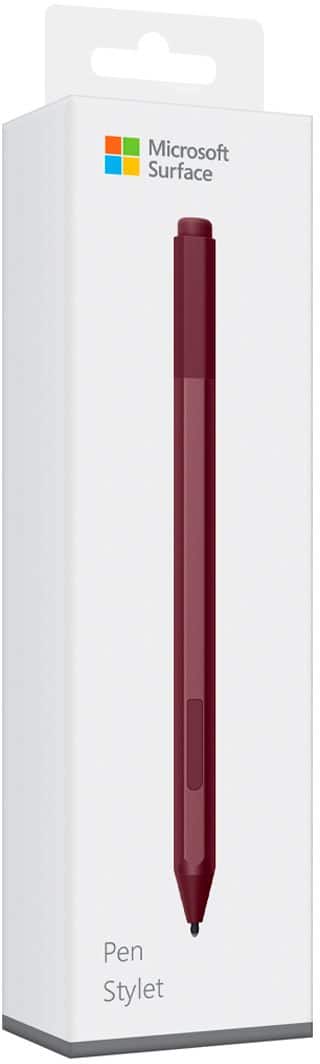

- Model:
- EYU-00025
- SKU:
- 5859102
Rating by feature
- Value
Rating 4.3 out of 5 stars
- Quality
Rating 4.7 out of 5 stars
- Ease of Use
Rating 4.7 out of 5 stars
Customers are saying
Customers praise the Surface Pen for its ease of use, overall performance, and compatibility with devices like the Surface Go. Many appreciate its suitability for drawing, good battery life, comfortable weight and feel, and sleek design, with some specifically loving the available colors and accuracy. However, some customers find the pen to be a little pricey and have concerns about the tip durability, while others have noted issues such as lag, the absence of a clip, and weak magnet strength.
This summary was generated by AI based on customer reviews.
Great Smart Pen
||Posted .This reviewer received promo considerations or sweepstakes entry for writing a review.This pen works well with the Surface Book 2. The sensitivity and precision is improved over the original surface pen.
I would recommend this to a friendBrand response from MicrosoftOutreachTeam
Posted .Hi there,
Thanks for letting us know about how you're loving the updates we have made through the years to bring you the latest version of Surface Pen! We're thrilled you're loving the precision and sensitivity of this handy tool to use in combination with your Surface Book 2. We hope you continue to enjoy!
Cheers,
Jessica
Surface Customer Care
good product
||Posted .This reviewer received promo considerations or sweepstakes entry for writing a review.a wonderful product, the feedback is good won't be disappointed
I would recommend this to a friendIT'S OK
||Posted .This reviewer received promo considerations or sweepstakes entry for writing a review.The pen skips while writing so the letters aren't transcribed correctly. Guessing with time the smoothness will come.
No, I would not recommend this to a friendBrand response from MicrosoftOutreachTeam
Posted .Hi there,
Thanks for taking the time to reach out. We're sorry to hear you're having some trouble with your Surface Pen. We would love to chime in and be of assistance. We highly recommend checking out our easy troubleshooting tips here: https://support.microsoft.com/en-us/help/4023523.
These should help you get back up-and-running smoothly. However, if you should encounter further questions or concerns, our support team is always happy to help you. Feel free to contact them here: https://support.microsoft.com/en-us/contactus/.
Best regards,
Jessica
Surface Customer Care
Good stylus
||Posted .This reviewer received promo considerations or sweepstakes entry for writing a review.Got the microsoft pencil when i got my surfaces, they had no solid black color option but no functionality issues yet.
I would recommend this to a friendBrand response from MicrosoftOutreachTeam
Posted .Hi there,
Thanks for sharing your experience with the community. We're glad you're liking to use Surface Pen so far. In case you'd like another color option, Best Buy does offer Surface Pen in black. Check it out here: https://www.bestbuy.com/site/microsoft-surface-pen-black/5859100.p?skuId=5859100.
Kind regards,
Jessica
Surface Customer Care
I purchased a blue one to go with my eyes
||Posted . Owned for 3 weeks when reviewed.This reviewer received promo considerations or sweepstakes entry for writing a review.Looks great works very well fits in pen holder very snug
I would recommend this to a friendReplacement pen
||Posted .This reviewer received promo considerations or sweepstakes entry for writing a review.The new pen works great. The older one was not working properly
I would recommend this to a friendEasy to use
||Posted .This reviewer received promo considerations or sweepstakes entry for writing a review.Unlike apple pencil, this uses battries and doesnt require to charge.
I would recommend this to a friendMicrosoft pen
||Posted . Owned for 11 months when reviewed.This reviewer received promo considerations or sweepstakes entry for writing a review.We purchased the Microsoft surface for my oldest daughter.
I would recommend this to a friendThe best digital stylus I've owned.
||Posted . Owned for 1 month when reviewed.This reviewer received promo considerations or sweepstakes entry for writing a review.I draw and sculpt digitally so a good stylus is important.
I would recommend this to a friendnice pen
||Posted .This reviewer received promo considerations or sweepstakes entry for writing a review.it feels like you are using a pen. response and recognition very good
I would recommend this to a friendtip keeps breaking
||Posted . Owned for 7 months when reviewed.This reviewer received promo considerations or sweepstakes entry for writing a review.The pen itself works fine, but I've bought two of these pens and on both of them, the cheap plastic piece that holds the magnetic tip has broken within a month or two of use. I'm not sure why you would make such an important part of such an expensive device so cheaply. The pen is jumpy and does not work well without the piece. Quite disappointing, honestly.
No, I would not recommend this to a friendGreat add on
||Posted .This reviewer received promo considerations or sweepstakes entry for writing a review.Use the pen for everything very responsive never have a problem
I would recommend this to a friendGreat to be able to draw on screen
||Posted . Owned for 1 month when reviewed.This reviewer received promo considerations or sweepstakes entry for writing a review.My granddaughter wanted to be able to draw on the screen.
I would recommend this to a friendGreat Pen
||Posted .This reviewer received promo considerations or sweepstakes entry for writing a review.very helpful in navigating through the Microsoft surface pro.
I would recommend this to a friend10/10
||Posted .This reviewer received promo considerations or sweepstakes entry for writing a review.Must need for the surface. The Bluetooth capability is great
I would recommend this to a friendOpen-Box is hit or miss
||Posted . Owned for 3 weeks when reviewed.This reviewer received promo considerations or sweepstakes entry for writing a review.The pen was listed as excellent condition but had scratches everywhere. We ended up returning it.
No, I would not recommend this to a friendHey look... it's a stylus
||Posted .This reviewer received promo considerations or sweepstakes entry for writing a review.Almost works as it should. Issues connecting the Bluetooth. Bought it to use with my newly purchased Surface Pro.
I would recommend this to a friendBrand response from MicrosoftOutreachTeam
Posted .Hi there,
Thanks for choosing to give Surface Pen a try. We're sorry you're experiencing some difficulties connecting via Bluetooth to your new Surface device. We would love to help you get up-and-running. We highly recommend checking out our tips on how to troubleshoot Surface Pen here: https://support.microsoft.com/en-us/help/4023523/surface-troubleshoot-microsoft-surface-pen.
If you should encounter any further questions or concerns, please don't hesitate to reach out to our support team here: https://support.microsoft.com/en-us/contactus/.
Kindly,
Jessica
Surface Customer Care
Awesome for presentations!
||Posted .This reviewer received promo considerations or sweepstakes entry for writing a review.Magnet could cause some issues. Keep separate from thumb drive and mag strip cards. More free software for note taking.
I would recommend this to a friendFine pen, not great
||Posted .This reviewer received promo considerations or sweepstakes entry for writing a review.Pairing this with a Surface is convenient as it magnetizes to the side of the device, but other than that it's just an okay pen. I notice it can be pretty jittery when drawing lines in Adobe Illustrator and the placement/size/shape of the button (equivalent to a right click) doesn't feel easy to press. I have slightly larger than average hands, but I'm not sure that's the problem.
I would recommend this to a friend- Cons mentioned:Price
Ok
||Posted .This reviewer received promo considerations or sweepstakes entry for writing a review.Personally not worth the extra money unless you are actually going to use it
No, I would not recommend this to a friend