Customer Ratings & Reviews

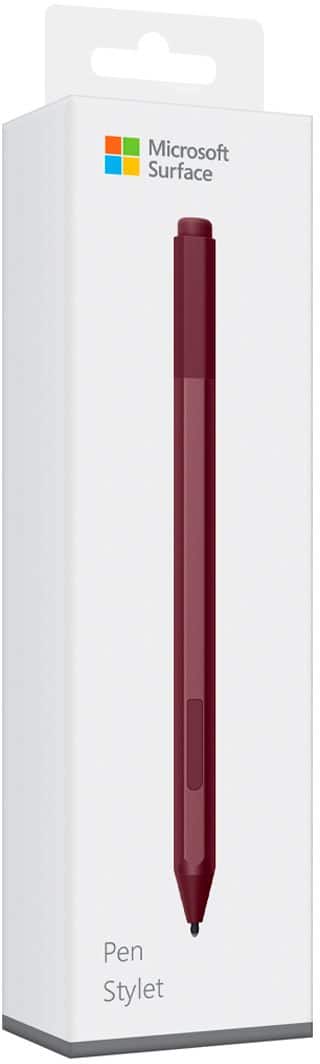

- Model:
- EYU-00025
- SKU:
- 5859102
Rating by feature
- Value
Rating 4.3 out of 5 stars
- Quality
Rating 4.7 out of 5 stars
- Ease of Use
Rating 4.7 out of 5 stars
Customers are saying
Customers praise the Surface Pen for its ease of use, overall performance, and compatibility with devices like the Surface Go. Many appreciate its suitability for drawing, good battery life, comfortable weight and feel, and sleek design, with some specifically loving the available colors and accuracy. However, some customers find the pen to be a little pricey and have concerns about the tip durability, while others have noted issues such as lag, the absence of a clip, and weak magnet strength.
This summary was generated by AI based on customer reviews.
Does not work.
||Posted . Owned for 3 weeks when reviewed.This reviewer received promo considerations or sweepstakes entry for writing a review.The first one I bought stopped working after week. After I returned it, the second one stopped working after a month. Now I am stuck with a product that does not work.
No, I would not recommend this to a friendStay away
||Posted . Owned for 2 weeks when reviewed.This reviewer received promo considerations or sweepstakes entry for writing a review.Second surface pen to break. The pen has a design flaw that breaks a resister making the pen unusable.
No, I would not recommend this to a friend$100 pen died after only 8 months of use
||Posted . Owned for 9 months when reviewed.This reviewer received promo considerations or sweepstakes entry for writing a review.I use this pen daily. It stopped working while I was using it. The battery has power, the computer detects it through bluetooth, but it won't write on the screen any longer.
No, I would not recommend this to a friendCrooked Lines
||Posted . Owned for 1 month when reviewed.This reviewer received promo considerations or sweepstakes entry for writing a review.The pen couldn't draw a straight line, it skipped and broke the line.... I had to return this item.
No, I would not recommend this to a friendBroke
||Posted . Owned for 1 month when reviewed.This reviewer received promo considerations or sweepstakes entry for writing a review.Too broke. First night really expensive. For that to happen
No, I would not recommend this to a friendDoes not work whth Yoga 6.
||Posted . Owned for less than 1 week when reviewed.This reviewer received promo considerations or sweepstakes entry for writing a review.Does not work with my Lenovo Yoga 6. Computer recognizes it and pairs but it doesnt acrually do anything. Will be exchanging.
No, I would not recommend this to a friendDefective
||Posted . Owned for 3 weeks when reviewed.This reviewer received promo considerations or sweepstakes entry for writing a review.This worked great up until a few days ago. I ran all updates, replaced the battery and the writing tips. All the buttons and pairing work it just wont write.
No, I would not recommend this to a friendGreat for three weeks
||Posted . Owned for 1 month when reviewed.This reviewer received promo considerations or sweepstakes entry for writing a review.After one month, the pen no longer works. I'm disappointed that I did not do more research on this- it seems to be a common issue
No, I would not recommend this to a friendBrand response from MicrosoftOutreachTeam
Posted .Hi there,
Thank you for taking the time to reach out and share your experience with the community. We're sorry to hear you're encountering difficulties with your Surface Pen and we'd like to help. We recommend looking at our Surface Pen troubleshooting link here: https://support.microsoft.com/en-us/help/4023523. If you'd like additional help, our support team is eager and available to help here: https://aka.ms/AA4rbq6.
Best,
Rebecca
Surface Customer Care
Do not buy
||Posted . Owned for 1.5 years when reviewed.This reviewer received promo considerations or sweepstakes entry for writing a review.This pen sucks my stopped working less than a week after buying it.
No, I would not recommend this to a friendNot a Wacom
||Posted .This reviewer received promo considerations or sweepstakes entry for writing a review.No where near as good as a Wacom pen, can't program shortcuts, it's limited to what you have to choose from. Needs a rubber grip it slips out of my hand a lot. It's ok....could be better.
I would recommend this to a friendBrand response from MicrosoftOutreachTeam
Posted .Hi there,
Thanks for taking the time to share your honest experience with Surface Pen. We'd love to help you get to know your new tool. To program shortcuts on your Surface Pen, check out our how-to tips here: https://support.microsoft.com/en-us/help/4023514.
We hope this helps!
Kindly,
Jessica
Surface Customer Care
Any one have the same problem
||Posted . Owned for 1 month when reviewed.This reviewer received promo considerations or sweepstakes entry for writing a review.For some reason i get a blue screen of death when i use the pen on my surface pro 7 right away so i just use my finger as a pen
No, I would not recommend this to a friendBrand response from MicrosoftOutreachTeam
Posted .Hi Ricky - We're sorry that there's an issue with your Surface. First, we recommend updating its software and firmware to the most recent version. If that doesn't help, please run the Surface Diagnostic Toolkit to diagnose and fix any problems. For more information on the Surface Diagnostic Toolkit, please go here: https://aka.ms/AA4r432 If that doesn't take care of the problem, we recommend that you contact Microsoft Support for assistance here: https://aka.ms/AA4rbq6 Hope that helps, Erica Surface Customer Care
Six weeks and it stopped working
||Posted .This reviewer received promo considerations or sweepstakes entry for writing a review.After a short period, with minimal use, my pen has stopped working at the point end. I am quite frustrated that it has already happened and limits my ability to work as I like.
No, I would not recommend this to a friendBrand response from MicrosoftOutreachTeam
Posted .Hi there,
Thanks for taking the time to reach out and let us know about your recent experience with Surface Pen. We would love to help you sort out the difficulties you are experiencing to get you back up-and-running with this powerful tool. Please don't hesitate to contact our team for assistance here: https://support.microsoft.com/en-us/contactus/.
We look forward to hearing from you soon!
Kindly,
Jessica
Surface Customer Care
Don’t buy
||Posted . Owned for 3 months when reviewed.This reviewer received promo considerations or sweepstakes entry for writing a review.Lasted 4 months before the stylus stopped working. Typical Microsoft. Garbage
No, I would not recommend this to a friendUseless
||Posted . Owned for 3 weeks when reviewed.This reviewer received promo considerations or sweepstakes entry for writing a review.Pen has stopped working after a month of use. The battery is at 98% the buttons work but it will not write anymore.
No, I would not recommend this to a friendNo instructions on how to use item
||Posted . Owned for 1 week when reviewed.This reviewer received promo considerations or sweepstakes entry for writing a review.I returned item after several attempts to find out from your geeks how it works..they replied I have no clue ..this was your managers by the way.
No, I would not recommend this to a friendAlright, not wonderful
||Posted .This reviewer received promo considerations or sweepstakes entry for writing a review.Although it is handy for my SurfaceGo to have a pen/stylus, this particular stylus does not operate as well as I would have expected as far as touch screen accuracy.
No, I would not recommend this to a friendBrand response from MicrosoftOutreachTeam
Posted .Hi there,
Thanks for taking the time to reach out. We're sorry to hear you're having trouble with the sensitivity while using Surface Pen. We'd like to chime in and let you know we're here to help! Here are some great ways you can customize and adjust your settings to help you make the most out of your Surface Pen: https://support.microsoft.com/en-us/help/4036281/surface-how-to-use-your-surface-pen.
We hope this helps!
Cheers,
Jessica
Surface Customer Care
Not worth the price
||Posted . Owned for 1 month when reviewed.This reviewer received promo considerations or sweepstakes entry for writing a review.No even two months and pen stops working, i tried to fix it but nothing works
No, I would not recommend this to a friendDisappointed
||Posted . Owned for 1 month when reviewed.This reviewer received promo considerations or sweepstakes entry for writing a review.Waited until I couldn't return it then stopped working. Writes but will not pair. Buttons don't work. Changed the battery... Still dead.
No, I would not recommend this to a friendDecent but pricey
||Posted .This reviewer received promo considerations or sweepstakes entry for writing a review.I had to purchase this for someone at work. They use it with their surface. Not sure what it can do their finger can't but apparently they come recommended.
I would recommend this to a friendBrand response from MicrosoftOutreachTeam
Posted .Hi there,
We're glad you took a moment to reach out. Here are some great ways Surface Pen can help you navigate your favorite Surface devices: https://support.microsoft.com/en-us/help/4036281/surface-how-to-use-your-surface-pen.
We hope these insights help!
Cheers,
Jessica
Surface Customer Care
Didn’t work
||Posted . Owned for 1 month when reviewed.This reviewer received promo considerations or sweepstakes entry for writing a review.It did t work with my surface pro I even asked the manager so that they would make sure if it’s compatible with my surface pro and she said yes
No, I would not recommend this to a friend