Customer Ratings & Reviews
- Model:
- 3Q9-00001
- |
- SKU:
- 7524004
Customer reviews
Rating 4.6 out of 5 stars with 480 reviews
(480 customer reviews)to a friend
Customers are saying
Customers consistently note the Surface Pro 3 Docking Station's ease of use and abundance of USB ports as significant advantages. Many appreciate its size and the ability to charge the Surface Pro 3 while docked, although some find the price to be a drawback. Concerns regarding compatibility with certain devices and accessories were also raised by some users.
This summary was generated by AI based on customer reviews.
- Pros mentioned:Usb ports
Rated 5 out of 5 stars
Excellent device for base station
||Posted .This reviewer received promo considerations or sweepstakes entry for writing a review.This is a great device for replacing a home computer. You can plug the cables in once and forget it.
I would recommend this to a friend - Pros mentioned:Usb ports
Rated 5 out of 5 stars
Very useful
||Posted .This reviewer received promo considerations or sweepstakes entry for writing a review.Very useful if you use it for work purposes and need secondary monitor and additional USB ports.
I would recommend this to a friend Rated 3 out of 5 stars
Others out there with more features
||Posted .This reviewer received promo considerations or sweepstakes entry for writing a review.It's good if you don't care about having a protective cover for your SP3. Otherwise Targus offers better option. Targus about the same price or a bit more for more features.
No, I would not recommend this to a friendRated 5 out of 5 stars
Well designed station
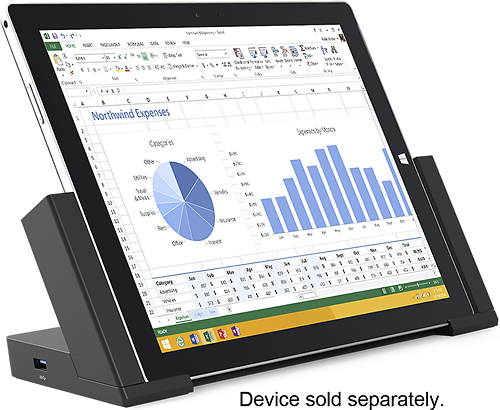
||Posted .This reviewer received promo considerations or sweepstakes entry for writing a review.This docking station has the surface sitting at a good angle for both using as a display and as a touchpad if connected to a larger display. Ports are in the back and the USB3 on the side of the surface is still accessible. Drop the Surface into a slot and slid the sides of the docking station inward to engage.
I would recommend this to a friendRated 4 out of 5 stars
Docking station - Does What it States!
||Posted .This reviewer received promo considerations or sweepstakes entry for writing a review.Need this for a business application? This is the product for you, great for extending your desktop to extra monitors.
I would recommend this to a friendRated 5 out of 5 stars
Essential
||Posted .This reviewer received promo considerations or sweepstakes entry for writing a review.I'm going to begin modeling a new workstation idea where my Surface Pro 3 is my primary workstation that I use everywhere (BYOD). While unlocked, I'll be my personal self on wireless but docked, I'm internal to my work network and can run local admin tools and RDP. I need to chain two monitors to get my normal desktop experience plus a proper wireless mouse.
I would recommend this to a friendRated 5 out of 5 stars
Great for a desktop replacement
||Posted .This reviewer received promo considerations or sweepstakes entry for writing a review.The Docking Station is what made the Surface Pro 3 i7 a desktop replace for me. It allows two external monitors to work at the same time (one on the docking station and the second on the Surface).
I would recommend this to a friend- Cons mentioned:Video quality
Rated 3 out of 5 stars
Not Bad - But not exactly what i had hoped
||Posted .This reviewer received promo considerations or sweepstakes entry for writing a review.It could have been my oversight when looking at the Surface 3 docking station but didn't realize how bad the video was going to be on my 2 25" monitors. The max resolution is much lower than the recommended size. That makes the whole size thing bigger and rather fuzzy. it's not unreadable but not even close to my desktop. I guess I should have realized but didn't...just so others know.
No, I would not recommend this to a friend - Pros mentioned:Usb ports
Rated 5 out of 5 stars
Works great with surface
||Posted .This reviewer received promo considerations or sweepstakes entry for writing a review.Works great with surface and allows me to have more usb slots
I would recommend this to a friend - Pros mentioned:Ease of use
Rated 4 out of 5 stars
Completes the package
||Posted .This reviewer received promo considerations or sweepstakes entry for writing a review.Really completes the surface pro 3 experience with the docking station, keyboard and external dvd drive.
I would recommend this to a friend Rated 3 out of 5 stars
wanted for hdmi
||Posted .This reviewer received promo considerations or sweepstakes entry for writing a review.I got this so I could dock my tablet but I took back when I found out you still have to by the lighting to hdmi adapter.
No, I would not recommend this to a friendRated 5 out of 5 stars
Phibulls
||Posted .This reviewer received promo considerations or sweepstakes entry for writing a review.Docking station is great. It really allows you to turn a tablet into a full work station. I have two monitors connected to hit with no issues. Sound leaves a little to be desired but that's the only flaw I have found. I've had the station for more than a year now. No other issues.
I would recommend this to a friend- Pros mentioned:Ease of use
Rated 4 out of 5 stars
Excellent home for Surface
||Posted .This reviewer received promo considerations or sweepstakes entry for writing a review.Easy to use. The surface slips right in. I don't have to connect everything manually.
I would recommend this to a friend Rated 5 out of 5 stars
Great Improvement of the dock for Pro 2
||Posted .This reviewer received promo considerations or sweepstakes entry for writing a review.My favorite things about the dock is that is does not use the usb slot to connect. Instead, it uses the power slot on the right side of the Surface. Also, there is a magnetic connection on the left side of the dock for the stylus.
I would recommend this to a friendRated 5 out of 5 stars
Awesome
||Posted .This reviewer received promo considerations or sweepstakes entry for writing a review.This model is amazingly fast and the screen is great. The pen works with OneNote so well I only take notes on my screen. I would recommend this to anyone that needs a laptop but also wants some tablet functionality.
I would recommend this to a friendRated 5 out of 5 stars
Great docking station for a great device.
||Posted .This reviewer received promo considerations or sweepstakes entry for writing a review.This is a great docking station for my surface pro 3. I have an external monitor plugged in to it as well as a full size keyboard, etc. really a must own if you want to use your surface pro 3 as a desktop computer.
I would recommend this to a friendRated 3 out of 5 stars
Basic functionality
||Posted .This reviewer received promo considerations or sweepstakes entry for writing a review.I don't use it as much as I thought I would, probably more due to the versatility of the SurfacePro3.
I would recommend this to a friendRated 4 out of 5 stars
works well but could be better
||Posted .This reviewer received promo considerations or sweepstakes entry for writing a review.microsoft missed a few things when they built this dock i have two monitors running but it wasnt easy to set up. they should have added another video port. when docking, you have to make sure its clicked in all the way. occasionally it doesn't connect without firmly locking it in.
I would recommend this to a friendRated 5 out of 5 stars
Great accessory to have!
||Posted .This reviewer received promo considerations or sweepstakes entry for writing a review.I use the docking station at my desk when I need to do a lot of work to requiring extra USB accessories I attach a monitor to my Surface using the mini video port to VGA or HDMI adapter. It is very sturdy, lightweight and works great!
I would recommend this to a friendRated 5 out of 5 stars
Best Accessory for the Surface
||Posted .This reviewer received promo considerations or sweepstakes entry for writing a review.The simplicity in design and well thought out user features are great. Set your Surface down and push the sides in and you're going. The magnetic pen support is great! Well worth the investment to turn your Surface into a true work station.
I would recommend this to a friend