Customer Ratings & Reviews
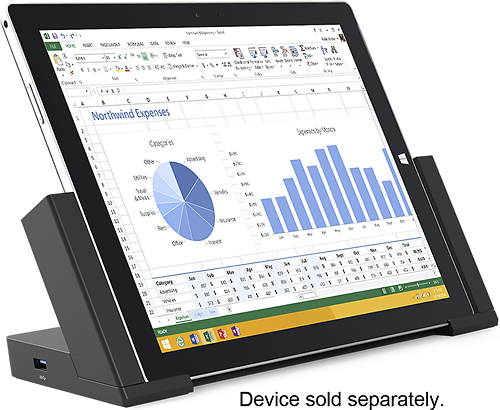
- Model:
- 3Q9-00001
- |
- SKU:
- 7524004
Customer reviews
Rating 4.6 out of 5 stars with 480 reviews
(480 customer reviews)to a friend
Customers are saying
Customers consistently note the Surface Pro 3 Docking Station's ease of use and abundance of USB ports as significant advantages. Many appreciate its size and the ability to charge the Surface Pro 3 while docked, although some find the price to be a drawback. Concerns regarding compatibility with certain devices and accessories were also raised by some users.
This summary was generated by AI based on customer reviews.
- Pros mentioned:Ease of use
Rated 5 out of 5 stars
A True Laptop/Desktop Replacement
Posted .This reviewer received promo considerations or sweepstakes entry for writing a review.This docking station is a MUST if you're going for what Microsoft advertises as a "desktop replacement". I have one at home and one at work - taking my Surface between the 2 as my only computer is SUPER easy thanks to this dock. If you're only using your SP3 as a tablet don't bother with the expense but if you're like me having 1 at home and work is TOTALLY worth it!
I would recommend this to a friend - Pros mentioned:Ease of use
Rated 5 out of 5 stars
Good, stable docking station
Posted .This reviewer received promo considerations or sweepstakes entry for writing a review.The docking station was very easy to set up by sliding apart to allow insertion of the Surface Pro 3. The angle of display is perfect and the magnetic strip to hold the pen was a good idea. Would be better if it had a few more ports. Looks like a second computer on my desk top without taking up a lot of space.
I would recommend this to a friend - Cons mentioned:Price
Rated 5 out of 5 stars
Good dock
Posted .This reviewer received promo considerations or sweepstakes entry for writing a review.A little pricey but worth it if you want to connect the surface to a monitor and other peripherals. I have my wireless keyboard, DVD/Blu-ray drive, and monitor hooked up to it. This makes it easy to switch between paying bills in the office and having it in the living room browsing the internet.
I would recommend this to a friend - Pros mentioned:Ease of use
Rated 5 out of 5 stars
Dock fits perfect
Posted .This reviewer received promo considerations or sweepstakes entry for writing a review.The dock fits nicely. Its easy to remove and dock the surface it also allows for the keyboard to stay attached
I would recommend this to a friend - Pros mentioned:Ease of use
Rated 5 out of 5 stars
Easy set up and works great
Posted .This reviewer received promo considerations or sweepstakes entry for writing a review.I purchased the docking station since sometimes the Surface Pro Fonts on some web apps are too small, so I wanted to hook up a monitor and keyboard. Easy setup and works great!
I would recommend this to a friend - Pros mentioned:Usb ports
Rated 5 out of 5 stars
Vastly better than individual attachments!
Posted .This reviewer received promo considerations or sweepstakes entry for writing a review.The Surface Pro 3 docking station really allows you to take the tablet pro. With only the addition of the monitor attachment, you can convert the fantastic tablet to a desktop unit. It contains extra ports for multiple 2.0 and 3.0 USB drives, charges your Surface Pro 3, and eliminates the need for multiple attachments. When I shopped for this docking station, I considered the multiple attachments and wires that I would need if I ever intended to use the Surface Pro 3 as my main computer, eliminating my desktop and laptop. The docking station makes that decision easy, and with the extra ports, even allows for the use of an expanded keyboard for the serious Office user. Its price was easily justified, as it replaced the many attachments and cables which would be necessary in its place.
I would recommend this to a friend - Pros mentioned:Ease of use, Usb ports
Rated 5 out of 5 stars
Great accessory
Posted .This reviewer received promo considerations or sweepstakes entry for writing a review.This is a great accessory if your looking to attached a monitor, keyboard and mouse to a Surface Pro 3. It's easy to use, has lots of ports, and works flawlessly. The magnetic pen holder on the side is a nice addition.
I would recommend this to a friend Rated 4 out of 5 stars
Frustrate at the beginning
Posted .This reviewer received promo considerations or sweepstakes entry for writing a review.I have read a lot of reviews before I bought my docking station from Best Buy. Most of them are excellent, only find out when I got it, the mini display port didn't work. I had called Best Buy.com explain the problem and was told to exchange the docking station. No problem, I went to the store the next day and exchanged it, hoping just that one I received was a defective product. That night, put the whole thing together, same problem, the mini display port didn't work and it didn't charge my device when docking. So frustrated, called Best Buy store this time, told me to go in and exchange another one, 2 in a row didn't work, doesn't make sense. Ask about anything they know about the product, no they don't. Finally, gave up on Best Buy and check Microsoft.com support. Only found out, this is very common issue on the docking station, all I need to do is to update the firmware on the system, but the device needed to be placed on the docking station when updating. After couple hours on the system update, everything works perfectly now. One more tips, the device has to be more than 50% charged battery, otherwise, the update won't start, I suggest to charge up the device 100% before starting the process. Hope this review can help someone else to set up the station easier. If I had know what to do at the beginning to set it up, it will get 5 stairs.
I would recommend this to a friendRated 5 out of 5 stars
Works correctly out of the box
Posted .This reviewer received promo considerations or sweepstakes entry for writing a review.Works correctly out of the box. I purchased this SP3 docking station from Best Buy because it is an authorized seller for Microsoft Surface. Reviews from other online vendors indicated runs of defective units being sold by third parties at lower prices. With Best Buy points and a Best Buy email coupon the net price was the lowest available so it was a win-win.
I would recommend this to a friend- Pros mentioned:Ease of use
Rated 5 out of 5 stars
Works as it should
Posted .This reviewer received promo considerations or sweepstakes entry for writing a review.Great, works as described with no issue. Great product!
I would recommend this to a friend - Pros mentioned:Ease of use
Rated 4 out of 5 stars
Good docking solution
Posted .This reviewer received promo considerations or sweepstakes entry for writing a review.Easy to use, would be nice if it had an additional minidisplay port.
I would recommend this to a friend Rated 5 out of 5 stars
Nice docking station
Posted .This reviewer received promo considerations or sweepstakes entry for writing a review.I really like the small footprint of the docking station. It is nice to have the keyboard, monitor, printer etc attached. It would be nice to have more monitor connection options as I have additional video adaptors to be able to make the connection.
I would recommend this to a friendRated 5 out of 5 stars
Works really well - works with 2 more monitors
Posted .This reviewer received promo considerations or sweepstakes entry for writing a review.Separate mini-HD ports on Docking Station and Surface. Two external monitors work with it. Also, I can leave the sleeve on my Surface, and it will work with the docking station. Really makes the Surface even more useful.
I would recommend this to a friend- Pros mentioned:Usb portsCons mentioned:Price
Rated 5 out of 5 stars
Surface Pro 3 Dock
Posted .This reviewer received promo considerations or sweepstakes entry for writing a review.Definitely worth it for me. I love the extra ports, the stand and the charging ability. I just wish it was cheaper
I would recommend this to a friend Rated 5 out of 5 stars
Awesome docking station!
Posted .This reviewer received promo considerations or sweepstakes entry for writing a review.Simple, easy to use and powerful. It charges my SP and allows me to use dual displays while having removable storage.
I would recommend this to a friendRated 4 out of 5 stars
Great buy for under 100$
Posted .This reviewer received promo considerations or sweepstakes entry for writing a review.bought it on sale. the Belkin HDMI connector doesn't fit properly. But nice to have.
I would recommend this to a friend- Pros mentioned:Ease of useCons mentioned:Price
Rated 1 out of 5 stars
Viewing angle too steep...
Posted .This reviewer received promo considerations or sweepstakes entry for writing a review.Nice dock but the fixed viewing angle of 64 degrees is too steep for anyone over 6' tall. When they go to all that trouble to create an adjustable kickstand for the SP3, why do they create a non-adjustable docking station? Just dumb. Plus $200 for a piece of plastic with no moving parts? C'mon MS, get serious. 5 stars for functionality but the price and dumb viewing angle knocks it down to 1 star.
No, I would not recommend this to a friend Rated 5 out of 5 stars
Great dock for my office setup
Posted .This reviewer received promo considerations or sweepstakes entry for writing a review.This is an extremely convenient device, I get into work, snap the sides of the dock closed on the my surface and get to work with all my peripherals connected. The amount of ports available and the gigabit Ethernet make this a must have.
I would recommend this to a friendRated 1 out of 5 stars
This product doesn't last very long
Posted .This reviewer received promo considerations or sweepstakes entry for writing a review.I have two of these docking stations, one at home and one at my office. After about 6 months of use, the home docking station failed completely. The one at my office (which is less than a month old) is showing symptoms of impending failure. I don't trust it. I will be going back to using a stupid hub hanging off the side of my Surface Pro 3, which will probably fail because it's a terrible design to have something dangling off the side of my computer in the USB slot. This product is way overpriced.
No, I would not recommend this to a friendRated 5 out of 5 stars
Excellent Product. Great Buy, errr no a BEST BUY!
Posted .This reviewer received promo considerations or sweepstakes entry for writing a review.Excellent Product. Great Buy, errr no a BEST BUY!!!! A++++++++++++ =)
I would recommend this to a friend