Customer Ratings & Reviews
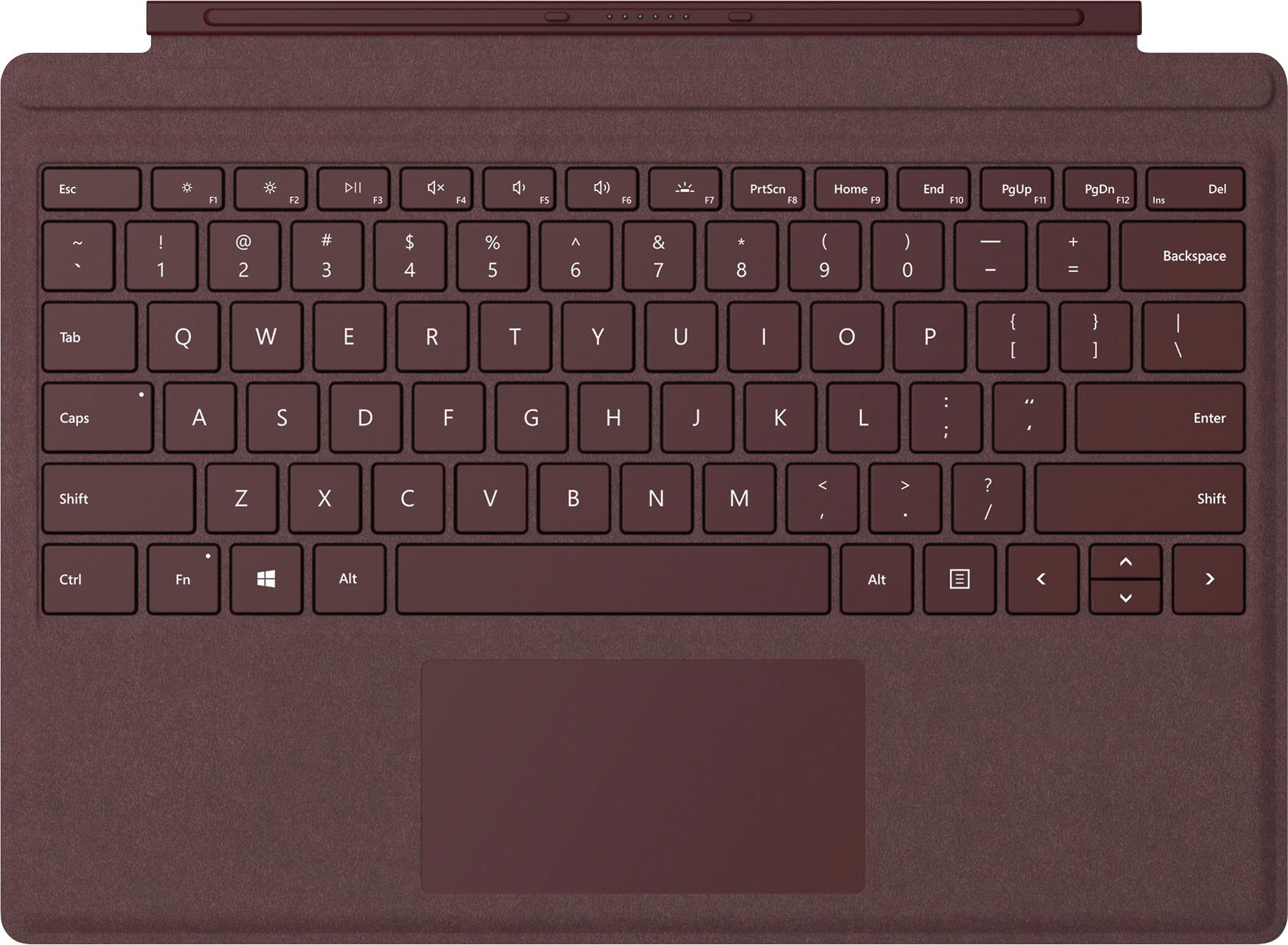


- Model:
- FFP-00041
- SKU:
- 5859009
Rating by feature
- Value
Rating 4.4 out of 5 stars
- Quality
Rating 4.7 out of 5 stars
- Ease of Use
Rating 4.8 out of 5 stars
Customers are saying
Customers are impressed with the Surface Pro Signature Type Cover's keyboard quality and ease of use, frequently praising its lightweight design and attractive colors. While some users wish for a number pad and express concerns about the material's susceptibility to marking, the overall positive feedback highlights its compatibility and protective qualities. The price point is a recurring negative comment. Many appreciate its convenient size and how well it protects their device.
This summary was generated by AI based on customer reviews.
- Pros mentioned:Ease of use, Keyboard quality
Great keyboard
||Posted .This reviewer received promo considerations or sweepstakes entry for writing a review.The keyboard is a must for the surface. This one is easy to snap on and off and very responsive to touch. It also provides support when you fold it up.
I would recommend this to a friend - Pros mentioned:Keyboard quality
Needed to replace my old one, great keyboard
||Posted . Owned for 3 weeks when reviewed.This reviewer received promo considerations or sweepstakes entry for writing a review.Great replacement and the right price, too (open box item, looked brand new). My 4-year-old keyboard was no longer working and the replacement was a fresh reminder for why I liked the Surface and keyboard so much to begin with. The keys have great travel, light up, are good sized for my hand and I love the soft backside when carrying it.
I would recommend this to a friend - Pros mentioned:Keyboard quality
Keyboard and cover for Microsoft Surface Pro 7
||Posted . Owned for 6 months when reviewed.This reviewer received promo considerations or sweepstakes entry for writing a review.Love, love, love the keyboard and cover! Works perfectly with my Microsoft Surface Pro 7!
I would recommend this to a friend - Pros mentioned:Keyboard quality
Really astounding keyboard
||Posted . Owned for 2 weeks when reviewed.This reviewer received promo considerations or sweepstakes entry for writing a review.I went into the migration from a laptop to a Surface Pro with a lot of concern about the keyboard, as I type a ton and I'm fussy about the keyboard under my fingers. The main reason I won't use a MacBook is I hate the feel and spacing of the keys (YMMV). This Surface Pro keyboard is just amazing, I genuinely enjoy typing on it and rarely make mistakes along the way. For the form factor, the width, depth and spacing of the keys is perfect. The feel is the best part, it has a true mechanical feel and sound.
I would recommend this to a friend - Pros mentioned:Color, Keyboard qualityCons mentioned:Price
Better than Apple's Smart Keyboard for iPad
||Posted .This reviewer received promo considerations or sweepstakes entry for writing a review.I like the feel of the keyboard, both the keys and how far they depress, as well as the overall feel of the Alcantara. Is it enough to justify an extra $60? No, but you can often find it down to around $120 and then the price isn't as hard to swallow. I tried a couple of the different colors, but in the end I chose the platinum color. It's close to the color of the magnesium body and neutral.
I would recommend this to a friend - Pros mentioned:Keyboard quality, Weight
Excellent performance.
||Posted . Owned for 5 months when reviewed.This reviewer received promo considerations or sweepstakes entry for writing a review.It’s just great. Easy hook up and great response. I highly recommend this product and Servpro for college students. Light and easy to handle.
I would recommend this to a friend - Pros mentioned:Keyboard quality
replacement was easy! works perfectly!
||Posted . Owned for 1 month when reviewed.This reviewer received promo considerations or sweepstakes entry for writing a review.I spilled a cup of coffee on my original type cover. Yikes! I immediately went to the Best Buy website to look for a replacement. I was so relieved to find exactly what I needed. The replacement works perfectly. I even found an open box option and saved a little money. I am a very satisfied customer!
I would recommend this to a friend Simple, basic necessity for a Surface Pro
||Posted .This reviewer received promo considerations or sweepstakes entry for writing a review.I've owned a Surface or Surface Pro device since the Surface 3 LTE was released, and have been happy with each in its turn. However, I continue to be mystified by Microsoft's choice to sell a solid tablet/laptop replacement device (such as the current Surface Pro) completely hamstrung as a bare-box item, which is almost non-functional as it comes. As anyone who owns or has ever used a Surface/Surface Pro can tell you, a keyboard is essential on these devices. The ability to use the surface pen to hand-write is wonderful, and the on-screen keyboard HAS improved, but a keyboard/type cover is an absolute must for any serious Surface user. Having owned multiple versions of the Surface Type Cover, I believe Microsoft has finally finished tweaking the design of these keyboards and has it where it needs to be. While the old keyboards tended to feel a bit clunky, with poor key travel/sensation, awful backlighting options, and a touchpad that was both too-small and too sensitive, these issues have been fixed in the current version. Additionally, the keyboard now has "dedicated" buttons for adjusting the Surface's screen brightness, as well as the keyboard's backlighting, something which earlier versions lacked. These buttons are the primary usage for the function keys, which does require you to be cognizant of the state of the "Fn" button lock if you're inclined to using keyboard commands to close windows or applications. There are two issues which I've noticed with this version of the Surface Pro Type Cover. The first is the habit of the surface to turn on auto-rotate mode and attempt to set itself to tablet mode, even when the keyboard is connected, when I first hit the space bar, as when waking up the screen. It seems like the Surface Pro LTE-A (2017 model) is acting like there's a keyboard shortcut for rotation mode or tablet mode tied to spacebar some of the time, but I can't find any evidence of such a command listed anywhere. Finally, there is only a single 'Control' key on the left side of the keyboard. The key layout is Control, Fn Lock, Windows, Alt, Spacebar, Alt, Menu Key (right click), arrows. I would really have valued a control key on the right side of the keyboard as well, perhaps in place of the rarely-used menu key. Overall this is a solid Surface Pro Type Cover which fits the most recent versions of the Surface Pro (4 & 2017), and will work with the Surface Pro 3. This version lacks the current Alcantara fabric covering, which makes it easier to wipe clean (the Alcantara is prone to staining). It also does not have the fingerprint scanner, which I have not found necessary given the accuracy of the IR camera. If you have a Surface Pro, you need a keyboard - this one is well worth the purchase.
I would recommend this to a friendBrand response from MicrosoftOutreachTeam
Posted .Hi there,
Wow! We appreciate you sharing such a detailed and thoughtful review. Thanks for calling out the improvements made since the previous models. To change the settings for tablet mode, visit the Windows 10 settings under "Tablet Mode" to control when if ever your device switches into tablet mode. We appreciate your continued investment in the Surface line. We'll be sure to forward your feedback to our team for review.
All the best,
Amanda
Surface Customer Care
- Pros mentioned:Keyboard quality, Weight
Great cover/keyboard
||Posted .This reviewer received promo considerations or sweepstakes entry for writing a review.The surface pro cover is very light and soft. The keyboard is great and the keys are soft. Great item and it works great with the new surface pro 6.
I would recommend this to a friend - Pros mentioned:Ease of use, Keyboard quality
Love the material feel
||Posted .This reviewer received promo considerations or sweepstakes entry for writing a review.The Surface Pro Signature Platinum detachable keyboard in the Alcantara material has a great feel and attaches to the Surface Pro easily and is very functional.
I would recommend this to a friend - Pros mentioned:Ease of use, Keyboard qualityCons mentioned:Price
Great and stylish!
||Posted .This reviewer received promo considerations or sweepstakes entry for writing a review.I love the color and really like the feel and spacing of the keys. It's extremely easy to attach to the Sun. There are magnets at the top of the keyboard that snaps into place on the Surface. Really strong hold. The keyboard is very comfortable. A little pricey: makes it hard to recommended to someone because of the costs, but if it drops to $80 I would say go for it.
I would recommend this to a friend - Pros mentioned:Ease of use, Keyboard quality
Great attachment for my surface
||Posted . Owned for 3 months when reviewed.This reviewer received promo considerations or sweepstakes entry for writing a review.Perfect for my needs when on the go. The keyboard is easy to attach and doubles as a screen protector.
I would recommend this to a friendBrand response from MicrosoftOutreachTeam
Posted .Hi – We're glad that you're a fan of its functionality, both as a keyboard and screen protector. We hope you continue to enjoy using it. Erica, Microsoft Outreach Team
- Pros mentioned:Keyboard quality
Great keyboard accessory for Surface Pro7
||Posted . Owned for 1 month when reviewed.This reviewer received promo considerations or sweepstakes entry for writing a review.This is a great accessory keyboard for the Microsoft Surface Pro 7... feels good when typing on it. You don't have to charge the keyboard just connect it to the Surface Pro 7 and you're good to go. It's not back-lit but that's okay because I rarely type in a dark room. The weight of the keyboard is great and not too heavy. Feels and weighs like a premium keyboard. Functions well and works well with the Surface Pro. Definitely a must have for your Surface Pro!!!!
I would recommend this to a friend - Pros mentioned:Keyboard quality
Business Owner
||Posted . Owned for 1 month when reviewed.This reviewer received promo considerations or sweepstakes entry for writing a review.I replaced my broken Surface Pro Signature Cover Pro 7+ with ease from Best Buy. The price was very reasonable. The new keyboard works perfect and it boosts the usability of my laptop. I love the light weight and solid keys with great touch response. I can type much faster with this keyboard, and the touch pad is very responsive.
I would recommend this to a friend - Pros mentioned:Keyboard quality, Weight
Sleek keyboard
||Posted . Owned for 1 month when reviewed.This reviewer received promo considerations or sweepstakes entry for writing a review.This keyboard has a nice magnetic click feature to attach to the surface pro tablet and is extremely lightweight.
I would recommend this to a friend - Pros mentioned:Keyboard quality, Weight
Great keyboard
||Posted .This reviewer received promo considerations or sweepstakes entry for writing a review.This keyboard is lightweight and works awesome with the Microsoft surface pro. Also acts like a case as it is sturdy and helps to protect the screen
I would recommend this to a friendBrand response from MicrosoftOutreachTeam
Posted .Hi Gary,
Thanks for letting the community know about how you love your new Surface Pro Type Cover. We're so glad that you are enjoying the lightweight design, and extra protection this adds to your Surface device.
Kind regards,
Jessica
Surface Customer Care
- Pros mentioned:Keyboard quality
Surface notebook
||Posted . Owned for 3 weeks when reviewed.This reviewer received promo considerations or sweepstakes entry for writing a review.Great product, lightweight but sturdy, perfect size for student, love that you can remove the keyboard!
I would recommend this to a friendBrand response from MicrosoftOutreachTeam
Posted .Hi – We're thrilled that you love the durability and functionality of your Surface Pro Signature Type Cover. We hope it continues to serve you well. Best, Erica Surface Customer Care
- Pros mentioned:Ease of use, Weight
Nice addition to Surface Pro
||Posted . Owned for 1 month when reviewed.This reviewer received promo considerations or sweepstakes entry for writing a review.It works very well, it's lightweight, and it is easy to type on.
I would recommend this to a friend - Pros mentioned:Keyboard quality
Impressive keyboard and trackpad
||Posted . Owned for 8 months when reviewed.This reviewer received promo considerations or sweepstakes entry for writing a review.Microsoft has a wonderful design for the Surface Pro Type Covers. The keys are a pleasure to type on. The touchpad, while small, is very responsive and just feels right. This is my second Surface and second type cover. The first unit is still in excellent condition after 4 years of use and now being used by a relative. I also have a 12.9 iPad with the Smart Keyboard Folio (NOT the magic keyboard). The Microsoft Type Cover is better than the Apple keyboard folio in every way.
I would recommend this to a friend - Pros mentioned:Keyboard qualityCons mentioned:Price
Nice keyboard/cover
||Posted . Owned for 1 month when reviewed.This reviewer received promo considerations or sweepstakes entry for writing a review.Nice dual purpose keyboard and cover. It's not too expensive but probably should be standard with the computer.
I would recommend this to a friend