Customer Ratings & Reviews


- Model:
- 8X6-00021
- SKU:
- 6478000
Rating by feature
- Value
Rating 4.4 out of 5 stars
- Quality
Rating 4.8 out of 5 stars
- Ease of Use
Rating 4.8 out of 5 stars
Customers are saying
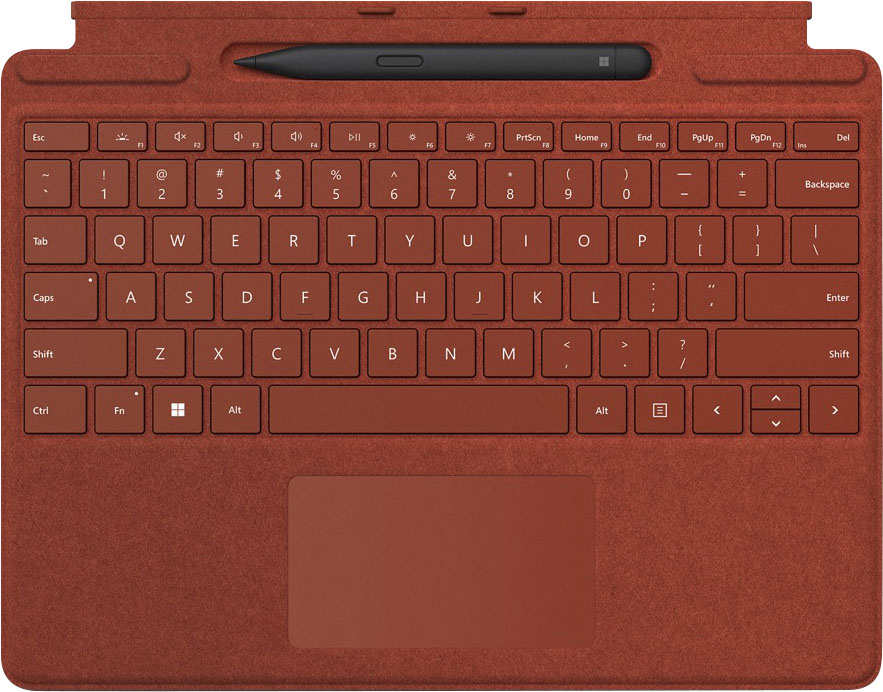
Customers are pleased with the keyboard quality, which feels like a traditional keyboard, and the overall design and connectivity of the product. The portability of the slim style is also a plus for many users. However, some customers have noted that the size is thinner than they expected.
This summary was generated by AI based on customer reviews.
- Pros mentioned:Keyboard quality

Awesome Accessories
|Posted .This reviewer received promo considerations or sweepstakes entry for writing a review.This keyboard is an awesome accessory to add to the surface pro. It includes a slot for the pen for storage and when connected to the surface the top magnetically snaps to the top of the screen to securely hid the pen when not in use. The buttons and touch pad feel responsive and clicky like they should and the keyboard itself acts like a cover for the screen when not in use. You can even remove the keyboard if you prefer to use the surface pro as a tablet. The keyboard and pen combo are a little pricey but worth it if you prefer to use the surface pro as a mini laptop. I would definitely recommend this to any new buyer looking to add an additional accessory.
I would recommend this to a friendBrand response from MicrosoftOutreachTeam
Posted .Hi – Thanks for sharing; we hope you continue to enjoy using your new Surface Pro Signature Keyboard with Surface Slim Pen 2. Erica, Microsoft Outreach Team

- Pros mentioned:Keyboard quality
A worthy accessory investment
|Posted .This reviewer received promo considerations or sweepstakes entry for writing a review.If you are using the Microsoft Surface Pro 9, run out to the store and pick up the Signature Keyboard with Slim Pen 2 immediately. Don’t bother to order it online unless you can get it shipped that same day. It is a game changer for the 2-in-1 laptop if you want to do any serious typing. That is because a keyboard and pen are accessories that do not come in the box with your purchase of the Surface Pro 9. The Signature Pro keyboard is specifically designed for the Surface Pro, so you know it will fit and connect effortlessly. Even better, the pen recharges in the tray when you are not using it. The pen stays secure and that is a huge priority for me. My last tablet had a pen that was housed on the outside of the keyboard making it easy to fall out. As such, I lost it once while traveling. Replacing the pen was so expensive. When open and in use, a small section of the Signature Keyboard folds over the pen tray trapping the pen so it cannot fall out unless you drop the laptop/keyboard. Microsoft listened to feedback from users when they developed this option. I connected the keyboard before I even powered up and it was not recognized during my initial computer set-up. To troubleshoot, I ended up removing the keyboard and re-attaching it while also rebooting the computer. That worked like a dream! The Signature Keyboard is not as large as my laptop full keyboard, but it is still a full mechanical keyset with backlit keys and a large trackpad. I found the key positioning comfortable, and it comes with the quick keys I use most frequently though some are in a different spot than what I am accustomed to. Once I had set up the Surface Pro 9, I was prompted to calibrate the pen and was asked to indicate whether I was left- or right-handed. As a left-handed person living in a right-hand dominated world, it was so nice to be treated like a first-class citizen and have my experience optimized! The keyboard is attractive, sturdy. It has the appearance of a fabric exterior, but it isn’t which means it is easy to clean the fingerprints, dust, and crumbs. What I don’t know is if the separate Signature Keyboard and separate pen are identical to this all-in-one keyboard/pen purchase. If they are, it would be smart to check out the prices for each and buy the cheapest combination since items do periodically go on sale.
I would recommend this to a friend Missing parts
||Posted . Owned for less than 1 week when reviewed.This reviewer received promo considerations or sweepstakes entry for writing a review.Was missing the pen, as this was an Open-Box (Excellent) purchase. No way to give an honest review when I was missing parts.
No, I would not recommend this to a friend2md order missing PEN
||Posted .This reviewer received promo considerations or sweepstakes entry for writing a review.This is the 2nd order that i made for the Keyboard with Slim Pen. and the 2nd order that has been missing the PEN. both of these orders were OPEN BOX Excellent. I do not consider missing the pen EXCELLENT.
No, I would not recommend this to a friendPoor quality for far too much money
||Posted .This reviewer received promo considerations or sweepstakes entry for writing a review.Buyer beware. Mine stopped working four months after purchase.
No, I would not recommend this to a friendRegretful
||Posted . Owned for 3 months when reviewed.This reviewer received promo considerations or sweepstakes entry for writing a review.Just 3 months and the keyboard doesn't work anymore and is terrible when you need it to work!! I regret buying it
No, I would not recommend this to a friendHorrible
||Posted . Owned for 1 year when reviewed.This reviewer received promo considerations or sweepstakes entry for writing a review.Stopped working after 15 months. So, warranty period is over, good luck!
No, I would not recommend this to a friendFailed just after 2 weeks
||Posted . Owned for 3 weeks when reviewed.This reviewer received promo considerations or sweepstakes entry for writing a review.Failed at 16 days no store warranty for even thirty days unless you pay extra.
No, I would not recommend this to a friend- Pros mentioned:Keyboard quality
A must have accessory for your Surface Pro
|Posted .This reviewer received promo considerations or sweepstakes entry for writing a review.The Surface Pro Signature Keyboard is an excellent accessory to the Surface Pro and makes using it a much more enjoyable experience. This keyboard is relatively straight forward when it comes to use on the Surface Pro. I am using my keyboard with the Surface Pro 9. It uses proprietary connectors to attach to the Surface Pro and holds itself with a magnet so it doesn't just come apart. Once attached to the Surface Pro, it will automatically fold over the stylus pen to keep it secure. The stylus is attached by a magnet as well and actually holds in the pocket pretty well. The pen is battery powered and the stylus pocket charges the pen when not in use and the keyboard is turned on. It is very precise when touching the screen and tracking is quick. The rest of the keyboard essentially is like any other keyboard. The keys are responsive and have a nice press to them. It is very sturdy and well constructed. The touchpad is a standard size and clicks well. Tracking is also accurate on the touchpad. One of the main things to remember is you will need to push the Fn key and the F1 key to wake the keyboard up and power up the stylus. However, pushing it again does not power off the keyboard and it will stay powered up until you shut off the Surface Pro. I do wish that it would have an off button. When closing the keyboard over the Surface Pro, it turns into a really nice folio case and screen protector. Again it is a solid design and provides great protection. Overall I highly recommend getting this keyboard for your Surface Pro. With it providing a keyboard, mouse, stylus, and Folio case, it is hard to pass up and makes life much easier using the Surface pro.
I would recommend this to a friend - Pros mentioned:Design, Keyboard quality
Essential accessory that's very pleasant to use
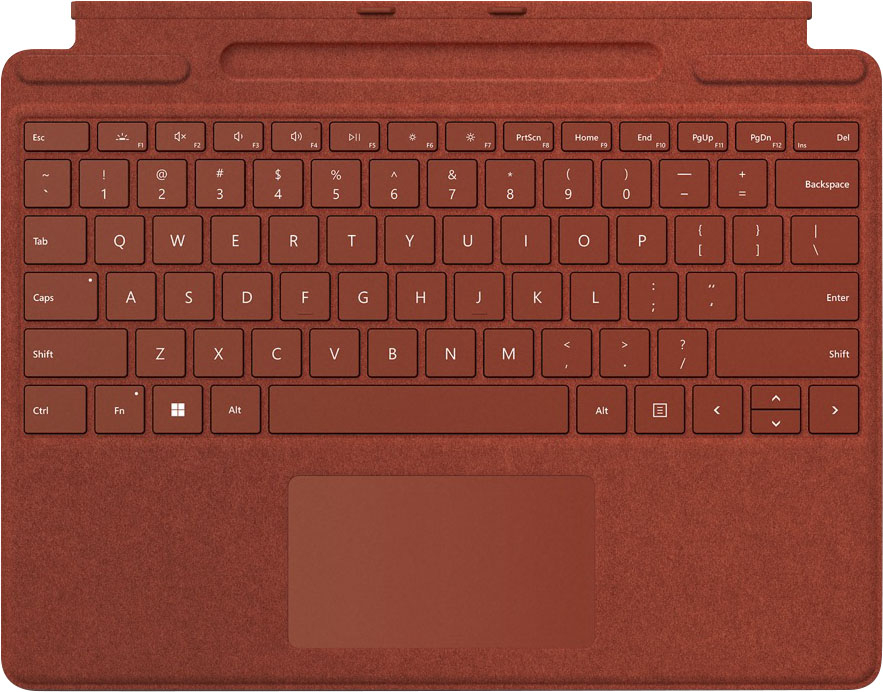
|Posted .This reviewer received promo considerations or sweepstakes entry for writing a review.The surface pro keyboard in my mind is an absolutely essential device to get the most out of the surface pro 9 tablet plus it actually feels very nice to boot. To start it has a very nice textured feel that's different between the bottom side and the top side and when docked with the tablet makes the whole package seem as an integrated unit. Typing on the keyboard feels very similar to typing on other premium laptop keyboards, actually maybe even a little better. The key size is at just the right shape and height, not too big or small. I appreciate the media controls on the function keys as well as the integrated backlight for the keys which is amazing and much better than the backlight on some of my other laptops which fails to start properly half the time. The trackpad itself is very nice. Easy to use and smooth operation, absolutely no issues with it. The keyboard also comes with the surface stylus and has a little cradle for the pen to charge in and you can orient the keyboard to even show the cradle or tuck it in for super clean look with the tablet and to keep it safely stored. This is forward thinking function and design and though I really haven't any use for the stylus as of yet, 3ds emulation with the touch screen on the surface pro comes to mind. The only downside I can say of the product is that it shouldn't be an optional accessory by default and should automatically comes with the surface pro tho I could definitely see having it be available for replacement or maybe a different color way. Other than that though, I've had a fantastic experience and Microsoft really nailed the design of the device here.
I would recommend this to a friend Terrible Ordering Experience
||Posted . Owned for 3 weeks when reviewed.This reviewer received promo considerations or sweepstakes entry for writing a review.The item ordered was wrong in color and type. I had to return it.
No, I would not recommend this to a friend- Pros mentioned:Keyboard quality
Perfect Addition to Surface Pro X
|Posted .This reviewer received promo considerations or sweepstakes entry for writing a review.I recently received a Surface Pro X device and added the Microsoft Surface Pro Signature Keyboard with Slim Pen 2. This is an affordable option to turn the Surface into as close to a laptop as wanted. I am an on-the-go professional and need both a tablet and a "laptop" for working. This keypad is a game changer for working on the go. It easily attaches to the bottom edge of the Surface with magnets and works as a screensaver when closed up. The Slim Pen 2 also sits magnetically in a tray on the top edge of the keyboard. It charges in the tray and the keyboard can be folded to hide the pen and add an angle to the keyboard. Overall Impressions - I had never used a Surface or Surface Keyboard in the past, so have not used older version keyboard. To me, this keyboard is solid enough to be used on the go whether on a workspace or lap. It's a standard keyboard layout, so nothing new to learn. The haptic feel of the keys is responsive yet touch is light and smooth. The trackpad is a good size and also provides great haptic response on clicking. The Surface Slim Pen 2 provides an option for using the touchscreen without marking it up...my screen remained clean over a week's worth of usage. I've started using collaboration tools that support a pen, so it's a great option to have right at your finger tips. The Alcantara material reminds me of a high-end car interior. It's smooth and comfortable to the touch and protects the screen when not in use. Pros: - Easy installation/connectivity with Surface Pro X unit. - Ease of setup for keyboard and pen - Ability to create a "laptop" on the fly - Haptic response of keys and touchpad are responsive and light to the touch - Use the pen instead of your finger, keeping the screen clean! Cons: - Haven't found any yet! Overall the Surface Pro Signature Keyboard with Slim Pen 2 is a great additional to the Surface Pro X and I would recommend purchasing it to anyone wanting keyboard support on the go.
I would recommend this to a friend - Pros mentioned:Keyboard quality
The Perfect Keyboard for your Surface Tablet
|Posted .This reviewer received promo considerations or sweepstakes entry for writing a review.I chose this keyboard to go with my Surface Pro 9. This is my first Surface tablet, so I needed a keyboard for it. This one is very nice! I like the pen that comes with it and how everything charges from the tablet. The keys have a decent feel – as good as any notebook computer I’ve used – and are well-spaced and intuitive. The pen works well, too, with just enough movement of the tip to provide some feedback when writing. I like the Alcantara surfaces as they feel nice to the touch and also give the tablet a soft backing when setting it down on a table. The magnets that hold the keyboard to the tablet are very strong. It makes it very easy to attach the keyboard with just one hand. All I have to do is hover the Surface over the keyboard and it magnetically finds it and snaps together perfectly. The magnets on either side of the pen tray do a great job of holding that edge against the surface giving the keyboard a slight angle which makes typing easier. I like that the Fn key works both as a toggle and a momentary “shifted” key. In other words, I can press it while pressing one of the top row keys and it will type the “F” key, but not toggle it into function-lock. If I do want to toggle it, I just press the Fn key by itself and its indicator LED lights-up. I believe that’s a great design. Overall, I really like this keyboard and find no faults with it. I highly recommend this for your compatible Surface tablet.
I would recommend this to a friend - Pros mentioned:Keyboard quality
The essential accessory to your Surface Pro 8
|Posted .This reviewer received promo considerations or sweepstakes entry for writing a review.Many have commented on the decision to make this an additional optional accessory instead of part of the core bundle with the Surface. You can use the surface without the signature keyboard, and the surface works great with a usb-c docking station, but in order to work on the go I wouldn't use anything else. If you think about the Surface as a tablet and compare to an iPad -- the OEM keyboard and pen from Microsoft is better than anything you can get for an iPad from Apple or on the secondary market. I love the keyboard, especially with the ability to lay flat or prop it up by hiding the pen slot. The keys have great tactile feel and I find the placement of things like the function key to be ideal in Microsoft's layout. I can type at full speed and worry free in almost any environment. What I've surprisingly found as enjoyable is the Slim Pen 2. Pens in general have really been places into a gimmick bucket when it comes to Windows, this is the first one where I feel like it's truly nicer to use a pen on the screen rather than the touch pad on the keyboard. It feels great in my hand, provides reasonable tactile and is easy to click on what I'm seeing. I don't necessarily care for the out of the box whiteboard functionality, but I love the double click to screencapture functionality -- as a Product Manager I'm often looking to mark up existing functionality or provides requirements based on things I'm screen capturing, and being able to quickly draw those up using the pen really makes my job easier. Don't get caught up on if this should be included in the other box. Look at what's in this box and compare it to what's available for Windows or iOS devices and you'll see that this really is the best keyboard cover/pen combo out there.
I would recommend this to a friend - Pros mentioned:Keyboard quality
Far beyond your standard keyboard
|Posted .This reviewer received promo considerations or sweepstakes entry for writing a review.I've tried out many keyboards over the years and none of them have lived up to my expectations. They usually feel frumpy and disconnected This keyboard is on a whole new level. It feels so natural and feels super slim. It's easy to attach and works seamlessly. Leave it attached and you can easily flip it up and it acts like a screen protector. The vibrant red is absolutely beautiful. The pen works great too. Now, I know such a thing exists. It's amazing!
I would recommend this to a friendBrand response from MicrosoftOutreachTeam
Posted .Hi Dan – We're glad that you're a fan of its functionality, both as a keyboard and screen protector. We hope you continue to enjoy using it. Erica, Microsoft Outreach Team
Right click function does not work
||Posted . Owned for 9 months when reviewed.This reviewer received promo considerations or sweepstakes entry for writing a review.The right click function on the mouse pad no longer works after 6 months
No, I would not recommend this to a friend- Pros mentioned:Keyboard quality
Must Have Accessories for Surface Pro
|Posted .This reviewer received promo considerations or sweepstakes entry for writing a review.The Microsoft Surface Pro is great on its own, but this keyboard cover and digital pen really complete the package. In tablet mode, the Slim Pen 2 adds exceptional drawing and hand-written note taking. With the keyboard connected, I’ve completely replaced my laptop with the Surface Pro. First, I’ll talk about the pen, which is very responsive, pressure sensitive, and very lightweight (almost to a fault – it took some getting used to). It connected to the Surface Pro immediately, and the little ridge in the top of the keyboard cover does double-duty as both a storage area and pen charger. The top of the pen is a clickable shortcut button. By default, it opens Whiteboard, but that’s customizable. Next, the keyboard. It’s very slim but has reasonably springy keys that are comfortable to use. It’s not like using a full-sized keyboard, but I was typing at my usual speed with almost no adjustment time. The trackpad is just right – responsive, “clicky,” and supports multi-touch gestures like pinch, stretch, scroll, etc. It snaps onto the Surface Pro magnetically and is rigid enough to provide some protection for the screen. Overall, this is a great bundle, and I’d recommend it for anyone who wants to be able to get the most out of their Surface Pro.
I would recommend this to a friend - Pros mentioned:Keyboard quality
Comfortable to use, a natural add-on
|Posted .This reviewer received promo considerations or sweepstakes entry for writing a review.There’s not a lot to say about this keyboard for the Surface Pro 9. It attaches easily and is comfortable to use. I’m very much a keyboard aficionado, and I have to love my keyboard because I’m using it all the time. The beauty of this keyboard is that it is designed to fit the Surface Pro. But sometimes I want a larger keyboard if I’m at home, so I’ll hook up something else. But 90% of the time, I’ll use this one because it’s a natural attachment, and it works well when traveling, something you can’t do with a full-size keyboard. Included with the keyboard is a “Surface Slim Pen,” which is a useful add-on, especially for me, who hates continually touching a screen to select things. Yes, it’s convenient, but you’re constantly having to wipe off fingerprints. (At least, I do. I’m someone who is constantly wiping down my phone’s screen.) So a device like this is very handy. It’s so natural that this keyboard goes with the Surface Pro, I’m a bit surprised that Microsoft treats it as a separate add-on rather that just including it with the computer. In any event, I imagine that most buyers of the Surface Pro will buy the attachable keyboard as well. Anyone who does should be well-satisfied with it.
I would recommend this to a friend - Pros mentioned:Keyboard quality
Love the Versatility it Adds to a Tablet!
|Posted .This reviewer received promo considerations or sweepstakes entry for writing a review.If you want something more than just a tablet from your Surface Pro X this combo essentially gives you a mini laptop. The keyboard quickly attaches to your tablet magnetically and starts working as soon as it’s connected. It’s light weight and doubles as a screen protector when connected and closed. The pen is oval, like a contractor’s pencil, and fits into its own magnetic holder built into the keyboard. The pen sits close to flush in the keyboard so when it’s closed you don’t have to worry about losing it as you move around. The pens shape does make it a little weird to hold compared to a normal pen or pencil, but once you get used to the shape it’s not bothersome. The pen moves smoothly across the screen and I tend to use it most to take notes at times when I can’t type. The keyboard is comfortable on the hands and the keys offer good feedback as you type and they are even backlit, which is helpful in a dark or dimly lit room. If you frequently find yourself using similar setups on your lap, like laptops, the keyboard itself feels comfortable on the legs, but the flip out stand on the back of the tablet can dig into the legs and get uncomfortable over time. Overall, I like the keyboard and pen and find them very useful. They add so much extra functionality to the tablet, essentially turning it into a small laptop. If you want more functionality and usability out of your tablet, this pen and keyboard combo definitely gets the job done!
I would recommend this to a friendBrand response from MicrosoftOutreachTeam
Posted .Hi – We're glad that you're a fan of its functionality, both as a keyboard and screen protector. We hope you continue to enjoy its magnetic technology that easily allows you to attach and remove your keyboard. Erica, Microsoft Outreach Team
- Pros mentioned:Keyboard quality
Really helps with my work on my tablet.
|Posted .This reviewer received promo considerations or sweepstakes entry for writing a review.Super convenient and good looking, The keyboard doubles as a protective cover for the screen. The unit is durable and the keys have just enough resistance so that you know that you're typing. The keys are also large enough that I haven't been accidently hitting two or three keys at a time. I appreciate that as it's been a problem with other keyboards I've used. This is my first experience regularly using a pen on a tablet, but the pen usage is pretty self explanatory and accurate enough so that I'm not angry with misclicks, bad selections, and ugly lines. I really like that the pen's holder also recharges the pen as one of the reasons I never went for these digital pens was because the batteries would go dead before the tablet went dead and I always found that weird and frustrating. All in all, I really the keyboard. It's light enough that it, in combination with the tablet, still weighs less than a laptop, but it has all the functionality I generally need to get through a day. I highly suspect that I'll use my laptop less and less as I use this.
I would recommend this to a friend