Customer Ratings & Reviews


- Model:
- 8X6-00021
- SKU:
- 6478000
Rating by feature
- Value
Rating 4.4 out of 5 stars
- Quality
Rating 4.8 out of 5 stars
- Ease of Use
Rating 4.8 out of 5 stars
Customers are saying
Customers are pleased with the keyboard quality, which feels like a traditional keyboard, and the overall design and connectivity of the product. The portability of the slim style is also a plus for many users. However, some customers have noted that the size is thinner than they expected.
This summary was generated by AI based on customer reviews.
- Pros mentioned:Design, Keyboard quality

Must-have Accessories
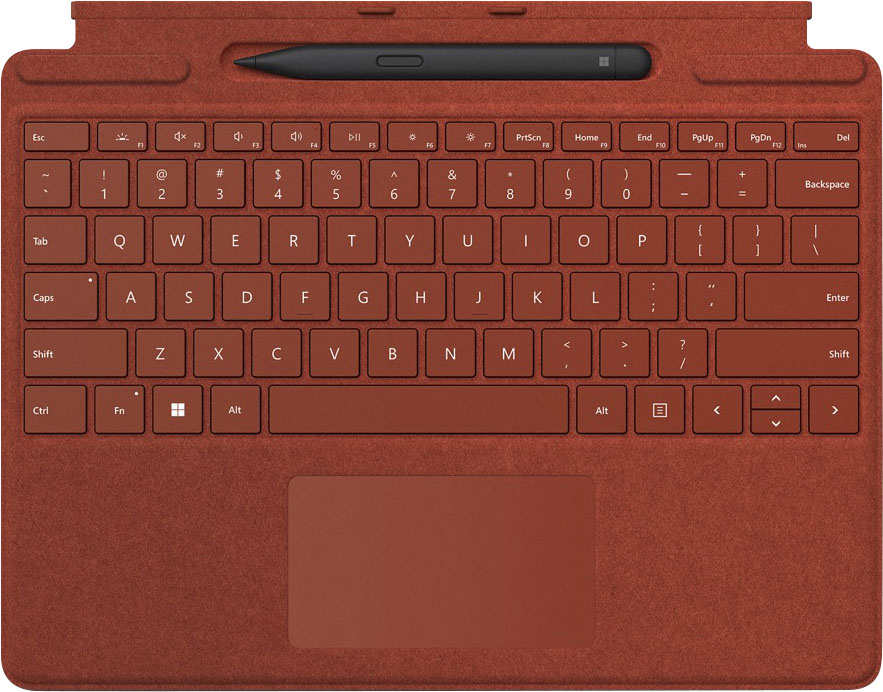
|Posted .This reviewer received promo considerations or sweepstakes entry for writing a review.In my opinion, the keyboard and stylus pens are a must-have if you are getting the Surface Pro. They are extremely well-designed and make using the machine even better. The keyboard case is great. It is really excellent to type on and the trackpad works well. It is easy to attach and detach which is great if you like to quickly switch between laptop mode and tablet mode. The keyboard can also be adjusted to provide a slight angle to the keyboard which I found to be a more comfortable typing position. In my opinion, the touchscreen and stylus are the ideal way to navigate Windows 11. Windows 11 made it easy and efficient to use the stylus to navigate. The new slim pen 2 is great. I like the way it fits in my hand, and I like that it has two buttons for shortcuts. I also think that it is genius that it charges in the keyboard case. I spent a lot of time using this computer with Adobe Illustrator, and the slim pen made interacting with my work so much easier. It made very accurate and precise marks. Plus, with the keyboard case, it was really easy to switch back and forth between using it as a tablet and using it as a laptop so I could get all my shortcuts. I'd say these are must-have accessories for any Surface Pro owner.
I would recommend this to a friend - Pros mentioned:Keyboard quality
Not an all day keyboard but it works on the go
|Posted .This reviewer received promo considerations or sweepstakes entry for writing a review.I wish this came as a bundle with the Surface Pro 9. It’s a nice keyboard but I think it could have been a lot better. I like the look and feel of the keyboard with the Alcantara material. It makes it look nicer than it being only plastic. The keyboard is backlit which is awesome and there’s levels of intensity. There’s not much key travel but expected because of how thin it is. The built-in trackpad could be a lot bigger. Not much real estate for selecting items. It covers and protects the Surface display screen and it has a built-in storage for the included Slim Pen. The Slim Pen is good but I still think the Apple Pen is better. It connects magnetically to the Surface and draws power from the Surface. It puts the computer to sleep when covered and wakes it up when you open it. There’s a Caps lock and Fn indicator light which I think is helpful. The only complaint I have is that flexes when typing especially when it is folded in to hide the pen storage. Other than that, It’s a good addition to my Surface Pro 9.
I would recommend this to a friend - Pros mentioned:Keyboard quality
Great Addition
|Posted .This reviewer received promo considerations or sweepstakes entry for writing a review.I am using this product with the newest Surface Pro X and I simply love the keyboard and the pen. Design - The Keyboard snaps to the tablet magnetically and is sturdy. The pen snaps into the keyboard also magnetically and stays in place even turning it upside down. 5/5 here. Aesthetics - A big win here as the keyboard has a soft outer texture over a firm inner component that makes it stiff but also comfortable. The pen has a nice weight to it but is not round - is semi flat. I like this design but others may like a more traditional round device. 5/5 here. Keyboard - The track pad is very responsive and gestures like scrolling and zooming are easily performed without errors. It has a backlight for when needed and is responsive as well. 5/5. Pen - Personally I like the design and found the pen adequate for all tasks - I am by no means an artist so it definitely worked well for me. 5/5 here. Price - underwhelming - $280 is simply too expensive for add on devices. I would argue that these should be included with the purchase of all the Surface Pro Line of devices. 3/5 here.
I would recommend this to a friend - Pros mentioned:Keyboard quality
Looks good and feels great!
|Posted .This reviewer received promo considerations or sweepstakes entry for writing a review.The Surface Pro Signature Keyboard with Surface Slim Pen 2 has been a joy to use with my new Surface Pro X. The keyboard feels great, is backlit and looks good too. An awesome feature is that the Keyboard has a nice little magnetic slot for the Slim Pen 2 to charge. When you're ready to use it just grab it and start writing or drawing. The Slim Pen 2 writes smooth and feels great in the hand. When you are ready to put your Surface away, simply close the keyboard and now your screen is protected. Attaching the keyboard is super simple. Just line up the keyboard to the bottom of the Surface and the magnets will do the rest. The keyboard itself has all the buttons and functions you would expect from a keyboard. The glass touchpad feels very nice too. The responsiveness and feel is very smooth. If you are looking for a keyboard and pen combo for your new Surface, I would definitely consider this product. High quality and fun to use!
I would recommend this to a friendBrand response from MicrosoftOutreachTeam
Posted .Hi – Thanks for sharing; we hope you continue to enjoy using your new Surface Pro Signature Keyboard. Erica, Microsoft Outreach Team

- Pros mentioned:Keyboard quality
Nice keyboard & Pencil
|Posted .This reviewer received promo considerations or sweepstakes entry for writing a review.This is the keyboard that attaches to the Surface Pro so it is an additional cost but worth it. There is an integrated pencil and they both work by just attaching to the pro and I don’t think they need to be charged. The pencil bworks bvery well and the keyboard feels very nice. The keyboard make the Pro tablet work like a laptop so it is pretty handy and doesn’t add much weight. I was able to set the Pro up easily and get the keyboard attached. It is fairly intuitive to set up. I generally use a desk top computer or my mini iPad. The pro was very similar to my desk top and if you used Microsoft 365, this would be a great addition since you could access all of your Word, Excel and Power Point from the cloud. .The Pro was similar to the large IPad but has more functionality. The Pro can be used with or without the keyboard. Computer devices and keyboards like this all depend on what it is needed for and which functions you need.
I would recommend this to a friend - Pros mentioned:Keyboard quality
A must for the Surface
|Posted .This reviewer received promo considerations or sweepstakes entry for writing a review.This is the perfect accessory and I would say required for the Surface Pro 8 or X. It's a very solid keyboard that houses the pen with a magnetic slot and also charges the pen. The Surface pen feels and writes like what a regular pen would feel like writing with. The keyboard is magnetically attached with a very strong magnet and also magnetically attaches to the bottom of the Surface to give a raised keyboard feel. The keyboard in the raised position is a bit mushy but not terrible. It is also backlit which is an absolute necessity for me. The glass trackpad is also excellent with a great feel. Also the Alcantara material of the keyboard has a nice soft feel. So, for me this is the perfect accessory for the Surface device.
I would recommend this to a friend - Pros mentioned:Keyboard quality, Portability
A Must Buy With Surface Pro 8
|Posted .This reviewer received promo considerations or sweepstakes entry for writing a review.This is a perfect match for the new Surface Pro 8! After opening the box, I immediately attached the keyboard to my new Surface Pro 8 with ease and I was ready to go! The pen sits snug in its charging nest and is covered by the keyboard which is magnetized and attached. When using just pull the keyboard away slightly and there it sits charged and ready to use. The pen is super responsive and has a nice sharp yet soft flow to it. I can see now why this is used for a lot of painting or drawing apps. The keyboard has a nice feel to it and is super thin. I almost prefer the feel of this keyboard over my laptop keyboard. The look and feel with a perfect fit. The first week with using it and I am impressed.
I would recommend this to a friend - Pros mentioned:Design, Keyboard quality
Best digital stylus yet! Keyboard feels good too.
|Posted .This reviewer received promo considerations or sweepstakes entry for writing a review.I’ve used many stylus products from the old days of Palm Pilots to Apple Pencil and a Samsung Tab S4. This Windows stylus is easily the closest to a real pen feel. It has tiny motors and haptic feedback that recreate the sensation of drag. Really something you need to feel to appreciate. Great for notes or art. It’s not just a gimmick. The keyboard is also really good. Has a stiff core and springy keys. Really feels like a traditional laptop keyboard, not a piece of cardboard. Pen conveniently stores in a groove on the keyboard and charges. Really a convenient design that will hopefully find it’s way into other products.
I would recommend this to a friendBrand response from MicrosoftOutreachTeam
Posted .Hi – Thanks for sharing your experience with your new Surface Pro Signature Keyboard and Surface Slim Pen 2! We hope it continues to serve you well. Erica, Microsoft Outreach Team
- Pros mentioned:Keyboard quality
The essential Surface Pro 8 bundle
|Posted .This reviewer received promo considerations or sweepstakes entry for writing a review.In terms of essential Surface Pro accessories, the Signature Keyboard and Surface Slim Pen 2 is it. The keyboard sets the standard in the detachable category with its clicky backlit keys, good key travel, and accurate trackpad. It's wrapped in the same Alcantara fabric as previous models which I've found to be extremely durable against typical wear-and-tear and would be stains. While the Surface Pro 7 keyboard was already great and the new keyboard is sturdier thanks to a carbon fiber skeleton and new magnetic coupling/alignment hardware that ensures you can type fast and in any environment. Like previous models once you've attached the Keyboard Cover to the edge of the Pro 8 it magnetically mounts to the front of the device for an extra rigid typing surface (pun not intended). This practically eliminates the bottom bezel making for a very sleek look when you’re typing away. The top and bottom bezel also gives you something to hold on to without touching the screen if you holding the tablet rather than drawing on a table top. The trackpad is a good size and realistically is probably as big as it can be without compromising the size and spacing of the keys and while minimizing accidental touching. I found it extremely smooth and accurate with fluid multi-touch gestures like scrolling and zooming like previous models. The Surface pen has long been a staple of the device, and it been further integrated in the Pro 8. For starters, it tucks away nicely (and charges!) in the keyboard cover which magnetically tucks towards the chin of the display. This makes it much harder to lose or get knocked off. It also means that when the keyboard is flipped to the back, the pen is revealed right below the screen making it very accessible in a mode where you might be using the pen more. The pen is an iterative improvement on the previous slim design. The new unit is more tapered making it more comfortable to hold and features a subtle vibration when you’re drawing. This paired with the higher screen refresh rate makes writing and drawing feel more natural than ever. The tip features 4096 levels of pressure, flipping it around the pen functions as an eraser so you don’t loose your flow by having to manually select different tools. The pen is best appreciated in the Whiteboard app and OneNote, where you can take advantage of these new additions. I expect other apps to integrate these new features to create a more immersive experience. While the difference is subtle - it's impressive how close to a pen on paper experience the Slim Pen 2 is. Overall, if you're looking to get the most our of your Surface Pro 8 from a productivity/notetaking or creative/drawing perspective you can't go wrong with bundle thanks to it's fit and finish and overall value it adds to the device itself.
I would recommend this to a friend - Pros mentioned:Keyboard quality
Makes the already Adaptable Surface even Better
|Posted .This reviewer received promo considerations or sweepstakes entry for writing a review.Wow...I had to say this because tablets these days are a dime a dozen and the Surface Pro X demonstrates why a number of tablets have found their way into a junk drawer never to be seen again. It really is a myriad of products in one that fits a flexible style of use. If you are like me, I have a laptop, a smartphone, a tablet, a different tablet, and other various products that only do only one thing well but promise to be so much more. Since I don't game on a PC, professionally edit photos or videos, or need a computer to manage multimedia devices, the Surface Pro does everything I need quickly, efficiently, and looks good doing it. This definitely bridges the gap between a smartphone and a PC so well, that I don't feel the need to even have a laptop anymore. When needed, it handles the office duties in an ergonomic package then quickly transitions into a binge or browse tablet that goes anywhere, sets up comfortably in a bed, couch, or chair, and looks very classy doing it all. The built in stand has the perfect amount of resistance for multiple setup options and disappears seamlessly when not needed. I love that with other smart products, I can start something on the surface, transition to doing it on the PC or TV, then have it back on the Surface if desired. The compatibility was an awesome surprise that makes me feel like I finally purchased a product that will last more than a couple years and still be useable for many more. The touch screen, smart pen option, and the keyboard make it adaptable and a joy to use when sometimes you want to zoom quickly, but not have to type on a screen keyboard. It is built well, doesn't have any area that looks or feels like sacrifices were made to cut costs, and is extremely user friendly. We have spent the past 15 years getting devices for this or that while the clutter and inconvenience piles up. I can't wait to find more uses in my life to consolidate to this device and start feeling like technology doesn't need to be a mix/match of devices all with different charging cables and cords. While I will say, the power cord has a new connection I've never seen, I don't mind because I will be getting rid of so many others it will be well worth it. Do yourself a favor and pick up a Surface Pro, try out a friend or relatives, or go online and take some time to really explore everything this product has to offer because I don't think you will be disappointed anytime soon!!
I would recommend this to a friend - Pros mentioned:Keyboard quality
A must have accessory for the Surface Pro
|Posted .This reviewer received promo considerations or sweepstakes entry for writing a review.If you are planning or thinking about getting a Microsoft Surface Pro do yourself a favor and get this Surface Pro Signature Keyboard along with it. Yes it adds quite a bit to the cost and I wish Microsoft would sell this for lower or better yet just include it with the Surface Pro as it really is a must have accessory. The problem is later you are going to want it so if you can, try and get it at the sametime. This is typically not an accessory that I have seen discounted so I don’t think waiting will save you any money. This keyboard is just a perfect match for the Surface Pro. The way it connects with magnets and doesn’t require its own power source, the keyboard is easy to type on for extended periods and I especially like the feel of the trackpad. The trackpad feel rivals those found on other higher end thin and light notebooks. The Surface Pro Signature keyboard also looks and feels good and doesn’t add any additional bulk. My only complaint is that in an earlier model for an older Microsoft Surface I had, this model is missing the keyboard backlighting. Not sure why that was removed but that doesn’t take away from the overall function and utility this adds. The Surface Pro Signature keyboard has very good build quality and you can expect many years of service with it. In fact my earlier model outlasted the actual surface I purchased with it which I finally had to retire when the battery failed. Not having this keyboard will be a companion that you will miss right away. There really isn’t anything else like it to round out the Surface Pro and should be the number one accessory you should buy when purchasing a Surface Pro.
I would recommend this to a friend - Pros mentioned:Portability
Awesome typing experience and stability, Pen is A+
|Posted .This reviewer received promo considerations or sweepstakes entry for writing a review.The keyboard is so essential for the best Surface experience, they should just come included with every surface option above the base models. This is the best Surface keyboard I have used, the stability is really good, hardly any flex at all when using keyboard on soft surfaces, thanks I think to the carbon fiber which really stiffens without adding much weight. The keys are responsive and not too mushy, with good travel. Lighted keyboard option is very nice with three levels of brightness, and if you don't touch the keyboard, it dims off the lighted keys, but then turns right back on when you touch again. The material cover on the back is nice feeling and hope to see how durable it is. The glass touchpad is large and responsive, haven't had a misstep using it even with gestures. The pen is fun to use, I used it on a Surface Pro X and the only feature missing using it like that, is that there is no haptic feedback from the pen. This is supposed to make it feel more like writing with a real pen, but it felt fine without it on the Pro X. The charging pad area to hold and charge the pen works very well, and it closes up and hides it if you wish, like when using the keyboard on your lap, the extra magnet attachment to the bottom of the tablet from the keyboard hinging and hiding the pen area makes it more stable. I used the pen in paint and 3d paint, one note. It is fairly accurate on ink placement on screen in relation to the pen position on screen. I notice that as you tilt the pen tip really far away from vertical, to flatter in relation to the screen, the inking gets a bit further away from the pen tip. I guess no super accurate charcoal shading for me, not that I'm much of an artist. I think this bundle is a great value, and the pen is nice to have, always ready to go and easy to store and hard to lose when traveling, a real plus for something as portable as a Surface setup. I recommend this keyboard/pen bundle for the creators and note takers out there who will get a lot of use out of the pen.
I would recommend this to a friendBrand response from MicrosoftOutreachTeam
Posted .Hi – Thank you for being a part of our Surface family and recommending it to others. It's great to hear that it’s a good fit for your needs. We hope you continue to enjoy using it. Erica, Microsoft Outreach Team
- Pros mentioned:Keyboard quality
a must have for your new surface
|Posted .This reviewer received promo considerations or sweepstakes entry for writing a review.At first I was a bit surprised at the price of this keyboard, but when you think about all the features it adds to your device, you soon realize thats its not only an important part of the surface "experience", its obvious that this keyboard brings alot to the surface. First of all, in spite of what some others have said, it DOES have backlit keys, at least mine did, and there are 3 brightness levels you can use with it. it comes with a nifty pen that you can use with the surface, and, even though I am not a big fan of pen type devices being used with mobile technology, this one does all the things that many folks like about interacting with a stylus on their mobile device. Also, the keyboard is actually a folio type case for your surface, and has a nice, suede like feel to it, and even thought it wouldnt protect your surface if you dropped it off your desk, it does add a nice amount of grip to the device when closed. And, the keys have a nice feel to them, are pretty responsive, and really make the surface a true laptop "replacement" for those business folks who want a lightweight, and agile device they can use while working on the road...dont get me wrong, this is a nice device to just use as a personal tablet as well, but the price tag wont make you forget that its really ALOT more than a tablet! Anyways, the keyboard is a valuable addition to your surface experience, and would recommend it strongly to anyone buying the new surface!
I would recommend this to a friend Light weight, responsive and a great stylus!
|Posted .This reviewer received promo considerations or sweepstakes entry for writing a review.The Microsoft Surface Pro Signature Keyboard with Surface Slim Pen is awesome. Let me get the only possible negative out first, it’s a bit pricey for a keyboard. Especially when it’s truly an option that you don’t need to operate the Surface Pro Touch Screen device. So now that I got that out of the way..ya..it’s pretty cool. First off the way it connects and disconnects from the computer is fun and functional. I know this is a little thing but I had to bring it up as people who haven’t seen that before almost universally respond with something like…oh cool..when I first show them how it disconnects and reconnects. It’s magnetic and connects so quick and easy. It also looks great, the finish on it is beautiful in person. And it also doubles as a nice screen protector for the computer when its folded up. Now for the more important stuff, how does it perform? It performs wonderfully. The keyboard is highly responsive in both the keys and the pad. It might take a few hours of typing to get used to such a thin keyboard and shallow keys, but it started to feel natural to me fairly quickly. I like the way it fits together as well. Its folds in a way to create a slight incline to the keyboard making it easier to type. The stylus is really solid. It’s the best stylus I have ever used and honestly the first one I have ever had that I expect to reuse often. It fits well in the hand and comes out so clean on the screen. I’m a big time note and list writer on scrap paper; I think this thing might actually convert me to making electronic lists. All in all I love this keyboard and give it 5 stars. Light, firm, responsive and attractive with the best stylus I have ever used. What’s not to love? I would absolutely recommend this to a friend.
I would recommend this to a friendNot compatible
||Posted .This reviewer received promo considerations or sweepstakes entry for writing a review.Why make a keyboard change not comparable with older devices!
I would recommend this to a friend- Pros mentioned:Keyboard quality
Microsoft Did Good!
|Posted .This reviewer received promo considerations or sweepstakes entry for writing a review.Very Impressed with this keyboard for the surface. Let me start out by saying this is my first surface experience and I'm blown away at the quality and experience of this keyboard. The key response is amazing, and it even has a backlight! This keyboard is super slim and stiff at the same time. This comes in handy for times like right now where I'm typing on a pillow and because the keyboard is so rigid, it allows me to type anywhere. It has a nice trackpad that is smooth as glass and at first it seemed a little small, now I'm used to it where I don't even notice. The Pen: I never had the first-generation pen but this one seems to be very nice. The pen is comfortable to hold and is fully customizable. You can click the top button to activate any preset functions that you can assign. For example, clicking it once opens up Microsoft Whiteboard which is great for writing notes and drawing. The fact that the pen magnetically pairs with the keyboard is another cool feature. And when its attached, it is also charging so you never have to remember to charge the pen. The keyboard also folds up close to the bottom bezel of the surface and hides the pen. All around this is a solid product and i am very impressed.
I would recommend this to a friend - Pros mentioned:Keyboard quality
Great Keyboard
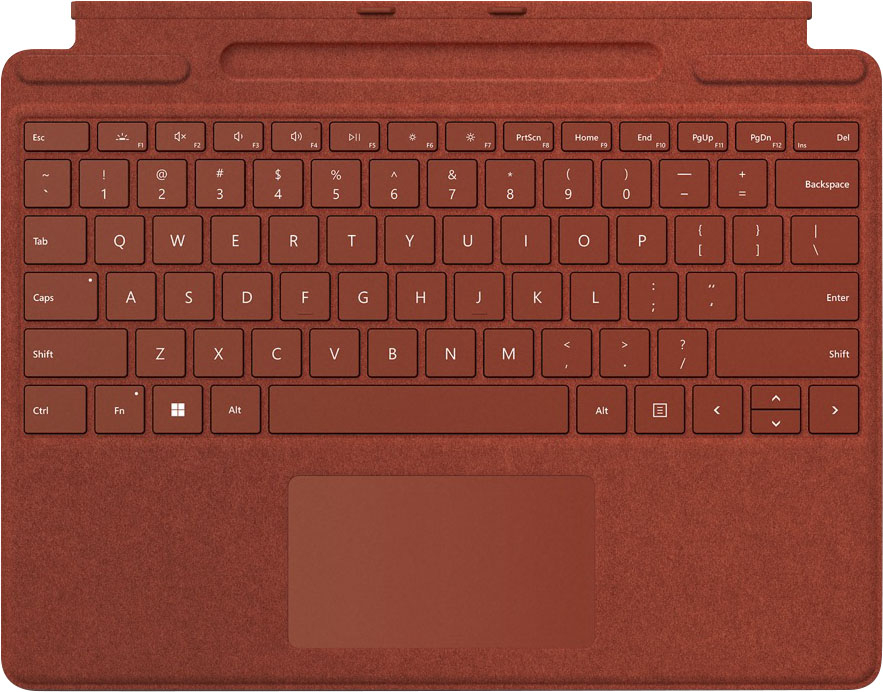
|Posted .This reviewer received promo considerations or sweepstakes entry for writing a review.As an addon, this keyboard is great. The keys are responsive and feel like a normal desktop keyboard. With the newest features on the Surface Pro X you get the benefits of more viewing angles which just makes using this keyboard EVEN BETTER. The Poppy Red is a very nice dull/muted red that doesn't hurt your eyes. I wasn't sure how I would feel about it but once I saw it with my own eyes... it was perfect. My favorite feature is how the pen sits inside the keyboard so I am less likely to lose it while traveling. It stays closed against the surface screen so no way for it to accidentally get knocked out.
I would recommend this to a friend - Pros mentioned:Keyboard quality
A Great Addition
|Posted .This reviewer received promo considerations or sweepstakes entry for writing a review.I wasn't a big fan of the keyboard I had with my Surface pro 7. It felt a bit wobbly and less reactive than this new one. When upgrading to the Surface Pro X, this keyboard is a must. The keyboard also doubles as a screen protector which is nice. Not to mention the new keyboard has a great spot to hold the slim pen. I love the way the pen is hidden and how it charges in the keyboard. This is a great upgrade.
I would recommend this to a friend - Pros mentioned:Keyboard quality
A Really Nice Combo
|Posted .This reviewer received promo considerations or sweepstakes entry for writing a review.The Microsoft Surface Pro Signature Keyboard and Slim Pen 2 make the perfect combo for the new Surface Pro 9. I mainly use my Pro 9 as a tablet, and I don't often use the keyboard, but when I do, as I am now to write this review, I can't find any flaws to report. It does what it is supposed to do and does it very well. Pros: 1. The keyboard seems well constructed and sturdy, with no flexing with normal use. 2. It is backlit. 3. It has all the necessary function keys and a dedicated row of number keys. 4. I like the look and the feel of the Alcantara fabric. 5. The keyboard has built in charging and storage for the Slim Pen 2. Cons: No serious flaws that I can find. Now, speaking of the Slim Pen 2, I thought at first I would not like it because it is a different shape from any stylus I have used previously, but I find that I actually like it very much. I like the plastic build of the pen and prefer it over the slick, cold metal of the older Surface Pen. The new pen's compatibility is very good, as I can use it with my Surface Go 3, and even with my Samsung Flex 2 Alpha laptop. The keyboard's ingenious charging/storage slot is great as well.
I would recommend this to a friend - Pros mentioned:Keyboard quality
A must have accessory
|Posted .This reviewer received promo considerations or sweepstakes entry for writing a review.In complete transparency, this is my first Surface tablet (I'm an Apple guy, so I do have an iPad Pro with the magic keyboard and pencil) so my comparisons will be to that, rather than a previous Microsoft model. My first statement would be that I can't imagine anyone using a Surface as a tablet only- it appears to be more laptop than tablet (though it can do both), where the iPad Pro is primarily a tablet and can do some multitasking and run apps that can make it a laptop substitute (albeit a limited one). Given where the surface 8 lands, in my eyes, this keyboard should be included with the Surface, not a separate accessory. Maybe that's just me. Pros: This is super lightweight and the alcantara feel is very pleasing. The keys have a very good feeling and I love that you can "lock" the function keys (I need F2 constantly in my primary work software, and it is a real pain to have to always hold down two keys to access it in the magic keyboard (and my Macbook Pro, to boot). I appreciate the red color, as well, but that is personal preference, obviously. The mechanism for charging the included slim pen is pretty slick, as well. Cons: While the pen works okay, it feels fairly cheap in the hand. It's shape isn't terribly natural to use, either- more like a carpenter's pencil than a traditional pencil/pen. Its implementation is hit or miss- when the option to use handwriting recognition to enter text is available, it works pretty well. It just isn't implemented in many of the programs I have used. That's really an OS issue, though, and will likely improve with time. The other cons are related to the aforementioned "pro" of how light and thin this keyboard is. There is definitely some flex in the keyboard itself when typing that is a little annoying, though it might something that you could adapt to in time. The light weight also means this is in no way a protective device (though it does protect the screen from scratches, I suppose). So you would definitely benefit from buying a sleeve or something similar for protection. Having said that- this combo (surface 8 with this keyboard/pen) is SIGNIFICANTLY more lightweight (by nearly half a pound, or approximately 20% lighter) than the comparative iPad Pro configuration. And that is worth something. The keyboard layout and feel are excellent. The pen is okay, if not awesome- but it is great to have that option if you need it. It looks and feels great, as well. It just should have been included with the Surface, IMHO.
I would recommend this to a friend