Customer Ratings & Reviews







- Model:
- SYT940800V024
- SKU:
- 6475032
Rating by feature
- Ease of Use
Rating 4.4 out of 5 stars
Customers are saying
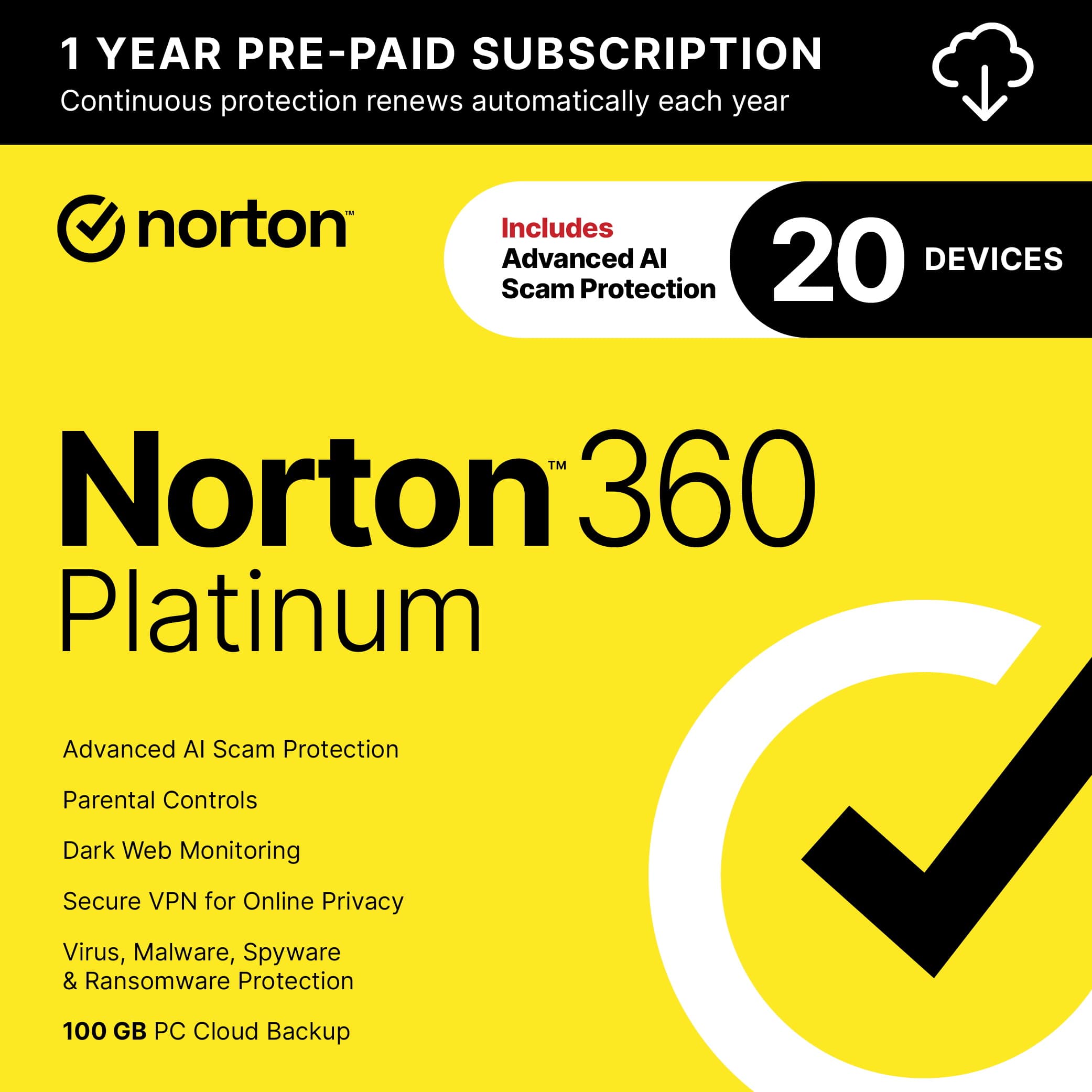
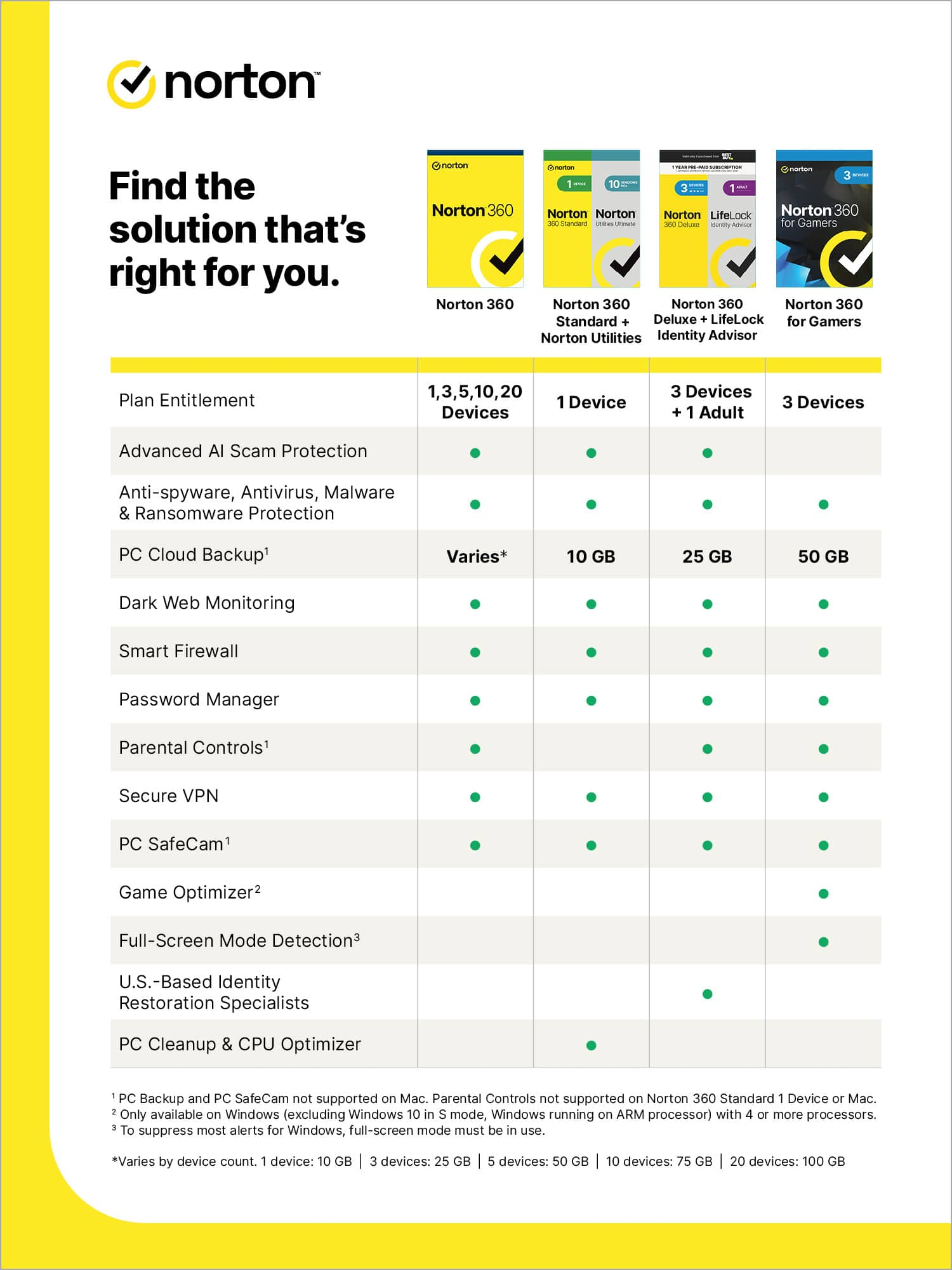
Customers consistently note the 360 Platinum antivirus software's comprehensive protection, ease of use, and the inclusion of a VPN. Many users appreciate the software's performance, dark web monitoring, and device compatibility. While the auto-renewal feature is mentioned as a minor inconvenience, the overall sentiment leans positively towards the software's features and value.
This summary was generated by AI based on customer reviews.
Not simple for renew upgrade
||Posted . Owned for 1 year when reviewed.This reviewer received promo considerations or sweepstakes entry for writing a review.I did not install it until a year later. If you used it as renew from your current one, it is not work.
No, I would not recommend this to a friendBrand response from Norton & LifeLock Product Expert
Posted .Hi Bob - Thanks for your review. You are correct - the retail store version of Norton 360 can unfortunately not be used to renew an existing subscription, often because the device counts may not match. *However*, you can add the new license to your existing Norton account - hopefully near the expiration of the current subscription - and the new license will take over when the old expires, typically updating the client license auto-magically! Hope this helps - DWN


Good antivirus product for PC
|Posted .This reviewer received promo considerations or sweepstakes entry for writing a review.I was able to install Norton antivirus in few easy steps. As soon as the installation was completed, I was curious to run a quick scan on my machine to see if there was any malware or suspicious files. I have intact had issues lately with computer slowness and multiple issues on my windows causing the system to slow down and also at times opens up web pages that I did not intend to. This quick scan I ran with Norton identified around 500 plus files they were suspicious and performed a clean. As part of the clean, I had to delete those files which were not very important anyway. After the scan I have used the system for about 5 days now and I certainly see a good performance. I do not see those websites or webpages opening up automatically. I usually don’t believe in this concept, but Norton certainly proved me wrong. I am loving this subscription and I am super excited to try it on my Mac as well. It has multiple device license for a year and I am quite certain I would renew the license after a year to keep my computers clean and safe. When I browse websites, it does prompt the ones that are suspicious. I would definitely recommend this to my friends.
- Pros mentioned:Protection
No Help from Norton Support for Quirky Software
|Posted .This reviewer received promo considerations or sweepstakes entry for writing a review.The Norton software is a security suite with several optional components that can be activated/ downloaded during or after the initial installation. Since I wasn’t certain how the Norton software would affect my computer’s performance, I opted to initially download just the basics to one computer and do the additional downloads and activate the Secure VPN, cloud storage, password protection, and Chrome extensions afterwards. So far I’ve done 3 installations and the downloads went smoothly and only took about 15 minutes each. It did require removing the McAfee software that I was using. The package comes with 100 GB of cloud storage for files. The annual cost of the cloud storage after the first year is $10 in addition to the subscription renewal cost of $139 (subject to change). I use Google Chrome as my browser. During the download there is the option to install between 1 and 4 Norton extensions - Norton Safe Search, Norton Home Page (same as Safe Search but with Norton home page), Safe Web and Password Manager. I initially installed them all, but due to the problems described below, I ended up removing all of them. The Norton Home Page is cluttered with news and updates that I don’t want to see and have no interest in. That part can be closed, but I also don’t want to see quick links for Booking.com, Nordstrom, etc. So I turned that extension off. I didn’t like the Norton Safe Search extension either. The list of search results are not as logical as Chrome. For instance, if I type USPS Shipping Calculator in Google Search, USPS Shipping Calculator is at the top of the list. With Norton Safe Search turned on, I had 14 website options, none of which were USPS. They were all third party vendors. When I type Best Buy in Google Search, Best Buy is at the top of the search list. When I type Best Buy in Norton Safe Search, Capital One Shopping is at the top. I didn’t notice any computer slow down with Safe Search turned on, but oddly my husband noticed a distinct lag when playing online Solitaire with the Safe Search extension turned on. When I turned the VPN on, every website identified as an Ad (like Best Buy) gave me a Google Search error. I spent an hour with Norton support and they had never heard of the problem and they didn’t have a solution. That evening I tried turning the Safe Web extension off, and now everything works as before. There is a Password Manager Chrome extension and a Password Manager section in the app. I’m not sure what the difference is, but considering my bad experiences with the extensions, I don’t plan on using that one. I’m still deciding if I want to use the Password Manager and the credit card and bank information storage vault at all. I contacted Norton support and they assured me that the Password Manager is a free download and will continue when the subscription expires. But I don’t have a lot of faith in Norton support and want to do some more research to make sure they won’t disappear if I don’t renew my subscription. My biggest concern when installing Norton 360 was that it would take a long time to scan each picture that I downloaded for viruses. I sometimes download several hundred pictures a day. One security software I tried took 3 - 5 minutes to scan a half dozen pictures. It slowed my process down so much that I had to remove it. But the Norton scan is very fast. It’s a fraction slower than McAfee was, but acceptable. The only lags I’ve noticed are the ones I mentioned - when playing online solitaire with the Safe Search Chrome extension activated and with the VPN turned on. I had a few other problems with the software, most of which I’ve been able to resolve. My business involves taking and downloading pictures to email. Immediately after installing Norton 360, everything (new and old) in my download folder had 2 huge blue arrows on top of them, obscuring the pictures. I contacted Norton Support and they initially told me it was unrelated to the software. After troubleshooting on my own for several hours, I discovered the solution. The arrows are backup status overlays. To make them go away, the Backup Status Overlay box in settings has to be unchecked. Another problem area is the VPN. With the VPN on, yesterday my location was San Jose, CA. Today it’s Dublin, OH. I’m in Oregon. Maybe that’s what a VPN is supposed to do, but it’s annoying to search for a business, and be shown the California or Ohio locations instead of the local ones. Since turning on the VPN I’ve also started having problems with pages that are slow to load or won’t load at all. Facebook frequently freezes and I have to disable the VPN to get it going again. Another Facebook quirky thing is that with the VPN on, sometimes the message and notification text changes to what looks like Chinese. If I turn the VPN off and refresh the page, it goes back to normal. The Norton 360 software says it will protect me from ransomware. phishing scams, malware, malicious apps and identity theft. It comes with a 100% virus protection promise (some restrictions apply). I wouldn’t recommend Norton customer support and the software has some quirks. Only time will tell if it provides the protection it says it does.
Brand response from NortonLIfeLock Product Expert
Posted .Hi there, I am really sorry to hear about the issues you are facing. We would like to collect more details about this issue and help you to get it sorted. Could you please connect with our support team here www.norton.com/support. Alternatively, you can connect with our official social support Channel -Twitter at https://twitter.com/messages/Nortonsupport or on Facebook at https://m.me/norton

- Pros mentioned:Vpn
Great but problems on Mac system
|Posted .This reviewer received promo considerations or sweepstakes entry for writing a review.Install is easy on all devices. The biggest issue is have to add a credit card just to install. The credit card is needed setup auto renewal. That is unfortunate as that should be your personal choice and not forced on customers just to install a product that they purchased. The only redeeming out is that you can take off auto renewal after install and remove your credit card. When you do attempt to remove auto renewal you will normally be given an additional month of service if you do not but after 5 day wait period you are allowed again to remove your credit card and turn off auto renewal. I have used Norton for decades on my windows system and mostly recently on my android devices. Protection works as it should and scans are relatively fast and informative. I like the low cost, features, performance and various scan options along with the various security setting levels. I love the vpn which provides an extea level of super strong protection when browsing. The vpn is super easy to set up and does not seem to effect your browsing speeds. I have installed the product on my iMac system, a first for me. It does not okay nice with my iMac. It causes browsing issues of either super slow web connectivity or no connectivity. It seems some of the security settings that the product puts into place lock your web access. You need to go into settings and turn off, prompting Norton to issue you warnings that your system is vulnerable or settings not correct. This is not only annoying but alarming. I find no work around other than to turn off certain settings to ensure full connectivity speed. Norton also locks up more on my iMac or causes a full reboot of my system. I have take a star off for the credit card requirement and difficult use on iMac.
I would recommend this to a friend Nice 1st year value for 20 devices - renewal $$
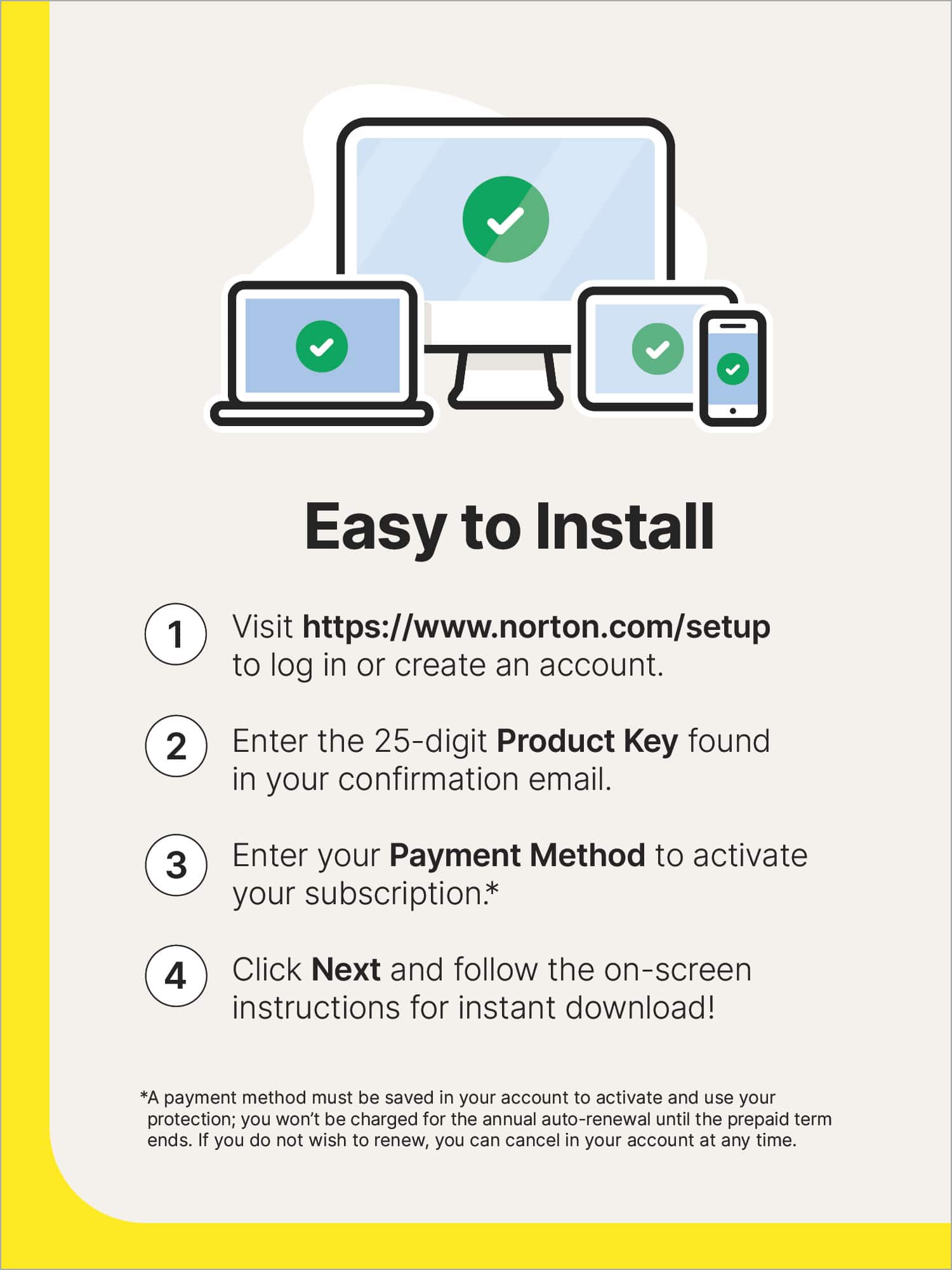
|Posted .This reviewer received promo considerations or sweepstakes entry for writing a review.Firstly, know that this price is ONLY for the 1st year; renewals are over $100. Installation is relatively quick & easy, just go to the website & download the installer after entering your key. After launching the installer, it only takes a couple of minutes. Password Manager only imports from Lastpass, Dashlane, McAfee, and Norton. Didn’t see any option to specify any formatting that would allow you to import from another password manager's csv export. Showstopper for me, as I’m already using another manager, and there’s no way I’m manually adding a few hundred entries. Android app: The setup process even leads you right through the steps necessary to effectively implement Norton security on your Android phone. Android app has Split Tunneling feature, which allows you to specify certain apps that can bypass VPN connectivity. Couldn’t find any remote wipe/lock functionality. Tried Norton Family Protect (parental controls) on a Chromebook, and I can’t recommend it. From a web browsing perspective, it’s okay IF you get your child to use the Norton browser. Supposedly you’re able to add an extension to Chrome, but I wasn’t able to get it to work, so your results may vary. That said, I didn’t have any trouble getting the Family Protection to work on a Windows laptop, including the Chrome extension, so it should be good to go if you’re using Windows. The software can also be a tad pushy on getting you to pay for additional services, particularly AntiTrack. It’s initially a bit chatty with Windows notifications also, but seemed to have died down a little after a few days. I haven’t noticed any performance issues on any devices running Norton360. I didn’t find the user interface to be particularly intuitive either. And the entire left half of the UI is pretty much dedicated to a Norton background, with the simple addition of a Run Smart Scan button. It isn’t horrible, but some of the other security suites I’ve used are better, imo.
No, I would not recommend this to a friendBetter to be Safe Than Sorry
|Posted .This reviewer received promo considerations or sweepstakes entry for writing a review.Norton has come a long way since the 1980's. The name Norton is synonyms with safety and protection. Norton - 360 Platinum (20-Device) (1-Year Subscription with Auto Renew carries on that proud tradition. Honestly, it took me a minute to see and set up all this package has to offer. It's a lot, that's for sure. Norton offers 9 different packages depending on your need and price point. This is literally a one stop shop for up to 20 devices. Norton - 360 Platinum (20-Device) (1-Year Subscription with Auto Renew includes; An unlimited VPN service which will scan then engage or disingage depending on how secure your destination website is. Comes in handy for streamers who may not need a VPN if their preferred streaming service is already secure. No unnessary slow down of service. That's a major plus for me, as some VPN's stay on all the time and can hinder performance. Also featured: 1- password protection 2- malwear protection 3- parental controls 4- backup and online storage 5- different levels of identity protection, including LIFE LOCK. As I've written there are different price points for Norton and honestly one can easily suffer a little sticker shock with a renewal price with LIFE LOCK topping $150. Worth the price or you can step down to where you are more comfortable. The only shortcoming is that you have to be willing to get into the menus and sub menus to engage or disengage the features you are comfortable with. Cheers!
I would recommend this to a friend- Pros mentioned:Vpn
Great anti virus
|Posted .This reviewer received promo considerations or sweepstakes entry for writing a review.This is Norton 360 which is a product that's been out for like forever it seems in it's current format at least . The product offers a license for up too 20 devices including iOS (idk why), Mac, Android and Windows. The Norton 360 platinum is more then just an anti virus suite but also includes offer services like a VPN and a bit mining tool if you really want to do that when your PC is idle. It also offers stuff like watching for your info in the dark web and etc. As far as the product goes I find the suite is easy to use on windows and my Android phone. I have used Norton products in the past and never had any issues with it being a resource hog on this current version. Granted my laptop has 16GB of RAM and an Ryzen 7 and a dedicated gpu. I wouldn't know if you have a more basic computer but I can't verify that or not. The one thing that I find intrusive is the crypto mining Norton offers. They will pay you to use your computer as a crypto miner but from what Ive heard about it they take a huge fee percentage out and hard to remove the software if you opt in.
I would recommend this to a friend - Pros mentioned:Ease of use
Easy Install, good monitor-info
|Posted .This reviewer received promo considerations or sweepstakes entry for writing a review.this product is easy to setup initially and can monitor up to 20 devices. It will monitor web browsing, passwords, and email addresses to let you know if you have vulnerabilities on certain websites or email accounts. I have not added the subscription to additional computers yet but plan to within the next week to take advantage of the 1 year monitoring. Typical norton dashboard options. Several services are included in the purchased subscription and they offer additional monitoring for an additional price. I did not sign up for any extras. I use it for web browsing, password, and the email monitoring to let me know if any websites may have compromised my data. The info I received is about certain sites that have had data loss in the past and recommendations on what to do with my account for these sites. I would recommend purchasing. I have not had any service issues so I have not had to contact their customer service yet. I was unable to install it on my iPad so i will stick with the laptops only for now. I have not tried it on my iPhone yet
I would recommend this to a friend meh
||Posted . Owned for 1 month when reviewed.This reviewer received promo considerations or sweepstakes entry for writing a review.Don't like this product. Wish I stayed with McAfee
No, I would not recommend this to a friend- Pros mentioned:Dark web monitoring
Decent software leaves some to be desired
|Posted .This reviewer received promo considerations or sweepstakes entry for writing a review.What I like: This version of Norton includes darkweb monitoring, something that gives me at least some piece of mind. You can include as many details as you want (credit cards, driver's license, bank accounts, phone numbers, etc). It's basically lifelock protection. You'll have to decide how much info you want to input and what elements of your life you want monitored. Generous 20 licenses make it convenient if you have a lot of devices. 20 is the most I've seen. Normally there are 5-10 licenses so this is a big advantage in my opinion. Includes VPN (31 countries) though my upload and download speeds were generally reduced to half What's OK norton safeweb extension Norton Safesearch extension What I don't like 30 day trial of parental. This is something I'd love to be included with the package, not as a trial or additional cost. The nudging to install a coin miner on my computer. It feels very "freeware" like. Overall, this Norton software does what it intends to nicely, but the fluff should really be left out.
I would recommend this to a friendBrand response from NortonLIfeLock Product Expert
Posted .Hi! Thank you for your feedback. We're sorry to hear of the issues you are facing regarding speed performance and would like to help assist. Could you please connect with our support team here www.norton.com/support. Alternatively, you can connect with our official social support Channel -Twitter at https://twitter.com/messages/Nortonsupport or on Facebook at https://m.me/norton
Norton Antivirus 20 Device Protection
|Posted .This reviewer received promo considerations or sweepstakes entry for writing a review.The Norton 360 Platinum 20 Device 1 Year Subscription, provides protection for up to 20 devices. Software is fairly easy to download on the device. You create an account first, then follow the steps to login and provide your subscription number. Once completed you are able to select the type of subscription that you would like to purchase. My subscription allows for the VPN to be hidden for extra added security. You are able to add mutlple devices. This can be done on a cell phone, computer, etc. Once activated you have the ability to secure apps, websites that are used, monitor to make sure information is not going on the dark web, and the ability to receive technical support through chat, if you need extra assistance. Norton also helps with cleaning up junk files. I like that Lifelock is provided for that extra security of protection and that there are parental controls for those that may have minor children. My pros for this product include: Password manager feature LifeLock protection option Hidden VPN to assist with not being hacked. Currently have no cons.
I would recommend this to a friendgood virus protection - constantly in your face
|Posted .This reviewer received promo considerations or sweepstakes entry for writing a review.I am a bit conflicted with the Norton 360 Platinum protection suite, while it has the familiar Norton Anti-virus interface buried deep into the product it often feels like the product won’t leave you alone. I’ve used other anti-virus suites and Norton has to be the most chatty of them all, especially soon after you install it. Reminding you to use the included VPN (more on that later), the Dark Web Monitoring, Cloud Backup, Password Manager and various browser integrations. Somewhere you can reduce the amount of prompts, popups and other items via some changes in settings, but the default configuration is just chatty. Lets start with the Device Security, where you can scan your hard drives, removable drives, force updates of virus definitions manually (this happens in the background automatically) and review security logs. Internet Security which monitors your Internet activity for various threats. Backup, which can backup your PC and important data to the cloud (the version I have provides 100GB of storage) however you need to smartly configure what is backs up as if you have a large amount of picture or videos on your computer you will receive messages that your backup failed due to cloud storage constraints. Granted you can only configure this if you have administrative rights on your PC, that level of access is also needed to make any real configuration changes with the Norton setup. As part of standard best security practices, you should use an account on your PC that has plain user rights and only use a full administrator account for configuring changes to your applications or PC. Performance, again you need full administrative right to Optimize the disk, you can do a limited file cleanup which only cleans up your browser cache (note to Norton, Internet Explorer is history, need to update the verbiage) and Windows Temporary files that are under your user profile. Startup manager requires Administrative privileges but will allow you to configure the startup behavior of your PC. Graphs will provide you a chart of activities Norton performed and when. Any of the actions that require Administrator privileges should really prompt you to enter elevated credentials instead of just saying Access Denied. Dark web monitoring is part of Norton Life Lock service and can be configured to monitor dark web activity with any of your personal information, such as address and email addresses as well as other Bank Accounts, Credit Cards, Phone Numbers, Drivers License, Mothers maiden name and Gamer tag. Now this is great service if you are comfortable with providing all this information in one place and with Norton (what if they get breached?). All of this opens a browser and is not integrated into the Norton Interface itself. Secure VPN – most security suites offer VPN access which can help secure some of your information and web surfing activities. Most VPN connections actually slow your connection down from your PC or Mobile device as all you internet traffic through a setup of servers. Norton’s implementation does not use Open VPN, but IPSEC instead – from a performance perspective this is good, but it practices seemed to make my connection a bit buggy. Also, it assumes you only want to use a VPN when connected to unknown or public networks, not your home Wi-Fi if it is password protected. This behavior also occurs with the mobile device VPN in addition to cellular networks, again in practice the VPN seemed a bit flaky when I installed in on my iOS device. There are also reasons for masking your traffic and sites you visit when using your Internet Services Provider (ISP) or mobile phone carrier since some internet providers monitor your Internet traffic and sell or otherwise use this info and/or feed it to third parties. Thus I prefer to keep my VPN all the time. If you plan to use their VPN, you can only specify a country, not a specific city. Their VPN servers are well known, and most content providers will be able to detect that you are using a VPN (in case you were going to try to spoof Netflix or another service but connecting to a different country) . Password Manager – useful for some, annoying for me. Parental Controls – useful for those with young offspring, again opens a browser to configure instead of doing it within the app. Pros: - Good performance, not a huge resource hog - Fairly high rated as it catches a majority of threats - Fairly configurable if you have Administrator rights, logging into an elevated account to do that is annoying. - Cloud storage (100GB) with my subscription level (Platinum) - VPN included, albeit not the best in class - Software Firewall included and mostly configure itself Cons: - VPN automatic configuration seems a bit overbearing and the connection sometimes varies in speed and connectivity. - The product out of the box is too chatty, need to change items (admin access required) to quiet it down. - Antitrack is not included in Deluxe. - VPN is only configurable by country, not a specific city within one, most services seem to be within the Amazon Web Services (AWS) cloud. - Limited amount of VPN servers worldwide.
I would recommend this to a friendSeems to work
Posted .This reviewer received promo considerations or sweepstakes entry for writing a review.Great product the vpn is spotty. The licenses are more than competitors.
I would recommend this to a friend