Customer Ratings & Reviews



- Model:
- SYC940800V058
- SKU:
- 6647022
to a friend
- Pros mentioned:Installation ease, Performance

A Solid Privacy Companion for Everyday Browsing
|Posted .This reviewer received promo considerations or sweepstakes entry for writing a review.During the last few days, I have been testing Norton AntiTrack, and I can admit that it is one of those tools that you do not notice until you can see what has been going on on the backstage of your own browser. This software is really mind opening in case you ever thought adverts stalk you on the internet all the time after searching something once, or you are fed up with the fact that every bit of data is being collected online. Easy Setup & Clean Interface The most outstanding fact that struck me is how simple it is. Installation of the Norton AntiTrack would only take a couple of minutes and the interface is user friendly to allow persons who desire to stay protected without having to browse the complex settings. There is nothing ever to be confused as everything is categorized well and you always have an idea of what will get blocked and why. What Makes It Different? There are plenty of browsers and antivirus programs that provide some form of tracker protection in these days, though Norton AntiTrack does it on a deeper level. It does not block cookies, but rather aims at blocking the creation of a fingerprint of you that is built by the companies based on your type of browser, on your device, your behavior, and several dozens of other minor peculiarities of the system. Such is the type of tracking that the majority of ad blockers always avoid. The fact that there is a dashboard with the indication of the number of tracking attempts being terminated is quite shocking to see. On the first day, alone, I had already hundreds of tracking requests blocked, including websites that I believed to be safe. It makes you question the extent to which you are being tracked online, as well. Uninterrupted Surfing, No Glitches. It happened that one of my concerns was that by blocking out all this stuff websites are going to run slowly or even break. But Norton Anti Track has been strangely easy. There are no problems with pages loading, and I seldom have certain layout problems. In case a site complains or behaves weirdly, then it is easy to add it into an exception list. Perfect Person Closet to Privacy. It can be said that this tool keeps you more in control regardless of whether you are privacy-conscious or just want fewer ads about you. It is particularly helpful in cases when you often shop online or use social media platforms as the latter are infamous in their aggressive tracking. The second advantage is that it could not conflict with your current antivirus, VPN, or ad blocker, thus you will not have to rearrange the current components. Room for Improvement The only additional feature I would like to have is a feature of more customization on the higher-level users (a more detailed record of activities or a more detailed control of particular tracker categories). However, with the rest of the world, the simplicity is in fact a huge advantage. As the name of the product Norton AntiTrack suggests, it actually does what it promises: it places trackers off the back and actually makes your internet activities significantly privateer. It does not slow things down and does so quietly while in the background, it provides the gratifying feeling of control over your own data once more. When you are sick of being stalked around the internet or you are after an additional form of privacy and do not want to go to any technicality, then Norton AntiTrack is actually worth trying it.
I would recommend this to a friendBrand response from Norton & LifeLock Product Expert
Posted .Hi pb22,
Thank you for sharing such a detailed and insightful review! We’re thrilled to hear Norton AntiTrack delivered on its promise and gave you that “behind-the-scenes” view of online tracking. Your breakdown of features like anti-fingerprinting, the clean interface, and uninterrupted browsing experience really highlights what makes this tool stand out.
We appreciate your feedback about adding more advanced customization for power users—that’s a great suggestion and something we’ll share with our team. For now, the simplicity is designed to keep privacy protection accessible to everyone, but we understand the value of deeper controls for those who want them.
It’s great to know you didn’t experience any slowdowns or site issues, and that AntiTrack worked smoothly alongside your existing security tools. That’s exactly the kind of seamless protection we aim for.
Thanks again for taking the time to write such a comprehensive review—it helps other users understand the benefits of AntiTrack. If you’d like tips on combining AntiTrack with other Norton features for even stronger privacy, just let us know!
- Pros mentioned:Installation ease, Performance
Does what it says, but it's questionable.
|Posted .This reviewer received promo considerations or sweepstakes entry for writing a review.You're being tracked constantly online. It's how you can do a search for something on your phone and then later that day pull up YouTube on your TV and suddenly you'll start seeing ads for what you searched for hours ago. Install was quick and easy. The program/browser extension is light and doesn't slow anything down. It gives you a log of everything that it has blocked that has been trying to track you. It tracks fingerprinting, which is the profile that websites build on you based on software, hardware, etc. It tracks/blocks ads and analytics (what you click on and interact with), social media (what you view/do outside of their websites, and shopping/browsing choices. Your digital fingerprint is who you are and what you like to these websites/companies. It's one way they make money. The track log can be filtered by today, 7 days, 30 days, 60 days and 90 days and breaks down how many trackers are in which category and what websites were using them. Going through this record is where it becomes questionable for me. Most of the list makes sense. It's from websites that I have visited. However, on the list is a website that I haven't visited in over 10 years, and another one that I've never been to. So, are they tracking me just from a Google search? Was there an ad for that particular website on a different page that I visited? I don't remember seeing any from those places. Interestingly, Norton says that they blocked 6 trackers...from themselves. Being that the entire product is about not being tracked, you'd think that they would be one company that wouldn't track you. I guess at least they're honest about it. You can set up an email mask that is a random string of gibberish/words at a @norton.me address. It's not something that I will use. My main email address is Gmail and anytime I just want to see a price or something that requires you to submit your email I just use an old Yahoo email address that I never look at. That way, any spam/junk just goes there instead of my main email address. Overall, I don't really think that it is beneficial enough to be worth it, at least not for me. We're all being tracked whether we like it or not. For example, my computer at work still tracks me, and because I'm tied to it and my phone as well, having it on my laptop at home is only really helping 1/3 of the problem. Obviously my company wouldn't allow me to install anything on their computer. Without having it on every internet connected device you own (phone, laptop, work computer, etc.) , you're not really doing anything.
No, I would not recommend this to a friendBrand response from Norton & LifeLock Product Expert
Posted .Thank you for sharing such a detailed review! It’s great to hear the installation was smooth and the extension runs without slowing things down. Your insights on tracking and the log feature are very helpful.
If you have any concerns or questions about the trackers you noticed or the email masking feature, our support team can assist further at https://www.norton.com/support.
We appreciate your honest feedback—it helps us improve!
- Pros mentioned:Installation ease
Surprisingly light and effective
|Posted .This reviewer received promo considerations or sweepstakes entry for writing a review.Really nice anti tracking software. Install was very easy, I just had to create a Norton account with my email and then I redeemed my key and I chose to download the Windows app. Install was fast and it also prompted me to install a web browser extension (on my case, for Google Chrome). Extension was light and I didn't notice any issues loading my most frequented sites. The app running in the background protecting windows has a dashboard that tells me which trackers and by whom were detected and if I wanted to delete them. My biggest worry was this, I've heard horror stories about these programs heavy on resources, but to my surprise, looking at the task manager (check pic), it was very light in its footprint, very low RAM and barely any CPU usage, this is what I wanted to see. Its really good at catching trackers and telling me what it is catching and blocking. It also gives you the option to enable its email anti tracker, you can either enable or leave this disabled, I like it doesn't force anything on you, you can choose which parts of the anti tracker you want enabled or disabled. I used to use Norton utilities way in the day, I remember their nice hard drive bad sector scanner. Lately they got a bad rap from being heavy on resources, but from what I could test, at least this anti tracker app is very lightweight, so I'm keeping it. I don't like being tracked online and I value my online privacy, thanks Norton, and keep it light!
I would recommend this to a friendBrand response from Norton & LifeLock Product Expert
Posted .Hi JamexRZ,
Thank you for sharing such a detailed and positive review! We’re thrilled to hear Norton AntiTrack met your expectations for being lightweight and effective. Your experience with the easy installation process, smooth browser integration, and minimal resource usage is exactly what we aim for—privacy protection without slowing you down.
We also appreciate your feedback on the dashboard and customizable features like email anti-tracking. Giving users control over what’s enabled is an important part of making privacy tools practical and user-friendly.
Thanks again for taking the time to share your thoughts.
- Pros mentioned:Performance
It works fine but not really needed imo
|Posted .This reviewer received promo considerations or sweepstakes entry for writing a review.Norton has been around for years and I’ve used their Antivirus software several times in the past(many years ago). And I thought hey why not try their anti tracking software right!? Well I’ve been using this software for a week now and all I can really say is that it works, you know because it pops up every so often even if you are playing a game which I do a lot. Not something I love as you can’t just click it away but you can turn off the pop up settings in windows I believe. It will show you how many things were blocked and that’s cool and all but and while browsing I didn’t see any slow down it felt a little snappier but hard to say if that’s placebo or not. I don’t browse on my pc a lot I mainly game on it and I shop on my phone like most people. I will say that these types of software do not bog your system down like they used to back in the day. So that is very nice to see. I did notice that I had to re log into a few websites after installing Norton antitrack. Not a huge deal but it is technically a cookie and this blocks those to help with the tracking. It is a fair price but personally after my subscription is done I don’t think I will need it. Again this works and is great if you browse on your pc and shop but for me it’s not necessary. But I’m glad at least I tried it and I know it’s not important for my use case. It might be useful to you.
I would recommend this to a friendBrand response from Norton & LifeLock Product Expert
Posted .Hi BestbuyGuy210,
Thank you for taking the time to share such a detailed review! We’re glad to hear that Norton AntiTrack is working as intended and that you noticed improvements without any slowdown—performance is something we take seriously. Your feedback about pop-up notifications and cookie-related logins is very helpful, and adjusting those settings is a great tip for others.
We understand that AntiTrack may be more valuable for users who browse and shop frequently on their PC, and we appreciate you giving it a try to see if it fits your needs. If you ever decide to explore more privacy tools or need assistance customizing your settings, our support team is here to help.
Thanks again for sharing your experience—it’s insights like yours that help others make informed decisions!
Simplified tool focused on Tracking.
|Posted .This reviewer received promo considerations or sweepstakes entry for writing a review.Review of Norton Antitrack for Blocking Trackers and Protecting Privacy Online. The anti track for blocking Trackers and Protecting Privacy Online from Norton seems a simple implementation to a complex problem parse as is indicated in its own name. It is simple in a sense how it does is installing a browser extension that result of adding an extra icon on the URL field of the browser on the top, next to the browser extension icon. Previous to going in detail, the installation consist of downloading Norton Antitrack application, a separate one from rest of other Norton solutions. As result, for existing users of Norton, this mean a new app being installed. From the installed application initiate the installation of the extension on the browser, then need to setup the security access depending on the OS. In case of Mac OS or iOS, needed to grant Allow option. But after these, that conclude the installation and setup. Then based on website can opt to Exception to track, which would be added in the Exception List accessible via the AntiTracker icon (within its setup icon) from the Browser URL field on the top. Now how it does work, based the website opened, via AntiTracker icon can see if there is tracking or not. In case there isn’t, it shows the message “Tracking & Fingerprinting 0 Trackers found”. If there is, it shows a kind of dashboard that indicates: -Tracker Levels color indicator by High, Medium, Low / Fingerprinting -Total Number of Blocked on website name - Section that list Ads/Analytics and Total Count of number of blocked url of tracking companies Example from just opening Bustbuy.com list: Icon High - criteo.com Icon High - demdex.net Icon High - doubleclick.net Icon High - googletagmanager.com Icon High - adsafeproected.com Icon High - c.contentsquare.net Total Count 6 Social/Media and Total Count of number of blocked url of tracking companies Icon High - gstatic.com Total Count 1 These result is visible from the applications and list by time line period. As part of functionalities, for case of website is not opening properly, the tool give option to “Fix it” for “Site not working correctly”. And the option to “Allow tracking and profiling for this site” As result, in overall, the AntiTracker provides a comprehensive way to see and understand what and which sites tracking based on the url and site opened. Then a quickly actionable options as control of the tracking and the page being opened. What I wish it were better: 1. For existing user of Norton Security, the Antitracker is not part of the same application having to install second one or totally separate one. 2. Applying in multiple devices, there isn’t a central place to observe the tracking and privacy detection blocked at all the devices installed with AntiTracker. 3. After its installation, opening sites result some delay loading the page. Based on my test, it goes from 5 sec to 15 secs. 4. For the option “Fix”, if the page is loaded correctly, the button should be grayed out as Norton Application would detect it automatically. And enabled only when it is detected incorrectly loaded page. Otherwise, feels like always the page has not been working correctly. 5. The color indicator seems not supported for accessibilities as upon selection of color doesn’t show mouse hover like text. Aside of the above list of wish it work better, the tools is simple and comprehensive with simple analytics. To end, despite of the detection of blocked name being provided by the tool, personally not sure if really it has blocked and the data has not been passthrough. But otherwise, it is easy to use and give some idea of what is involved.
I would recommend this to a friendBrand response from Norton & LifeLock Product Expert
Posted .Thank you for your detailed review, MigDigital! We appreciate your thorough insights on Norton AntiTrack and the suggestions for improvement. It’s great to hear you found the tool simple and comprehensive, even if there were some areas that could be better.
If you’d like help with optimizing settings or troubleshooting issues like page delays or accessibility concerns, our support team is ready to assist at https://www.norton.com/support.
Your feedback is invaluable and helps us improve—thank you for sharing!
Definitely blocks trackers but little User control
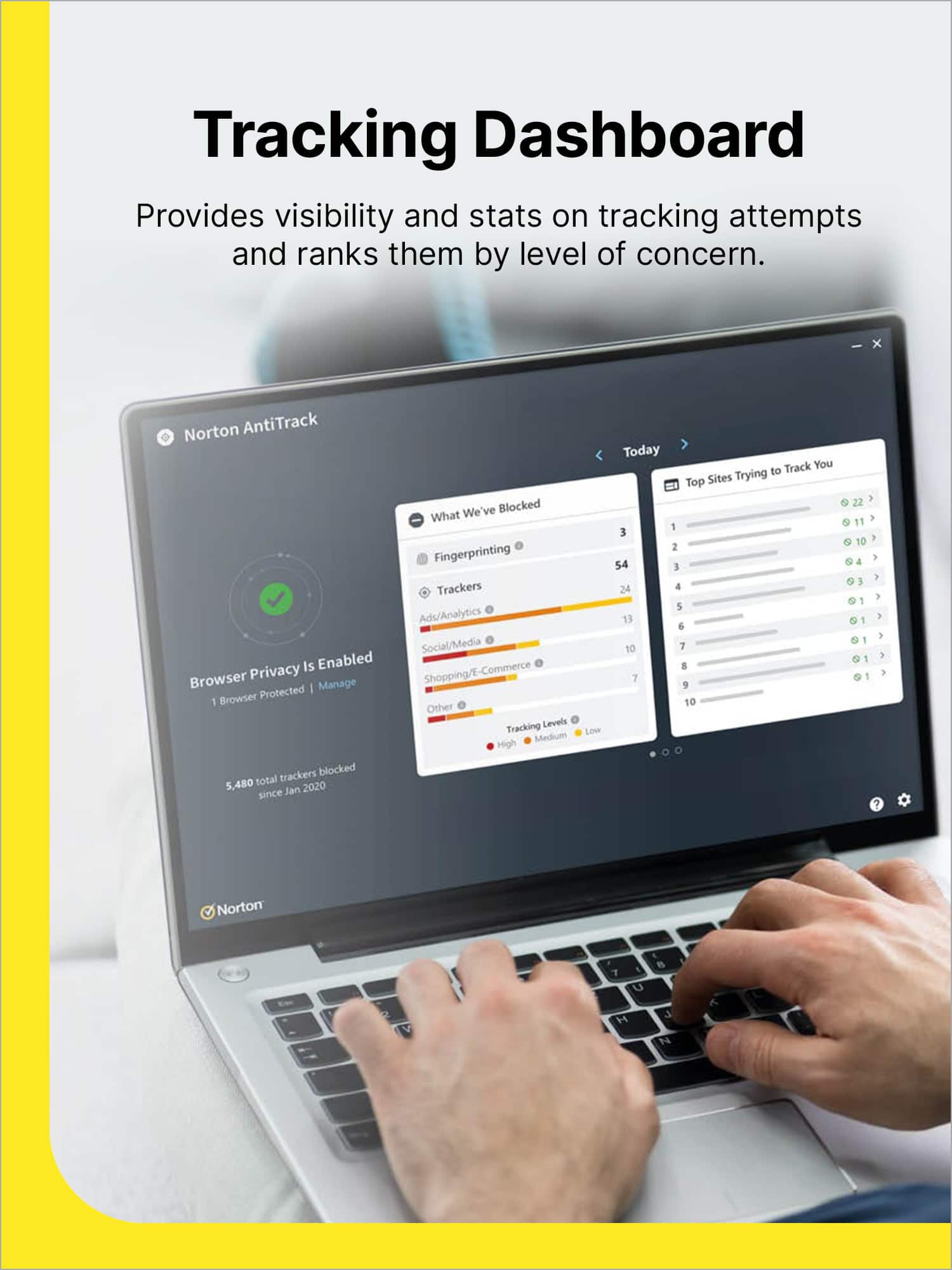
|Posted .This reviewer received promo considerations or sweepstakes entry for writing a review.The Norton AntiTrack was easy to activate and start using. I was going to install it on my laptop but didn’t want to add yet another app to it or having to approve the large vat of websites I’m required to access for work purposes. Not sure why Norton didn’t integrate this software into its existing app interface and made it a standalone one. Since it’s only for one device, I installed it on my iPad. It’s easy to set up an account (if you don’t already have one), download and install the app, and activate it. Add the extension to the Safari browser and give it permission to track and you’re ready to go. The software does exactly what it says and quickly – blocks trackers and profiling, even for sites you use regularly. To see what’s blocked, just hit the Norton icon displayed in the browser’s address bar. You’ll see a report that outlines how many trackers were blocked, what categories fall under, and the level of tracking (High, Medium, Low, Fingerprinting). A Fix It button is also there if it’s something to be worked around so that the site might still work properly. You can see a history of these same details in the app, but that’s really the extent of what the app does. There’s really no way to control any features or settings of the software. Overall, it does a great job of identifying tracking and profiling. However, without being able to have a little more control over what’s blocked and what’s not and across all the browsers I use on one device, it’s not a software I’d keep buying without Norton making some tweaks.
I would recommend this to a friendBrand response from Norton & LifeLock Product Expert
Posted .Hi MzRose,
Thank you for taking the time to share such a detailed review! We’re glad to hear Norton AntiTrack was easy to activate and is effectively blocking trackers and profiling as intended. Your insights about the standalone app and limited user control are extremely valuable. We understand how important flexibility and integration are, especially for users who access multiple sites and browsers for work.
Your feedback helps us improve, and we’ll make sure it’s shared with our product team as we continue to enhance the experience. In the meantime, if you have any questions or need assistance with optimizing AntiTrack, our support team is here to help.
Thanks again for choosing Norton and for providing such constructive input!
- Pros mentioned:Installation ease
Nice VPN Enriched Browser!
|Posted .This reviewer received promo considerations or sweepstakes entry for writing a review.The Norton - Antitrack browser was easy to download and install from the Google play store. I did not load or launch it from my computer. From a purely security perspective, it does a good job of restricting your options in terms of access to side features like a smart AI powered search option. On the good side, it seems to function more like a VPN embedded in your browser, which means that if you want to have a higher level of security you can connect with your favorite VPN and use this browser to block all of the trackers for more safety. Norton AntiTrack is fast and keeps a record of all the tracking cookies and software that it blocks. What I like best is that it blocks ads and 'pop-ups' in addition to securing your browser connections. I used it for secure shopping instead of using store apps. Because of the protective functionality, the AntiTracking browser does a good job of protecting your payment information from being accessed during the shopping and payment process. So, if you don't like downloading a variety of apps to bank, shop or access your accounts, this product makes it easy to log in from just this one secure browser plus a VPN. That means you don't have to store your payment information with the merchants you trade with. You can simply use the secure payment process built into your phone and pay through the Norton AntiTracking browser. I gave this app only 4 stars because I was hoping that it would integrate with or plug in to my existing browser, but that is not the case. Otherwise it works well. Please note that as a member of the Best Buy Insider Network, I received a complimentary instance of this software in exchange for my review.
I would recommend this to a friendBrand response from Norton & LifeLock Product Expert
Posted .Thank you for your detailed review! We’re glad to hear you found Norton AntiTrack effective for blocking trackers and securing your browsing experience, especially for shopping and payments. Your note about integration is helpful feedback for us.
If you’d like tips on optimizing features or have any questions, our support team is available at https://www.norton.com/support.
We appreciate your insights and hope you continue to enjoy the added security!
- Pros mentioned:Privacy protection
It does what it's called and it does it well.
|Posted .This reviewer received promo considerations or sweepstakes entry for writing a review.This is surprisingly useful to be quite honest. Now there are browsers out there that minimize trackers or even block them for you, however, this application that can support multiple browsers and provides a way to privatize your email has some serious value in my mind. It is also, just a tad bit scary the sheer number of trackers it blocks from a single site. The number one category of trackers that it blocked for me was ads and analytics, so if you ever wonder why your phone knows what you need before you need it every once in awhile, it’s because they are using analytics to figure out what you might want before you need it. I have found this useful all of one time, the rest really don’t like the idea of my every move being tracked and analyzed. I think the private email relay in some ways even hits on privacy in an even grander way. I am thinking of course of all the database leaks that have been happening, my email address has been compromised so many times at this point that I have to be careful with any email as the phishing emails are getting better every day. I absolutely love being able to create an email address that front ends mine so that if/when that database gets hacked, they have a pretty useless address. One site I did need, completely broke without trackers, but in the extension I was able to enable tracker for that site which fixed the site. Overall, I really appreciate the usability and added layer of personal security this adds. Yes, this is all possible to do with other solutions, however, those solutions are usually locked behind being a tad bit on the techy side just to be aware of them in the first place and I love how accessible this makes some basic security features that we should all be striving to add to our daily internet habits.
I would recommend this to a friendBrand response from Norton & LifeLock Product Expert
Posted .Hi Benb,
Thank you for sharing such an insightful review! We’re thrilled to hear that Norton AntiTrack has added real value for you, especially with features like multi-browser support and private email relay. Your point about the sheer number of trackers blocked—and how that impacts privacy—is spot on. It’s eye-opening for many users, and we’re glad you appreciate the added layer of security.
We also appreciate your feedback on usability. Making advanced privacy tools accessible without requiring technical expertise is exactly what we aim for, and it’s great to know that resonates with you. The ability to customize settings for specific sites is another feature designed to keep things flexible, so we’re happy to hear that worked well for you.
May give you some peace of mind
|Posted .This reviewer received promo considerations or sweepstakes entry for writing a review.I had an account already at Norton from a previous product a few years ago, so getting in and downloading was simple. The installer hung itself though the first time. I ended up having to get into task manager and ending the task, then trying to run it again. Second time was the charm, finally got to the Install button on the splash screen. Once I got the install finished, it prompted me to add it to edge - and I see this extension only has a 1.5 out of 5 star rating. Lots of complaints that the program says it's disabled but the web extension says it is on. And people unable to get to websites anymore, so we'll see. Right off the bat when it's installed, I'm told there are trackers. Websites tracking me (yes, because I have passwords saved for things like 365 and such) and shopping/e-commerce, again for the same reason. Social media, ads/analytics. I have a single "remove trackers" button that I'm not pressing yet since I can't SELECT which ones to remove and I don't want this program deleting everything I actually WANT to keep. So I went back to the browser extension, hit settings, and see there's an exceptions list. But I can't add any exceptions here. Of course, the only setting you can change is whether or not you improve their user experience by sending them data - the exact thing the program is supposed to prevent... At least they have it disabled by default. So it was time to see if "Remove Tracker" was going to nuke everything by default or bring up a submenu kind of option for selecting what to do. And the first thing it says is to close my browsers. And yep, it did the nuclear option. Every single website was logged out. Irritating to say the least. There should have been options for what to preserve and what to let go. Then it prompted for email. I've got addresses at several places, so figured I'd see what it would do with gmail - that gets a lot of spam in the spam filter. And it looks like what it does is give email masks so you can give a spoofed address to places that you want information from but don't necessarily want to be in their spam list for themselves or whoever they sell it to. That could be handy, but I already have a gmail address that I use expressly for that. You end up with a three part email address before the @norton.me domain portion which is randomly generated, or you can type in your own, which I tried. Then it asks you for the actual delivery address you want it forwarded to, tracker free. Apparently you can later add and protect up to 5 emails. I created a second one, for a Hotmail address. Once you create a mask for an address that isn't the address for your Norton account, it will do the normal code send to that email so you can verify it is you. Code came quickly, verified, and I was up and running. Unfortunately the dashboard will only show the mask for the account you have your Norton account registered with. You have to go to the settings tab to see anything else. Sent an email to the two masks for gmail and Hotmail. One showed up after about three or four minutes. And it has this awful, huge graphic that I've posted as a photo that it puts on top of the email in my outlook program. But when I checked a web browser it showed something far less obtrusive. Oddly enough, the other one NEVER showed up. It wasn't in my spam filter either. It simply ceased to exist. Which seriously limits the functionality of this email masking. The main window shows what was blocked, and the top sites tracking me. It also allows you to add extensions to other browsers. I told it to manage my browsers, and it only found edge and chrome - doesn't see Brave at all. You can select between today, 7 days, 30 days, 60 days, and 90 days for the view of what's tracking and what was blocked. So it was time to get into the program settings to see if I can keep it from knocking me out of the sites I use regularly. And nope. The only settings you can change is the frequency of privacy report notifications, how many trackers it has to have triggered before you get a real time alert, whether or not it does OS tracker blocking, and the option to clear the antitrack data. Nothing in here lets me tell it what sites to ignore, but when you are ON a website in the browser you have the option to disable tracking for that site via the extension. But again, there is no granular option like "never mess with my login in cookies but you can clear other ones anytime." So back to the extension. After it nuked me out of almost every single site I had credentials saved for, after I log in, I can see an option in the extension to "allow tracking and profiling for this site." But no option to make sure it never signs me out again. Fortunately up to this point there's been no sign out of any site that I signed back INTO after being forced out. So hopefully the login information will be persisted and just other trackers blocked. That first afternoon I purchased Visio and added it to my Microsoft account. Then on the MS account page, I couldn't get at anything because as long as I had this extension going, all it would do is refresh the page before I could even click anything. I finally was able to get to the extension and click "fix it" and it stopped the refresh. So it was nice to have the extension be aware enough of itself to fix issues like that. The app itself is a bit buggy it seems - every time I reboot and log in, I get an aborted little Norton icon on the taskbar and if I hover it previews the program but it can't display it and the preview shows some broken view that only has basically the title bar. So you have to close that out and then manually open the program. And when you actually open the program, it doesn't seem to allow for resizing. Which means that when I click for details on some things, I'm missing data on the bottom of that window since none of it allows for resizing and there is no scrolling so things are cut off on the bottom. And other parts of the main window show that the formatting isn't right for the background grey areas and the graphic bars showing incidents. This is on a Surface Pro 11. And dragging it to a different screen (I am multimon at home and at the office) makes no difference. And it seems it's not QUITE scaling properly between the smaller screen and the bigger screen as I have different percentages of scaling on each. I dragged another window the exact same size as the Norton window on my Surface screen, and when I drag both to the external monitor, the one enlarges more than the Norton one. Norton seems to scale alright horizontally but not vertically, which may be why the graphics are off on my system and the bars are below the grey window they should fit in. The reporting is straight forward. You can see what they blocked, fingerprinting, ads/analytic trackers, social media trackers, ecommerce trackers, etc. And they also show the top sites that have been trying to track you. Ultimately there may be some value here, but it's hidden behind some frustrations with how they actually do some things and how some things simply didn't work at all, such as the private email option that bombs utterly with Hotmail. They lost a star right out of the gate by not letting me select anything to PERSIST when they did their initial global nuke of everything. Some sites are a real pain to get back into. I would have preferred the option to specify to go ahead and work on trackers but NOT kill all my saved / persisted logins for websites I frequent. And I took the second star away for a few reasons. The graphics issues, where it can't even properly display anything after a reboot when it opens the app but leaves it useless on the taskbar unable to actually bring up the program, forcing you to exit it and then open it up again manually if you want, along with the failure rate for me on the email masking. I'm happy to say that the bad reviews on the extension didn't impact me. The few sites I had issues with, the "fix it" button was able to make things work again, so moving forward up to this point I had no other website issues that weren't able to be overcome. If you're worried about being tracked online, this may help you feel a bit more secure. It shows that it is doing things but there really is no way to tell outright if it makes any difference in the long run. You just have to take it on faith.
I would recommend this to a friendCut Online Tracking While You Browse the Web
|Posted .This reviewer received promo considerations or sweepstakes entry for writing a review.Norton AntiTrack is a tool designed for blocking trackers and protecting privacy online. Norton assures you that it will work on Mac OS and Windows. I found this to be accurate, and also found that it works on iOS (on my iPhone). I installed it first on my iPhone, entering my primary email. Then I opened my Mac & AntiTrack was available by clicking on the cloud. It just needed my authorization to set it up on my computer. After you purchase AntiTrack, you first need to install a Norton profile. If you already have a Norton profile, simply open it and proceed. Next, contact Norton at the address provided to provide your identification & proof of purchase. You will receive a digital download with 25 characters. At this point, you open your browser extensions & add Norton AntiTrack Extension to your browser. You will see a yellow square shape, with an internal target insignia, to the left of the browser. Click on your browser extensions to activate or to deactivate AntiTrack. Under Permissions you will see Webpage Contents and Browsing History. A list of the web pages you have opened follows. Choose: "Always Allow on Every Website", "Ask to Allow", or "Never Allow”. My biggest concern about installing AntiTrack was that it might break site functionality. Thankfully, I have not experienced any sign of site compromise. I was prepared to uninstall it immediately, had that been the case. CONCLUSION: The biggest benefit of Norton AntiTrack to me is Anti-Fingerprinting. This means that it hides unique identifiers so you cannot be profiled. That protects you from third parties gathering your online information.
I would recommend this to a friendBrand response from Norton & LifeLock Product Expert
Posted .Hi gadgetguy11,
Thank you for sharing such a detailed and helpful review! It’s great to hear that Norton AntiTrack worked seamlessly across your devices and that you didn’t experience any site functionality issues—that’s a common concern for many users.
You highlighted some important benefits, especially Anti-Fingerprinting, which is a key feature for protecting privacy and preventing profiling by third parties. Your step-by-step installation notes will be valuable for others considering the product.
If you ever want to fine-tune your privacy settings further, here are a couple of tips:
Adjust Permissions Per Site: If you notice any site behaving oddly, you can customize permissions for that specific domain instead of disabling AntiTrack entirely.
Combine with Secure Browsing Practices: Using AntiTrack alongside a VPN (like Norton’s built-in option) adds another layer of protection against tracking and data collection.
Thanks again for taking the time to share your experience—it helps other users make informed decisions. If you have any questions or want advanced privacy tips, feel free to ask!
- Pros mentioned:Installation ease
Works great
|Posted .This reviewer received promo considerations or sweepstakes entry for writing a review.Norton anti-track security is a part of Security that no one ever thinks about. Since I’ve had some unfortunate events happen I’m taking extra precaution and protecting my electronics and my information. This product is easy to download. There is nothing tangible about it. Making sure you follow each step carefully registering your product. Your electronics is the easiest thing you can do for yourself. Especially if you’re on your computer all day long for work and play. Norton has been around for years so their product is tried and true. I don’t have any complaints and when it comes to upgrading or extending my subscription other than making sure I cover all of my devices I don’t have anything else to worry about. Some people overlook this whole process and it’s like insurance you don’t like having it or paying for it until you need it and then if you don’t have it, you wish you had it. So again I choose to be proactive and use the Norton anti-track. The installation took less than five minutes no hassle.
I would recommend this to a friendBrand response from Norton & LifeLock Product Expert
Posted .Thank you for sharing such a detailed and insightful review! You’ve highlighted an important point that many people overlook—privacy protection is just as critical as antivirus security. Your comparison to insurance is spot-on; it’s something we hope we never need, but when the time comes, we’re glad we have it.
It’s great to hear that Norton AntiTrack was easy to install and hassle-free. We appreciate your trust in Norton’s long-standing reputation and your proactive approach to safeguarding your devices and personal information. Your experience will definitely help others understand the value of taking these extra steps for online privacy.
Thanks again for choosing Norton and for taking the time to share your feedback!
Effective ad/tracking filter
|Posted .This reviewer received promo considerations or sweepstakes entry for writing a review.This has been working better than expected. It's been awhile since I've had any Norton products, because most software in this category tends to get a reputation for being intrusive, bloated, and ineffective. But this defies that and is actually relatively lightweight, quiet(-ish), and effective. This can be installed on one device, such as a phone or a computer (this license covers all device types). You have to create and log into a Norton account to redeem, and then install an app. Then, for web protection, you need to add a browser extension. Overall, it looks like it maybe be using 100-200mb of RAM (or less). It does have a somewhat aggressive setting to notify you if more than 5 trackers are blocked, and you'll find that will trigger on virtually every website. So I suggest turning it off or setting it to only notify if there is 20 or 50 trackers blocked (if you really care). The only other thing that's annoying is that it is a little pushy about letting you know about their new private email service. It's included as part of the service, but they seem really insistent that you know about it. Basically, the service creates an email alias for you, that you would enter into a website, and it forwards the emails to your real email address, stripping any trackers in the process. So this doubles as an anonymizer and for keeping your email address a little more private. It's a nice service, but wish they weren't so pushy. If a website isn't working, the browser extension can either try and make the website by allowing the trackers, but still anonymizing your data, or you can completely whitelist the website so all trackers are allowed. So, overall, I'm pretty happy with this, as it works well without being too intrusive, difficult, or slowing down my computer.
I would recommend this to a friendBrand response from Norton & LifeLock Product Expert
Posted .Hi ILikeVideoGames,
Thank you for sharing such a detailed and balanced review! We’re glad to hear Norton AntiTrack exceeded your expectations and that you found it lightweight and effective—especially since concerns about intrusiveness and performance are common in this category.
Your tips about adjusting notification thresholds and managing site functionality are excellent. For users who want fewer alerts, customizing the tracker notification settings (e.g., raising the threshold to 20 or 50 trackers) is a great way to keep things quiet without sacrificing protection.
Regarding the private email service, we appreciate your feedback. It’s designed to enhance privacy by anonymizing your email address and stripping trackers, but we understand that repeated prompts can feel pushy. We’ll share this insight with our team to improve the experience.
If you ever run into a site that doesn’t work properly, your suggestion to whitelist or allow trackers while maintaining anonymization is spot-on. That flexibility is one of AntiTrack’s strengths.
Thanks again for taking the time to write such a thorough review—it helps other users make informed decisions.
Norton Protection
|Posted .This reviewer received promo considerations or sweepstakes entry for writing a review.In the modern day you are tracked everywhere you go, but this review is about the Norton Software which addresses tracking issues. Initially I had a difficult time retrieving my username log in and username information, I ended up creating a whole new account. Once I had gotten past that it was smooth sailing setup was a breeze and it doesn't take long to install. I used Windows defender for Anti-virus and Norton to remove trackers from doing what they best and that is keep tabs on you. Once installed it immediately installed the edge browser extension and that took like twenty seconds. It is fast and efficient only thing is I had to use another browser to visit certain sites because the software works a little too well. I need to find a way to either whitelist or turn down the protection. So what features does this version have? Well it is pretty straight forward it offers anti-tracking and also e-mail protection which takes things a step further which keeps the various companies from tracking and selling your personal information, that is a plus in my book. In total seventeen trackers were found on my device and it sends a report to you in whatever frequency you choose, I went with the default setting which is weekly. Norton also breaks down the category of trackers that trace your web identity. Overall this was a simple and nearly effortless task and thankfully I have one less worry when browsing the web, For this particular service it is solely one device so opt for the next step up if you are in need of protection for more devices.
I would recommend this to a friendBrand response from Norton & LifeLock Product Expert
Posted .Thanks for sharing your experience! It’s great to hear that setup was smooth and the anti-tracking features are working well for you. For whitelisting sites or adjusting protection levels, you can find step-by-step guidance at https://norton.com/support.
We appreciate your detailed feedback—it’s helpful for others considering this service! Enjoy browsing with peace of mind.
Stop annoying trackers
|Posted .This reviewer received promo considerations or sweepstakes entry for writing a review.With today's web technology, everything is tracked. A person can't shop for an item without being spammed about it several times after leaving the shopping site. While it can be handy not needing to remember your shopping preferences, it's also annoying being reminded to complete your purposes. Spying on consumers has been prevalent for marketing campaigns. Notice that if you click on an advertisement in your favorite social media application, it will appear over and over again. That's where Norton AnitTrack comes to the rescue. I was shocked when I reviewed my dashboard after having this installed for just two weeks. This utility has blocked 182 attempts, and this isn't even my primary browsing device. It's shocking the sites that attempt to track us. To prove its integrity, it even detected tacking from its own website. I am using the browser extension for Microsoft Edge, and it blocks some sites that I want it to ignore. The fix is so simple to allow exceptions. There is an icon on the upper portion of the browser to manage the extension. There is an "Extensions" icon which will launch a "quick fix" window to automatically allow the current website through as an exception. This software will ensure privacy when browsing your favorite websites. Keeping your personal information to your intended sites is important, and this will help with protecting you.
I would recommend this to a friendBrand response from Norton & LifeLock Product Expert
Posted .Thank you for sharing such a detailed and insightful review! Your experience really underscores how pervasive online tracking has become—and why tools like Norton AntiTrack are so important. Blocking 182 tracking attempts in just two weeks is eye-opening, and your example of even well-known sites trying to track users adds real value for others considering this product.
It’s great that you highlighted the ease of setup and the simple way to manage exceptions in Microsoft Edge. That flexibility makes AntiTrack practical for everyday browsing while still maintaining strong privacy protection.
Your review is a great reminder that keeping personal information private is essential in today’s digital world. Thanks for recommending it and explaining how it works so clearly!
Added to my iPad. Stops the prying eyes on my peso
|Posted .This reviewer received promo considerations or sweepstakes entry for writing a review.So far I have been okay with allowing certain sites seeing my searches. But, I like the idea of having more control. Norton gives me that ability. I have noticed there is a lot more tracking going on than i thought. Behind the scenes Norton is working. It asks me if the site has permission to track my search. Most Wes store apps default to track your search. Even when you don’t know it. So, having the choice is much more important and valuable to me personally. I search for items clients need or have purchased for me to install or repair. After that, I don’t need the information. So, why should I be pestered by someone else constantly trying to get me to buy something I never will need. Cons: this is a subscription service so you have to decide for yourself if it is performing the service you need and want. Limited to five (5) devices, that may or may not work well for you. I own three (3) iPads, two (2) android phones, and multiple PCs bothe for work and for personal use. Bottom line, it just works.
No, I would not recommend this to a friendBrand response from Norton & LifeLock Product Expert
Posted .Thank you for sharing such a thoughtful review! We’re glad Norton AntiTrack is giving you more control over your privacy and helping block unwanted tracking—it’s great to hear it’s working well for your needs.
We appreciate your feedback on device limits and subscription considerations. If you ever need help managing devices or have questions about your setup, our support team is ready to assist at https://norton.com/support.
Thanks for choosing Norton and for highlighting the value of privacy control!
- Pros mentioned:Installation ease
Safer than ever
|Posted .This reviewer received promo considerations or sweepstakes entry for writing a review.AntiTrack For Blocking Trackers and Protecting Privacy Online - Mac OS, Windows (Digital) it was easy to download & not to hard to set up, I’ve never done this myself always had my IT friend handle it all for me, was able to add multiple devices which took me a little time to figure out how to do, but I was able to add my different email address. I like the simplicity of the tracker system that shows you in categories of trackers that were blocked on different sites I browsed, shows fingerprint and top sites trying to track you. For a person that has had identity theft it does make me feel a little safer while I’m on line. I do have to figure out one issue that drives me crazy I don’t know if it’s normal but I get a bunch of pop ups I never got before, I never had any problems or issues with pop ups, the laptop I downloaded it to is strictly used only for documents and emails, I don’t use it for shopping or online browsing although I do go online to access the website I use for my work. I feel like it drained a little over 50% of my battery by the time it stopped. I didn’t have that issue on my other laptop so definitely looking into that. But would definitely recommend. Easy to create a Norton acct if you don’t already have one and it pretty much takes you step by step through set up.
I would recommend this to a friendBrand response from Norton & LifeLock Product Expert
Posted .Thank you for sharing such a detailed review! We’re glad to hear Norton AntiTrack helped you feel safer online and that the setup process was straightforward.
Regarding the pop-up issue and battery drain, that’s definitely something our support team can help troubleshoot. Please visit https://norton.com/support for step-by-step assistance.
We appreciate your recommendation and feedback—it helps us improve! Stay safe and protected online.
- Pros mentioned:Privacy protection
Great Product To Reduce Your Digital Footprint
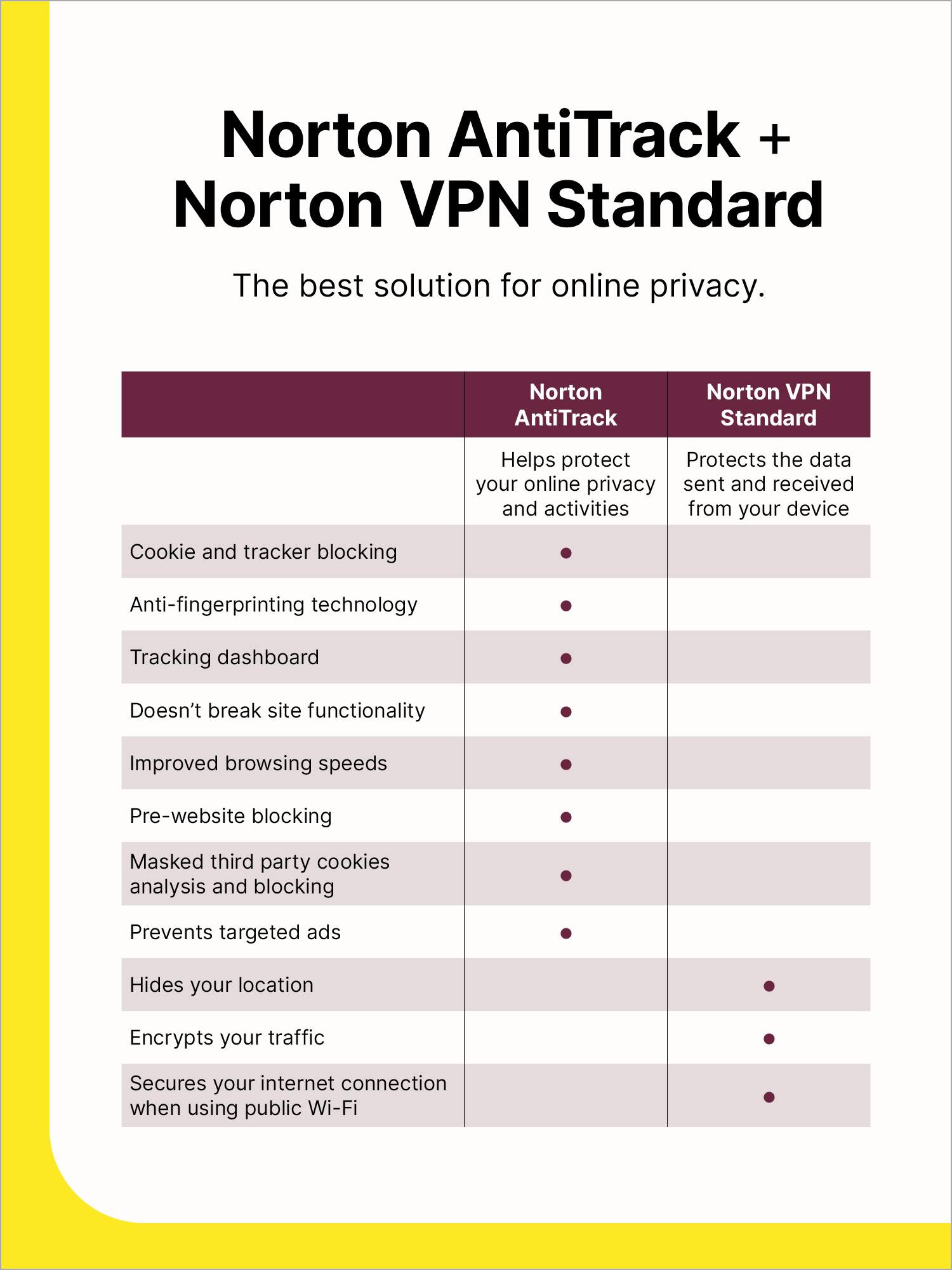
|Posted .This reviewer received promo considerations or sweepstakes entry for writing a review.This is my review of the Norton program supporting AntiTrack For Blocking Trackers and Protecting Privacy Online for Mac OS or Windows upon which I rate at 4 out of 5 stars. This product was delivered as a digital download and activated with a single device product license key. You will need to have a Norton account to use this product which can simply be created on the Norton.com site using your email address. Once installed, this product will run in the background and also launch upon each boot-up. As you surf, the product will reduce your digital footprint. It will tell you which sites are tracking you and how they track you. There are a few items in settings to customize the product. In settings, you will find selections on how often you would like to receive reports and alerts. You can enable operating system tracker blocking to keep your location private from prying eyes on the web. This feature is not to be confused with VPNs that masks/alters your location. This product helps prevent online companies from profiling you, which is very much different than a VPN. One other item I did as a final customization was to add this product as an extension in my web browser. This is helpful as you are able to see the product running in the toolbar and see the number of trackers that have been blocked as you surf. In my use of the product, some websites will yield a normal experience as you won't even know that the product is running in the background. But in another instance, shopping on a furniture website for example, the website was locked up and wouldn't allow me to make choices between various pieces of furniture. The workaround here for me was to click on the product icon in my web toolbar. There will be pop-up menu showing you the website you are on and how many trackers have been blocked. You will see, "Site not working correctly" and below a yellow "Fix It" button. I clicked on it and was provided a message, "We're trying to make the site work correctly." If you're still having problems, try disabling AntiTrack below." I attempted some more browsing of this same merchant website as was still having issues. I then went back into the program via the web toolbar and selected, "Allow tracking & profiling for this site". Doing such will place a website into an Exceptions List. This will give this an any other site you place into the Exceptions List the ability to track your activity. You can look at this exceptions list anytime by clicking on the web toolbar and then click on the gear/settings icon. This will display all your exceptions and yield also the ability to remove them if you wish. Other than protecting you while web browsing, you have the ability to create a private email address. This is performed by clicking on the program icon, look for "Private Email", then click on "Got To Dashboard". On the dashboard, you click on "Create Email Mask", then let the program generate the email mask or create your own, then add the real email address that the email mask is to be linked to. Now when doing some browsing and not wanting to give a merchant or content creator your real email address, you use the email mask having the "@norton.me" address. This will forward all email from the mask to your real email. I do find this product valuable for those wishing to reduce their web browsing footprint. Having this product puts you in control of your information and also gives you piece of mind. The only reason why I deducted 1-star was the increase in web browsing time if having to go through steps to add certain sites to your exceptions list. I don't see any other way to get around this, but having this product doesn't allow for 100% fluid browsing. I hope you liked reading my review and it helped in your purchasing decision.
I would recommend this to a friendBrand response from Norton & LifeLock Product Expert
Posted .Thank you for sharing such a detailed and practical review! Your explanation of how Norton AntiTrack works and the steps you took to customize settings is extremely helpful for anyone considering this product. I especially appreciate how you clarified the difference between AntiTrack and a VPN—many people confuse the two, so that distinction is valuable.
Your experience with adding browser extensions and using the email masking feature really highlights the versatility of this tool for reducing your digital footprint. The ability to create a private email address is a great tip for protecting personal information when shopping or signing up for services.
Your note about occasional site compatibility issues and the need to add exceptions is an important consideration. While it’s understandable that strong privacy tools can sometimes interfere with site functionality, your workaround instructions make it clear that the product still offers flexibility.
Overall, your review does an excellent job of showing how AntiTrack can give users more control over their online privacy, while also pointing out the trade-off of extra steps for certain sites. Thanks for taking the time to share your experience—it will definitely help others make an informed decision!
Invisible Protection, Visible Frustrations
|Posted .This reviewer received promo considerations or sweepstakes entry for writing a review.HOW IT WORKS: If I'm understanding this software correctly, we have cookies which are essentially a name tag. Which plenty of things these days can block but can also break stuff when blocked, depending on the cookie. As they are necessary sometimes. Then we have fingerprinting, which is a newer way to get similar information so it can feed you the correct stuff. A fingerprint works behind the scenes, often invisible to us users, and gives the websites data on us such as screen resolution, battery, fonts, browser, etc. which then creates a fingerprint or ID on us without the need of cookies. Well, this works by feeding it "fake data". Which means they are unable to build a fingerprint of you. INSTALLATION: I had a lot of issues getting this installed and running. Usually, this isn't a problem for me as I’m the “tech guy” in my family (including extended family). But multiple Norton webpages failed to load. So, I had to go in through alternative backend ways, most of which also failed to load. When it finally did load and I got the software downloaded it only offered it for Edge. Which I don't use and had a 1.5/5 stars. Oof. Then I thought maybe I could download it through Chrome’s webstore. But I couldn’t find it. Which isn’t a good sign. Which then led me to just defaulting back to just using it on my mobile devices (iPhone/iPad) and Safari. Where it worked fine and was easy to setup. Downloaded the app. Go to safari in settings. Go to extensions. Click allow for all. Done. Overall, this should have been easier. As if I wasn’t persistent I would have given up. But with it being a digital download likely wouldn’t get my money back and felt like I was robbed. A huge company like Norton shouldn’t have issues like this. Plenty of things are just not working the way it ought to. DAY TO DAY: I haven't noticed any problems with any of the websites that I go to. As this is mostly feeding the website fake data instead of disabling anything. You won’t see less ads (just ads that aren’t relevant). And because of this it shouldn’t brick any sites. If I go into the app it does show the tracking. Which if you aren't aware is egregious when doing anything online. Doubly so when on social media and shopping. Which has only worsened over the last decade. They do have an exception list that if you do run into problems or do enjoy the targeted ads and other things associated with that you can add. However, I wonder if I'm just selling all my data to another singular person instead of it being broken up to multiple people. In this case Norton vs random websites. I didn’t notice any slow downs or changes to the websites I tend to frequent. I think many users, myself included, will wonder if it is actually doing anything at all. As it is so basic for the user (essentially, you click allow for a bunch of stuff and then just let it run) you don’t actually see it working. Other than just listing everything that is tracking you to make it appear to be doing something. Some websites have also gotten “smarter” and put essential coding with their tracking which then bricks the site when you try to use something like this. Hence the “exceptions” list. I haven’t actually done that. But reading other reviews it appears doing that is cumbersome. Which sounds about right based off other Norton products I’ve used. Clunky, cumbersome, tons of pop ups, upselling, issues with canceling my subscriptions, etc. is synonymous with Norton. HESITATION: I’ve not had a good experience with Norton in the past. Often their software is filled with annoying pop ups constantly. With me doing this through mobile I didn’t get that. However, reading other reviews it appears this continues to be a problem. Additionally, they’ll get you with auto renewals if you aren’t being cautious of them. And often will scare users when trying to cancel that the end of the world will happen if they do so. They are also expensive, limited on the devices that can be run at the same time, and have horrible UI and navigation. Which are not user friendly. However, they tend to score well on synthetic benchmarking. Which is good. CONCLUSION: My biggest hurdle outside of trusting Norton with my system and data, is if this is actually doing anything worthwhile. Does it make you safer or just give you the illusion of safety? I’m not sure. Since this software uses data spoofing rather than ad blocking, it is impossible to visually verify if it is working, forcing the user to trust Norton blindly. Which I don’t. For me this is pass. But your mileage may vary.
No, I would not recommend this to a friendBrand response from Norton & LifeLock Product Expert
Posted .Thank you for sharing such a detailed review! We appreciate your honest feedback about the installation challenges, usability concerns, and overall experience. It’s clear you put a lot of thought into evaluating the product, and your insights are valuable.
We’re sorry to hear about the difficulties you faced and the frustration with setup and trust issues. If you’d like, our support team can help troubleshoot installation problems, clarify functionality, and address any concerns about performance or subscription management. You can reach them anytime at https://norton.com/support.
Thank you again for taking the time to share your perspective!
- Pros mentioned:Installation ease
Had no idea the tracking was this bad
|Posted .This reviewer received promo considerations or sweepstakes entry for writing a review.This is a product I wasnt sure I needed until I had it. I knew about cookies and other tracking means, but had no idea it was this prevelent. The intitial set up was easy using my existing Google account and a product key. Downloaded and installed with no issues. After the install it directed me to the Google Chrome add-on for Norton Anti-track. This also installed with no issues. I didnt install it on any other browsers because I only use Chrome. Once installed and after some browsing it immediately started finding sites that were tracking me. Even well known sites seemed to track more then necessary. I have a full year of Norton Anti-track and am glad I gave it a shot. Like I said this is something I didnt know I needed, but now get it. Just the piece of mind knowing these trackers will be blocked gives you a piece of mind while online that is worth it. I think this is a definite necessity for anyone that wants to remain as private as possible online. And Norton Anti-track makes it all as easy as possible. Glad I gave it a shot and recommend!
I would recommend this to a friendBrand response from Norton & LifeLock Product Expert
Posted .Thank you for sharing such an eye-opening review! Your experience really highlights how widespread online tracking can be—and why tools like Norton AntiTrack are so valuable. It’s great to hear that setup was simple and that the Chrome add-on started blocking trackers immediately, even on well-known sites.
Your point about peace of mind is spot on. Knowing that your digital footprint is being protected without breaking site functionality makes this solution practical and user-friendly. Thanks for recommending it—your feedback will definitely help others who want to take control of their online privacy.
Solid anti-tracking software
|Posted .This reviewer received promo considerations or sweepstakes entry for writing a review.Norton AntiTrack positions itself as a simple way to cut down on online tracking and reduce how much data advertisers can collect while you browse. After spending time with it, the experience feels very much in line with what Norton tends to offer across its software lineup. It is straightforward, accessible, and clearly aimed at people who want better privacy without having to understand the technical details behind browser fingerprinting or tracking scripts. Setup is quick and largely painless. Installing the app and browser extension takes only a few minutes, and once it is running, most of the work happens quietly in the background. I appreciated that I did not have to tweak a long list of settings to feel like it was doing something useful. The main dashboard shows how many trackers have been blocked and gives a general sense of how often websites are attempting to profile you, which helps make an otherwise invisible problem feel more tangible. In day-to-day browsing, Norton AntiTrack seems to reduce basic tracking. Targeted ads felt less persistent over time, and the software consistently reported blocking tracking attempts across common sites. That said, the impact is more about incremental improvement than total anonymity. This is not a tool that makes you disappear online, and it does not claim to be. It focuses on masking certain identifying signals and limiting the most common tracking methods rather than stopping every advanced fingerprinting technique in existence. Performance was generally fine, but not flawless. On occasion, I ran into minor compatibility issues where certain sites did not behave quite as expected until the extension was disabled or refreshed. These moments were not constant, but they were noticeable enough to be mildly frustrating, especially when logging into accounts or navigating more complex websites. It is the kind of friction that privacy tools sometimes introduce, and Norton AntiTrack is no exception. The subscription model is also worth mentioning. While the annual price is reasonable for what it offers, it does require paying ongoing costs for functionality that some users may already partially get through browser settings or free extensions. Managing the subscription and auto renewal settings is something you need to stay on top of, especially if you are already juggling other Norton products. Overall, Norton AntiTrack feels like a solid entry-level privacy tool rather than a comprehensive solution. I see it working best for people who want a recognizable brand, an easy interface, and a noticeable reduction in everyday tracking without having to dive into technical privacy workflows. It does not replace a VPN, a secure browser, or more advanced anti-fingerprinting tools, but as a layer of added privacy, it does its job reasonably well. If your goal is to be less tracked rather than completely anonymous, Norton AntiTrack fits that role comfortably.
I would recommend this to a friendBrand response from Norton & LifeLock Product Expert
Posted .Hi DarthNeyehilus,
Thank you for taking the time to share such an in-depth review of Norton AntiTrack! We really appreciate your insights on both the strengths and areas for improvement. It’s great to hear that the setup was quick and that the dashboard helped make online tracking more visible—that’s exactly what we aim for with a user-friendly experience.
Your feedback on incremental privacy improvements and occasional site compatibility issues is very valuable. We’re always working to refine performance and reduce friction, so comments like yours help guide future updates. You’re absolutely right that AntiTrack is designed as an added layer of privacy rather than a complete anonymity solution, and we appreciate you highlighting that distinction for others.