Customer Ratings & Reviews
- Model:
- 83223
- |
- SKU:
- 4321700
Customer reviews
Rating 4.2 out of 5 stars with 90 reviews
(90 customer reviews)to a friend
Customers are saying
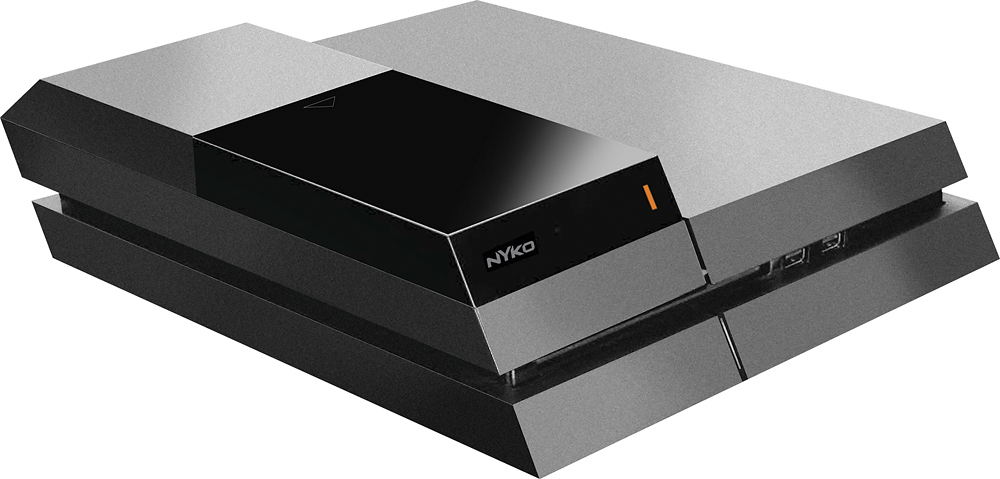
Customers frequently mention the ease of use, storage capacity, and hard drive compatibility as positive features of the Data Bank Hard Drive Upgrade Dock for Sony PlayStation 4. Some customers have noted compatibility issues with newer PS4 models and problems with the console's rest mode when using the device. However, others appreciate the design and the ability to expand their storage.
This summary was generated by AI based on customer reviews.
- Pros mentioned:Ease of use
Rated 1 out of 5 stars
Not necessary
||Posted .This reviewer received promo considerations or sweepstakes entry for writing a review.Unless you want to change out hard drives frequently, this is a waste of money and is a waste of space on your ps4. I replaced my ps4 hard drive and returned this best buy because it wasn't necessary. It is actually more work to install this than just replacing the hard drive. The only advantage it would have is, once it is installed, swapping hard drives in the future would be easier.
No, I would not recommend this to a friend Rated 1 out of 5 stars
Worst stuff I've ever bought
||Posted .This reviewer received promo considerations or sweepstakes entry for writing a review.waste $400 for buying two hardwares and didn't work at all
No, I would not recommend this to a friendRated 1 out of 5 stars
Not my kind of thing.
||Posted .This reviewer received promo considerations or sweepstakes entry for writing a review.I tought this was a memory expander,its just a case
No, I would not recommend this to a friend- Cons mentioned:Compatibility
Rated 4 out of 5 stars
Works great, but may require modding
Posted .This reviewer received promo considerations or sweepstakes entry for writing a review.I bought this along with the Nathan Drake Collection PS4 bundle (which is just a standard PS4 and a digital download; I offer that info purely as a time reference), and the internal PS4 design has apparently changed since this peripheral was designed. I had to modify the Nyko piece by cutting off a piece of it in order to attach it to the PS4. The screw that holds the internal HD in the PS4 has been moved, so you won’t be able to properly attach this Nyko piece to the PS4 using the included instructions. That being said, after I cut the piece off, I was able to complete the installation, and it’s been working flawlessly with a 7,200 RPM Western Digital 2TB drive for about a month now. Just be aware that you may need to steel your nerves to irreversibly alter the Nyko piece in order to install it in certain PS4 models.
I would recommend this to a friend - Pros mentioned:Hard drive, Storage capacity
Rated 5 out of 5 stars
The best way to expand storage.
Posted .This reviewer received promo considerations or sweepstakes entry for writing a review.Make sure to get the right firmware update. You'll need to go to Sony's specific page on reinstalling firmware. The download will be about 700Mb. I put a 2Tb drive in mine. You'll need the desktop sized 3.5'' drive. I hear you can get a larger one to work now. Simple procedures and good documentation, it shouldn't take more than 30 minutes. You can find some tutorials for backing up your Playstation to an external drive. But I'd recommend USB 3.0 for that. Took me 3hrs to back up to a USB 2.0 drive. Anyway, I'm enjoying all the extra space.
I would recommend this to a friend - Pros mentioned:Installation
Rated 4 out of 5 stars
perfect adapter
Posted .This reviewer received promo considerations or sweepstakes entry for writing a review.this is an easy install adapter for the PS4 and at a great cost. My only complaint is that it only comes in black, which my PS4 is white.
I would recommend this to a friend Rated 4 out of 5 stars
Great product, doesn't work with Destiny edition
Posted .This reviewer received promo considerations or sweepstakes entry for writing a review.Well it WILL work with the Destiny edition ps4 with modification. The HD screw is in a different position than the normal ps4. I had to cut off the tab on the adapter that the screw would normally go into and I had to use double sided tape to secure it in. Goodbye warranty. Other than that it would perfectly fine. If you have a normal ps4 BUY THIS!
I would recommend this to a friend- Pros mentioned:Hard drive
Rated 5 out of 5 stars
great product
Posted .This reviewer received promo considerations or sweepstakes entry for writing a review.i like the product offers the ability to using a bigger hard drive with more space recommend the 4 TB hard drive
I would recommend this to a friend Rated 5 out of 5 stars
Data Bank PS4 2TB
Posted .This reviewer received promo considerations or sweepstakes entry for writing a review.Just ran out of my 500gb so needed a quick upgrade while keeping the looks of PS4!
I would recommend this to a friendRated 3 out of 5 stars
A Question
Posted .This reviewer received promo considerations or sweepstakes entry for writing a review.How many GB's does it hold? There's no info on how many GB's.
I would recommend this to a friend