Customer Ratings & Reviews
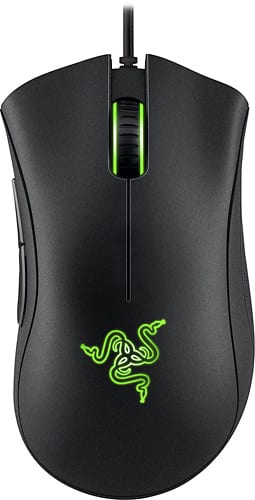
- Model:
- RZ01-01210100-R3U1
- |
- SKU:
- 8501032
Customer reviews
Rating 4.8 out of 5 stars with 1105 reviews
(1,105 customer reviews)to a friend
Customers are saying
Customers are enthusiastic about the DeathAdder Chroma Optical Gaming Mouse for its comfort, gaming performance, and customizability. They appreciate its ergonomic design, which makes it comfortable to use for extended gaming sessions. The mouse is also highly responsive and accurate, making it ideal for gaming. Additionally, customers appreciate the ability to customize the mouse's DPI and other settings to suit their preferences. While some customers have concerns about its durability, overall, the DeathAdder Chroma Optical Gaming Mouse is well-received for its comfort, gaming capabilities, and customizability.
This summary was generated by AI based on customer reviews.
- Pros mentioned:Accuracy, Grip
Rated 5 out of 5 stars
Best Gaming Mouse I've Ever Used
Posted .This reviewer received promo considerations or sweepstakes entry for writing a review.This is hands down the best gaming mouse I've ever used, fits into my hand perfectly and has also improved my gaming. Here are some reasons I think this is one of the best gaming mouses in the market. Design: The curve and length of the mouse is very ergonomically designed. I never feel discomfort after a longer than usual gaming session. The bottom of the mouse is very smooth, especially if paired with a higher quality mousepad. The thumb buttons on the left side of the mouse are easy to reach and provide a nice click sound to ensure you've hit the buttons. Feel: The top of the mouse is a plastic material with a slightly course surface that provides a nice subtle grip, a welcome feature when I play FPS games. The thumb buttons are surrounded by the same material. Just under the thumb buttons and on the opposite side of the mouse, there are small rubber sections meant for extra grip for your thumb and pinky/ring finger. The scroll button is a nice solid rubber with a tire tread pattern along the whole wheel. Performance: The mouse has a range of 100 - 10,000 DPI on the sensor, along with acceleration settings to fine tune the sensitivity to your playstyle. It is very accurate and makes aiming so easy. Overall, great mouse for the price!
I would recommend this to a friend Rated 3 out of 5 stars
Good for League
||Posted .This reviewer received promo considerations or sweepstakes entry for writing a review.I use this mouse when for league of legends, it works very well.
I would recommend this to a friend- Pros mentioned:Accuracy
Rated 5 out of 5 stars
Excellent Gaming mouse
Posted .This reviewer received promo considerations or sweepstakes entry for writing a review.I'm in love with this mouse I've had a regular death adder for years and always loved it. The Chroma is a solid upgrade very smooth tracking 10,000 Dpi is very nice it also has a great light weight feel to it. This mouse is extremely accurate as well. It comes with a ton of customizable features the main one being the ability to have it glow any color you can imagine you can also set what kind of pad or surface you will be using it on and it will calibrate to match. Overall i would recommend this mouse to anyone especially gamers great mouse.
I would recommend this to a friend Rated 3 out of 5 stars
Good but glitches
||Posted .This reviewer received promo considerations or sweepstakes entry for writing a review.The mouse stays on after you turn off the computer
I would recommend this to a friend- Pros mentioned:Comfort, Customization, Responsiveness
Rated 5 out of 5 stars
Great mouse
Posted .This reviewer received promo considerations or sweepstakes entry for writing a review.This mouse is not just great for gaming but is very nice to use in 3d studio max. I would recommend it for anyone who games or just wants a comfortable and very responsive mouse. Plus all the colors are fun to switch!
I would recommend this to a friend - Pros mentioned:ComfortCons mentioned:Software
Rated 5 out of 5 stars
Wonderful gaming mouse all around
Posted .This reviewer received promo considerations or sweepstakes entry for writing a review.This is a superb mouse. It works very well, is extremely comfortable and ergonomic, and looks great to boot. Once you have the Razer Synapse software installed for the mouse to perform optimally, it works like a dream. The one note I need to leave is that in the software, there is a surface calibration setting that calibrates the sensor for the surface it is on. Once initially calibrated, this setting should be turned off, otherwise the mouse will be actively calibrating as you use it, and will have inconsistencies during use. Besides this one aspect of the software, the mouse itself is fantastic, and is by far one of the best investments a person can make for PC gaming.
I would recommend this to a friend Rated 5 out of 5 stars
Great, I mean great mouse for beginners and pro's.
Posted .This reviewer received promo considerations or sweepstakes entry for writing a review.So after my father and i have purchased the Razer Deathadder Chroma for about a month now. We decided to write a brief review of how we feel about it as a young gamer and an older gamer. How I feel: I have small hands and was afraid that the Deathadder would be a disadvantage to me since it looks rather large in pictures. To my surprise it actually is a medium and fits right in the middle for gamers with large hands and gamers with rather small ones. Its ergonomic designs i have to say is the best part, you can sit there for 12 hours straight and feel like you are holding something that was made custom for your own hands. The buttons like Razer said it would be, is a next level response!! So easy to click on purpose and so hard to click on accident! Big thumbs up to Razer on that one. The scroll wheel can be accessed fairly quick when needed unlike other mice, where the scroll wheel can take a while to get to and uncomfortable after a while. The only downside i have of this mouse is the lighting, only because you can't set the breathing mode to also spectrum cycle which would have been pretty cool. But all in all great mouse for competitive and beginners who are trying to ditch there not up to standard old mouse! Dad's review: Great mouse! Bought it not too long ago at best buy, so that i can upgrade from the Logitech G620 that sadly wasnt doing what i expected. Once i plugged the beast (DeathAdder Chroma) in it was viscous, the sensor is so pitch perfect that snap shooting in fps games are no problem. This mouse is definitely what every youtuber is saying about it! it is amazing!! I would also like to add that the software Razer Synapse (Which you need to program the mouse) is very simple and gets programs done right away with clicks of buttons! If i had to choose between my G620 and the DeathAdder it would honestly be DeathAdder all the way. Very Comfortable, easy to move around (no need for weights), and very very beautiful!
I would recommend this to a friend- Pros mentioned:Accuracy, Comfort
Rated 5 out of 5 stars
Comfortable and colorful mouse
Posted .This reviewer received promo considerations or sweepstakes entry for writing a review.I recently upgraded from an old Logitech budget mouse to this Razer mouse. I chose to go with razer because I also use a Razer Deathstalker keyboard and a Razer Kraken headset and I've been very impressed with the quality of both. This mouse is comfortable and very accurate. Aesthetically, it's pleasing to look at and I like that I can change and customize the colors on it to match my computer tower. :) I would recommend this mouse to any fellow PC gamer or anyone that just wants a very nice and customizable mouse.
I would recommend this to a friend - Pros mentioned:Grip
Rated 5 out of 5 stars
Exactly what I need
Posted .This reviewer received promo considerations or sweepstakes entry for writing a review.Started off with logitech but did some research and ended up buyin a 2009 deathadder years ago. Loved it then and it's only gotten better from then, to the 2013, to the chroma. Adjustable up to 10,000 DPI, grip on the sides, grip on the wheel, just the buttons you need, none that you don't. Razer definitely got it right, plain and simple.
I would recommend this to a friend - Pros mentioned:ResponsivenessCons mentioned:Button count
Rated 5 out of 5 stars
Exactly what I was looking for
Posted .This reviewer received promo considerations or sweepstakes entry for writing a review.I have been using the mouse for a couple months now and am extremely satisfied. Pros: Fits in hand very well Responsive Simplistic design Looks cool Cons: Not a ton of buttons. Only reason I can think of to not get this mouse is if you want some MMO mouse that has 1380571805718057 buttons on the side. I personally hate those mouses (and don't do anything that would require that many buttons).
I would recommend this to a friend - Pros mentioned:Accuracy
Rated 5 out of 5 stars
Amazing all around mouse!
Posted .This reviewer received promo considerations or sweepstakes entry for writing a review.I love this mouse. I'm a huge fps gamer and this mouse has never disappointed me. It feels great, moves great, is light, accurate, and is at a great affordable price. I recommend this mouse to any gamer. You will be pleased with it, especially since it has no tracking issues.
I would recommend this to a friend - Pros mentioned:Comfort, Responsiveness
Rated 5 out of 5 stars
Love it
Posted .This reviewer received promo considerations or sweepstakes entry for writing a review.I love the product it's great, the button are easy to click and locate while in the middle of an intense game. It has a comfortable feel and really responsive to movement. If you want a good mouse that will do want you need and wont break the bank this is the best choice I have owned a few gaming mouses and this one by far is the best.
I would recommend this to a friend Rated 5 out of 5 stars
My new mouse of choice
Posted .This reviewer received promo considerations or sweepstakes entry for writing a review.I have owned a number of gaming mice for both Windows and Mac over the years, mostly from Logitech due to a more positive experience with the brand's hardware and software. Not to say I haven’t given Razer products a chance. At one point or another, I’ve owned the Orochi, Imperator, Mamba, and original DeathAdder, all of which I’ve returned or resold due mostly to shoddy software. Heaven help me, I can’t resist colorful and/or shiny things. So with the preponderance of RGB-backlit mice and keyboards making their way to market, I had to jump on board. Due to the aforementioned good luck with Logitech products, I wanted to get the G303 “Daedalus Apex,” which incidentally sounds like the title of a Tom Clancy novel/video game. My sole computer is a MacBook Pro that dual boots between OS X and Windows 8.1. This is about as far removed from a gaming rig as you can get, but it does what I need. At the time I was interested in the G303, however, Logitech had not updated its Mac OS X gaming software to support it (it is compatible now). Further, upon trying the identical-looking but non-RGB backlit G302, I found its shape to be uncomfortable. Undeterred, and being the glutton for punishment that I am, I decided to give Razer another opportunity. To my immense surprise, the DeathAdder Chroma has become my new favorite mouse. It’s as comfortable to use as the venerable Logitech MX518 that served me for the better part of a decade. Razer Synapse 2.0 is not as bad as everyone says. While I’m not exactly fond of the online account creation aspect, it’s not been a huge burden. You can put the software into offline mode immediately after installation and use it just like any other mouse driver. I’ve actually found Synapse to be more stable and functional than Logitech’s offering. Whether it was with my MX518 or G602, the Logitech Gaming Software (LGS) exhibited some strange quirks in both OS X and Windows. For example, in OS X, upon waking my computer from sleep, both Logitech mice would occasionally experience odd tracking issues that required me to close and restart the software. On the Windows 8.1 side, around 10-20% of the time I would boot into that OS, LGS would refuse to load all the way. Its task would reside in memory, but the system tray icon would not appear, requiring me to force close the process and re-launch the program. Synapse, on the other hand, launches the first time, every time, regardless of which operating system I’m using. Further, waking the machine from sleep has posed no issues with tracking. There’s one aspect to Razer’s software that is annoying, but it’s mainly due to my dual-OS Mac setup, which puts me as a subset of a subset of the gaming population. OS X and Windows handle tracking, mouse acceleration, and default thumb-button behavior differently. To get around this, I’ve created a separate profile for each operating system. However, if I leave Synapse in its online mode under both operating systems and boot into Windows, the software will, by default, load my Mac profile. The same thing happens when going the other way; booting from Windows to OS X loads the former's profile. This means I have to manually go into the software and select the correct profile. As a workaround, I put the software in offline mode while in Windows (since I’m in OS X the majority of the time), so when I reboot it loads the correct profile. After that, I only put the Windows driver in its online setting if I need to run an update. An easy fix for this issue would be for Razer to implement a checkbox and drop-down menu that says something to the effect of, “Load [profile name] when [Windows/OS X/Synapse] starts.” I’ve sent the company an email with this idea, and if such an option would be useful for you, I would suggest you do the same. There’s an option to email such suggestions on Razer’s support page. The only real significant issue/question mark is reliability. The reports I’ve read here and elsewhere of these mice failing after 6-12 months is disconcerting considering my aforementioned Logitech MX518 held up for almost 10 years. That being said, a comprehensive feature set, functional cross-platform software, comfortable design, and reasonable price all make the Razer DeathAdder Chroma a compelling choice.
I would recommend this to a friend- Pros mentioned:Comfort, Responsiveness
Rated 5 out of 5 stars
Best gaming mouse hands down
Posted .This reviewer received promo considerations or sweepstakes entry for writing a review.Need I say more? Its amazing in every possible way totally worth the price. Its also insanely comfortable with its shape and texture and all. The configuration options are a nice touch as well. Would highly recommend to anyone looking for a fast responsive gaming mouse that's also really comfortable.
I would recommend this to a friend - Pros mentioned:Comfort
Rated 5 out of 5 stars
Super Smooth!!!
Posted .This reviewer received promo considerations or sweepstakes entry for writing a review.This is the most comfortable mouse I've ever had and the tracking is super smooth even on non-pad surfaces. I don't have a mouse pad yet and it's doing great. The custom lighting is an added bonus! Already put the logo stickers on my tower. Thanks Razer!
I would recommend this to a friend Rated 5 out of 5 stars
Best mouse I've ever used
Posted .This reviewer received promo considerations or sweepstakes entry for writing a review.I'm not a gamer, I use this mouse with AutoCAD. I love the size and shape of this mouse, I have large hands and it fits great. The left side buttons are positioned perfectly, and the rubberized side texture is nice. The Razer software works well to assign various functions and profiles. I really like the RGB lighting and that you can assign different colors to different profiles so it is easy to see that the desired profile is being activated when you expect it to. It costs about 2x as much as a "normal" mouse but it is 10x better and worth every penny, especially if you use your computer a lot. I use mine about 50 hours per week and having high quality gear makes life much better.
I would recommend this to a friend- Pros mentioned:Comfort
Rated 5 out of 5 stars
Amazing
Posted .This reviewer received promo considerations or sweepstakes entry for writing a review.This mouse was my first ACTUAL Razer product, meaning that it's long term usage. In the past before I got my mechanical keyboard I used a Razer Deathstalker, but it was only temporary. The DeathAdder is a very good mouse, not only for gaming, but for everyday usage. PROS -Smooth Handling -Ergonomic Feel -AMAZING RGB lighting -Fully programmable -Really durable -Doesn't use a laser sensor, so when you flip it upside down your setup doesn't turn into a rave party CONS -Plastic, despite it being sturdy, it lacks a full premium feel. -Takes a few days to get used to (even hours, if you have experience with good mice.) -Program is a bit clunky.
I would recommend this to a friend Rated 5 out of 5 stars
This is a great keyboard for any gamer!
Posted .This reviewer received promo considerations or sweepstakes entry for writing a review.When my friend first introduced me to Razer, he said that you only pay for the brand and they aren't high quality. I decided to buy the Razer Deathadder Chroma to prove him wrong. I was blown away by the quality of the mouse. The ergonomics are astounding and fit my hand size perfectly. I really do enjoy the vibrant Chroma lighting and hope Razer makes more Chroma products than just the Krakens, Deathadder, and Blackwidow. The fiber braided cables on the Deathadder Chroma are very strong and have withstanded some pretty brutal punishment. Anyways, this was just a quick review on a truly perfect mouse and I would recommend it to any gamer.
I would recommend this to a friendRated 5 out of 5 stars
Solid Mouse
Posted .This reviewer received promo considerations or sweepstakes entry for writing a review.This is a very good mouse. I've been using lasers for the last few years but it's good to be back. It was hard being a cheapo for a while but I'm super glad I kicked down. +++ Sturdy construction. Feels good in your hand, whether you grip or claw. COLORS! Razer Synapse is super cool software for ALL settings (-) Weight customization? Not big enough deal to knock off a star. This is on the high-end for optical mice... but once you get your hands on one you'll see why. I've messed around with buying off-brands popping up from Asia, but no more. This completes my razer periphery on my desktop. I'm now Cult of Razer!!!
I would recommend this to a friendRated 5 out of 5 stars
A good mouse for gaming.
Posted .This reviewer received promo considerations or sweepstakes entry for writing a review.Overall, I love my new mouse. It's light, but feels very solid and fits my hand nicely. All of the buttons feel very responsive, and I've never had the scroll wheel slip. I like the two extra buttons on the side, enough to map some extra functions to it, without feeling cluttered The mouse lighting up and changing colors serves no practical purpose, but I love it anyway. I only really have two nitpicks about it. The first is that I hate the sound the cloth-like cord covering makes if it runs over the back corner of my keyboard tray. The second is that I wish that the color cycle had more options. Would buy again.
I would recommend this to a friend