Customer Ratings & Reviews
- Model:
- BBY- CPW-1
- SKU:
- 6537769
Rating by feature
- Value
Rating 3.6 out of 5 stars
- Quality
Rating 3.8 out of 5 stars
- Ease of Use
Rating 3.9 out of 5 stars
Customers are saying
Customers consistently note the ease of use, small size, and relatively easy setup of the Wireless CarPlay Adapter for iPhone, with many praising the convenience of wireless CarPlay functionality. However, some users experienced connection issues and occasional lag, while others reported that steering wheel controls did not function correctly with the adapter. A few also mentioned concerns about battery drain and the product's price point.
This summary was generated by AI based on customer reviews.
- Pros mentioned:Ease of use, SizeCons mentioned:Battery life

Fast connection to my phone. Works great.
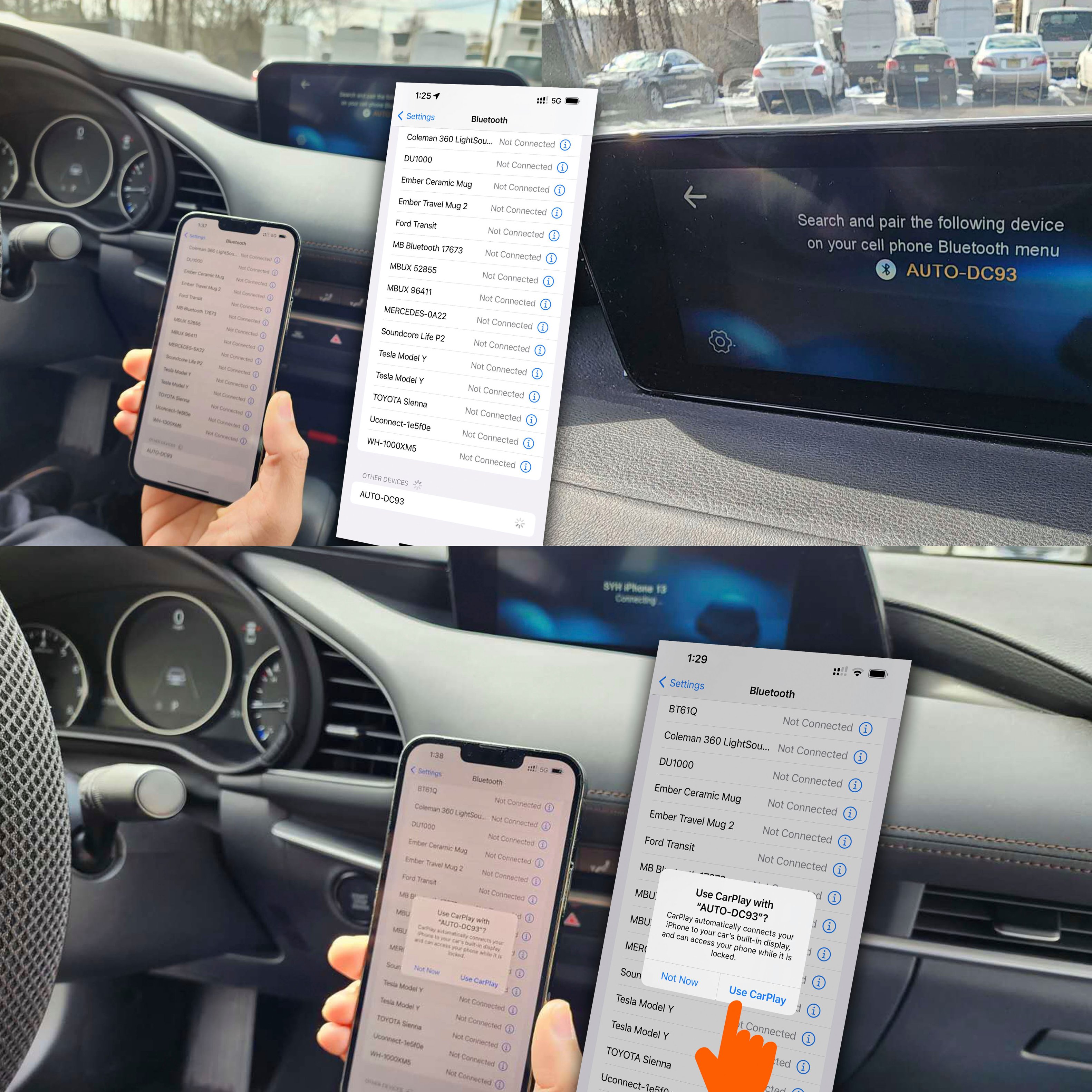
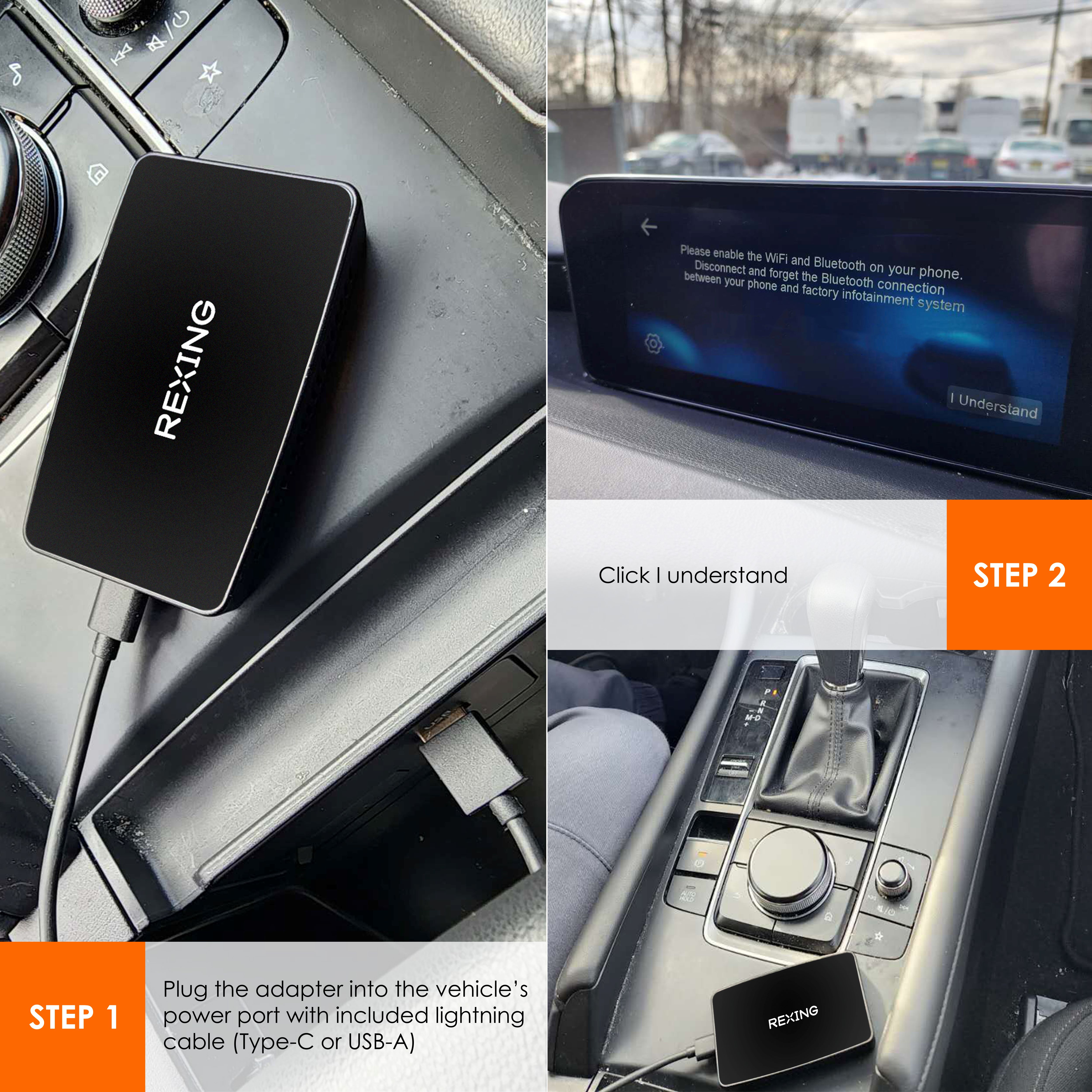
|Posted .This reviewer received promo considerations or sweepstakes entry for writing a review.Easy set up and great fast connection to my iPhone. The device has a small footprint so shouldnt take up too much room in your car. I set this up in about 5 minutes. First thing you must do is delete your Bluetooth connection to your car from the phone and on the car itself. Then plug this in and go to your Bluetooth settings on your phone and select the device. On your iPhone you want to allow Apple Car play on the pop up then you’re good to go. I tested everything out after it was set up and I can honestly say this connects to my car with in 5 seconds or a bit more. But by the time I’m backing out of my driveway it’s all working flawlessly. The steering controls work to change tracks and activate Siri. The sound quality going into my speakers is great. No diminished sound. The only drawback is your phone isn’t charging now when connected to your phone. But I have two usb plugs so it was a none issue for me. Navigating works. All the apps work. It’s really a great device and I think a fair price too. If you’ve been thinking about getting something similar I can definitely recommend this product.
I would recommend this to a friend Wireless CarPlay
||Posted . Owned for 3 weeks when reviewed.This reviewer received promo considerations or sweepstakes entry for writing a review.it doesn’t work, when I turn my car on in the morning I have to disconnect and connect it again
No, I would not recommend this to a friendBrand response from RexingUSA
Posted .Hi! Thanks for leaving a review! Please forget the entire connection and then reconnect to it. You shouldn't need to reconnect each time. If you continue to have issues, please do contact us a care@rexingusa.com

The volume can’t go up or down
||Posted . Owned for 1 month when reviewed.This reviewer received promo considerations or sweepstakes entry for writing a review.It sucks the fact that you can’t turn up or down the volume while it connected
No, I would not recommend this to a friendBrand response from RexingUSA
Posted .Hello,
We are sorry to hear that your Wireless CarPlay adapter is unable to control the volume. This typically happens when the vehicle make and year is not compatible with the adapter. Please reach out to us for us to explore our options for trouble shooting. You contact us through the following link https://www.rexingusa.com/support/contact-us/
This thing sucks
||Posted . Owned for 3 weeks when reviewed.This reviewer received promo considerations or sweepstakes entry for writing a review.Never works. Always very static sounds and never works right
No, I would not recommend this to a friendBrand response from RexingUSA
Posted .Hi Brodie.
We're sorry you're having trouble with the CPW-1.
Please contact support for further assistance, using this link:
https://www.rexingusa.com/support/contact-us/
Thank you.
Not good
||Posted . Owned for 1 month when reviewed.This reviewer received promo considerations or sweepstakes entry for writing a review.Trash!!! Not good products keeps log in off not recommended.
No, I would not recommend this to a friendCarPlay
||Posted . Owned for 3 weeks when reviewed.This reviewer received promo considerations or sweepstakes entry for writing a review.The item didn’t work. It states that the installation should be simple. This was not the case
No, I would not recommend this to a friendBrand response from RexingUSA
Posted .The Wireless Carplay is a really cool product to have and we can understand the frustration when it fails. We would like one of our technicians to review this issue and come up with a solution that brings a smile on your face. Please contact us by phone or email here https://www.rexingusa.com/support/contact-us/
No dice.
||Posted . Owned for 1 month when reviewed.This reviewer received promo considerations or sweepstakes entry for writing a review.Couldn't get it to work. Wish I had another option available to me.
No, I would not recommend this to a friend- Pros mentioned:SizeCons mentioned:Battery life
Functionality of CarPlay without the wire
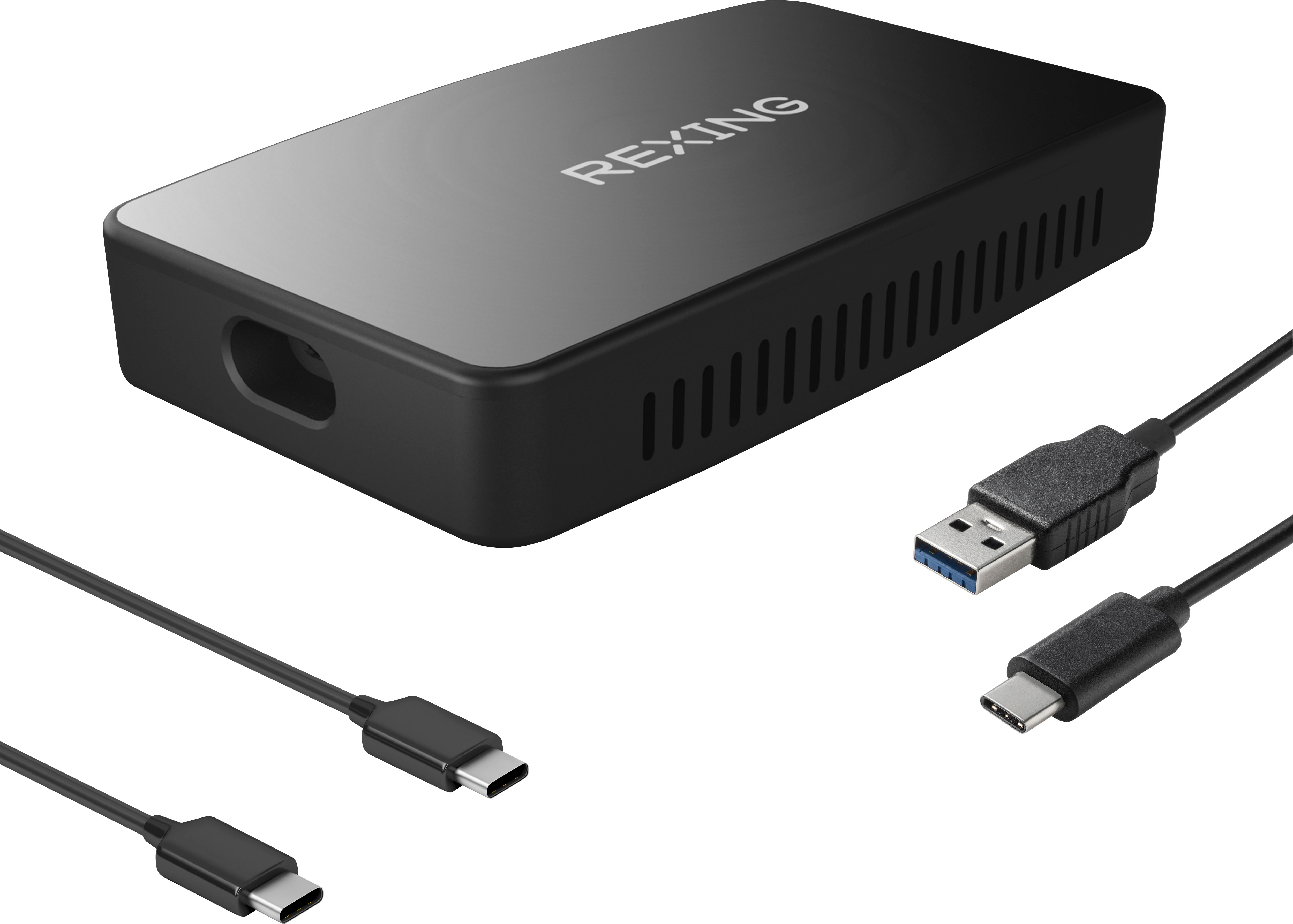
|Posted .This reviewer received promo considerations or sweepstakes entry for writing a review.In the box: • Wireless CarPlay Adapter • USB-A to USB-C adapter cable • USB-C to USB-C adapter cable • Quick Start Guide and User’s Manual Setup: Pairing was easy! First, if you have a prior Bluetooth pairing with your car, go to the Bluetooth settings on your iPhone and forget the connection for your car. Start the car. Plug the Rexing CPW-1 into the car’s USB port. [Note: In my car, not all of the USB ports are CarPlay enabled. Be sure to use one that is.] The car’s display will present the Rexing pairing dialog. Select the Rexing device for pairing from your iPhone’s list of available Bluetooth devices. It may take a minute or two to appear in the list. You will be asked if you want to share your contact and phone lists with your car’s infosystem. It is not necessary to do so! I keep my contacts private and do not want to share them with my auto manufacturer. Accept the request to use CarPlay and you are in business. Use: Once you establish a Bluetooth pairing connection with the Rexing CPW-1, CarPlay will activate wirelessly each time you start the car. It takes 20 seconds for the unit to wake up and activate the connection with a paired phone. During this time, it presents a pairing request on the infosystem display until the Bluetooth connection with the paired iPhone is complete. It’s possible that this “feature” allows a second phone to be paired without resetting. Nonetheless, the start-up delay can be annoying. I normally keep my phone in a holster on my left hip and GPS reception is not optimal in this position. For best GPS reception, I still need to keep my phone in a more open location while driving. Functionality is identical to using a wired USB to Lightning cable with one notable exception. With a wireless connection, the phone is not being charged. This could be a problem for long road trips due to the increased demand for power when GPS navigation and Bluetooth communication are active for an extended period. A pass-through power port would have been a nice design feature. There is a MicroSD card slot in the CPW-1 who’s sole function is to accommodate firmware updates. Firmware updates are only recommended if you encounter an issue with the device. Overall: Pros: Easy setup, small size, works just like a wired CarPlay connection Cons: There is no pass-through power port for charging the phone
I would recommend this to a friend - Pros mentioned:Ease of use, SizeCons mentioned:Lag
Stay wired, my friends. . .
|Posted .This reviewer received promo considerations or sweepstakes entry for writing a review.I own a 2022 hybrid vehicle that does not have wireless connectivity. Missed that fact when we test drove and when we were deciding to purchase or not. Quickly became irritated at the fact that I had to plug my iphone 13 into a brand new vehicle in order to project my phone through Apple CarPlay. Cmon man, how long has Bluetooth technology existed?? They even have Bluetooth lightbulbs…you name it. Started seeing ads for wireless CarPlay adaptors on social media and thought, ok, NOW we’re talking. Still, like any technology, best to wait for a little while to let them iron out the bugs. Saw this Rexing CPW-1 CarPlay WIRELESS adaptor and thought to myself that surely all the irons in the world had been put to work and took care of bizness! Survey SAYS!! BUZZER Don’t get me wrong, there’s bonuses to this gadget, but I’ll stay wired for a while longer. GOOD: Small device, doesn’t take up much room in your vehicle (roughly the size of a deck of cards) Comes with two plug options, USB-A, or USB-C. I believe most vehicle’s still come with a male USB-A, but some might be USB-C, I’m not positive. EASY to use and setup connected right away and super easy setup with no hiccups Wireless main reason I wanted it, it’s not even a lazy factor, it’s just the fact that in this day and age there shouldn’t even be a need for this product. BAD: Sometimes it connects and the radio from the vehicle plays at the same time. Sometimes it connects and it Apple CarPlay shows up, yet you have to touch the screen to initiate. Not a big deal, just unneccesary. everything has a lag, barely noticeable, but it’s there. And when you’re not used to it, it can be frustrating. Phone functions/calling, and talking. Volume has to be turned WAY up to even hear the person on the other line. Vice versa if you’re the other person talking to the occupant of the car with this adaptor, it sounds like the person is talking from 20 feet away. Constant echo also if youre on the other line to the car with the adaptor, you hear the last 3-5 words you say, every time you talk. Conclusion, it was a noble try, but I’ll keep my iphone plugged in for now. Would not recommend.
No, I would not recommend this to a friendBrand response from RexingUSA
Posted .Hey Mookie, thank you for your honest feedback.
We're sorry you've been experiencing some issues with the CPW-1.
Try forgetting both bluetooth and wi-fi connections on your phone and do the pairing process again.
Let us know if that changes anything.
Thank you.
- Pros mentioned:Size
Handy iOS Carplay Wireless connectivity
|Posted .This reviewer received promo considerations or sweepstakes entry for writing a review.The Rexing CPW-1 Wireless CarPlay Adapter comes in handy if you have a wired only connection in your vehicle. CarPlay has revolutionized how you use your iPhone with your car and some models do not yet provide wireless connectivity between your phone and car. This device is about the size of three AA batteries and has a USB-C port which plugs in either your USB-A or USB-C data enabled port in your car. Rexing provides two cables 1) a USB-A to USB-C and 2) a USB-C or USB-C, Also on the opposite side of the USB-C port is a micro SD card slot, what functionality this provides is unknown, perhaps a firmware update or something else. It does not allow you play MP3 files onto an inserted Micro-SD card, so this is a bit of a mystery, perhaps a future enhancement which would rock. As for how this operates, pretty well, the device boots up quickly and took only about 12 seconds to a CarPlay screen, then you have all CarPlay functionality. The connection is stable and I have not had any problems with it as of yet. I have a device which provides the same type of functionality which I was gifted almost a year ago, that one is not as stable or quick booting. Overall this is a must have for people that are annoyed in having to constantly plug and unplug your phone when you use in your car. Pros: - starts up quick - have had no glitches - sound quality seems the same as a wired connection - small compact unit Cons: - Micro-SD card slot is a mystery - open side vents for cooling, don't put this anywhere there is a potential to spill a liquid (my Acura's USB data port is next the my upholders).
I would recommend this to a friend - Pros mentioned:CompatibilityCons mentioned:Connection
Rexing CPW-1 Apple CarPlay wireless adapter works
|Posted .This reviewer received promo considerations or sweepstakes entry for writing a review.The Rexing CPW-1 is a solid wireless CarPlay adapter. I received it in a well-packaged box with two cords - one for USB ports and the other for USB-C ports. This shows Rexing's got us covered, whether we're using older or newer tech. Pairing it up with my iPhone 14 Pro was a breeze. Once it was connected, I had no lag or disconnection issues. The connection when I start my truck is a but slower than the cable, but I didn’t have a problem with the speed. Overall, performance is good. Performance-wise, this little device holds its own. I tested it with my 2023 Tacoma TRD Sport and it worked like a charm. I could easily use my iPhone features like messaging, navigation, and music without any wires dangling around. However, I did face some volume control issues with different playback sources. But, to be fair, I had this issue even before I started using the CPW-1. So, I think it's more of a CarPlay problem than the device's. One thing that did bug me was the auto-takeover of the microphone by CarPlay each time I connected my phone. It would be nice if Apple gave us an option to control this. Unfortunately, this is not a CPW-1 issue, it's a CarPlay thing. So, in a nutshell, Rexing CPW-1 is a solid buy. It makes using your iPhone in the car easier and hassle-free. It's not perfect, thanks to some CarPlay quirks, but it does what it's supposed to do pretty well. If you want to get rid of the wires and enjoy your iPhone features in the car, this adapter might be just what you need.
I would recommend this to a friend - Pros mentioned:Compatibility, Size
Easy Installation, Reliable Connection, No Lag
|Posted .This reviewer received promo considerations or sweepstakes entry for writing a review.I have a 2020 Ford Bronco Sport that has wired Apple CarPlay. The OEM system works well, but the extra time it takes to hook up the cable between my phone and the console (and limited sight lines--especially in the dark) can become frustrating. So I see where the idea of wireless CarPlay originated. I use CarPlay mostly for navigation and listening to and responding to text messages, but I did evaluate some of the other functions--including music library playback and use of the SiriusXM app. This system works extremely well, is reliable, and flexible. Setting up the system in my Bronco Sport required me to eliminate the Bluetooth pairing between my phone and the vehicle (I did this on both the vehicle and the phone), and I also eliminated the recognition of the phone for Apple CarPlay (on both the vehicle and the phone). So note that the OEM Bluetooth functions between your phone and vehicle will no longer work, which is OK because Apple CarPlay tends to do all the OEM phone functions and more. I was up and running in well under 10 minutes. The way the system works is that the car recognizes the Rexing device as an Appe CarPlay device through the wired USB connection, and then your phone pairs through Bluetooth to the Rexing device. It is nothing more than a daisychain. My vehicle shows the Rexing device as the only connected device, and my phone shows the Rexing device as its only connected device. The understanding of this daisychaining is extremely important, as I will discuss a bit later. My Bronco Sport takes a few seconds to recognize the Rexing device, and then another few seconds for my phone to pair with the Rexing device. So I am up and running with CarPlay about 10 seconds after starting my vehicle. In the CarPlay settings, you can have the system default to the OEM screen, or you can have the CarPlay screen come up immediately. All of the phone and texting functions worked exactly as it did as if I had wired CarPlay. All my steering wheel functions for audio (volume, track changes, etc.) worked perfectly and without any lag. In addition, screen presses for function were also without lag. Very impressive. My SiriusXM app worked just as well. Mapping functions equally as good. I was able to dictate addresses to the system without any lag or issue, and Siri also functioned exactly as expected. It is if my vehicle had the wirelss CarPlay as stock equipment. I am curious to know how the system will function when I have my wife in the vehicle with me, where her phone will connect to the vehicle and mine will connect to the Rexing device. Only the voice button on the steering wheel would likely be affected--would it trigger Siri or the OEM functions for climate control, etc.? If it triggers the OEM functions, no big deal--I would just summon Siri by voice instead of using the steering wheel voice button. The size of the device is small enough to keep tucked away and the unit is shiped with both a USB-A and USB-C connector. Therefore, the installation is flexible depending on which CarPlay USB port you have in your vehicle and/or which one you prefer to use. I can use the additional USB ports in my center console to charge my phone while connected to the wireless CarPlay. Here's where I love the flexibility. I wrote Rexing a question regarding the transportability of their device between vehicles, and their answer was as expected. Because of the daisychaining I described earlier, you can move this device from one vehicle to another without hassle. For example, I can move the Rexing device from my Bronco Sport to my F-150 (which also has wired CarPlay). The F-150 will then recognize the Rexing device, and then my phone will still pair with the Rexing device. In other words, my phone only cares that it sees the Rexing device, not what vehicle the Rexing device is in. So now with the one Rexing device I can make all of my wired CarPlay vehicles wireless with only the one Rexing device. Super! Note that on Rexing's website, it states that their device will not work in any BMW vehicle. Overall, this is a well-designed and capable device!
I would recommend this to a friend - Pros mentioned:Ease of use, Size
Handy Hands-Free CarPlay Device
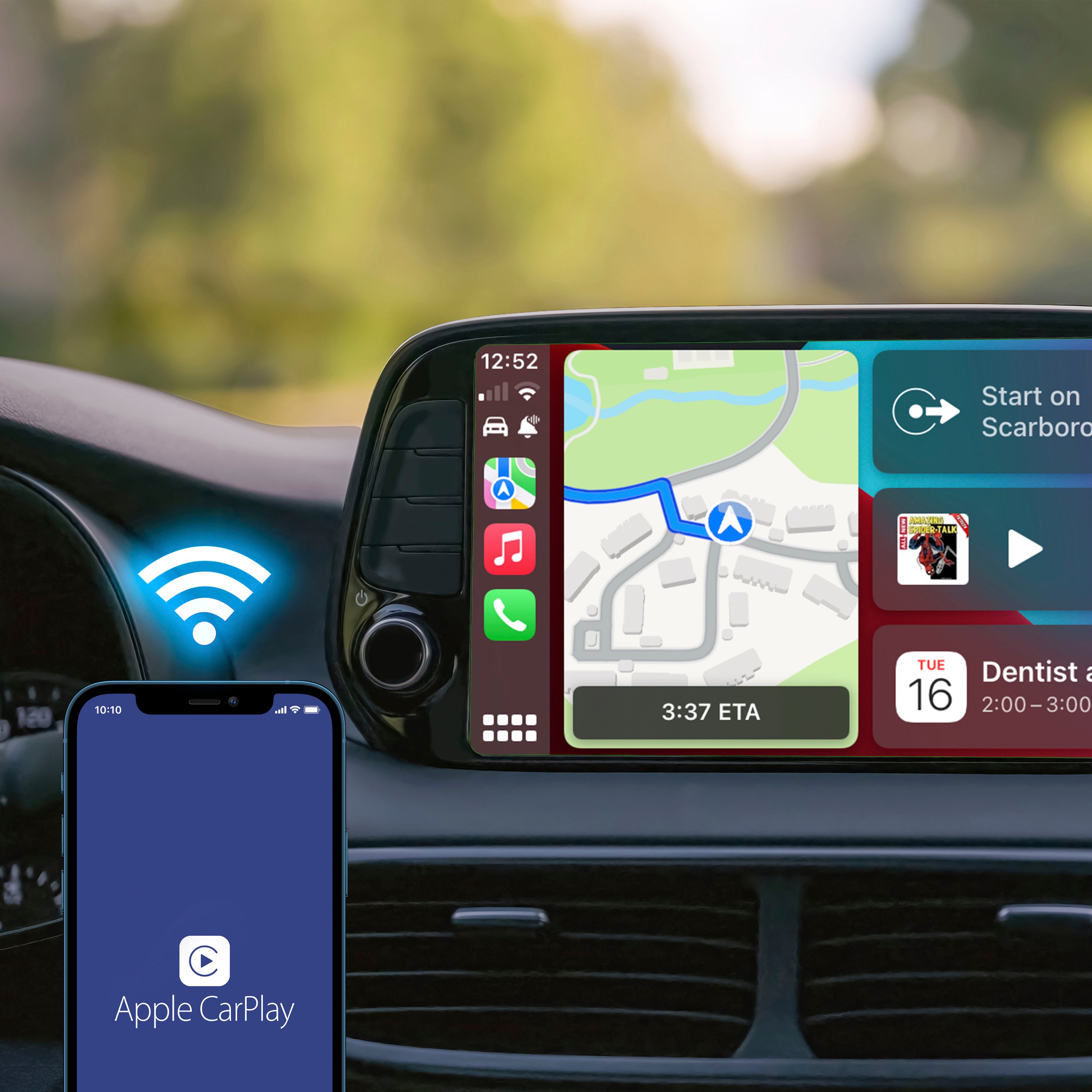
|Posted .This reviewer received promo considerations or sweepstakes entry for writing a review.Our new car has Sync and an on-board 'touch tablet' media/navigation control panel on the central dash. Yet, my husband still has had to plug-in his iPhone to be able to make use of the CarPlay feature. While this is not all that inconvenient, it's still not as seamless a process as we would like. However, now that we have the Rexing CPW-1 Wireless CarPlay Adapter, being able to connect his iPhone to our vehicle has become all that much more simplified. This adapter allows you to effortlessly navigate through compatible apps via your car's dashboard media console instead of your iPhone (when NOT driving); without needing to plug in your phone with a cable. And being able to make use of key phone features 'hands-free' using Siri with voice-controls, keeps your focus on the road (when driving). Always drive safe! Getting the device connected and setup, was pretty straightforward - simply follow the Quick Tips & Help Guide, and refer back to the handy User Manual. We didn't have any issues, and kinda knew what to expect from previously having used a similar wireless CarPlay adapter, from another different brand. The length of the included USB-A / USB-C cables is good enough; being not too long or short. The size of this adapter also makes it easy to conceal out of the way. If you leave the device plugged in to your car, once you return to your vehicle, the adapter reconnects to your iPhone automatically, although there is a slight delay; but this is to be expected. So far this Rexing CPW-1 Wireless CarPlay Adapter is working as intended. We've not noticed any lack of responsiveness with the connection between the device, iPhone, or car. It's working well for us. Recommend.
I would recommend this to a friend - Pros mentioned:SetupCons mentioned:Connection
Works great!
|Posted .This reviewer received promo considerations or sweepstakes entry for writing a review.Plugged this into a 2018 Chevy Equinox that only had wired CarPlay. It's not a huge deal but it's so much easier now to just leave the phone in your pocket (or purse for some) and start the car and go with a wireless connection. The setup is really simple. Just plug this into whichever USB port you need to use for wired CarPlay and follow the prompts to connect it to your Bluetooth and pair it. Once you have it paired up, it's pretty seamless. When you get in the car, it takes a few seconds and you'll see a screen pop up with the name of your phone. Then the CarPlay home screen appears and you can use it as you normally would. After using it for a week or so, it has had one time where I started the car and it didn't connect. I just unplugged the USB cable and plugged it back in. A few seconds later it connected. Now that I know it works, I'll probably find a way to hide the box using double sided tape or something to get it out of the console under the radio for a cleaner install. I wish it could connect through the USB that inside the armrest but that's a Chevy problem, not a Rexing problem. Overall, this is a perfect solution for newer vehicles that only have an option for wired CarPlay. I highly recommend it if you use CarPlay but your vehicle requires a wired connection. It makes the whole experience better!
I would recommend this to a friend - Pros mentioned:SetupCons mentioned:Lag
Yes, yes, yes!
|Posted .This reviewer received promo considerations or sweepstakes entry for writing a review.I love CarPlay, I think it's a major step forward for automobile technology and makes my life int he car so much easier. While wireless CarPlay is becoming the new standard in newer cars, my 2021 Wrangler only has the wired option. While it works great, I don't always need to have my phone plugged. I tried another wireless adapter last year, but the startup delay and lag when changing songs made me give up on it. This new adapter from Rexing fixes those issues and more, I really love this little device. Here is why: - Setup is incredibly easy. Simply plug it in with the included cables (USB-A or USB-C) and follow the on-screen instructions to connect it via Bluetooth. This process took about a minute - Once the setup is done, the device connects quickly when starting the Jeep. My last device took too long - There is very little lag when switching songs - The connection is stable, I drove around for an hour yesterday to test and it worked flawlessly - It is the first device, including a lightning cable, that has worked with my center console USB port. Wrangler JL's are notorious for having faulty CarPlay connections via the center console, but somehow, this device never drops out. This made me so happy Cons: There are no cons! If you want wireless CarPlay, this is absolutely the device to get. I love it
I would recommend this to a friend - Cons mentioned:Battery life
Works Great
|Posted .This reviewer received promo considerations or sweepstakes entry for writing a review.The Rexing Wireless CarPlay Adapter is a product that really shouldn't need to exist, but I'm glad it does. So what is it? It is a dongle for lack of a better term, that allows you to use Apple's CarPlay without the need to plug your phone into the USB port in your car. It works using a bluetooth connection. Setup is pretty straightforward. You just plug the device into your vehicle's CarPlay enabled USB port, and connect your phone via bluetooth. The whole process took like 2 minutes for me. Once set up, connection will be automatic going forward. Performance is actually very good. It's basically just like if you would have your phone plugged in wirelessly. I was a bit skeptical that performance would be acceptable. I was expecting stuttering or lots of loading or something, but it all seemed pretty seamless. Music played like normal. Maps displayed exactly as they would if connected with wires. I only noticed slight hiccups every so often, but nothing major, and nothing that really affected overall function. As I stated in the opening, wireless CarPlay shouldn't need this type of accessory, it should just be built-in, but this is the reality we live in. And the Rexing adapter does a very nice job of solving this issue. The only issue I saw with it is that it does drain your battery slightly. So average commute usage will probably be fine, but if you're planning on using this on like a longer road trip or something you're probably better off plugging in directly. That's the only reason I took off a star. Other than that, I'd definitely recommend this to anyone that enjoys using CarPlay but just wished it was wireless.
I would recommend this to a friend - Pros mentioned:Ease of useCons mentioned:Connection
Works great and it's really fast to connect
|Posted .This reviewer received promo considerations or sweepstakes entry for writing a review.This was really easy to setup, while the instructions were a little light and I didn't see an option for digital instructions, all I had to do was plug in the unit to my car's Apple CarPlay USB port and connect to it via Bluetooth from my phone. From there, it connected really fast and continues to connect quickly every time I use it - even faster than wired CarPlay (which seems to have its own set of issues from time to time). This allows me to use the AC Outlet in my car to charge my phone faster than the USB port, which is a huge plus. I still gave the unit 5 stars for the ease of use and convenience (CarPlay also stays connected now when I turn the car off until I open the driver's door and the screen in the car shuts off), but I did notice it's slightly slower than wired CarPlay. Sometimes, I notice a very short delay to a command (less than a second though it seems), but I think this may be reflective of Wireless CarPlay over wired CarPlay. Overall though, I am very satisfied as it connects almost immediately after I turn on the car and works really great. I highly recommend this unit for anyone wanting to use Wireless CarPlay who's car doesn't support it.
I would recommend this to a friend - Pros mentioned:Ease of use
Best CarPlay adapter so far
|Posted .This reviewer received promo considerations or sweepstakes entry for writing a review.This review is for the Rexing CPW-1 Wireless CarPlay adapter. Set up and install was super easy. Just plug in to an open usb port for power and connect to the adapter from your phone. After you do this your phone will automatically connect each time you are in your vehicle. I have mine in the storage compartment of the center consul. So it’s out of the way and can’t be seen. Next thing you need to do is unpair your phone with your vehicle if it’s set up to connect automatically with Bluetooth. After installing this adapter I was having all kinds of issues. But unpairing my phone helped out with some of them. This is the 3rd wireless CarPlay adapter I have tried. The other two were so bad I tossed them out. This one does have its corks, but I feel like I can live with them. One drawback is the delay in the audio when watching videos on your phone. At least one or two seconds. Which makes it unbearable to do. I am happy with the feature that I use the most which is Google maps. I just like it better than the stock navigation. I always have google maps running even when just driving around the city. Phone call have been working good so far. And haven’t seen an issue with any of my other apps I use. Over all I am happy with this unit and will continue to use it. Just won’t keep the phone paired when watching videos.
I would recommend this to a friend - Pros mentioned:Setup, Wireless carplay
Great Adapter
|Posted .This reviewer received promo considerations or sweepstakes entry for writing a review.I love Carplay, but I hate cords. I tried a van that had wireless Carplay and thought this is the way to go! This adapter delivers wireless Carplay on older cars and works like a charm. There really is not a lot to this adapter. It's very much a plug it in and forget it device. You just plug into your USB port in your car and it's good to go. Setting it up is pretty easy, you just connect your phone to the adapter via Bluetooth and select it as your Carplay device. After that the magic happens. As long as the car is on and the phone is in the car you can have Carplay without having your phone tethered to the car. Overall the end product is great. I've had no problems with dropped Carplay or trouble connecting. After the initial setup, every time I start my car it will connect and work just like Carplay did with a wire. Only now I can lay my phone on the wireless charger in my truck, and don't have tons of cords all over my truck. Overall I'd say this adapter does exactly what it says. It does one thing and does it really well!
I would recommend this to a friend - Cons mentioned:Battery life
Perfect fit for older car.
|Posted .This reviewer received promo considerations or sweepstakes entry for writing a review.Rexing CPW-1 Wireless Carplay Adapter This Rexing CPW-1 Wireless Carplay Adapter was used in a 2018 Honda CR-V with an iPhone 12 Pro. After reading the directions and the Quick Tips & Help Guide, I plugged the CPW-1 into the Honda CR-V. Almost immediately a message popped up on the car’s screen and gave me directions on how to connect to the iPhone to the CPW-1. Following those on-screen directions, it took less than 2 minutes to fully install the Rexing CPW-1 and start playing Spotify through the iPhone on the car’s sound system. The device comes nicely packaged with a USB-A cord and a USB-C cord that are each about nine inches long. The Rexing CPW-1 must be registered within the first 30 days to receive the 18-month warranty which includes firmware/software updates. You need the device in hand to register - the serial number is on the back of the CPW-1; an email will be sent to complete the registration process. Once the CPW-1 is installed when the car is turned on the phone screen(s) and apps pop up on the car’s screen (as if the iPhone was plugged directly into the car). The apps are limited to audio programs (for example, Apple News only lists the audio articles, Libby only lists the audio books, none of the non-audio programs, like Netflix, show up on screen). The apps work the same as if the iPhone were plugged directly into the car and using the wired version of Apple CarPlay. Once an app is opened (such as google maps or Waze) the only way I found to turn them off was to use the actual phone (although there may be a way, I haven’t found it in the written instructions or by playing with the apps on the car screen). This isn’t a problem as you can still select other apps while maps or a GPS program is running – but the constant running of a GPS program does drain the phone battery. Overall, the device does exactly what it says it will do (on a five year old car with a three year old iPhone). It is very helpful to have Apple CarPlay pop up immediately when you start the engine without having to plug in your phone. The only negative is the drain on the battery, which is only a concern as the phone gets older and the battery less efficient or on longer/frequent trips.
I would recommend this to a friend