Customer Ratings & Reviews





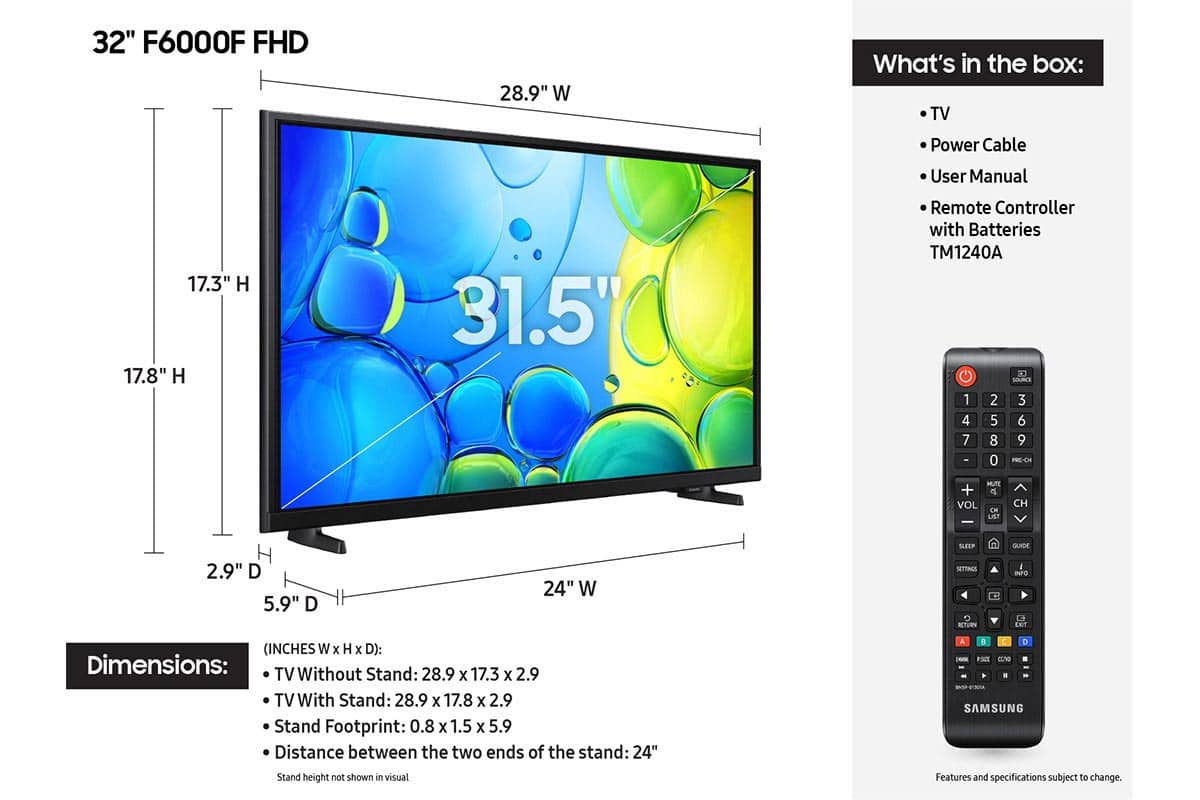






- Model:
- UN32F6000FFXZA
- SKU:
- 10187608
Rating by feature
- Picture Quality
Rating 4.8 out of 5 stars
- Sound Quality
Rating 4.5 out of 5 stars
- Brightness
Rating 4.8 out of 5 stars
Customers are saying
Customers have good things to say about the product's excellent picture quality, ease of setup, and convenient size. Its lightweight design is also appreciated by users. However, some customers have noted concerns regarding the TV's responsiveness, processor speed, and overall smart functionality, with apps occasionally freezing.
This summary was generated by AI based on customer reviews.
- Pros mentioned:Picture quality
Great buy
||Posted .This reviewer received promo considerations or sweepstakes entry for writing a review.Excellent picture quality and full of features. Highly recommended
I would recommend this to a friend Free TV - Five Starts!!
||Posted . Owned for 3 weeks when reviewed.This reviewer received promo considerations or sweepstakes entry for writing a review.I have not even opened the box yet so I can't provide a review on how it looks, but it came free with a purchase of an OLED TV, so to me that gets five stars!
I would recommend this to a friend- Pros mentioned:Picture quality
Bright and Clear
||Posted . Owned for 2 weeks when reviewed.This reviewer received promo considerations or sweepstakes entry for writing a review.So nice and clear and it's shows like you in the movies.
I would recommend this to a friend - Pros mentioned:Picture quality
Samsung TV
||Posted .This reviewer received promo considerations or sweepstakes entry for writing a review.Samsung TV is a great quality picture at a great price!
I would recommend this to a friend - Pros mentioned:Setup ease
Easy easy
||Posted .This reviewer received promo considerations or sweepstakes entry for writing a review.Light small easy to carry up everywhere. I love it
I would recommend this to a friend - Pros mentioned:Picture quality
Samsung TV
||Posted . Owned for 1 month when reviewed.This reviewer received promo considerations or sweepstakes entry for writing a review.Our Samsung TV is great! We have excellent picture quality (1080 helps) and got it at a great price.
I would recommend this to a friend - Pros mentioned:Picture quality
TV review
||Posted . Owned for 2 weeks when reviewed.This reviewer received promo considerations or sweepstakes entry for writing a review.Very clear picture. Easy set up. Awesome price would recommend
I would recommend this to a friend - Pros mentioned:Picture quality
32" Samsung Smart TV
||Posted . Owned for 1 week when reviewed.This reviewer received promo considerations or sweepstakes entry for writing a review.I needed a Smart TV for my stay in a Hotel room so I purchased this TV. I love Samsung TV. It works great! I'm very happy with my purchase.
I would recommend this to a friend - Cons mentioned:Responsiveness
Picture ok, remote response time super slow.
||Posted .This reviewer received promo considerations or sweepstakes entry for writing a review.Picture ok for my wife’s sewing room but the GUI and remote response time is very slow compared to 3 other Samsung TVs that we own. I won’t advise this model for a main TV in your house.
No, I would not recommend this to a friendBrand response from Samsung
Posted .Hi Jimp142,
We appreciate your feedback regarding response time. For optimal performance, please ensure your F6000 TV is running the latest firmware. You can check this by going to: Home > left directional key > Settings > Support > Software Update
To further optimize performance, try running Device Care, which checks memory, clears unused cached data, and closes background apps: Home > left directional key > Settings > Support > Device Care > Start Device Care
If issues continue, please reach Samsung Support at 1-800-SAMSUNG, available 8AM – 12AM EST, 7 days a week.
LiveChat is also available via the ‘Support’ link on our website.
~Samsung Advisor
- Pros mentioned:Picture quality
Samsung TV
||Posted . Owned for 1 week when reviewed.This reviewer received promo considerations or sweepstakes entry for writing a review.I really like the TV. It works great for my security camera and watching TV
I would recommend this to a friend Better than the alternatives.
||Posted .This reviewer received promo considerations or sweepstakes entry for writing a review.This Samsung F6000F TV replaces my 2018 version Samsung (UN32J5500) which had LED on a grid. 5 LEDs had come detached causing 5 white spots on the screen. Otherwise I would have preferred that old Smart TV. This new one required that I buy a stand, as the one that comes with the TV should be declared a safety hazard. Also the sound on this new TV is inferior to the old TV. I hope I’ll get used to it — I don’t want to have to buy a sound bar. I AM happy not to look at 5 dots all the time. :-)
I would recommend this to a friendBrand response from Samsung
Posted .Hi NESquare,
Thanks for being a loyal Samsung customer! Please know that the TV stand was solidly designed and extensively tested for stability. For step-by-step setup, refer to the Installation Guide included in the box, or download it at: https://www.samsung.com/us/support/downloads/
If the volume on your Samsung TV seems too low, we recommend checking for firmware updates: Settings > Support > Software Update > Update Now
Then, go to: Settings > All Settings > Sound > Sound Mode and try Amplify to boost dialogue and upper tones.
To maintain consistent volume across channels and apps, enable Auto Volume under: Settings > All Settings > Sound > Expert Settings > Auto Volume = On
Samsung Q- and S-Series Soundbars with Q-Symphony can also enhance your sound experience. For further help, please contact Samsung Support at 1-800-SAMSUNG (8AM – 12AM EST, 7 days a week) or use LiveChat via the ‘Support’ link on our website.
~ Samsung Advisor
- Pros mentioned:Picture quality
Samsung TV
||Posted . Owned for 1 week when reviewed.This reviewer received promo considerations or sweepstakes entry for writing a review.My Samsung 32" TV was the perfect size for my bedroom. Pictur and sound were great.
I would recommend this to a friend Out of Box Samsung
||Posted .This reviewer received promo considerations or sweepstakes entry for writing a review.I purchased this Samsung TV 'open box' for just $70 for use in a bedroom. It is perfect, We use an antenna rather than cable and combined with the $70 price, it makes it very easy to live with cost for an extra TV.
I would recommend this to a friend- Pros mentioned:Setup ease
Great TV those adults on fixed budget
||Posted . Owned for 1 month when reviewed.This reviewer received promo considerations or sweepstakes entry for writing a review.Very affordable and easy to operate. I like to watch TV every now and then, and this is great TV
I would recommend this to a friend - Pros mentioned:Picture quality
Samsung 32" TV
||Posted . Owned for 2 months when reviewed.This reviewer received promo considerations or sweepstakes entry for writing a review.Samsung 32" it is a very good TV I will recommend to my family I already bought like 7 TV's
I would recommend this to a friend - Pros mentioned:Picture quality
Samsung - 32" Class F6000F Series LED Full HD Smar
||Posted .This reviewer received promo considerations or sweepstakes entry for writing a review.Great TV for the price! Defintiely recommend for a smaller TV.
I would recommend this to a friend - Pros mentioned:Size
Great addition
||Posted . Owned for 3 weeks when reviewed.This reviewer received promo considerations or sweepstakes entry for writing a review.Just the right size for our kitchen and wall it went on. Just went to streaming versus cable and this smart TV is an excellent choice.
I would recommend this to a friend - Pros mentioned:Picture quality
Performs as stated
||Posted .This reviewer received promo considerations or sweepstakes entry for writing a review.Works like it should. Picture and remote are fine.
I would recommend this to a friend - Pros mentioned:Picture quality
Owner
||Posted . Owned for 3 weeks when reviewed.This reviewer received promo considerations or sweepstakes entry for writing a review.Very pleased with the TV. The staff promptly solved a issue that arose.
I would recommend this to a friend - Pros mentioned:Picture quality
great for gaming
||Posted . Owned for 3 weeks when reviewed.This reviewer received promo considerations or sweepstakes entry for writing a review.use it for my PS5, beautiful image and color quality. highly recommend for the price
I would recommend this to a friend